ManualGo.com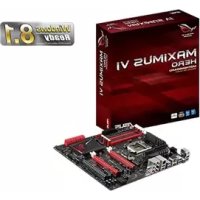
MAXIMUS VI HERO - Motherboard ASUS - Free user manual and instructions
Find the device manual for free MAXIMUS VI HERO ASUS in PDF.


Download the instructions for your Motherboard in PDF format for free! Find your manual MAXIMUS VI HERO - ASUS and take your electronic device back in hand. On this page are published all the documents necessary for the use of your device. MAXIMUS VI HERO by ASUS.
USER MANUAL MAXIMUS VI HERO ASUS
(2) for the cost of reproduction and shipment, which is dependent on the preferred carrier and the location where you want to have it shipped to, by sending a request to: ASUSTeK Computer Inc. Legal Compliance Dept. 15 Li Te Rd., Beitou, Taipei 112 Taiwan In your request please provide the name, model number and version, as stated in the About Box of the product for which you wish to obtain the corresponding source code and your contact details so that we can coordinate the terms and cost of shipment with you. The source code will be distributed WITHOUT ANY WARRANTY and licensed under the same license as the corresponding binary/object code. This offer is valid to anyone in receipt of this information. ASUSTeK is eager to duly provide complete source code as required under various Free Open Source Software licenses. If however you encounter any problems in obtaining the full corresponding source code we would be much obliged if you give us a notication to the email address gpl@asus.com, stating the product and describing the problem (please do NOT send large attachments such as source code archives etc to this email address).iii Table des matières Informations relatives à la sécurité ........................................................... vi À propos de ce manuel ............................................................................. vii Résumé des spécications de la MAXIMUS VI HERO ............................. ix
3.6.6 Platform Misc Conguration
(Paramètres de plate-forme) ......................................... 3-35
3.6.7 Onboard Devices Conguration
(4-pin CPU_FAN; 4-pin CPU_OPT; 4-pin CHA_FAN1-3) 1-42
(4-1 pin SPDIF_OUT) 1-40
Chip Brand Chip NO. Timing Voltage DIMM socket support (Optional)
Chip Brand Chip NO. Timing Voltage DIMM socket support (Optional)
Chip Brand Chip NO. Timing Voltage DIMM socket support (Optional)
DDR3 2500 MHz Vendors Part No. Size SS/
Chip Brand Chip NO. Timing Voltage DIMM socket support (Optional)
GEIL GOC316GB2400C11QC
DDR3 2200 MHz Vendors Part No. Size SS/
Chip Brand Chip NO. Timing Voltage DIMM socket support (Optional)
Chip Brand Chip NO. Timing Voltage DIMM socket support (Optional)
DDR3 2000 MHz Vendors Part No. Size SS/
Chip Brand Chip NO. Timing Voltage DIMM socket support (Optional)
DDR3 1866 MHz Vendors Part No. Size SS/
Chip Brand Chip NO. Timing Voltage DIMM socket support (Optional)
DDR3 1800 MHz Vendors Part No. Size SS/
Chip Brand Chip NO. Timing Voltage DIMM socket support (Optional)
Chip Brand Chip NO. Timing Voltage DIMM socket support (Optional)
DDR3 1600 MHz Vendors Part No. Size SS/
Chip Brand Chip NO. Timing Voltage DIMM socket support (Optional)
DDR3 1600 MHz Vendors Part No. Size SS/
Chip Brand Chip NO. Timing Voltage DIMM socket support (Optional)
DDR3 1600 MHz Vendors Part No. Size SS/
Chip Brand Chip NO. Timing Voltage DIMM socket support (Optional)
DDR3 1333 MHz Vendors Part No. Size SS/
Chip Brand Chip NO. Timing Voltage DIMM socket support (Optional)
DDR3 1333 MHz Vendors Part No. Size SS/
Chip Brand Chip NO. Timing Voltage DIMM socket support (Optional)
Chip Brand Chip NO. Timing Voltage DIMM socket support (Optional)
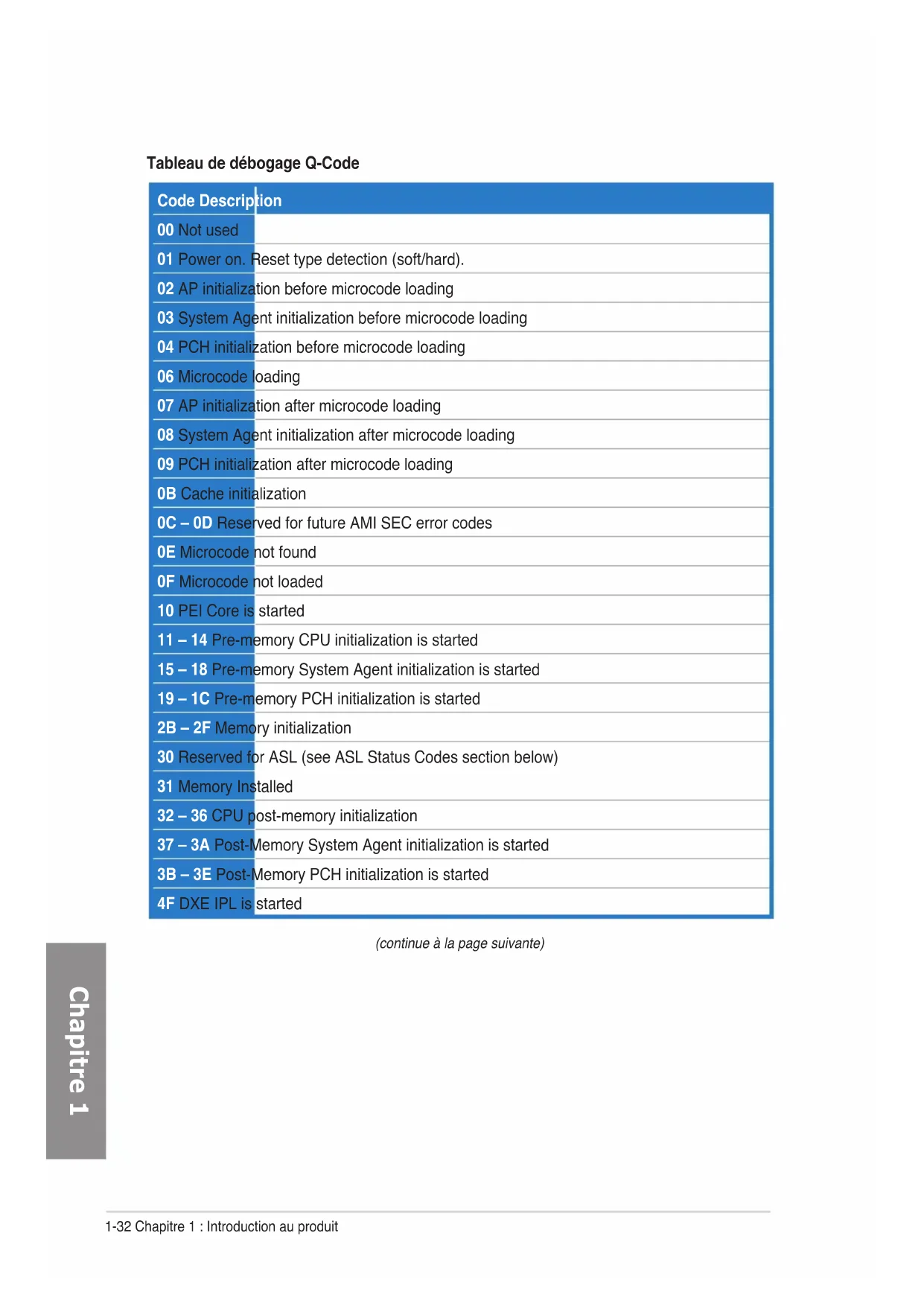
Tableau de débogage Q-Code (continue à la page suivante) Code Description 00 Not used 01 Power on. Reset type detection (soft/hard). 02 AP initialization before microcode loading 03 System Agent initialization before microcode loading 04 PCH initialization before microcode loading 06 Microcode loading 07 AP initialization after microcode loading 08 System Agent initialization after microcode loading 09 PCH initialization after microcode loading 0B Cache initialization 0C – 0D Reserved for future AMI SEC error codes 0E Microcode not found 0F Microcode not loaded 10 PEI Core is started 11 – 14 Pre-memory CPU initialization is started 15 – 18 Pre-memory System Agent initialization is started 19 – 1C Pre-memory PCH initialization is started 2B – 2F Memory initialization 30 Reserved for ASL (see ASL Status Codes section below) 31 Memory Installed 32 – 36 CPU post-memory initialization 37 – 3A Post-Memory System Agent initialization is started 3B – 3E Post-Memory PCH initialization is started 4F DXE IPL is startedASUS MAXIMUS VI HERO 1-33
(continue à la page suivante) Code Description 50 – 53 Memory initialization error. Invalid memory type or incompatible memory speed 54 Unspecied memory initialization error 55 Memory not installed 56 Invalid CPU type or Speed 57 CPU mismatch 58 CPU self test failed or possible CPU cache error 59 CPU micro-code is not found or micro-code update is failed 00 Not used 01 Power on. Reset type detection (soft/hard). 02 AP initialization before microcode loading 03 System Agent initialization before microcode loading 04 PCH initialization before microcode loading 06 Microcode loading 07 AP initialization after microcode loading 08 System Agent initialization after microcode loading 09 PCH initialization after microcode loading 0B Cache initialization 0C – 0D Reserved for future AMI SEC error codes 0E Microcode not found 0F Microcode not loaded 10 PEI Core is started 11 – 14 Pre-memory CPU initialization is started 15 – 18 Pre-memory System Agent initialization is started 19 – 1C Pre-memory PCH initialization is started 2B – 2F Memory initialization 30 Reserved for ASL (see ASL Status Codes section below) 31 Memory Installed 32 – 36 CPU post-memory initialization 37 – 3A Post-Memory System Agent initialization is started1-34 Chapitre 1 : Introduction au produit
(continue à la page suivante) Code Description 3B – 3E Post-Memory PCH initialization is started 4F DXE IPL is started 50 – 53 Memory initialization error. Invalid memory type or incompatible memory speed 54 Unspecied memory initialization error 55 Memory not installed 56 Invalid CPU type or Speed 57 CPU mismatch 58 CPU self test failed or possible CPU cache error 59 CPU micro-code is not found or micro-code update is failed 5A Internal CPU error 5B Reset PPI is not available 5C – 5F Reserved for future AMI error codes E0 S3 Resume is stared (S3 Resume PPI is called by the DXE IPL) E1 S3 Boot Script execution E2 Video repost E3 OS S3 wake vector call E4 – E7 Reserved for future AMI progress codes E8 S3 Resume Failed E9 S3 Resume PPI not Found EA S3 Resume Boot Script Error EB S3 OS Wake Error EC – EF Reserved for future AMI error codes F0 Recovery condition triggered by rmware (Auto recovery) F1 Recovery condition triggered by user (Forced recovery) F2 Recovery process started F3 Recovery rmware image is found F4 Recovery rmware image is loaded F5 – F7 Reserved for future AMI progress codes F8 Recovery PPI is not availableASUS MAXIMUS VI HERO 1-35
(continue à la page suivante) Code Description F9 Recovery capsule is not found FA Invalid recovery capsule FB – FF Reserved for future AMI error codes 60 DXE Core is started 61 NVRAM initialization 62 Installation of the PCH Runtime Services 63 – 67 CPU DXE initialization is started 68 PCI host bridge initialization 69 System Agent DXE initialization is started 6A System Agent DXE SMM initialization is started 6B – 6F System Agent DXE initialization (System Agent module specic) 70 PCH DXE initialization is started 71 PCH DXE SMM initialization is started 72 PCH devices initialization 73 – 77 PCH DXE Initialization (PCH module specic) 78 ACPI module initialization 79 CSM initialization 7A – 7F Reserved for future AMI DXE codes 90 Boot Device Selection (BDS) phase is started 91 Driver connecting is started 92 PCI Bus initialization is started 93 PCI Bus Hot Plug Controller Initialization 94 PCI Bus Enumeration 95 PCI Bus Request Resources 96 PCI Bus Assign Resources 97 Console Output devices connect 98 Console input devices connect 99 Super IO Initialization 9A USB initialization is started 9B USB Reset1-36 Chapitre 1 : Introduction au produit
Points de référence ACPI/ASL Code Description D2 PCH initialization error D3 Some of the Architectural Protocols are not available D4 PCI resource allocation error. Out of Resources D5 No Space for Legacy Option ROM D6 No Console Output Devices are found D7 No Console Input Devices are found D8 Invalid password D9 Error loading Boot Option (LoadImage returned error) DA Boot Option is failed (StartImage returned error) DB Flash update is failed DC Reset protocol is not available Code Description 0x01 System is entering S1 sleep state 0x02 System is entering S2 sleep state 0x03 System is entering S3 sleep state 0x04 System is entering S4 sleep state 0x05 System is entering S5 sleep state 0x10 System is waking up from the S1 sleep state 0x20 System is waking up from the S2 sleep state 0x30 System is waking up from the S3 sleep state 0x40 System is waking up from the S4 sleep state 0xAC System has transitioned into ACPI mode. Interrupt controller is in PIC mode. 0xAA System has transitioned into ACPI mode. Interrupt controller is in APIC mode.1-38 Chapitre 1 : Introduction au produit
3.6.3 SATA Conguration (Conguration SATA)
3.6.5 USB Conguration (Conguration USB)
3.6.7 Onboard Devices Conguration
Please select boot device: SATA: XXXXXXXXXXXXXXXX USB XXXXXXXXXXXXXXXXX UEFI: XXXXXXXXXXXXXXXX Enter Setup↑ and ↓ to move selection ENTER to select boot device ESC to boot using defaultsWelcome to FreeDOS (http://www.freedos.org)!C:\>d:D:\>
Note [Enter] Select or Load [Tab] Switch [V] Drive Info [Up/Down/Home/End] Move [B] Backup [Esc] Exit
7. CliquezsurSubmit(Envoyer)
2. Delete RAID Volume
3. Reset Disks to Non-RAID
[ HELP ] Enter a unique volume name that has no special characters and is 16 characters or less. [↑↓]Change [TAB]-Next [ESC]-Previous Menu [ENTER]-Select Name: Volume0 RAID Level: RAID0(Stripe) Disks: Select Disks Strip Size: 128KB Capacity: 0.0 GB Sync: N/A Create Volume [ SELECT DISKS ] Port Drive Model Serial # Size Status 0 ST3160812AS 9LS0HJA4 149.0GB Non-RAID Disk 1 ST3160812AS 9LS0F4HL 149.0GB Non-RAID Disk 2 ST3160812AS 3LS0JYL8 149.0GB Non-RAID Disk 3 ST3160812AS 9LS0BJ5H 149.0GB Non-RAID Disk Select 2 to 6 disks to use in creating the volume.
Are you sure you want to create this volume? (Y/N):
Are you sure you want to exit? (Y/N): [ CONFIRM EXIT ]
sur<N>pourretourneraumenuDELETEVOLUME. ALL DATA IN THE VOLUME WILL BE LOST! (This does not apply to Recovery volumes) Are you sure you want to delete volume “Volume0”? (Y/N):
[ HELP ] Deleting a volume will reset the disks to non-RAID.
WARNING: ALL DISK DATA WILL BE DELETED.
(This does not apply to Recovery volumes) [↑↓]-Select [ESC]-Previous Menu [DEL]-Delete Volume Name Level Drives Capacity Status Bootable Volume0 RAID0(Stripe) 2 298.0GB Normal YesASUS MAXIMUS VI HERO 5-7
- Consultez le revendeur ou un technicien expérimenté radio/TV pour de l’aide. L’utilisation de câbles protégés pour le raccordement du moniteur à la carte de graphique est exigée pour assurer la conformité aux règlements de la FCC. Les changements ou les modications apportés à cette unité n'étant pas expressément approuvés par la partie responsable de la conformité pourraient annuler l’autorité de l’utilisateur à manipuler cet équipement. AppendiceA-2 Appendice Appendice Conformité aux directives de l’organisme VCCI (Japon) Déclaration de classe B VCCI Avertissement de l’organisme KC (Corée du Sud) Rapport du Département Canadien des Communications Cet appareil numérique ne dépasse pas les limites de classe B en terme d'émissions de nuisances sonore, par radio, par des appareils numériques, et ce conformément aux régulations d’interférence par radio établies par le département canadien des communications. (Cet appareil numérique de la classe B est conforme à la norme ICES-003 du Canada.) REACH En accord avec le cadre réglementaire REACH (Enregistrement, Evaluation, Autorisation et Restrictions des produits chimiques), nous publions la liste des substances chimiques contenues dans nos produits sur le site ASUS REACH : http://csr.asus.com/english/REACH. htm. Services de reprise et de recyclage d’ASUS Les programmes de recyclage et de reprise d’ASUS découlent de nos exigences en terme de standards élevés de respect de l’environnement. Nous souhaitons apporter à nos clients permettant de recycler de manière responsable nos produits, batteries et autres composants ainsi que nos emballages. Veuillez consulter le site http://csr.asus.com/english/Takeback.htm pour plus de détails sur les conditions de recyclage en vigeur dans votre pays. NE PAS mettre ce produit au rebut avec les déchets municipaux. Ce produit a été conçu pour permettre une réutilisation et un recyclage appropriés des pièces. Le symbole représentant une benne barrée indique que le produit (équipement électrique, électronique et ou contenant une batterie au mercure) ne doit pas être mis au rebut avec les déchets municipaux. Consultez les réglementations locales pour la mise au rebut des produits électroniques. NE PAS mettre la batterie au rebut avec les déchets municipaux. Le symbole représentant une benne barrée indique que la batterie ne doit pas être mise au rebut avec les déchets municipaux.ASUS MAXIMUS VI HERO A-3 Appendice Notices relatives aux équipements à radiofréquences Conformité aux directives de la Communauté européenne Cet équipement est conforme à la Recommandation du Conseil 1999/519/EC, du 12 juillet 1999 relative à la limitation de l’exposition du public aux champs électromagnétiques (0–300 GHz). Cet appareil est conforme à la Directive R&TTE. Utilisation de module radio sans l Cet appareil est restreint à une utilisation intérieure lors d’un fonctionnement dans la plage de fréquence de 5.15 à 5.25 GHz. Exposition aux radiofréquences La puissance d’émission radio de la technologie Wi-Fi est inférieure aux limites d’exposition aux ondes radio dénies par la FCC. Il est néanmoins recommandé d’utiliser cet équipement sans l de façon à réduire autant que possible les contacts avec une personne lors d’une utilisation normale. Conformité aux directives de la FCC du module sans l Bluetooth L’antenne utilisée par cet émetteur ne doit pas être colocalisée ou opérée conjointement avec d’autres antennes ou émetteurs. Déclaration d’Industrie Canada relative aux modules sans l Bluetooth Cet appareil numérique de la Class B respecte toutes les exigences du Règlement sur le matériel brouilleur du Canada. Déclaration du bureau BSMI (Taiwan) relative aux appareils sans l Déclaration de l’organisme KC (Corée du Sud) relative aux équipements à radiofréquences) Déclaration du Japon en matière d’équipements à radiofréquencesA-4 Appendice Appendice Contacter ASUS ASUSTeK COMPUTER INC. Adresse 15 Li-Te Road, Peitou, Taipei, Taiwan 11259 Téléphone +886-2-2894-3447 Fax +886-2-2890-7798 E-mail info@asus.com.tw Web www.asus.com.tw Support technique Téléphone +86-21-38429911 Web support.asus.com ASUS COMPUTER INTERNATIONAL (Amérique) Adresse 800 Corporate Way, Fremont, CA 94539, USA Téléphone +1-812-282-3777 Fax +1-510-608-4555 Web usa.asus.com Support technique Téléphone +1-812-282-2787 Fax +1-812-284-0883 Web support.asus.com ASUS France SARL Adresse 10, Allée de Bienvenue, 93160 Noisy Le Grand, France Téléphone +33 (0) 1 49 32 96 50 Web www.france.asus.com Support technique Téléphone +33 (0) 8 21 23 27 87 Fax +33 (0) 1 49 32 96 99 Web support.asus.comASUS MAXIMUS VI HERO A-5 Appendice EC Declaration of Conformity We, the undersigned, Manufacturer: ASUSTeK COMPUTER INC. Address, City: 4F, No. 150, LI-TE Rd., PEITOU, TAIPEI 112, TAIWAN Country: TAIWAN Authorized representative in Europe: ASUS COMPUTER GmbH Address, City: HARKORT STR. 21-23, 40880 RATINGENCountry: GERMANYdeclare the following apparatus: Product name : Motherboard Model name : MAXIMUS VI HERO conform with the essential requirements of the following directives: 2004/108/EC-EMC Directive EN 55022:2010 EN 61000-3-2:2006+A2:2009 EN 55013:2001+A1:2003+A2:2006 EN 55024:2010 EN 61000-3-3:2008 EN 55020:2007+A11:20111999/5/EC-R &TTE Directive EN 300 328 V1.7.1(2006-10) EN 300 440-1 V1.6.1(2010-08) EN 300 440-2 V1.4.1(2010-08) EN 301 511 V9.0.2(2003-03) EN 301 908-1 V5.2.1(2011-05) EN 301 908-2 V5.2.1(2011-07) EN 301 893 V1.6.1(2011-11) EN 302 544-2 V1.1.1(2009-01) EN 302 623 V1.1.1(2009-01) EN 50360:2001 EN 62479:2010 EN 50385:2002 EN 62311:2008 EN 301 489-1 V1.9.2(2011-09) EN 301 489-3 V1.4.1(2002-08) EN 301 489-4 V1.4.1(2009-05) EN 301 489-7 V1.3.1(2005-11) EN 301 489-9 V1.4.1(2007-11) EN 301 489-17 V2.1.1(2009-05) EN 301 489-24 V1.5.1(2010-09) EN 302 326-2 V1.2.2(2007-06) EN 302 326-3 V1.3.1(2007-09) EN 301 357-2 V1.4.1(2008-11) EN 302 291-1 V1.1.1(2005-07) EN 302 291-2 V1.1.1(2005-07) 2006/95/EC-LVD Directive EN 60950-1 / A12:2011 EN 60065:2002 / A12:2011 2009/125/EC-ErP Directive Regulation (EC) No. 1275/2008 Regulation (EC) No. 642/2009 Regulation (EC) No. 278/2009 2011/65/EU-RoHS Directive Ver. 130208 CE markingDeclaration Date: 06/05/2013 Year to begin affixing CE marking:2013 Position : CEOName : Jerry ShenSignature : __________(EC conformity marking)
DECLARATION OF CONFORMITY
Per FCC Part 2 Section 2. 1077(a) Responsible Party Name: Asus Computer International Address: 800 Corporate Way, Fremont, CA 94539. Phone/Fax No: (510)739-3777/(510)608-4555 hereby declares that the product Product Name : Motherboard Model Number : MAXIMUS VI HERO Conforms to the following specifications: FCC Part 15, Subpart B, Unintentional Radiators Supplementary Information: This device complies with part 15 of the FCC Rules. Operation is subject to the following two conditions: (1) This device may not cause harmful interference, and (2) this device must accept any interference received, including interference that may cause undesired operation. Representative Person’s Name : Steve Chang / President Signature : Date : May 06, 2013 Ver. 120601