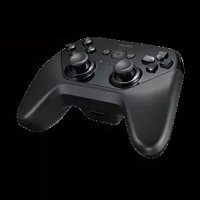
Gamepad TV500BG - Controller ASUS - Free user manual and instructions
Find the device manual for free Gamepad TV500BG ASUS in PDF.


| Product type | Controller / Gamepad |
| Brand | Asus |
| Model | Gamepad TV500BG |
| Compatibility | Nexus Player, Android TV devices |
| Connectivity | Wireless Bluetooth |
| Power | 2 AA batteries (not included) |
| Approximate dimensions | 15 x 10 x 5 cm |
| Approximate weight | 200 g |
| Operating temperature | 0°C to 40°C |
| Buttons | Directional buttons, action buttons (A, B, X, Y), analog sticks, Home, Back, Power button |
| Maintenance and cleaning | Clean with a dry cloth; do not use liquids |
| Safety | Do not expose to water; do not open or modify; use only with approved accessories |
| Spare parts and repairability | No user-serviceable parts; refer all repairs to qualified personnel |
| Warranty | 12 months from date of purchase |
| Certifications | FCC, CE, IC |
Frequently Asked Questions - Gamepad TV500BG ASUS
User questions about Gamepad TV500BG ASUS
0 question about this device. Answer the ones you know or ask your own.
Ask a new question about this device
Download the instructions for your Controller in PDF format for free! Find your manual Gamepad TV500BG - ASUS and take your electronic device back in hand. On this page are published all the documents necessary for the use of your device. Gamepad TV500BG by ASUS.
USER MANUAL Gamepad TV500BG ASUS
Gamepad for Nexus Player
Important safety instructions
- Read these instructions.
- Keep these instructions.
Heed all warnings. - Follow all instructions.
- Do not use this device near water.
- Clean only with dry cloth.
- Do not block any ventilation openings. Install in accordance with the manufacturer's instructions.
- Do not install near any heat sources such as radiators, heat registers, stoves, or other apparatus (including amplifiers) that produce heat.
- Do not defeat the safety purpose of the polarized or grounding prong. The wide blade or the third prong are provided for your safety. If the provided prong does not fit into your outlet, consult an electrician for replacement of the obsolete outlet.
- Protect the power cord from being walked on or pinched particularly at plugs, convenience receptacles, and the point where they exit from the apparatus.
- Only use attachments/accessories specified by the manufacturer.
- Use only with the cart, stand, tripod, bracket, or table specified by the manufacturer, or sold with the apparatus. When is a cart is used, use caution when moving the cart/apparatus combination to avoid injury from tip-over.
-
Unplug this apparatus during lightning storms or when used for long periods of time.
-
Refer all servicing to qualified service personnel. Servicing is required when the apparatus has been damaged in any way, such as power-supply cord or plug is damaged, liquid has been spilled, or objects have fallen into the apparatus, the apparatus has been exposed to rain or moisture, does not operate normally, or has been dropped.
-
Apparatus shall not be exposed to dripping or splashing and no objects filled with liquids such as vases, shall be placed on the apparatus.
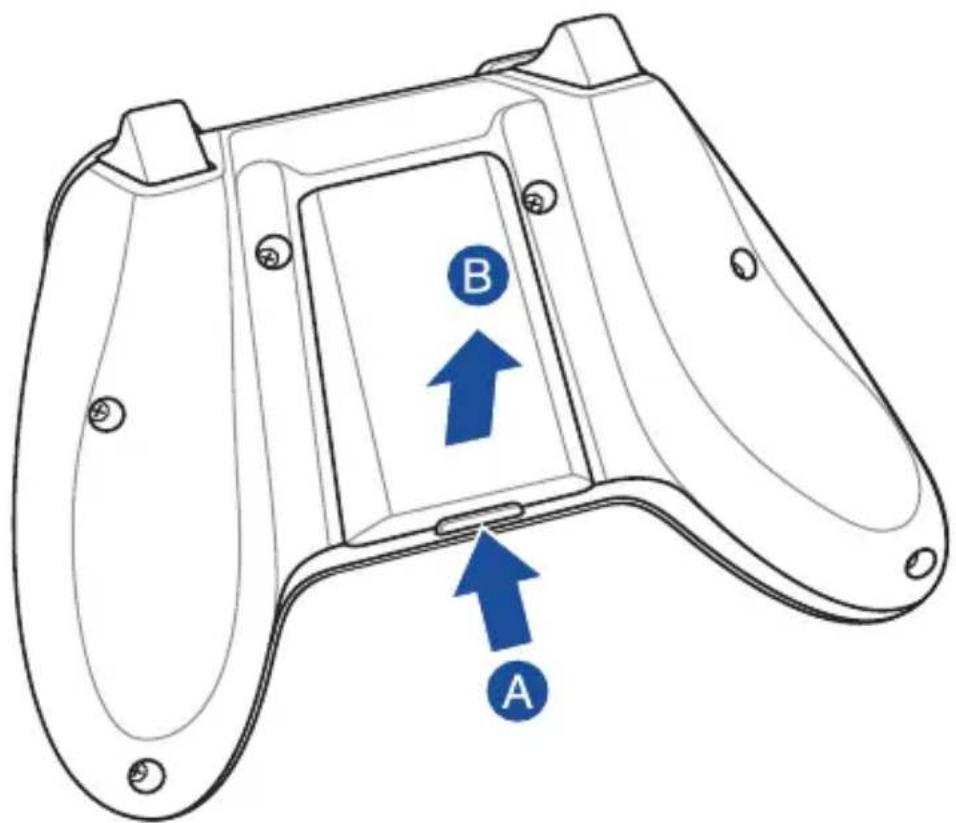
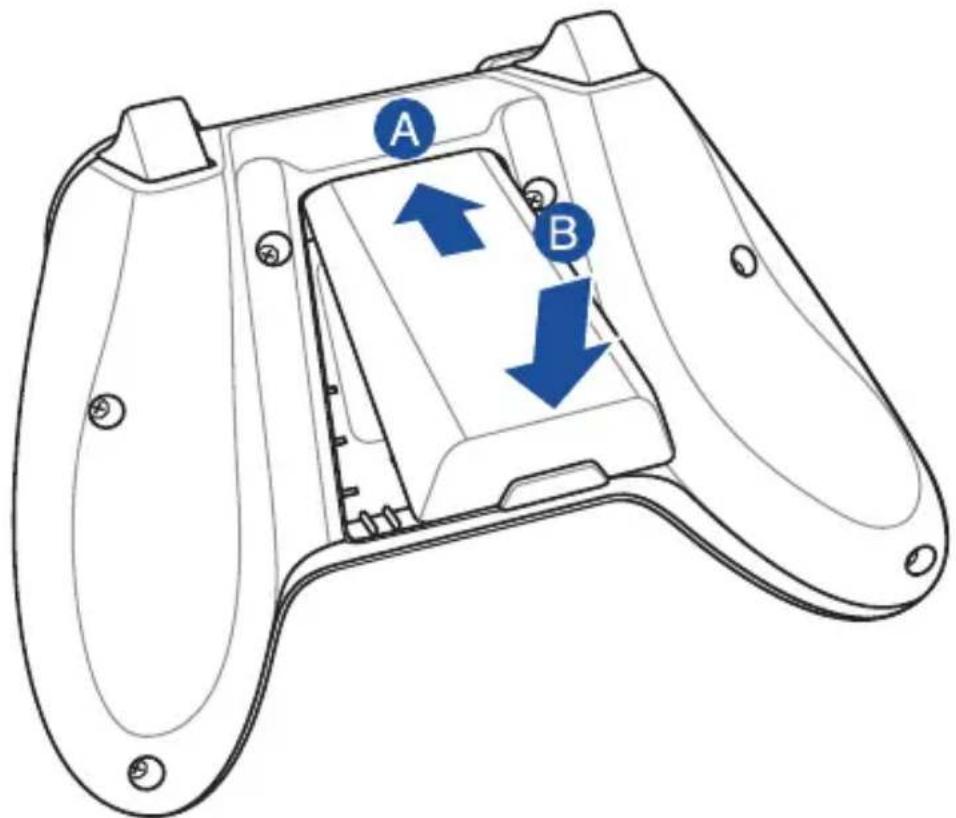
Battery compartment Compartment pour piles
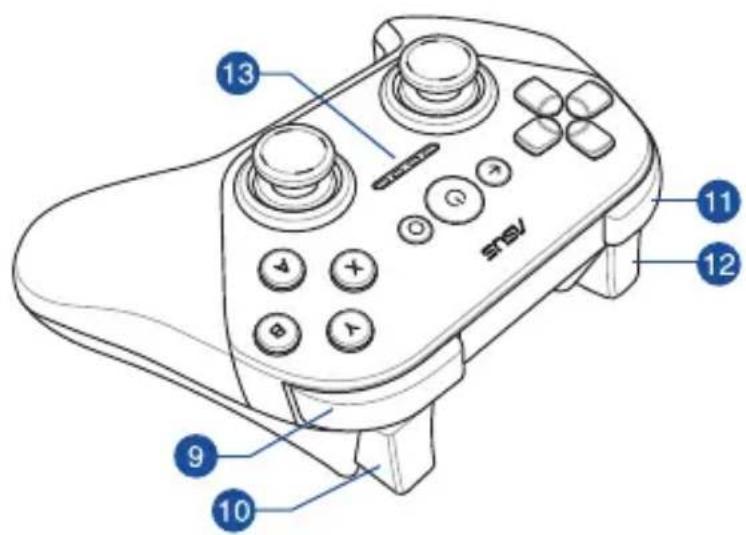

R1 control button
Bouton R1

L1 control button
Bouton L1

R2 control button
Bouton R2

L2 control button
Bouton L2

Activity LED
Témoin d'activité
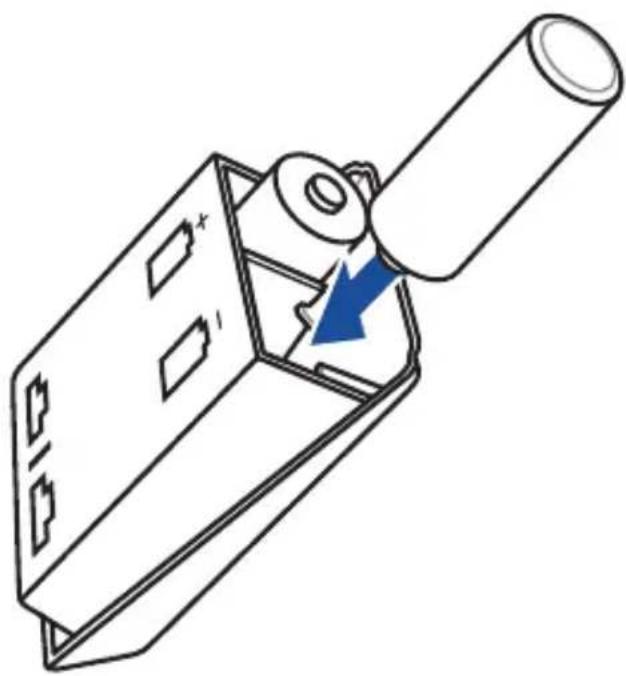
Installing batteries / Installer les piles

2

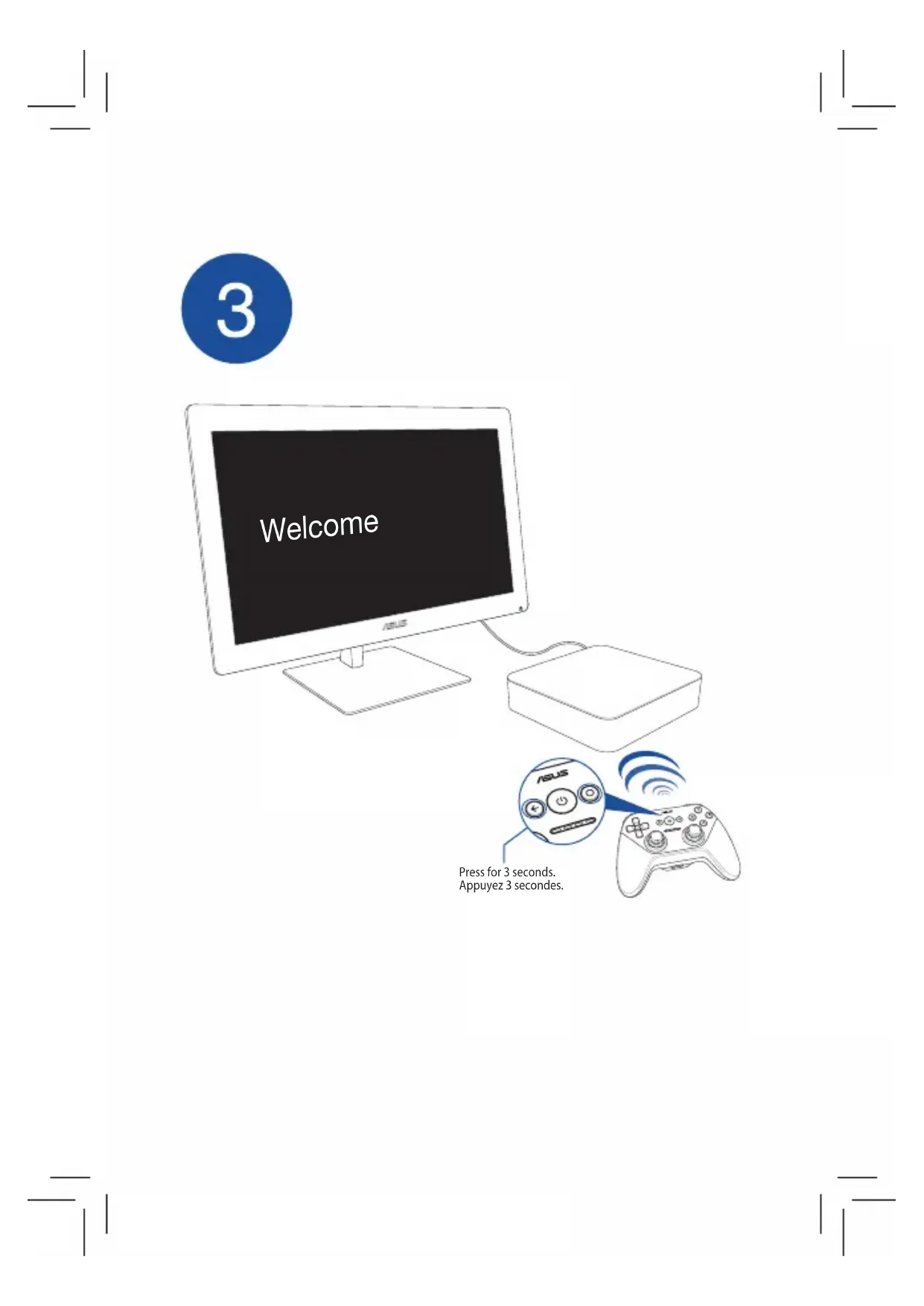
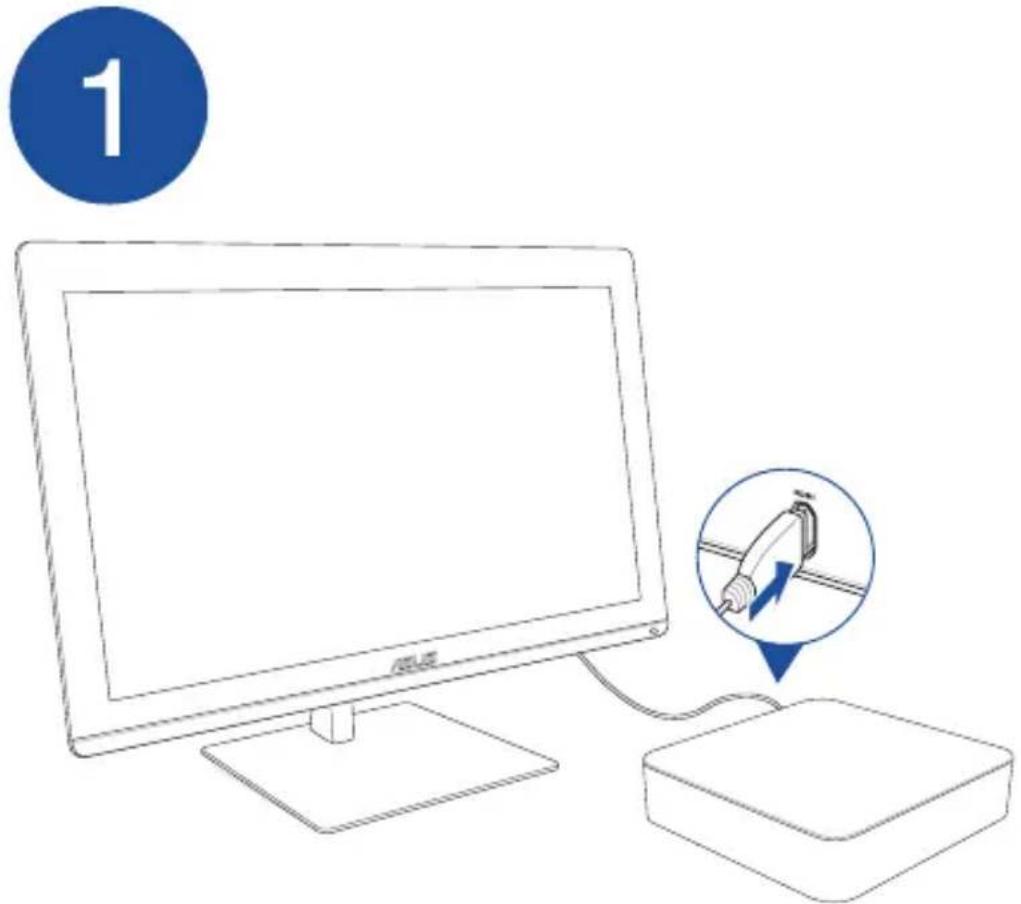
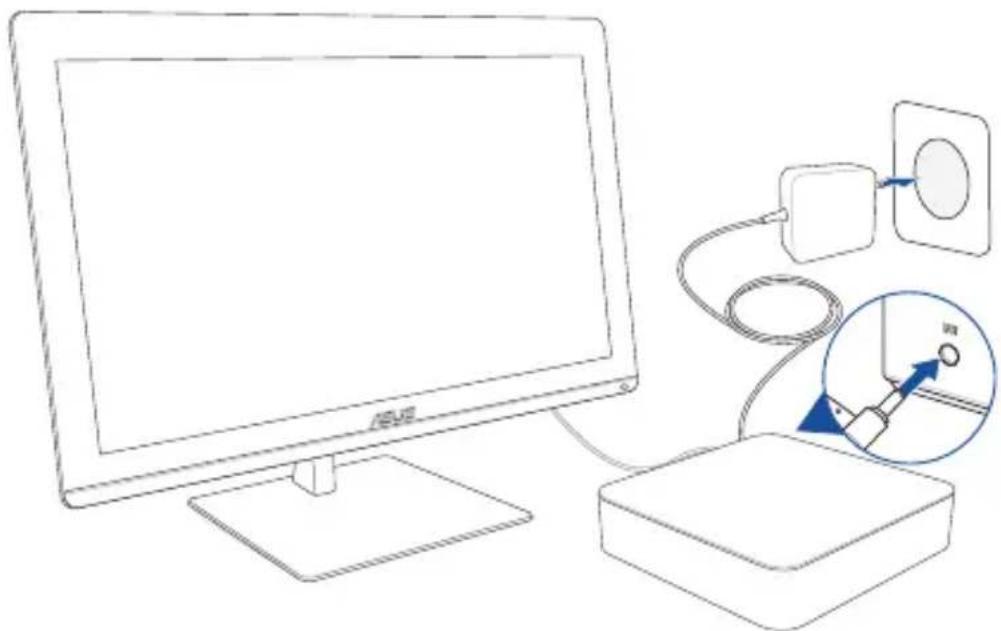
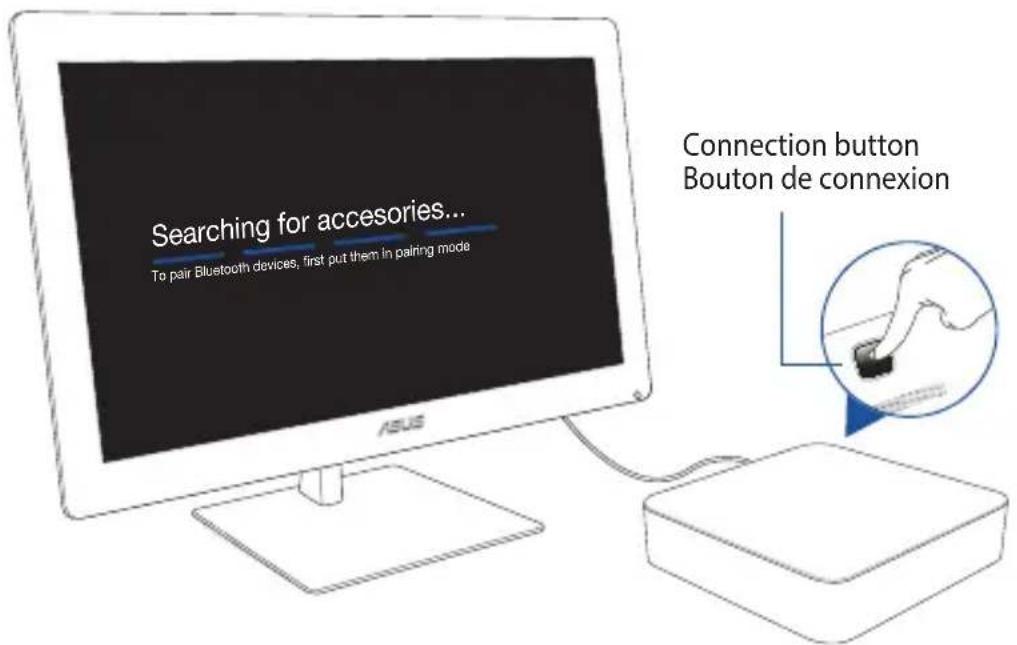
Setting up with Android TV Box / Connexion au boîtier Android TV
2
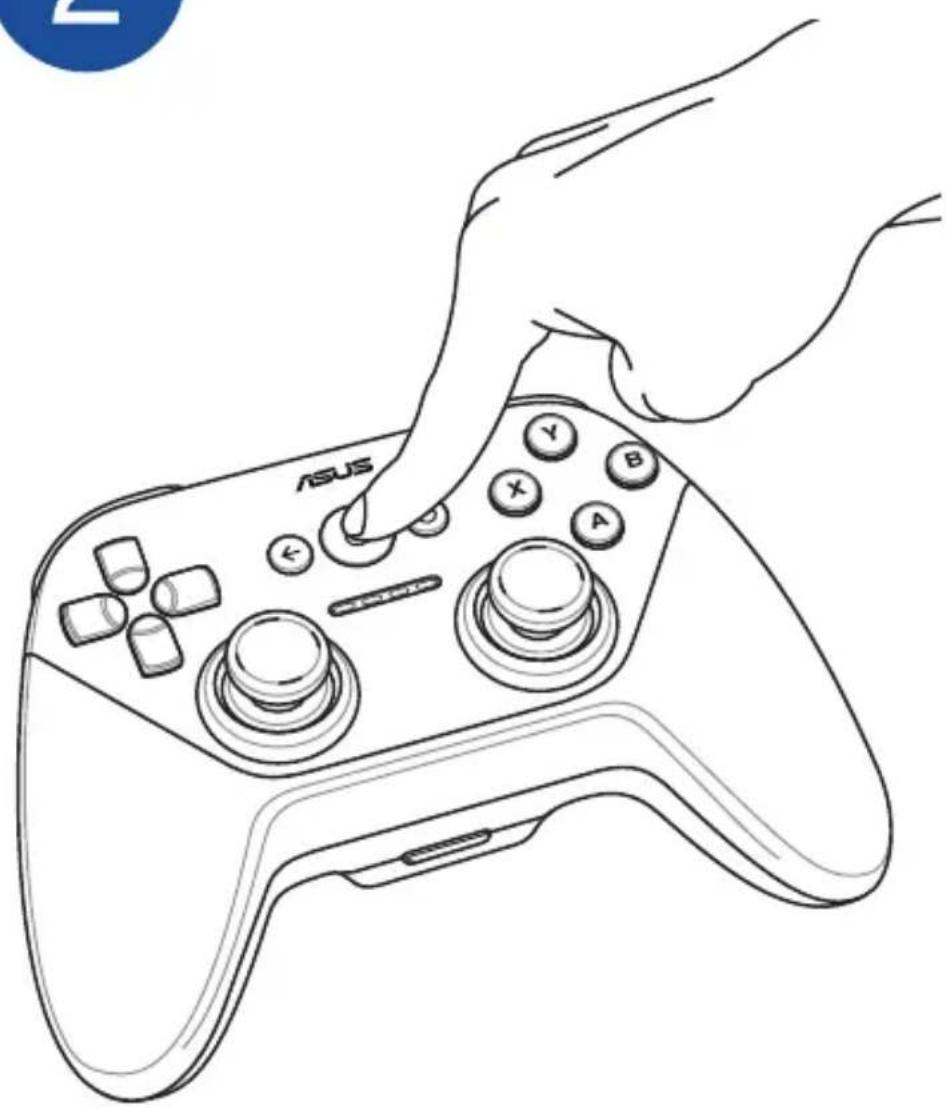
Pairing up / Pairage
1

3
Welcome
Press for 3 seconds. Appuyez 3 seconds
Notices
Warranty period of the Product
This Warranty applies for the period of 12 months ("Warranty Period") from the date the Product was first purchased by an end-customer ("Date of Purchase"). If proof of purchase cannot be provided, the manufacture date as recorded by ASUS will be deemed to be the start of the Warranty Period.
Please visit the ASUS support site at http://www.asus.com/support for complete ASUS warranty information.
Operating temperature
The operating temperature of this device is 0ircC to 40ircC .
Federal Communications Commission statement
This device complies with Part 15 of the FCC Rules. Operation is subject to the following two conditions: (1) This device may not cause harmful interference, and (2) this device must accept any interference received, including interference that may cause undesired operation.
FCC Caution: Any changes or modifications not expressly approved by the party responsible for compliance could void the user's authority to operate this equipment. This transmitter must not be co-located or operating in conjunction with any other antenna or transmitter.
This equipment has been tested and found to comply with the limits for a Class B digital device, pursuant to Part 15 of the FCC Rules. These limits are designed to provide reasonable protection against harmful interference in a residential installation.
This equipment generates, uses and can radiate radio frequency energy and, if not installed and used in accordance with the instructions, may cause harmful interference to radio communications.
However, there is no guarantee that interference will not occur in a particular installation. If this equipment does cause harmful interference to radio or television reception, which can be determined by turning the equipment off and on, the user is encouraged to try to correct the interference by one of the following measures:
- Reorient or relocate the receiving antenna.
Increase the separation between the equipment and receiver.
- Connect the equipment into an outlet on a circuit different from that to which the receiver is connected.
- Consult the dealer or an experienced radio/TV technician for help.
Radiation Exposure Statement
The product comply with the FCC portable RF exposure limit set forth for an uncontrolled environment and are safe for intended operation as described in this manual. The further RF exposure reduction can be achieved if the product can be kept as far as possible from the user body or set the device to lower output power if such function is available.
CE General statement
CE
IEC 60950-1:2005 (2nd Edition; Am 1:2009; Am2:2013.
Safety of Information Technology Equipment
This device complies with the essential requirements of the R&TTE Directive 1999/5/EC. The following test methods have been applied in order to prove presumption of conformity with the essential requirements of the R&TTE Directive 1999/5/EC:
EN300328V1.8.1:2012
Electromagnetic compatibility and Radio spectrum Matters (ERM); Wideband transmission systems; Data transmission equipment operating in the 2.4GHz ISM band and using wide band modulation techniques; Harmonized EN covering the essential requirements of article 3.2 of the R&TTE Directive.
EN 301 489-1 V1.9.2:2011
Electromagnetic compatibility and Radio spectrum Matters (ERM); ElectroMagnetic Compatibility (EMC) standard for radio equipment and services; Part 1: Common technical requirements
EN301489-17V2.2.1:2012
Electromagnetic compatibility and Radio spectrum Matters (ERM); ElectroMagnetic Compatibility (EMC) standard for radio equipment; Part 17: Specific conditions for Broadband Data Transmission Systems
EN 62311:2008
Assessment of electronic and electrical equipment related to human exposure restrictions for electromagnetic fields (0 Hz-300 GHz)
Canada, Industry Canada (IC) Notices
This device complies with RSS-210 of the Industry Canada Rules. Operation is subject to the following two conditions: (1) This device may not cause harmful interference, and (2) this device must accept any interference received, including interference that may cause
Radiation Exposure Statement
The product comply with the Canada portable RF exposure limit set forth for an uncontrolled environment and are safe for intended operation as described in this manual. The further RF exposure reduction can be achieved if the product can be kept as far as possible from the user body or set the device to lower output power if such function is available. undesired operation.
Notices


- Important safety instructions
- Notices
- Warranty period of the Product
- Operating temperature
- Federal Communications Commission statement
- Radiation Exposure Statement
- CE General statement
- CE
- EN300328V1.8.1:2012
- EN 301 489-1 V1.9.2:2011
- EN301489-17V2.2.1:2012
- EN 62311:2008
- Canada, Industry Canada (IC) Notices
Brand : ASUS
Model : Gamepad TV500BG
Category : Controller