LeapPad Academy - Tablet LEAPFROG - Free user manual and instructions
Find the device manual for free LeapPad Academy LEAPFROG in PDF.


| Product Type | Educational tablet for children |
| Brand | LEAPFROG |
| Model | LeapPad Academy |
| Recommended age | 3 to 9 years |
| Power supply | 5V 1.5A AC adapter; rechargeable Li-polymer battery |
| Charging time | Approximately 5 hours with AC adapter |
| Connectivity | Built-in Wi-Fi |
| Screen | Touch screen (not specified) |
| Main functions | Educational games, learning apps, parental controls, LeapFrog card support |
| Cleaning | Slightly damp cloth (cold water), do not use chemical products |
| Safety precautions | Do not expose to moisture, do not disassemble, do not use near heat source, do not leave charging unattended |
| Repairability | No user-serviceable parts; contact LeapFrog customer service |
| Warranty | See leapfrog.com/legal for details |
| Operating temperature | 5°C to 38°C |
Frequently Asked Questions - LeapPad Academy LEAPFROG
User questions about LeapPad Academy LEAPFROG
0 question about this device. Answer the ones you know or ask your own.
Ask a new question about this device
Download the instructions for your Tablet in PDF format for free! Find your manual LeapPad Academy - LEAPFROG and take your electronic device back in hand. On this page are published all the documents necessary for the use of your device. LeapPad Academy by LEAPFROG.
USER MANUAL LeapPad Academy LEAPFROG
text_image
Leap Frog®LeapPad Academy
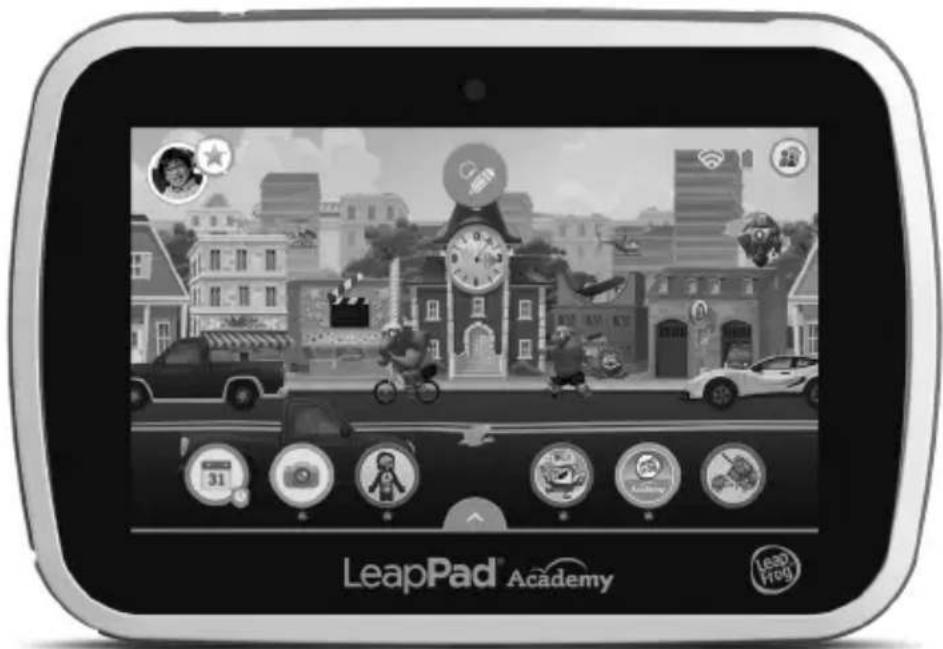
text_image
LeapPad® Academy LeapFrogУмабка бэгбесл

Parent's Guide
Need help? Visit: leapfrog.com/support/leappad-academy
leapfrog.com/support/leappad-academy
Getting Started
- Power Up LeapPad® Academy learning tablet with the AC adapter. Save time: set up while charging.
- Set up Wi-Fi by following onscreen prompts. It's the easiest way to access the app center.
- Register your device by creating a parent account. It's super quick and easy!
- Sign-Up for a 3-month free trial to LeapFrog Academy* and download your included apps. Wi-Fi, parent account and device set-up required to access all included apps.
- Create & Play! You're all set for an awesome experience that's truly LeapPad®Academy!
* LeapFrog®Academy is a subscription service. This 3-month free trial offer is exclusive to the LeapPad®Academy tablet purchaser. Your 3-month free trial period begins when you sign-up. Cancel anytime during the first 3 months of your subscription and you will not be charged. After that you will be automatically charged, to the payment method you provide, until you cancel. No refunds or credits for partial months. Price subject to change. For details please read the LeapFrog Academy Subscription Terms of Use at www.leapfrog.com/terms-academy.
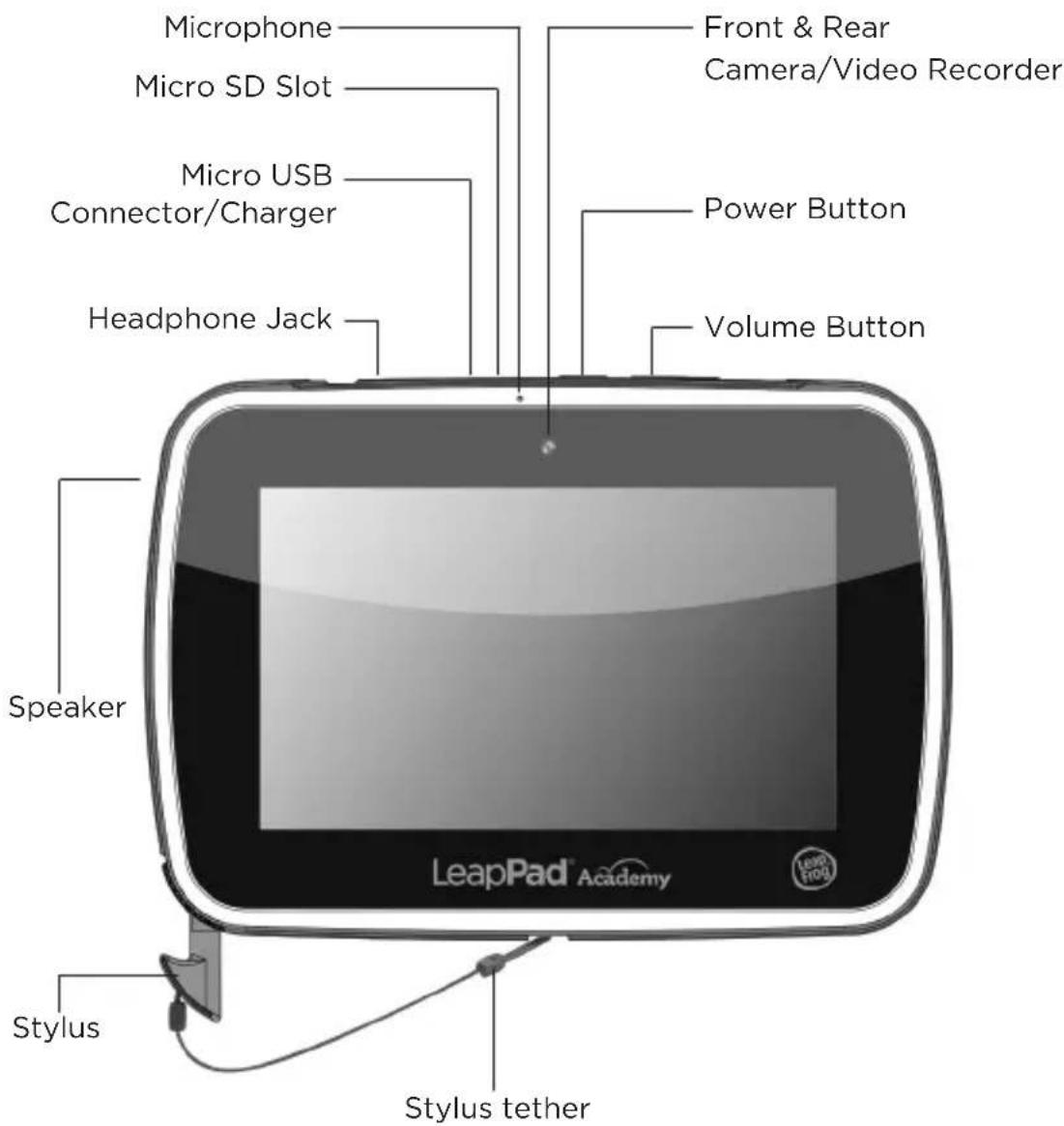
Key Features
text_image
Microphone Micro SD Slot Micro USB Connector/Charger Headphone Jack Front & Rear Camera/Video Recorder Power Button Volume Button Speaker Stylus Stylus tether LeapPad® AcademyParent Settings
Control your child's play with these interactive LeapPad® Academy features:
- Wireless settings — Control connection setup and access to online experiences.
- Child profile — Easily manage permissions and profile information or add a new profile.
- App Center/Centre — Parents can purchase digital content directly from the tablet with a Parent Account password. Control your child's access to the App Center/Centre, where they can create a wish list. Parents can choose whether children may view pricing and buy buttons.
- App Manager — Control your child's access to included and downloaded apps
- Time Controls — Manage the amount of time your child spends on the tablet by total time, hours of the day and by app category
- LeapSearch™ Controls — Manage the web pages and websites your child explores in the LeapSearch Parent Portal.
- Tablet Settings — Manage settings like language, time, date and more. Access to Parent Settings is protected by a 4-digit parent lock code that must be established during initial setup. Parent Settings can be accessed from the Sign In screen by pressing the Parent Settings icon to log in with your parent lock. Alternatively, you can log in via the Parent Settings icon on the upper right hand corner of the child's Home Screen.
Forgetting or resetting your Parent Lock
If you have forgotten your 4-digit parent lock code you can look it up in the leapfrog.com Parent Account you created during device setup and registration. If you need to reset your parent lock, you can do it from the device or reference the FAQ section at leapfrog.com/support/leappad-academy for more information.
Operating Instructions
WARNING. Please read all the Important Safety Instructions prior to using the LEAPFROG™ tablet. Failure to follow these safety instructions could result in fire, electric shock, or other injury or damage to the LEAPFROG tablet or other property.
WARNING: Please read all safety instructions for any accessories or other products before using with the LEAPFROG tablet. LeapFrog is not responsible for the operation of third-party accessories or their compliance with safety and regulatory standards.
Wi-Fi connection support. If you experience any difficulty with Wi-Fi connectivity, troubleshooting suggestions are available at leapfrog.com/support
For indoor, dry-location use only. Do not use the product near a sink or other wet locations. Take care not to spill food or any kind of liquid on this product as it may render it inoperable and not serviceable. In case the unit does get wet, unplug all cables and turn it OFF. Allow to dry thoroughly before reusing. Do not attempt to dry with a hair dryer or other heat source. Do not re-connect to the AC outlet if wet or damaged.
Handle with care. To avoid injury, damage to this product or other property, avoid dropping and never disassemble, crush, puncture, microwave, incinerate, insert foreign objects or paint the product. Clean your hands before handling the product if they have been exposed to suntan lotions or other chemicals. Use the included bumper to help minimize damage from typical use and drops.
Avoid prolonged exposure to extreme temperatures and direct sunlight. Operate in places with temperatures ranging from 5°C (40°F) to 38°C (100°F). Do not leave the product in your car as the temperatures in parked cars can exceed the acceptable storage temperature. Exposure to extreme temperatures can result in shortened battery life or cause the product to temporarily stop working.
Battery Charging BC
The LEAPFROG™ tablet is equipped with a rechargeable lithium-polymer battery. It will require about 5 hours of charging using the included AC power adapter/adaptor prior to use. The tablet may also be charged via USB connection; however, this charging method will take much longer.
If the battery is charging when the device is off, a battery meter icon will light up on the dark screen. When the battery meter icon is full, the battery is fully charged. If it is charging when the device is on, the battery meter at the top of the screen will show the charging status and the charge level.
Charge the device in a well-ventilated area only. While charging the device do not cover it with anything such as a blanket, pillow or your child's body. Never allow your child to sleep with or on the device while it is charging. For power or battery issues, please contact LeapFrog Consumer Support.
Cleaning. Disconnect all cords before cleaning. Clean the product with a slightly damp cloth (cold water). Do not use soap, detergent or other chemicals. Never submerge the unit in water. Allow to dry thoroughly before re-use.
Using connectors and ports. Never force a USB or other connector into a port on the device. If the connector does not fit into the port, double check the connector and port to ensure they match up and are positioned correctly, and make sure nothing is obstructing the port.
Environmental phenomena. The LEAPFROG tablet may malfunction if subjected to radio-frequency interference. It should revert to normal operation when the interference stops. If not, it may become necessary to turn the power OFF and then back ON. In the unlikely event of an electrostatic discharge, the unit may malfunction and lose memory, requiring the user to reset the device by turning the power OFF and then back ON.
Static electricity and headphones. In certain dry environments, static electricity can build up in headphones and cause a small quick static discharge when plugging the headphones into a device. To avoid this static discharge from occurring, do not use in extremely dry environments or touch a grounded unpainted metal object to discharge static electricity before connecting the headphones to the device.
Do not connect to the AC wall outlet if wet or damaged.
Important Safety Instructions
CAUTION: All packing materials such as tape, plastic sheets, packaging locks, removable tags, cable ties and packaging screws are not part of this toy, and should be discarded for your child's safety.
WARNING: CHOKING HAZARD - Small Parts.
Vol for children under 3 yrs.
WARNING: The AC Adapter or USB cords could be a strangulation hazard. Not for children under 3 years.
CAUTION. Routinely check this tablet for proper and safe condition. If there is any damage or broken parts, such as a fractured or cracked screen (display), immediately remove the tablet from use.
CAUTION: DO NOT GET WET. Do not use the tablet and its accessories in the drain, near sinks or in other wet or highly humid locations. Ensure food or liquid is not spilled on the tablet or its accessories.
CAUTION: Do not attempt to dry the LEAPFROG™ tablet or its accessories with an external heat source, such as a microwave or hair dryer.
CAUTION: Do not store or carry the tablet and its accessories along with flammable or explosive materials, liquids or gases. Do not expose to fire, explosion, or other hazard.
CAUTION·DO NOT REPAIR OR MODIFY. The LEAPFROG™ tablet does not contain any user-serviceable parts. Service should only be provided by LeapFrog Enterprises, Inc. If the product has been in contact with liquids, punctured, or subjected to a severe impact or fall, immediately remove this product from use and contact LeapFrog Consumer Services.
WARNING: It is rare but possible for seizures to be triggered by light waves. Patterns. Play/watch in a well-lit room and take 10 to 15 minute breaks every hour.
PROTECT YOUR EYESIGHT Use the tablet in a well-lit room; take a 20-second break ever, 120 minutes and look at something far away; take 10 to 15 minute breaks every hour; and do not hold the screen too close to your eyes. If you experience any vision problems, such as blurred vision or eye pain, stop using the tablet and have your eyes checked.
PROTECT YOUR HEARING. Long-term exposure to loud sounds, at high volume may result in permanent hearing loss. When using headphones or ear buds, it is recommended that the product is listened to at lower volumes for shorter periods of time. Set the volume while in a quiet environment; turn the volume down if you cannot hear people speaking near you. Limit the listening time to 90 minutes, followed by a quiet period. The louder the volume, the less time required before your hearing may be affected. If you experience ringing in your ears or hear muffled speech, stop listening and have your hearing checked.
PROTECT YOUR BODY ERGONOMIC CONSIDERATIONS: When using a tablet device, it is possible that repetition of certain motions or remaining in certain positions over long periods of time may cause discomfort in the hands, neck, shoulders, or other parts of the body. Reduce risk of discomfort and repetitive motion injuries by using the tablet in a comfortable position and taking a 10 to 15 minute break every hour. If you experience any injury or ongoing discomfort, stop use and see a physician.
CAUTION. Keep the device at least 6" (15cm) away from pacemakers and other similar medical devices that may be sensitive to devices that contain magnets and emit electromagnetic fields.
Battery and AC Adapter/Adaptor
WARNING: A minimum separation distance of 0 cm must be maintained between the user's body and the device including the antenna during body-worn operation to comply with the RF exposure requirements in Europe.
WARNING: The lithium rechargeable battery cannot be removed from the product. For your safety, never try to remove the battery. For power or battery issues, please contact LeapFrog Consumer Services.
CAUTION: The battery is only to be charged by adults or children 8+ years of age under the full supervision of an adult.
CAUTION: Use only the AC adapter/adaptor provided with the product.

WARNING: Not suitable for children under 3 years. Misuse of transformer (AC Adapter/ adaptor) can cause electric shock. (Note: The word “transformer” is sometimes substituted for the word “adapter.”) Use only the included AC power adapter/adaptor.
- Connection of the transformer to the wall outlet should be performed only by an adult or child 8+ years of age.
- The transformer is not intended to be used as a toy, and the use of the transformer shall be under the full supervision of parents.
- As with all electrical products, precautions should be observed during handling and use to prevent electrical shock.
- The power adapter/adaptor may become warm during normal use.
Always allow adequate ventilation and use care when handling the power adapter/adaptor. - Charge the device in a well-ventilated area only. While charging the device do not cover it with anything such as a blanket, pillow or your child's body. Never allow your child to sleep with or on the device while it is charging.
- Do not prolong body contact with USB/AC cables while connected to a computer or AC outlet to avoid injury. Do not sit or sleep on cables while in use.
- Do not connect or disconnect with wet hands.
- The transformer should be periodically examined for conditions that may result in the risk of fire, electrical shock or injury to persons, such as damage to the cord, plug, blades, housing or other parts. If any such conditions are present, the transformer must not be used.
Dispose of a damaged or faulty transformer in accordance with your local electrical product recycling regulations. - The USB charging unit varies by country or region.
AC Adapter/Adaptor Electrical Ratings: Input: \~ 120VAC, 60Hz (for US); \~ 230VAC, 50Hz (for UK or EU); \~ 240VAC, 50Hz (for AS/NZL)
Output: — DC5V, 1.5A, 7.5VA
Regulatory Information
FCC Compliance Statement:
Note: This equipment has been tested and found to comply with the limits for a Class B digital device, pursuant to part 15 of the FCC Rules. These limits are designed to provide reasonable protection against harmful interference in a residential installation. This equipment generates, uses and can radiate radio frequency energy and, if not installed and used in accordance with the instructions, may cause harmful interference to radio communications.
However, there is no guarantee that interference will not occur in a particular installation. If this equipment does cause harmful interference to radio or television reception, which can be determined by turning the equipment off and on, the user is encouraged to try to correct the interference by one or more of the following measures:
- Reorient or relocate the receiving antenna.
- Increase the separation between the equipment and receiver.
- Connect the equipment to an outlet on a circuit different from that to which the receiver is connected.
- Consult the dealer or an experienced radio/TV technician for help.
Certification and Compliance
U.S. Models
FCC ID: HFS-UYT
Canada Models
IC: 1787B-UYT
CAN ICES-3(B)/NMB-3(B)
Disclaimer and limitation of liability
LeapFrog and its suppliers assume no responsibility for any damage or loss resulting from the use of this handbook. LeapFrog and its suppliers assume no responsibility for any loss or claims by third parties that may arise through the use of this software. LeapFrog and its suppliers assume no responsibility for any damage or loss caused by deletion of data as a result of malfunction, dead battery, or repairs. Be sure to make backup copies of important data on other media to protect against data loss.
Company: LeapFrog Enterprises, Inc.
Address: 6401 Hollis Street, Suite 100, Emeryville, CA 94608 USA
Phone: 1-800-701-5327
Supplier's Declaration of Conformity
Trade Name : LeapFrog
®
Model : 6022
Product name: : LeapPad
® Academy
Responsible party : LeapFrog Enterprises, Inc.
Address : 6401 Hollis Street, Suite 100, Emeryville, CA 94608
Website : leapfrog.com
THIS DEVICE COMPLIES WITH PART 15 OF THE FCC RULES.
OPERATION IS SUBJECT TO THE FOLLOWING TWO CONDITIONS:
(1) THIS DEVICE MAY NOT CAUSE HARMFUL INTERFERENCE, AND
(2) THIS DEVICE MUST ACCEPT ANY INTERFERENCE RECEIVED,
INCLUDING INTERFERENCE THAT MAY CAUSE UNDESIRED OPERATION.
Caution: Changes or modifications not expressly approved by the party responsible for compliance could void the user's authority to operate the equipment.
This device contains licence-exempt transmitter(s)/receiver(s) that comply with Innovation, Science and Economic Development Canada's licence-exempt RSS(s). Operation is subject to the following two conditions:
(1) This device may not cause interference.
(2) This device must accept any interference, including interference that may cause undesired operation of the device.
FCC Caution: This transmitter must not be co-located or operating in conjunction with any other antenna or transmitter.
FOR COUNTRY CODE SELECTION USAGE (WLAN DEVICES)
Note: The country code selection is for non-US model only and is not available to all US model. Per FCC regulation, all WiFi product marketed in US must fixed to US operation channels only.
USB Cable: The USB cable provided with this product complies with FCC and other regulatory emission limits. If using a USB cable other than the one provided, a shielded cable must be used in order not to exceed FCC and other regulatory emissions limits.
Wireless/Wi-Fi Use Regulations: Under certain regulations, it may be necessary to turn off your wireless/Wi-Fi connection in locations or situations when it may cause interference or danger, such as on an airplane.
Warranty: Please visit our website at leapfrog.com/legal for full details of the warranty provided in your country.
Intellectual Property License Information
General Public License: Certain software included in this product contains copyrighted software that is licensed under the General Public License (GPL). A copy of that license is included at leapfrog.com/en-us/legal/open-source.html.
Anyone may obtain from us the complete corresponding source code for the software covered by the GPL for a period of three years after our last shipment of this product by contacting our Customer Service team at leapfrog.com/support.
Please write “GPL source code for [name of device]” in the subject line of your email. We reserve the right to charge a reasonable fee to cover the costs of shipping and the physical media on which the source code is loaded.
Other Licenses: Copies of other third-party open source licenses are available at http://www.leapfrog.com/en-us/legal/open-source.html.
LeapFrog Enterprises Inc., a subsidiary of VTech holdings Limited. TM & © 2015 LeapFrog Enterprises, Inc. All rights reserved. leapfrog.com
Consumer Support Visit our Consumer Support websites 24 hours a day:
U.S.: leapfrog.com/support
Canada: leapfrog.ca/support
U.K.: leapfrog.co.uk/support
Version 2, June 1991
Copyright (C) 1989, 1991 Free Software Foundation, Inc., 51 Franklin Street, Fifth Floor, Boston, MA 02110-1301 USA Everyone is permitted to copy and distribute verbatim copies of this license document, but changing it is not allowed.
Preamble
The licenses for most software are designed to take away your freedom to share and change it. By contrast, the GNU General Public License is intended to guarantee your freedom to share and change free software--to make sure the software is free for all its users. This General Public License applies to most of the Free Software Foundation's software and to any other program whose authors commit to using it. (Some other Free Software Foundation software is covered by the GNU Lesser General Public License instead.) You can apply it to your programs, too.
When we speak of free software, we are referring to freedom, not price. Our General Public Licenses are designed to make sure that you have the freedom to distribute copies of free software (and charge for this service if you wish), that you receive source code or can get it if you want it, that you can change the software or use pieces of it in new free programs; and that you know you can do these things.
To protect your rights, we need to make restrictions that forbid anyone to deny you these rights or to ask you to surrender the rights. These restrictions translate to certain responsibilities for you if you distribute copies of the software, or if you modify it.
For example, if you distribute copies of such a program, whether gratis or for a fee, you must give the recipients all the rights that you have. You must make sure that they, too, receive or can get the source code. And you must show them these terms so they know their rights.
We protect your rights with two steps: (1) copyright the software, and (2) offer you this license which gives you legal permission to copy, distribute and/or modify the software.
Also, for each author's protection and ours, we want to make certain that everyone understands that there is no warranty for this free software. If the software is modified by someone else and passed on, we want its recipients to know that what they have is not the original, so that any problems introduced by others will not reflect on the original authors' reputations.
Finally, any free program is threatened constantly by software patents. We wish to avoid the danger that redistributors of a free program will individually obtain patent licenses, in effect making the program proprietary. To prevent this, we have made it clear that any patent must be licensed for everyone's free use or not licensed at all.
The precise terms and conditions for copying, distribution and modification follow.
GNU GENERAL PUBLIC LICENSE
TERMS AND CONDITIONS FOR COPYING, DISTRIBUTION AND MODIFICATION
- This License applies to any program or other work which contains a notice placed by the copyright holder saying it may be distributed under the terms of this General Public License. The “Program”, below, refers to any such program or work, and a “work based on the Program” means either the Program or any derivative work under copyright law: that is to say, a work containing the Program or a portion of it, either verbatim or with modifications and/or translated into another language. (Hereinafter, translation is included without limitation in the term “modification”.) Each licensee is addressed as “you”.
Activities other than copying, distribution and modification are not covered by this License; they are outside its scope. The act of running the Program is not restricted, and the output from the Program is covered only if its contents constitute a work based on the Program (independent of having been made by running the Program). Whether that is true depends on what the Program does.
- You may copy and distribute verbatim copies of the Program's source code as you receive it, in any medium, provided that you conspicuously and appropriately publish on each copy an appropriate copyright notice and disclaimer of warranty; keep intact all the notices that refer to this License and to the absence of any warranty; and give any other recipients of the Program a copy of this License along with the Program.
You may charge a fee for the physical act of transferring a copy, and you may at your option offer warranty protection in exchange for a fee. - You may modify your copy or copies of the Program or any portion of it, thus forming a work based on the Program, and copy and distribute such modifications or work under the terms of Section 1 above, provided that you also meet all of these conditions:
a) You must cause the modified files to carry prominent notices stating that you changed the files and the date of any change.
b) You must cause any work that you distribute or publish, that in whole or in part contains or is derived from the Program or any part thereof, to be licensed as a whole at no charge to all third parties under the terms of this License.
c) If the modified program normally reads commands interactively when run, you must cause it, when started running for such interactive use in the most ordinary way, to print or display an announcement including an appropriate copyright notice and a notice that there is no warranty (or else, saying that you provide a warranty) and that users may redistribute the program under these conditions, and telling the user how to view a copy of this License. (Exception: if the Program itself is interactive but does not normally print such an announcement, your work based on the Program is not required to print an announcement.) These requirements apply to the modified work as a whole. If identifiable sections of that work are not derived from the Program, and can be reasonably considered independent and separate works in themselves, then this License, and its terms, do not apply to those sections when you distribute them as separate works. But when you distribute the same sections as part of a whole which is a work based on the Program, the distribution of the whole must be on the terms of this License, whose permissions for other licensees extend to the entire whole, and thus to each and every part regardless of who wrote it.
Thus, it is not the intent of this section to claim rights or contest your rights to work written entirely by you; rather, the intent is to exercise the right to control the distribution of derivative or collective works based on the Program.
In addition, mere aggregation of another work not based on the Program with the Program (or with a work based on the Program) on a volume of a storage or distribution medium does not bring the other work under the scope of this License.
- You may copy and distribute the Program (or a work based on it, under Section 2) in object code or executable form under the terms of Sections 1 and 2 above provided that you also do one of the following:
a) Accompany it with the complete corresponding machine-readable source code, which must be distributed under the terms of Sections 1 and 2 above on a medium customarily used for software interchange; or,
b) Accompany it with a written offer, valid for at least three years, to give any third party, for a charge no more than your cost of physically performing source distribution, a complete machine-readable copy of the corresponding source code, to be distributed under the terms of Sections 1 and 2 above on a medium customarily used for software interchange; or,
c) Accompany it with the information you received as to the offer to distribute corresponding source code. (This alternative is allowed only for noncommercial distribution and only if you received the program in object code or executable form with such an offer, in accord with Subsection b above.)
The source code for a work means the preferred form of the work for making modifications to it. For an executable work, complete source code means all the source code for all modules it contains, plus any associated interface definition files, plus the scripts used to control compilation and installation of the executable. However, as a special exception, the source code distributed need not include anything that is normally distributed (in either source or binary form) with the major components (compiler, kernel, and so on) of the operating system on which the executable runs, unless that component itself accompanies the executable.
If distribution of executable or object code is made by offering access to copy from a designated place, then offering equivalent access to copy the source code from the same place counts as distribution of the source code, even though third parties are not compelled to copy the source along with the object code.
-
You may not copy, modify, sublicense, or distribute the Program except as expressly provided under this License. Any attempt otherwise to copy, modify, sublicense or distribute the Program is void, and will automatically terminate your rights under this License. However, parties who have received copies, or rights, from you under this License will not have their licenses terminated so long as such parties remain in full compliance.
-
You are not required to accept this License, since you have not signed it. However, nothing else grants you permission to modify or distribute the Program or its derivative works. These actions are prohibited by law if you do not accept this License. Therefore, by modifying or distributing the Program (or any work based on the Program), you indicate your acceptance of this License to do so, and all its terms and conditions for copying, distributing or modifying the Program or works based on it.
-
Each time you redistribute the Program (or any work based on the Program), the recipient automatically receives a license from the original licensor to copy, distribute or modify the Program subject to these terms and conditions. You may not impose any further restrictions on the recipients' exercise of the rights granted herein. You are not responsible for enforcing compliance by third parties to this License.
-
If, as a consequence of a court judgment or allegation of patent infringement or for any other reason (not limited to patent issues), conditions are imposed on you (whether by court order, agreement or otherwise) that contradict the conditions of this License, they do not excuse you from the conditions of this License. If you cannot distribute so as to satisfy simultaneously your obligations under this License and any other pertinent obligations, then as a consequence you may not distribute the Program at all. For example, if a patent license would not permit royalty-free redistribution of the Program by all those who receive copies directly or indirectly through you, then the only way you could satisfy both it and this License would be to refrain entirely from distribution of the Program.
If any portion of this section is held invalid or unenforceable under any particular circumstance, the balance of the section is intended to apply and the section as a whole is intended to apply in other circumstances.
It is not the purpose of this section to induce you to infringe any patents or other property right claims or to contest validity of any such claims; this section has the sole purpose of protecting the integrity of the free software distribution system, which is implemented by public license practices. Many people have made generous contributions to the wide range of software distributed through that system in reliance on consistent application of that system; it is up to the author/donor to decide if he or she is willing to distribute software through any other system and a licensee cannot impose that choice.
This section is intended to make thoroughly clear what is believed to be a consequence of the rest of this License.
-
If the distribution and/or use of the Program is restricted in certain countries either by patents or by copyrighted interfaces, the original copyright holder who places the Program under this License may add an explicit geographical distribution limitation excluding those countries, so that distribution is permitted only in or among countries not thus excluded. In such case, this License incorporates the limitation as if written in the body of this License.
-
The Free Software Foundation may publish revised and/or new versions of the General Public License from time to time. Such new versions will be similar in spirit to the present version, but may differ in detail to address new problems or concerns.
Each version is given a distinguishing version number. If the Program specifies a version number of this License which applies to it and “any later version”, you have the option of following the terms and conditions either of that version or of any later version published by the Free Software Foundation. If the Program does not specify a version number of this License, you may choose any version ever published by the Free Software Foundation.
- If you wish to incorporate parts of the Program into other free programs whose distribution conditions are different, write to the author to ask for permission. For software which is copyrighted by the Free Software Foundation, write to the Free Software Foundation; we sometimes make exceptions for this.
Our decision will be guided by the two goals of preserving the free status of all derivatives of our free software and of promoting the sharing and reuse of software generally.
NO WARRANTY
-
BECAUSE THE PROGRAM IS LICENSED FREE OF CHARGE, THERE IS NO WARRANTY FOR THE PROGRAM, TO THE EXTENT PERMITTED BY APPLICABLE LAW. EXCEPT WHEN OTHERWISE STATED IN WRITING THE COPYRIGHT HOLDERS AND/OR OTHER PARTIES PROVIDE THE PROGRAM "AS IS" WITHOUT WARRANTY OF ANY KIND, EITHER EXPRESSED OR IMPLIED, INCLUDING, BUT NOT LIMITED TO, THE IMPLIED WARRANTIES OF MERCHANTABILITY AND FITNESS FOR A PARTICULAR PURPOSE. THE ENTIRE RISK AS TO THE QUALITY AND PERFORMANCE OF THE PROGRAM IS WITH YOU. SHOULD THE PROGRAM PROVE DEFECTIVE, YOU ASSUME THE COST OF ALL NECESSARY SERVICING, REPAIR OR CORRECTION.
-
IN NO EVENT UNLESS REQUIRED BY APPLICABLE LAW OR AGREED TO IN WRITING WILL ANY COPYRIGHT HOLDER, OR ANY OTHER PARTY WHO MAY MODIFY AND/OR REDISTRIBUTE THE PROGRAM AS PERMITTED ABOVE, BE LIABLE TO YOU FOR DAMAGES, INCLUDING ANY GENERAL, SPECIAL, INCIDENTAL OR CONSEQUENTIAL DAMAGES ARISING OUT OF THE USE OR INABILITY TO USE THE PROGRAM (INCLUDING BUT NOT LIMITED TO LOSS OF DATA OR DATA BEING RENDERED INACCURATE OR LOSSES SUSTAINED BY YOU OR THIRD PARTIES OR A FAILURE OF THE PROGRAM TO OPERATE WITH ANY OTHER PROGRAMS), EVEN IF SUCH HOLDER OR OTHER PARTY HAS BEEN ADVISED OF THE POSSIBILITY OF SUCH DAMAGES.
text_image
CLASS 1 LED PRODUCT
text_image
Leap Frog®Visit our website for more information about our products, downloads, resources and more.
leapfrog.com
Read our complete warranty policy online at leapfrog.com/legal
LeapFrog Enterprises, Inc., a subsidiary of VTech Holdings Limited. TM & © 2015 LeapFrog Enterprises, Inc. All rights reserved. 91-003653-001 US