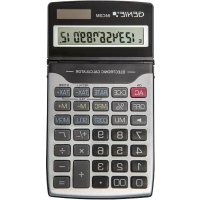
84 CSM - Calculator Genie - Free user manual and instructions
Find the device manual for free 84 CSM Genie in PDF.


| Product type | Electronic desktop calculator |
| Brand | Genie |
| Model | 84 CSM |
| Display capacity | 12 digits |
| Power supply | 1 LR54 (LR1130) battery |
| Automatic shutdown | After 4 to 5 minutes of inactivity |
| Dimensions (H × W × D) | 135 × 77 × 13 mm |
| Weight | 80 g |
| Calculation functions | Basic operations, percentage, taxes, margin, cost-sell-margin |
| TAX+ function | Yes |
| TAX- function | Yes |
| Display | LCD display |
| Safety | Not a toy, keep out of reach of children, avoid water and shocks |
| Maintenance | Clean with a dry cloth, change battery with a screwdriver |
| Storage | Avoid humidity and dust, store in shade |
| Package contents | Calculator with installed battery, user manual |
| Main material | Plastic |
| Battery type | LR54 (LR1130) non-rechargeable |
| Intended use | Personal calculations, home and office use |
| Automatic shutdown period | 4 to 5 minutes |
| Manual languages | Multilingual (FR, EN, etc.) |
Frequently Asked Questions - 84 CSM Genie
User questions about 84 CSM Genie
0 question about this device. Answer the ones you know or ask your own.
Ask a new question about this device
Download the instructions for your Calculator in PDF format for free! Find your manual 84 CSM - Genie and take your electronic device back in hand. On this page are published all the documents necessary for the use of your device. 84 CSM by Genie.
USER MANUAL 84 CSM Genie
Please read the following safety instructions. The manufacturer assumes no liability for damage arising from failure to observe these safety instructions. Keep this manual together with the calculator for later reference and pass it on with the product.
CALCULATOR
This product is not a toy. Children could injure each other or themselves when playing with the calculator; they could break off and swallow small parts such as keys or damage the display.
- Keep the calculator away from water. Moisture or liquids can damage the calculator.
- Avoid dropping the product or exposing it to shocks. Pressure can damage the calculator irreparably, for example, by carrying it around in a tight trouser pocket.
- Never subject the calculator to direct sunlight and protect it from dust.
The calculator should only be opened for disposal purposes or in order to replace the battery.
BATTERIES
- Use only the type of batteries specified for this product in this manual and make sure that the battery's positive (+) and negative (-) sides are facing correctly when you put it into the calculator.
- Keep batteries out of the reach of children. If accidentally swallowed, consult with a doctor immediately.
- Never recharge non rechargeable batteries, try to take batteries apart, or allow batteries to become shorted.
- Always remove a weak or dead battery to avoid danger of leaks.
- Never expose batteries to direct heat or throw them into fire.
- Misuse of batteries can cause them to leak and damage nearby items. They also create the risk of fire and personal injury.
INTENDED USE
This calculator has been produced for calculating only. It is not a toy and was not designed as such. It is intended for private use only. The manufacturer assumes no liability for damage arising from improper use.
DELIVERY CONTENTS
Calculator including 1x battery LR54 (LR1130).
BEFORE USING THE FIRST TIME
- Please check that everything is included.
- Check if there are any signs of damage.
- If the calculator is damaged or incomplete, please return it to the place of purchase.
TECHNICAL DATA:
- Type: electronic desktop calculator
- Operating capacity: 12 digits
- Power supply: including LR54 (LR1130) battery
Automatic power-off: after 4 - 5 minutes - Operating temperature: 0 - 40ircC
- Dimensions: 135 × 77 × 13 mm( H × W × D)
Weight: 80g
CARE & MAINTENANCE
- Clean the calculator only with a dry cloth.
- Open the battery compartment with a proper screwdriver and change the battery.
- Close the compartment firmly after changing the battery.
STORAGE
- Avoid storage in areas subjected humidity and dust. Take care never to leave the calculator where it might be splashed by water. Such elements can damage internal circuitry.
- Store out of reach of children.
- Remove battery if not in use for longer period of time.
- Store in dark place (not in direct sunlight).
DISPOSAL INSTRUCTION

Guideline 2012/19/EC concerning the handling, collection, recycling and disposal of electrical and electronic equipment and their components ('waste electrical and electronic equipment', known as WEEE).

The crossed symbol on a rubbish container indicates that the machine or device is not allowed to be disposed of but it must be handed over to a suitably equipped collection centre for proper recycling or disposal.
Bring all batteries, regardless whether they contain harmful substances* or not, to a collection point or to a retailer, so that they can be disposed of in an environmentally friendly manner.
- labelled with: Cd = cadmium, Hg = mercury, Pb = lead
DIRECTIVES

We declare that this device has been manufactured in accordance with the applicable rules and regulations.
If the article is damaged, please return it to the place of purchase.
FR - INSTRUCTIONS D'UTILISATION
Calculatrice - GENIE 84 CSM
SECURITE
1234 × 2 = 2468
1 2 3 5 4 × 2 = 2 ^ 4 6 8
Konstanten-berechnung / Constant Calculation / Calcul de la constante / Calcolo costante / Calculo de constante:
4 × 3 = 1 2, 4 × 5 = 2 0
4 amp; × amp; 3 amp; =
cc 5 amp; =
12
20
6÷ 2 = 3,8÷ 2 = 4 6÷ 2 = 3 8
Speicherberechnung / Memory Calculation / Calcul de la mémoire / Calcolo in memoria / Cálculo de memoria:
(5 × 0.25) + (6 × 0.75) - (2 × 0.15) = 5.45 MRC MRC(Speicher löschen) / (Clear the memory) / (Efface la mémoire) / (Cancella la memoria) / (Borrar la memoria)
5x.2 $M+
6x.7 $M+
2x.1 $M-
MRC
MRC 5.45
M 1.25 M 4.5
M 0.3 M 5.45
Aufschlags-/Abschlagskalkulationen / Markup/ Markdown Calculations / Calcul de la majoration/de la réduction / Calcoli del margine/ della riduzione / Cáculos aumento/reducción:
Preis = Kosten x (1 + Aufschlag in %) / Price = cost × (1+MU%) / Prix = cotut × (1+MU%) / Prezzo = costo × (1+MU%) / Precio = costes × (1+MU%)
Cost = 100, Markup Rate = 20%, find Selling Price? (120)
Cost = 100, Selling Price =120, find Markup rate? (20%)
Selling Price = 120, Markup Rate = 20%, find Cost? (100)
Selling Price = 80, Markdown Rate = 20%, find Cost? (100)
If the cost of an item is $180 and the margin is 25%, find the selling price.
If the cost of an item is 380 and the selling price is400, find the margin percentage.
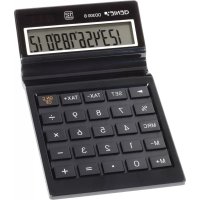
Brand : Genie
Model : 84 CSM
Category : Calculator