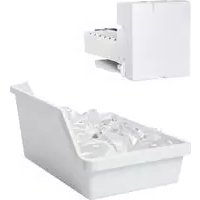
IM4D - Ice machine GE - Free user manual and instructions
Find the device manual for free IM4D GE in PDF.


| Product type | Automatic refrigerator ice maker |
| Brand | GE |
| Model | IM4D |
| Production capacity | 100 to 130 ice cubes per 24 hours (7 per cycle) |
| Ice type | Cubes |
| Power supply | 120 V, 60 Hz |
| Required water pressure | 1.4 to 8.2 bar (20 to 120 p.s.i.) |
| Dimensions (estimated) | Height: 13 cm, Width: 28 cm, Depth: 33 cm |
| Weight (estimated) | 2.5 kg |
| Material | Plastic and metal |
| Control | On/Off switch |
| Ice bucket included | Yes |
| Automatic shut-off | Yes, by feeler arm when bucket is full |
| Safety | Circuit breaker; do not insert objects into the machine |
| Installation | Requires connection to cold water and electricity; recommended by a technician |
| Cleaning | Washable bucket; discard first batches of ice after installation |
| Replacement parts | Complete IM-4D kit (machine, bucket, water line, faucet, fasteners) |
| Warranty | 1 year (parts and labor) |
| Normal sounds | Humming during filling, sound of ice dropping |
| Operating temperature | Freezer at -9°C (15°F) or below |
Frequently Asked Questions - IM4D GE
User questions about IM4D GE
0 question about this device. Answer the ones you know or ask your own.
Ask a new question about this device
Download the instructions for your Ice machine in PDF format for free! Find your manual IM4D - GE and take your electronic device back in hand. On this page are published all the documents necessary for the use of your device. IM4D by GE.
USER MANUAL IM4D GE
Icemaker Accessory Kit
Safety Information 2
Operating Instructions 3
Before You Call For Service 5,6
Normal Sounds You May Hear 3
Preparing for Vacation 3
When You Should Set the
Icemaker Power Switch to OFF 3
Installation Instructions
Icemaker Installation 7-13
Water Line Installation
Water Valve Assembly Installation .14-17
Consumer Support
Consumer Support . Back Cover
Warranty 22
Owner's Manual and Installation Instructions
Trousse
Machine à glaçons
This is the safety alert symbol. This symbol alerts you to potential hazards that can kill or hurt you and others. All safety messages will follow the safety alert symbol and the word "DANGER", "WARNING", or "CAUTION". These words are defined as:
DANGER
WARNING
CAUTION
Indicates a hazardous situation which, if not avoided, will result in death or serious injury.
Indicates a hazardous situation which, if not avoided, could result in death or serious injury.
Indicates a hazardous situation which, if not avoided, could result in minor or moderate injury.

SAFETY PRECAUTIONS
CAUTION
Do not place fingers or hands in the automatic icemaking mechanism while the refrigerator is plugged in. This will help protect you from possible injury.
It will also prevent interference with moving parts of the ejector mechanism and the heating element that releases the cubes, located on the bottom of the icemaker.

READ AND FOLLOW THIS SAFETY INFORMATION CAREFULLY.
READ AND SAVE THESE INSTRUCTIONS
A newly-installed refrigerator may take 12 to 24 hours to begin making ice.
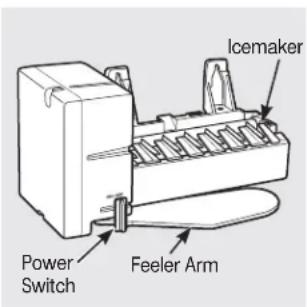
(Appearance may vary)
Automatic Icemaker
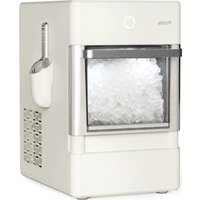
The icemaker will produce seven cubes per cycle—approximately 100-130 cubes in a 24-hour period, depending on freezer compartment temperature, room temperature, number of door openings and other use conditions.
If the refrigerator is operated before the water connection is made to the icemaker, set the power switch to OFF.
When the refrigerator has been connected to the water supply, set the power switch to ON.
The icemaker will fill with water when it cools to freezing. A newly-installed refrigerator may take 12 to 24 hours to begin making ice cubes.
You will hear a buzzing sound each time the icemaker fills with water.
Throw away the first few batches of ice to allow the water line to clear.
Be sure nothing interferes with the sweep of the feeler arm.
When the bin fills to the level of the feeler arm, the icemaker will stop producing ice.
It is normal for several cubes to be joined together.
If ice is not used frequently, old ice cubes will become cloudy, taste stale and shrink.
Preparing for Vacation
Set the icemaker power switch to OFF and shut off the water supply to the refrigerator.
If the temperature can drop below freezing, have a qualified servicer drain the water supply system (on some models) to prevent serious property damage due to flooding.
When you should set the icemaker power switch to OFF
When the ice storage bin is removed for more than a minute or two.
When the refrigerator will not be used for several days.
When the water supply will be shut off for several hours.
Normal sounds you may hear
The icemaker water valve will buzz when the icemaker fills with water. If the power switch is in the ON position, it will buzz even if it has not yet been hooked up to water. Keeping the power switch in the ON position before it is hooked up to water can damage the icemaker. To prevent this, move the power switch to the OFF position. This will stop the buzzing.
The sound of cubes dropping into the bin and water running in the pipes as the icemaker refills.
Before you call for service...
Troubleshooting Tips
Save time and money! Review the following chart first
and you may not need to call for service.
Problem Possible Causes What To Do
| Automatic icemaker does not work the icemaker will begin ice production. | Freezer compartment too warm. | After installing the kit, allow the refrigerator to completely cool down for 24 hours. Once the compartment is cool. |
| Icemaker is not turned on. power switch to the | • Move the icemaker Power Switch Appearance may vary. | Icemaker ON position. Feeler Arm (Clear position may vary) |
| Icemaker is not plugged in correctly. cord plug is fully inserted into the socket. See Plug in | • Check that the icemaker is working well • Check that the icemaker is properly installed into the socket. See Plug in | Locking Tabs Clip Restraints onto Locking Tabs Locking Tabs the icemaker. Hook Water line kinked. • Check that the plastic water is working well • After installing the kit, make sure the house water supply to the refrigerator has been turned on. |
| line running from the valve to the water tube inlet is not water line will restrict flow to the water line. | ||
| Water supply turned off or not connected. |
Piled up cubes in the storage bin - Level cubes by hand. cause the icemaker to shut off.
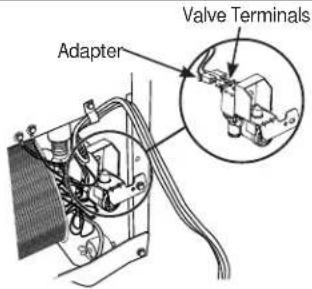
Water valve is not plugged in Check that the valve wire correctly.
plugged onto the terminals on the water valve.
adapter is completely
See Attach the water valve.
| Problem Possible Causes What To Do | ||
| Leaking water around the fill cup as it was pushed through. This foam can interfere with the water flow in the fill cup. Check the cup and make sure there are no foam pieces. | Foam in the fill cup from installing the fill tube. | If the fill tube was installed by sliding it through the back of the refrigerator, it may have picked up pieces of foam Fill Tube |
| in the fill cup. correctly inserted in the fill cup opening. See Mount | Fill tube not correctly seated | Check that the fill tube is Fill Tube the icemaker. Fill Cup |
| Leaking water behind the refrigerator | House supply not properly connected to the water valve. | Check that the house supply is firmly attached to the water valve. See Water line installation instructions. |
| Water line not connected the valve to the water tube inlet is firmly attached with the hose clamp. See Connect the water line. | · Check that the plastic to the water tube inlet. | water line running from Water Tube Inlet Hose Clamp Water Line |
| Slow ice/freezer not cold enough | Door left open. | Check to see if package is holding door open. |
| Temperature control not set cold enough. | See About the Temperature Control in the Owner's Manual of the refrigerator. | |
| Ice cubes too small/slow ice | Water shutoff valve connecting refrigerator to house water line may be clogged. hole may result in reduced ice production or smaller cubes. | · We recommend drilling a 1/4" hole in the water pipe to connect the water shut-off valve. Failure to drill a 1/4" Drill 1/4" hole in water pipe in water pipe |
| Water line kinked. line running from the valve to the water tube inlet is not water line will restrict flow to the icemaker. | See Installng the water line. Check that the plastic water kinked. See Connect the water line. A kink in the Adhesive-backed Fasteners for Water Tube | |
Before you call for service...
Troubleshooting Tips
Save time and money! Review the following chart first
and you may not need to call for service.
Problem Possible Causes What To Do
| Ice cubes not landing in bucket | Icemaker cord causing icemaker/ bucket misalignment | ·Be sure icemaker power cord is in the hook as stated in Step 8 in Installation Instructions. |
| Ice cubes have odor/taste Food transmitting to ice cubes. needs cleaning. | Ice storage bin needs cleaning. Interior of refrigerator refrigerator. | ·Empty and wash bin. Discard old cubes. ·See Care and cleaning in the Owner's Manual of the Refrigerator. |
| Frequent “buzzing” sound | Normal operation. | ·During normal operation, the water valve will “buzz” when the icemaker fills with water. |
Installation IM-4D Instructions
Icemaker
Questions? Call 800.GE.CARES (800.432.2737) or Visit our Website at: GEAppliances.com In Canada, call 1.800.561.3344 or Visit our Website at: geappliances.ca
BEFORE YOU BEGIN
Read these instructions completely and carefully.
- IMPORTANT - Save these instructions for local inspector's use.
- IMPORTANT - Observe all governing codes and ordinances.
Note to Installer - Be sure to leave these instructions with the Consumer. - Note to Consumer - Keep these instructions for future reference.
- Skill level - Installation of this appliance requires basic mechanical and electrical skills.
Completion time - 20-60 minutes - Proper installation is the responsibility of the installer.
Product failure due to improper installation is not covered under the Warranty.
ARE YOU REPLACING AN ICEMAKER WITH THIS KIT?
It's important that you use the water valve and fill tube assembly that come with this kit, even though your refrigerator may already have them installed.
The old valve will not allow enough water through to fill the icemaker properly and will cause damage.
DAMAGE - SHIPMENT/INSTALLATION
- If the unit is damaged in shipment, return the unit to the store in which it was bought for repair or replacement.
- If the unit is damaged by the customer, repair or replacement is the responsibility of the customer.
- If the unit is damaged by the installer (if other than the customer), repair or replacement must be made by arrangement between customer and installer.
CONTENTS OF KIT IM-4D
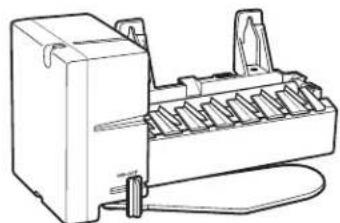

Icemaker
(Appearance may vary)


Installation Instructions
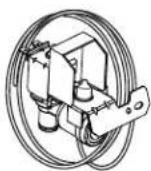

Water Valve and
Tube Assembly


Adhesive-Backed Water Tube
Fasteners, to secure plastic
water tube (4)
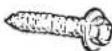

Hex-Head Screw
for Water Line Clamp (3 / 4)^
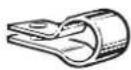

Water Line Clamp
(strain relief), for house water line
ICEMAKER
WARRANTY VERIFICATION
Date Installed.

Warranty Label
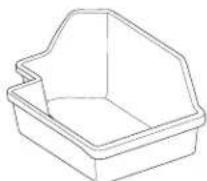

Ice Bucket


Hex-Head Screw, for
attaching water valve (3 / 8)^+
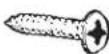

Phillips Head Screws,
for mounting icemaker (2)
[7/8]*
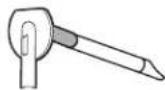

Short 8^m Fill tube Assembly
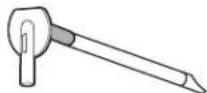

Long ( 9^ ) Fill tube Assembly
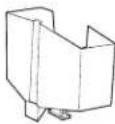

Icemaker Fill Cup
(side-mounted)


Hose Clamp


Hex-Head Screws, for
attaching water tube
inlet cover (2) (5 / 8)^*
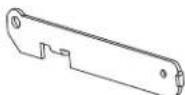

Bracket Extension


Hex-Head Screws, for
bracket extension {1}
(1/4)
*NOTE: Screw lengths are the lengths of the threaded portion of the screw, not including the head.
ICEMAKER INSTALLATION INSTRUCTIONS U V OR W
Are these the right instructions for your model? Follow the Installation Instructions indicated by the label on the back of the refrigerator—U V or W. For letter T, go to page 12 for instructions.
BEFORE YOU BEGIN
Read each step thoroughly before proceeding.
WARNING To eliminate the risk of electric shock or injury during installation, you must first unplug the refrigerator before proceeding. Failure to follow these instructions can result in electrical shock.
TOOLS YOU WILL NEED

Flat blade and Phillips screwdrivers
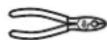
Pliers
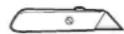
Sharp knife
Which fill tube should you use?
There is a label on the back of the refrigerator that will tell you which to use U V or W
The fill tube you use will depend on the model and size of your refrigerator.
For letter U
Use long fill tube assembly #12 and cut off 1/2 of length from the tip of the fill tube. This will ensure the correct length fill tube for your model. This will provide proper water flow into your fill cup and icemaker. It will prevent the fill tube from freezing up with water and ice.

For letter V
It is important to use the correct fill tube assembly because the length is critical to the performance of your icemaker. It is also critical to prevent any leaking from the fill tube into the freezer itself.
- Open the fresh food door and locate the label in the upper left corner of the compartment.
Find the model number in bold listed under MODEL NO. - Match the two digit number in the model number to the fill tube number in the table below. NOTE: The desired number starts at the fourth character.

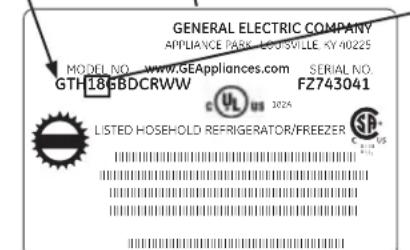
| Model Number | Fill Tube |
| 12 | # 12 |
| 15 | # 11 |
| 16 | # 11 |
| 18 | # 12 |
| 21 | # 12 |
For letter W
Use short fill tube assembly #11 and cut off 1" of length from the tip of the fill tube. This will ensure the correct length fill tube for your model. This will provide proper water flow into your fill cup and icemaker. It will prevent the fill tube from freezing up with water and ice.
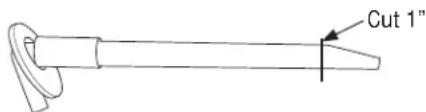
- Make sure the freezer shelf is in the lowest position.
ICEMAKER INSTALLATION INSTRUCTIONS (CONT.)
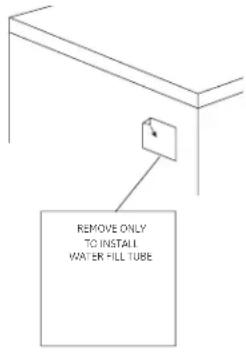
3 REMOVE THE OUTLET COVER
Peel off the outlet cover.
6 SET POWER SWITCH TO OFF
Set the icemaker power switch to OFF. Leave the power switch in the OFF position until the refrigerator is connected to the water supply to prevent premature operation.
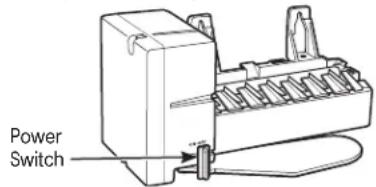
(Appearance may vary)
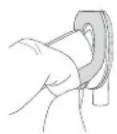
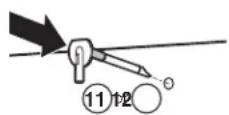
4 INSTALL FILL TUBE
Go to the back of the refrigerator. On the refrigerator side of the fill tube assembly (11 or 12 depending on model), there is an adhesive backing. Remove the adhesive backing and slide the tube into the hole near the top at the back of the refrigerator. Firmly press on the fill tube assembly to secure it to the refrigerator.
5 PREPARE FOR INSTALLATION
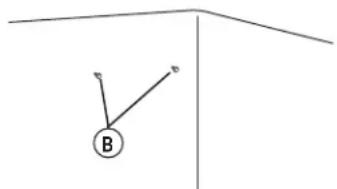
Inside the freezer, loosen the two mounting screws (B) but do not screw them all the way out. Your model may have screws already installed; if not, remove the 2 plug buttons and insert the 2 Phillips head screws (10). The screws should extend approximately 1/2'' (13 mm) out from the freezer wall.
7 INSTALL THE ICEMAKER FILL CUP
For letters U & V
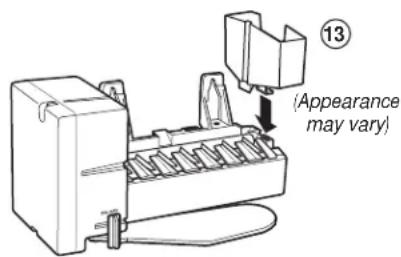
Install the icemaker fill cup (13) into the icemaker as shown.
For letter W
Install the icemaker fill cup that came with your refrigerator into the icemaker as shown. If the fill cup has been misplaced, call 1.800.626.2002 and order part WR29X10074. If the correct fill cup is not installed into the icemaker, there is the possibility of water leaking into the freezer and not into the icemaker.
8 PLUG IN THE ICEMAKER
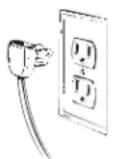
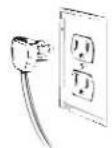
Holding the icemaker in place, insert the icemaker power cord plug into the socket on the side wall, making sure the prongs and holes are matched. Press the plug firmly into the socket. Lock the plug in play by clipping the restraints onto each side of the plug.
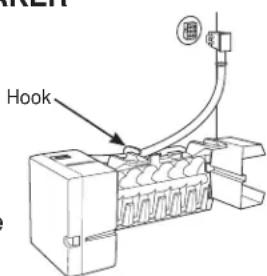
Make sure the restraints click into place. Make sure the power cord is still in the hook on the back of the icemaker.
9MOUNT THE ICEMAKER
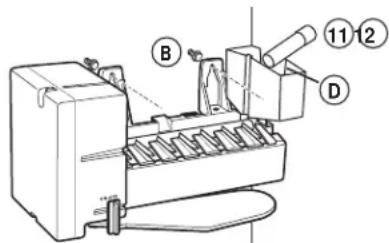
- Lift the icemaker so the fill tube assembly (11 or 12 depending on model) fits in the fill cup opening (D). Hang the icemaker on the two mounting screws (B).
Make sure:
- The power cord is still firmly in the socket.
- The fill tube assembly (11 or 12 depending on model) extends into the fill cup opening at the back of the icemaker. (Check the rear of the refrigerator to make sure the fill tube has not been pushed out of the back of the refrigerator).
- The icemaker mounting screws are located in the uppermost position of the mounting slots on the icemaker bracket.
The icemaker is level. - The icemaker power switch is in the OFF position.
SECURELY TIGHTEN THE ICEMAKER MOUNTING SCREWS.
11 ATTACH WARRANTY LABEL
A label (7) is provided with this kit to record the date of installation for warranty purposes. Apply it to the back of the refrigerator.
12 KEEP THIS MANUAL
The warranty for the icemaker is printed in this manual. Keep this manual with your Refrigerator Owner's Manual.
The icemaker installation inside the freezer is now complete. Continue to the Water Valve Assembly section on page 14.
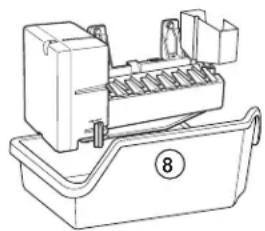
10 INSTALL THE ICE BUCKET
Place the ice bucket (8) under the icemaker.
ICEMAKER INSTALLATION INSTRUCTIONS T
BEFORE YOU BEGIN
Read each step thoroughly before proceeding.
WARNING
WARNING To eliminate the risk of electric shock or injury during installation, you must first unplug the refrigerator before proceeding. Failure to follow these instructions can result in electrical shock.
TOOLS YOU WILL NEED
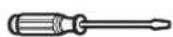
Flat blade and Phillips screwdrivers
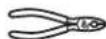
Pliers
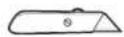
Sharp knife
PREPARE FOR INSTALLATION
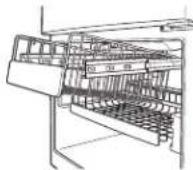
- Remove the storage basket (on some models) by pulling it out to the stop position and lifting it up and out.
Note: After removing the basket, push the extension arms back into the freezer compartment. - Remove the chiller shelf (on some models) by pulling it straight out.
- Remove the center vertical shelf support (on some models) by lifting it and rotating its bottom to the right.
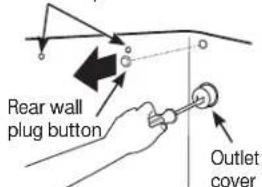
- Inside the freezer, remove the two small white plug buttons (on some models) from the side wall. (If screws are present instead of plugs, leave them in place.)
- Remove and discard the large white plug from the rear freezer wall.
- Remove the outlet cover with a flat-blade screwdriver.
Remove side wall plug buttons or leave screws in place

2SET POWER SWITCH TO OFF
Set the icemaker power switch to OFF. Leave the power switch in the OFF position until the refrigerator is connected to the water supply to prevent premature operation.
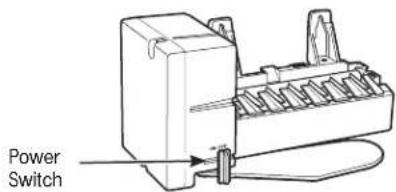
(Appearance may vary)
3 INSTALL THE MOUNTING SCREWS
- Skip to Step 4 if screws are already in place in the freezer side wall.
Install two self-tapping Phillips head screws (10) from the kit in the holes in the side wall. The screw heads should extend about 1/2 (13 mm) from the side wall.
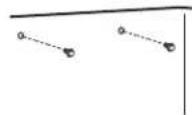
4 INSTALL THE ICEMAKER FILL CUP
Install the icemaker fill cup (end-mounted) that came with your unit into the icemaker as shown. If the fill cup has been misplaced, call 1.800.626.2002 and order part WR29X10092.
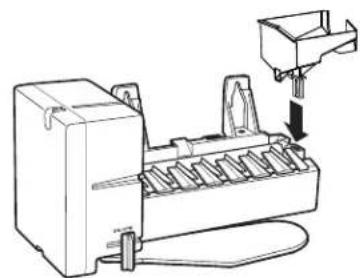
5 PLUG IN THE ICEMAKER
Holding the icemaker in place, insert the icemaker power cord plug into the socket on the side wall, making sure the prongs and holes are matched. Press the plug firmly into the socket. Lock the plug in place by clipping the restraints onto each side of the plug. Make sure the restraints click into place and the power cord is still in the hook on the back of the icemaker.
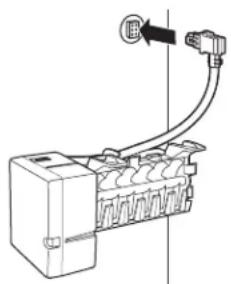
6 MOUNT THE ICEMAKER
- Lift the icemaker so the fill tube that was already installed in the refrigerator fits in the fill cup opening. Hang the icemaker on the two mounting screws in the side wall.
Make sure:
- The power cord is still firmly in the socket.
The fill tube extends into the fill cup opening on the back of the icemaker. (Check the rear of the refrigerator to make sure the fill tube has not been pushed out of the back of the refrigerator). - The icemaker mounting screws are located in the uppermost position of the mounting slots on the icemaker bracket.
The icemaker is level. - The icemaker power switch is set to OFF.
THEN SECURELY TIGHTEN THE ICEMAKER MOUNTING SCREWS.
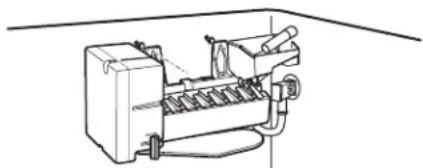
RE-INSTALL THE SHELF SUPPORT, BUCKET, SHELF AND BASKET
Replace the center vertical shelf support, ice bucket, chiller shelf and storage basket by reversing the steps in Step 1.
8 ATTACH WARRANTY LABEL
A label (7) is provided with this kit to record the date of installation for warranty purposes. Apply it to the back of the refrigerator.
9 KEEP THIS MANUAL
The warranty for the icemaker is printed in this manual. Keep this manual with your Refrigerator Owner's Manual.
The icemaker installation inside the freezer is now complete. Continue to the Water Valve Assembly section on page 16.
WATER VALVE ASSEMBLY INSTALLATION INSTRUCTIONS U V OR W
Are these the right instructions for your model? Follow the Installation Instructions indicated by the label on the back of the refrigerator—U V or W. For letter T, go to page 16 for instructions.
BEFORE YOU BEGIN
Read each step thoroughly before proceeding.
- AWARNING To eliminate the risk of electric shock or injury during installation, you must first unplug the refrigerator before proceeding. Failure to follow these instructions can result in electrical shock.
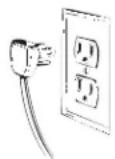
TOOLS YOU WILL NEED

Flat blade and Phillips screwdrivers
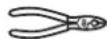
Pliers
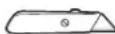
Sharp knife

1/4" and 5/16" Nutdrivers
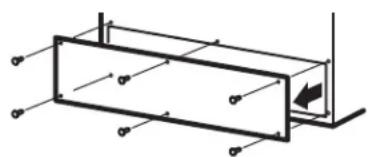
1REMOVE THE COVER
Remove the compressor compartment access cover. This requires removing screws which attach the cover to the back of the refrigerator case.
Be sure to save the screws as the access cover must be reinstalled later to ensure your refrigerator will function properly.
2 ATTACH THE WATER VALVE
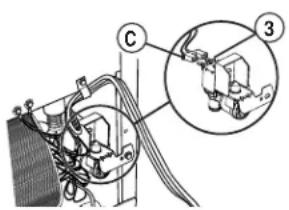
- Locate the female connector plug. Plug the female connector (C) onto the male terminals on the water valve (3). Either wire can go on either terminal.
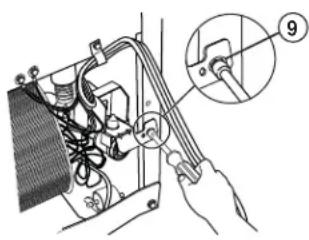
- Fasten the water valve to the cabinet by driving the hex-head screw (9) from the kit into the hole in the cabinet leg.
3 CONNECT WATER TUBE TO INLET
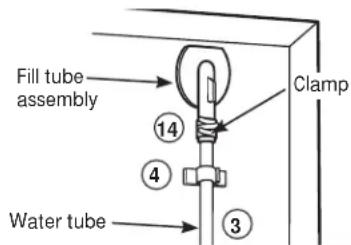
- Squeeze the ends of the hose clamp (14) from the kit with pliers and slide the clamp over the fill tube assembly, located in the top right corner of the refrigerator.
- While still squeezing the clamp, insert the free end of the water tube (3) into the fill tube assembly as far as it will go.
- Then slide the clamp downward to capture the water tube in place.
- Using one of the adhesive-backed fasteners (4), secure the water tube to the back of the refrigerator about 1/2 below the inlet.
- If the water tube is not pushed in as far as it can go and the hose clamp is not in place over the fill tube assembly, then leaks are possible.
4INSTALL WATER LINE CLAMP
-
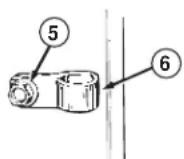
Attach the metal water line clamp (strain relief) (6) to the refrigerator. Drive the screw (5) from the kit through the clamp (6) at the small indent into the back of the cabinet.
-
The metal clamp is for the house water line (see the Water Line Installation Instructions). It is not to be used for the water tube from the water valve up to the inlet.
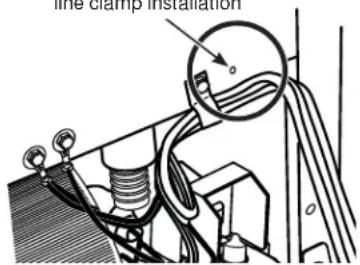
Small indent for water line clamp installation
6 WATER VALVE INSTALLED
Refer to the Water Line Installation Instructions for connection to the home water supply. After water line installation is completed, set the icemaker power switch to ON.
The icemaking cycle will not begin until the icemaker and freezer compartment reach operating temperature, then icemaking will begin automatically.
7 REINSTALL THE COVER
Reinstall the compressor compartment access cover. This requires using the screws you removed previously to reattach the cover to the back of the refrigerator case. This must be reinstalled for your refrigerator to function properly.
5 ROUTE AND ATTACH THE WATER TUBE
- Fasten the plastic water tube to the back of the refrigerator with adhesive-backed fasteners (4), spacing the fasteners as shown to take up slack in the tube.
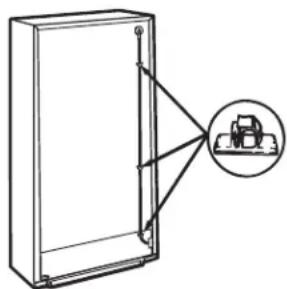
Adhesive-backed fasteners for water tube
WATER VALVE ASSEMBLY INSTALLATION INSTRUCTIONS

BEFORE YOU BEGIN
Read each step thoroughly before proceeding.
WARNING To eliminate the risk of electric shock or injury during installation, you must first unplug the refrigerator before proceeding. Failure to follow these instructions can result in electrical shock.
TOOLS YOU WILL NEED
Flat blade and Phillips screwdrivers
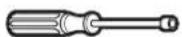
1/4" and 5/16" Nutdrivers

Pliers
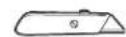
Sharp knife
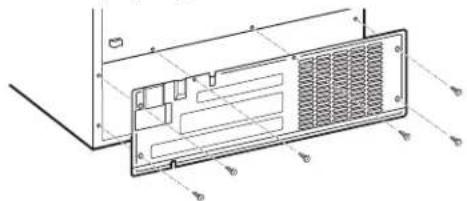
1REMOVE THE COVER
Use a 5/16" nutdriver or an adjustable wrench to remove the compressor compartment access cover. This requires removing six screws which attach the cover to the back of the refrigerator case.
Be sure to save the screws as the access cover must be reinstalled later to ensure your refrigerator will function properly.
2 PLASTIC WATER TUBING
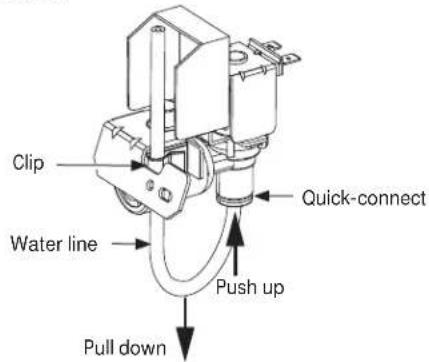
- Remove water line from the valve assembly (3) included in this kit by removing the tube from the clip and pushing on the bottom of the valve quick-connect, disengaging the tube and pulling it from the valve.
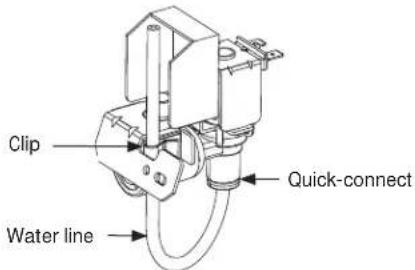
- Use the water line from the fill tube assembly that came with the refrigerator. The water line is attached to the fill tube assembly that is already installed in the refrigerator. Remove the plug from the end of the waterline. Route the water line through the clip on the valve pushing it into the quick-connect on the valve. The white line will be barely visible if properly engaged.
3 ATTACH THE BRACKET EXTENSION TO THE WATER VALVE
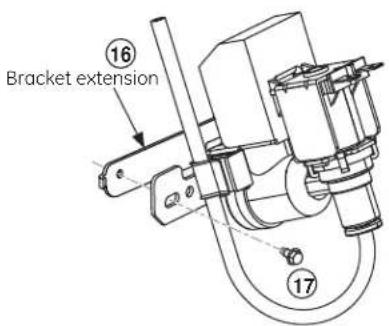
Use a 1/4'' nutdriver to attach the bracket extension (16) to the water valve bracket with the screw (17).
4 ATTACH THE WATER VALVE TO THE MACHINE COMPARTMENT
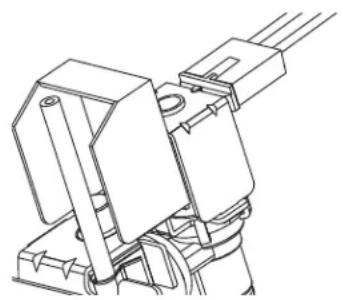
- Locate the female connector plug. Plug the female connector onto the male terminals on the water valve. Either wire can go on either terminal.
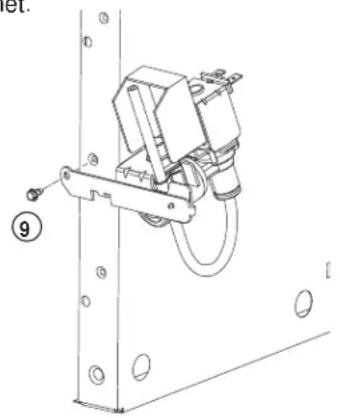
- Fasten the water valve to the cabinet by driving the hex-head screw (9) from the kit through the hole in the bracket extension and into the hole in the cabinet.
5 INSTALL WATER LINE CLAMP
- Attach the water line clamp (6) (strain relief) from the kit to the refrigerator. With the clamp directly in line with the water valve, drive the screw (5) from the kit through the clamp at the indent into the back of the cabinet.
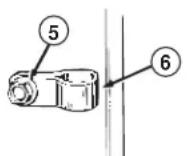
- The metal clamp is for the house water line (see Water Line Installation Instructions). It is not to be used for the tubing from the water valve up to the icemaker.
6 ROUTE AND ATTACH THE PLASTIC WATER LINE
- Fasten the plastic water line to the back of the cabinet with adhesive-backed fasteners (4).
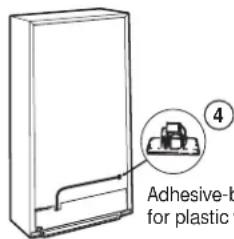
Adhesive-backed fastener for plastic water line
7 WATER VALVE INSTALLED
Refer to the Water Line Installation Instructions for connection to the home water supply. After water line installation is completed, set the icemaker power switch to ON.
The icemaking cycle will not begin until the icemaker and freezer compartment reach operating temperature, then icemaking will begin automatically.
8 REINSTALL THE COVER
Reinstall the compressor compartment access cover. This requires using the screws you removed previously to reattach the cover to the back of the refrigerator case. This must be reinstalled for your refrigerator to function properly.
INSTALLING THE WATER LINE
BEFORE YOU BEGIN
Recommended copper water supply kits are WX8X2, WX8X3 or WX8X4, depending on the amount of tubing you need. Approved plastic water supply lines are GE SmartConnect Refrigerator Tubing (WX08X10002, WX08X10006, WX08X10015 and WX08X10025).
When connecting your refrigerator to a GE Reverse Osmosis Water System, the only approved installation is with a GE RVKit. For other reverse osmosis water systems, follow the manufacturer's recommendations. If the water supply to the refrigerator is from a Reverse Osmosis Water Filtration System AND the refrigerator also has a water filter, use the refrigerator's filter bypass plug. Using the refrigerator's water filtration cartridge in conjunction with the RO filter can result in hollow ice cubes and slower water flow from the water dispenser.
This water line installation is not warranted by the refrigerator or icemaker manufacturer. Follow these instructions carefully to minimize the risk of expensive water damage.
Water hammer (water banging in the pipes) in house plumbing can cause damage to refrigerator parts and lead to water leakage or flooding. Call a qualified plumber to correct water hammer before installing the water supply line to the refrigerator.
To prevent burns and product damage, do not hook up the water line to the hot water line.
If you use your refrigerator before connecting the water line, make sure the icemaker power switch is in the OFF position.
Do not install the icemaker tubing in areas where temperatures fall below freezing.
When using any electrical device (such as a power drill) during installation, be sure the device is double insulated or grounded in a manner to prevent the hazard of electric shock, or is battery powered.
All installations must be in accordance with local plumbing code requirements.

WARNING
Connect to potable water
supply only.
WHAT YOU WILL NEED
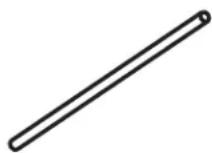
Copper or GE SmartConnect Refrigerator Tubing kit, 1 / 4" outer diameter to connect the refrigerator to the water supply. If using copper, be sure both ends of the tubing are cut square.
To determine how much tubing you need: measure the distance from the water valve on the back of the refrigerator to the water supply pipe. Then add 8 feet (2.4m) .Be sure there is sufficient extra tubing (about 8 feet [2.4m] coiled into 3 turns of about 10^ [25cm] diameter) to allow the refrigerator to move out from the wall after installation.
GE SmartConnect Refrigerator Tubing Kits are available in the following lengths:
2'(.6 m) - WX08X10002
8' (2.4 m) - WX08X10006
15' (4.6 m) - WX08X10015
25' (7.6 m) - WX08X10025
Be sure that the kit you select allows at least 8 feet (2.4m) as described above.
NOTE: The only GE approved plastic tubing is that supplied in GE SmartConnect Refrigerator Tubing kits. Do not use any other plastic water supply line because the line is under pressure at all times. Certain types of plastic will crack or rupture with age and cause water damage to your home.
- A GE water supply kit (containing tubing, shutoff valve and fittings listed below) is available at extra cost from your dealer or from Parts and Accessories, 800.626.2002.
- A cold water supply. The water pressure must be between 20 and 120 p.s.i. (1.4-8.2 bar) on models without a water filter and between 40 and 120 p.s.i. (2.8-8.2 bar) on models with a water filter.
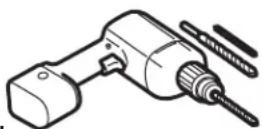
- Power drill.
- 1 / 2 or adjustable wrench.
- Straight and Phillips blade screwdriver.
WHAT YOU WILL NEED (CONT.)
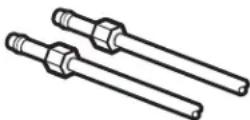
- Two 1/4" outer diameter compression nuts and 2 ferrules (sleeves)—to connect the copper tubing to the shutoff valve and the refrigerator water valve. OR
- If you are using a GE SmartConnect Refrigerator Tubing kit, the necessary fittings are preassembled to the tubing.
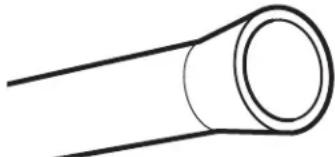
- If your existing copper water line has a flared fitting at the end, you will need an adapter (available at plumbing supply stores) to connect the water line to the refrigerator OR you can cut off the flared fitting with a tube cutter and then use a compression fitting. Do not cut formed end from GE SmartConnect Refrigerator tubing.
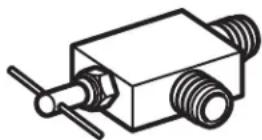
- Shutoff valve to connect to the cold water line. The shutoff valve should have a water inlet with a minimum inside diameter of 5/32'' at the point of connection to the COLD WATER LINE. Saddle-type shutoff valves are included in many water supply kits. Before purchasing, make sure a saddle-type valve complies with your local plumbing codes.
Install the shutoff valve on the nearest frequently used drinking water line.
1 SHUT OFF THE MAIN WATER SUPPLY
Turn on the nearest faucet long enough to clear the line of water.
2 CHOOSE THE VALVE LOCATION
Choose a location for the valve that is easily accessible. It is best to connect into the side of a vertical water pipe. When it is necessary to connect into a horizontal water pipe, make the connection to the top or side, rather than at the bottom, to avoid drawing off any sediment from the water pipe.
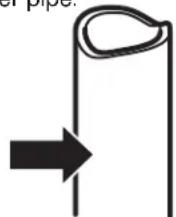
3 DRILL THE HOLE FOR THE VALVE
Drill a 1/4'' hole in the water pipe (even if using a self-piercing valve) using a sharp bit. Remove any burrs resulting from drilling the hole in the pipe. Take care not to allow water to drain into the drill. Failure to drill a 1/4'' hole may result in reduced ice production or smaller cubes.
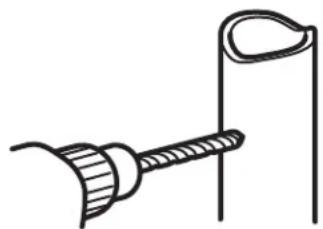
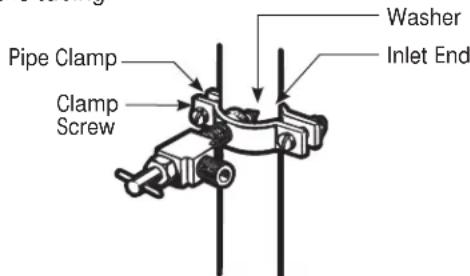
4 FASTEN THE SHUTOFF VALVE
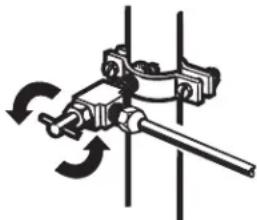
Fasten the shutoff valve to the cold water pipe with the pipe clamp.
Pipe Clamp
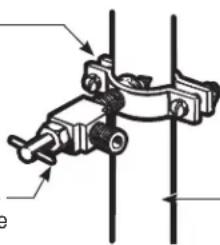
Vertical Cold Water Pipe
NOTE: Commonwealth of Massachusetts Plumbing Codes 248CMR shall be adhered to. Saddle valves are illegal and use is not permitted in Massachusetts. Consult with your licensed plumber.
INSTALLING THE WATER LINE (CONT.)
5 TIGHTEN THE PIPE CLAMP
Tighten the clamp screws until the sealing washer begins to swell.
NOTE: Do not overtighten or you may crush the tubing.
6 ROUTE THE TUBING
Route the tubing between the cold water line and the refrigerator.
Route the tubing through a hole drilled in the wall or floor (behind the refrigerator or adjacent base cabinet) as close to the wall as possible.
NOTE: Be sure there is sufficient extra tubing (about 8 feet [244 cm] coiled into 3 turns of about 10^ [25 cm] diameter) to allow the refrigerator to move out from the wall after installation.
7 CONNECT THE TUBING TO THE VALVE
Place the compression nut and ferrule (sleeve) for copper tubing onto the end of the tubing and connect it to the shutoff valve.
Make sure the tubing is fully inserted into the valve. Tighten the compression nut securely.
For plastic tubing from a GE SmartConnect Refrigerator Tubing kit, insert the molded end of the tubing into the shutoff valve and tighten compression nut until it is hand tight, then tighten one additional turn with a wrench. Overtightening may cause leaks.
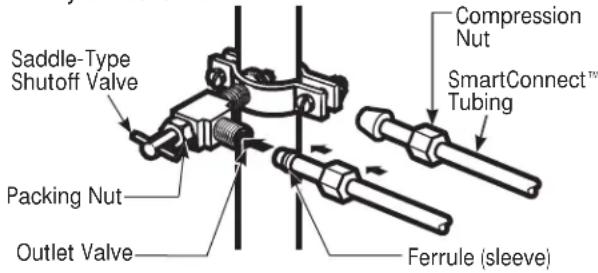
NOTE: Commonwealth of Massachusetts Plumbing Codes 248CMR shall be adhered to. Saddle valves are illegal and use is not permitted in Massachusetts. Consult with your licensed plumber.
8 FLUSH OUT THE TUBING
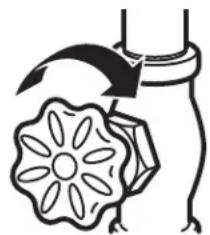
Turn the main water supply on and flush out the tubing until the water is clear.
Shut the water off at the water valve after about one quart (1 liter) of water has been flushed through the tubing.
9 CONNECT THE TUBING TO THE REFRIGERATOR
NOTES:
- Before making the connection to the refrigerator, be sure the refrigerator power cord is not plugged into the wall outlet.
- If your refrigerator does not have a water filter, we recommend installing one if your water supply has sand or particles that could clog the screen of the refrigerator's water valve. Install it in the water line near the refrigerator. If using GE SmartConnect Refrigerator Tubing kit, you will need an additional tube (WX08X10002) to connect the filter. Do not cut plastic tube to install filter.
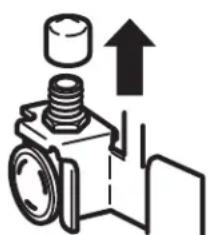
Remove the plastic flexible cap from the water valve (refrigerator connection).
9 CONNECT THE TUBING TO THE REFRIGERATOR (CONT.)
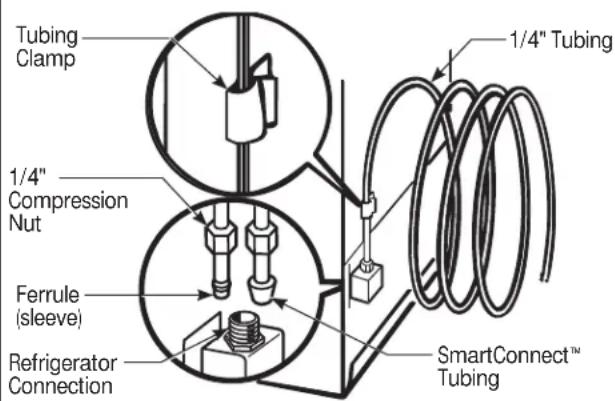
Place the compression nut and ferrule (sleeve) onto the end of the tubing as shown. On GE SmartConnect Refrigerator Tubing kit, the nuts are already assembled to the tubing.
Insert the end of the tubing into the water valve connection as far as possible. While holding the tubing, tighten the fitting.
For plastic tubing from a GE SmartConnect Refrigerator Tubing kit, insert the molded end of the tubing into the refrigerator connection and tighten compression nut until it is hand tight, then tighten one additional turn with a wrench. Overtightening may cause leaks.
Fasten the tubing into the clamp provided to hold it in a vertical position. You may need to pry open the clamp.
11 INSTALLING THE REFRIGERATOR
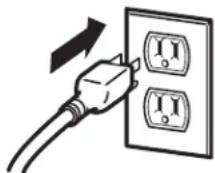
Plug in the refrigerator.
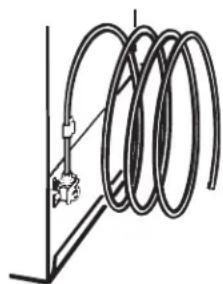
Arrange the coil of tubing so that it does not vibrate against the back of the refrigerator or against the wall. Push the refrigerator back to the wall.
12 START THE ICEMAKER
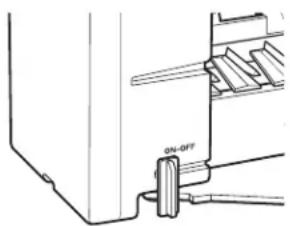
Set the icemaker power switch to the ON position. The icemaker will not begin to operate until it reaches its operating temperature of 15^ (-9^) or below. It will then begin operation automatically if the icemaker power switch is in the ON position.
10 TURN THE WATER ON AT THE SHUTOFF VALVE
Tighten any connections that leak.
Reattach the compressor compartment access cover.
Icemaker Warranty.
All warranty service provided by our Factory Service Centers, or an authorized Customer Care technician. To schedule service, on-line, visit us at GEAppliances.com, or call 800.GE.CARES (800.432.2737). In Canada, call 1.800.561.3344. Please have serial number and model number available when calling for service.
Staple your receipt here. Proof of the original purchase date is needed to obtain service under the warranty.
For The Period Of: We Will Replace:
One Year
From the date of the
Any part of the icemaker which fails due to a defect in materials or workmanship.
During this limited one-year warranty, GE will provide free of charge, replacement parts
original purchase for any defective part in your icemaker kit.
What Is Not Covered (for customers in the United States):
Service trips to your home to teach you how to use the product.
Improper installation.
You are responsible for providing adequate electrical, plumbing, and other connecting facilities, including the water line to the icemaker and the water line installation.
Failure of the product if it is abused, misused, or used for other than the intended purpose or used commercially.
Replacement of house fuses or resetting of circuit breakers.
Damage to the product caused by accident, fire, floods or acts of God.
- Incidental or consequential damage caused by possible defects with this appliance.
Product not accessible to provide required service.
EXCLUSION OF IMPLIED WARRANTY--Your sole and exclusive remedy is product repair as provided in this Limited Warranty. Any implied warranties, including the implied warranties of merchantability or fitness for a particular purpose, are limited to one year or the shortest period allowed by law.
This warranty is extended to the original purchaser and any succeeding owner for products purchased for home use within the USA. If the product is located in an area where service by a GE Authorized Servicer is not available, you may be responsible for a trip charge or you may be required to bring the product to an Authorized GE Service location for service. In Alaska, the warranty excludes the cost of shipping or service calls to your home.
Some states do not allow the exclusion or limitation of incidental or consequential damages. This warranty gives you specific legal rights, and you may also have other rights which vary from state to state. To know what your legal rights are, consult your local or state consumer affairs office or your state's Attorney General.
Warrantor: General Electric Company. Louisville, KY 40225
What Is Not Covered (for customers in Canada):
Service trips to your home to teach you how to use the product.
Read your Owner's Manual. If you then have any questions about operating the product, please contact your dealer or our Consumer Relations office at:
Manager, Consumer Relations
Mabe Canada Inc.
1Factory Lane, Suite 310
Moncton, N.B.
E1C 9M3
Improper installation.
If you have an installation problem, contact your dealer or installer. You are responsible for providing adequate electrical, exhausting and other connecting facilities.
■ Replacement of house fuses or resetting of circuit breakers.
Failure of the product if it is misused, or used for other than the intended purpose or used commercially.
- Damage to product caused by accident, fire, floods or acts of God.
WARRANTOR IS NOT RESPONSIBLE FOR CONSE QUEN TIAL DAMAGES.
Warrantor: MABE CANADA INC.
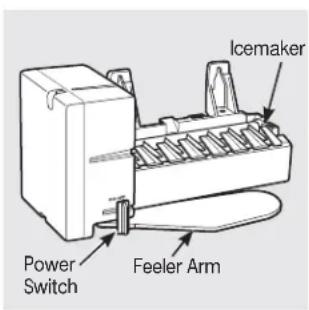
(Appearance may vary)
DOMMAGES - EXPÉDITION/INSTALLATION
12 CONSERVEZ CE MANUEL
9 CONSERVEZ CE MANUEL
ENLEVEZ LE COUVERCLE
ENLEVEZ LE COUVERCLE
4 FIXEZ LE ROBINET D'EAU AU COMPARTIMENT MACHINE
4 FIXEZ LE ROBINET D'ARRET
Garant: General Electric Company, Louisville, KY 40225
7 CONECTE LA TUBERIA A LA VALVULA
Garante: General Electric Company. Louisville, KY 40225
Manager, Consumer Relations
Mabe Canada Inc.
1 Factory Lane, Suite 310
Moncton.N.B.
E1C 9M3
General Manager, Customer Relations
GE Appliances, Appliance Park
Louisville, KY 40225
Registre su electrodoméstico GEAppliances.com
Have a question or need assistance with your appliance? Try the GE Appliances Website 24 hours a day, any day of the year! For greater convenience and faster service, you can now download Owner's Manuals, order parts or even schedule service on-line. In Canada: www.geappliances.ca
Schedule Service
In the U.S.: GEAppliances.com
Expert GE repair service is only one step away from your door. Get on-line and schedule your service at your convenience any day of the year! Or call 800.GE.CARES (800.432.2737) during normal business hours. In Canada, call 1.800.561.3344
Real Life Design Studio
In the U.S.: GEAppliances.com
GE supports the Universal Design concept—products, services and environments that can be used by people of all ages, sizes and capabilities. We recognize the need to design for a wide range of physical and mental abilities and impairments. For details of GE's Universal Design applications, including kitchen design ideas for people with disabilities, check out our Website today. For the hearing impaired, please call 800.TDD.GEAC (800.833.4322).
In Canada, contact: Manager, Consumer Relations, Mabe Canada Inc.
Suite 310, 1 Factory Lane
Moncton, N.B. E1C 9M3
Extended Warranties
In the U.S.: GEAppliances.com
Purchase a GE extended warranty and learn about special discounts that are available while your warranty is still in effect. You can purchase it on-line anytime, or call 800.626.2224 during normal business hours. GE Consumer Home Services will still be there after your warranty expires. In Canada, call 1.888.261.2133
Parts and Accessories
In the U.S.: GEAppliances.com
Individuals qualified to service their own appliances can have parts or accessories sent directly to their homes (VISA, MasterCard and Discover cards are accepted). Order on-line today, 24 hours every day or by phone at 800.626.2002 during normal business hours.
Instructions contained in this manual cover procedures to be performed by any user. Other servicing generally should be referred to qualified service personnel. Caution must be exercised, since improper servicing may cause unsafe operation.
Customers in Canada should consult the yellow pages for the nearest Mabe service center, or call 1.888.261.3055.
Contact Us In the U.S: GEAppliances.com
If you are not satisfied with the service you receive from GE, contact us on our Website with all the details including your phone number, or write to: General Manager, Customer Relations
GE Appliances, Appliance Park
Louisville, KY 40225
In Canada: www.geappliances.ca, or write to: Director, Consumer Relations, Mabe Canada Inc.
Suite 310, 1 Factory Lane
Moncton, N.B. E1C 9M3
Register Your Appliance
In the U.S.: GEAppliances.com
Register your new appliance on-line—at your convenience! Timely product registration will allow for enhanced communication and prompt service under the terms of your warranty, should the need arise. You may also mail in the pre-printed registration card included in the packing material, or detach and use the form in this Owner's Manual. In Canada: www.geappliances.ca

- Icemaker Accessory Kit
- Machine à glaçons
- SAFETY PRECAUTIONS
- CAUTION
- Automatic Icemaker
- Preparing for Vacation
- When you should set the icemaker power switch to OFF
- Normal sounds you may hear
- Before you call for service...
- Installation IM-4D Instructions
- Icemaker
- BEFORE YOU BEGIN
- ARE YOU REPLACING AN ICEMAKER WITH THIS KIT?
- DAMAGE - SHIPMENT/INSTALLATION
- CONTENTS OF KIT IM-4D
- ICEMAKER INSTALLATION INSTRUCTIONS U V OR W
- TOOLS YOU WILL NEED
- ICEMAKER INSTALLATION INSTRUCTIONS (CONT.)
- REMOVE THE OUTLET COVER
- SET POWER SWITCH TO OFF
- INSTALL FILL TUBE
- PREPARE FOR INSTALLATION
- INSTALL THE ICEMAKER FILL CUP
- PLUG IN THE ICEMAKER
- 9MOUNT THE ICEMAKER
- Make sure:
- ATTACH WARRANTY LABEL
- KEEP THIS MANUAL
- INSTALL THE ICE BUCKET
- ICEMAKER INSTALLATION INSTRUCTIONS T
- WARNING
- PREPARE FOR INSTALLATION
- 2SET POWER SWITCH TO OFF
- INSTALL THE MOUNTING SCREWS
- INSTALL THE ICEMAKER FILL CUP
- PLUG IN THE ICEMAKER
- MOUNT THE ICEMAKER
- RE-INSTALL THE SHELF SUPPORT, BUCKET, SHELF AND BASKET
- ATTACH WARRANTY LABEL
- KEEP THIS MANUAL
- WATER VALVE ASSEMBLY INSTALLATION INSTRUCTIONS U V OR W
- 1REMOVE THE COVER
- ATTACH THE WATER VALVE
- CONNECT WATER TUBE TO INLET
- 4INSTALL WATER LINE CLAMP
- WATER VALVE INSTALLED
- REINSTALL THE COVER
- ROUTE AND ATTACH THE WATER TUBE
- WATER VALVE ASSEMBLY INSTALLATION INSTRUCTIONS
- PLASTIC WATER TUBING
- ATTACH THE BRACKET EXTENSION TO THE WATER VALVE
- ATTACH THE WATER VALVE TO THE MACHINE COMPARTMENT
- INSTALL WATER LINE CLAMP
- ROUTE AND ATTACH THE PLASTIC WATER LINE
- WATER VALVE INSTALLED
- REINSTALL THE COVER
- INSTALLING THE WATER LINE
- WHAT YOU WILL NEED
- WHAT YOU WILL NEED (CONT.)
- SHUT OFF THE MAIN WATER SUPPLY
- CHOOSE THE VALVE LOCATION
- DRILL THE HOLE FOR THE VALVE
- FASTEN THE SHUTOFF VALVE
- INSTALLING THE WATER LINE (CONT.)
- TIGHTEN THE PIPE CLAMP
- ROUTE THE TUBING
- CONNECT THE TUBING TO THE VALVE
- FLUSH OUT THE TUBING
- CONNECT THE TUBING TO THE REFRIGERATOR
- NOTES:
- CONNECT THE TUBING TO THE REFRIGERATOR (CONT.)
- INSTALLING THE REFRIGERATOR
- START THE ICEMAKER
- TURN THE WATER ON AT THE SHUTOFF VALVE
- Icemaker Warranty.
- For The Period Of: We Will Replace:
- What Is Not Covered (for customers in the United States):
- What Is Not Covered (for customers in Canada):
- DOMMAGES - EXPÉDITION/INSTALLATION
- CONSERVEZ CE MANUEL
- CONSERVEZ CE MANUEL
- ENLEVEZ LE COUVERCLE
- FIXEZ LE ROBINET D'EAU AU COMPARTIMENT MACHINE
- FIXEZ LE ROBINET D'ARRET
- CONECTE LA TUBERIA A LA VALVULA
- Registre su electrodoméstico GEAppliances.com
- Schedule Service
- Real Life Design Studio
- Extended Warranties
- Parts and Accessories
- Contact Us In the U.S: GEAppliances.com
- Register Your Appliance
Brand : GE
Model : IM4D
Category : Ice machine