
15680 - Watch Lotus - Free user manual and instructions
Find the device manual for free 15680 Lotus in PDF.


User questions about 15680 Lotus
0 question about this device. Answer the ones you know or ask your own.
Ask a new question about this device
Download the instructions for your Watch in PDF format for free! Find your manual 15680 - Lotus and take your electronic device back in hand. On this page are published all the documents necessary for the use of your device. 15680 by Lotus.
USER MANUAL 15680 Lotus
Instructions M6P89/M6P77 28
Instructions M6P27 30
Instructions M6P25 32
Instructions M6P29/M6P79 34
Instructions M6P23 36
Instructions MVX3L 38
Instructions MVX3SE 40
Instructions MVX3JA 42
Instructions MVX3T 44
Instructions MVX3TE 46
Instructions MGP03 48
Instructions MVX46 50
M6P89/M6P77
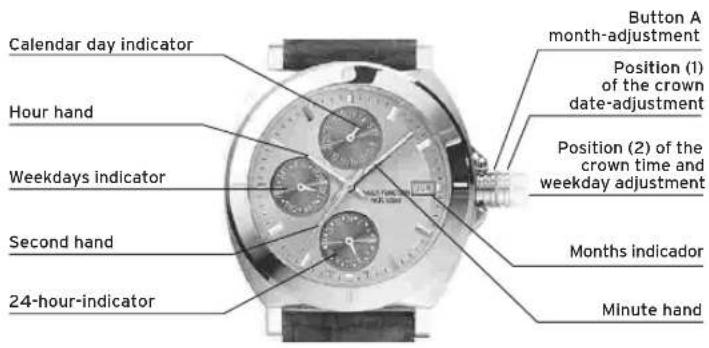
DISPLAYS AND BUTTONS
M6P89/M6P77
TIME ADJUSTMENT
Adjust crown to position 2 (Pull right out).
By turning the crown adjust minutes and hours to exact time.
WEEKDAY ADJUSTMENT
Adjust crown to position 2 (Pull right out).
The crown must be turned till the 24 hour limit is passed and the hand of the weekdays indicator moves further (to correct weekday).
DATE ADJUSTMENT
Adjust crown to position 1 (Pull out only one step).
Adjust date by turning the crown to the left.
ATTENTION: No date adjustment between 21:00 an 1:00
M6P27
DISPLAYS AND BUTTONS
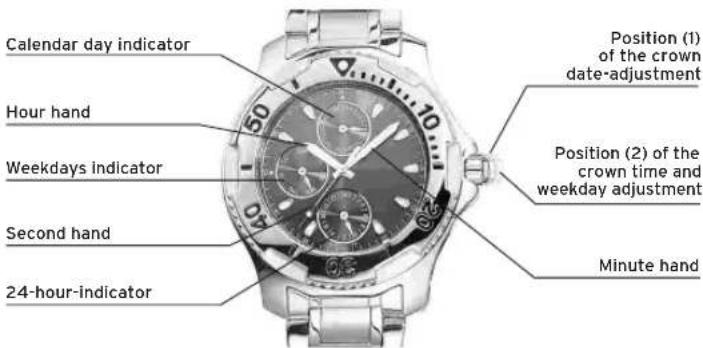
M6P27
TIME ADJUSTMENT
Adjust crown to position 2 (Pull right out). By turning the crown, adjust the minute; hour and 24 hour hands to exact time.
ATTENTION: No date adjustment between 21:00 and 01:00!
WEEKDAY ADJUSTMENT
Adjust crown to position 2 (Pull right out). The crown must be turned till the 24 hour limit is passed and the hand of the weekdays indicator moves further (to correct weekday).
DATE ADJUSTMENT
Adjust crown to position 1 (Pull out only one step). Adjust date by turning the crown to the left.
ATTENTION: No date adjustment between 21:00 and 01:00!
M6P2S
DISPLAYS AND BUTTONS
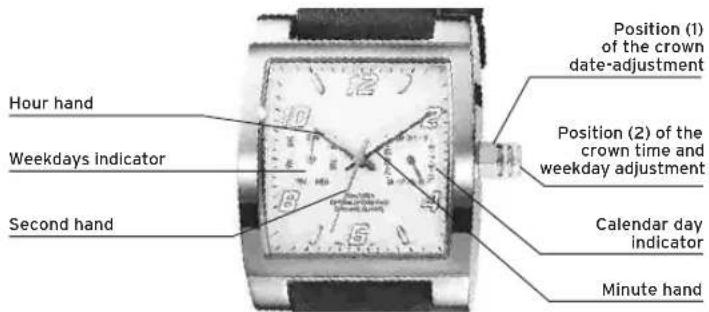
M6P2S
TIME ADJUSTMENT
Adjust crown to position 2 (Pull right out).
By turning the crown adjust minutes and hours to exact time.
ATTENTION: No date adjustment between 21:00 and 01:00!
WEEKDAY ADJUSTMENT
Adjust crown to position 2 (Pull right out).
The crown must be turned till the 24 hour limit is passed and the hand of the weekdays indicator moves further (to correct weekday).
DATE ADJUSTMENT
Adjust crown to position 1 (Pull out only one step). Adjust date by turning the crown to the left.
ATTENTION: No date adjustment between 21:00 and 01:00!
M6P29/M6P79
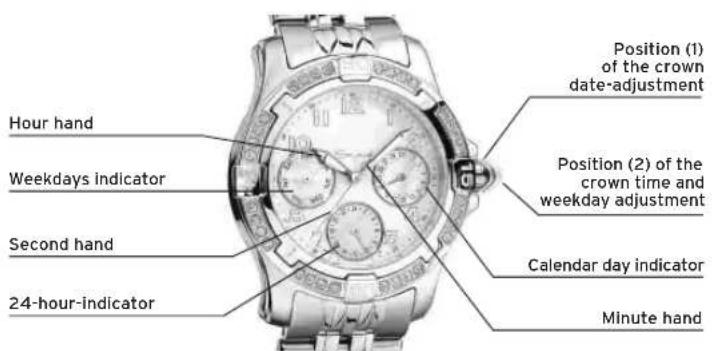
DISPLAYS AND BUTTONS
M6P29/M6P79
TIME ADJUSTMENT
Adjust crown to position 2 (Pull right out).
By turning the crown adjust minutes and hours to exact time.
WEEKDAY ADJUSTMENT
Adjust crown to position 2 (Pull right out).
The crown must be turned till the 24 hour limit is passed and the hand of the weekdays indicator moves further (to correct weekday).
DATE ADJUSTMENT
Adjust crown to position 1 (Pull out only one step).
Adjust date by turning the crown to the left.
ATTENTION: No date adjustment between 21:00 and 01:00!
M6P23
DISPLAYS AND BUTTONS
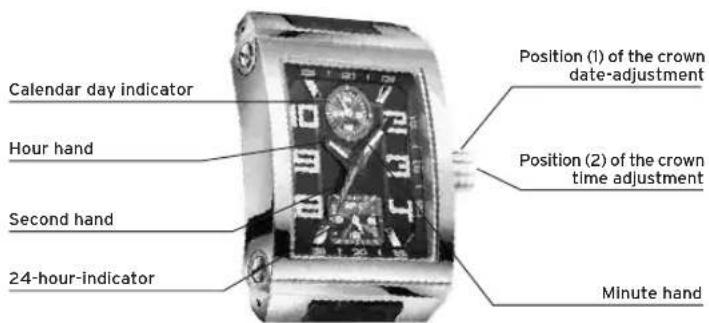
M6P23
TIME ADJUSTMENT
Adjust crown to position 2 (Pull right out).
By turning the crown adjust minutes and hours to exact time.
DATE ADJUSTMENT
Adjust crown to position 1 (Pull out only one step).
Adjust date by turning the crown to the left.
ATTENTION: No date adjustment between 21:00 and 01:00!

DISPLAYS AND BUTTONS
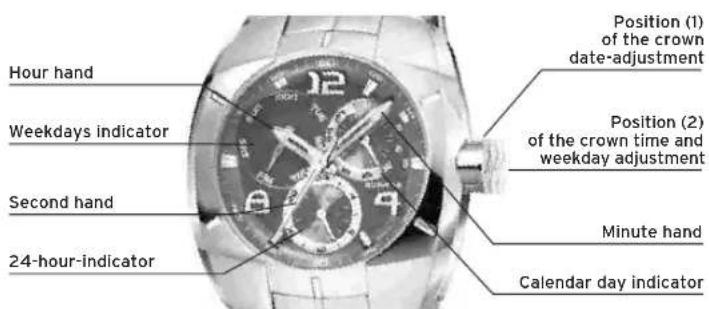

TIME ADJUSTMENT
Adjust crown to position 2 (Pull right out).
By turning the crown adjust minutes and hours to exact time.
WEEKDAY ADJUSTMENT
Adjust crown to position 2 (Pull right out).
The crown must be turned till the 24 hour limit is passed and the hand of the weekdays indicator moves further (to correct weekday).
DATE ADJUSTMENT
Adjust crown to position 1 (Pull out only one step).
Adjust date by turning the crown to the right.
ATTENTION: No date adjustment between 21:00 and 01:00!
MVX3SE
DISPLAYS AND BUTTONS
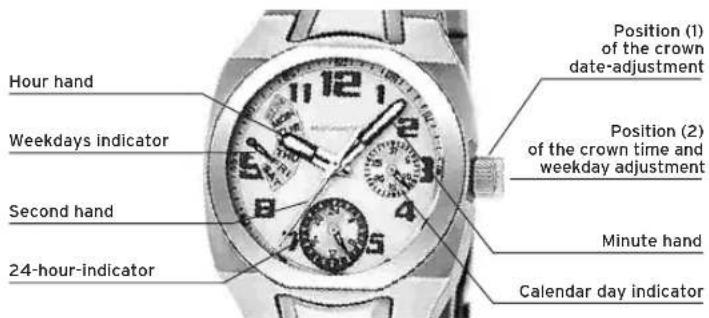
MVX3SE
TIME ADJUSTMENT
Adjust crown to position 2 (Pull right out).
By turning the crown adjust minutes and hours to exact time.
WEEKDAY ADJUSTMENT
Adjust crown to position 2 (Pull right out).
The crown must be turned till the 24 hour limit is passed and the hand of the weekdays indicator moves further (to correct weekday).
DATE ADJUSTMENT
Adjust crown to position 1 (Pull out only one step).
Adjust date by turning the crown to the left.
ATTENTION: No date adjustment between 21:00 and 01:00.
MVX3JA
DISPLAYS AND BUTTONS
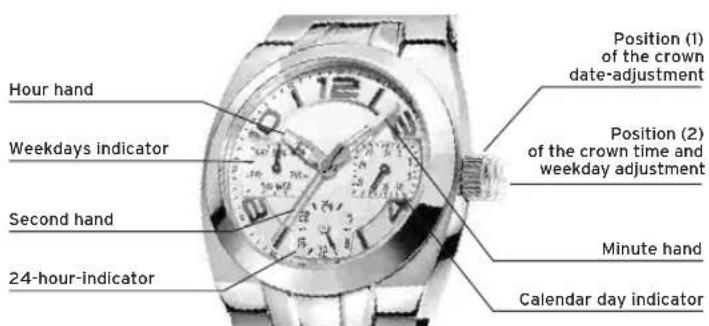
MVX3J8
TIME ADJUSTMENT
Adjust crown to position 2 (Pull right out).
By turning the crown adjust minutes and hours to exact time.
WEEKDAY ADJUSTMENT
Adjust crown to position 2 (Pull right out).
The crown must be turned till the 24 hour limit is passed and the hand of the weekdays indicator moves further (to correct weekday).
DATE ADJUSTMENT
Adjust crown to position 1 (Pull out only one step).
Adjust date by turning the crown to the left.
ATTENTION: No date adjustment between 21:00 and 01:00.
MVX3T
DISPLAYS AND BUTTONS
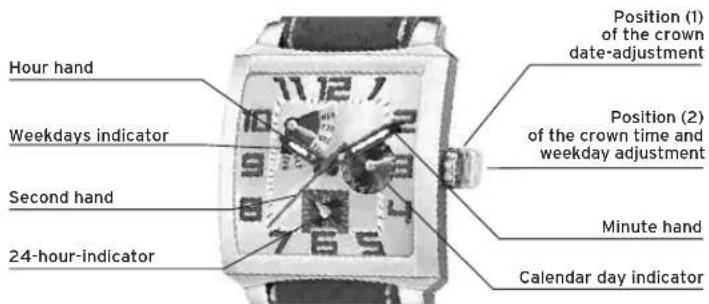
MVX3I
TIME ADJUSTMENT
Adjust crown to position 2 (Pull right out).
By turning the crown adjust minutes and hours to exact time.
WEEKDAY ADJUSTMENT
Adjust crown to position 2 (Pull right out).
The crown must be turned till the 24 hour limit is passed and the hand of the weekdays indicator moves further (to correct weekday).
DATE ADJUSTMENT
Adjust crown to position 1 (Pull out only one step).
Adjust date by turning the crown to the left.
ATTENTION: No date adjustment between 21:00 and 01:00.
MVX3TE
DISPLAYS AND BUTTONS
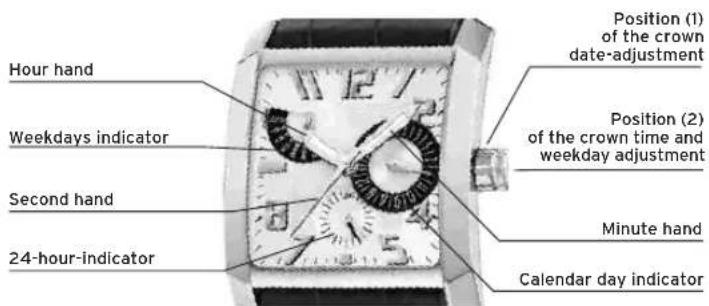
MVX3TE
TIME ADJUSTMENT
Adjust crown to position 2 (Pull right out).
By turning the crown adjust minutes and hours to exact time.
WEEKDAY ADJUSTMENT
Adjust crown to position 2 (Pull right out).
The crown must be turned till the 24 hour limit is passed and the hand of the weekdays indicator moves further (to correct weekday).
DATE ADJUSTMENT
Adjust crown to position 1 (Pull out only one step).
Adjust date by turning the crown to the left.
ATTENTION: No date adjustment between 21:00 and 01:00.
MGPO3
DISPLAYS AND BUTTONS
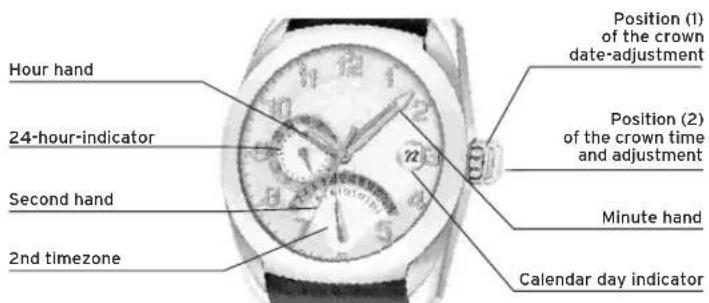
MGP03
TIME ADJUSTMENT
Adjust crown to position 2 (Pull right out).
By turning the crown adjust minutes and hours to exact time.
DATE ADJUSTMENT
Adjust crown to position 1 (Pull out only one step).
Adjust date by turning the crown clock wise.
2ND TIMEZONE ADJUSTMENT
Adjust crown to position 1.
Adjust 2nd timeframe by turning the crown anti clock wise.
MVX46
DISPLAYS AND BUTTONS
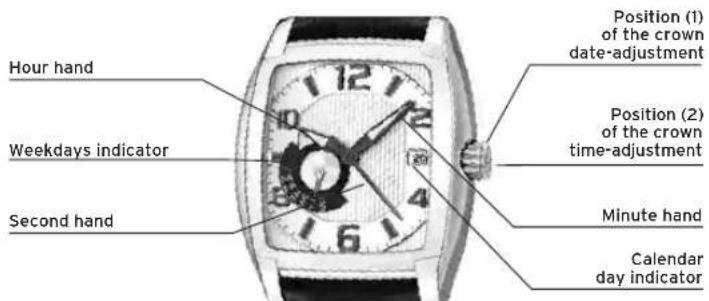
MVX46
TIME ADJUSTMENT
Adjust crown to position 2 (Pull right out).
By turning the crown adjust minutes and hours to exact time.
WEEKDAY ADJUSTMENT
Adjust crown to position 1 (Pull out only one step).
Adjust weekday by turning the crown clock wise.
DATE ADJUSTMENT
Adjust crown to position 1 (Pull out only one step).
Adjust date by turning the crown anti clock wise.
ATTENTION: No date adjustment between 21:00 and 1:00.
ILMULTIEFUNCTION
By virtue of the regulations pursuant to the handling of waste products deriving from electronic and electrical equipment, end of lifecycle watch making products must be selectively collected for processing. You may therefore dispose of your quartz watch making products at any of our retail outlets or any other authorized collection point. The selective collection, processing, rating and recycling of these products helps contribute to safeguarding the environment and protecting our health.
ILMULTIFUNCTION
Instructions M6P89/M6P77 54
Instructions M6P27 56
Instructions M6P25 58
Instructions M6P29/M6P79 60
Instructions M6P23 62
Instructions MVX3L 64
■ Instructions MVX3SE 66
Instructions MVX3JA 68
Instructions MVX3T 70
Instructions MVX3TE 72
Instructions MGPO3 74
Instructions MVX46 76
M6P89/M6P77
AFFICHAGE ET BOUTONS
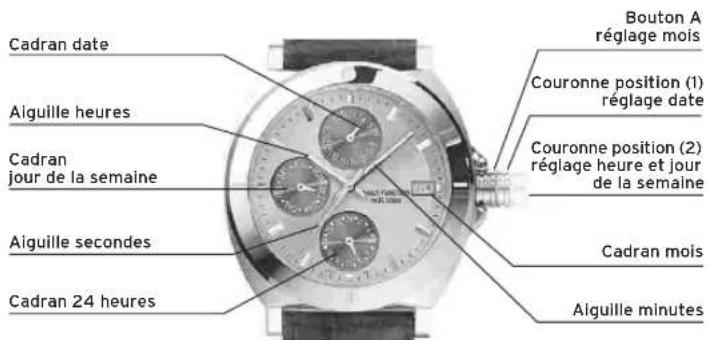
M6P89/M6P77
RÉGLAGE HORE
Tirer la couronne en position 2.
Adjust crown to position 1 (Pull out only one step).
Adjust date by turning the crown clock wise.
RéGLAGE 2e FUSEAU HORAIRE
Tirer la couronne en position (1).
Adjust crown to position 1 (Pull out only one step).
Adjust weekday by turning the crown clock wise.