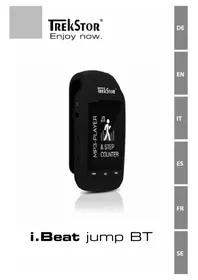
I.Beat jump - Mp3 player TrekStor - Free user manual and instructions
Find the device manual for free I.Beat jump TrekStor in PDF.



| Product Type | MP3 player with 1.8" color TFT display, Bluetooth, pedometer |
| Brand | TrekStor |
| Model | I.Beat jump (BT) |
| Storage Capacity | 8 GB (internal) |
| Memory Expansion | microSD/microSDHC up to 32 GB |
| Display | 1.8" TFT (4.6 cm), resolution 128 x 160 px, 65,000 colors |
| Supported Audio Formats | MP3, WAV, FLAC, WMA |
| Supported Image Formats | JPEG, BMP |
| Bluetooth | Yes, for audio streaming to headphones or speaker |
| Voice Recording | Yes, via built-in microphone (adjustable format) |
| Pedometer | Yes, with step counter, distance, calories, speed, time |
| Stopwatch | Yes |
| Power Supply | Non-removable Li-Polymer battery, battery life approx. 6 hours |
| Charging | Via Micro USB port, charging time approx. 1 hour |
| Interfaces | Micro USB 2.0, 3.5 mm headphone jack, microSD slot |
| Equalizer | Yes, adjustable in settings |
| Menu Languages | Multilingual (including French) |
| Operating Temperature | 10°C to 40°C |
| Cleaning | Soft dry cloth, without solvents or chemicals |
| Safety | Do not open the case, avoid moisture, limit volume to protect hearing |
| Repairability | Battery not user-replaceable, no internal maintenance |
| Package Contents | Player, stereo headphones, Micro USB cable, user manual |
Frequently Asked Questions - I.Beat jump TrekStor
User questions about I.Beat jump TrekStor
0 question about this device. Answer the ones you know or ask your own.
Ask a new question about this device
Download the instructions for your Mp3 player in PDF format for free! Find your manual I.Beat jump - TrekStor and take your electronic device back in hand. On this page are published all the documents necessary for the use of your device. I.Beat jump by TrekStor.
USER MANUAL I.Beat jump TrekStor
We hope you enjoy your TrekStor MP3-Player iBeat jump BT. Please read the following passages carefully to familiarise yourself with the functions of this product and how to operate it.
IMPORTANT!
Follow the safety information in Section 2.
IMPORTANT!
Please keep these instructions in a safe place for future reference. Should the device change hands, pass these instructions on to the new owner.
Up-to-date product information is available on the TrekStor website: www.trekstor.de
Visit www.trekstor-onlineshop.de for additional products and accessories.
1) About TrekStor i.Beat jump BT
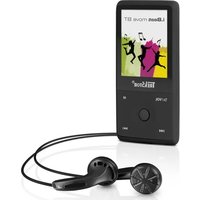
TrekStor i.Beat jump BT is an MP3-Player with a 1.8" TFT LC display for playing audio files. You can also use the MP3-Player to view images.
The Bluetooth function enables you to stream soundfiles to Bluetooth loudspeakers or Bluetooth headphones.
The integrated pedometer counts the number of steps taken, measures the distance covered and calculates the calories burned over the course of a day.
Only use the device for its intended purpose.
The manufacturer is not liable for damages resulting from improper use. Furthermore, the manufacturer shall not be responsible for damages or loss of data and any subsequent damage caused.
2) Safety information
These instructions use the following warning symbols and key words:

DANGER
Indicates possible danger to life and/or danger of severe, irreversible injuries.

CAUTION
Follow instructions to avoid injuries and material damage.

WARNING
Follow instructions to avoid material damage.

NOTE
Further information about the use of the device.
Operational safety

Those who, as a result of their physical, sensory or mental capabilities, or lack of experience or knowledge, are not in a position to use the product safely must not be allowed in the vicinity of the product without supervision or instruction by a person responsible for their safety. Supervise children around the product.
DANGER
Keep packaging materials out of reach of children (e.g., plastic sheets). There is a danger of suffocation.

DANGER
Some accessories can pose a choking hazard for babies and young children. Keep these accessories out of reach of babies and young children.

DANGER
Never open the casing of the device or the charger. This may cause an electrical shock, short circuit or fire!
DANGER
Do not insert any object into the ports or openings of the device or charger: This may cause an electrical shock, short circuit or fire!
DANGER
Do not cover the device or charger during operation or while charging. This may cause the device/charger to overheat and potentially catch fire!
CAUTION
This device can generate high sound volumes. Never listen at high volumes for long periods. Doing so can result in immediate or gradual hearing damage. Remember: Permanent hearing damage may only emerge later in life. You may become used to listening to high volumes over time, making them appear normal to you. However, your hearing may have already been damaged. The higher you set the volume, the more quickly your hearing can be damaged.
DANGER
Your safety is very important to us! Safety always has first priority in road transport. Protect yourself and other road users by operating the device only if the traffic situation allows it and you do not endanger or hinder anyone. Adjust the volume of the device for your safety so that you can continue to react to all the sounds around you. Local legislation in force applies.
WARNING
Do not exert excessive pressure on the display, as it may break.

Avoid using USB cables over 3m in length.
the computer or impair the functions of the device. Should this happen, disconnect the device from the USB port and reconnect it or rebuild the WiFi connection from scratch.
Repair
WARNING
No parts inside the device require maintenance or cleaning.

WARNING
Should the device become wet, turn it off immediately. Ensure the device is checked for operational safety before using it again.
Intended operating conditions
Protect the device from extremely high or low temperatures and fluctuations in temperature.
Use it at an ambient temperature between 10° C and 40° C .

Do not place the device near a heat source and protect it in direct sunlight.

Never expose the device to humidity, condensation or moisture.

Ensure you use and store the device in a dust-free environment.
Power supply

CAUTION
damaged or leaks.
Care and maintenance

Never clean the surface of the device with solvents, thinners, cleaning agents or other chemical acts. Use a soft, dry cloth or a soft paintbrush.
Information on the memory capacities indicated
The storage capacity indicated on the packaging in the technical specifications refers to the
total storage capacity of your device. The storage capacity of the device indicated by your operating system may differ from the stated storage capacity, as a portion of the total storage is also used by the operating system and system applications.
3) Technical specifications
Storage capacity:
8GB
Display type:
TFT LC display
Display size:
4.6 cm (1.8")
Display dimensions (W x H): 28.5 x 35 mm
Display resolution:
128 × 160 px
Display colours:
65.000
Interfaces:
Micro-USB 2.0, audio out (3.5 mm jack), microphone, memory card reader, Bluetooth®
Supported card formats: microSD, microSDHC* (max. 32 GB)
Dimensions (W x H x D): 40 x 76 x 21 mm
Weight: Approx. 35 g
Housing material: Plastic (rubber)
Playable audio formats: MP3, WAV, FLAC, WMA
Supported image formats: JPEG, BMP
File information: File name, ID3 tag
Recorder: Integrated microphone
Special features: Pedometer, stopwatch
Power source: Lithium polymer battery*
Maximum playing time: Approx. 6 hours
Battery recharged via: Micro-USB socket
Charging time: Approx. 1 hour
- It is not possible to guarantee 100 per cent compatibility of microSD cards.
** The battery in this product cannot be easily replaced by users themselves.
4) Package contents
- TrekStori. Beat jump BT
- Stereo headphones
- Micro-USB cable
- Operating instructions
5) Controls and ports
A) Clip to attach to your clothes
B) Headphone jack
C) Volume control
D) Display
E) 14 button
F) button
G) button
H) button
I) Reset
J) Memory card slot
K) Micro-USB port / charging socket
6) Charging the MP3-Player
Switch on your MP3-Player by pressing the 口 \ 口 button. Charge it by connecting it to your computer using the Micro-USB cable provided. Your MP3-Player is fully charged after approximately 1 hour.

Please fully charge your MP3-Player before using it for the first time. The maximum battery life is reached after approximately ten charging cycles.
7) Switching the MP3-Player on and off
Press and hold the button for approximately 3 seconds. The MP3-Player switches on. From now on, you will also be able to switch on your MP3-Player by briefly pressing the button.
To save power, it is advisable to adjust the duration of the display under "SET" - "DISPLAY" - "BACKLIGHT TIME". Now the display automatically switches off after the time you have set has passed. This does not affect the music you are playing.
If you want to switch off your MP3-Player altogether, press and hold the button for approximately 3 seconds.
The MP3-Player switches off.
i If your MP3-Player freezes and no longer responds, you can perform a reset by pressing a pointed, but not sharp, object (such as a bent paper clip) into the reset slot under the button for a short while. The TrekStor logo will soon appear on the screen and your MP3-Player will automatically switch on again.
Never use pins or other sharp objects for this procedure, as this may damage your device!
8) Using the menu
Your MP3-Player has various modes which you can select from the main menu.
8.1) Main menu
The main menu offers 7 different modes: Bluetooth, Music, Recordings, Pictures, Folder view, Tools and Set.
Select the desired mode by pressing the 14 or 15 button to switch between the options and confirm the desired option by briefly pressing the 16 button.
You proceed in the same way in the submenus.
You can always return to the previous menu by pressing and holding the button for a longer period of time.
8.2) Mode: Music
In Music mode, you can play back tracks via the music library, folder navigation or playlists.
Music library
The soundfiles in the music library are sorted according to various criteria using their ID3 tags: All songs, Artists, Albums and Genres.
Selecting Music mode by pressing the button will take you directly to the music library. Here you can select the desired criterion using the or button and confirm by briefly pressing the button.
The music library displays only the currently available files for the selected criterion.
For instance, selecting Artists will display the names of artists whose tracks you have loaded to your Player.
Select an artist and confirm your selection by briefly pressing the l button. Now all albums by this artist that are available on the MP3-Player are displayed, from which you can make your selections.
Play and pause
Briefly press the button in order to start or pause playback of a soundfile.
Change track
Briefly press the button to play the next track. Press the button within 5 seconds of starting the new track in order to revert back to the previous track.
i If you briefly press the button after this time has elapsed, then your current track will start playing from the beginning again.
Fast forwarding or rewinding a track
Keep the or button pressed for longer during playback to fast forward or rewind the track respectively.
Controlling the volume
You can control the volume using the [+] and [-] buttons beneath the headphone jack. The volume bar will then be displayed on the screen. You can decrease the volume by pressing and holding the [-] button. The [+] button allows you to increase the volume.
8.3) Mode: Bluetooth®
Your MP3-Player allows you to play music through Bluetooth loudspeakers or Bluetooth headphones.
To do this, switch to "BLUETOOTH" in the main menu. Confirm by pressing the l button.
Before searching for devices, please ensure that the "TURN BT ON" option is selected under the "BLUETOOTH SWITCH CONTROL" sub item.
Activate the Bluetooth function on the device you want to connect. Select the "SEARCH DEVICE" option using the 14 or button and confirm by pressing the 14 button. Once the search is complete, select your chosen playback device using the 14 or 14 button and confirm by pressing the 14 button. Now confirm "PAIR" option by pressing the 14 button. The devices are now connected.
You can specify directly in Bluetooth mode under "ALL MUSIC" which tracks you would like to play. To do this, go back to the Bluetooth menu by pressing the button, select this option and confirm by pressing the button.
To exit the Bluetooth mode, confirm the prompt "EXIT BT TRANSMISSION" with "YES" by pressing the >> button. The Bluetooth transmission switches off.
(8.4) Mode: Recordings
You can record voice memos on your MP3-Player using the integrated microphone.
To record a voice memo, go to "RECORDINGS" mode in the main menu and select the "START VOICE RECORDING" option. To pause the current recording, briefly press the button. To resume the current recording, briefly press the button once more. To save the recording, press the button for slightly longer and confirm you wish to save.
You can play back recordings by going to "RECORDINGS LIBRARY" in the menu within "RECORDING" mode. You can also determine the quality of the recordings by using the "RECORD FORMAT" and "RECORD SETTINGS" options.
All voice recordings are stored in the MP3-Player's RECORD folder, which you can open by selecting "FOLDER VIEW".
(8.5) Mode: Pictures
Selecting the "PICTURES" mode in the main menu will take you directly to your selection of images. Here you can select and display images stored on your MP3-Player.
Briefly press the button to open an image. You can specifically navigate through the entire selection of images using the or button.
You can start a slide show by pressing the button when an image is displayed. Pressing the button again ends the slide show.
i Images are displayed in reduced size if music is currently playing. The playing of music has to be stopped in order to view the images in full size.
8.6) Mode: Tools
You can select the "PEDOMETER" and "STOPWATCH" options by selecting the "TOOLS" mode in the main menu.
Pedometer
The pedometer counts the number of steps taken, measures the distance travelled and calculates kilocalories, speed and travel time.
To activate the pedometer, select "START" in the options of pedometer menu by briefly pressing the button.
You have the option to enter your stride length and weight within the movement mode under "PERSONAL INFO" in the options menu to make the measurements more accurate. Your activities are archived under "RESULTS TRACKER" and can be viewed at any time.
Stopwatch
The stopwatch allows you to measure time intervals, when running laps for example, to keep track of your progress. To start and stop the stopwatch, briefly press the button.
The stopwatch can also add up measurements.
8.7) Mode: Folder view
"Folder view" mode allows you to view all files stored on your MP3-Player. You can play files directly from the Explorer.
Use the 14 or 15 button to select the file you wish to play. Briefly press the 16 button to confirm your selection.
8.8) Mode: Set
The "SET" mode allows you to make settings for the following:
Play mode: Play mode (e.g. Repeat) Shuffle mode
Audio: Equalizer, Volume limit
Sleep timer: Desired time interval (max. 99 min)
Display: Brightness, Backlight time, Screensaver
Date and time: Time settings, Date settings
Slideshowhow settings: Time per slide, Play mode, Shuffle mode
Language: Desired menu language
Information: System info
Default settings: Restore to factory settings
i If you set the time or date, press the button briefly to jump from hour to minute respectively from day to month to year.
i Your saved data is retained if you restore to factory settings.
9) Transferring data to or from a computer
Connect the MP3-Player to a USB port on your computer using the Micro-USB cable provided. Now select the "CHARGE AND TRANSFER" option.
9.1) Windows® 10 / 8.1 / 8 / 7 / Vista® / XP
Your operating system automatically detects the device and adds a "TREKSTOR" to "MY COMPUTER"/"COMPUTER".
a) Highlight the files or folders you wish to copy using the mouse. Copy these files by clicking them with your right mouse button ("COPY").
b) Under "MY Computer" or "COMPUTER", select the device with removable storage, "TREKSTOR".
c) Right-click the device and select " Paste", to start copying. After copying has completed, the data will be available on your MP3 player.

You can also copy files with "DRAG & DROP".
9.2) Mac® OS X ab 10.6
Select the desired files (such as MP3) with the mouse. Drag and drop the files in the "FINDER" to the drive symbol of your MP3 player.
10) Logging off the MP3-Player from the computer

Please follow the recommended logout procedure to prevent damage to the device or data loss!
10.1) Windows® 10 / 8.1 / 8 / 7 / Vista® / XP
At the bottom right on the task bar, left-click the "SAFELY REMOVE HARDWARE AND EJECT MEDIA" icon. In the popup menu that appears, leftclick "EJECT I.BEAT JUMP BT" to select it. You can now disconnect your MP3 player from the computer.
10.2) Mac OS X ab 10.6
You must remove the drive from the "DESKTOP" before you disconnect your MP3 player. Click the relevant drive icon and drag it to the trash icon.
11) Notes on copyright and trademarks
Copyright law prohibits the copying of the content of these operating instructions (illustrations, reference documents etc.), in whole or in part, without the permission of the copyright holder.
The Bluetooth word mark and logos are registered trademarks owned by Bluetooth SIG, Inc. and any use of such marks by TrekStor GmbH is under license.
Mac OS and OS X are trademarks of Apple Inc., registered in the U.S. and other countries.
Microsoft, Windows and Windows Vista are either registered trademarks or trademarks of Microsoft Corporation in the United States and/or other countries.
TrekStor and i.Beat are registered trademarks of TrekStor Ltd. in the European Community and other countries.
Copyright © 2016 TrekStor GmbH. All rights reserved. Some product or company names mentioned elsewhere may be brand names or trade names of the respective proprietor.
12) Notes on disposal
Disposal
This symbol indicates that this product and/or the battery used contain components that are harmful to the environment and/or human health if not disposed of correctly. As the owner of a used electrical or electronic device, you may not dispose of this device together with unsorted domestic waste.
Remove the battery from the device before disposing of your old device. Contact your city or municipal authority for information on how to correctly dispose of the device and its battery.
Recycling
Your device and its sales packaging consist of valuable raw materials, which must be recycled in the interest of environmental protection. Contact your city or municipal authority for information on the correct method of disposal.
13) Notes on liability and warranty
The manufacturer shall reserve the right to constantly further develop the product. These changes may be made without any direct reference to them in the operating instructions. As a result, the information contained in the operating instruction does not need to reflect the current technical design.
The statutory warranty period for consumer products is 24 months. There is no warranty beyond this.
Unauthorised modifications to the device (particularly installing external firmware not approved by the manufacturer or modifications to the device hardware) may result in a loss of all warranty claims.
14) Support information
If you have questions about your TrekStor product or problems, please proceed as follows:
- Carefully read the operating instructions.
- Take a look at our FAQ section of our website, where you will find answers to the most frequently asked questions about your product.
- Check whether you have entered the correct settings on your device using the product features and functions as points of reference.
- Consult the respective product detail page for up-to-date information (such as newly available firmware updates) on your product.
If you have taken these measures and the problem persists, please contact our service team directly. Our professional service employees will discuss all of the additional necessary steps with you and provide individual support to help you quickly and easily continue to address your concern. Directly contacting us, the manufacturer, via our service hotline or by filling out our service form allows us to address your concern more quickly and allows you to benefit from high-quality consulting and support. You can find out how to reach our service team here:
www.trekstor.de/support-en.html
Color displayed: 65.000
Interface: Micro-USB 2.0,
i Se先进技术, including the use of a wide range of techniques to improve the performance of your system.
The Bluetooth word mark and logos are registered trademarks owned by Bluetooth SIG, Inc. and any use of such marks by TrekStor GmbH is under license.
Mac OS and OS X are trademarks of Apple Inc., registered in the U.S. and other countries.
Microsoft, Windows and Windows Vista are either registered trademarks or trademarks of Microsoft Corporation in the United States and/or other countries.
TrekStor and i.Beat are registered trademarks of TrekStor Ltd. in the European Community and other countries.
The Bluetooth word mark and logos are registered trademarks owned by Bluetooth SIG, Inc. and any use of such marks by TrekStor GmbH is under license.
Mac OS and OS X are trademarks of Apple Inc., registered in the U.S. and other countries.
Microsoft, Windows and Windows Vista are either registered trademarks or trademarks of Microsoft Corporation in the United States and/or other countries.
TrekStor and i.Beat are registered trademarks of TrekStor Ltd. in the European Community and other countries.
Dimensions (I x H x P) : 40 x 76 x 21 mm
Poids: env. 35 g
The Bluetooth word mark and logos are registered trademarks owned by Bluetooth SIG, Inc. and any use of such marks by TrekStor GmbH is under license.
Mac OS and OS X are trademarks of Apple Inc., registered in the U.S. and other countries.
Microsoft, Windows and Windows Vista are either registered trademarks or trademarks of Microsoft Corporation in the United States and/or other countries.
TrekStor and i.Beat are registered trademarks of TrekStor Ltd. in the European Community and other countries.
D. however materially rich, they remain spiritually poor
Driftsakerhet

SIKTIGHET
The Bluetooth word mark and logos are registered trademarks owned by Bluetooth SIG, Inc. and any use of such marks by TrekStor GmbH is under license.
Mac OS and OS X are trademarks of Apple Inc., registered in the U.S. and other countries.
Microsoft, Windows and Windows Vista are either registered trademarks or trademarks of Microsoft Corporation in the United States and/or other countries.
TrekStor and i.Beat are registered trademarks of TrekStor Ltd. in the European Community and other countries.
EC DECLARATION OF CONFORMITY
As manufacturer and importer respectively:
TrekStor GmbH, Berliner Ring 7, 64625 Bensheim, Germany
herewith declares that the products
Product: iBeat jump BT
Type: MP3-Player
comply with the following directive(s):
.2014/35/EU Low-voltage directive
99/5/EC Radio Equipment and Telecommunications Terminal Equipment
- 2011/65/EG Restriction of the use of certain hazardous substances
2006/66/EG on batteries and accumulators and waste batteries and accumulators
The following norms were consulted to assess conformity:
EN300328V1.9.2
Electromagnetic compatibility and Radio spectrum Matters (ERM); Data transmission equipment operating in the 2,4 GHz ISM band and using wide band modulation techniques
EN 301 489-1 V1.9.2 EMC and ERM
EMC standard for radio equipment and services; Part 1: Common technical requirements
- EN 301 489-17 V2.2.1
Electromagnetic compatibility and Radio spectrum Matters (ERM); ElectroMagnetic Compatibility (EMC) standard for radio equipment; Part 17: Specific conditions for 2,4 GHz wideband transmission systems.
EN 50566:2013 SAR
Product standard to demonstrate compliance of radio frequency fields from handheld and body-mounted wireless communication devices used by the general public (30 MHz - 6 GHz)
EN62479:2010
Assessment of the compliance of low power electronic and electrical equipment with the basic restrictions related to human exposure to electromagnetic fields (10 MHz to 300 GHz)
EN 60065:2014
Audio/, video and similar electronic apparatus - Safety requirements
EN 50581:2012
Technical documentation for the assessment of electrical and electronic products with respect to the restriction of hazardous substances
The CE symbol confirms that this product conforms with the above mentioned norms and regulations.
- 2006/1907/EC
REACH: Regulation concerning the Registration, Evaluation, Authorisation and Restriction of Chemicals
2013/1272/EU PAH:
Ch restricting the use of polycyclic aromatic hydrocarbons
2004/850/EC SCCP:
REACH restricting the use of short chain chlorinated paraffins
- ABOUT TREKSTOR I.BEAT JUMP BT
- SAFETY INFORMATION
- DANGER
- CAUTION
- WARNING
- NOTE
- OPERATIONAL SAFETY
- REPAIR
- INTENDED OPERATING CONDITIONS
- POWER SUPPLY
- CARE AND MAINTENANCE
- INFORMATION ON THE MEMORY CAPACITIES INDICATED
- TECHNICAL SPECIFICATIONS
- PACKAGE CONTENTS
- CONTROLS AND PORTS
- CHARGING THE MP3-PLAYER
- SWITCHING THE MP3-PLAYER ON AND OFF
- USING THE MENU
- MAIN MENU
- MODE: MUSIC
- MUSIC LIBRARY
- PLAY AND PAUSE
- CHANGE TRACK
- FAST FORWARDING OR REWINDING A TRACK
- CONTROLLING THE VOLUME
- MODE: BLUETOOTH®
- (8.4) MODE: RECORDINGS
- (8.5) MODE: PICTURES
- MODE: TOOLS
- PEDOMETER
- STOPWATCH
- MODE: FOLDER VIEW
- MODE: SET
- TRANSFERRING DATA TO OR FROM A COMPUTER
- WINDOWS® 10 / 8.1 / 8 / 7 / VISTA® / XP
- MAC® OS X AB 10.6
- LOGGING OFF THE MP3-PLAYER FROM THE COMPUTER
- MAC OS X AB 10.6
- NOTES ON COPYRIGHT AND TRADEMARKS
- NOTES ON DISPOSAL
- DISPOSAL
- RECYCLING
- NOTES ON LIABILITY AND WARRANTY
- SUPPORT INFORMATION
- IF YOU HAVE QUESTIONS ABOUT YOUR TREKSTOR PRODUCT OR PROBLEMS, PLEASE PROCEED AS FOLLOWS
- DRIFTSAKERHET
- SIKTIGHET
- EC DECLARATION OF CONFORMITY
Brand : TrekStor
Model : I.Beat jump
Category : Mp3 player