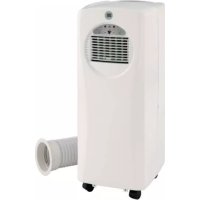
EV9050 - Air Conditioning Everglades - Free user manual and instructions
Find the device manual for free EV9050 Everglades in PDF.


User questions about EV9050 Everglades
0 question about this device. Answer the ones you know or ask your own.
Ask a new question about this device
Download the instructions for your Air Conditioning in PDF format for free! Find your manual EV9050 - Everglades and take your electronic device back in hand. On this page are published all the documents necessary for the use of your device. EV9050 by Everglades.
USER MANUAL EV9050 Everglades
Please read and retain this manual for future reference
| Model no. EV9050 | |
| Cooling capacity | 7000 BTU/hr 2.1 KW |
| Power/Ampere consumption | 810W/3.6A (35℃, 40%RH) 780W/3.5A (32℃, 80%RH) |
| Air volume (max. speed) | 350m³/h |
| Humidity removal capacity | 14.6L/day |
| Recommended room size | 50 m³ max |
| Power supply | 220~240V/50Hz |
| Compressor | rotary |
| Refrigerant | R410A/350g (0.73t CO2 Åq.) |
| Greenhouse Warming Potential (GWP kg CO2 Åq) | 2088 |
| deeps naF | 2 |
| Timer | 1~12 hours |
| Working temperature | 18 ~ 32℃ |
| Exhaust pipe | Ø 127x1500mm |
| Net Weight | 20.5kg |
| Dimension | 305 x 383 x 752 mm (WxDxH) |
REMARK:
-
The data marked with ** may vary for technical reasons: for greater precision, please refer to the rating label placed at the back of the unit.
-
Measuring condition for above is: Cooling - DB 35^ WB 24^
GENERAL SAFETY
- ONLY USE IN THE UPRIGHT POSITION ON A FLAT LEVEL SURFACE AND AT LEAST 50cm FROM ANY OBJECTS (Fig 1 & 4).
DO NOT PLACE OBJECTS ON THE UNIT OR RESTRICT AIR INLET / OUTLET (FIG. 2). - This appliance can be used by children aged from 8 years and above and persons with reduced physical, sensory or mental capabilities or lack of experience and knowledge if they have been given supervision or instruction concerning use of the appliance in a safe way and understand the hazards involved. Children shall not play with the appliance. Cleaning and user maintenance shall not be made by children without supervision.
ELECTRICAL SAFETY
FOR INDOOR USE ONLY.
- SWITCH OFF AND UNPLUG WHEN NOT IN USE.
DO NOT USE IN HUMID OR WET ENVIRONMENTS (FIG 3)
DO NOT PULL THE UNIT ALONG BY THE CORD.
IF THE SUPPLY CORD IS DAMAGED, IT MUST BE REPLACED BY AN ELECTRICIAN OR SIMILARLY QUALIFIED PERSON, TO AVOID HAZARD.
FOR MAXIMUM EFFICENCY
- Do not exceed the recommended room size 50m^3 (typically 20m^2 floor area)
- Close doors and windows
- Keep curtains of blinds closed during the sunniest part of the day
- Keep filters clean
- Once room has reached the desired conditions, reduce temperature and ventilation settings
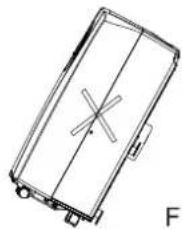
FIG.1
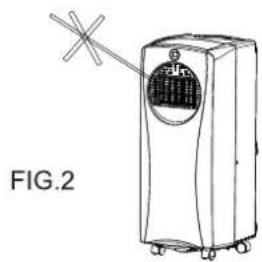
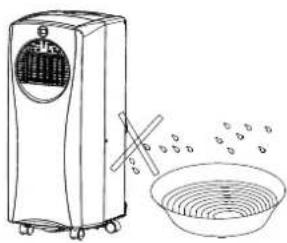
FIG.3
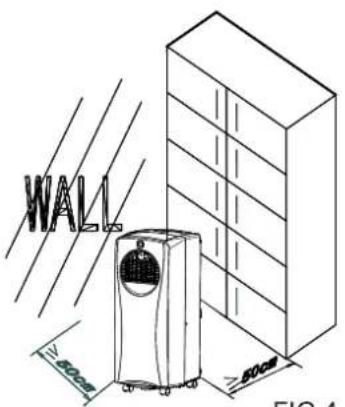
FIG.4
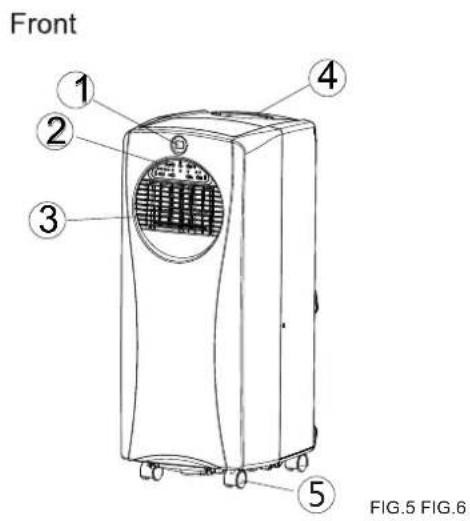
- Display window
- Control panel
- Air outlet
- Carrying handle
- Caster
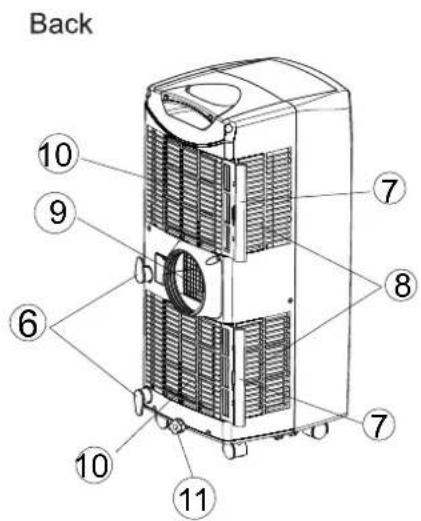
- Cord storage
- Air filter
- Air inlet
- Exhaust air outlet
- Air inlet
- Water stopper/drainage point
Accessories
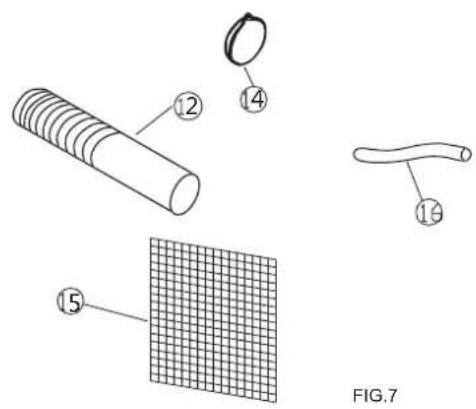
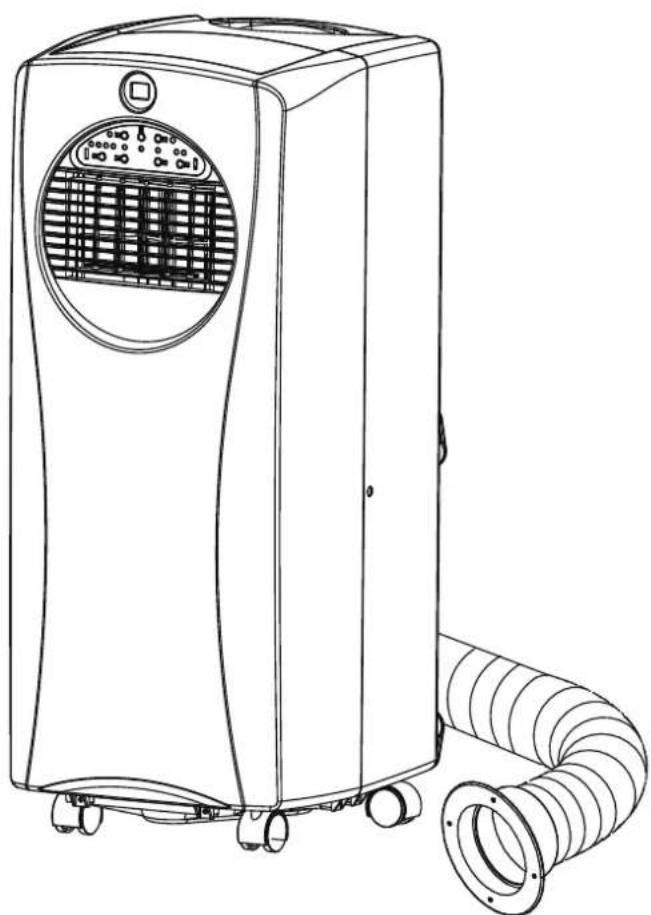
- Exhaust hose
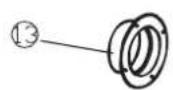
- Outward adaptor - for insertion over hose and into foam strip (or into hole in the wall/window).
- Foam strip - for filling the open window space
- Active carbon filter
- Drain tube for continuous drainage
INSTALLATION
Installation of the exhaust pipe
The unit is a portable air conditioner that may be moved from room to room.
- Using the foam strips
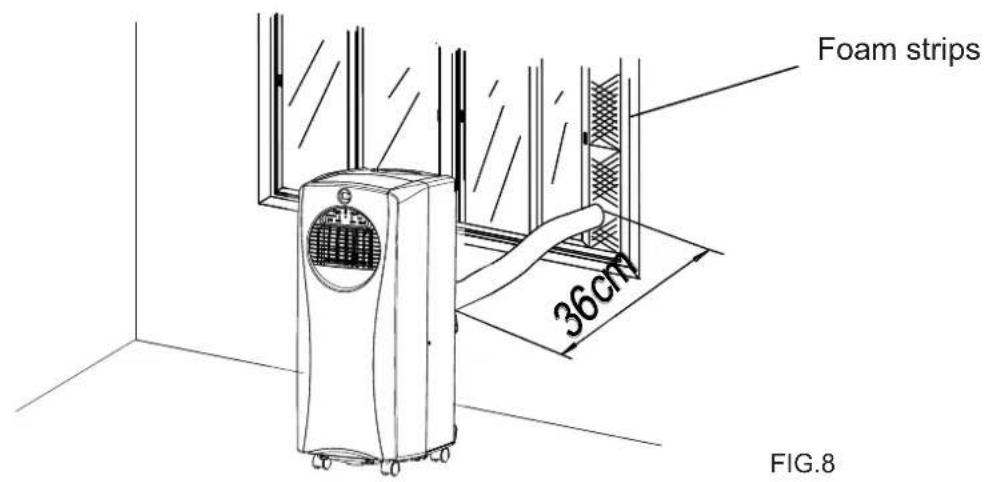
- Offer foam strips to the window gap and cut to size if necessary.
-
Feed exhaust hose through the foam strip and insert strip into window gaps as shown and slide window across so that foam is held securely. This technique may also be used for sash windows. Note: Take care to maintain protection against intruders
-
Using the adaptor
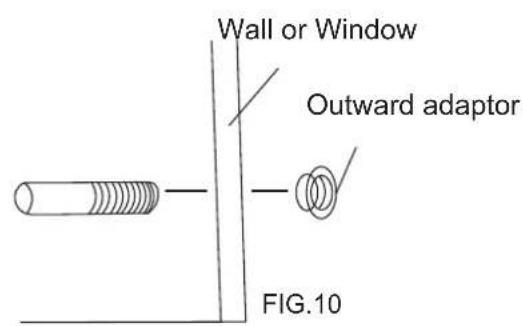
Cut a 130mm diameter hole in the wall or window.
Feed exhaust hose through the window or wall and attach the threaded adaptor from the outside as shown.
- When not in use, plug the hole with the cover provided.
Mounting of the exhaust pipe
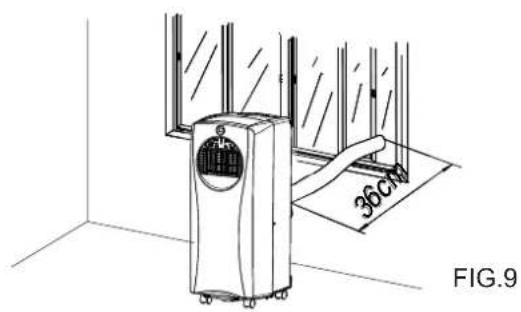
- Use only the hose provided and clip exhaust hose to the back of the air conditioner
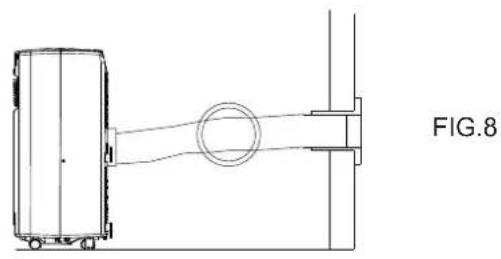
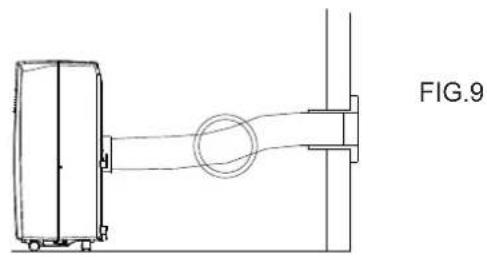
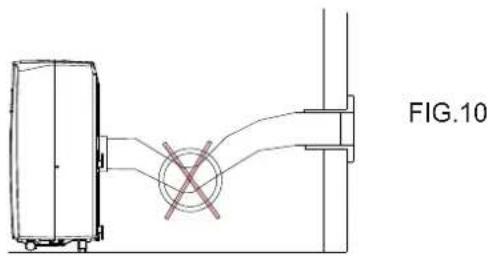
- Avoid kinks and bends in the exhaust hose as this will cause expelled moist air to build up causing the unit to overheat and shut down.
Fig 8 & 9 show correct position
The hose may be extended from 300mm to 1500mm but for maximum efficiency use the shortest length possible.
WARNING!
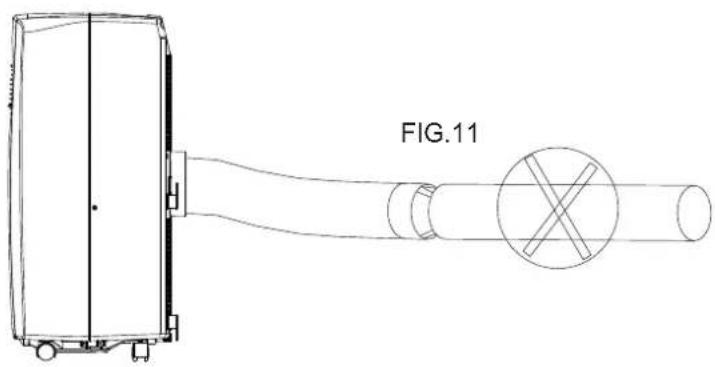
The length of the exhaust pipe is specially designed according to the specification of this product. Do not replace or prolong it with your own private hose as this could cause the unit to mal-function.
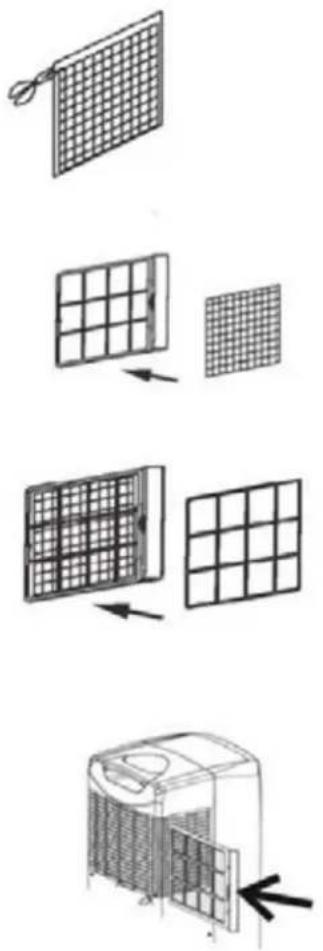
Installation of the carbon filter
- Remove the filter frame from the unit.
- Remove the active carbon filter from its plastic bag.
- Insert the active carbon filter into the back of the unit.
- Re-fit the filter frame inside the unit.
Control panel
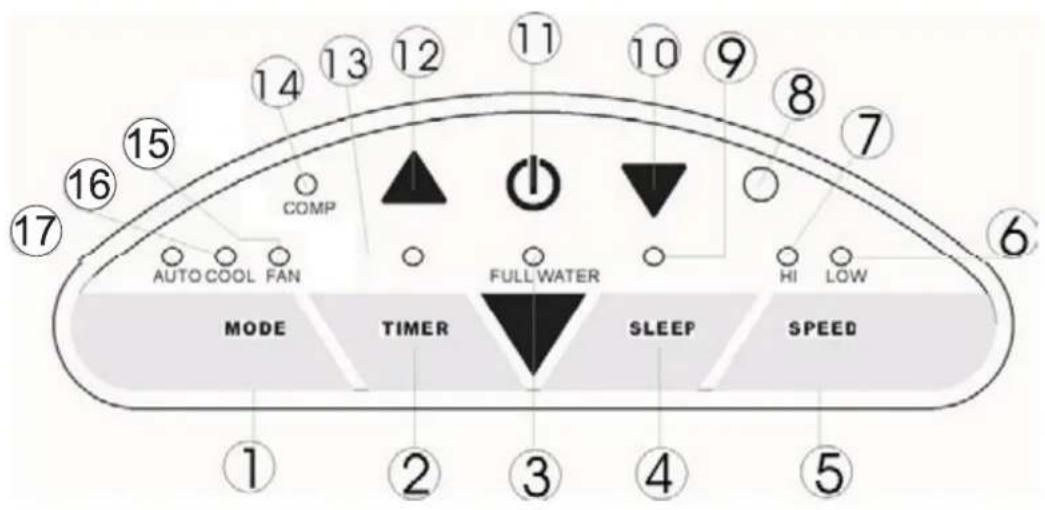
FIG.12
- Mode (function) option button
- Timer button
- "Full Water" indicator
- Sleep button
- Speed (ventilation) button
- Low ventilation indicator
- High ventilation indicator
- Receiver for remote control
-
Sleep operation indicator
-
'Temperature down' button
- ON/OFF (power) button
- 'Temperature up' button
- Timer operation indicator
- Compressor operation indicator
- Fan (ventilation) mode indicator
- Auto mode indicator
- Cooling mode indicator
Turning ON/OFF
-
Press ON/OFF button, the unit will start automatically. If the ambient temperature is
-
higher than 23^ , the unit will work in cooling model.
-
higher than 20^ but below or equal to 23^ , the unit will work in ventilation model.
below 20^ the unit will work in heating function (This is for cooling & heating models only.). -
Indicators of the functions in progress come on at the same time. *NOTE! The display window shows the ambient room temperature from 0^ to 50^
- To turn the unit off, press ON/OFF button again.
Setting mode/function
Press MODE button to select required working mode: automatic, cooling or fan.
The indicator of your selected mode comes on.
Setting temperature
- Press 'Temperature up' or 'Temperature down' button to regulate the temperature you desired.
- The display window will show the temperature you set as you press 'Temperature up' or 'Temperature down' button. Otherwise, it will always show the ambient temperature.
- The pre-setting temperature of this machine is: 24^ ( 75^ ) for cooling, 20^(68^) for heating.
Setting ventilation speed
- Press SPEED button to choose the ventilation speed you need, high or low. The indicator of high or low ventilation will light on at the same time.
- If the unit is in AUTO mode, it will choose the ventilation speed automatically according to the ambient temperature (the related indicators will light on), at this time, the speed switch is invalid.
Setting timer
- Press TIMER button to set the operating hours you desired (1 to 12 hours, the timer indicator will light on). When the set time has been reached, the machine will turn off automatically. The display window will show the hour(s) you set as you press TIMER button. If the timer button is not pressed, the unit will work continuously.
- By pressing the timer but without turning on the other functions, you can PRE-SET the time for the machine to work. For example, if you press the timer to '2', the unit will work automatically after 2 hours.
Sleep function
- In cooling mode, by pressing the SLEEP button, the set temperature will increase 1^(2^) at the 1st hour, another 1^ (2^) at the second hour, then keeps at that temperature.
- In heat mode, by pressing the SLEEP button, the set temperature will descend 1^(2^) at the 1st hour, another 1^(2^) at the second hour, then keeps at that temperature.
- In sleep mode, the ventilation will keep at low speed. Re-press the SLEEP button, the setting temperature and ventilation speed will return to the pre-selected one.
- The unit will shut down automatically after the SLEEP function running for 12 hours.
- Please note, the sleep function is not available while the machine is working in AUTO or FAN (ventilation) mode.
Regulating air flow direction
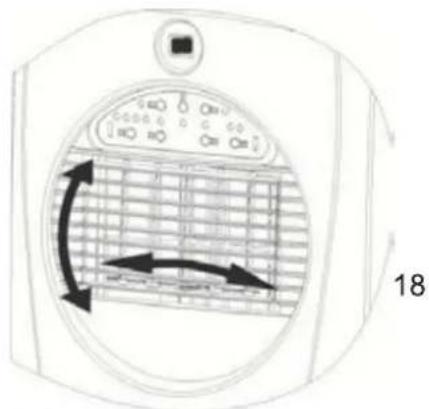
FIG. 16
Turn the vertical louvers left & right by moving the roller on the air vent. For horizontal louvers, adjust them up & down by hands directly to control the air flow direction.
NOTICE!
- To prolong the compressor's life, after switch-off of the unit, please wait for 3 minutes (at least) before re-switch.
- The cooling system will switch off if the ambient temperature is lower than the set one. The ventilation, however, keeps working on the set level. If the ambient temperature rises above the selected level, the cooling will return to work.
- On the contrary, the heating will switch off if the ambient temperature is higher than the set one (still, the ventilation keeps working on the set level). As the ambient temperature drops below the selected level, the heating will return to work.
- This machine is equipped with ANTI-FROST function. While using the heating function during low temperature, sometimes the heating will stop for a while in order to melt the frost. As this occurs, just wait for the heating returns to work.
DRAINAGE
During the process of cooling, some water will be extracted from the air into the unit. If the reservoir is full, both of the compressor and motor will stop and the units would buzz (you can press any button to stop the buzz). The W.F. indicator will flash to show you.
To make the cooling work again, please empty the water by one of the following ways:
- Turn off the air conditioner and avoid moving it when full.
- Position a container (a water tray for example) underneath the drain hole.
- Remove the drain knob & rubber plug from the drain hole and allow the water to drain out.
- When the container is almost full, replace the rubber plug in the drain hole and empty the water tray.
- Repeat until the unit is emptied.
- Replace the rubber plug and tighten the drain knob firmly.
- Switch on the unit - the full water or compressor operating indicator should not be flashing.
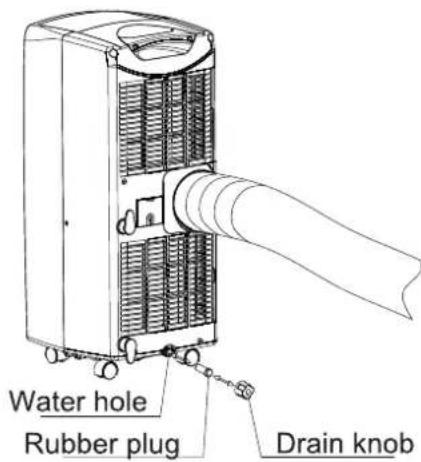
FIG.17
If you wish to operate the unit without the need to empty the water tank, please:
- Remove the drain knob and rubber plug and retain for future use.
- Connect the drain tube supplied to the water outlet as shown and locate the other end into a drain.
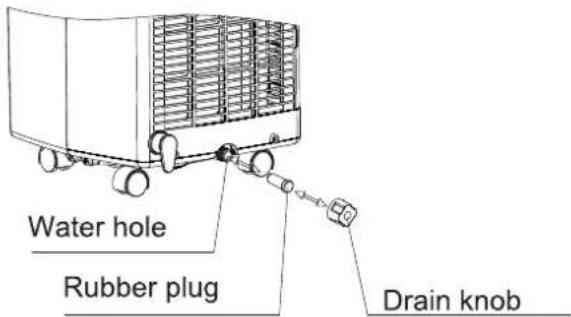
FIG.16
- The drain tube may be extended by adding an extension tube and using a suitable connector.
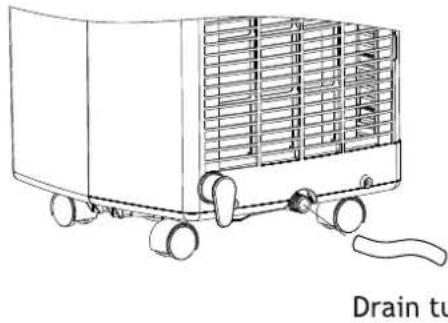
FIG.17
Please note
- The drain must be at or below the outlet level.
- Flashing comp / 'full water' indicator will not function in this mode of drainage.
- If you want to extend the water tube, you can connect it with another tube (OD: 18mm)
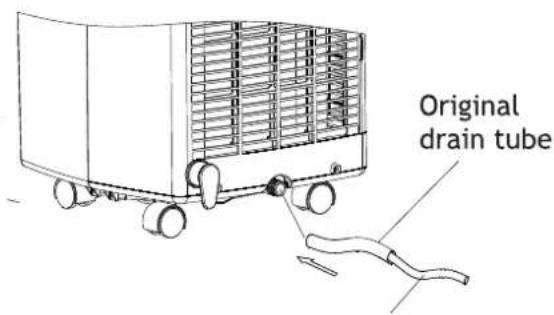
FIG.18
Extended drain tube (OD: 18 mm)
MAINTENANCE
Always unplug the air conditioner from the mains before cleaning. To maximize the efficiency of the air conditioner clean regularly.
Cleaning the housing
Use a soft, damp cloth to wipe the body clean.
Never use aggressive chemicals, gasoline, detergents, chemically treated cloths, or other cleansing solutions. These all could possibly hurt the cabinet.
Cleaning the filter
Use a vacuum cleaner or tap the filter lightly to remove loose dust and dirt from the filters and then rinse thoroughly under running water (no hotter than 40^ ).
Dry thoroughly before replacing.
Notice! Never operate the unit without the filters.
End of season storage
- Drain any water in the unit before completely operating the unit on ventilation only mode for a few hours, to thoroughly dry the inside.
Clean or change the filter
Unplug and store the power cord as shown - Replace in the original carton or cover for storage.
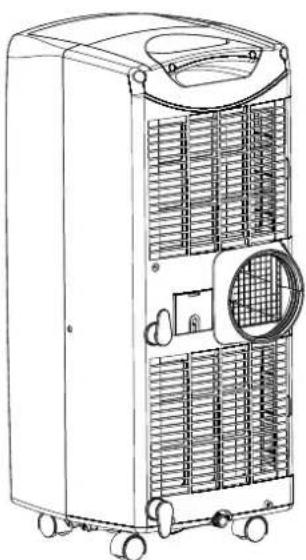
FIG.20
The air conditioner does not run
Is the air conditioner plugged in?
Is there a power failure?
Is the comp / 'full water' indicator flashing?
Is the room temperature below the set temperature?
The machine seems to do little
- Is there direct sunshine? (Please put down the curtain.)
- Are too many windows or doors open?
- Are there too many people in the room?
Is there something in the room producing lots of heat?
The machine seems to do nothing.
Is the filter dusty, contaminated?
Is the air intake or output blocked up?
Is the room temperature below your selected temperature?
Too noisy
Is the machine positioned unevenly so as to create vibration?
Is the floor underneath the machine uneven?
The compressor doesn't run.
Is so, it is possible the overheat protection of the compressor is on. Just wait for the temperature to drop.
Never try to repair or dismantle the unit yourself
Never move the device laying it on its side.
Wait at least 2 hours after transportation before installing and turning on the machine, so the system gas/fluid will return into the compressor (this is very important for the preservation of your airco)
You have 2 years of warranty from the manufacturer from date of purchase; but only in combination with a valid purchase invoice. Without purchase invoice there is no warranty.
Damage to the machine should be reported to the retailer within 48 hours, devices with technical problems due to damage are exempted from warranty.
A cracked filter or a crack in other plastic parts due to incompetent use are exempted from warranty.
Electrical and cooling technical duties may only be performed by an authorized installer
The device is suitable for rooms as indicated on the basis of a well-insulated space.
If the device does not work properly, consult the User Manual and below-mentioned items.
Check if there is power supplied to the outlet.
Check if the filter is clean on the front side, you must regularly clean the filter
Check if the ventilation valves are open on the front side.
Check the receptacle under in the device if it is not full of water. To drain the water, remove the rubber plug from the hose at the rear side of the device. (See User Manual)
When using the airco, check if windows and doors are closed for optimum cooling.
If the temperature is below 18 degrees Celsius, it will not turn on.
Note the device's serial number which is located on the back and on this ticket number:
Check these items in relation with other conditions mentioned in the User Manual before calling the service desk.
If you make an appointment with the service desk and there is no error found to the device, you will still be charged for the visit made by the service technician.
In the event of a malfunction, please mention the following: date of purchase and serial number of the device.
NL : with your supplier Or service desk is available on working days! : 0900-0400026
BE
: with your supplier
Everglades®
TRAGBARER AIRCONDITIONER
Betriebsanleitung
Model No.EV9050