
DSC-W390 - Camera SONY - Free user manual and instructions
Find the device manual for free DSC-W390 SONY in PDF.


| Product type | Digital camera |
| Brand | SONY |
| Model | DSC-W390 |
| Sensor resolution | 14 megapixels (4320×3240) |
| Optical zoom | 5x |
| Digital zoom | Available (precision, intelligent) |
| Shooting modes | Intelligent Auto, Program Auto, Sweep Panorama, Scene Selection, Movie, Easy Shooting |
| Video recording | 1280×720 Fine/Standard, VGA (640×480) |
| Supported memory types | Memory Stick Duo, Memory Stick PRO Duo, Memory Stick PRO-HG Duo, SD, SDHC |
| Internal memory | Approx. 45 MB |
| LCD screen | Yes, color |
| Built-in flash | Yes (Auto, On, Slow Sync, Off) |
| Face/Smile detection | Yes |
| Power supply | Lithium-ion battery NP-BN1 (supplied) |
| Connectivity | Multi-connector (USB/AV), component output (HD) |
| Supplied accessories | NP-BN1 battery, charger, multi-use cable, wrist strap, CD-ROM, manual |
| Weight | Data not available in the manual |
| Dimensions | Data not available in the manual |
| Maintenance | Avoid condensation, don't touch the lens, clean with a soft cloth |
| Safety | Do not expose to water, use only specified battery, store in a cool, dry place |
Frequently Asked Questions - DSC-W390 SONY
User questions about DSC-W390 SONY
0 question about this device. Answer the ones you know or ask your own.
Ask a new question about this device
Download the instructions for your Camera in PDF format for free! Find your manual DSC-W390 - SONY and take your electronic device back in hand. On this page are published all the documents necessary for the use of your device. DSC-W390 by SONY.
USER MANUAL DSC-W390 SONY
DSC-W350/W360/W380/W390
The flash strobes two or more times before shooting using the flash.
to reduce the red-eye phenomenon when
1 Set the camera to shooting mode.
2 MENU (Settings) (Shooting Settings) [Red Eye Reduction] desired mode on the control button
| ✓ | Auto | When the Face Detection function is activated, the flash strobes |
| ↓ | automatically to reduce the red-eye phenomenon. | |
| On | The flash always strobes to reduce the red-eye phenomenon. | |
| Off | Does not use Red Eye Reduction. |
- To avoid blurring of images, hold the camera firmly until the shutter is released. It usually takes a second after you press the shutter button. Be also sure not to allow the subject to move during this period.
- Red Eye Reduction may not produce the desired effects. It depends on individual differences and conditions, such as distance to the subject, or if the subject looked away from the pre-strobe.
- If you do not use the Face Detection function, Red Eye Reduction does not work, even when you select [Auto].
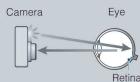
What causes the red-eye phenomenon?
Pupils become dilated in dark environments. Flash light is reflected off the blood vessels at the back of the eye (retina), causing the "red-eye" phenomenon.
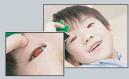
Other ways to reduce red-eye
-
Select (High Sensitivity) mode in Scene Selection. (The flash is set to [Off] automatically.)
-
When the eyes of the subject turn out red, correct the image with [Retouch] [Red Eye
Correction] on the viewing menu or with the supplied software "PMB"
Mode Facile (DSC-W350/W360subsection)
Mode Facile (DSC-W350/W360subsection)
Bulgarie, France, Greece, Guyane, Iran, Irak, Monaco, Russia, Ukraine, etc.
Lecture continue. 72
Logiciel 114
M
Mesure multi-zone 63
Mesure spot 63
Mise au P. 61
Mode de mesure 63
Mode Demo 92
Mode ENR. 47
Mode Facile 29, 71
Mode Film 35
Music Transfer. 114, 115
N
Neige 34
NTSC. 95
Importation d-images. 116, 117
MPEG Layer-3 audio coding technology and patents licensed from Fraunhofer IIS and Thomson.