WM850EB - Washing machine Campomatic - Free user manual and instructions
Find the device manual for free WM850EB Campomatic in PDF.


| Product type | Washing machine |
| Brand | Campomatic |
| Model | WM850EB |
| Dimensions (W x H x D) | 59.5 x 85.0 x 59.0 cm |
| Maximum wash capacity | 8.5 kg (cotton), 4 kg (synthetics), 2 kg (wool) |
| Maximum spin speed | Approximately 1000 rpm (depending on model) |
| Water pressure | 0.05 - 1 MPa |
| Technology | Easy Logic (automatic load recognition) |
| Wash programs | Cotton (90°, 75°, 60°, 40°, 30°), Synthetic (60°, 40°, 30°), Delicate (40°, 30°), Wool (40°, 30°, cold), Quick wash (35°), Daily (40°), Cold wash, Rinses, Drain and spin |
| Special functions | Prewash, Intensive wash, Extra rinse, Rinse hold, Delay start (up to 8h), Variable spin, Anti-unbalance control |
| Loading type | Front-loading (porthole) |
| Electrical supply | See rating plate (230 V / 50 Hz typical) |
| Maximum input power | See rating plate (approximately 2000 W) |
| Noise level | Not specified, estimated 55-75 dB |
| Energy class | Not specified |
| Net weight | Not specified, estimated 60-70 kg |
| Maintenance | Regularly clean the filter and door seal; descale if necessary |
| Safety | Door lock during cycle, anti-unbalance control |
| Spare parts | Available from the manufacturer or authorized dealers |
| Repairability | Repairability index not specified; standard parts accessible |
Frequently Asked Questions - WM850EB Campomatic
User questions about WM850EB Campomatic
0 question about this device. Answer the ones you know or ask your own.
Ask a new question about this device
Download the instructions for your Washing machine in PDF format for free! Find your manual WM850EB - Campomatic and take your electronic device back in hand. On this page are published all the documents necessary for the use of your device. WM850EB by Campomatic.
USER MANUAL WM850EB Campomatic
FONCTIONS OPTIONNELLES
MAIN FUNCTIONS OF THE WASHING MACHINE
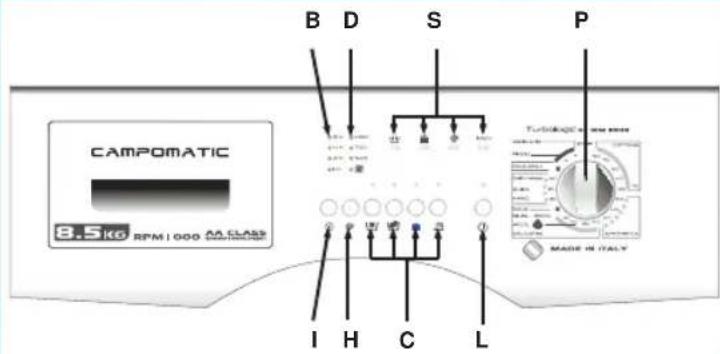
C Optional function buttons
D Spin speed indicator leads
B Delayed start led
H Spin selection button
I Delayed start button
L Start button
P Programme and temperature knob
S Programme status led
USING THE WASHING MACHINE

"EASY LOGIC" TECHNOLOGY
The electronic washing machine is fitted with an "EASY LOGIC" system that automatically recognises the quantity of washing loaded. The machine can thus regulate the amount of water to use for the wash and proportion the wash time accordingly, thus saving water, time and energy.
In the case where the amount of washing is less than the maximum recommended load (see technical characteristics table), the quantity of water used for the wash will be reduced by 2 litres for each kg less of washing.
In the case of a half-load or less, the machine will automatically carry out one rinse less than programmed.
N.B. The "EASY LOGIC" function is only active for cotton programmes.
WASH CYCLE:
(follow these instructions and the washing machine will run the selected wash cycle)
- Open the door
- Load the washing in the drum and close the door. Warning: Do not overload the machine. It is not advisable to wash items that absorb large quantities of water such as carpets.
- Ad a low-suds detergent and softener designed for automatic washing machines in the respective compartments of the detergent drawer (see chapter "USE OF DETERGENTS").
- Close the detergent drawer. Do not open the drawer while the machine is working as this may cause water to spill out.
- Rota te the programmer knob (P) to select the required programme and temperature according to the type of fabric to wash (see: "PROGRAMME TABLES")
N.B.: When selecting a program, the led of maximum spin speed allowed by the program selected will automatically light up. One of the leds (S) will light up to indicate the starting wash cycle.
- Select the required spin speed by pressing button (H) (see "VARIABLE SPIN").
- Select the (C) buttons with the functions required (see "OPTIONAL FUNCTIONS").
- Press button (I) if required (see "DELAYED START").
- Press button (L) to start the wash cycle (see "START BUTTON").
- At the end of the wash cycle, turn the pro gram selector knob (P) on "STOP".
- Open the door and remove the washing.
- With dry hands, unplug the washing machine from the mains supply.
- Close the water feed valve.
VARIABLE SPIN:
The machine offers a wide selection of spin speeds that can be selected beforehand according to the wash programme. To change the spin speed, simply press button (H) to select the required speed. The corresponding speed led will light-up each time the button is pressed. To exclude the s pin, select the led corresponding to symbol , present, or the writing "no-spin".
NB. the maximum spin speed will vary according to the model and is indicated by the LEDs on the machine. The maximum spin speed that can be selected for each programme is indicated by the leds that light-up automatically when the wash programme is selected.
Spin load imbalance control:
This washing machine is equipped with a special electronic control system for correctly balancing the wash load.
Prior to each spin, the system ensures that the washing is evenly distributed in the drum. If the washing is not evenly distributed, the final spin speed is reduced, and if the load is very unbalanced, the spin is not effected.
DELAYED START:
The machine is fitted with a delayed start function. This allows the washing machine to be programmed to start the wash cycle up to 8 hours later. The delay in hours can be selected as follows: press the button to set a delay of 1, 2, 4, 8 hours. When the START button (L) is pressed, the selected led will flash or button I) will light up (according to the model), signalling that the function has been activated. The machine will wait for the number of hours set to elapse and then start the wash cycle automatically.
START BUTTON:
After having carried out all the operations described in points 1 to 8 in the paragraph "WASHING CYCLE" press this button and the washing machine will begin its washing cycle. The relative LED will light up after 2-3 seconds, to indicate that the door is locked and the program has started.
PROGRAMMER KNOB "STOP":
The stop function resets the washing machine. If, for any reason, you want to change the wash programme or add more washing to the load during the wash cycle, simply place the programmer knob in position "STOP", then re-position the knob on the new programme and press the "START" button.
Warning!! only use this function if strictly necessary and then only if the programme to reset has been running for a few minutes. Before opening the door after a reset, wait 2 minutes for the locking mechanism to release.

OPTIONAL FUNCTIONS
If one of the following buttons is selected, the corresponding LED will switch on. But if it has been selected by mistake or you have changed your mind, simply press it again to cancel the selection.
PREWASH:
Press this button to run a short wash at a maximum temperature of 40^ of approximate duration 10 minutes. This function can only be used with the "COTTON" and "SYNTHETIC" programmes and DAILY
N.B. When using this function, remember to put some detergent in the prewash compartment too.

ENERGY WASH:
Press the button and the machine will carry out a wash cycle at the set temperature but lasting longer.
The button is active with "COTTON" and "SYNTHETICS" programs.
PLUS RINSES:
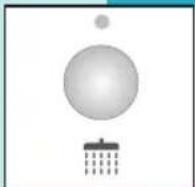
The washing machine has been designed to reduce water consumption to a minimum. In very soft water areas, or in the case where detergent residues are noticed at the end of the wash cycle, pressing this button will add one more rinse to the programme.

ANTI-CREASE:
When this button is pressed, at the end of the wash cycle, the items loaded in the washing machine will continue to rotate for a further thirty minutes to reduce creasing. With this function, the working spin speed is 800 rpm.
NB. The use of this function depends on the type of programme selected. Consequently, if the wash programme does not include this function, the button cannot be enabled (see "PROGRAMME TABLE").
MONTITORING THE WASH:
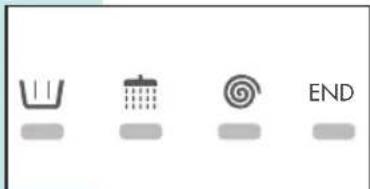
The figure alongside shows the 4 main functions of a wash cycle: PREWASH - MAIN WASH, RINSES, SPIN, END.
During the cycle, each of these functions is highlighted by a led informing the user what the washing machine is doing at that moment.
After the spin phase, the corresponding led will stay lit for approximately 2 minutes; this is the time lapse necessary before the door can be opened. At this point, the "END" led will light-up.

PROGRAMME TABLES
| PROGRAMMER KNOB | WASH TEMPERATURE | SYMBOL | FABRIC TYPE | Detergent compartment | BUTTONS ENABLED | |||
| U | ||||||||
| COTTON | 90° | 90° | Heavily soiled white cotton fabrics with organic stains. | 2+1 | ||||
| COTTON | 75° | 75° | Sheets, shirts, tablecloths, towels that are resistant and heavily soiled | 2+1 | ||||
| COTTON * | 60° | 60° | For shirts, tablecloths, towels that are resistant and normally soiled | 2+1 | ||||
| COTTON | 40° | 40° | White and coloured fabrics that are resistant and heavily soiled | 2+1 | ||||
| COTTON | 30° | 30° | Delicate coloured fabrics that are lightly soiled | 2+1 | ||||
| SYNTHETICS | 60° | 60° | Colourfast synthetic fabrics that are heavily soiled | 2+1 | ||||
| SYNTHETICS | 40° | 40° | Delicate coloured synthetic fabrics that are lightly soiled | 2+1 | ||||
| SYNTHETICS | 30° | 30° | Delicate coloured synthetic fabrics that are lightly soiled | 2+1 | ||||
FUNCTION ENABLED FUNCTION DISABLED 1OPTIONAL WITH PRE-WASH BUTTON PRESSED
- Benchmark program for energy classification, in accordance with the EN 60456 standard, running at max. spin speed and with energetic wash button selected.
| PROGRAMMER KNOB | WASH TEMPERATURE | SYMBOL | FABRIC TYPE | Detergent compartment | BUTTONS ENABLED | |||
| DELICATES | 40° | 40° | Delicate cotton, viscous and mixed delicate fabrics | 211 | ○ | ○ | ○ | |
| DELICATES | 30° | 30° | Delicate cotton, viscous and mixed delicate fabrics | 211 | ○ | ○ | ○ | |
| WOOL *** | 40° | Machine washable wool | 211 | ○ | ○ | ○ | ○ | |
| WOOL | 30° | 30° | Machine washable wool | 211 | ○ | ○ | ○ | ○ |
| WOOL | COLD | — | Machine washable wool | 211 | ○ | ○ | ○ | ○ |
| SILKS | ||||||||
| HAND WASH | 30° | Hand washable fabrics | 211 | ○ | ○ | ○ | ○ | |
| QUICK WASH | 35° | 35° | Fabrics in delicate cotton, viscse and mixed fibres, lightly soiled, lasts about 35/40 min. | 211 | ○ | ○ | ○ | ○ |
| DAILY WASH | 40° | 40° | Fabrics in delicate cotton and coloured fabrics, lightly soiled and used daily | 211 | ○ | ○ | ○ | ○ |
| COLD WASH | COLD | — | Delicate fabrics | 211 | ○ | ○ | ○ | ○ |
| RINSES | — | — | To rinse and refresh the washing | 211 | ○ | ○ | ○ | ○ |
| DRAIN AND SPIN | — | — | Drain and final spin | 211 | ○ | ○ | ○ | ○ |

FUNCTION ENABLED FUNCTION DISABLED

OPTIONAL WITH PRE-WASH BUTTON PRESSED
*** The wool wash cycle of this machine has been approved by Woolmark for the washing of machine washable Woolmark products provided that the garments are washed according to the instructions on the garment label and those issued by the manufacturer of this washing machine. M0402-M0403-M0404-M0405.
TECHNICAL CHARACTERISTICS
| MODEL → | WM850E WM850EB WM850ES | |
| Dimensions: | Width cm.: | 59.5 |
| Height cm.: | 85.0 | |
| Depth cm.: | 59.0 | |
| Maximum recommended load: | 8.5 Kg | |
| 4 Kg | ||
| 2 Kg | ||
| Max. spin: (rpm) | MAX | |
| Water pressure: | min. 0,05 MPa - max. 1 MPa | |
| Max. absorbed power/Electrical connection | see rating plate | |
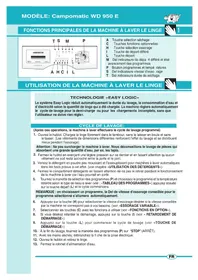
- FONCTIONS OPTIONNELLES
- MAIN FUNCTIONS OF THE WASHING MACHINE
- USING THE WASHING MACHINE
- "EASY LOGIC" TECHNOLOGY
- WASH CYCLE:
- VARIABLE SPIN:
- Spin load imbalance control:
- DELAYED START:
- START BUTTON:
- PROGRAMMER KNOB "STOP":
- OPTIONAL FUNCTIONS
- PREWASH:
- ENERGY WASH:
- PLUS RINSES:
- ANTI-CREASE:
- MONTITORING THE WASH:
- FUNCTION ENABLED FUNCTION DISABLED 1OPTIONAL WITH PRE-WASH BUTTON PRESSED
- FUNCTION ENABLED FUNCTION DISABLED
- OPTIONAL WITH PRE-WASH BUTTON PRESSED
Brand : Campomatic
Model : WM850EB
Category : Washing machine