F6716 - Watch FESTINA - Free user manual and instructions
Find the device manual for free F6716 FESTINA in PDF.


| Product Type | Combined quartz watch (analog + digital) |
| Brand | Festina |
| Model | F6716 |
| Accuracy | ±20 sec/month max (at normal temperature 5°C to 35°C) |
| Operating temperature range | 0°C to 55°C |
| Time display | Analog (hands) and digital (30 cities + UTC, daylight saving time) |
| Calendar | Month, date, day, automatic (1995-2099), city adjustment |
| Alarm 1 and Alarm 2 | Two adjustable daily alarms, different tone, 20 second duration |
| Chronograph | Measurement up to 24h, accuracy 1/100s, split time (SPL) |
| Timer | Countdown up to 99 minutes, 1 minute increment, 5 second alarm |
| Time zone adjustment | Selection of displayed cities, enable/disable daylight saving time |
| Lighting | Electroluminescent panel (EL), activation by button Ⓐ |
| Power supply | SR927W battery |
| Battery life | Approximately 2 years (alarm 40s/day, timer 5s/day, lighting 3s/day) |
| Full reset | Procedure in case of abnormal display or after battery change |
| Recycling | Selective collection WEEE, drop off at an approved point of sale |
Frequently Asked Questions - F6716 FESTINA
User questions about F6716 FESTINA
0 question about this device. Answer the ones you know or ask your own.
Ask a new question about this device
Download the instructions for your Watch in PDF format for free! Find your manual F6716 - FESTINA and take your electronic device back in hand. On this page are published all the documents necessary for the use of your device. F6716 by FESTINA.
USER MANUAL F6716 FESTINA
Pila aplicable SR927W
Using the cronograph "CHR" 56
Using the Timer
Using the Zone Setting
When these problems occur... 66
All-reset operation 67
Specifications 68
NAME OF PARTS
IFMCR60
![Hour Hand Button M Mode display Button B Second Hand Digital Display [1] Minute Hand Crown Digital Display [2] 12 10:09:35 TAE 3 NYC](/content/2026/03/479889/images/31c4fd558a030718ac2bbdef56f310a17e84ef082658fb80eaff8dd33e04e7a2.jpg)
IFMCR60
FEATURES
This watch allows you to display the time in 30 cities and UTC (universal time coordinated) time worldwide by a simple button operation. The watch is also equipped with an internal EL (electroluminescence) lamp function that allows you to read the display even in the dark.
EL ILLUMINATION FUNCTION
What is EL?. Electroluminescence is a physical phenomenon whereby electrical voltage is directly converted into light in a thin film solid. This watch tilzes an EL panel for the illumination function.
How to Light the Illumination? The EL Illumination comes on in the following situations.
-
When the Ⓐ button is pressed during the normal
mode, mode, or mode displays. -
During split time display or stop in the
mode.
IFMCR60
SETTING DE ANALOG TIME
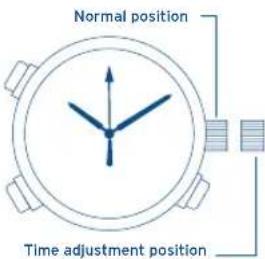
In the case of watches where the crown is a screw type, perform the operation after loosening the screw. Make sure to tighten the screw firmly when the operation has been completed.
- when the second hand comes to the 0-second position, pull the crown out to the time adjustment position.
- Turn the crown to align with the correct time.
- Return the crown to its normal position.
The analog time and digital time can be adjusted separately, so you can use this watch as a dual time watch.
IFMCR60
HANDING OF DIGITAL DISPLAY SECTION A- SWITCHING MODES (Functions)
In addition to the time mode, this watch has six other modes (functions): calendar, Alarm 1, Alarm 2, Chronograph, Timer, and Zone Setting. Each press of the button switches the mode in the following sequence.
| Display Mode | |
| TME Time | |
| CAL Calendar | |
| AL1 Alarm 1 | |
| AL2 Alarm 2 | |
| CHR Chronograph | |
| TMR Timer | |
| SET Zone Setting | |
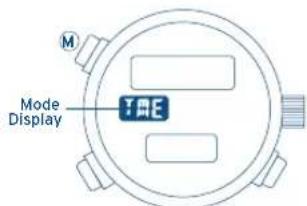
* If the watch is left in the Alarm 1, Alarm 2, or Zone Setting mode for approximately 2 minutes, it automatically returns to the time mode
IFMCR60
B- DISPLAYING THE TIME AND CALENDAR OF CITIES WORLDWIDE
- Press the Ⓜ button to select the
mode or mode.
IFMCR60
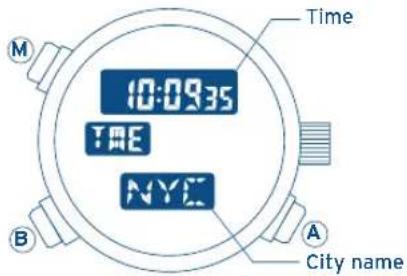
- Each time the Ⓑ button is pressed, a city's name and its time (calendar) are displayed sequentially. Cities can be displayed in the order No. 2→3 ... 31→1→2 (e.g., LON→PAR ... BUE→UTC→LON), as shown in the table, or in the opposite order, i.e., No. 2→1→31 ... 3→2 (e.g., LON→UTC→BUE ... PAR→LON). To switch to the opposite display sequence, press the Ⓑ button and the Ⓑ button simultaneously.
IFMCR60
The Time Difference Between the Cities and UTC Time
| NO. | Indicator | City | Time difference | Summer time |
| 1 | UTC | Universal time coordinated | +0 | |
| 2 | LON | London 0 | + | ○ |
| 3 | PAR | Paris +1 | ○ | |
| 4 | ROM | Rome +1 | ○ | |
| 5 | CAI | Cairo | +2 | ○ |
| 6 | IST | Istanbul | +2 | ○ |
| 7 | MOV | Moscow | +3 | ○ |
| 8 | KWI | Kuwait | +3 | X |
| 9 | DXB | Dubai | +4 | X |
| 10 | KHI | Karachi | +5 | X |
| 11 | DEL | New Delhi | +5,5 | X |
| 12 | DAC | Dacca | +6 | X |
| 13 | BKK | Bangkok | +7 | X |
| 14 | SIN | Singapore | +8 | X |
| 15 | HKG | Hong Kong | +8 | X |
| NO. | Indication | City | Time difference | Symmer Time |
| 16 | PEK | Beijing +8 X | ||
| 17 | TYO | Tokyo | +9 | X |
| 18 | SYD | Sydney | +10 | ○ |
| 19 | NOU | Noumea | +11 | X |
| 20 | AKL | Auckland | +12 | ○ |
| 21 | HNL | Honolulu | -10 | X |
| 22 | ANC | Anchorage | -9 | ○ |
| 23 | LAX | Los Angeles | -8 | ○ |
| 24 | DEN | Denver | -7 | ○ |
| 25 | CHI | Chicago | -6 | ○ |
| 26 | MEX | Mexico City | -6 | X |
| 27 | NYC | New York | -5 | ○ |
| 28 | YUL | Montreal | -5 | ○ |
| 29 | CCS | Caracas | -4 | X |
| 30 | RIO | Rio de Janeiro | -3 | ○ |
| 31 | BUE | Buenos Aires | -3 | X |
IFMCR60
As of 1997.
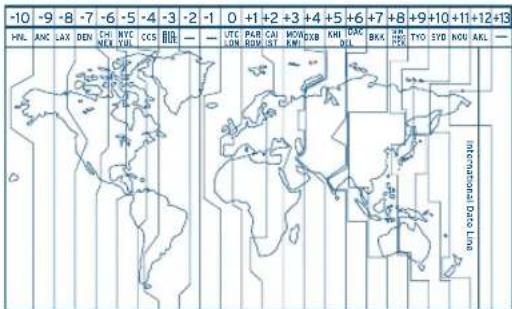
* Cities (regions) with summertime are indicated by the O symbol, and cities (regions) with no summertime system are indicated by the X symbol.
* Please note that time difference and summertime for cities are subject to change.
IFMCR60
C- SETTING DE DIGITAL TIME
When the time is set for one of the 30 cities and UTC (Universal time coordinated) time, the time is automatically set for the cities.
[Normal Time Display]
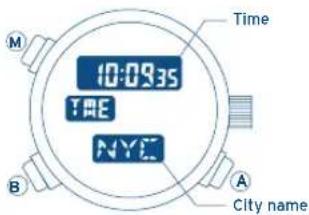
What Is summertime? Summertime or "daylight saving time: DST" has been inaugurated in many countries in order to efficiently utilize daylight by advancing the clock a certain amount of time, in relational to the normal time, during the summer. (This watch advances the time by 1 hour).
IFMCR60
- Press the Ⓜ button to select the
mode. - Press the Ⓑ button to display the city whose time you want to adjust.
- Press and hold the Ⓑ button for 2 seconds or more. "S.T. (summertime abbreviation.)" and "ON" or "OF" flashes.
Press the Ⓐ button to select summertime (ON) or (OF) for the city. - Each time the B button is pressed, the flashing figures change in this sequence [Summertime 'Seconds' Minutes]
Hour '12 hours/24 hours] sequence. Make the figures that you want to adjust, flash. - Press the Ⓐ button to adjust. (The flashing figures can be adjusted.)
- Press the Ⓜ button to return to the normal time display.
IFMCR60
- When running in the 12-hour system, pay attention to the morning Ⓐ and afternoon Ⓟ indicators.
- The set mode (flashing display) will automatically revert to thenormal display if left for two minutes with no input.
- Summertime can be set for any city. The Summertime setting is interlocked with all modes so that the
, and modes of a city for which Summertime is selected, will also indicate the time according to the Summertime.
IFMCR60
D- USING THE CALENDAR
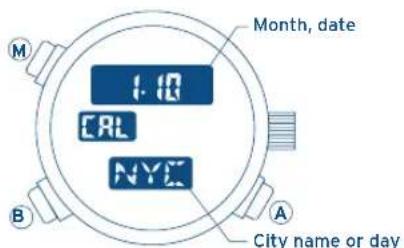
Adjusting the calendar for one of the 30 cities and UTC time will automatically adjust the calendar for the remaining cities.
[Normal Calendar Display]
IFMCR60
[Adjusting the calendar]
- Press the Ⓜ button to move to the
mode. - Press the Ⓑ button to display the city whose calendar you want to adjust.
- Press and hold the Ⓑ button for 2 seconds or more, the "month" starts flashing. Press the Ⓐ button to adjust the "month". (The flashing figures can be adjusted.)
- Each time the Ⓑ button is pressed, the flashing figures change in this sequence [Month ' Day ' Year] sequence.
Make the item that you want to adjust, flash.
- Press the Ⓐ button covers adjust. (If the button is kept pressed, the setting changes quickly.)
- Press the Ⓜ button to return to the normal calendar display.
• The calendar covers the years 1995 thru 2099.
- The automatic calendar eliminates any need to adjust the watch at the end of the month or for leap years.
• The day is automatically adjusted when the month, date and year are adjusted.
IFMCR60
- The calendar adjustment mode (flashing display) will automatically return to the normal display if left for about two minutes with no input.
- If a nonexisting date (e.g., February 30) is set, the date will automatically reset to the first of the next month once display returns to normal.
[Changing the Display]
[ City name ] [ Day ]

Press the Ⓐ button for more than 2 seconds to switch between city display and day display.
IFMCR60
E- USING THE ALARM
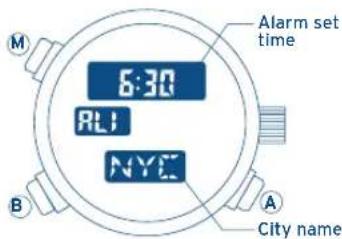
Setting and operation of the Alarm 1 and Alarm 2 are the same, only the sound of the alarm is different.
Once you turn the alarm on, it will sound for 20 seconds at the same time each day.
[Normal alarm display]
IFMCR60
[Setting the Alarm]
- Press the M button to select the
or mode. - Press the Ⓑ button to display the time of the city for which you want to set the alarm.
- Press and hold the Ⓐ button for 2 seconds or more, the "hour" display will start flashing. The flashing item can be adjusted. Press the Ⓐ button to adjust the "hour". (If the Ⓐ button is kept pressed, the setting changes quickly.).
- Press the Ⓑ button while the "hour" is flashing to make the "minute" display flash instead. Press the Ⓐ button to adjust.
- Press the Ⓜ button to return to the normal alarm display.
IFMCR60
- While in the alarm mode you can sound the alarm continuously for as long as you keep the Ⓐ button pressed.
(Alarm sound monitor function) - When you are using the 12-hour system, the alarm time will also run according to the 12-hour system. Watch the AM/PM indicator to confirm that you have made the setting you want.
- The alarm mode will automatically return to the normal display if left for about two minutes with no input.
IFMCR60
[Switching the Alarm Function On and Off]
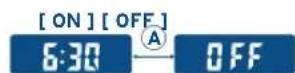
Press the Ⓐ button while in the alarm mode to switch the alarm between on and off.
[How to Stop the Alarm Sound]
Press any button to stop the alarm while sounding.
IFMCR60
This chronograph measures times of up to 23 hours 59 minutes 59 seconds and 99/100 seconds in units of 1/100 second. On reaching 24 hours of elapsed time, it resets to zero (0:00'00") and stops. It can also measure split times (intermediate elapsed times).
[Chronograph reset display]
| M | Measured time(minutes, secondes1/100 seconds) |
M
B
A
Measured time (hour)
56
IFMCR60
* About the confirmation sound
A confirmation sound will be heard when the chronograph is started, stopped, and at the time of split and reset operations.
[Accumulative Time Measurement]
- Each time the A button is pressed, the chronograph is switched between start and stop.
- Press the B button to reset while the chronograph is stopped.
B
RESET STOP
MEASURE
A
A
57
IFMCR60
[Split Time Measurement]
- Each time the Ⓐ button is pressed, the chronograph is switched between start and stop.
- Press the Ⓑ button while the chronograph is measuring to display the split time for about ten seconds. (The "SPL" indicator will flash while the split time is displayed.) Each time the Ⓑ button is pressed, the newest split time is displayed.
- Press the Ⓑ button to reset while the chronograph is stopped.
![FESTINA F6716 - [Split Time Measurement] - 1](/content/2026/03/479889/images/5ccf6f6336cb652535044ca8b3350b4dd8832f85087b16e55e2bf47df68abb79.jpg)
flowchart
graph TD
    A["RESET MEASURE"] --> B["STOP"]
    B --> C["SPLIT TIME"]
    C --> D["+1"]
    D --> E["Split Time"]
    E --> F["Reset Measure"]
    F --> G["Stop"]
    G --> H["STOP"]
    H --> I["Reset Measure"]
    I --> J["Split Time"]
    J --> K["+1"]
    K --> L["Split Time"]
    L --> M["Reset Measure"]
    M --> N["Stop"]
    N --> O["Reset Measure"]
    O --> P["Split Time"]
    P --> Q["+1"]
    Q --> R["Split Time"]
    R --> S["Reset Measure"]
    S --> T["Stop"]
    T --> U["Reset Measure"]
    U --> V["Split Time"]
    V --> W["+1"]
    W --> X["Split Time"]
    X --> Y["Reset Measure"]
    Y --> Z["Stop"]
    Z --> AA["Reset Measure"]
    AA --> AB["Split Time"]
    AB --> AC["+1"]
    AC --> AD["Split Time"]
    AD --> AE["Reset Measure"]
    AE --> AF["Stop"]
    AF --> AG["Reset Measure"]
    AG --> AH["Split Time"]
    AH --> AI["+1"]
    AI --> AJ["Split Time"]
    AJ --> AK["Reset Measure"]
    AK --> AL["Stop"]
    AL --> AM["Reset Measure"]
    AM --> AN["Split Time"]
    AN --> AO["+1"]
    AO --> AP["Split Time"]
    AP --> AQ["Reset Measure"]
    AQ --> AR["Stop"]
    AR --> AS["Reset Measure"]
    AS --> AT["Split Time"]
    AT --> AU["+1"]
    AU --> AV["Split Time"]
    AV --> AW["Reset Measure"]
    AW --> AX["Stop"]
*1: After 10 seconds, automatically returns to the measuring display.
IFMCR60
[Switching the Mode During Chronograph Measuring]
Even if the M button is pressed and the mode is switched while the chronograph is measuring, the measurement will continue.
When you return to the
![FESTINA F6716 - [Switching the Mode During Chronograph Measuring] - 1](/content/2026/03/479889/images/145f23386eddb27a8f403f5ca9dfd2b1b8bfc5e977f9c9b3969133f54daf9127.jpg)
flowchart
graph LR
    A["Start"] --> B["Split time"]
    B --> C["Goal"]
    style A fill:#f9f,stroke:#333
    style C fill:#bbf,stroke:#333
What is split time: Intermediate elapsed times from the start.
IFMCR60
USING THE TIMER
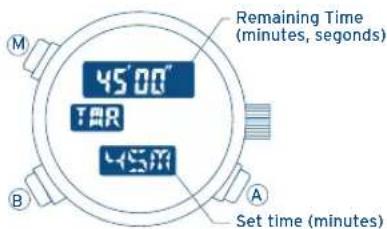
You can set the timer for a number of whole minutes up to 99 in one minute increments. At "time up" (when the set time has elapsed), the time-up alarm sounds for five seconds and the watch returns to the timer set time.
[Timer set display]
IFMCR60
[How to Set the Timer]
- Press the Ⓜ button to move to the
mode. - Each time you press the Ⓑ button, the set time will increase by one minute. (If the Ⓑ button is kept pressed, the setting changes quickly.)
[How to Use the Timer]
- Each time the Ⓐ button is pressed, the timer is switched between start and stop.
- Press the Ⓑ button to reverts to set time while the timer is stopped.
![FESTINA F6716 - [How to Use the Timer] - 1](/content/2026/03/479889/images/00445b269fe2a8324a1091b5d1763cb2d778c76936570048345e85386b3ccb58.jpg)
flowchart
graph TD
    A["RESET TIMING"] --> B["STOP"]
    B --> C["TIME UP"]
    C --> D["To be automatically returned to Reset Display"]
    D --> E["A"]
    E --> F["B"]
    F --> G["*1"]
    G --> H["A"]
    H --> I["B"]
    I --> J["RESET TIMING"]
    J --> K["A"]
    K --> L["B"]
    L --> M["STOP"]
    M --> N["A"]
    N --> O["B"]
    O --> P["TIME UP"]
*1: Timer restart function.
IFMCR60
If you press the Ⓑ button while the timer is running, the time is reset to the set time and the timer is automatically restarted.
(Timer restart function)
* About the confirmation sound
While in the timer mode, a confirmation sound will be heard when the timer is started, stopped, and restart operations.
[Switching the Mode During Timer Running]
Even if the Ⓜ button is pressed and the mode is changed while the timer is running, the timer countdown will continue. When you return to the
IFMCR60
USING THE ZONE SETTING
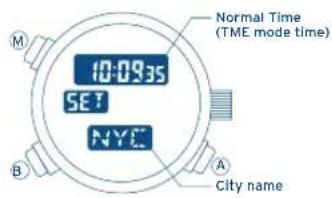
In the zone setting mode, you can select the cities that you want to display from among the 30 cities and UTC time that this watch is capable of displaying, and you can set Summertime for each of these cities.
This allows you to easily recall and display only the cities that have been set (to ON) in any mode.
[Normal zone setting display]
IFMCR60
[How to Zone Setting]
- Press the Ⓜ button to move to the
mode. - Press the Ⓑ button to recall the city that you want to set.
- When the Ⓑ button is pressed for more than 2 seconds, the "ON" or "OFF" and the "city name" will flash. Press the Ⓐ button to select whether the city should be displayed (ON) or not (OFF).
- When the Ⓑ button is pressed while the "city name" and "ON", or "OFF", are flashing, the "S.T. (Summertime symbol)" and "ON", or "OFF", will start flashing. Press the Ⓐ button to select whether Summertime should be set (ON) or canceled (OFF).
- To set other cities, press the Ⓑ button again to move to the adjustment mode for the next city. Follow the same procedure in sequence to set each of the desired cities.
IFMCR60
- When all the desired cities have been set, press the Ⓜ button again to return to the normal zone setting display.
- The zone setting adjustment mode (flashing display) will automatically return to the normal display if left for more than two minutes with no input.
IFMCR60
[The Watch Shows Abnormal Display]
When the battery life is close to expiring, the display or functions may become abnormal. When these problems occur, replace the battery as soon as possible.
In rare cases, a strong impact, etc. may cause the display or functions to become abnormal (no display, alarm sounds incessantly, etc.) In this case, perform the all-reset operation by referring to "ALL-RESET OPERATION".
[Following Battery Replacement]
After the battery has been replaced, perform the all-reset operation by referring to "ALL-RESET OPERATION".
IFMCR60
ALL-RESET OPERATIONWHEN THESE PROBLEMS OCCUR...
- Pull the crown out.
- Press the three buttons Ⓐ, Ⓑ, and Ⓜ simultaneously. (While pressed, there will be no display.)
- Release the buttons. (All the display segments will appear.)
- Push the crown in. (At this point, a monitor sound is heard.) This completes the all-reset operation.
This completes the all-reset operation. Set each mode correctly before using the watch.
IFMCR60
SPECIFICATIONS
Type Combination (Analog + Digital) quartz watch
Accuracy Whithin 20 sec/month (At a normal temperature of
Operating temperature
range 0°C/32°F - 55°C/131°F
Function Time Hours, minutes, seconds, City, name,
Summertime switch function
Calendar Month, date, day, city name
Alarma 1 / Alarma 2
Chronograph 24-Hour measurement
(1/100 seconds unit),
Split time measurement
Timer 99 minutes system
(1 minute unit)
Zone setting
IFMCR60
Additional function EL lamp function
Applicable battery SR927W
Battery life Approx. 2 years. (conditions: 40-second alarm sound/day,
5-second timer time-up sound/day, 3-second
EL lamp function/day)

By virtue of the regulations pursuant to the handling of waste products deriving from electronic and electrical equipment, end of lifecycle watch making products must be selectively collected for processing. You may therefore dispose of your quartz watch making products at any of our retail outlets or any other authorized collection point. The selective collection, processing, rating and recycling of these products helps contribute to safeguarding the environment and protecting our health.