
SAW705 - Pregnant SONY - Free user manual and instructions
Find the device manual for free SAW705 SONY in PDF.


User questions about SAW705 SONY
0 question about this device. Answer the ones you know or ask your own.
Ask a new question about this device
Download the instructions for your Pregnant in PDF format for free! Find your manual SAW705 - SONY and take your electronic device back in hand. On this page are published all the documents necessary for the use of your device. SAW705 by SONY.
USER MANUAL SAW705 SONY
Operating Instructions EN
Mode d'emploi
CCC C
SA-W70ES/SA-W705/SA-W505
WARNING
To prevent fire or shock hazard, do not expose the unit to rain or moisture.
Do not install the appliance in a confined space, such as a bookcase or built-in cabinet.
For the customers in the U.S.A.
text_image
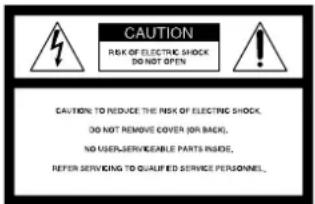
CAUTION RISK OF ELECTRIC SHOCK DO NOT OPEN CAUTION TO REDUCE THE RISK OF ELECTRIC SHOCK, DO NOT REMOVE COVER (OR BACK), NO USER-SERVICEABLE PARTS INSIDE, REFER SERVICING TO QUALIFIED SERVICE PERSONNEL,
This symbol is intended to alert the user to the presence of uninsulated "dangerous voltage" within the product's enclosure that may be of sufficient magnitude to constitute a risk of electric shock to persons.

This symbol is intended to alert the user to the presence of important operating and maintenance (servicing) instructions in the literature accompanying the appliance.
Owner's Record
The model number and serial numbers are located at the rear. Record these numbers in the spaces provided below. Refer to these numbers whenever you call upon your Sony dealer regarding this product.
Model No. SA-W70ES/SA-W705/
SA-W505
Serial No. ____
CAUTION
You are cautioned that any changes or modifications not expressly approved in this manual could void your authority to operate this equipment.
CAUTION
Use of this appliance with some systems may present a shock or fire hazard. Do not use with any units which have the following marking located near output. WARNING: HAZARDOUS ENERGY!
Note to CATV system installer:
This reminder is provided to call CATV system installer's attention to Article 820-40 of the NEC that provides guidelines for proper grounding and, in particular, specifies that the cable ground shall be connected to the grounding system of the building, as close to the point of cable entry as practical.
For detailed safety precautions, see the leaflet "IMPORTANT SAFEGUARDS" included with this manual in the vinly bag.
For the customers in Canada
CAUTION
TO PREVENT ELECTRIC SHOCK, DO NOT USE THIS POLARIZED AC PLUG WITH AN EXTENSION CORD, RECEPTACLE OR OTHER OUTLET UNLESS THE BLADES CAN BE FULLY INSERTED TO PREVENT BLAD EXPOSURE.
NOTICE FOR THE CUSTOMERS IN THE UNITED KINGDOM
A moulded plug complying with BS 1363 is fitted to this equipment for your safety and convenience.
Should the fuse in the plug supplied need to be replaced a 5 AMP fuse approved by ASTA or BSI to BS 1362, (i.e. marked with ⓧ or ⏢ mark) must be used.
If the plug supplied with this equipment has a detachable fuse cover, be sure to attach the fuse cover after you change the fuse. Never use the plug without the fuse cover. If you should lose the fuse cover, please contact your nearest Sony service station.
IMPORTANT
If the plug supplied is not suitable for the socket outlets in your home, it should be cut off and an appropriate plug fitted in accordance with the following instructions.
The wires in this mains lead are coloured in accordance with the following code:
Blue: Neutral
Brown: Live
As the colours of the wires in the mains lead of this apparatus may not correspond with the coloured markings identifying the terminals in your plug, proceed as follows: The wire which is coloured blue must be connected to the terminal which is marked with the letter N or coloured black. The wire which is coloured brown must be connected to the terminal which is marked with the letter L or coloured red. Do not connect either wire to the earth terminal in the plug which is marked by the letter E or by the safety earth symbol 12 or coloured green or green-and-yellow.
WARNING
To prevent shock hazard, do no insert the plug cut off from the mains lead into a socket outlet. This plug cannot be used and should be destroyed.
Welcome!
Thank you for purchasing the Sony Active Super Woofer. Before operating this woofer, please read this manual thoroughly and retain it for future reference.
TABLE OF CONTENTS
Getting Started
Unpacking 4
Installation 4
Hooking Up the System 5
Basic Operations
Listening to the Sound 8
Adjusting the Sound 9
Additional Information
Precautions 10
Troubleshooting 10
Specifications 11
Unpacking
Check that you received the following items:
• Audio connecting cord (1)
- Speaker cord (2)
Installation
Since the human ear cannot detect the direction and position where the bass sound being reproduced by a woofer (below 150 Hz) comes from, you can install the woofer wherever you like in your room. To obtain a better bass reproduction, we recommend you to install the woofer on a solid floor where the resonance is unlikely to occur.
You can obtain a sufficient heavy bass reproduction from a single woofer. However if you use a couple of the woofers, you can obtain an even more effective heavy bass reproduction.
When connecting the optional speaker SS-T505
You can attach the speaker to this woofer by using the dedicated speaker stand WS-W505.
Notes
- Always install the woofer vertically, keeping a few centimeters from away the wall.
- Do not place an object on the woofer or sit on it.
- If the woofer is installed in the center of a room, the bass could be extremely weakened. This is due to the influence of the standing wave of the room. If this happened, move the woofer away from the center of a room or eliminate the cause of the standing wave, by installing a bookshelf on the wall, etc.
Hooking Up the System
Overview
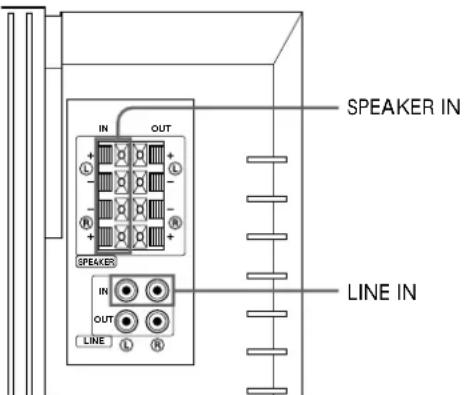
Use the LINE IN jacks or the SPEAKER IN terminals of the woofer when you connect the amplifier.
- If your amplifier has one of the following types of output jacks, connect the Ⓐ (left channel) of the LINE IN jack and the amplifier's jack using the supplied audio connecting cord.
— MONO OUT jack
— MIX OUT jack
— SUB WOOFER output jack(s)
— SUPER WOOFER output jack(s)
- If your amplifier does not have the above mentioned output jacks, connect the speaker terminals of the amplifier to the SPEAKER IN terminals instead.
text_image
IN OUT SPEAKER IN OUT LINE IN SPEAKER IN LINE INBefore you get started
- Turn off the power of the amplifier and the woofer before making any connection.
- Use the audio connecting cords that are supplied to the respective equipment. If there are not enough audio connecting cords to make the necessary connections, you need to purchase some optional audio connecting cords.
- Be sure to make connections firmly to avoid noise.
- Connect the AC power cord from the woofer to a wall outlet.
- You cannot connect the CENTER output jack for use with Dolby Pro Logic function to the woofer. Bass sound is not output with some Dolby Pro Logic modes.
(continued)
Connecting to an amplifier with a single set of speaker terminals
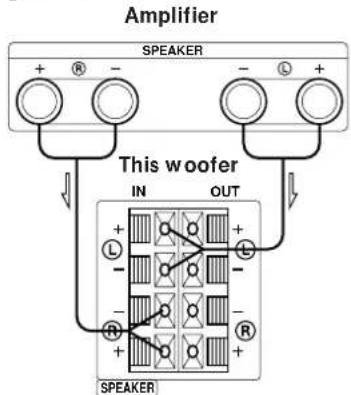
If your amplifier is equipped with a single set of speaker terminals, connect the woofer to the amplifier, and then connect the front speakers to the woofer.
What cords will I need?
Speaker cord (supplied) (1 for each speaker)

Twist the stripped ends of the cord about ^2/_3 inch (15 mm). Be sure to match the speaker cord to the appropriate terminal on the components: + to + and - to -. If the cords are reversed, the sound will be distorted and will lack bass. It is useful to decide that the speaker cord marked with a line is always the positive (+) and should be connected to the positive (+) terminal to avoid any improper connections.
Hookups
1 Connect the woofer to the amplifier.
Connect the SPEAKER IN terminals of the woofer to the amplifier's speaker terminals with the speaker cords. Be sure to connect both L and R channels.
→: signal flow
flowchart
graph TD
    A["SPEAKER"] -->|+ R -| B["This woofer"]
    A -->|- L +| C["SPEAKER"]
    B -->|IN OUT| D["Grid-based inverter with labeled ports: L, R, +"]
    C -->|+ -| E["Output"]
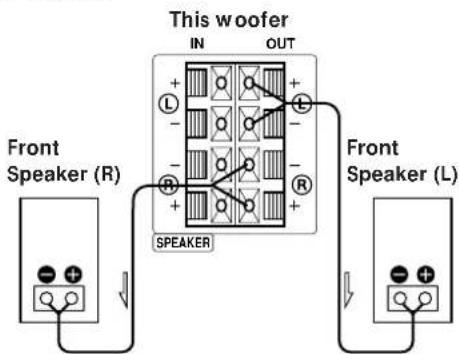
2 Connect the front speakers to the woofer.
Connect the speakers to the speaker terminals of the woofer.
text_image
This woofer IN OUT + - - - - - - - - - - - - - - - - - - - - - - - - - - - - - - - - - - - - - - - - - - - - - - - - - - - - - - - - - - - - - - - - - - - - - - - - - - - - - - - - - - - - - - - - - - - - - - - - - - - - - - + - R SPEAKER Front Speaker (R) Front Speaker (L)Connecting to an amplifier with double(A+B) sets of speaker terminals
If your amplifier has double(A+B) sets of speaker terminals, connect both the woofer and the front speakers to the amplifier.
What cords will I need?
Speaker cord (supplied) (1 for each speaker)

Twist the stripped ends of the cord about 23 inch (15 mm).
Hookups
1 Connect the front speakers to the amplifier. Connect the speakers to your amplifier's speaker terminals (A).
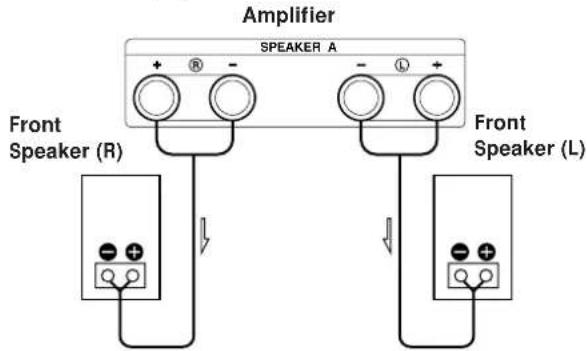
text_image
Amplifier SPEAKER A + - R - L + Front Speaker (R) Front Speaker (L)2 Connect the woofer to the amplifier.
Connect the SPEAKER IN terminals of the woofer to the amplifier's speaker terminals (B) using speaker cords (supplied).
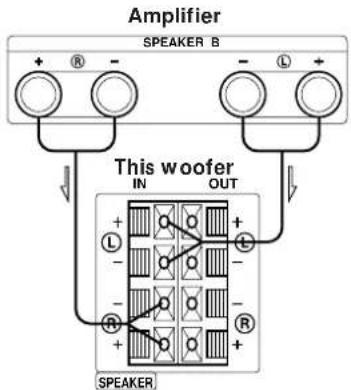
text_image
Amplifier SPEAKER B + - - - L+ This woofer IN OUT + - - - - R R SPEAKERWhen using the double (A +B) sets of speakers, make sure that you select the "A +B" position with your amplifier.
Note
When you are using speaker terminal (A) only (front speaker only) or when the power of the amplifier is turned off, turn down the volume or turn off the power of the woofer otherwise, hum noise may be heard.
Connecting to an amplifier with a special jack for a super woofer
If your amplifier has a special jack for a super woofer (like a MONO OUT jack, MIX OUT jack, SUB WOOFER jack or SUPER WOOFER jack), connect the LINE IN jack of the woofer to one of those jacks.
What cords will I need?
Audio connecting cord (supplied) (1)

Hookups
Connect the MONO OUT jack of your amplifier to the left LINE IN jack (L) of the woofer with the supplied audio connecting cord.
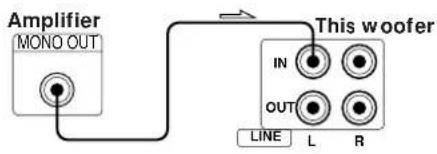
flowchart
graph LR
    A["Amplifier MONO OUT"] --> B["This woofer"]
    B --> C["OUT L R"]
    style A fill:#f9f,stroke:#333
    style B fill:#ccf,stroke:#333
Connect the PRE OUT jacks (L/R) of your amplifier to the LINE IN jacks (L/R) of the woofer with the supplied audio connecting cord.
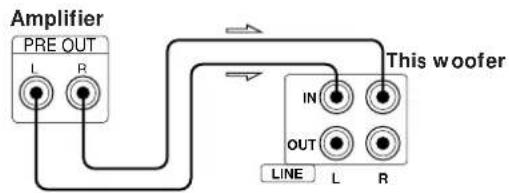
text_image
Amplifier PRE OUT L R This woofer IN OUT LINE L RNote
If the output level of your amplifier is not large enough, the sound may not be loud enough. In this case, connect the speaker terminals of the amplifier directly to the SPEAKER IN terminals of the woofer.
When using this woofer for both left (L) and right (R) channels
If your amplifier has PRE OUT jacks, connect them to the woofer as shown in the following illustrations.
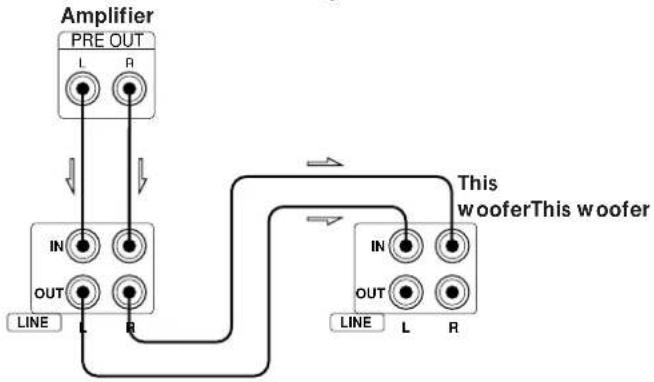
flowchart
graph TD
    A["Amplifier"] --> B["PRE OUT"]
    B --> C["IN"]
    B --> D["OUT"]
    C --> E["L"]
    D --> F["R"]
    G["This woofer"] --> H["IN"]
    G --> I["OUT"]
    H --> J["L"]
    I --> K["R"]
or
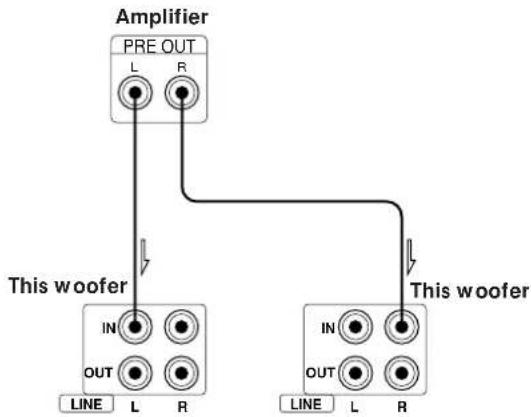
flowchart
graph TD
    A["Amplifier"] --> B["PRE OUT L R"]
    A --> C["This woofer IN OUT LINE L R"]
    A --> D["This woofer IN OUT LINE L R"]
If your amplifier has a MONO OUT jack, connect it to the left LINE IN jack (L) of the woofer.
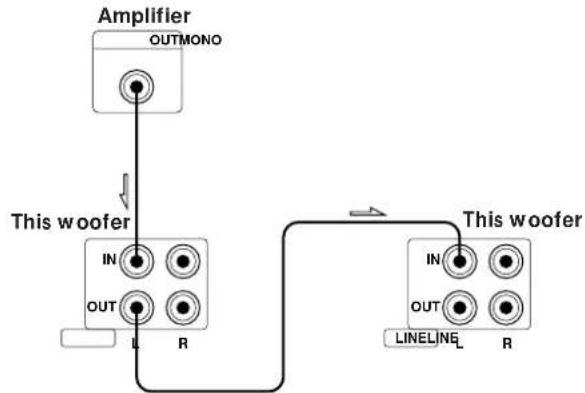
flowchart
graph TD
    A["Amplifier OUTMONO"] --> B["This woofer IN OUT L R"]
    B --> C["This woofer IN OUT LINE LINE R"]
Note
Connect the MONO OUT jack, SUB WOOFER output jack, SUPER WOOFER output jack of the amplifier to the left input jack of the woofer. When connecting them to the right input jack of the woofer the sound will not come out.
Connecting the AC power cord
Connect the AC power cord from the woofer and from your amplifier to a wall outlet.
Listening to the Sound
text_image
INPUT STANDARD LAST COT OFF FREQ RNG FREQ 1 SONY 3Note
Never set the amplifier's tone control (BASS, TREBLE, etc.) or the equalizer output to a high level or input sinewaves of 20 Hz to 50 Hz recorded on a commercially-available test disc or special sound (bass sound of electronic musical instrument, pop noise of analog disc turntable, sound with abnormally enhanced bass, etc.) in a high level to this unit. These actions may cause damage to the speakers.
When a special disc containing abnormally enhanced bass is played, noise may be output in addition to the original sound. In such a case, decrease the sound level.
Note
The sub woofer output signal (DOLBY digital (AC-3) signal) of the digital surround processor sold singularly is set 10 dB higher by Dolby laboratories Licensing Corporation. In the case of using normally, adjust the sub woofer level.
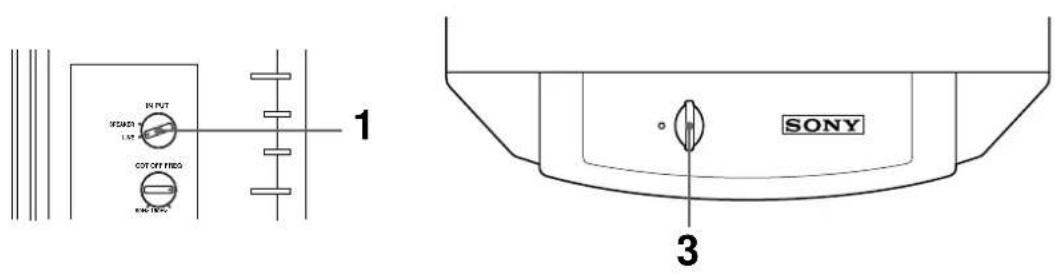
1 Select SPEAKER or LINE with IN PUT selector.
2 Turn on the amplifier and select the program source.
3 Press POWER.
The woofer turns on and the POWER indicator lights up in green.
4 Play the program source.
Adjust the VOLUME so that sound from front speakers is not distorted.
If it is distorted, the sound from the woofer will also be distorted.
To turn off the power
Press POWER to release the switch.
If you hear noise when you turn off the woofer, turn down the LEVEL of the woofer, or turn off the amplifier before turning off the woofer.
Adjusting the Sound
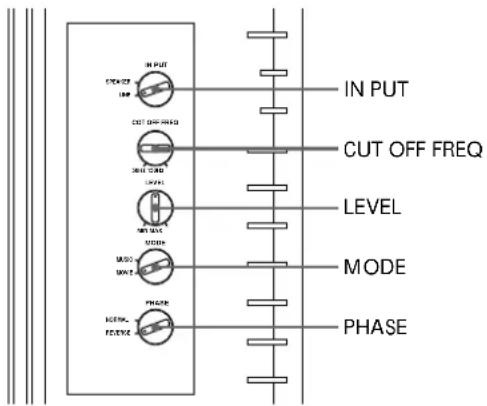
You can adjust the sound of the woofer to suit the sound of your front speakers. Reinforcing the bass sound gives you a greater sense of atmosphere.
flowchart
graph TD
    A["IN PUT"] --> B["CUT OFF FREQ"]
    B --> C["LEVEL"]
    C --> D["MODE"]
    D --> E["PHASE"]
    E --> F["SCK/VE"]
    F --> G["OUT"]
    G --> H["OUT"]
    style A fill:#f9f,stroke:#333
    style B fill:#ccf,stroke:#333
    style C fill:#cfc,stroke:#333
    style D fill:#fcc,stroke:#333
    style E fill:#cff,stroke:#333
    style F fill:#ffc,stroke:#333
    style G fill:#cfc,stroke:#333
    style H fill:#fcc,stroke:#333
Note
If the sound distorts when you turn on the bass reinforcement from your amplifier (such as, DBFB, GROOVE, the graphic equalizer, etc.), turn off the bass reinforcement and adjust the sound.
Note
Selecting NORMAL or REVERSE with the PHASE selector reverses the polarity and may provide better bass reproduction in certain listening environments (depending on the type of front speakers, the position of the woofer and the adjustment of the cut-off frequency). It may also change the expanse and tightness of sound, and effect the feeling of the sound field. Select the setting that provides the sound you prefer when listening in your normal listening position.
1 Adjust the cut-off frequency.
Turn the CUT OFF FREQ control, depending on the reproduction frequencies of your front speakers. 100Hz
Refer to the following when adjusting.
① Typical very small sized speakers: 5 – 7 cm dia.
② Typical small sized speakers: 8–15 cm dia.
③ Typical medium sized speakers: 16–24 cm dia.
④ Typical large sized speakers: more than 25 cm dia.
To make the most of the low level converter function of Dolby digital, turn the CUT OFF FREQ as high as possible when playing back the Dolby digital (AC-3).
2 Adjust the volume level of the woofer. Turn the LEVEL control so that you can be
Turn the LEVEL control so that you can hear the bass sound a little more than before. To increase the volume, turn the control clockwise. To decrease the volume, turn the control counterclockwise.
2 Play your favorite song and movie.
Select MOVIE or MUSIC with MODE selector.
Male vocal tunes and voice containing bass sounds are most suitable for adjustment. Turn the volume for front speakers to the same level as usual.
4 Select the phase polarity.
Use the PHASE selector to select the phase polarity.
5 Repeat steps 1 to 4 to adjust for your preference.
Once you have adjusted the woofer to the settings you desire, use the VOLUME control on the amplifier to adjust the volume of the woofer with that of the other speakers. You don't need to adjust the woofer settings when you change the volume level of the amplifier.
Precautions
On safety
- Before operating the woofer, be sure that the operating voltage of your woofer is identical with that of your local power supply.
- Unplug the woofer from the wall outlet if it is not to be used for an extended period of time. To disconnect the cord, pull the cord by grasping the plug. Never pull the cord itself.
- Should any liquid or solid object fall into the woofer, unplug the woofer and have the woofer checked by qualified personnel before operating it any further.
- AC power cord must be changed only at the qualified service shop.
When turning on or off an amplifier or other equipment
Lower the volume of the amplifier to minimum.
To avoid damaging the woofer
- Be careful in setting the volume control of the amplifier to avoid an excessive input power.
- Do not attempt to open the enclosuer or remold speaker units and networks.
- The grill net is not removable. Do not remove it.
In case color irregularity is observed on the nearby TV screen
With the magnetically shielded type of the speaker system, the speakers can be installed near a TV set. However, color irregularity may still be observed on the TV screen depending on the type of your TV set.
If color irregularity is observed...
→Turn off the TV set once, then turn it on after 15 to 30 minutes.
If color irregularity is observed again...
→Place the speakers further apart from the TV set.
When howling occurs
Relocate the speaker or turn down the volume of the amplifier.
On installation
- Do not install the woofer near heat sources such as radiators or air ducts, or in a place subject to direct sunlight, excessive dust, mechanical vibration or shock.
- Good ventilation is essential to prevent internal heat build-up in the woofer. Place the woofer in a location with adequate air circulation. Do not place the woofer on a soft surface or too close to a wall as this may obstruct the ventilation hole on the back.
On cleaning the cabinet
Clean the cabinet with a soft cloth lightly moistened with water. Do not use any type of abrasive pad, scouring powder or solvent such as alcohol or benzine.
If you have any questions or problems concerning your woofer that is not covered in this manual, please consult your nearest Sony dealer.
Troubleshooting
If you experience any of the following difficulties while using the woofer, use this troubleshooting guide to help you remedy the problem. Should any problem persist, consult your nearest Sony dealer.
There's no sound.
→ Check that this woofer and components are connected correctly and securely.
→ Turn LEVEL clockwise to turn the volume up.
→ Select SPEAKER or LINE with IN PUT selector.
→ Reset the level.
The sound has suddenly stopped.
→ The speaker cords may have short-circuited. Connect the cords properly.
The sound is distorted.
→ The input signal is imperfect.
→ The input signal level is too high.
→ Set the CUT OFF FREQ as high as possible when playing back the Dolby digital (AC-3).
Severe hum or noise is heard.
→ Connect the ground wire of the turntable properly.
The contacts between the plugs of the connecting cords and the corresponding jacks have not been made properly. Connect the plugs firmly.
The audio system is picking up some noise from a TV set. Move the audio system away from the TV set or turn the TV set off.
Specifications
For the U.S.A. model
Audio power specifications
POWER OUTPUT AND TOTAL HARMONIC
DISTORTION:
With 8 ohm loads, from 20 – 150 Hz; rated 180 watts (SA-W70ES/W705)/130 watts (SA-W505) per channel minimum RMS power, with no more than 0.8 % total harmonic distortion from 250 milliwatts to rated output.
System
Type Active Super Woofer (magnetically shielded design)
Speaker unit
Woofer: SA-W70ES/W705: 20cm dia. (8 in.) x 2
SA-W505: 20cm dia. (8 in.) x 1
Practical maximum output
U.S.A. and Canada
SA-W70ES/W705: 250 W (50 Hz)
SA-W505: 170 W (50 Hz)
Europe and Malaysia
SA-W70ES/W705: 200 W (8 ohms, DIN)
400 W (MUSIC)
SA-W505: 130 W (8 ohms, DIN)
260 W (MUSIC)
Other countries
SA-W70ES/W705: 250 W (50 Hz)
SA-W505: 170 W (50 Hz)
Reproduction frequency range
SA-W70ES/W705: 18 - 150Hz
SA-W505: 20 - 150Hz
High frequency cut-off frequency
50 Hz - 150 Hz
Phase selector
NORMAL, REVERSE
Inputs
Input jacks
LINE IN: Input pin jack
SPEAKER IN: Input terminals
General
SA-W70ES/W705:
| Where purchased | Power requirements |
| U.S.A and Canada | 120 V, 60 Hz |
| Europe and Other countries | 220 – 230 V, 50/60 Hz |
SA-W505:
| Where purchased | Power requirements |
| U.S.A and Canada | 120 V, 60 Hz |
| Europe and Other countries | 220 – 230 V, 50/60 Hz |
Power consumption
SA-W70ES/W705: 190 W
SA-W505: 130 W
Dimensions
SA-W70ES/W705: Approx. 255 x 630 x 520 mm
(w/h/d) (10 ^1 /8 x 24 ^7 /8 x 20 ^1 /2 in.)
SA-W505: Approx. 255x 380 x 520 mm (w/h/d)
(10^1/s × 15 × 20^1/_2 in.)
Mass SA-W70ES/W705: 27 kg (59lb 90oz)
SA-W505: 19 kg (41lb 15oz)
Supplied accessories
Audio connecting cord
(1 phono plug - 1 phono plug) (1)
Speaker cord (2)
Optional accessory
Speaker stand WS-W505(for SA-W505 and
optional speaker SS-T505)
Design and specifications are subject to change without notice.