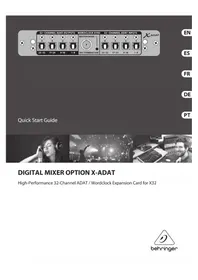
XADAT - Digital Mixer BEHRINGER - Free user manual and instructions
Find the device manual for free XADAT BEHRINGER in PDF.



| Product Type | Digital Audio Interface Expansion Card |
| Brand | Behringer |
| Model | XADAT |
| Compatibility | X32 series digital mixing consoles (firmware 2.0 or later) |
| Number of Input/Output Channels | 32 x 32 channels |
| Audio Connectors | 4 Toslink inputs, 4 Toslink outputs (8 channels per connector) |
| Word Clock Connector | BNC coaxial, selectable input/output |
| LED Indicators | Word Clock signal presence (Master mode) |
| Dimensions (approx.) | Standard expansion card, approx. 100 x 70 x 20 mm |
| Weight | Approx. 50 g |
| Power Supply | Powered by the console via the expansion port |
| Power Consumption | Negligible (bus-powered) |
| Operating Temperature | Tropical and/or moderate climate |
| Main Functions | ADAT digital I/O expansion, Word Clock transmission |
| Installation | Insert into the console expansion port, secure with 2 M3x6 screws |
| Maintenance and Cleaning | Clean with a dry cloth; do not use liquids |
| Safety | Disconnect console before installation; avoid electrostatic discharge; do not open the card |
| Spare Parts and Repairability | No user-serviceable parts; contact qualified professional |
| General Information | Expansion card for digital inserts and ADAT recording |
Frequently Asked Questions - XADAT BEHRINGER
User questions about XADAT BEHRINGER
0 question about this device. Answer the ones you know or ask your own.
Ask a new question about this device
Download the instructions for your Digital Mixer in PDF format for free! Find your manual XADAT - BEHRINGER and take your electronic device back in hand. On this page are published all the documents necessary for the use of your device. XADAT by BEHRINGER.
USER MANUAL XADAT BEHRINGER
High-Performance 32-Channel ADAT / Wordclock Expansion Card for X32

Table of Contents
Important Safety Instructions. 3
FCC INFORMATION U.S.A. 12
English
- Introduction 13
- Installation 13
- Connector Plate. 14
- Connection Scenarios 14
- X32 Setup 15
Espanol
Important Safety Instructions
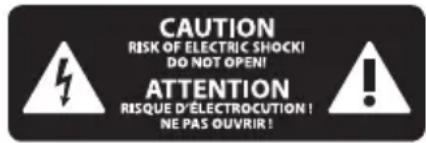
Terminals marked with this symbol carry electrical current of sufficient
magnitude to constitute risk of electric shock. Use only high-quality professional speaker cables with 1/4 TS or twist-locking plugs pre-installed. All other installation or modification should be performed only by qualified personnel.
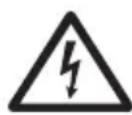
This symbol, wherever it appears, alerts you to the presence of uninsulated
dangerous voltage inside the enclosure - voltage that may be sufficient to constitute a risk of shock.

This symbol, wherever it appears, alerts you to important operating and
maintenance instructions in the accompanying literature. Please read the manual.

Caution
To reduce the risk of electric shock, do not remove the
top cover (or the rear section). No user serviceable parts inside. Refer servicing to qualified personnel.

Caution
To reduce the risk of fire or electric shock,
do not expose this appliance to rain and moisture. The apparatus shall not be exposed to dripping or splashing liquids and no objects filled with liquids, such as vases, shall be placed on the apparatus.

Caution
These service instructions are for use by qualified
service personnel only. To reduce the risk of electric shock do not perform any servicing other than that contained in the operation instructions. Repairs have to be performed by qualified service personnel.
- Read these instructions.
- Keep these instructions.
- Heed all warnings.
- Follow all instructions.
- Do not use this apparatus near water.
- Clean only with dry cloth.
- Do not block any ventilation openings. Install in accordance with the manufacturer's instructions.
- Do not install near any heat sources such as radiators, heat registers, stoves, or other apparatus (including amplifiers) that produce heat.
- Do not defeat the safety purpose of the polarized or grounding-type plug. A polarized plug has two blades with one wider than the other. A grounding-type plug has two blades and a third grounding prong. The wide blade or the third prong are provided for your safety.
If the provided plug does not fit into your outlet, consult an electrician for replacement of the obsolete outlet.
- Protect the power cord from being walked on or pinched particularly at plugs, convenience receptacles, and the point where they exit from the apparatus.
- Use only attachments/accessories specified by the manufacturer.
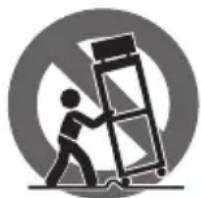
- Use only with the cart, stand, tripod, bracket, or table specified by the
manufacturer, or sold with the apparatus. When a cart is used, use caution when moving the cart/apparatus combination to avoid injury from tip-over.
13. Unplug this apparatus during lightning storms or when unused for long periods of time.
14. Refer all servicing to qualified service personnel. Servicing is required when the apparatus has been damaged in any way, such as power supply cord or plug is damaged, liquid has been spilled or objects have fallen into the apparatus, the apparatus has been exposed to rain or moisture, does not operate normally, or has been dropped.
15. The apparatus shall be connected to a MAINS socket outlet with a protective earthing connection.
16. Where the MAINS plug or an appliance coupler is used as the disconnect device, the disconnect device shall remain readily operable.

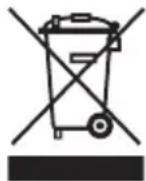
- Correct disposal of this product: This symbol indicates that this product must not be disposed of with
household waste, according to the WEEE Directive (2012/19/EU) and your national law. This product should be taken to a collection center licensed for the recycling of waste electrical and electronic equipment (EEE). The mishandling of this type of waste could have a possible negative impact on the environment and human health due to potentially hazardous substances that are generally associated with EEE. At the same time, your cooperation in the correct disposal of this product will contribute to the efficient use of natural resources. For more information about where you can take your waste equipment for recycling, please contact your local city office, or your household waste collection service.
- Do not install in a confined space, such as a book case or similar unit.
- Do not place naked flame sources, such as lighted candles, on the apparatus.
- Please keep the environmental aspects of battery disposal in mind. Batteries must be disposed-of at a battery collection point.
- Use this apparatus in tropical and/or moderate climates.
LEGAL DISCLAIMER
MUSIC Group accepts no liability for any loss which may be suffered by any person who relies either wholly or in part upon any description, photograph, or statement contained herein. Technical specifications, appearances and other information are subject to change without notice. All trademarks are the property of their respective owners. MIDAS, KLARK TEKNIK, LAB GRUPPEN, LAKE, TANNOY, TURBOSOUND, TC ELECTRONIC, TC HELICON, BEHRINGER, BUGERA and DDA are trademarks or registered trademarks of MUSIC Group IP Ltd. © MUSIC Group IP Ltd. 2017 All rights reserved.
LIMITED WARRANTY
For the applicable warranty terms and conditions and additional information regarding MUSIC Group's Limited Warranty, please see complete details online at music-group.com/warranty.
ES
BESCHRANKTE GARANTIE
Failure to observe the following warnings may lead to fatality or serious injury from fire or
electric shock.
Before installing the card, you must refer to the owner's manual of the host device or to behringer.com to verify that your host device supports this card, and to verify the number of cards that can be installed in combination with other BEHRINGER or third-party cards.
- Do not attempt to disassemble or modify the card. Do not apply excessive force to board connectors or other board components. Mishandling of board may lead to shock, fire hazard, or equipment failure.
- Disconnect the power cable from the main unit before installing this card to eliminate shock hazard.

Caution
Failure to observe the following precautions may lead to personal injury, or may result in damage
to equipment or other property.
- Do not touch the board's metallic leads (pins) when handling the card. Pins are sharp and may cause injury.
The card is electrostatic-sensitive. Before handling the card, you should briefly touch the main unit's metal casing with your bare hand so as to drain off any static charge from your body. BEHRINGER assumes no responsibility for data loss, equipment damage, or injury caused by inappropriate handling or usage.
FCC INFORMATION U.S.A.
- IMPORTANT NOTICE: DO NOT MODIFY THIS UNIT! This product, when installed as indicated in the instructions contained in this manual, meets FCC requirements. Modifications not expressly approved by BEHRINGER may void your authority, granted by the FCC, to use the product.
- IMPORTANT: When connecting this product to accessories and/or another product, use only high quality shielded cables. Cables supplied with this product MUST be used. Follow all installation instructions. Failure to follow instructions could void your FCC authorization to use this product in the USA.
- NOTE: This product has been tested and found to comply with the requirements listed in FCC Regulations, Part 15 for Class "B" digital devices. Compliance with these requirements provides a reasonable level of assurance that your use of this product in a residential environment will not result in harmful interference with other electronic devices. This equipment generates/uses radio frequencies and, if not installed and used according to the instructions found in the users manual, may cause interference harmful to the operation of other electronic devices. Compliance with FCC regulations does not guarantee that interference will not occur in all installations. If this product is found to be the source of interference, which can be determined by turning the unit "OFF" and "ON", please try to eliminate the problem by using one of the following measures: Relocate either this product or the device that is being affected by the interference. Utilize power outlets that are on different branch circuits (circuit breaker or fuse) or install AC line filters. In the case of radio or TV interference, relocate/reorient the antenna. If the antenna uses 300 Ohm ribbon cable, use coaxial cable instead. If these corrective measures do not produce satisfactory results, please contact the local retailer authorized to distribute this type of product. If you can not locate the appropriate retailer, please contact BEHRINGER customer service.
1. Introduction
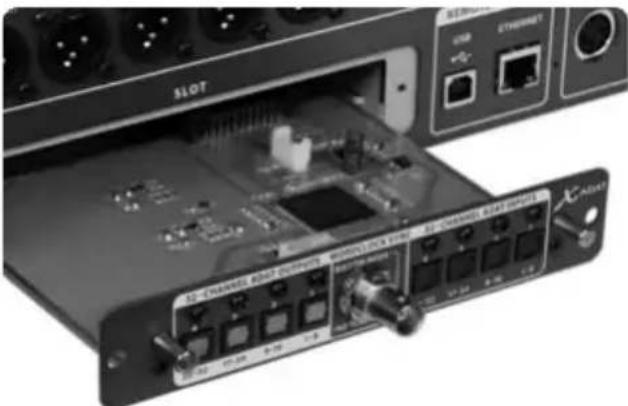
The X-ADAT card is a multichannel audio interface expansion card for the X32 series of digital mixers. It provides 32 channels of input and output via 8 Toslink connectors and word clock transmission via coaxial connector. The interface is perfect for recording with standalone ADAT hard disk recorders and offers some unique digital insert options for incorporating external processors with ADAT connectivity.
2. Installation
Before you install the X-ADAT card in the expansion slot of the X32 console, you must check behringer.com to verify whether the console firmware supports that card.
Caution - before installing the X-ADAT card into the console, you must make sure that the console's power switch is turned off. Malfunctions or electrical shock may occur otherwise.
- Make sure that the mixer's power is turned off.
- Loosen the 2 screws left and right that fasten the slot, then remove the slot cover or currently-installed card and keep it in a safe place.
- Before removing the X-ADAT card from its protective bag, we recommend touching the grounded metal chassis of the console to prevent electrostatic discharges affecting the sensitive electronic components. It is generally a good idea to hold the card either by the face plate or by the two small handles, but never touching the components on the circuit board directly.
-
Align both edges of the card with the guide rails inside the slot and carefully insert the card into the slot. Push the card all the way into the slot to ensure that the contacts of the card are correctly inserted into the connector inside.
-
Fasten the card using the included screws. Be aware that damage or malfunctions may occur if the card is not fastened.

Requirements
X32 Series console with firmware version 2.0 or higher.

3. Connector Plate

- Single BNC coaxial, in/output switchable, no internal termination, LED indicates WC output (Master mode)
4x Toslink inputs and 4x Toslink outputs, 8 channels per connector
2x small handles for removing the expansion card from the slot
2x M3x6 screws left and right for fastening the card in the slot
- 3x small counter sunk screws fixing the bracket on the pcb. Do not loosen these!
4. Connection Scenarios
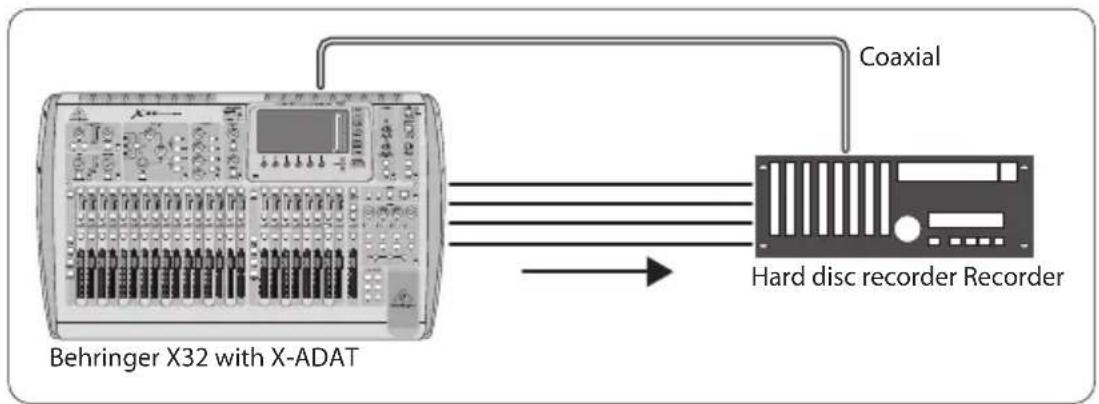
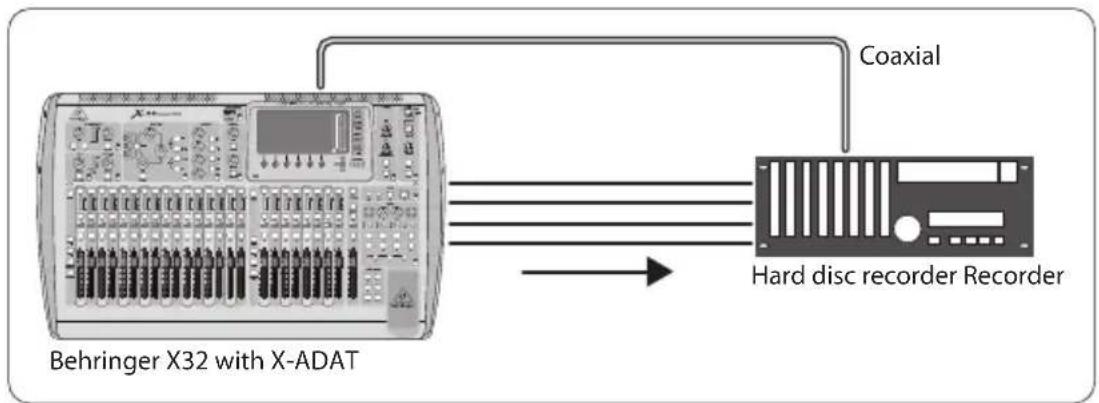
X-ADAT external hard disc recorder
(providing Word Clock via BNC coaxial connection)
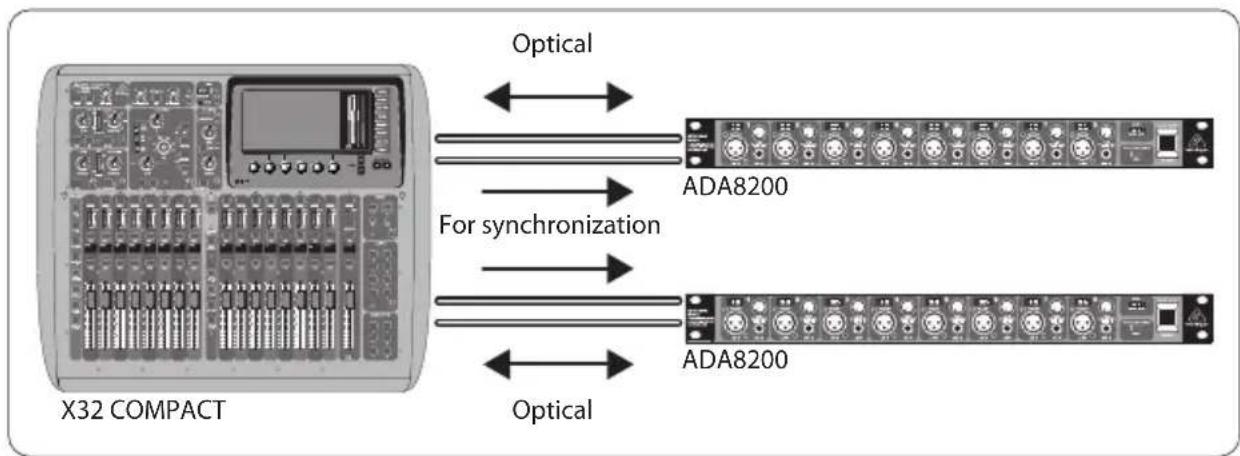
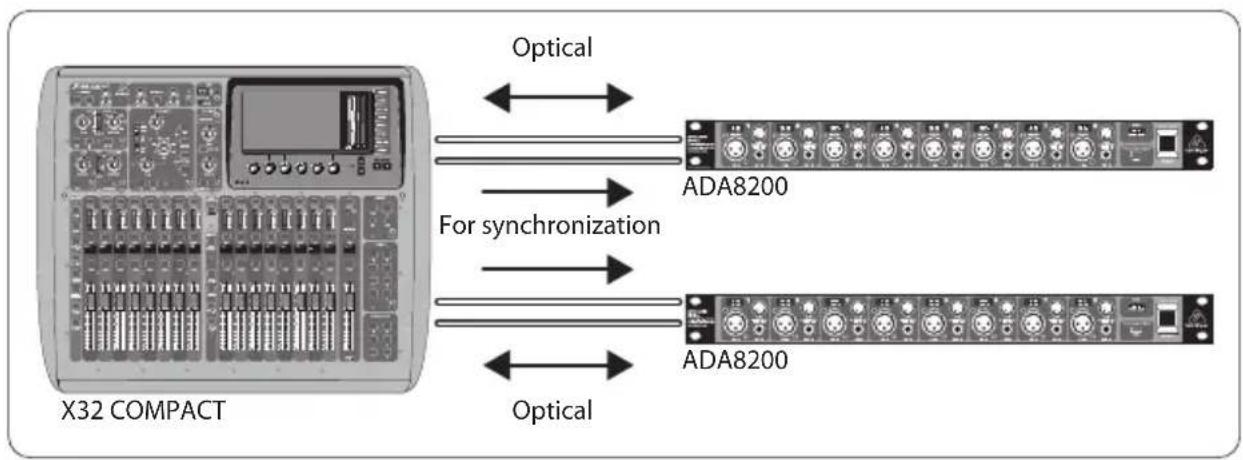
2x ADA8200 X32 COMPACT input channels 17-24 and 25-32
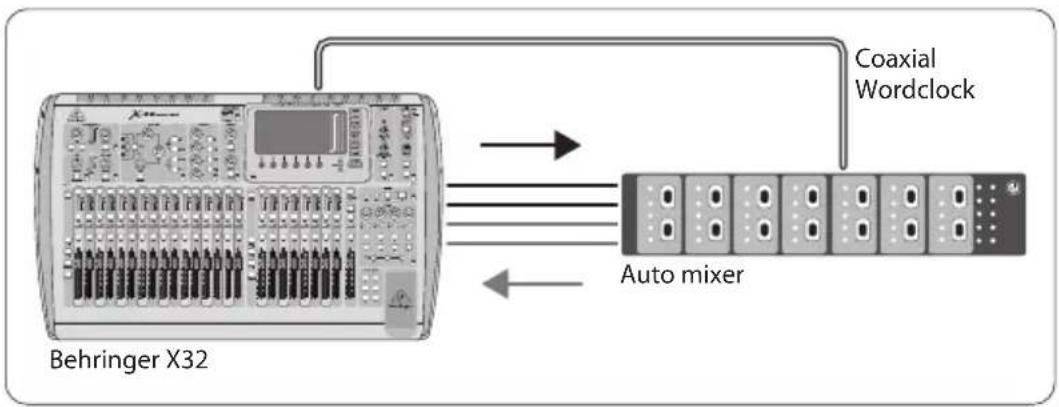
X-ADAT external automixer return to X-ADAT
Out 1-8 and 9-16 to Auto-mixing Processor inputs
In 1-8 and 9-16 from Auto-mixing Processor outputs
- Routing/home > Input 1-16 = Card In 1-16, Routing/card out > Output 1-16 = Local 1-16
Note, this would also apply for any other sort of specialized outboard processing that features ADAT I/O. It can be used for all 32 × 32 channels simultaneously, even spread over several external processors.
5. X32 Setup
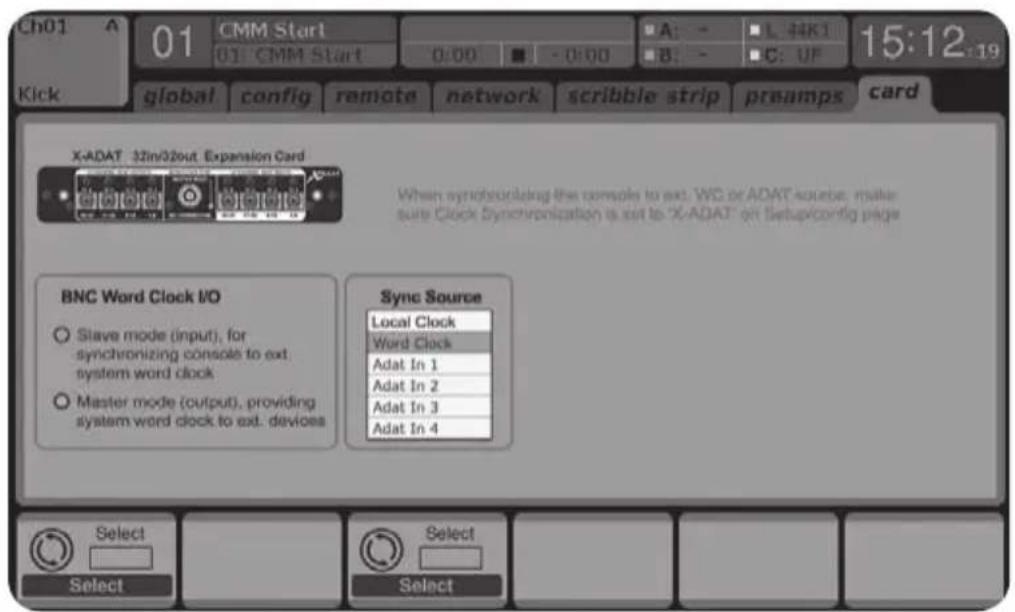
Word clock I/O selector:
either word clock slave (input), allowing the console to sync to external WC devices or
word clock master (output), providing system word clock to other devices
X-ADAT card can be selected as the clock source on the X32 Setup/ config page. In this case, the X32 will be slaved to the ADAT clock received on BNC input or fiber optic Toslink inputs. Note that this may require the console to be rebooted if the internal and external clock rates are different (i.e. 44.1 / 48kHz ).
Word clock selection box for choosing the external clock synchronization source:
fiber optic inputs 1-4 or
coaxial BNC WC input
- local clock indicates the X32 console's internal clock.
1. Introduccion
(fornecendo Word Clock atraves de conexão coaxial BNC)

2x ADA8200 → canais de entrada 17-24 e 25-32 do X32
X-ADAT misturador automatico externo returna para X-ADAT
- Saidas 1-8 e 9-16 para entrada do processor Auto-mixing
-
Entradas 1-8 e 9-16 provenrientes das saidas do processor Auto-mixing
-
Routing/home > Input (entradas) 1-16 = Cartão In 1-16
- Routing/cartão out > Output (saidas) 1-16 = Local 1-16
| Connectors | |
| TOSLINK opt. IN 4 | |
| TOSLINK opt. OUT 4 | |
| WORDCLOCK BNC IN/OUT 1 | |
| Input/Output Characteristics | |
| Sample rates 44.1 kHz / 48 kHz | |
| Sample word length 24 Bit | |
| Clock synchronization selectable internal/Local | WordClock In ADAT In 1 ADAT In 2 ADAT In 3 ADAT In 4 |
| Round-trip latency <0.5 ms | |
| Indicator | |
Master Mode (on=Clock Out, off=Clock In) 1 LED, amber
FEDERAL COMMUNICATIONS COMMISSION COMPLIANCE INFORMATION

BEHRINGER
DIGITAL MIXER OPTION X-ADAT
Responsible Party Name: MUSIC Group Services NV Inc.
Address: 5270 Procyon Street
Las Vegas, NV 89118
USA
Phone Number: +17028008290
DIGITAL MIXER OPTION X-ADAT
complies with the FCC rules as mentioned in the following paragraph:
This equipment has been tested and found to comply with the limits for a Class B digital device, pursuant to part 15 of the FCC Rules. These limits are designed to provide reasonable protection against harmful interference in a residential installation. This equipment generates, uses and can radiate radio frequency energy and, if not installed and used in accordance with the instructions, may cause harmful interference to radio communications. However, there is no guarantee that interference will not occur in a particular installation. If this equipment does cause harmful interference to radio or television reception, which can be determined by turning the equipment off and on, the user is encouraged to try to correct the interference by one or more of the following measures:
Reorient or relocate the receiving antenna
- Increase the separation between the equipment and receiver
- Connect the equipment into an outlet on a circuit different from that to which the receiver is connected
- Consult the dealer or an experienced radio/TV technician for help
This device complies with Part 15 of the FCC rules. Operation is subject to the following two conditions:
(1) this device may not cause harmful interference, and
(2) this device must accept any interference received, including
interference that may cause undesired operation.
Important information:
Changes or modifications to the equipment not expressly approved by
MUSIC Group can void the user's authority to use the equipment.

Dedicate Your Life to MUSIC
- Table of Contents
- English
- Espanol
- Important Safety Instructions
- Caution
- LEGAL DISCLAIMER
- LIMITED WARRANTY
- BESCHRANKTE GARANTIE
- FCC INFORMATION U.S.A.
- Introduction
- Installation
- Requirements
- Connector Plate
- Connection Scenarios
- X32 Setup
- Word clock I/O selector:
- Introduccion
- FEDERAL COMMUNICATIONS COMMISSION COMPLIANCE INFORMATION
- DIGITAL MIXER OPTION X-ADAT
- Important information:
Brand : BEHRINGER
Model : XADAT
Category : Digital Mixer