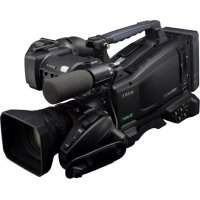
SONY PMW320K - Camcorder

PMW320K - Camcorder SONY - Free user manual and instructions

Find the device manual for free PMW320K SONY in PDF.

📄 201 pages English EN Download 💬 AI Question 10 questions ⚙️ Specs
Notice SONY PMW320K - page 193
View the manual : Français FR English EN
Feature Details
Camcorder type Professional camcorder
Sensor 3 Exmor CMOS sensors
Video resolution Full HD 1920 x 1080
Recording format XDCAM EX, MPEG-2, AVCHD
Optical zoom 16x
Image stabilization Optical stabilization
Screen 3.5-inch LCD screen
Connectivity HDMI, SDI, USB
Power supply Rechargeable lithium-ion battery
Weight Approximately 2.5 kg
Usage Ideal for professional video production, reporting, and live events
Maintenance Regular cleaning of lenses and sensors recommended
Safety Use only with accessories recommended by the manufacturer
General information Check memory card compatibility before purchase

Frequently Asked Questions - PMW320K SONY

How to turn on the SONY PMW320K camcorder?
To turn on the camcorder, press the power button located on the top panel. Make sure the battery is properly charged and inserted.
How to change the recording mode?
To change the recording mode, access the menu by pressing the 'Menu' button, then navigate to 'Setup' and select 'Recording Mode'. Choose the desired mode and confirm.
What to do if the camcorder does not turn on?
Check that the battery is properly charged. Try removing and reinserting the battery. If the problem persists, test with another battery.
How to transfer videos to a computer?
Connect the camcorder to your computer using a USB cable. Make sure the camcorder is in 'Playback' mode. Your computer should detect the device, and you can copy the files.
How to adjust the focus?
Use the focus ring located on the lens to manually adjust the focus. You can also activate autofocus by pressing the corresponding button on the camcorder.
How to clean the camcorder lens?
Use a clean, dry microfiber cloth to gently wipe the lens. Avoid using chemicals that could damage the lens.
Why is the sound low during recording?
Check the audio level settings in the menu, and ensure the microphone is properly connected. You can also adjust the audio input level.
How to update the camcorder firmware?
Visit Sony's website to download the latest firmware version. Follow the provided instructions to update the camcorder via a USB connection.
What to do if the screen remains black?
Make sure the camcorder is turned on and the lens is extended. If the screen remains black, try resetting the camcorder by removing the battery for a few seconds.
How to use a tripod with the SONY PMW320K?
The camcorder is equipped with a standard screw thread. Attach the camcorder to the tripod by screwing the thread into the hole located under the camcorder.

User questions about PMW320K SONY

0 question about this device. Answer the ones you know or ask your own.

Ask a new question about this device

The email remains private: it is only used to notify you if someone responds to your question.

No questions yet. Be the first to ask one.

Download the instructions for your Camcorder in PDF format for free! Find your manual PMW320K - SONY and take your electronic device back in hand. On this page are published all the documents necessary for the use of your device. PMW320K by SONY.

USER MANUAL PMW320K SONY

Solid-State Memory Camcorder

Mode d'emploi

Commutateur PRESET/ 00 00 00 00

REGEN/CLOCK: PRESET

Commutatour F-RUN/SET/

R-RUN:SET

Indication Signification

Indication Signification

Indication Signification

REC i pregistration HDV en cours

Mode ECS (Extended Clear Scan)

2,3,4,5,6,7,8,16,32,64

Remarques

Front Commande MIC LEVEL

Front Commande MIC LEVEL

FrontCommandeMICLEVEL

Front+Side1 Bouton LEVEL (CH1) et

commande MIC LEVEL

Front Commande MIC LEVEL

Front+Side2 Bouton LEVEL (CH2) ct

commande MIC LEVEL

Side3 Bouton LEVEL (CH3)

Front Commande MIC LEVEL

Front Commande MIC LEVEL

SBS-32G1A (32 Go)
SBS-64G1A (64 Go)
Manual assistant
Powered by Anthropic
Waiting for your message
Product information

Brand : SONY

Model : PMW320K

Category : Camcorder