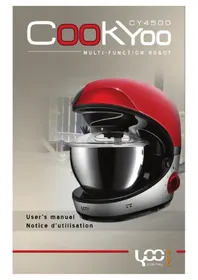
CookYoo 4500 - Food processor YOO DIGITAL - Free user manual and instructions
Find the device manual for free CookYoo 4500 YOO DIGITAL in PDF.


| Brand | YOO DIGITAL |
| Model | CookYoo 4500 |
| Product type | Food processor (stand mixer) |
| Voltage | 220-240 V ~ 50 Hz |
| Rated power | 1000 Watts |
| Bowl capacity | 5 litres |
| Bowl material | Stainless steel |
| Number of speeds | 6 speeds + off position |
| Control type | Rotary knob |
| Included accessories | Flat beater, dough hook, whisk, splash guard |
| Main functions | Mix, knead, whisk, blend |
| Maximum flour capacity (kneading) | 1700 g |
| Maximum cream capacity (whipping) | 250 ml |
| Maximum number of eggs (whipping) | 12 |
| Safety | Automatic shut-off when raising head, anti-splash protection, head locking |
| Care of bowl and accessories | Bowl, whisk and chopping blade are dishwasher safe; flat beater, dough hook and others hand wash |
| Repairability | Do not disassemble yourself, contact customer service |
| Weight | Not specified |
| Dimensions (approx.) | Not specified |
Frequently Asked Questions - CookYoo 4500 YOO DIGITAL
User questions about CookYoo 4500 YOO DIGITAL
0 question about this device. Answer the ones you know or ask your own.
Ask a new question about this device
Download the instructions for your Food processor in PDF format for free! Find your manual CookYoo 4500 - YOO DIGITAL and take your electronic device back in hand. On this page are published all the documents necessary for the use of your device. CookYoo 4500 by YOO DIGITAL.
USER MANUAL CookYoo 4500 YOO DIGITAL
- To avoid electric shocks, do not use this device in the vicinity of water. Do not immerse the mains lead in water or other liquid.
- Please read through the information and safety advice contained in these operating instructions carefully and thoroughly before you use the stand mixer for the first time.
- Do not kink or clamp the mains lead. To avoid any risk of stumbling, do not allow the mains lead to hang over the edge of a table or a counter.
- Make sure that the voltage shown on the rating label corresponds with that of the mains supply. The rating label can be found on the bottom of the motor block. The stand mixer is only to be connected to an AC supply. The motor must always be switching off before the stand mixer is connected with the mains supply. (Knob 10 in the "O" setting).
Do not use outdoors. Only suitable for use indoors.
- This device should not be set up in close proximity to a naked flame, easily flammable materials (curtains, textiles, etc.), a radiator, an oven or some other heat source.
Before use, place the device on a horizontal and flat surface.
- Place this device as close as possible to the power source so that you can disconnect the plug quickly and easily.
- The device must be operated with the type of power specified on the rating plate. If you are unsure about the details of the available power supply, ask your dealer or the local power supply company.
- Do not attempt to repair the device yourself, since you will be exposed to hazardous live components or other hazards by opening and removing the covers.
Repairs should only be carried out in a qualified workshop.
- This is not a toy! Keep away from children. The device should be used and stored out of the reach of children.
Careful supervision is required when the device is used by or in the vicinity of children.
The device should only be used for its intended purpose.
- Never operate empty and without supervision.
- During use, do not touch moving parts with your fingers.
- Please note that when passing the device on to a third party, the operating instructions must be included.
- No liability is accepted for damage due to improper use or the failure to observe our operating instructions / safety notes.
- Unplug the appliance when not in use or before cleaning.
- If the supply cord is damaged, it must be replaced by the manufacturer or its service agent or a similarly qualified person in order to avoid a hazard.
The blades are very sharp. Be careful while clean the jar. - Switch off the appliance and disconnect from supply before changing accessories or approaching parts that move in use.
- This appliance is not intended for use by persons (including children) with reduced physical, sensory or mental capabilities, or lack of experience and knowledge, unless they have been given supervision or instruction concerning use of the appliance by a person responsible for their safety.
Children should be supervised to ensure that they do not play with the appliance. - Do not use mixing, mincing and blending function at the same time. Only use one of them at a time.
Your safety and the safety of others are very i mp or ta nt .
We have provided many important safety messages in this manual and on your appliance. Always read and obey all safety messages.

This is the safety alert symbol. This symbol alerts you to potential hazards that can kill or hurt you and others. All safety messages will follow the safety alert symbol and either the word "DANGER" or "WARNING." These words mean:

DANGER
You can be killed or seriously injured if you don't immediately follow instructions.

WARNING
You can be killed or seriously injured if you don't follow instructions.
All safety messages will tell you what the potential hazard is, tell you how to reduce the chance of injury, and tell you what can happen if the instructions are not followed.
ELECTRICAL REQUIREMENTS
Volts:220/240V.A.C.Hertz:50/60Hz
The wattage rating for your stand mixer is printed on a tag under the mixer base. It is also listed on the trim band. If the power cord is too short, have a qualified electrician or serviceman install an outlet near the appliance. The maximum rating is based on the attachment that draws the greatest load (power). Other recommended attachments may drawsignifi cantly less power.

WARNING

Electrical Shock Hazard
Plug into a grounded 3 prong outlet.
Do not remove ground prong.
Do not use an adapter.
Do not use an extension cord.
Failure to follow these instructions can result in death, fire, or electrical shock.
V
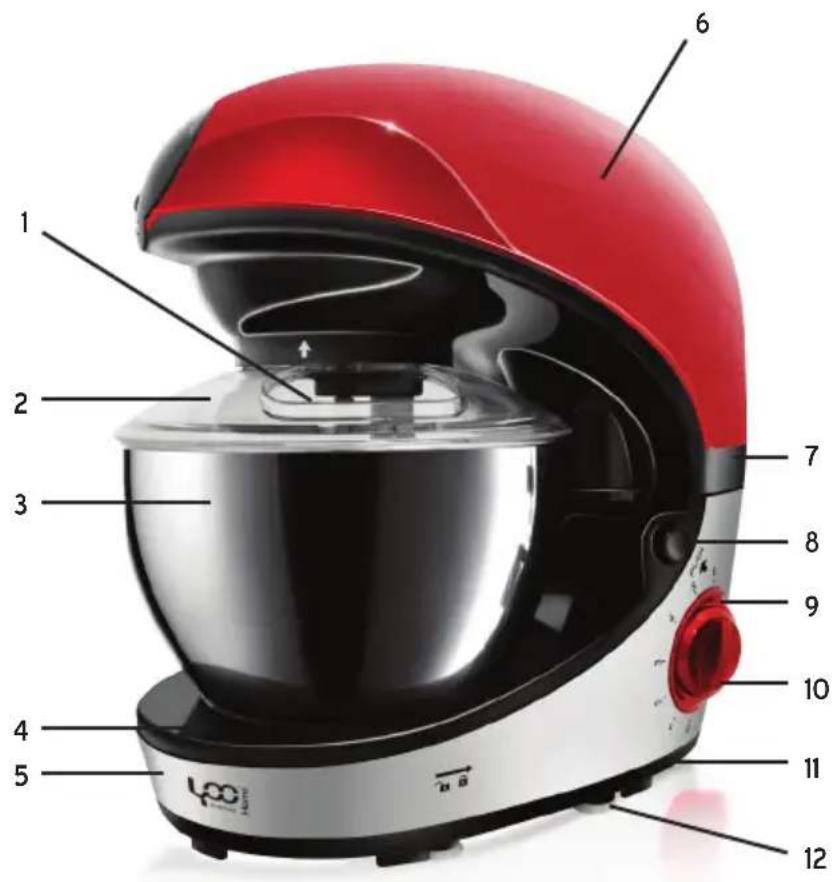
Fixing ring1.
Top enclosure6.
- Base cover
Bowl cover2.
Middle enclosure7.
12.Rubber foot
Steel bowl3.
Rise button8.
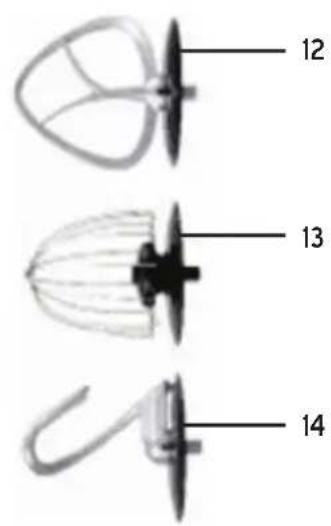
13.Beater
Face cover4.
Control panel9.
- Whip
Enclosure5.
Knob10.
15.Dough hook

WARNING
Injury Hazard
Unplug mixer before touching beaters.
Failure to do so can result in broken bones, cuts or bruises.
NOTE : Do not scrape the bowl while the stand mixer is operating.
The bowl and beater are designed to provide thorough mixing without frequent scraping. Scraping the bowl once or twice during mixing is usually sufficient. Turn the stand mixer off before scraping.
The stand mixer may warm up during use. Under heavy load with extended mixing time, you may not be able to comfortably touch the top of the stand mixer. This is normal.
TECHNICAL INFORMATION
Voltage: 220-240 V
frequency: 50/60Hz
Power: 650W
Agitator kettle capacity : 5 liters
BEFORE FIRSTUSE
- All parts of the stand mixer are to be thoroughly cleaned before being used for the first time. (See section : Cleaning).
- Take out the required length of cable from the cable tidy on the base of the blender and connect the device to the mains supply.
ACCESSIONS
Mixer1. : For making cakes, biscuits, cakes, icings, fillings, éclairs and mashed potatoes.
Dough hook2. : For mixtures containing yeast.
- Whip : To the eggs, cream, batter, cakes without fat, meringues, cheeses, moussees, soufflés. Do not use the whisk for heavy mixtures (eg, fat and sugar) - you could damage it.
Using your mixer
Press the release lever of the head and lift the beater until it clicks into place. To insert a utensill.
Select a pan and press it in the output accessory. Always ensure that the protection is installed on the 2. shaft of the dough hook before inserting it in the output. Once inserted the pan, put the protection on the output of the mixer to avoid splashing of food.
Place the bowl on the base and turn clockwise to clockwise to lock it into position.3.
Press the release lever of the head and lower the mixer head until it clicks into position.4.
To remove a utensil
Raise the mixer head and, while holding the camera firmly, remove the pan from the output.
Testing the device
Press the rise button, then lift the machine arm. 1.
Put the mixing bowl onto the base, and lock it as the arrowhead denotes.2.
- Fix the dusty cover onto the mixing blade, then lock the blade into the machine
4Press the rise button. Make the arm down. Make sure the arm is fixed together the basc. - Plug-in the cord, and turn on the adjustable knob, then try every function for a few seconds.
- After the trial, turn off the knob.
- Press the button and lift the arm, then take apart the mixing blade from the blade conector.
Important
Movements at the mixer head is normal when mixing heavy ingredients, tells the dough.
If you raise the mixer head while the unit is operating, it stops immediately. To restart the mixer, lower the head, move the gear selector to «Off», wait a few seconds, then re-select a speed. The batter should be restarted immediately.
If for any reason, the power supply is interrupted and the drummer stops the machine, set the speed to “stop”, wait a few seconds, then re-select a speed. The batter should be restarted immediately.
TO MIX OR KNEADDough
- Suggestion flour and water at a ratio of 5:3
- Assembly the dough hook, and turn on knob 11.
- When filling the agitator kettle, please ensure that the maximum quality is not exceeded.
- Maximum quantity of flour is 1500g.
- The dough hook or mixer beater should be used.
- Turn on the knob, The device oprated 30's at speed"1", then operated 4min at speed"2"
- No longer use than 5 minutes continuously at a time. And cool down used again.
Important
Never exceed the maximum capacities stated - you overload the machine.
Movements at the mixer head is normal when mixing heavy ingredients such as bread dough.
The ingredients mix best if you pour the liquid first.
Stop periodically and scrape the mixture with the dough hook.
WHIPPING EGG WHITES OR CREAM
Turn the device, whip the egg whites without stopping for about 5 minutes, according to the size of the 1. eggs until stiff.
Maximum quantity 12 eggs.2.
For whipped cream, whip 250ml fresh cream at high speed for about 5 minutes.3.
When filling the agitator kettle with fresh milk, cream or other ingredients, please ensure that the maxi-4. mum quality is not exceeded.
The egg beater should be used.5.
No longer use than10 minutes continuously at a time.6.
MIXING SHAKES, COCKTAILS OR OTHER LIQUIDS
Mix the ingredients according to the available recipe, at high speed for about 5 minutes.1.
Do not exceed the maximum quantity for the agitator kettle.2.
The mixer beater should be used.3.
No longer use than 10 minutes continuously at a time.4.
INSTALLATIONET UTILISATIONDE LAPROTECTIONANTI-PROJECTIONS
- Place the bowl on the base and add the ingredients.
- Install the pan, then lower the mixer head.
- Place the bowl on the protection by sliding the open around the mixer head.
- To remove the splashguard, repeat the above procedure in reverse order.
The ingredients can be added directly into the bowl through the opening during operation of the device.
NETTOYAGE
Before cleaning, please ensure that the knob turn off and that the plug has been disconnected from the 1. socket.
-
After use, allow the device to cool down before you start to clean it.
-
To clean the exterior of the device, use a moist cloth and a mild detergent.
- When cleaning the interior and exterior and protective dust cover do not use any abrasive detergents or alcohol.
To clean the device, never submerge it in water.5.
The dough beater, mixer beater, Food plate are not in dishwasher. The accessories must be cleaned or in warm water and washing-up liquid.
The plastic accessories, Mixing bowl, egg beater and blades, Must be cleaned with warm water and 7. washing-up liquid or in dishwasher. Do not use any abrasive detergents..
CLEANING
Unplug the appliance.1.
Never immerse the motor until in water or put it under running water wipe it with a soft dry or slight 2. damp cloth.
For easier cleaning, quickly rinse the accessories after use. Completely dismantle the mixer attachment.
Wash, rinse and wipe the accessories or the can be put in the dishwasher.4.
If your accessories are discoloured by food, rub them gently with kitchen towel dipped in cooking oil and 5 then clean in the usual way.
PROCESSING GUIDE
| Accessory Food | Food | Maximum | Operation time | Speeds | Preparation |
| whisk | Cream(include 38%fat) | 250ml | 10 minutes | 5-6 | / |
| Egg white | 12pcs | 3 minutes | 5-6 | / | |
| Dough hook | Flour | 1700g | 10 minutes | 5-6 | / |
| Salt | 20g | ||||
| Yeast | 10g | ||||
| Sugar | 10g | ||||
| Water | 1100g | ||||
| Lard | 20g | ||||
| Mixer blade | Flour | 100g | 5 minutes | 1-4 | / |
| Castor sugar | 100g | ||||
| Margarine | 100g | ||||
| Egg | 2pcs |
PACKING LIST
- Main body COOKYOO 4500
Steel bowl - Dusty cover
Beater
Dough hook
Wire whipe
Instruction manual
Warranty card
WHEN YOU NEED SERVICE

WARNING

Electrical Shock Hazard
Unplug before servicing.
Failure to do so can result in death or electrical shock.
Please read the following before calling your service center.
The Stand Mixer may warm up during use. Under heavy loads with extended mixing time periods, you 1. may not be able to comfortably touch the top of the unit. This is normal.
The Stand Mixer may emit a pungent odor, especially when new. This is common whit electric motors.2. If the flat beater hits the bowl, stop the stand mixer.3.
If your Stand Mixer should malfunction or fail to operate, please check the following :
Is the Stand Mixer plugged in?
- Is the fuse in the circuit to the Stand Mixer in working order? If you have a circuit breaker box, be sure the circuit is closed.
- Turn the Stand Mixer off for 10-15 seconds, then turn it back on. If the mixer still does not star, allow it to cool for 30 minutes before turning it back on.
- If the problem is not due to one of the above items, see "Service Centers".
This marking indicates that this product should not be disposed with other household wastes throughout the EU. To prevent possible harm to the environment or human health from uncontrolled waste disposal, recycle it responsibly to promote the sustainable reuse of material resources. To return your used device, please use the return and collection systems or contact the retailer where the product was purchased. They can take this product for environmental safe recycling.

- Your safety and the safety of others are very i mp or ta nt .
- DANGER
- WARNING
- ELECTRICAL REQUIREMENTS
- Injury Hazard
- TECHNICAL INFORMATION
- BEFORE FIRSTUSE
- ACCESSIONS
- Using your mixer
- To remove a utensil
- Testing the device
- Important
- TO MIX OR KNEADDough
- WHIPPING EGG WHITES OR CREAM
- MIXING SHAKES, COCKTAILS OR OTHER LIQUIDS
- INSTALLATIONET UTILISATIONDE LAPROTECTIONANTI-PROJECTIONS
- NETTOYAGE
- CLEANING
- PROCESSING GUIDE
- PACKING LIST
- WHEN YOU NEED SERVICE
- Please read the following before calling your service center.
- If your Stand Mixer should malfunction or fail to operate, please check the following :
Brand : YOO DIGITAL
Model : CookYoo 4500
Category : Food processor