Easy Reader TW2R237009J - Watch TIMEX - Free user manual and instructions
Find the device manual for free Easy Reader TW2R237009J TIMEX in PDF.


| Technical Features | Analog watch with clear display, stainless steel case, scratch-resistant mineral glass. |
|---|---|
| Dimensions | Case diameter: 38 mm, thickness: 10 mm. |
| Weight | Approximately 50 grams. |
| Movement | Quartz movement for optimal accuracy. |
| Water Resistance | Water resistant up to 30 meters (3 ATM). |
| Usage | Ideal for daily use, suitable for a casual style. |
| Bracelet | Genuine leather strap, adjustable for optimal comfort. |
| Maintenance | Clean regularly with a soft cloth, avoid harsh chemicals. |
| Repair | For any repairs, contact an authorized TIMEX service center. |
| Safety | Avoid prolonged exposure to water and strong impacts. |
| General Information | 2-year warranty against manufacturing defects. |
Frequently Asked Questions - Easy Reader TW2R237009J TIMEX
User questions about Easy Reader TW2R237009J TIMEX
0 question about this device. Answer the ones you know or ask your own.
Ask a new question about this device
Download the instructions for your Watch in PDF format for free! Find your manual Easy Reader TW2R237009J - TIMEX and take your electronic device back in hand. On this page are published all the documents necessary for the use of your device. Easy Reader TW2R237009J by TIMEX.
USER MANUAL Easy Reader TW2R237009J TIMEX
Register your product at https://www.timex.com/product-registration.html
Congratulations on purchasing your TIMEX® watch. Please read these instructions carefully to understand how to operate your Timex timepiece.
Your watch may not have all of the features described in this booklet. For more information, please visit: www.timex.com
HOW TO START YOUR WATCH
Quartz Movement: To start your watch remove the plastic guard from under the crown, then press the crown in against the case. The second hand will begin advancing in one-second intervals.
Some deep-depth water-resistant watches require the setting crown to be screwed in to secure water-resistance. If your watch case has a protrusion with screw threads, the crown must be screwed in after setting the watch.
To screw in, push the crown firmly against the threaded protrusion and hold in while turning the crown clockwise. Continue to screw in the crown until it is tight. You will need to unscrew the crown (counter-clockwise) before pulling it out the next time you want to set your watch.
Solar Movement: The watch includes a solar cell that charges its battery. Expose the watch in direct sunlight, sunlight through a window, or artificial (indoor) lighting to charge the battery prior to use. When fully charged, the watch may function without additional charging for up to 2 months.
To start your watch, remove the plastic guard from under the crown, then press the crown in against the case. The second hand will begin advancing in one-second intervals.
Charging happens faster while in direct sunlight and slower when indoors. A depleted battery may be charged by exposing the dial to sunlight for several days. Wear watch so that the sleeve does not cover all or part of the dial and impede charging. Store watch where it will be exposed to light or the battery will run down and require a full charge. See the table below for more information.
WARNING: Leaving the watch in direct sunlight or close to a lamp may cause the watch to become hot. Handle with care.
After many years of use, if the battery becomes unable to charge fully, it may be replaced with a new rechargeable battery of the same type. Please see BATTERY section for details.
| Illumination (Lx) | Light Source | Environment | Full Charge from Empty | Charge for One Day's Operation |
| 700 | Fluorescent Light | Office Lighting N/A | 100 Minutes | |
| 3,000 | Incandescent Light | 150W Lamp (8" / 20cm distance) | 60 Hours 25 | Minutes |
| 10,000 Sunlight | Cloudy Weather | 20 Hours 8 | Minutes | |
| 100,000 Sunlight Clear Weather | 5 Hours 2 Minutes | |||
Hand-wind Movement: To start your watch remove the plastic guard from under the crown, set the Time and Date (if applies) then press the crown in against the case. Slowly turn the crown clock-wise until you feel resistance. You should hear the watch "ticking" and the second hand will begin to move. If the watch stops in the next 24 hours, you should increase the amount of clock-wise turns of the crown during the winding process until you find the watch will work for 24 hours without stopping. You should wind the watch each 24-hour period at approximately the same time of day to ensure the watch does not become fully un-wound and stops. If the watch stops, follow the instructions to set the Time and Date (if applies), and wind to start the watch again.
WATER AND SHOCK RESISTANCE
If your watch is water-resistant, meter marking or ( ≈ ) is indicated.
| Water-Resistance Depth p.s.i.a. * Water Pressure Below Surface | |
| 30m /98ft 60 | |
| 50m /164ft 86 | |
| 100m /328ft 160 | |
| 200m /656ft 284 | |
*pounds per square inch absolute
WARNING: TO MAINTAIN WATER-RESISTANCE, DO NOT PRESS ANY BUTTONS OR PULL OUT THE CROWN UNDER WATER UNLESS YOUR WATCH IS INDICATED AS 200 METER WATER-RESISTANT.
- Watch is water-resistant only as long as lens, push buttons and case remain intact.
- Watch is not a diver watch and should not be used for diving.
- Rinse watch with fresh water after exposure to salt water.
- Shock-resistance will be indicated on watch face or caseback. Watches are designed to pass ISO test for shock-resistance. However, care should be taken to avoid damaging crystal/lens.
Press button or crown to activate light. Electroluminescent technology used in the INDIGLO® night-light illuminates entire watch face at night and in low light conditions.
natural_image
Three identical line drawings of a wristwatch with hour and minute hands, shown from different angles (no text or symbols)DATE MODELS
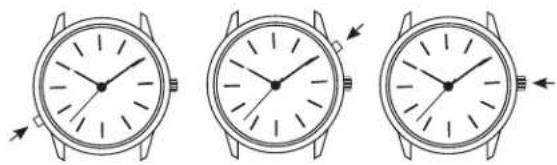
TO SET TIME:
- PULL crown all the way out and turn to correct time.
- Push crown in to restart. For screw-in setting crown, push crown in while turning CLOCKWISE to tighten.
Watches with date: Note correct time of day (A.M or P.M.) for proper date function.
TO SET DAY:
- PULL crown to "middle" position and turn CLOCKWISE until correct day appears. If day does not change, pull crown to "out" position and turn CLOCKWISE or COUNTERCLOCKWISE through necessary number of 24 hour periods until correct day appears.
text_image
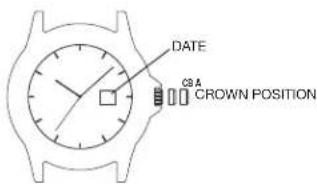
DATE CBN POSITIONTO SET "QUICKDATE®" FEATURE:
3-POSITION CROWN:
- Pull crown to "Middle" position and turn CLOCKWISE or COUNTERCLOCKWISE until correct date appears.
2-POSITION CROWN:
- Pull crown to "OUT" position and turn CLOCKWISE until date changes. Repeat until correct date appears. Adjust date when month has less than 31 days. Push crown in when finished.
Caution: Wearing or storing the watch with the crown in the "middle" position will cause damage to the movement. Always return the crown to the normal position, or if you wish to save the battery life while storing the watch, leave the crown in the "out" position.
TIMEX
The date function advances the date between the hours of 10 PM and 2 AM. Avoid setting the date during this timeframe. If you attempt to set the date during this time period, rotate the crown at a very slow rate to avoid damaging the watch.
DAY / DATE MODELS
TO SET THE TIME:
- PULL the crown out to the "C" position.
- TURN the crown either way to the correct time.
- PUSH in the crown to the "A" position.
TO SET THE DATE:
- PULL the crown out to the "B" position.
- TURN the crown either way to the correct date.
- PUSH in the crown to the "A" position.
TO SET THE DAY:
- PULL the crown out to the "C" position.
- TURN the crown either way for full 24 hour cycle to set day.
- PUSH the crown in to the "A" position.
TO SET THE BILINGUAL DATE:
If your watch is equipped with a bilingual day display, you may select the desired language by advancing the day display.
- PULL the crown out to the "C" position.
- Repeatedly move the time back to 11pm and forward to 4am until you see the current day displayed in the desired language.
- PUSH the crown in to the "A" position.

text_image
DATE A C CROWN POSITIONEASY SET ALARM
text_image
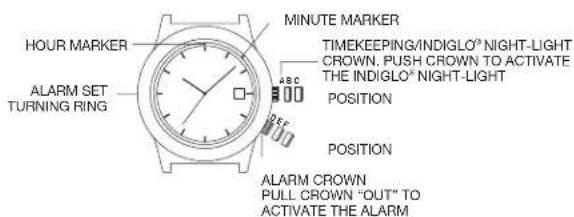
HOUR MARKER ALARM SET TURNING RING MINUTE MARKER TIMEKEEPING/INDIGLO® NIGHT-LIGHT CROWN. PUSH CROWN TO ACTIVATE THE INDIGLO® NIGHT-LIGHT POSITION POSITION ALARM CROWN PULL CROWN "OUT" TO ACTIVATE THE ALARMEASY SET ALARM WITH DATE & INDIGLO® NIGHT-LIGHT
- From the "A" position, PUSH the TIMEKEEPING CROWN in (towards the watch case) to activate the INDIGLO® Night-Light and illuminate the watch dial.
EASY SET ALARM DATE & TIME SETTINGS
TO SET THE DATE:
- With the TIMEKEEPING CROWN in the "B" position TURN the TIMEKEEPING CROWN or TURNING RING in either direction to set the date.
TO SET THE TIME:
- With the TIMEKEEPING CROWN in the "C" position TURN the TIMEKEEPING CROWN or TURNING RING in either direction to set the time.
EASY SET ALARM SETTINGS
- Your easy set alarm watch is equipped with two types of alarms:
- 12-Hour Alarm: rings OR vibrates twice per day at the desired hour and minute as long as the alarm is activated. (Alarm crown must be in "E" position.)
- Hourly Alarm: rings OR vibrates every hour at the desired minute if activated. (Alarm crown must be in "F" position.)
TO SET THE 12-HOUR ALARM:
- With the ALARM CROWN in the "D" position, TURN the ALARM CROWN or TURNING RING in either direction to set the hour and minute alarm markers. To activate the alarm to ring or vibrate at the desired time, PULL the ALARM CROWN out to the "E" position. A single beep sound and flash, OR a vibration will indicate that the 12-Hour Alarm is activated.
- The alarm will sound and the dial will flash OR vibrate at the desired time (hour and minute) and will repeat every twelve hours unless the alarm is deactivated.
NOTE: Alarm is deactivated when the ALARM CROWN is in the "D" position. If the alarm is not deactivated it will automatically stop ringing after 20 beeps and flashes OR stop vibrating, and will resume in 12 hours at the indicated time.
TO SET THE HOURLY ALARM:
- With the ALARM CROWN in the "D" position, TURN the ALARM CROWN or TURNING RING in either direction to set the minute alarm marker.
- To activate the alarm to ring or vibrate at the desired minute, PULL the ALARM CROWN out to the "F" position. Three beops sound and flash OR a vibration indicates the Hourly Alarm is activated.
- The alarm will sound and the dial will flash OR vibrate at the desired minute and will repeat every hour on the specified minute unless the alarm is deactivated.
NOTE: Alarm is deactivated when the ALARM CROWN is in the "D" position.
If the alarm is not deactivated it will automatically stop ringing after 20 beeps and flashes OR stop vibrating, and will resume again in one hour at the indicated minute.
PERPETUAL CALENDAR
Your Perpetual Calendar watch accurately keeps track of how many days are in each month. It also adjusts for leap years. The date on your watch (including the month and year) was preset at the factory to Eastern Standard Time, Greenwich Mean Time or Hong Kong Standard Time (depending on where you purchased your watch). You only need to adjust the time.
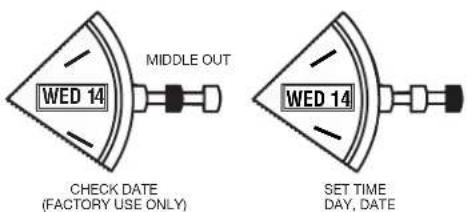
text_image
MIDDLE OUT WED 14 CHECK DATE (FACTORY USE ONLY) WED 14 SET TIME DAY, DATETO SET TIME
To set time, simply pull crown all the way out and turn. Day and date change automatically when time is adjusted past midnight; there is no additional step for setting day or date. Push crown in when done.
After setting, if date changes at noon, time needs to be adjusted ahead or back 12 hours.
If crown is accidentally put in MIDDLE position and turned, date display will change temporarily, but date setting is unaffected. Simply pull crown all the way out and set time. Proper date display will resume.
PERPETUAL CALENDAR WATCH
FREE LIFETIME BATTERY REPLACEMENT\*\*
If the battery needs to be changed, we recommend that only TIMEX replace it. Your watch will need to be recalibrated to correct time and date after changing the battery. To return your watch to Timex, visit the retailer where you purchased your watch or go to http://www.timex.com/product!Warranty.html for information on contacting Timex.
** Shipping & handling charges apply.
NEVER INCLUDE A SPECIAL WATCHBAND OR ANY OTHER ARTICLE OF PERSONAL VALUE IN YOUR SHIPMENT.
TIMEX
ELAPSED TIME RING
If your watch is equipped with a rotatable outer ring on the face, with numbers corresponding to minutes, you can use this Elapsed Time Ring to time an activity from the start, or to mark the ending time for the duration of an activity.
TO TIME AN ACTIVITY FROM THE START:
Set the Start/Stop triangle at the time (hour or minute) when you start the activity (As shown on the left in the illustration shown below). At completion, you can see how long the activity took.
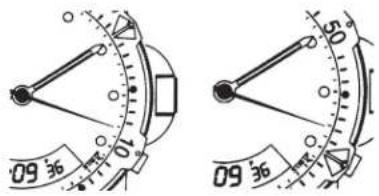
text_image
09 36 50 09 36TO MEASURE THE TIME REMAINING:
Set the triangle to the hour or minute position when you wish to complete the activity, and check the watch periodically for progress towards that goal.
In the illustration shown on the previous page on the right you can stop when the minute hand reaches the 20 minutes past the hour position.
TACHYMETER RING
The tachymeter feature can be used to measure speed in miles per hour (MPH), nautical miles per hour (knots) or kilometers per hour (KPH) using the sweep second hand and the scale on the wall above the watch face. You need to know the actual distance you are covering in miles or km.
Start the chronograph with the second hand at zero (the twelve o'clock position). Within the first minute, the second hand will point to the rate for a one-mile (or one kilometer) course: if it takes 45 seconds, the hand will point to 80 at that position - 80 MPH or 80 KPH.
If within the first minute, a distance greater than one mile or kilometer is covered, multiply the tachymeter number by the distance to get the actual rate: if you went 1.2 miles in 45 seconds, multiply the 80 by 1.2–96 MPH.
COMPASS RING
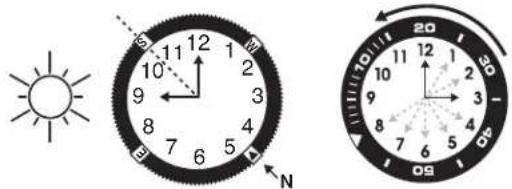
If your watch is equipped with a movable ring around the dial marked at the letters "N", "E", "W", "S" (for the four compass directions) or compass degrees, you can use this feature to find an approximate compass directionalreading.
- Lay the watch on a flat surface, or hold it so that the face is parallel to the ground.
- Locate the sun and point the hour hand at the sun.
- In the A.M., rotate the ring until the "S" (south) marker is halfway between the hour hand and 12:00 (after the hour hand or within the shortest distance between the hour hand and 12:00).
- In the P.M., rotate the ring until "S" is before the hour hand and halfway between the hour hand and 12:00.
text_image
Weather icon and analog compass showing sun, hour, minute, and 20/50/60 reading with directional arrowsHOW TO ADJUST BRACELET
(Variations of the following bracelet sections apply to all watch models).
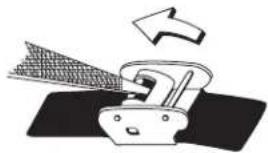
SLIDING CLASP BRACELET
- Open locking plate.
- Move clasp to desired bracelet length.
- Exert pressure while holding locking plate and slide clasp back and forth until it engages in grooves on underside of bracelet.
- Press locking plate down until it snaps closed. Clasp can be damaged if excessive force is used.
natural_image
Illustration of a mechanical device emitting a triangular blade, with an arrow indicating direction (no text or symbols)FOLDOVER CLASP BRACELET
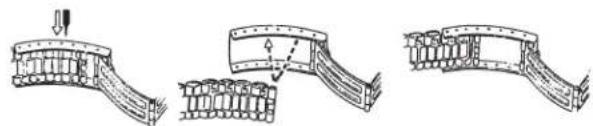
- Find spring bar that connects bracelet to clasp.
- Using a pointed tool, push in spring bar and gently twist bracelet to disengage.
- Determine wrist size, then insert spring bar in correct bottom hole.
- Push down on spring bar, align with top hole and release to lock in place.
natural_image
Three sequential diagrams showing structural changes in a curved beam or support structure, with arrows indicating direction of movement (no text or symbols present)FIG. 1 FIG. 2 FIG. 3
BRACELET LINK REMOVAL
REMOVING LINKS:
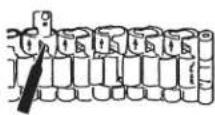
- Place bracelet upright and insert pointed tool in opening of link.
- Push pin forcefully in direction of arrow until link is detached (pins are designed to be difficult to remove).
- Repeat until desired number of links are removed.
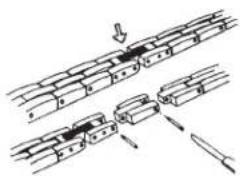
RE-ASSEMBLY:
- Rejoin bracelet parts.
- Push pin back into link in opposite direction of arrow.
- Press pin down securely into bracelet until it is flush.
natural_image
Diagram showing mechanical assembly steps with no visible text or symbolsBATTERY
Timex strongly recommends that a retailer or jeweler replace battery. Battery type is on watch back. If present, push/short internal reset switch after replacing battery. Battery life estimates are based on certain assumptions regarding usage; battery life may vary depending on actual usage.
DO NOT DISPOSE OF BATTERY IN FIRE. DO NOT RECHARGE. KEEP LOOSE BATTERIES AWAY FROM CHILDREN.
TIMEX INTERNATIONAL WARRANTY
http://www.timex.com/productWarranty.html
©2019 Timex Group USA, Inc. TIMEX, INDIGLO and QUICKDATE are registered trademarks of Timex Group B.V. and its subsidiaries.
TIMEX
Luz nocturna INDIGLO®
natural_image
Three identical line drawings of a wristwatch with hour and minute hands, shown from different angles (no text or symbols)MODELOS CON FECHA
PARA FIJAR LA HORA:
text_image
Weather icon and compass diagram showing sun, hour, minute, and second dial with directional arrowsCÓMO AJUSTAR LA PULSERA
natural_image
Diagram of a mechanical device with a rotating arrow indicating motion (no text or symbols)PULSERA CON BROCHE PLEGABLE
natural_image
Three sequential line drawings of a curved structural component with internal components, showing progressive assembly (no text or symbols)FIG. 1 FIG. 2 FIG. 3
natural_image
Diagram showing mechanical assembly steps with arrows indicating motion (no text or labels)PILA
natural_image
Three identical line drawings of a wristwatch with hour and minute hands, shown from different angles (no text or symbols)MODÈLES AVEC AFFICHAGE DE LA DATE POUR RÉGLER L'HEURE :
text_image
Weather icon and compass diagram showing sun, directional compass, and hour/minute handsCOMMENT AJUSTER LE BRACELET
natural_image
Diagram of a mechanical device emitting force or material, with an arrow indicating direction (no text or symbols present)BRACELET À FERMOIR DÉPLIANT
natural_image
Technical line drawings of three mechanical components or assemblies, showing structural details without any text or symbols.FIG. 1 FIG. 2 FIG. 3
DÉMONTAGE DE MAILLONS DU BRACELET DÉMONTAGE DE MAILLONS :
text_image
Diagram showing mechanical assembly steps with labeled components and directional arrowsPILE
LUZ NOTURNA INDIGLO®
natural_image
Three identical line drawings of a wristwatch with hour and minute hands (no text or symbols)MODELOS COM DATA PARA CONFIGURAR A HORA:
text_image
Weather icon and analog compass showing sun, hour, minute, and minute hands with degree markingsCOMO AJUSTAR A PULSEIRA
natural_image
Diagram of a mechanical device emitting powder or material, with an arrow indicating direction (no text or symbols present)PULSEIRA DE FIVELA DOBRÁVEL
natural_image
Three-step diagram showing structural deformation of a curved bridge or channel (no text or symbols present)FIG. 1 FIG. 2 FIG. 3
RETIRADA DOS ELOS DA PULSEIRA RETIRADA DOS ELOS:
text_image
Diagram illustrating a mechanical or structural assembly with labeled components and directional arrows indicating movement or force.BATERIA
natural_image
Three identical line drawings of a wristwatch with hour and minute hands, shown in different angles (no text or symbols)MODELLI CON DATA PER IMPOSTARE L'ORA
text_image
Weather icon and compass diagram showing sun, 1200, and 240-degree hand signals with directional arrowsCOME REGOLARE IL BRACCIALE
natural_image
Diagram of a mechanical device with a rotating arrow and textured internal structure (no text or symbols)BRACCIALE CON FERMAGLIO RIPIEGABILE
natural_image
Three-step diagram showing a mechanical assembly with arrows indicating motion (no text or symbols)FIG. 1 FIG. 2 FIG. 3
text_image
Diagram illustrating a mechanical or structural assembly with labeled components and directional arrows indicating movement or force.BATTERIA
www.timex.it/it_IT/productWarranty.html
*pounds per square inch absolute
natural_image
Three identical line drawings of a wristwatch with hour and minute hands, shown from different angles (no text or symbols)DATUMSMODELLE
text_image
Weather icon and compass diagram showing solar and 24-hour cycle with hour and minute handsANPASSEN DER ARMBÄNDER
natural_image
Diagram of a mechanical device emitting particles with an arrow indicating direction (no text or symbols)ARMBAND MIT FALTVERSCHLUSS
natural_image
Three technical line drawings of a structural component with arrows indicating motion (no text or symbols)text_image
Diagram showing mechanical assembly steps with labeled components and directional arrowsTIMEX
DEUTSCH 990-095926-05
BATTERIE
natural_image
Three identical line drawings of a wristwatch face showing front, side, and side views with no text or symbols.MODELLEN MET DATUM
DE TIJD INSTELLEN:
text_image
Weather icon and analog compass showing sun, 1200, and 95°/30' cycles with hour and minute handsARMBAND AFSTELLEN
natural_image
Diagram of a mechanical device with an arrow indicating motion or force direction (no text or symbols present)ARMBAND MET KLAPSLUITING
natural_image
Three-step diagram showing structural deformation of a curved beam or spring, with arrows indicating force direction (no text or symbols present)FIG. 1 FIG. 2 FIG. 3
text_image
Technical diagram showing assembly steps of a mechanical component with arrows indicating direction and componentsTIMEX
NEDERLANDS 990-095926-05
BATTERIJ
natural_image
Three identical line drawings of a wristwatch with hour and minute hands, shown from different angles (no text or symbols)日期显示型手表
时间设置:
text_image
Weather icon and analog compass showing sun, hour, minute, and minute hands with degree markings如何调整表带
natural_image
Illustration of a mechanical device emitting powder from a fan, with an arrow indicating direction (no text or symbols)翻扣式表带
natural_image
Three sequential line drawings of a curved structural component, showing progressive assembly or assembly steps (no text or symbols present)图1 图2 图3
拆卸表带环扣
拆卸环扣:
text_image
Diagram showing mechanical assembly steps with labeled components and directional arrows电池
natural_image
Three identical line drawings of a wristwatch with hour and minute hands, shown in different angles (no text or symbols)日付のモデル
時間の設定
text_image
Weather icon showing sun and minute hand pointing to 12:00, with compass needle indicating 12:00 hour.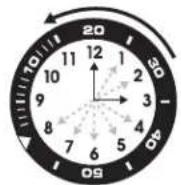
ブレスレットの調整
natural_image
Illustration of a mechanical device emitting smoke or vapor, with no visible text or symbols折り重ね式留め金ブレスレット
text_image
Diagram illustrating a mechanical or electrical assembly with labeled components and directional arrows indicating movement or process.電池
www.timexwatch.jp/fs/timex/c/guide#returns
natural_image
Three identical line drawings of a wristwatch with hour and minute hands (no text or symbols)text_image
Weather icon and analog compass showing sun, hour, minute, and minute hands with degree markingsnatural_image
Diagram of a mechanical device with a triangular component and an arrow indicating motion (no text or symbols)natural_image
Three technical line drawings of a mechanical component or bracket assembly, showing progressive assembly and alignment (no text or symbols)text_image
Diagram showing mechanical assembly steps with arrows indicating direction of movementБАТАРЕЯ
text_image
Weather icon showing sun and a compass with hour and minute hands, indicating solar position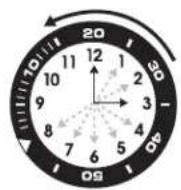
NASTAVENÍ ŘEMÍNKU
natural_image
Illustration of a mechanical device emitting smoke or vapor, with no visible text or symbolsŘEMÍNEK SE SKLÁDACÍ SPONOU
text_image
Diagram illustrating a mechanical or structural assembly with labeled components and directional arrows indicating movement or assembly.BATERIE
natural_image
Three identical line drawings of a wristwatch with hour and minute hands, shown from different angles (no text or symbols)DÁTUM MODELLEK
IDÖBEÁLLÍTÁS:
text_image
Weather icon and analog compass showing sun, hour, minute, and minute hands with degree markingsHOGYAN LEHET BEÁLLÍTANI A KARKÖTŐ ÓRASZÍJAT
natural_image
Diagram of a mechanical device with a rotating arrow and blade-like structure (no text or symbols)ÁTHAJTÓ CSATOS KARKÖTŐ
natural_image
Three sequential diagrams showing structural changes in a curved mechanical component (no text or symbols)- ÁBRA 2. ÁBRA 3. ÁBRA
text_image
Diagram showing mechanical assembly steps with arrows indicating direction of movementELEM
USTAWIANIE DATY W DWÓCH JĘZYKACH:
DZWONEK UPŁYWU CZASU
text_image
Weather icon showing sun and a clock face with hour and minute hands, indicating solar or night division.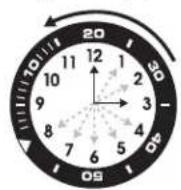
natural_image
Diagram of a mechanical device emitting a fan or blade, with an arrow indicating direction (no text or symbols present)natural_image
Three sequential line drawings of a curved structural component, showing progressive assembly and alignment (no text or symbols)RYS.1 RYS.2 RYS.3
ODŁĄCZANIE OGNIW OD BRANSOLETKI ODŁĄCZANIE OGNIW:
text_image
Diagram showing mechanical assembly steps with labeled components and directional arrowsBATERIA
LUMINA NOCTURNĂ INDIGLO®
natural_image
Three identical line drawings of a wristwatch with hour and minute hands, shown from different angles (no text or symbols)MODELE DE DATA
PENTRU A SETA ORA:
INELUL PENTRU BUSOLĂ
text_image
Weather icon and analog compass showing sun, hour, minute, and minute hands with degree markingsCUM SĂ REGLATI BRĂTARA
natural_image
Diagram of a mechanical device emitting force with an arrow indicating direction (no text or symbols)BRĂȚARĂ CU CATARAMĂ PLIABILĂ
natural_image
Three-step diagram showing structural deformation of a curved bridge or arch structure (no text or symbols present)FIG. 1 FIG. 2 FIG. 3
SCOATEREA UNEI VERIGI DIN BRĂȚARĂ PENTRU A SCOATE O VERIGĂ:
text_image
Diagram illustrating a mechanical or structural assembly with labeled components and directional arrows indicating movement or force.BATERIE
natural_image
Three identical line drawings of a wristwatch with hour and minute hands, shown from different angles (no text or symbols)TARİH MODELLERİ
SAATI AYARLAMAK IÇIN:

SAATİN AYARLANMASI
GÜN, TARIH
text_image
Weather icon and analog compass showing sun, hour, minute, and minute hands with degree markingsKORDONUN AYARLANMASI
natural_image
Illustration of a mechanical device emitting force with an arrow indicating direction (no text or symbols)KATLANAN TOKALI KORDON
natural_image
Three sequential diagrams showing structural changes of a curved bridge or cable, with arrows indicating direction (no text or symbols present)ŞEKİL 1 ŞEKİL 2 ŞEKİL 3