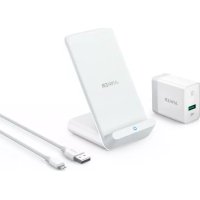
PowerWave 7.5 - Phone charger Anker - Free user manual and instructions
Find the device manual for free PowerWave 7.5 Anker in PDF.

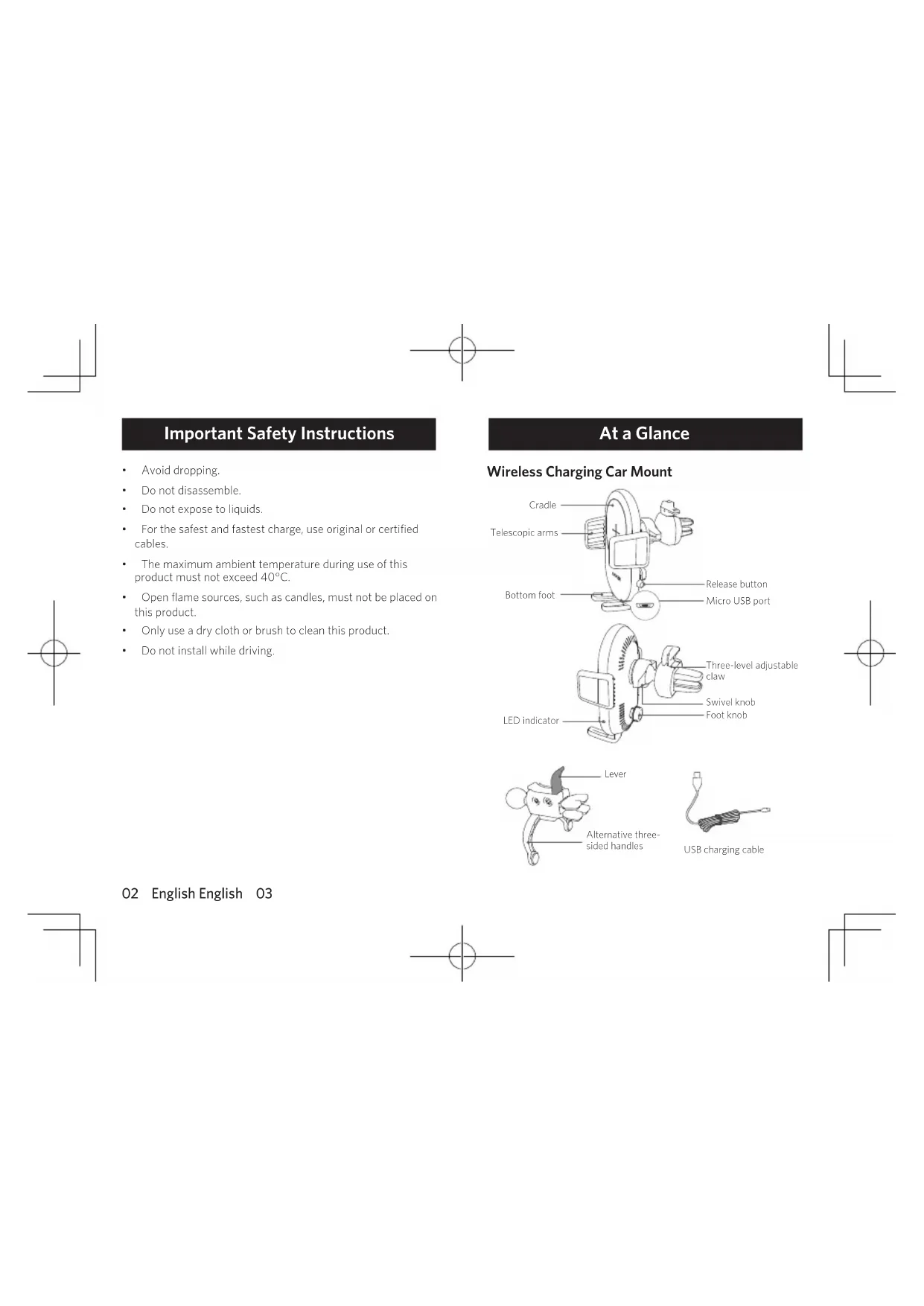


| Product Type | Car mount with wireless charger |
| Brand | Anker |
| Model | PowerWave 7.5 |
| Charging technology | Qi wireless charging |
| Maximum output power | 10 W (Samsung), 7.5 W (iPhone), 5 W (others) |
| Input voltage | 5 V / 9 V / 12 V |
| Input current | 2 A (5 V / 9 V) or 5 A (12 V) |
| Dimensions (L x W x H) | 74.1 x 17.7 x 58.3 mm |
| Weight of mount with claw | 138 g |
| Weight of alternative handles | 21 g |
| Weight of USB cable | 40 g |
| Mounting method | Three-level adjustable claw or three-sided handles |
| LED indicator | Solid blue (charging/standby), blinking blue (metal object/incompatible), blinking red (overheating) |
| Smartphone compatibility | iPhone XS, XR, X, 8, Samsung Galaxy Note/S series, LG G7/V30, etc. (all Qi devices) |
| Safety protection | Metal object detection, overheating protection |
| Operating temperature | Do not exceed 40 °C |
| Care and cleaning | Clean with a dry cloth or brush |
| Materials | Plastic and metal |
| Color | Black (as shown) |
| Cable length | Approximately 1 m (estimated) |
Frequently Asked Questions - PowerWave 7.5 Anker
User questions about PowerWave 7.5 Anker
0 question about this device. Answer the ones you know or ask your own.
Ask a new question about this device
Download the instructions for your Phone charger in PDF format for free! Find your manual PowerWave 7.5 - Anker and take your electronic device back in hand. On this page are published all the documents necessary for the use of your device. PowerWave 7.5 by Anker.
USER MANUAL PowerWave 7.5 Anker
Charge Fast, Live More
ANKER
For FAQs and more information, please visit:
anker.com/support


@Anker
@Anker Japan
@Anker Deutschland

@AnkerOfficial
@Anker_JP

@Anker
Model: A2551
51005001337 V02
USER MANUAL
PowerWave 7.5 Car Mount
02 Important Safety Instructions
03 At a Glance
04 Status LED
05 Compatibility
06 Mounting Your Smartphone
11 Using the Alternative Three-Sided Handles
13 Charging Your Smartphone Wirelessly
14 Specifications
14 Notice
English 01
Important Safety Instructions
- Avoid dropping.
• Do not disassemble.
• Do not expose to liquids. - For the safest and fastest charge, use original or certified cables.
- The maximum ambient temperature during use of this product must not exceed 40°C.
- Open flame sources, such as candles, must not be placed on this product.
• Only use a dry cloth or brush to clean this product. - Do not install while driving.
At a Glance
Wireless Charging Car Mount
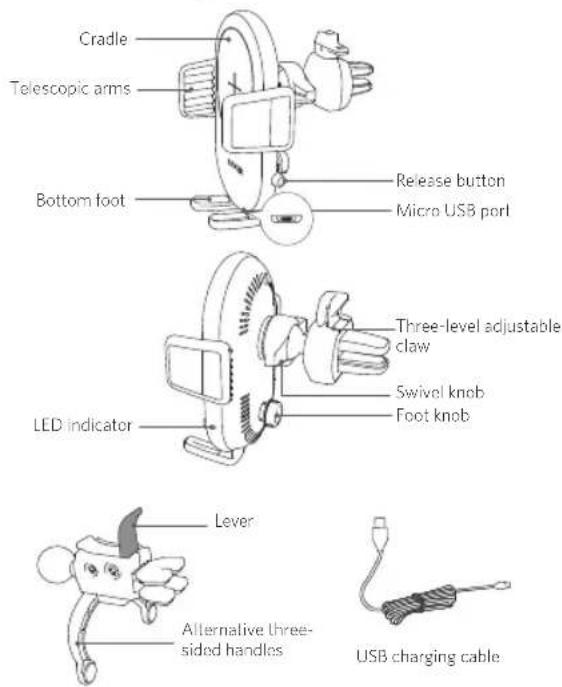
02 English English 03
Status LED
The LED indicator displays the status of the car mount charger.
| Status LED Indicator | |
| Connected to power Solid blue for three | seconds, then off |
| Charging mobile device / Fully charged Solid blue | |
| - Metal or other foreign objects detected- Using an incompatible car charger or cable | Flashing blue |
| Overheating problem detected Flashing red | |
Compatibility
Before using this product, make sure your smartphone is compatible with Qi wireless charging technology.
| Smartphone | Car Charger | Power Output | ||
| Qi-Compatible Phones | +5V 2A=5W | |||
| iPhone XS Max,iPhone XS,iPhone XR,iPhone X,iPhone 8 Plus,iPhone 8,etc. | + | 9V ⇌ A12V ⇌ 5AQuick Charge 3.0 | =7.5W | |
| Samsung Galaxy Note 9,S9+,S9,Note 8,S8-,S8,S7 Edge,S7,etc. | + | 9V ⇌ A12V ⇌ 5AQuick Charge 3.0 | =10W | |
| LG G7+,G7,V35,V30+,V30,etc. | ||||
04 English English 05
Mounting Your Smartphone
- Loosen the foot knob on the back to adjust the height of the foot. The degree scale printed on the bottom foot helps you best fit the dimensions of your smartphone.
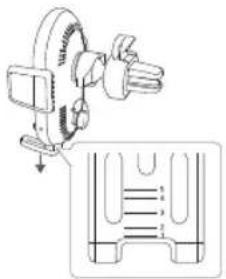
natural_image
Technical line drawing of a mechanical device with a magnified inset showing internal components (no text or symbols)Degree Scale Ideal for
| 5 | Samsung | Note 8, Note 9 |
| 4 | iPhone XS Max, iPhone 8 Plus,Samsung S8+, S9+ | |
| 3 | iPhone XR | Samsung S9, S8, S7 edge, LGG7, G7+, V30, V30+, V35 |
| 2 | iPhone XS | iPhone X, Samsung S7 |
| 1 | iPhone 8 |
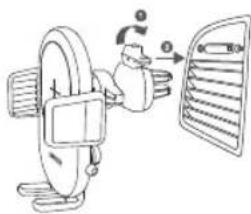
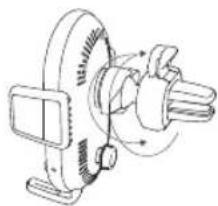
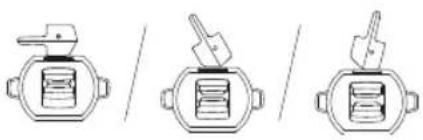
- Insert the three-level adjustable claw into your car's air vent. Make sure the claw is inserted securely in position.
natural_image
Diagram of a car seatbelt device with a belt switch and fan blade, showing no text or symbols• 3 levels to fit more air vents
natural_image
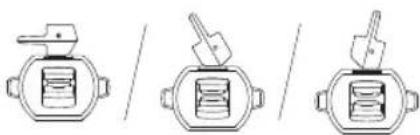
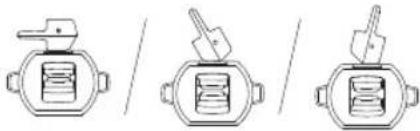
Three identical diagrams showing a device with a handle and internal components, arranged horizontally (no text or symbols)- Loosening the claw
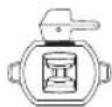
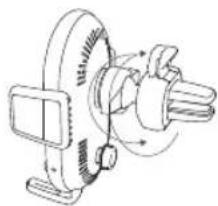
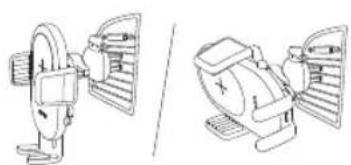
- Unscrew the swivel knob on the back, adjust the car mount to the optimal viewing angle, then tighten the swivel knob to secure.
06 English English 07
natural_image
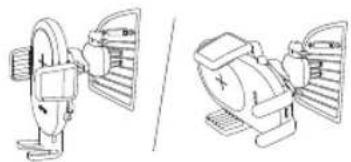
Technical line drawing of a mechanical device with rotating components and directional arrows (no text or symbols)- Placing the car mount horizontally or vertically

natural_image
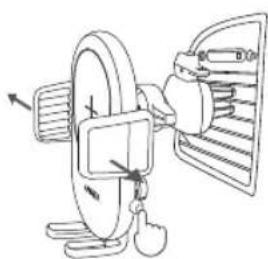
Technical line drawings of two mechanical components with no visible text or symbols- Press the release button on the side of the cradle to extend the telescopic arms.
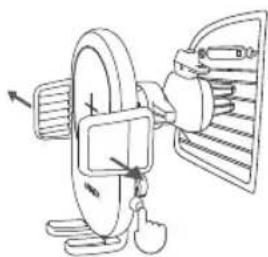
natural_image
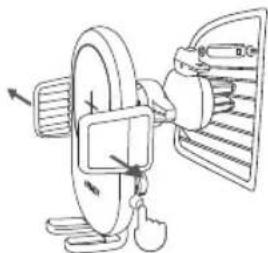
Line drawing of a mechanical device with rotating components and directional arrows (no text or symbols)- Place your smartphone in the mount and squeeze the telescopic arms until the phone is securely in position. Adjust the mount to the perfect angle.
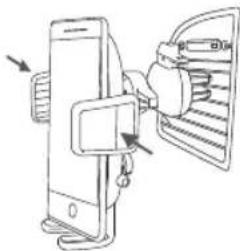
natural_image
Line drawing of a car seatbelt switch with a door open, showing no text or symbols
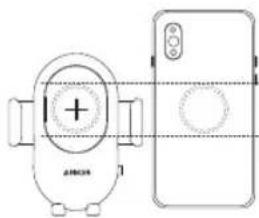
For optimal charging performance, align the smartphone with the Qi coil on the center of the car mount. If there is no grade scale for your smartphone or your phone has a protective cover, you can slightly adjust the bottom foot to align the smartphone with the Qi coil.

natural_image
Technical line drawing of a smartphone with a circular dial indicator and an AMR device (no text or symbols)08 English English 09

To securely fasten the phone, press the rear-end position of the telescopic arms, as illustrated.
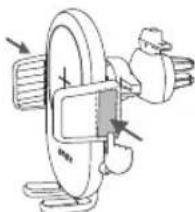
natural_image
Mechanical diagram of a mechanical device with rotating components and directional arrows (no text or symbols)
Non-intensive, arc-shaped or retraction-type air vents are not supported.


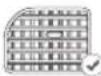


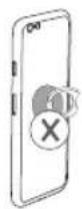
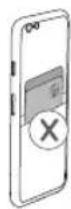
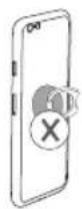
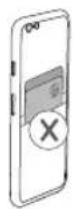
Do not place any foreign objects between your smartphone and the surface of the car mount, including metal objects, credit cards, door keys, coins, or NFC cards, as it may cause overheating.
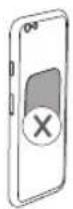
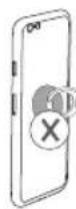
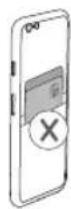

Using an ultra-thick protective phone case is not recommended as it may affect the wireless charging function.
Using the Alternative Three-Sided Handles
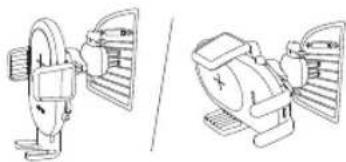
If the three-level adjustable claw does not fit your air vents, use the alternative three-sided handles instead.
- Unscrew the swivel knob on the back and remove the three-level adjustable claw.
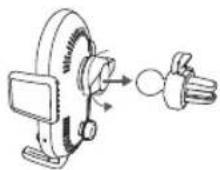
- Firmly insert the round head of the three-sided handles into the joint of the car mount, then tighten the swivel knob to secure.
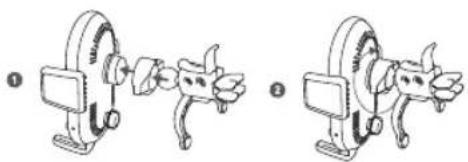
natural_image
Illustration of two mechanical devices with clamps and a gear mechanism, no text or symbols present- Press and hold the lever to firmly insert the claw into your car's air vent. Make sure the claw is inserted securely in position
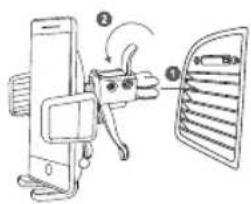
- Repeat steps 3-5 mentioned in the "Mounting Your Smartphone" section to mount your phone.
Charging Your Smartphone Wirelessly
- Mount your smartphone in your desired location.
- Use the USB cable to connect the car mount to a car charger.
- Your phone will begin to charge wirelessly.
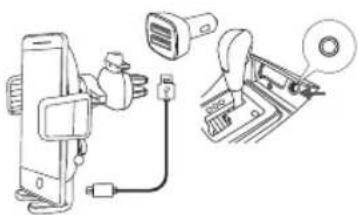
natural_image
Line drawing of a car infotainment device with attached components (no text or symbols)- After use, press the release button to remove your phone.

- Wireless charging function is sensitive to temperature. The in-car high temperature may pause charging or slow down the charging speed, so it is recommended to turn on the air conditioner in your car to avoid overheating. If the LED indicator flashes red, it indicates this product is overheated. Let it cool down before you resume charging.
- For optimal wireless charging performance, use a Quick Charge™ car charger.
12 English English 13
Specifications
| Input | 5 V ≈ 2 A / 9 V ≈ 2 A /12 V ≈ 5 A |
| Size (L x W x H) | 74.1 x 17.7 x 58.3 mm /2.9 x 4.6 x 2.3 in |
| Weight- car mount with three-leveladjustable claw- three-sided handles- USB cable | 138 g / 4.9 oz21 g / 0.7 oz40 g / 1.4 oz18 g / 0.6 oz |
Notice
FCC Statement
This device complies with Part 15 of the FCC Rules. Operation is subject to the following two conditions: (1) this device may not cause harmful interference, and (2) this device must accept any interference received, including interference that may cause undesired operation.
Warning: Changes or modifications not expressly approved by the party responsible for compliance could void the user's authority to operate the equipment.
Note: This equipment has been tested and found to comply with the limits for a Class B digital device, pursuant to Part 15 of the FCC Rules. These limits are designed to provide reasonable protection against harmful interference in a residential installation.
This equipment generates, uses, and can radiate radio frequency energy and, if not installed and used in accordance with the instructions, may cause harmful interference to radio communications. However, there is no guarantee that interference will not occur in a particular installation. If this equipment does cause harmful interference to radio or television reception, which can be determined by turning the equipment off and on, the user is encouraged to try to correct the interference by one or more of the following measures: (1) Reorient or relocate the receiving antenna. (2) Increase the separation between the equipment and receiver. (3) Connect the equipment into an outlet on a circuit different from that to which the receiver is connected. (4) Consult the dealer or an experienced radio/TV technician for help.
Radiation Exposure Statement
This equipment complies with FCC radiation exposure limits set forth for an uncontrolled environment. This equipment should be installed and operated with minimum distance of 20 cm between the radiator & your body.
IC Statement
This device complies with RSS-216 of Industry Canada. Operation is subject to the condition that this device does not cause harmful interference.
14 English English 15
Declaration of Conformity
Hereby, Anker Innovations Limited declares that the product type A2551 is in compliance with Directive 2014/53/EU. The full text of the EU declaration of conformity is available at the following internet address: https://www.anker.com/products
Product Name: PowerWave 7.5 Car Mount Model: A2551
Anker Innovations Limited
Room 1318-19, Hollywood Plaza, 610 Nathan Road, Mongkok, Kowloon, Hong Kong
The following importer is the responsible party. Company Name: Fantasia Trading LLC
Address: 9155 Archibald Avenue, Suite 202, Rancho Cucamonga, CA, 91730, US
natural_image
Technical line drawing of a mechanical device with a circular component and a separate view showing internal structure (no text or symbols)Skala Ideal für
| 5 | Samsung Note 8, Note 9 |
| 4 | iPhone XS Max, iPhone 8 Plus, Samsung S8+, S9+ |
| 3 | iPhone XR, Samsung S9, S8, S7 edge, LG G7,G7+, V30, V30+, V35 |
| 2 | iPhone XS, iPhone X, Samsung S7 |
| 1 | iPhone 8 |
natural_image
Illustration of a car seatbelt device with a belt switch and fan blade, no text or symbols presentnatural_image
Three identical diagrams showing a device with a handle, mounted on a circular base, and two others holding a tray (no text or symbols)- Lösen der Gabel
natural_image
Technical line drawing of a mechanical device with rotating components (no text or symbols)natural_image
Technical line drawings of two mechanical devices with no visible text or symbolsnatural_image
Technical line drawing of a mechanical device with no visible text or symbolsnatural_image
Line drawing of a mobile phone with a door and seatbelt, showing no text or symbols
natural_image
Diagram of a smartphone with a central display and external casing, showing no text or symbols.24 Deutsch Deutsch 25

natural_image
Technical line drawing of a mechanical device with no visible text or symbols
natural_image
Illustration of two mechanical devices with animal heads and gears, shown from different angles (no text or symbols)natural_image
Technical line drawing of a mechanical device with a magnified inset showing internal components (no text or symbols)Escala de grados Ideal para
| 5 Samsung Note 8, Note 9 | |
| 4 | iPhone XS Max, iPhone 8 Plus,Samsung S8+, S9+ |
| 3 iPhone XR, Samsung S9, S8, S7 edge,LG G7, G7+, V30, V30+, V35 | |
| 2 iPhone XS, iPhone X, Samsung S7 | |
| 1 iPhone 8 | |
natural_image
Diagram of a car steering wheel with a gear and valve mechanism (no text or symbols)natural_image
Three identical line drawings of a mechanical device with a handle, shown in different angles (no text or symbols)natural_image
Mechanical assembly diagram showing a rotating motor with shafts and housing (no text or symbols)natural_image
Technical line drawings of two mechanical components with no visible text or symbolsnatural_image
Technical line drawing of a mechanical device with no visible text or symbolsnatural_image
Line drawing of a car seatbelt switch with an open door (no text or symbols)
natural_image
Diagram of a smartphone with an AMER device and external screen (no text or symbols)natural_image
Mechanical diagram showing a rotating device with arrows indicating motion (no text or symbols)
natural_image
Illustration of two mechanical devices with numbered parts, no text or symbols presentnatural_image
Diagram showing a car interior with connected devices and a fan (no text or symbols present)natural_image
Technical line drawing of a mechanical device with a magnified inset showing internal components (no text or symbols)| Échelle de mesure | déale pour |
| 5 Samsung Note | 8, Note 9 |
| 4 | iPhone XS Max, iPhone 8 Plus,Samsung S8+, S9+ |
| 3 iPhone XR, Samsung | S9, S8, S7 edge,LG G7, G7+, V30, V30+, V35 |
| 2 iPhone XS, iPhone X, Samsung | S7 |
| 1 iPhone 8 |
50 Français Français 51
natural_image
Diagram of a car steering wheel with a gear shift and valve mechanism (no text or labels)natural_image
Three identical line drawings of a mechanical device with a handle, shown in different angles (no text or symbols)natural_image
Mechanical assembly diagram showing a rotating component with motion arrows (no text or labels)natural_image
Technical line drawings of two mechanical components with no visible text or symbolsnatural_image
Line drawing of a mechanical device with gears and a handle, no text or symbols presentnatural_image
Line drawing of a car seatbelt switch with arrows indicating direction (no text or symbols)
natural_image
Diagram of a smartphone with a charging device and external casing, showing front and side views (no text or symbols)52 Français Français 53

natural_image
Mechanical diagram of a mechanical device with gears and a housing (no text or symbols)
natural_image
Mechanical assembly diagram showing a gear and clamping mechanism (no text or symbols)54 Français Français 55
natural_image
Illustration of two mechanical devices with a tool, showing different angles and positions (no text or symbols)natural_image
Diagram showing car infotainment device connections with no visible text or symbolsnatural_image
Technical line drawing of a mechanical device with a magnified inset showing internal components (no text or symbols)| Scala graduata Ideale per | |
| 5 Samsung Note 8, Note 9 | |
| 4 | iPhone XS Max, iPhone 8 Plus,Samsung S8+, S9+ |
| 3 iPhone XR, Samsung S9, S8, S7 edge, LGG7, G7+, V30, V30+, V35 | |
| 2 iPhone XS, iPhone X, Samsung S7 | |
| 1 iPhone 8 | |
natural_image
Illustration of a car seatbelt device with a belt switch and air vent (no text or symbols)natural_image
Three identical line drawings of a device with a handle, shown in different angles (no text or symbols)natural_image
Technical line drawing of a mechanical device with rotating components and directional arrows (no text or symbols)natural_image
Technical line drawings of two mechanical devices with no visible text or symbolsnatural_image
Technical line drawing of a mechanical device with no visible text or symbolsnatural_image
Diagram of a car seatbelt device with attached door panel and lock mechanism (no text or symbols)
natural_image
Technical line drawing of a device with a circular component and a rectangular housing (no text or symbols)66 Italiano Italiano 67

natural_image
Mechanical diagram showing a rotating disc and housing assembly (no text or symbols)
natural_image
Mechanical assembly diagram showing a gear and clamping mechanism (no text or symbols)natural_image
Illustration of two mechanical devices with a cow-like animal, shown from different angles (no text or symbols)natural_image
Diagram showing car interior components including a vehicle, plug, and fan (no text or labels)74 Portuguese Portuguese 75
LED de status
76 Portuguese Portuguese 77
natural_image
Technical line drawing of a mechanical component with a magnified inset showing internal structure (no text or symbols)| Escala de graus Ideal para | |
| 5 Samsung Note 8, Note 9 | |
| 4 | iPhone XS Max, iPhone 8 Plus,Samsung S8+, S9+ |
| 3 iPhone XR, Samsung S9, S8, S7 edge,LG G7, G7+, V30, V30+, V35 | |
| 2 iPhone XS, iPhone X, Samsung S7 | |
| 1 iPhone 8 | |
natural_image
Illustration of a car seatbelt with a hand operating the seatbelt (no text or symbols)natural_image
Three identical line drawings of a mechanical component with no text or symbols- Soltando a garra
78 Portuguese Portuguese 79
natural_image
Mechanical diagram of a rotary switch mechanism with rotating components (no text or labels)natural_image
Technical line drawings of two mechanical devices with no visible text or symbolsnatural_image
Technical line drawing of a mechanical device with no visible text or symbolsnatural_image
Line drawing of a mobile phone with a door and cable attachment (no text or symbols)
natural_image
Technical line drawing of a device with an AMOS sensor and a smartphone (no text or symbols)80 Portuguese Portuguese 81

natural_image
Mechanical device diagram showing a rotating wheel and housing mechanism (no text or symbols)
natural_image
Mechanical assembly diagram showing a gear and adjustment mechanism (no text or symbols)82 Portuguese Portuguese 83
natural_image
Illustration of two mechanical devices with a tool, showing different angles and positions (no text or symbols)natural_image
Diagram showing car infotainment device connected to a charger and fan (no text or labels)84 Portuguese Portuguese 85
Especificações
natural_image
Technical line drawing of a mechanical device with a magnified inset showing internal components (no text or symbols)| Градуированная шкала | Идеально для |
| 5 Samsung Note | 8, Note 9 |
| 4 | iPhone XS Max, iPhone 8 Plus,Samsung S8+, S9+ |
| 3 iPhone XR, Samsung S9, S8, S7 edge,LG G7, G7+, V30, V30+, V35 | |
| 2 iPhone XS, iPhone X, Samsung S7 | |
| 1 iPhone 8 | |
92 РусскийРусский 93
natural_image
Diagram of a car steering wheel with a gear and fan, showing motion direction (no text or symbols)natural_image
Three identical line drawings of a device with a handle, shown in different angles (no text or symbols)natural_image
Mechanical assembly diagram showing a rotating component with directional arrows (no text or labels)natural_image
Two technical line drawings of industrial equipment, one with a curved arm and the other with a fan or valve (no text or symbols)natural_image
Technical line drawing of a mechanical device with no visible text or symbolsnatural_image
Diagram of a smartphone with a lock and door, showing the exterior view of the door (no text or symbols present)
natural_image
Diagram of a smartphone with an antenna and screen, showing front and side views (no text or symbols)94 РусскийРусский 95

natural_image
Mechanical diagram of a mechanical device with rotating components and directional arrows (no text or symbols)
natural_image
Mechanical assembly diagram showing a gear and pin component with directional arrows (no text or labels)natural_image
Illustration of two mechanical device configurations (① and ②) showing a turning mechanism with no text or symbols.natural_image
Diagram showing car interior components including a car, plug, and fan (no text or labels)natural_image
Technical line drawing of a mechanical device with a magnified inset showing internal components (no text or symbols)| 目盛りの表示 | 最適な機器 |
| 5 Samsung Note 8, Note 9 | |
| 4 | iPhone XS Max, iPhone 8 Plus,Samsung S8+, S9+ |
| 3 iPhone XR, | Samsung S9, S8, S7 edge,LG G7, G7+, V30, V30+, V35 |
| 2 iPhone XS, | iPhone X, Samsung S7 |
| 1 iPhone 8 | |
natural_image
Illustration of a car steering wheel with a person adjusting the seat (no text or symbols)natural_image
Three identical line drawings of a device with a handle, shown in different angles (no text or symbols)- クローを緩める
natural_image
Technical line drawing of a mechanical device with rotating components and mounting brackets (no text or symbols)natural_image
Technical line drawings of two mechanical devices with no visible text or symbolsnatural_image
Technical line drawing of a mechanical device with no visible text or symbolsnatural_image
Diagram of a car door lock mechanism with a smartphone and fan (no text or symbols)
natural_image
Technical line drawing of a smartphone with front and back views, showing no text or symbols108 日本語 日本語 109

natural_image
Diagram of a mechanical device with rotating components and directional arrows (no text or symbols)
natural_image
Illustration of two mechanical components with numbered parts, no text or symbols presentnatural_image
Diagram showing a car interior with connected devices and a fan (no text or symbols present)natural_image
Technical line drawing of a mechanical device with a magnified inset showing internal components (no text or symbols)| 눈금 대상 모델 | |
| 5 Samsung Note 8, Note 9 | |
| 4 | iPhone XS Max, iPhone 8 Plus, Samsung S8+, S9+ |
| 3 iPhone XR, Samsung S9, S8, S7 edge, LG G7,G7+, V30, V30+, V35 | |
| 2 iPhone XS, iPhone X, Samsung S7 | |
| 1 iPhone 8 | |
natural_image
Illustration of a car seatbelt with a valve and handle, showing motion arrows (no text or symbols)natural_image
Three identical line drawings of a device with a handle, no text or symbols present- 클로를 느슨하게 합니다.
natural_image
Technical line drawing of a mechanical device with rotating components and directional arrows (no text or symbols)natural_image
Technical line drawings of two mechanical devices with no visible text or symbolsnatural_image
Line drawing of a car steering wheel with gear and side-mounted fan (no text or symbols)natural_image
Line drawing of a car seatbelt device with a door open, showing no text or symbols
natural_image
Technical line drawing of a smartphone with front and back views (no text or symbols)122 한국어 한국어 123

natural_image
Diagram of a mechanical device with rotating components and directional arrows (no text or symbols)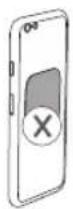

natural_image
Illustration of two mechanical components with numbered parts, no text or symbols presentnatural_image
Diagram showing a car interior with connected devices and a fan (no text or symbols present)natural_image
Technical line drawing of a mechanical device with a magnified inset showing internal components (no text or symbols)| 刻度尺 | 适合 |
| 5 Samsung Note 8, Note 9 | |
| 4 | iPhone XS Max, iPhone 8 Plus, Samsung S8+, S9+ |
| 3 iPhone XR, Samsung S9, S8, S7 edge, LG G7,G7+, V30, V30+, V35 | |
| 2 iPhone XS, iPhone X, Samsung S7 | |
| 1 iPhone 8 | |
natural_image
Illustration of a car seatbelt device with a valve and fan, showing motion arrows (no text or symbols)3种调节级别可适合更多的通风口:
natural_image
Three identical line drawings of a mechanical device with a handle, shown in different angles (no text or symbols)如要松开调节爪:
natural_image
Mechanical assembly diagram showing a rotating component with directional arrows (no text or labels)- 横放或竖放车载支架:
natural_image
Two technical line drawings of industrial equipment or fans, no text or symbols present- 按下支座侧的释放按钮以展开伸缩臂。
natural_image
Line drawing of a mechanical device with a handle and lever mechanism (no text or symbols)natural_image
Line drawing of a smartphone mounted on an air vent, showing the door and seat (no text or symbols)
natural_image
Technical line drawing of a device with an optical lens and a separate close-up view (no text or symbols)136 简体中文 简体中文 137

natural_image
Mechanical diagram of a mechanical device with rotating components and directional arrows (no text or symbols)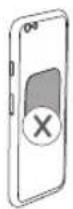

natural_image
Illustration of two mechanical devices with clamps and a gear mechanism, no text or symbols presentnatural_image
Diagram showing car air intake system with plug, fan, and dashboard components (no text or labels)- 使用后,按下释放按钮以取出您的手机。

natural_image
Technical line drawing of a mechanical assembly with a magnified inset showing internal components (no text or symbols)| 角度刻度 | 適用於 |
| 5 Samsung Note 8, Note 9 | |
| 4 | iPhone XS Max, iPhone 8 Plus, Samsung S8+, S9+ |
| 3 iPhone XR, Samsung S9, S8, S7 edge, LG G7, G7+, V30, V30+, V35 | |
| 2 iPhone XS, iPhone X, Samsung S7 | |
| 1 iPhone 8 | |
natural_image
Illustration of a car seatbelt with a valve and handle, showing mechanical components (no text or symbols)- 3段調整可支援更多種出風口。
natural_image
Three identical line drawings of a device with a handle, no text or symbols present- 鬆開夾架。
natural_image
Technical line drawing of a mechanical device with rotating components (no text or symbols)- 以水平或垂直形式設置車架。
natural_image
Technical line drawings of two mechanical devices with no visible text or symbols- 按下固定架側邊的釋放按鈕來展開伸縮臂。
natural_image
Line drawing of a mechanical device with rotating components and directional arrows (no text or symbols)natural_image
Line drawing of a car lift device with attached arm and door (no text or symbols)
natural_image
Technical line drawing of a device with a circular component and a smartphone (no text or symbols)150 繁體中文 繁體中文 151

natural_image
Mechanical diagram of a device with rotating components and directional arrows indicating motion (no text or symbols)
natural_image
Illustration of two mechanical components with numbered parts, no text or symbols presentnatural_image
Diagram showing car seatbelt components including a plug, cable, and fan (no text or labels)- 使用完後,按下釋放按鈕以卸下您的手機。

natural_image
Technical line drawing of a mechanical device with a magnified inset showing internal components (no text or symbols)| مثالى لهالف | مقياس الدرجات |
| Samsung Note 8, Note 95 | |
| iPhone XS Max, iPhone 8 Plus, Samsung S8+, S9+ | 4 |
| iPhone XR, Samsung S9, S8, S7 edge, LG G7, G7+, V30, V30+, V35 | 3 |
| iPhone XS, iPhone X, Samsung S7 2 | |
| iPhone 8 1 | |
natural_image
Illustration of a car seatbelt with a door panel and directional arrows indicating motion (no text or symbols)natural_image
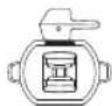
Three identical line drawings of a mechanical device with a handle, shown in different angles (no text or symbols)• إرخاء القابض.
natural_image
Technical line drawing of a mechanical device with rotating components and directional arrows (no text or symbols)natural_image
Technical line drawings of two mechanical devices with no visible text or symbolsnatural_image
Line drawing of a mechanical device with gears and a handle, no text or symbols presentnatural_image
Line drawing of a car seatbelt switch mechanism (no text or symbols)natural_image
Technical line drawing of a device with a plus symbol and a separate close-up view (no text or labels)natural_image
Technical line drawing of a mechanical device with no visible text or symbolsnatural_image
Mechanical assembly diagram showing a rotating component and a pin-like connector (no text or symbols)167
natural_image
Illustration of two mechanical components with a tool, shown in two different poses (no text or symbols present)natural_image
Diagram showing a car infotainment device connected to a battery and a connector, with no visible text or symbols.natural_image
Technical line drawing of a mechanical device with a magnified inset showing internal components (no text or symbols)natural_image
Illustration of a car seatbelt with a belt and air vent, showing motion arrows (no text or symbols)natural_image
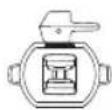
Three identical line drawings of a mechanical component with a handle, shown in different angles (no text or symbols).בְרַעָה וּוֹת אַל
natural_image
Mechanical assembly diagram showing a rotating component with directional arrows (no text or labels)•
natural_image
Technical line drawings of two mechanical devices with no visible text or symbolsnatural_image
Line drawing of a mechanical device with a handle and lever mechanism (no text or symbols)178
natural_image
Line drawing of a car door seatbelt device with an open handle (no text or symbols)תְרָהִיַעֹשְׁבָם, בְּרָהִיַעֹשְׁבָם, בְּרָהִיַעֹשְׁבָם, בְּרָהִיַעֹשְׁבָם, בְּרָהִיַעֹשְׁב
Qi-70

natural_image
Technical line drawing of a smartphone with front and back views, showing no text or symbols179
natural_image
Mechanical diagram showing a rotating disc and housing assembly (no text or symbols)natural_image
Mechanical assembly diagram showing a gear and pin component (no text or symbols)natural_image
Illustration of two mechanical components with a tool, shown in two different poses (no text or symbols present)natural_image
Line drawing of a car infotainment device with attached components and wiring (no text or symbols).1707-2017, 3
EN: 18-month limited warranty*
EN: Lifetime technical support
FR. Support technique à vie
IT: Assistenza post-vend ta a v ta
*EN. Please note that your rights under applicable law governing the sale of consumer goods remain unaffected by the warranties given in this Limited Warranty.
(US) +1 (800) 988 7973 Mon-Fri 9:00am - 5:00pm (PT)
(UK) 144 (0) 1604 935200 Mon-Fri 6:00 - 11:00 (GMT)
(DE) +49 (0) 69 9579 7960 Mo-Fr 6:00 -11:00
(中国)1864000550036周一至周五9:00-17:30
(日本)+810344557823月-金9.00-17:00



- ANKER
- USER MANUAL
- PowerWave 7.5 Car Mount
- Important Safety Instructions
- At a Glance
- Status LED
- Compatibility
- Mounting Your Smartphone
- Using the Alternative Three-Sided Handles
- Charging Your Smartphone Wirelessly
- English English 13
- Notice
- FCC Statement
- Radiation Exposure Statement
- IC Statement
- English English 15
- Declaration of Conformity
- Français Français 55
- Portuguese Portuguese 75
- LED de status
- Portuguese Portuguese 79
- Portuguese Portuguese 83
Brand : Anker
Model : PowerWave 7.5
Category : Phone charger