Prestige F20493 - Watch FESTINA - Free user manual and instructions
Find the device manual for free Prestige F20493 FESTINA in PDF.


| Feature | Details |
|---|---|
| Brand | FESTINA |
| Model | Prestige F20493 |
| Watch type | Analog watch |
| Movement | Quartz |
| Case material | Stainless steel |
| Case diameter | 40 mm |
| Case thickness | 10 mm |
| Glass type | Mineral glass |
| Water resistance | 50 meters |
| Additional functions | Chronograph, date display |
| Bracelet | Leather |
| Bracelet width | 20 mm |
| Dial color | Black |
| Warranty | 2 years |
| Usage | Ideal for daily use and formal occasions |
| Maintenance | Recommended every 3 to 5 years for the movement |
| Safety | Do not expose to strong shocks or extreme temperatures |
| General information | Check wrist size before purchase |
Frequently Asked Questions - Prestige F20493 FESTINA
User questions about Prestige F20493 FESTINA
0 question about this device. Answer the ones you know or ask your own.
Ask a new question about this device
Download the instructions for your Watch in PDF format for free! Find your manual Prestige F20493 - FESTINA and take your electronic device back in hand. On this page are published all the documents necessary for the use of your device. Prestige F20493 by FESTINA.
USER MANUAL Prestige F20493 FESTINA
Basic specifications 24
Features 26
Displays and buttons 27
Reading the watch 28
Setting the time 29
Setting the date 34
Using the time different correction 35
Using the chronograph 37
Chronograph reset (after replacing battery) 38
IFMFS16/26-17/27 IFMFS16/26-17/27
BASIC SPECIFICATIONS BASIC SPECIFICATIONS
CALIBER
FS16/26
is for slanted push buttons

FS17/27
is for pallale! push buttons

TIME STANDARD
Type of quartz: Tuning fork type quartz crystal
Frequency: 32,768Hz
Accuracy: ± 20 s/month at the normal temperature
+5^ a + 35^ / 41^ a 95^
Operating -10°C to +60°C / 14°F to 140°F
temperature:
BATTERY & LIFE
SR626SW 2 YEARS
*based on 1hour/day chronograph
FUNCTION
Time: Hour, minute, second
Date
Dual Time
Chronograph 1/1 sec. Basis (Up to 59 min. 59 sec.)
EYE POSITION
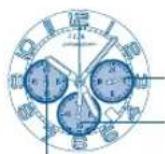
24-hour hand (12H)
(nome time)
Second hand
Chrono 60 min (9h) Chrono 60 min (9h)
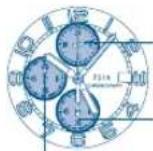
24-hour hand (12H)
Second hand (home time)
IFMFS16/26-17/27 IFMFS16/26-17/27
FEATURES
This watch is an analog quartz watch which features dual time operation for home time and second times zone.
HOMETIME
Is the time where you live.
SECOND TIME ZONE
Is the time of the country or area you are visiting or you are verifying
DISPLAYS AND BUTTONS
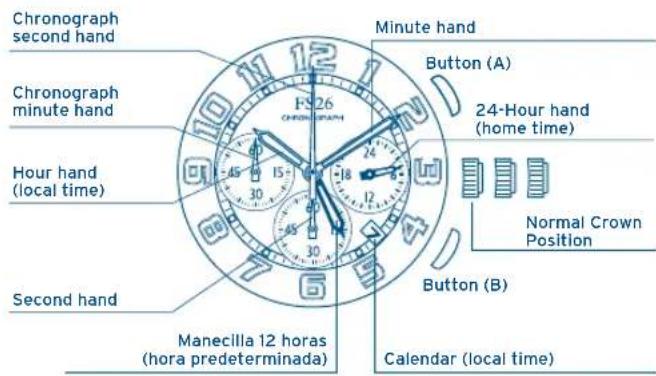
READING THE WATCH SETTING THE TIME
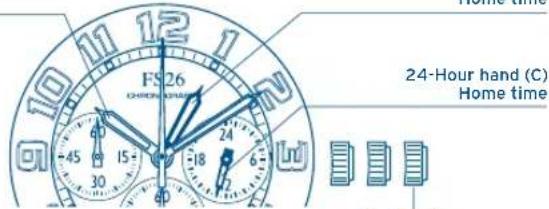
When the watch hands appear in the diagram;
Home time in GMT is 13:10:35 (12hours-B & 24 hours-C display).
- Local time in Tokyo is 10:10:35(hour hands-A display).
12-Hour hand (A) Local time
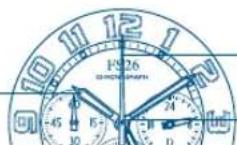
12-Hour hand (B) Home time
24-Hour hand (C) Home time
NOTE
The minute and second hands are the same under home and local time.
The 24 small hand (C) is synchronized with 12hours (B).
The date is synchronized with hour hands-A (local time). local.
There are 2 ways to use the 12 hour-hand (B) and setting the time depends on which way to use. Please be very careful and follow the instructions below for setting the time for both ways (Type1 & Type2).
TYPE1
Using the 12 hour hand (B) and 24 hour hand (C) for the "home time". In other word, using hour hand and minute hand to see the "second time zone" while the 12 hour hand (B) and 24 hour hand (C) to see the "home time". (When you use in domestic, the 12 hour hand will be hidden under the normal hour hand).
IFMFS16/26-17/27 IFMFS16/26-17/27
SETTING THE TIME SETTING THE TIME
TYPEI TYPEI
SETTING THE HOME TIME
12-Hour hand (A) Local time
12-Hour hand (B) Home time
2nd position Time correction position
- Pull the crown out to the second position when the second hands has reached the O position.
- Turn the crown to set the current time, paying attention to the motion of 12 hour hand (B) and 24 hour hand (C) and minute hand.
- Return the crown to the normal position. Setting the 12 hour hand (B) and 24 hour hand (C) and minute hand has been now completed.
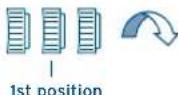
-
Pull the crown out to the first position when the second hands has reached the O position. Turn the crown anticlockwise to set the current time. Please also set the date together.
-
Hour hand is linked with calander. Please be careful if it is in morning or afternoonwhen you set the time.
-
Return the crown to the normal position.
IFMFS16/26-17/27 IFMFS16/26-17/27
SETTING THE TIME SETTING THE TIME
TYPE2 TYPE2
When you use the 12 hour hand (B) and 24 hour hand (C) for the "second time zone". In other words, you can select this type when using the 12 hour hand (B) and 24 hour hand (C) to see the "second time zone" (the time which has time lag), while the hour and minute hand and 12 hour hand (B) (linked with 24 hour hand) to see the "dual time".
For example, if you set the 12 hour hand (B) and 24 hour hand (C) to GMT (Greenwich Mean Time) and the normal hour and minute hand for the "second time zone", you can check GMT anytime and anyplace.
SETTING THE HOME TIME
- Pull the crown out to the second position when the second hands has reached the O position.
-
Turn the crown to set the current time, paying attention to the motion of 12 hour hand (B) and 24 hour (C) hand and minute hand.
-
Return the crown to the normal position. Setting the 12 hour hand (B) and 24 hour hand (C) and minute hand has been now completed.
- Pull the crown out to the first position when the second hands has reached the O position.
Turn the crown anticlockwise to set the current time.
Please also set the date together.
Hour hand is linked with calander.
Please be careful if it is in morning or afternoon when you set the time.
- Return the crown to the normal position.
IFMFS16/26-17/27 IFMFS16/26-17/27
SETTING THE DATE USING THE TIME DIFFERENT CORRECTION
- Pull the crown out to the first position when the second hands has reached the O position.
- 2Turn the crown clockwise to set the date. If the date is set between the hours of around 9:00PM and 1:00PM, the date may not change on the following date.
- After the date has been set, push the crown back to the normal position.
When moving to a country or area which is in a different timezone, the current time in the "second time zone" can be corrected.
As the date calander is linked with time, the date in the "second time zone" is also corrected.
- Pull the crown out to the first position when the second hands has reached the O position.
Turn the crown anticlockwise to set the "second time zone".
Date may gain in some countries or regions.
In this case, please set the date also when you set the time.
(As for details, please refer to the page "setting the date". - After the date has been set, push the crown back to the normal position.
IFMFS16/26-17/27 IFMFS16/26-17/27
USING THE TIME DIFFERENT CORRECTION
THE TIME DIFFERENCE BETWEEN THE CITIES AND UTC TIME
| City | Time difference | Summer time |
| UTC | ±0 | — |
| LONDON | ±0 | ○ |
| PARIS | +1 | ○ |
| ROME | +1 | ○ |
| CAIRO | +2 | ○ |
| ISTANBUL | +2 | ○ |
| MOSCOW | +3 | ○ |
| KUWAIT | +3 | × |
| DUBAI | +4 | × |
| KARACHI | +5 | × |
| DACCA | +6 | × |
| BANGKOK | +7 | × |
| SINGAPORE | +8 | × |
| City | Time difference | Summer time |
| HONG KONG | +8 | × |
| TOKYO | +9 | × |
| SYDNEY | +10 | ○ |
| NOUMEA | +11 | × |
| AUCKLAND | +12 | ○ |
| HONOLULU | -10 | × |
| ANCHORAGE | -9 | ○ |
| LOS ANGELES | -8 | ○ |
| DENVER | -7 | ○ |
| CHICAGO | -6 | ○ |
| NEW YORK | -5 | ○ |
| CARACAS | -4 | × |
| RIO DE JANEIRO | -3 | ○ |
USING THE CRONOGRAPH
This chronograph is able to measure and display time in 1/1 second united up to maximum of 1 hour.
MEASURING TIME WITH THE CHRONOGRAPH
- The chronograph can be started and stopped each time button "A" is pressed.
- To reset, press button "B" and the chronograph second & minute hands return to their 0 positions.

IFMFS16/26-17/27 IFMFS16/26-17/27
CHRONOGRAPH RESET [after replacing battery] CHRONOGRAPH RESET
This procedure should be performed when the chronograph second hand do not return to the O second position after the chronograph has been reset, and including after the battery has been replaced.
![FESTINA Prestige F20493 - CHRONOGRAPH RESET [after replacing battery] CHRONOGRAPH RESET - 1](/content/2026/03/473240/images/27c2376e67b6588f1f233ed2c752871a76fab538e5e83a75fd012986f6b57abb.jpg)
placing battery]
- Pull the crown out to the 2nd position.
- Press button "A" to set the chronograph second hand to the O position.
- The chronograph hands can be advanced rapidly by continuously pressing button "A".
- Once the hands have been zeroed, reset the time and return the crown to its normal position.
- Do not return crown to normal position while chronograph second hand return to 12:00 (ZERO) position. Hand stops on the way when crown are returned to normal position and these positions are recognized as 12:00 (ZERO) position.
IFMFS16/26-17/27
IFMFS16/26-17/27
MANUEL D'INSTRUCTION
DUAL TIME
By virtue of the regulations pursuant to the handling of waste products deriving from electronic and electrical equipment, end of lifecycle watch making products must be selectively collected for processing. You may therefore dispose of your quartz watch making products at any of our retail outlets or any other authorized collection point. The selective collection, processing, rating and recycling of these products helps contribute to safeguarding the environment and protecting our health.
42
44
Heure:Heure,minute,second
Date
Affichage 12/24
trai+5°Ce+35°C/41°Fa95°F