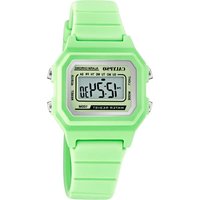
Calypso K5698 - Wristwatch

K5698 - Wristwatch Calypso - Free user manual and instructions

Find the device manual for free K5698 Calypso in PDF.

📄 49 pages English EN Download 💬 AI Question 11 questions ⚙️ Specs
Notice Calypso K5698 - page 17
View the manual : Français FR Deutsch DE English EN Español ES Italiano IT
Pick your language and provide your email: we'll send you a specifically translated version.
Product TypeDigital wristwatch
BrandCalypso
ModelK5698
DisplayHours, minutes, seconds, month, date, day of the week, AM/PM
LightingElectroluminescent light (EL)
AlarmYes, with audible signal
StopwatchYes, with lap measurement
TimerYes
Hourly chimeYes
12/24-hour selectorYes
Second time zoneYes
Accuracy±30 seconds per month at 25°C
Operating temperature10°C to 40°C
MaintenanceClean with a soft cloth and clean water only
Water resistanceNot recommended for swimming or diving
Power supplyButton cell battery (type not specified)
Dimensions (estimated)Approximately 45 mm diameter
Weight (estimated)Approximately 50 g
PrecautionsAvoid strong impacts, extreme temperatures, strong electric fields
RecyclingSelective collection according to WEEE regulations

Frequently Asked Questions - K5698 Calypso

How do I set the time on my Calypso K5698 watch?
Press the MODE button until the hour display flashes. Use the SET button to adjust the hours, then press MODE again to move to minutes. Adjust with SET and confirm with MODE.
How do I use the stopwatch?
Press MODE several times until CHRONO appears. Press START/STOP to start, again to stop. For a lap time, press SET during timing.
How do I set the alarm?
Press MODE until you see AL (alarm). Hold SET to make the hour flash, adjust with START/STOP, then press MODE to confirm.
How do I activate the light?
Press the LIGHT (or LICHT) button to turn on the electroluminescent light. The lighting duration is limited to save battery.
Is the watch waterproof?
The manual advises against pressing buttons in water or while swimming. It is not designed for diving. Avoid prolonged contact with water.
How do I replace the battery?
The manual recommends not opening the case. For replacement, take the watch to a watchmaker or an authorized retailer. Use a CR2016 or similar battery.
Why is the display dim or not working?
Check the battery. If the battery is dead, replace it. The EL light may also weaken over time. If the problem persists, contact customer service.
How do I clean the watch?
Use a soft cloth and clean water. Never use soap or chemicals. Wipe gently to remove dirt.
How do I use the timer?
Press MODE until TIMER is displayed. Use SET to set the duration, then press START/STOP to start the countdown.
How do I change the 12/24 hour format?
In time setting mode, hold SET to scroll through options. When the 12H or 24H indicator flashes, press START/STOP to switch.

User questions about K5698 Calypso

1 question about this device. Answer the ones you know or ask your own.

Ask a new question about this device

The email remains private: it is only used to notify you if someone responds to your question.

How to change the time display format between 12h and 24h on the Calypso K5698 watch?
Frequently Asked Questions - 06/26/2026
Response Notice-Facile

To change the time display format between 12 hours and 24 hours on your Calypso K5698 watch, follow these steps:

  1. Press the MODE button several times to access the time setting mode (the hour digits should be blinking).
  2. Hold down the SET button to scroll through the setting options.
  3. When the 12H or 24H indicator is blinking, press the START/STOP button to toggle between the two formats.
  4. Confirm your choice by pressing MODE.

Your watch will then display the time in the selected format, with or without the AM/PM indicator depending on the chosen 12 or 24-hour format.

Respond (be the first)

Download the instructions for your Wristwatch in PDF format for free! Find your manual K5698 - Calypso and take your electronic device back in hand. On this page are published all the documents necessary for the use of your device. K5698 by Calypso.

USER MANUAL K5698 Calypso

4. HOW TO SET NORMAL TIME
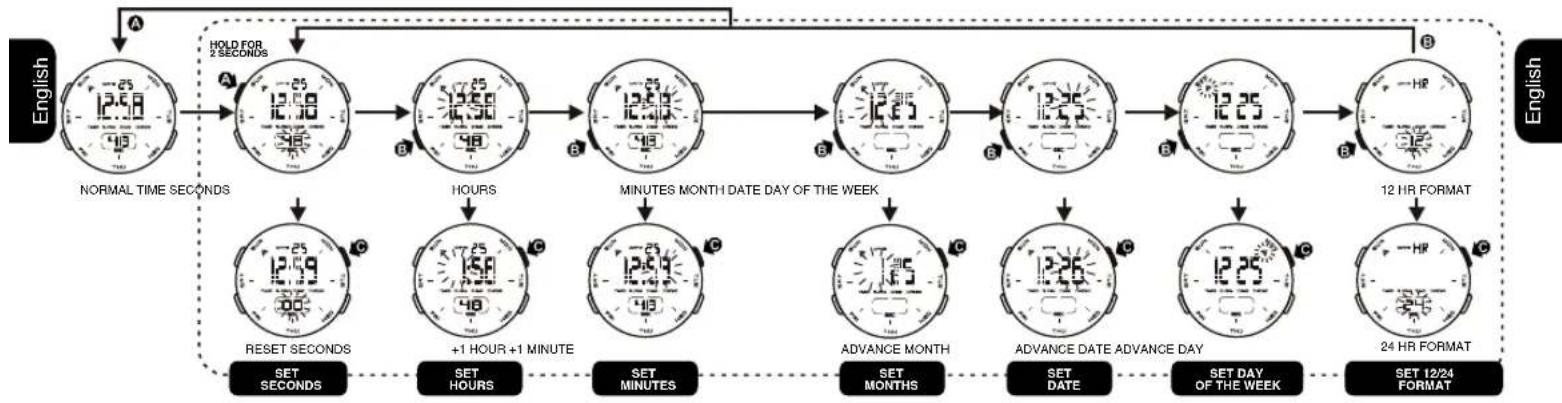
Calypso K5698 - HOW TO SET NORMAL TIME - 1

5. HOW TO SET ALARM TIME

Calypso K5698 - HOW TO SET ALARM TIME - 1

6. HOW TO SET THE ALARM, RINGING ON THE HOUR AND KEY TONE

Calypso K5698 - HOW TO SET THE ALARM, RINGING ON THE HOUR AND KEY TONE - 1

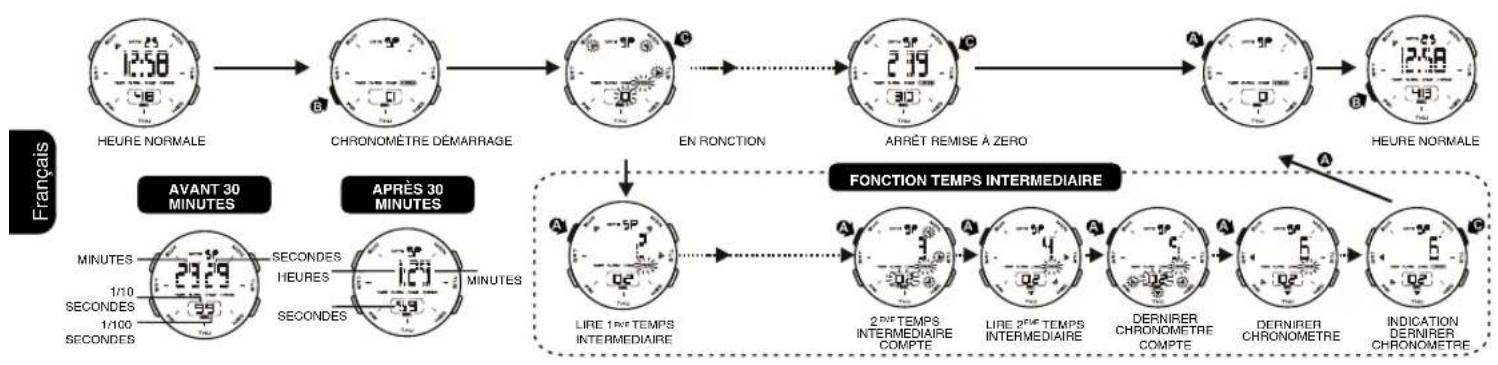
7. HOW TO USE THE CHRONOGRAPH

Calypso K5698 - HOW TO USE THE CHRONOGRAPH - 1

8. HOW TO USE TIMER

Calypso K5698 - HOW TO USE TIMER - 1

9. HOW TO SET SECOND TIME ZONE

10. HOW TO USE EL LIGHT

Calypso K5698 - HOW TO USE EL LIGHT - 1

Calypso K5698 - HOW TO USE EL LIGHT - 2
NOTE:
1. This watch features an electro-luminescent (EL) backlight, which tends to lose illuminating power after very long use.
2. The illumination provided by backlight may be hard to see under direct sunlight.

11.CARE OF YOUR WATCH

  1. This watch contains electronic components. Never attempt to open the case or remove the back cover.
  2. Do not operate push buttons below the surface of the water while swimming or diving.
  3. Should water or condensation appear in the watch, have the watch checked immediately. Corrosion of electronic parts can occur inside the case.
  4. Avoid severe impact. The watch is designed to withstand impact under normal use. It is inadvisable to subject it to severe impact of rough usage.
  5. Avoid exposing the watch to extreme temperature.
  6. Clean the watch with soft cloth and clean water only. Avoid using chemicals.
  7. Keep your watch away from the conditions of strong electric field and static electricity.

12. FEATURES AND SPECIFICATIONS

  1. Standard display mode: Hour, minutes, seconds, month, day of the week.
  2. Function:
  3. Year, Month, date AM/PM and Electro-Luminiscent light.
  4. Alarm function with buzzer signal output.
  5. Chronograph function with lap operation.
  6. Hourly chime.
  7. 12/24 hour format switch option.
    Second time zone.
  8. Accuracy at normal temperature (25^) : + - 30 seconds a month.
  9. Normal operating temperature range: 10^ - 40^

1.AFFICHAGE NORMALE ET BOUTON D'UTILISATION
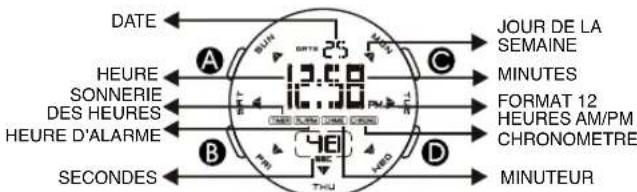
Calypso K5698 - 1.AFFICHAGE NORMALE ET BOUTON D'UTILISATION - 1

Calypso K5698 - 1.AFFICHAGE NORMALE ET BOUTON D'UTILISATION - 2

By virtue of the regulations pursuant to the handling of waste products deriving from electronic and electrical equipment, end of lifecycle watch making products must be selectively collected for processing. You may therefore dispose of your

quartz watch making products at any of our retail outlets or any other authorized collection point. The selective collection, processing, rating and recycling of these products helps contribute to safeguarding the environment and protecting our health.

38 39

BOUTONS D'UTILISATION

REGLAGE

ADJUSTMENT, MARCHE/ARRETER

MODE

LUMIÈRE

39
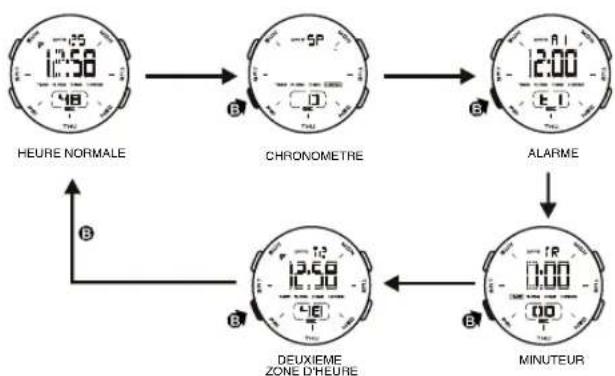
Calypso K5698 - BOUTONS D'UTILISATION - 1
2.COMMENT CHANGER LE MODE D'AFFICHAGE
3.COMMENT AFFICHER LE MOIS, LA DATE

Calypso K5698 - BOUTONS D'UTILISATION - 2

Calypso K5698 - BOUTONS D'UTILISATION - 3
4.COMMENT RÉGLER L'HEURE NORMALE

5.COMMENT RÉGLER L'ALARME

Calypso K5698 - 5.COMMENT RÉGLER L'ALARME - 1

6.COMMENT REGLER L'ALARME, LA SONNERIE DE CHANGEMENT D'HEURE ET LE VOLUME DES TOUCHES

Calypso K5698 - 6.COMMENT REGLER L'ALARME, LA SONNERIE DE CHANGEMENT D'HEURE ET LE VOLUME DES TOUCHES - 1

7. COMMENT UTILISER LE CHRONOMÉTRE

Calypso K5698 - COMMENT UTILISER LE CHRONOMÉTRE - 1

8. POUR UTILISER LE MINUTEUR DU COMPTE A REBOURS

Calypso K5698 - POUR UTILISER LE MINUTEUR DU COMPTE A REBOURS - 1

9.COMMENT REGLER L'HEURE D'UNE DEUXIEME ZONE

10. COMMENT ALLUMER LA LUMIÈRE ELECTRO-LUMINISCENTE

Calypso K5698 - COMMENT ALLUMER LA LUMIÈRE ELECTRO-LUMINISCENTE - 1

Calypso K5698 - COMMENT ALLUMER LA LUMIÈRE ELECTRO-LUMINISCENTE - 2

Francais

NOTE:

Manual assistant
Powered by Anthropic
Waiting for your message
Product information

Brand : Calypso

Model : K5698

Category : Wristwatch