
Facile Sempre 2 - Smartphone NGM - Free user manual and instructions
Find the device manual for free Facile Sempre 2 NGM in PDF.


| Product Type | Dual SIM flip phone |
| Brand | NGM |
| Model | Facile Sempre 2 |
| Dimensions (estimated) | Approximately 108 x 52 x 18 mm |
| Weight (estimated) | Approximately 100 g |
| Internal screen | Color LCD screen (size not specified, approximately 2.4 inches) |
| External screen | LCD screen (size not specified, approximately 1.4 inches) |
| Camera | Integrated VGA (0.3 MP) sensor |
| SIM card | Dual SIM (2 standard SIM slots) |
| Memory card | MicroSD (not included) |
| Battery | Removable lithium-ion (typical capacity 1000 mAh) |
| Charging | Via charging dock or micro USB cable |
| Connectivity | Bluetooth, micro USB port, 3.5 mm headphone jack |
| FM radio | Yes, with built-in antenna, works without headphones |
| Main functions | Calls, SMS, phonebook, camera, music player, FM radio, Bluetooth, SOS, calculator, alarm, calendar |
| SOS button | Dedicated button on the external side, sends SMS and calls up to 5 numbers |
| Maintenance and cleaning | Clean with a soft, dry cloth. Do not use chemical or abrasive products. |
| Safety | Do not expose to moisture or extreme temperatures. Use only original NGM accessories. |
| Spare parts and repairability | Removable battery and back cover. Access to SIM and microSD slots. Repair by authorized center. |
| Warranty | Manufacturer warranty (duration not specified, refer to retailer) |
Frequently Asked Questions - Facile Sempre 2 NGM
User questions about Facile Sempre 2 NGM
0 question about this device. Answer the ones you know or ask your own.
Ask a new question about this device
Download the instructions for your Smartphone in PDF format for free! Find your manual Facile Sempre 2 - NGM and take your electronic device back in hand. On this page are published all the documents necessary for the use of your device. Facile Sempre 2 by NGM.
USER MANUAL Facile Sempre 2 NGM
Copyright © 2015 NGM Italia
Welcome to the NGM world. Thank you for purchasing NGM FACILE Sempre². With this Dual SIM Easy Phone you can easily make phone calls, send and receive SMS. Thanks to the SOS key you can start an automatic procedure to call some previously set numbers in case of emergency.
By visiting the official website www.ngm.eu you can appreciate the whole range of NGM mobile phones, ask for after sales assistance, access the forum for technical assistance and download software updates.
26ENGLISH
Inserting the SIM card: the SIM cards contain your phone numbers, PIN codes, links to operator services, contacts and SMS text messages. To access the compartment containing the SIM slot, turn off the phone and slide down the cover. Remove the battery. Insert the SIM cards into the slots with their gold contacts facing downwards.
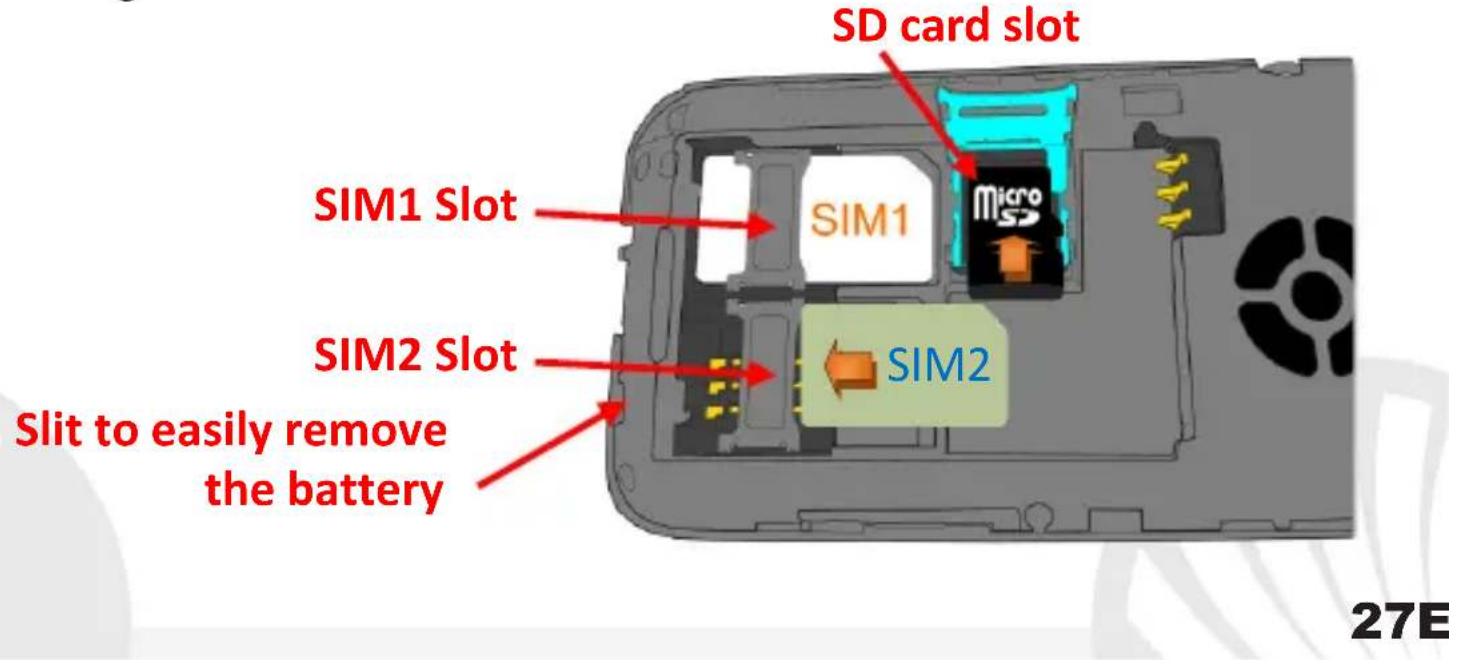
Insert a memory card: in order to use camera and media player functions of NGM FACILE Sempre², a micro-SD memory card is required (not included in the package): the card must be placed into the backside of the phone, over the SIM1 slot. Unlock the metal grid by pushing it towards the side of the phone. Slide in SD card, as shown above, with the gold contacts facing downwards. Lock the grid onto the micro-SD by sliding it into the opposite direction.
Camera: to activate the camera from the main menu select Multimedia > Camera. Take a picture by pressing the OK key. Through Options (SIM1 call key) you can access various settings of the camera and you can switch to Video recorder.
28ENGLISH
Connecting to a PC: use the USB cable to connect NGM FACILE Sempre² to a computer. Select USB Storage on your phone. You can save songs to play with the music player in the "My Music" folder, on the SD card.
Inserting the Battery:
Your device is provided with a lithium-ion battery and is designed to be used exclusively with original NGM batteries and chargers. Insert the battery into the battery compartment with the contacts facing up, matching those of the phone. When done, put the hind cover back into position as shown in the following illustrations.
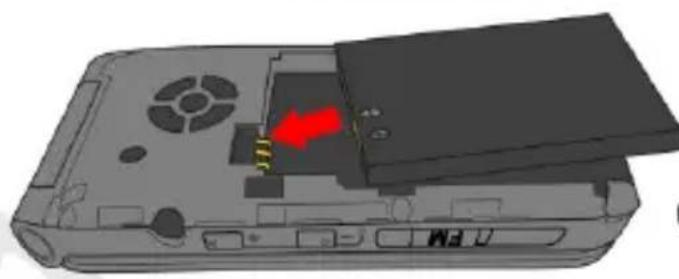
Inserting the battery
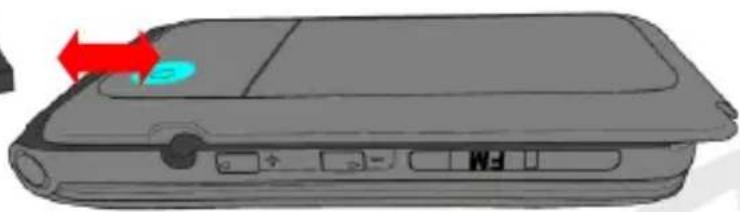
Placement of the cover
30ENGLISH
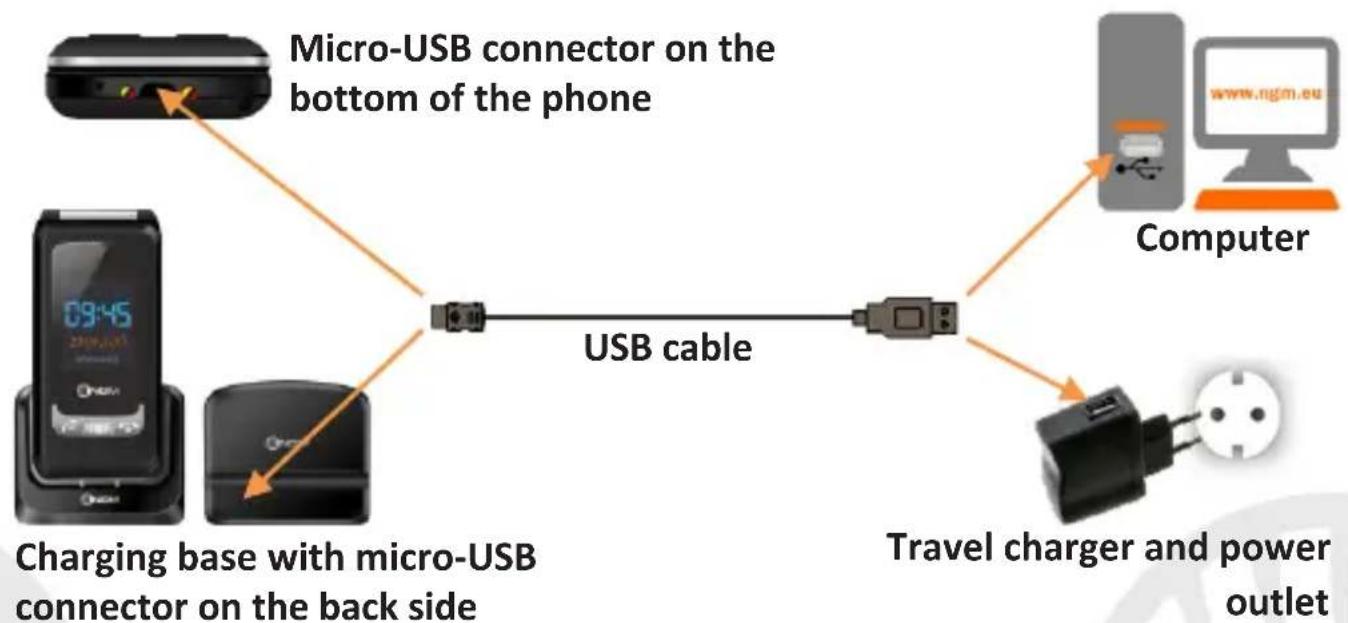
Charging the battery: charge the battery before starting to use the device. Connect the charger to a provided wall socket adapter and then plug the jack into the charging base or insert it directly into its connector on the lower side of the phone. The charging base can also be connected to a micro USB cable to charge your phone. An animation on the screen will indicate the charging is in progress and a pop-up will indicate that charging is complete and the device may be disconnected safely from the grid.
Warning: to preserve the functionality of the product and the integrity of the warranty, we recommend the use of original NGM chargers. Please charge the battery indoors, in a dry and favorable environment. It's normal for the battery to get slightly warm during the charging process. The battery will reach its full capacity when cycled several times.
Turn ON, Turn OFF and keypad lock:
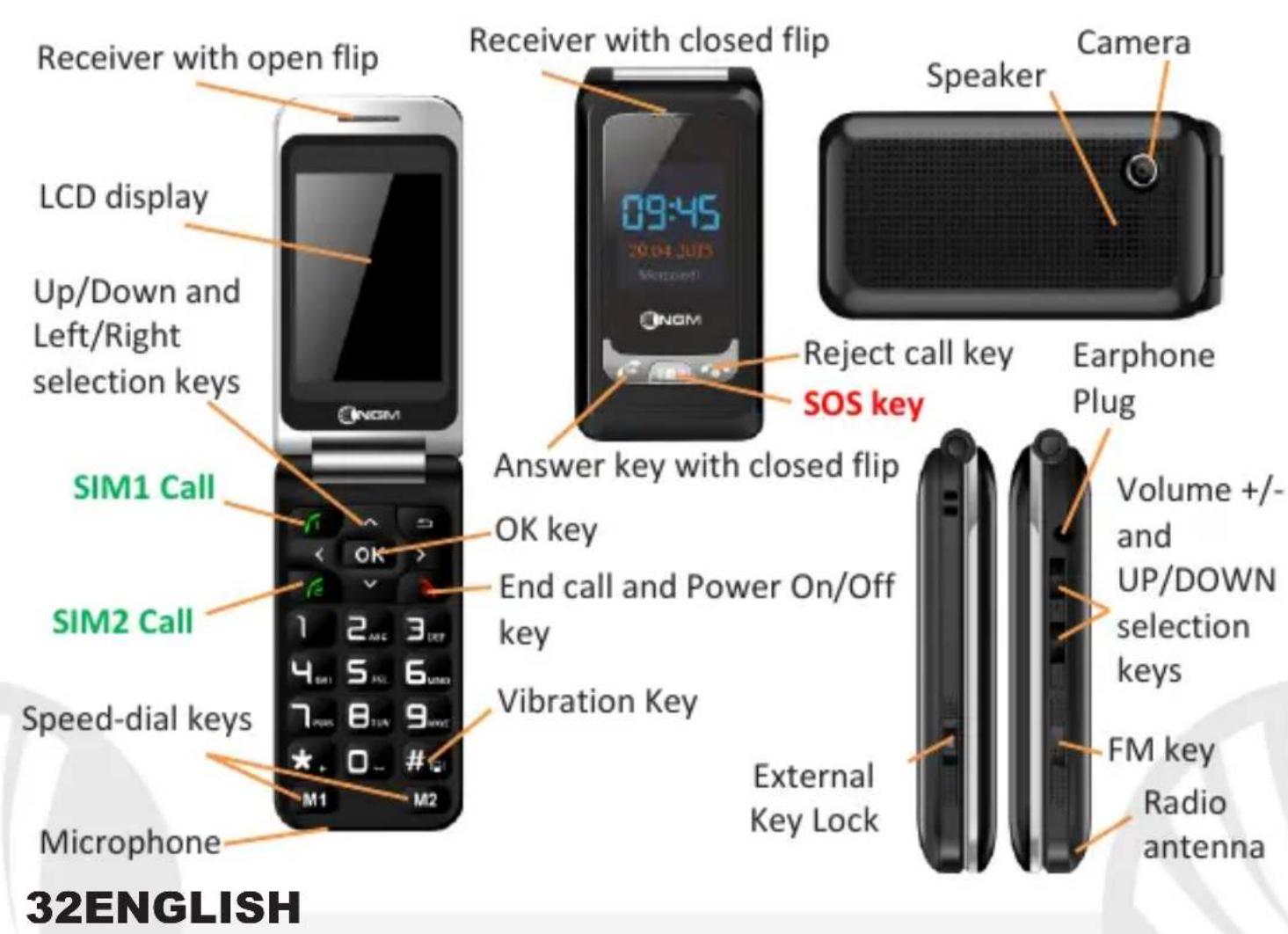
To turn on and off the phone, press and hold the red end call key when the flip is open. The keyboard locks by closing the phone, but you can still choose a period of time after which the keyboard locks itself automatically when the phone is open, in Menu > Settings > Security > keyboard lock.
To unlock the keypad, press Unlock (key) and then.
It is also possible to lock the external keys when the flip is closed, by pushing down the Lock switch on the left side of the phone.
Main Menu
To access the phone Main Menu, press OK. Scroll through the items in the menu with the up and down keys
- Messaging to write and read SMS text messages
- Phonebook to manage and save contacts
- Calls: call settings
- Settings to customize your phone
- Multimedia: camera, radio, gallery...
- File Manager: to manage the files on the mass storage and on the SD card
- Tools: with Bluetooth, Calendar, To Do, Alarm and Calculator
- SOS: to enable and customize the SOS function
34ENGLISH
Making a call
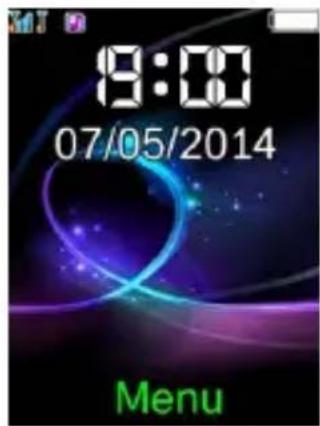
To make a call from the home screen, type the desired number with the keypad and then press the green call key of the SIM you want to use to make the call. To end the call, press the red End Call key or close the flip.
Answer an incoming call
The external screen displays the caller number or the name if the contact has been saved on Phonebook. Take an incoming call simply by opening the flip. You can also answer with the closed flip; press the answer key on the external cover and use the external receiver. During the conversation, by selecting Options you can add a call, put a call on hold or end one of the two calls, turn on the handsfree and deactivate the sound.
Notifications of missed calls will also be displayed on the external display.
Call a number from the Phonebook
From the main menu, go to Phonebook. Scroll through contacts with the UP and DOWN keys and press the green call key of the desired SIM card to call a selected contact.
Call a number from the call log
From the main screen, press the green call key, the missed, received, and outgoing calls will be automatically displayed. Scroll them with the UP and DOWN keys and press again the green call key of the desired SIM when you found the number you want to call. You can call back a number from Call Log with closed flip as well. By pressing the answer key, you will see the list of missed, received and outgoing calls. Scroll through them with the UP and DOWN volume keys and press again the answer key to call the desired number, after choosing the SIM card to call with.
36ENGLISH
Add contacts to the Phonebook
Select Menu > Phonebook > Add new, and choose the storage between one of the SIM cards or the Phone. Enter the name and the new number, then press Options > Save.
Speed dial: in Menu > Calls > Settings > Speed Dial > Set
Numbers, you can assign to keys 2-9 some numbers that will be automatically called if you press and hold the related key.
Furthermore the device has two other speed dial buttons, M1 and M2, which are located below the numeric keypad. These two buttons will be activated with a simple pressure.
This feature can be turned on and off under Status.
Memory status: in Phonebook > Options > Settings > Memory status you can check how many free storage locations there are on the phone and on the SIM cards.
Speech: NGM FACILE Sempre² speaks out each number key you press. This function can be disabled in Settings > Profiles > General > Customize > Keypad > Options > Edit.
[Please note: only available in the Italian language] From the same menu, you can also choose a tone for the keypad or a click.
Send SMS: from the main screen, choose Menu > Messaging > Write message and write your message. Press Options > Send to > Number and enter the number using the numeric keypad or Add from phonebook to select from the Phonebook the contact you want to text.
38ENGLISH
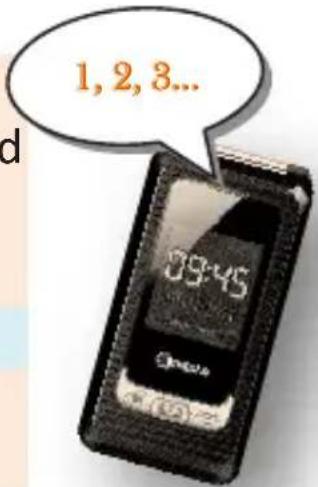
Read SMS: when you receive a new SMS, a pop up notification appears in the main screen and in the external display. Press View (with the OK key) to access the Received folder or open it from the main screen by selecting Menu > Messages > Received.
You can view the received messages only from the internal display
In the messaging menu, you can access additional features such as Templates, short preset messages and Memory status, on SMS Settings, to control how many messages there are in the phone memory and on the SIM cards.
S.O.S. Function: NGM FACILE Sempre ^2 is equipped with a dedicated SOS key on the external flip, for the fast forwarding of emergency calls (^*) . This feature can be turned on and off by selecting Menu > SOS > Activation (on/off).
In Menu > SOS > Wait time, you can decide to activate it immediately or after long pressing it for 5 to 10 seconds.
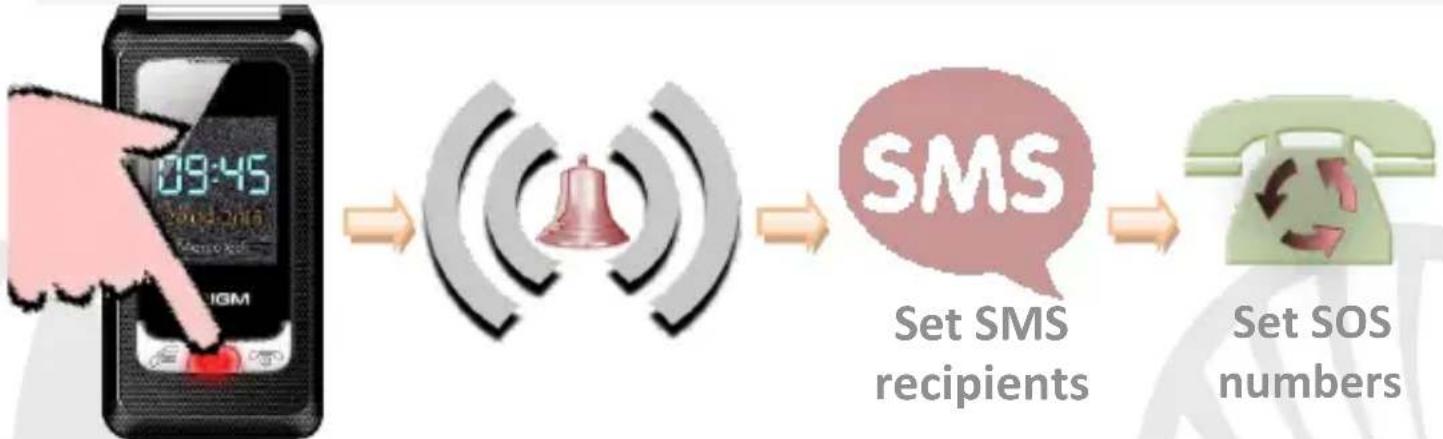
In case of emergency, use this function to ask for help up to five phone numbers, previously set in Menu > SOS > SOS numbers. As soon as S.O.S. is enabled, the phone will start to emit a high volume alarm tone (the alarm won't ring if you selected the "Call now" option in Wait time). So, it will send an SOS message to the SOS numbers set in Menu > SOS > SMS Recipients.
40ENGLISH
Then, the phone will call the five SOS numbers, for about 20 seconds each. If there is no answer, there will be a second cycle of calls. This procedure will be repeated for 5 times. If one of the called numbers answers, the cycle will be interrupted and the call will automatically switch to speaker phone (handsfree).
Warning: The SOS calls cycle will be interrupted if the answering machine or voicemail of one of the called SOS numbers takes the call.
Bluetooth: in Tools > Bluetooth > Power you can turn on Bluetooth and search for other devices (headsets, phones...) by selecting the Search new devices option. Select the device you would like to associate with and confirm it on both devices. Inside the Bluetooth menu you can manage the visibility of your device, change its name and access the advanced settings.
Set Ringtones: from the main screen, select Menu > Settings > User Profiles > General > Options > Customize. Select SIM1/SIM2 Ringtone and set the desired tone from those available for each SIM card. You can also customize the following features: Alert type, Ringtone Volume, Keypad Volume, Message tone, Ringtone type.
42ENGLISH
Quickly turn on/off the vibration mode
To turn off all the phone ringtones and activate the vibration mode for calls and messages, press and hold the # key . By pressing again #the phone will enter the General mode.
Phone Settings: from Menu > Settings > Phone, you can access various settings such as Date and Time, Language and Display.
Restoring the Phone: select Menu > Settings > Restore to reset the factory settings of NGM FACILE Sempre2: enter the phone password 1122 to confirm the reset.
FM Radio
Push down the FM key on the right side of the phone. The radio works also without a headset; pull the antenna out of the bottom of the phone to improve the reception of the radio signal.
Pressing Options (SIM1 call key), you can access the following features:
- Channel list to manually browse the saved channels
- Manual input for the manual search of radio channels
- Auto search to automatic search of radio stations
- Settings of radio playback
- Record to record from radio
- File list to view the list of recorded files
Select the key to turn on and off the radio and the left and right navigation keys to browse through the stations.

44ENGLISH
*Limitation of Liability this is not a life-saving device but a mobile phone. NGM will not be liable for any indirect, special, incidental or consequential damage arising from, or in connection with the use of this product.
Warning: The manufacturer assumes no responsibility for any failure of the policies set out above, or for any misuse of the phone. NGM reserves the right to modify any of the content in this user guide without previous public announcement. The content of this manual may vary from the actual content displayed in the mobile phone. In that case, the latter shall govern.
Copyright © 2015 NGM Italia
No part of this manual may be reproduced, distributed, translated, or transmitted in any form or by any means, electronic or mechanical, including photocopying, recording, or storing in any information storage and retrieval system, without the prior written permission of NGM Italia.
Facile SEMPRE
Copyright © 2015 NGM Italia
Copyright © 2015 NGM Italia
Copyright © 2015 NGM Italia

- Copyright © 2015 NGM Italia
- 26ENGLISH
- 28ENGLISH
- Inserting the Battery:
- 30ENGLISH
- Turn ON, Turn OFF and keypad lock:
- Main Menu
- 34ENGLISH
- Making a call
- Answer an incoming call
- Call a number from the Phonebook
- Call a number from the call log
- 36ENGLISH
- Add contacts to the Phonebook
- Speed dial: in Menu > Calls > Settings > Speed Dial > Set
- 38ENGLISH
- Quickly turn on/off the vibration mode
- FM Radio
- 44ENGLISH
Brand : NGM
Model : Facile Sempre 2
Category : Smartphone