GNEV120S - Fridge BEKO - Free user manual and instructions
Find the device manual for free GNEV120S BEKO in PDF.



| Features | Details |
|---|---|
| Type of refrigerator | Combined refrigerator |
| Total net capacity | 500 liters |
| Energy class | A++ |
| Dimensions (H x W x D) | 190 x 70 x 65 cm |
| Cooling system | No Frost |
| Number of drawers | 3 drawers in the freezer |
| Additional features | Water dispenser, LED lighting |
| Weight | 90 kg |
| Warranty | 2 years |
| Annual energy consumption | 350 kWh |
| Freezing temperature | -18°C |
| Noise emissions | 42 dB |
Frequently Asked Questions - GNEV120S BEKO
User questions about GNEV120S BEKO
0 question about this device. Answer the ones you know or ask your own.
Ask a new question about this device
Download the instructions for your Fridge in PDF format for free! Find your manual GNEV120S - BEKO and take your electronic device back in hand. On this page are published all the documents necessary for the use of your device. GNEV120S by BEKO.
USER MANUAL GNEV120S BEKO
Please read this manual first!
Dear Customer,
We hope that your product, which has been produced in modern plants and checked under the most meticulous quality control procedures, will provide you an effective service.
For this, we recommend you to carefully read the entire manual of your product before using it and keep it at hand for future references.
This manual
Please note that this manual may be valid for other models as well.
Symbols and their descriptions
This instruction manual contains the following symbols:
i Important information or useful usage tips.
⚠ Warning against dangerous conditions for life and property.
⚠ Warning against electric voltage.
This product is supplied with the selective sorting symbol for waste electrical and electronic equipment (WEEE).
This means that this product must be handled pursuant to European Directive 2002/96/EC in order to be recycled or dismantled to minimise its impact on the environment. For further information, please contact your local or regional authorities.
Electronic products not included in the selective sorting process are potentially dangerous for the environment and human health due to the presence of hazardous substances.
1 The refrigerator 3
2 Important Safety Warnings 4
Intended use 4
For products with a water dispenser; .... 6
Child safety 6
HCA Warning 7
Things to be done for energy saving ..... 7
3 Installation 8
Points to be considered when re-transporting your refrigerator .... 8
Electric connection....9
Disposing of the packaging 9
Disposing of your old refrigerator ..... 9
Placing and Installation 9
Floor balance adjustment 10
Adjusting the gap between the upper door 12
4 Preparation 13
5 Using your refrigerator 14
Indicator Panel 14
Setting the fridge compartment temperature 15
Setting the freezer compartment temperature 15
Fast Freeze function 15
Quick cool function 16
Egg tray 16
Crisper humidity control sliders...... 17
lon: 17
frozen food 18
Defrosting 18
Using the Icematic 21
Chiller compartment 21
6 Cleaning and care 22
Protection of plastic surfaces ..... 22
7 Recommended solutions for the problems 23
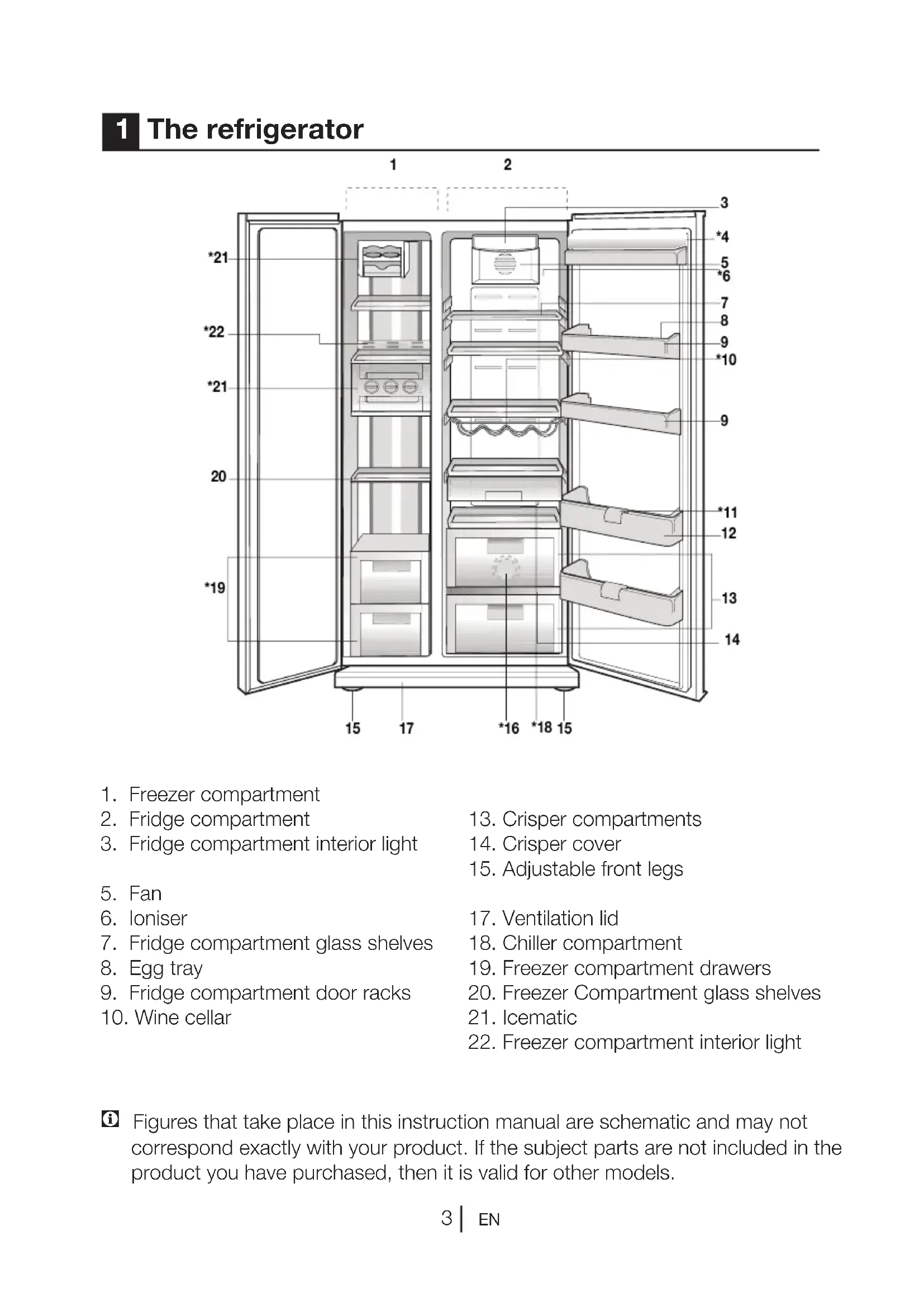
1 The refrigerator
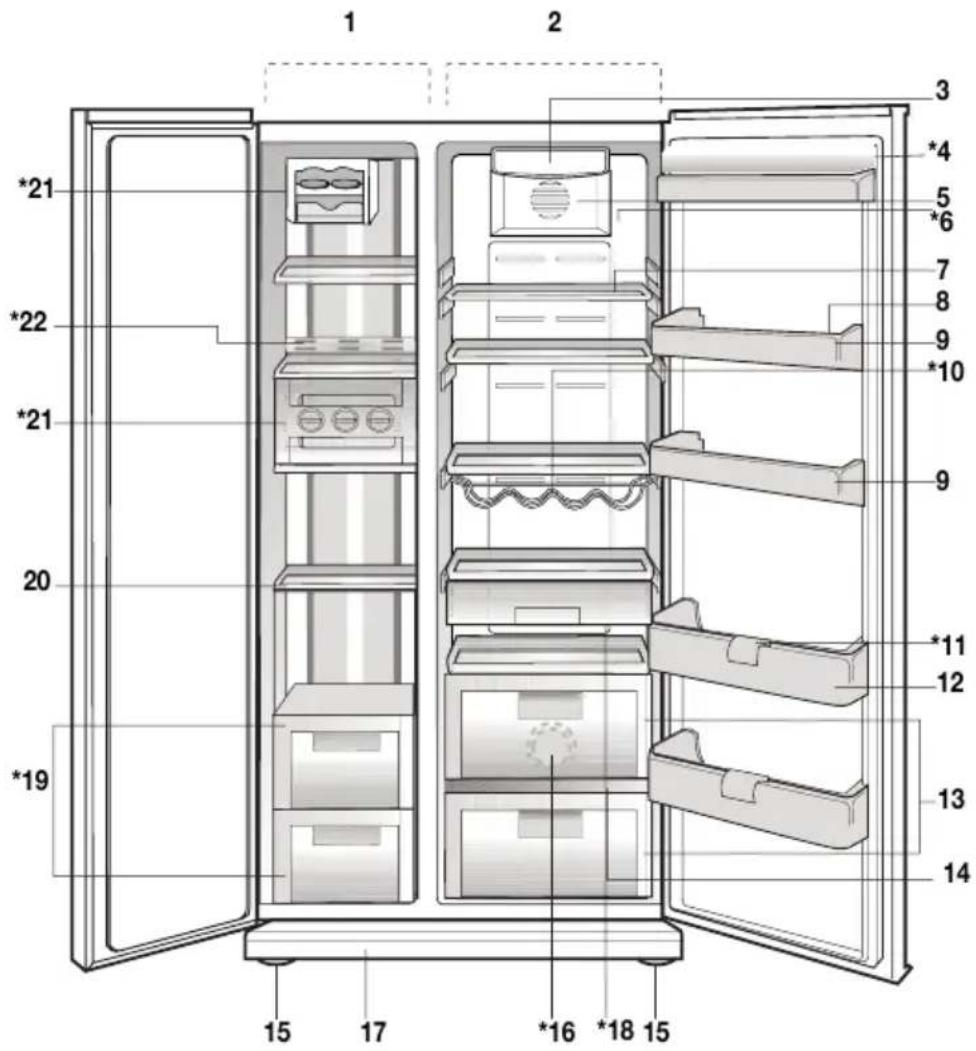
text_image
Technical diagram of a refrigerator with numbered compartments and storage areas marked- Freezer compartment
- Fridge compartment
-
Fridge compartment interior light
-
Fan
- Ioniser
- Fridge compartment glass shelves
- Egg tray
- Fridge compartment door racks
-
Wine cellar
-
Crisper compartments
- Crisper cover
-
Adjustable front legs
-
Ventilation lid
- Chiller compartment
- Freezer compartment drawers
- Freezer Compartment glass shelves
- Icematic
- Freezer compartment interior light
i Figures that take place in this instruction manual are schematic and may not correspond exactly with your product. If the subject parts are not included in the product you have purchased, then it is valid for other models.
2 Important Safety Warnings
Please review the following information. Failure to observe this information may cause injuries or material damage. Otherwise, all warranty and reliability commitments will become invalid.
The usage life of the unit you purchased is 10 years. This is the period for keeping the spare parts required for the unit to operate as described.
Intended use
This product is intended to be used
- indoors and in closed areas such as homes;
– in closed working environments such as stores and offices;
– in closed accommodation areas such as farm houses, hotels, pensions.
outdoors.
General safety
the product, we recommend you to consult the authorized service in order to learn the required information and authorized bodies.
all your questions and problems related to the refrigerator. Do not intervene or let someone intervene to the refrigerator without notifying the authorised services.
cream and ice cubes immediately after you take them out of the freezer compartment! (This may cause frostbite in your mouth.)
compartment; Do not put bottled and canned liquid beverages in the freezer compartment. Otherwise, these may burst.
they may stick to your hand.
cleaning or defrosting.
materials should never be used in cleaning and defrosting processes of your refrigerator. In such cases, the vapor may get in contact with the electrical parts and cause short circuit or electric shock.
refrigerator such as the door as a means of support or step.
the refrigerator.
the refrigerant is circulating, with drilling or cutting tools. The refrigerant that might blow out when the gas channels of the evaporator, pipe extensions or surface coatings are punctured causes skin irritations and eye injuries.
holes on your refrigerator with any material.
compartment; Do not eat cone ice
performed by incompetent persons create a risk for the user.
a maintenance or repair work, disconnect your refrigerator's mains supply by either turning off the relevant fuse or unplugging your appliance.
off the plug.
tightly closed and vertically.
flammable and explosive substances in the refrigerator.
or other means to accelerate the defrosting process, other than those recommended by the manufacturer.
used by persons with physical, sensory or mental disorders or unlearned or inexperienced people (including children) unless they are attended by a person who will be responsible for their safety or who will instruct them accordingly for use of the product
refrigerator. Consult with the service agent if you have any concerns.
shall be guaranteed only if the earth system in your house complies with standards.
sun and wind is dangerous with respect to electrical safety.
there is a power cable damage to avoid danger.
the wall outlet during installation. Otherwise, risk of death or serious injury may arise.
storing food items. It must not be used for any other purpose.
located on the left wall inside the refrigerator.
electricity-saving systems; they may damage the refrigerator.
refrigerator, do not look at the blue light with optical tools.
wait for at least 5 minutes to start the refrigerator after power failure.
handed in to the new owner of the product when it is given to others.
cable when transporting the
fire. Never place heavy objects on power cable. Do not touch the plug with wet hands when plugging the product.

natural_image
Diagram showing a device with a lightning bolt and cable, no text or symbols presentoutlet is loose.
on inner or outer parts of the product for safety purposes.
inflammable gases such as propane gas near the refrigerator to avoid fire and explosion risk.
water on top of the refrigerator, otherwise this may cause electric shock or fire.
with excessive amounts of food. If overloaded, the food items may fall down and hurt you and damage refrigerator when you open the door. Never place objects on top of the refrigerator; otherwise, these objects may fall down when you open or close the refrigerator's door.
temperature, vaccines, heat-sensitive medicine and scientific materials and etc. should not be kept in the refrigerator.
refrigerator should be unplugged. A possible problem in power cable may cause fire.
cleaned; otherwise, it may cause fire.
regularly with a dry cloth; otherwise, it may cause fire.
legs are not properly secured on the floor. Properly securing adjustable legs on the floor can prevent the refrigerator to move.
hold it from door handle. Otherwise, it may be snapped.
next to another refrigerator or freezer, the distance between devices should be at least 8cm. Otherwise, adjacent side walls may be humidified.
For products with a water dispenser;
Pressure of water mains should be minimum 1 bar. Pressure of water mains should be maximum 8 bars.
Child safety
be kept away from reach of children.
prevent them from tampering with the product.
HCA Warning
If your product's cooling system contains R600a:
This gas is flammable. Therefore, pay attention to not damaging the cooling system and piping during usage and transportation. In the event of damage, keep your product away from potential fire sources that can cause the product catch a fire and ventilate the room in which the unit is placed.
Ignore this warning if your product's cooling system contains R134a.
Type of gas used in the product is stated in the type plate which is on the left wall inside the refrigerator.
Never throw the product in fire for disposal.
Things to be done for energy saving
refrigerator open for a long time.
refrigerator.
that the air circulation inside of it is not prevented.
under direct sunlight or near heat emitting appliances such as ovens, dishwashers or radiators.
closed containers.
compartment; You can store maximum amount of food items in the freezer when you remove the shelf or drawer of the freezer. Energy consumption value stated for your refrigerator has been determined by removing freezer shelf or drawer and under maximum load. There is no harm to use a shelf or drawer according to the shapes and size of food to be frozen.
compartment will both provide energy saving and preserve the food quality.
3 Installation
i Please remember that the manufacturer shall not be held liable if the information given in the instruction manual is not observed.
Points to be considered when re-transporting your refrigerator
- Your refrigerator must be emptied and cleaned prior to any transportation.
- Shelves, accessories, crisper and etc. in your refrigerator must be fastened securely by adhesive tape against any jolt before repackaging.
- Packaging must be tied with thick tapes and strong ropes and the rules of transportation printed on the package must be followed.
i Always remember...
Every recycled material is an indispensable source for the nature and for our national resources.
If you wish to contribute to recycling the packaging materials, you can get further information from the environmental bodies or local authorities.
Before operating your refrigerator
check the following:
- Is the interior of the refrigerator dry and can the air circulate freely in the rear of it?
- Clean the interior of the refrigerator as recommended in the “Maintenance and cleaning” section.
- Plug the refrigerator into the wall outlet. When the door is open the respective interior light will come on.
- You will hear a noise as the compressor starts up. The liquid and gases sealed within the refrigeration system may also give rise to noise, even if the compressor is not running and this is quite normal.
- Front edges of the refrigerator may feel warm. This is normal. These areas are designed to be warm to avoid condensation.
natural_image
Technical diagram of a computer monitor rear panel showing internal compartments and mounting points (no text or labels)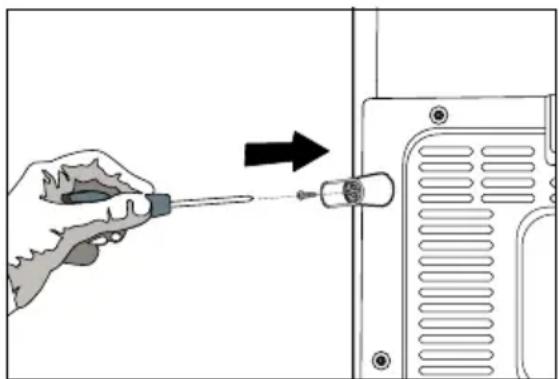
natural_image
Illustration of a hand using a screwdriver to adjust or install a component, with an arrow indicating the process (no text or symbols present)Electric connection
Connect your refrigerator to a grounded socket which is being protected by a fuse with the appropriate capacity.
Important:
The connection must be in compliance with national regulations.
The power cable plug must be easily accessible after installation.
△ Voltage and allowable fuse protection are specified in the “Technical Specifications” section.
The specified voltage must be equal to your mains voltage.
△ Extension cables and multiway plugs must not be used for connection.
⚠ A damaged power cable must be replaced by a qualified electrician.
The appliance must not be operated before it is repaired! There is danger of electric shock!
Disposing of the packaging
⚠ The packing materials may be
packing materials out of the reach of children or dispose them of by classifying them in accordance with the waste instructions. Do not dispose them of along with the normal household waste.
The packing of your refrigerator is produced from recyclable materials.
Disposing of your old refrigerator
Dispose of your old machine without giving any harm to the environment.
⚠️ You may consult your authorized dealer or waste collection center of your municipality about the disposal of your refrigerator.
cut out the electric plug and, if there are any locks on the door, make them inoperable in order to protect children against any danger.
Placing and Installation
Caution: Never plug the refrigerator into the wall outlet during installation. Otherwise, risk of death or serious injury may arise.
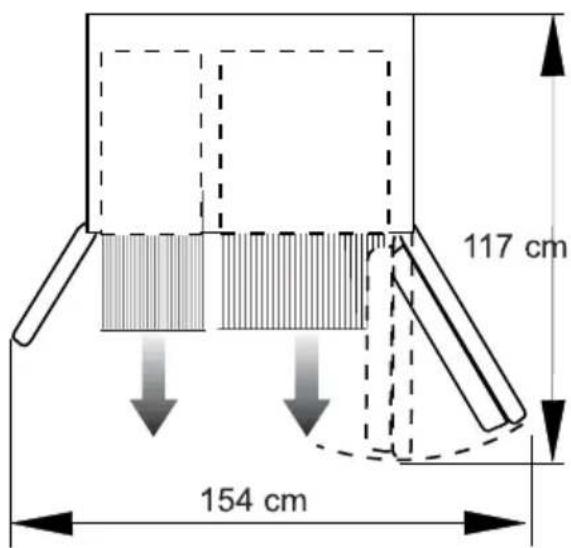
⚠️ If the entrance door of the room where the refrigerator will be installed is not wide enough for the refrigerator to pass through, than call the authorised service to have them remove the doors of your refrigerator and pass it sideways through the door.
- Install your refrigerator to a place that allows ease of use.
heat sources, humid places and direct sunlight.
3. There must be appropriate air ventilation around your refrigerator in order to achieve an efficient operation. If the refrigerator is to be placed in a recess in the wall, there must be at least 5 cm distance with the ceiling and at least 5 cm with the wall.
If the floor is covered with a carpet, your product must be elevated 2.5 cm from the floor.
4. Place your refrigerator on an even floor surface to prevent jolts.
- Do not keep your refrigerator in ambient temperatures under 10^ C.
Floor balance adjustment
If your refrigerator is unbalanced;
You can balance your refrigerator by turning the front legs of it as illustrated in the figure. (See Figure A) The corner where the leg exists is lowered when you turn in the direction of black arrow and raised when you turn in the opposite direction. Taking help from someone to slightly lift the refrigerator will facilitate this process.
Door height adjustment
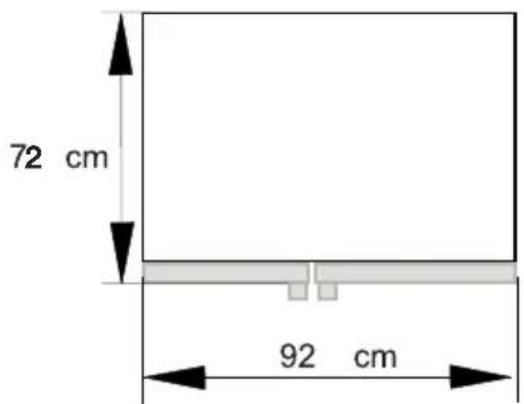
In case there is a problem with the alignment of the doors with respect to each other, they may be aligned by ascension vertically in the order given below. Ensure that door shelves are empty when adjusting the door height.

natural_image
Diagram of a mechanical or electrical setup with directional arrows indicating motion, no text or symbols present(A)
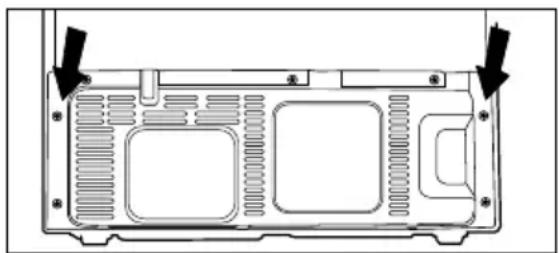
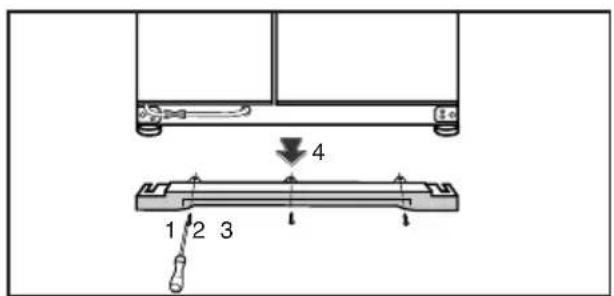
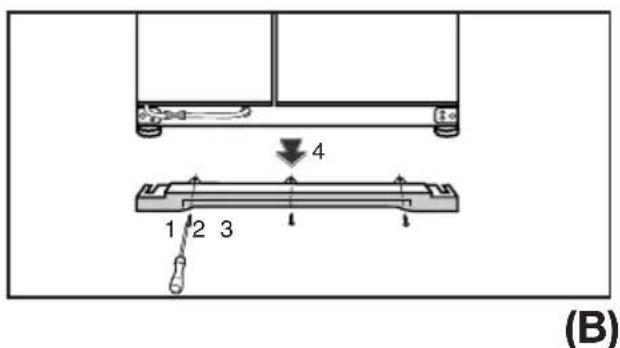
by unscrewing its screws as shown in

text_image
4 1 2 3(B)
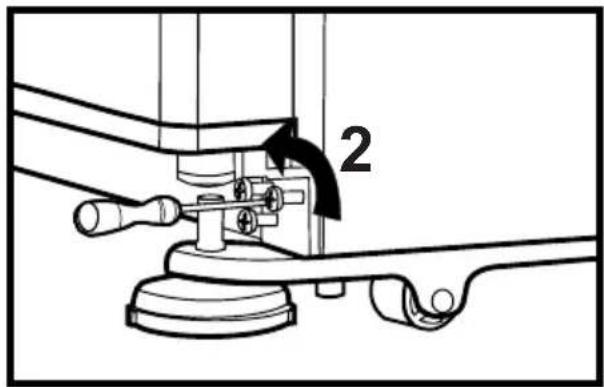
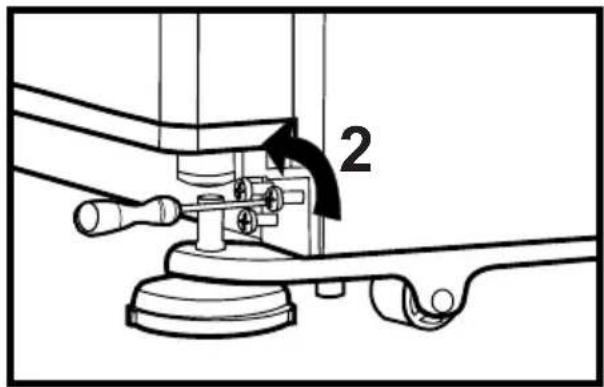
hinges of the lower door, which you wish to escalate, with the help of a screwdriver as shown in the figure below. (Do not remove completely)
(See Figure C)
text_image
2(C)
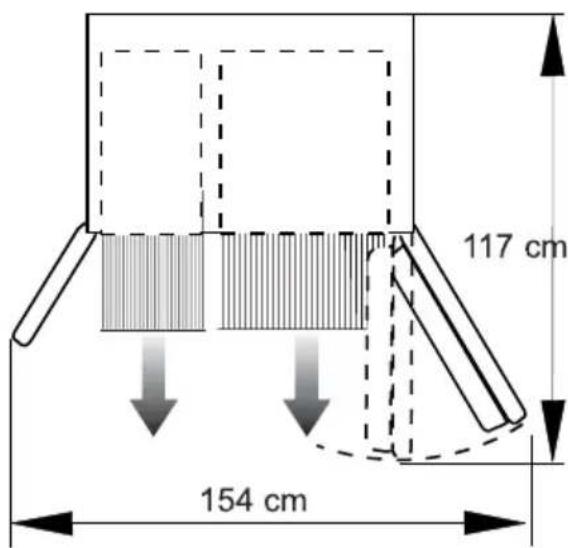
text_image
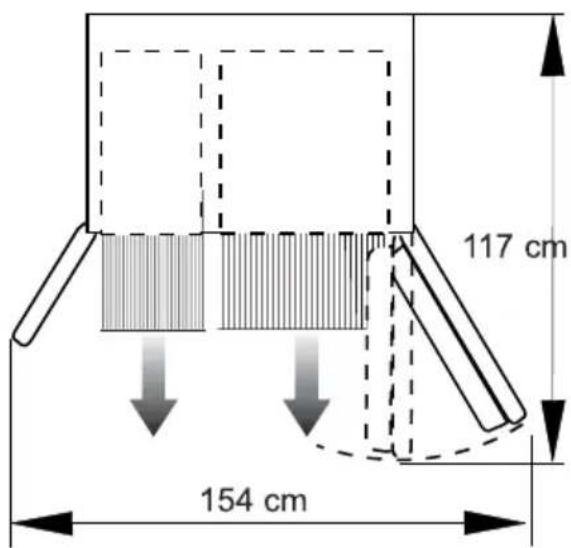
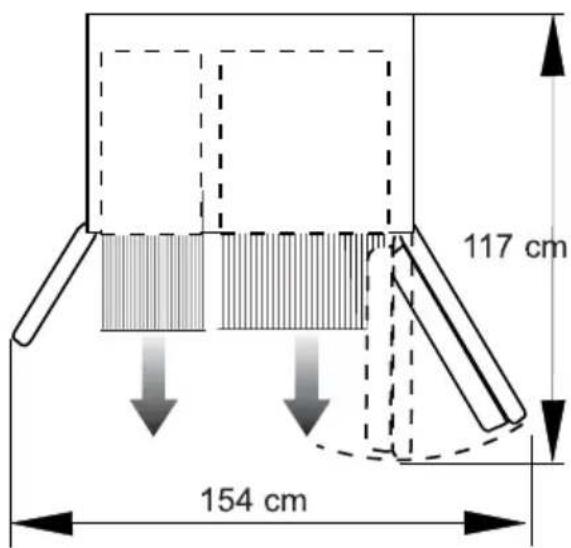
117 cm 154 cm
text_image
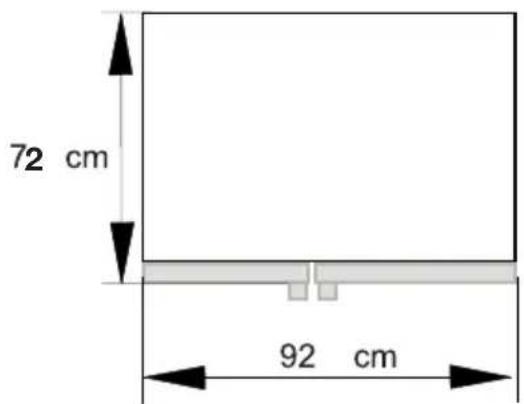
72 cm 92 cmlower than the fridge compartment door, bring them to the same level by turning the elevation screw on the freezer compartment side in the direction of arrow using a M6 Allen wrench as illustrated in Figure D.
higher than the fridge compartment door, bring them to the same level by turning the elevation screw on the freezer compartment side in the direction of arrow using a M6 Allen wrench as illustrated in Figure D.
After bringing the doors to the same level by elevating the front part with the aid of the elevation screws, doors of the refrigerator shall close properly. If the doors do not close properly, this might adversely affect the efficiency of the refrigerator.
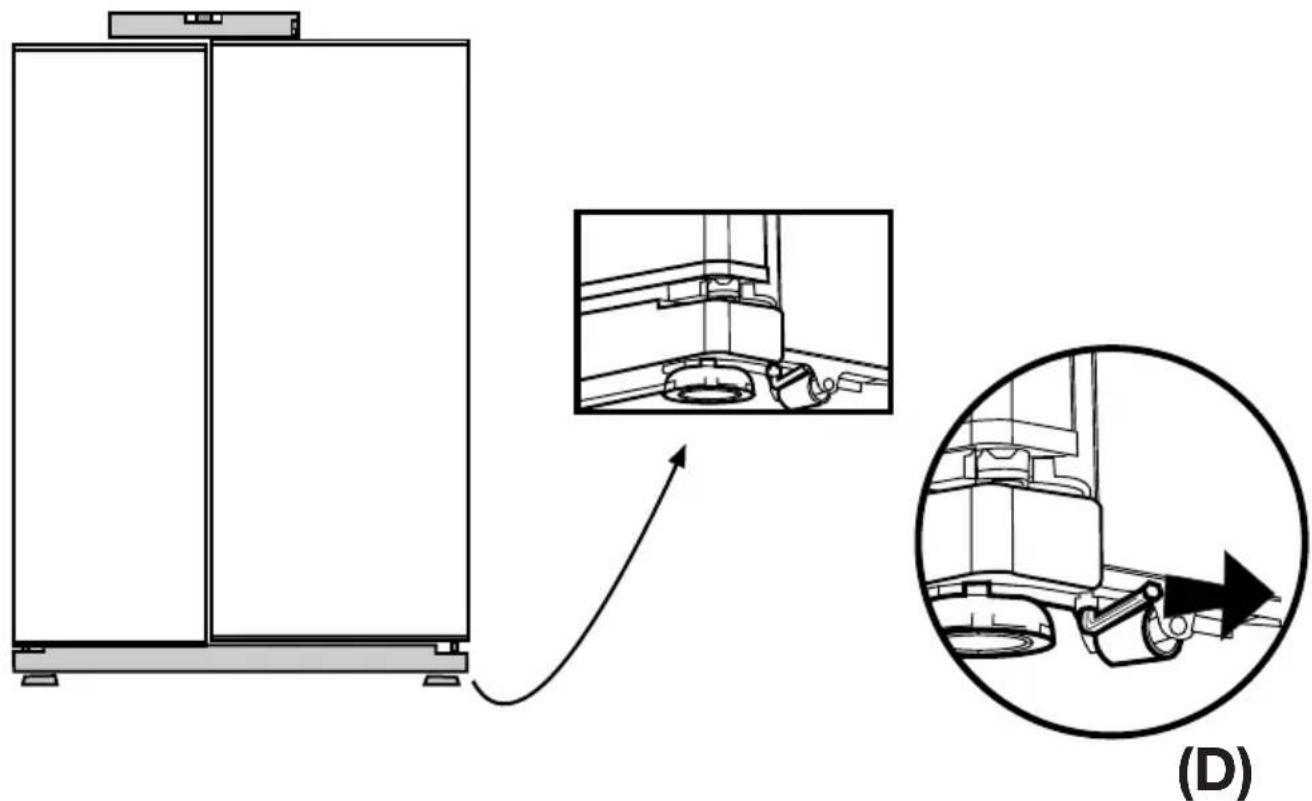
natural_image
Diagram showing a mechanical assembly with an inset close-up of a gear mechanism, labeled (D), no text or symbols present.Adjusting the gap between the upper door
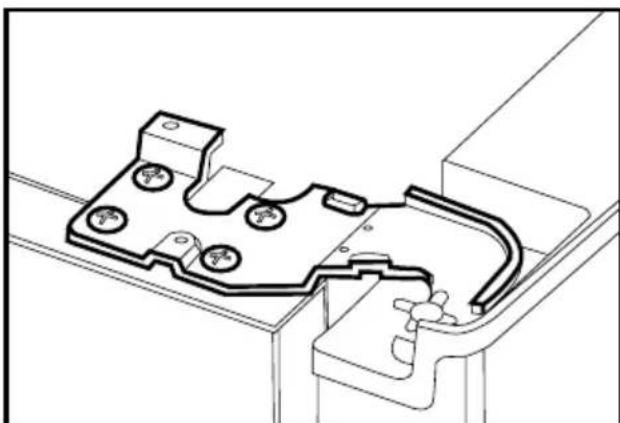
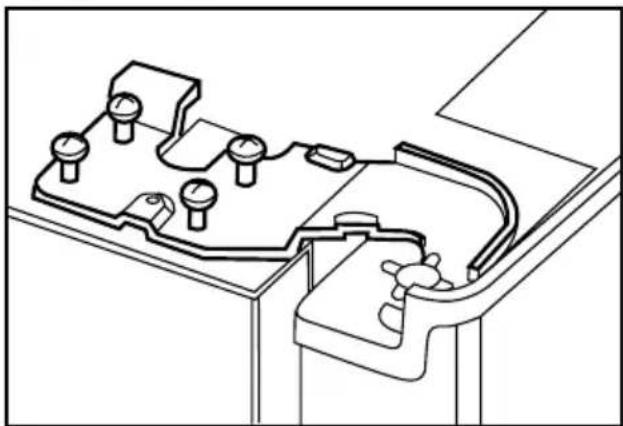
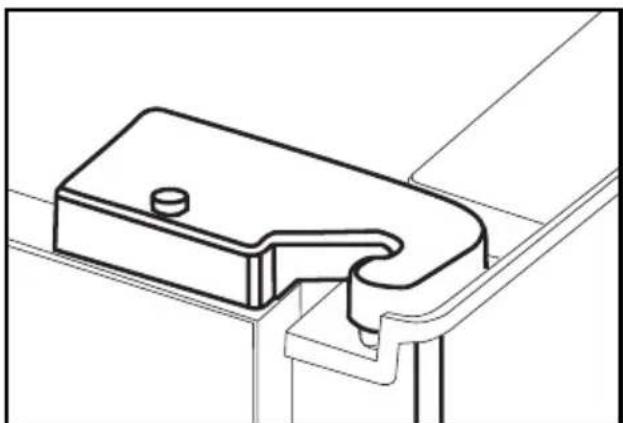
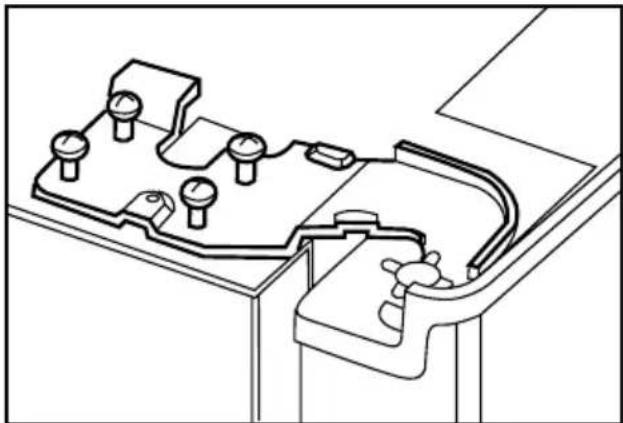
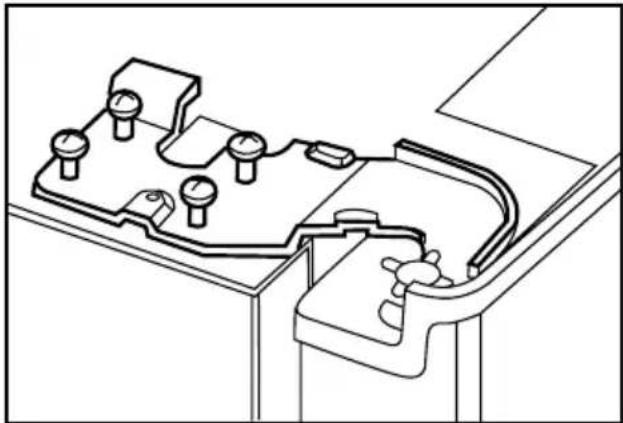
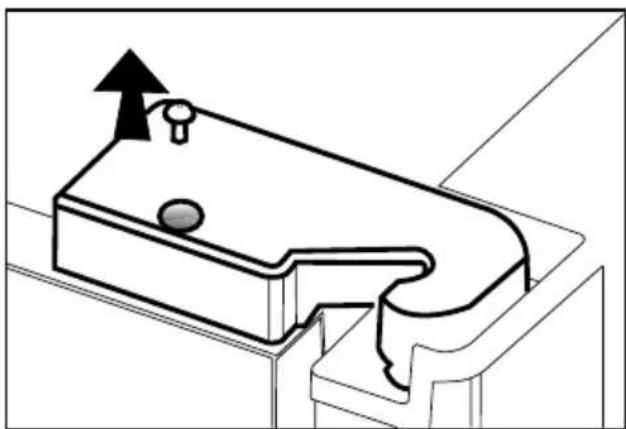
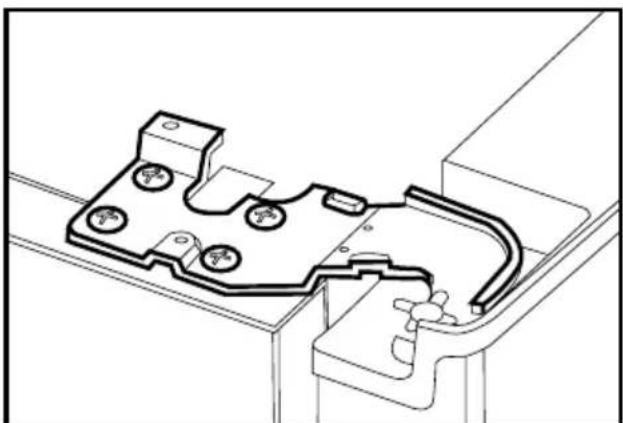
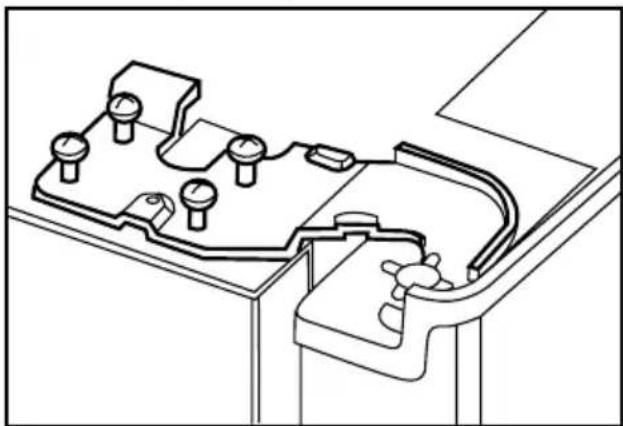
i You can adjust the gap between the fridge compartment doors as illustrated in the figures.
Door shelves should be empty when adjusting the door height.
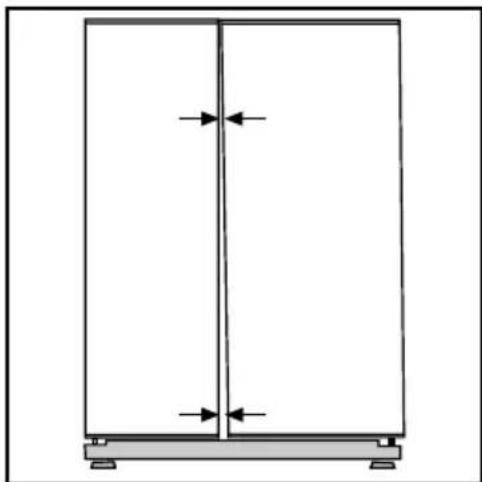
natural_image
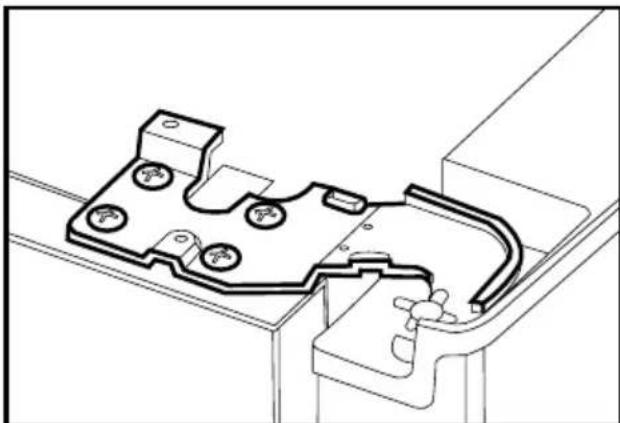
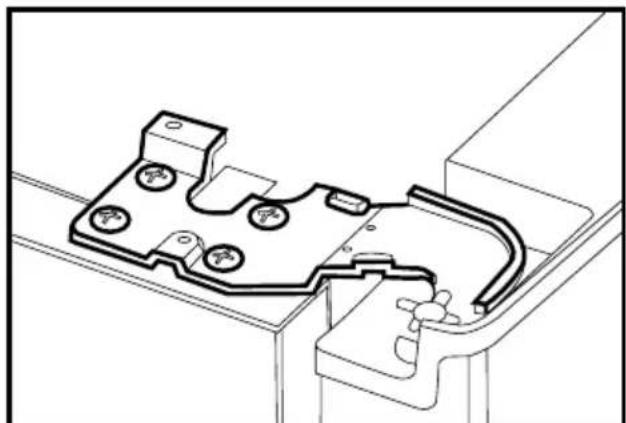
Simple line drawing of a two-panel cabinet or enclosure with vertical and horizontal arrows indicating measurement or alignment (no text or symbols)i Using a screwdriver, remove the screw of upper hinge cover of the door you want to adjust.
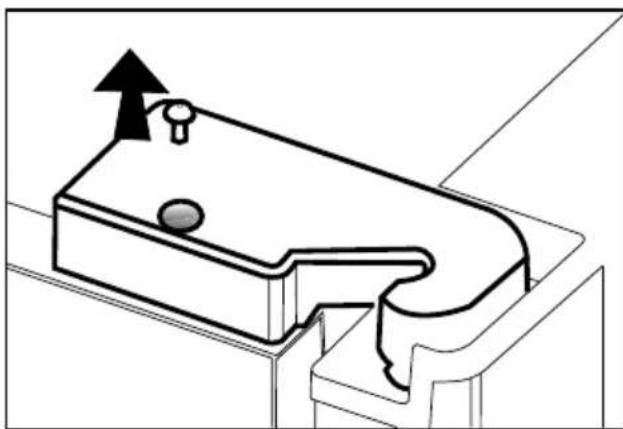
natural_image
Technical line drawing of a mechanical component with an upward arrow indicating motion (no text or symbols)i Adjust the door appropriately as you desire by loosing the screws.
natural_image
Technical line drawing of a mechanical housing or enclosure component (no text or symbols)i Fix the door without changing the position of the door you have adjusted by tightening the screws.
natural_image
Technical line drawing of a mechanical assembly with mounting holes and internal components (no text or symbols)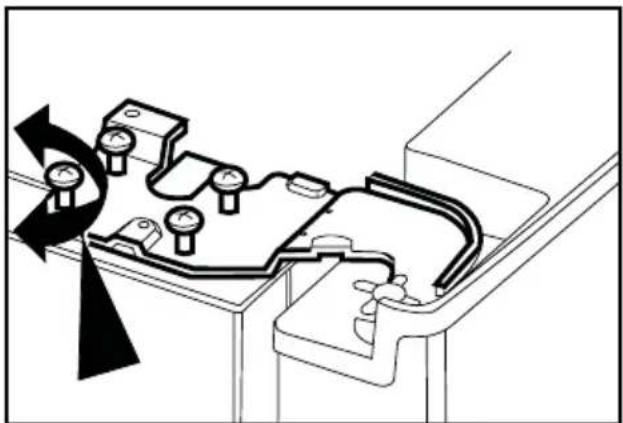
natural_image
Technical diagram of a mechanical assembly with rotating components and a curved component (no text or symbols)with the screw.
natural_image
Technical line drawing of a mechanical bracket or clamp component (no text or symbols)4 Preparation
i Your refrigerator should be installed at least 30 cm away from heat sources such as hobs, ovens, central heater and stoves and at least 5 cm away from electrical ovens and should not be located under direct sunlight.
The ambient temperature of the room where you install your refrigerator should at least be 10^ C. Operating your refrigerator under cooler conditions than this is not recommended with regard to its efficiency.
i Please make sure that the interior of your refrigerator is cleaned thoroughly.
i If two refrigerators are to be installed side by side, there should be at least 2 cm distance between them.
When you operate your refrigerator for the first time, please observe the following instructions during the initial six hours.
- The door should not be opened frequently.
- It must be operated empty without any food in it.
- Do not unplug your refrigerator. If a power failure occurs out of your control, please see the warnings in problems" section.
i Original packaging and foam materials should be kept for future transportations or moving.
5 Using your refrigerator
Indicator Panel
Indicator panel aids in using your refrigerator with its audio and visual functions.
This panel allows you to start and use all functions of your refrigerator without opening its doors since the panel is located on the outer side of the freezer compartment door.
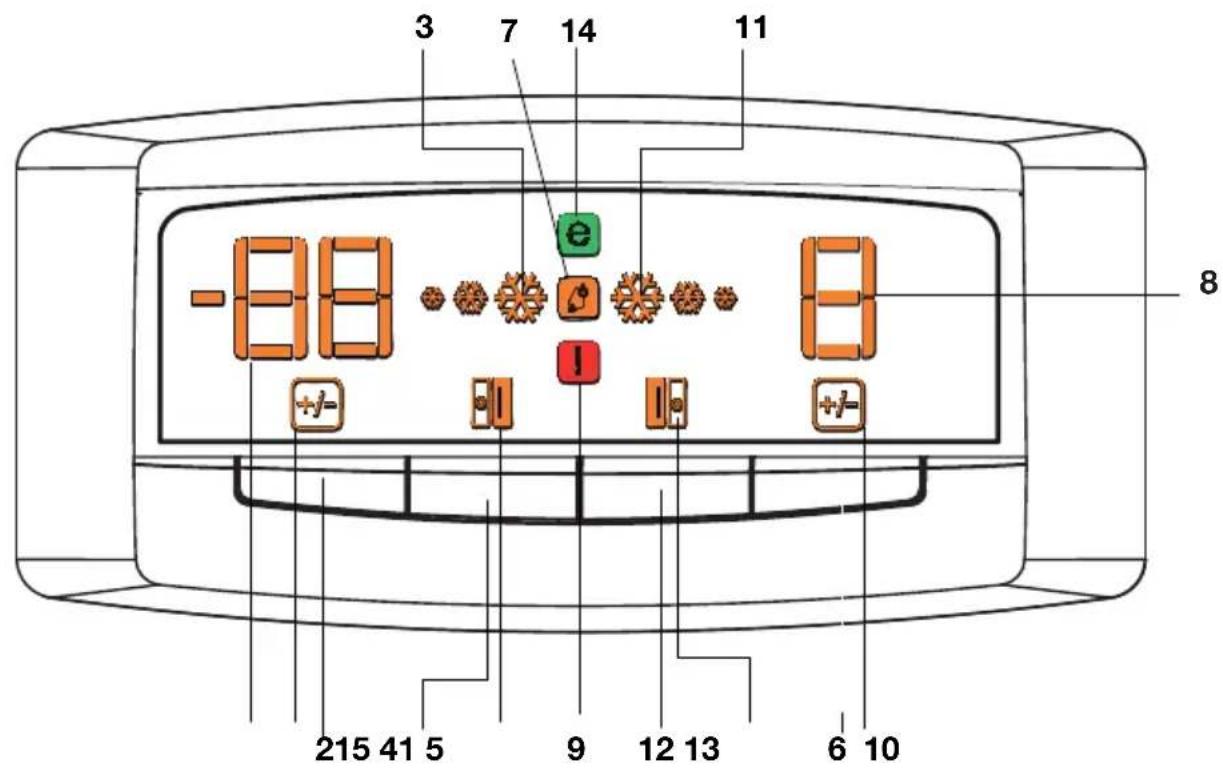
text_image
-88 7 14 11 8 215 41 5 9 12 13 6 10-
Freezer compartment temperature setting indicator
-
Freezer compartment temperature setting button
-
Fast Freeze indicator
-
Freezer door open indicator
-
Fridge compartment temperature butto
-
High humidity indicator
-
Fridge Compartment Temperature Setting Indicator
-
Error indicator
-
Fridge compartment temperature change indicator
-
Quick cool indicator
-
Quick cool button
-
Fridge compartment door open indicator
-
Economy mode
-
Freezer compartment temperature change indicator
i Figures that take place in this instruction manual are schematic and may not correspond exactly with your product. If the subject parts are not included in the product you have purchased, then it is valid for other models.
Setting the fridge compartment temperature
When you want to change your refrigerator's temperature settings, you need to press the “Fridge compartment temperature adjustment button” to make the fridge compartment temperature adjustment. The fridge compartment temperature can be set to cooler degrees every time you press on the button (such as 8, 6, 4, 2, 8, ...).
Setting the freezer compartment temperature
When you want to change your refrigerator's temperature settings, you need to press the “Freezer compartment temperature adjustment button” to make the freezer compartment temperature adjustment. The freezer compartment temperature can be set to cooler degrees every time you press on the button (such as, -18, -20, -22, -24, -18, ...).
Fast Freeze function
You can use this function of your refrigerator to rapidly freeze the food you put into the freezer compartment for the first time or to obtain ice more quickly. If you want to keep your food frozen for a long period, first apply the fast freeze function to them. Fast freeze is the healthiest way of keeping the food for a long time. Temperature of your refrigerator's freezer compartment drops down to -27°C during fast freeze process. You must read Part 4 carefully before applying fast freeze process to your food.
When you want to use the “Fast Freeze” function, press the fast freeze button. Fast freeze indicator lights up when you press the button. Freezer Compartment Temperature Adjustment Indicator turns to -27^ C. While fast freeze function is activated, this compartment reaches colder degrees than the adjusted values and all of the freezer compartment temperature indicators may light up. Fast Freeze function lasts for maximum 24 hours. Your refrigerator will automatically exit the fast freeze mode once the fast freeze process is completed, fast freeze indicator lamp will go off and the refrigerator will turn back to the previously adjusted temperatures. Freezer compartment temperature indicators will gradually go off until the adjusted temperature value is attained.
If you have unintentionally switched your refrigerator to fast freeze mode or if you want to cancel the process, just press the “Fast Freeze” button again to exit the fast freeze mode.
If you want to freeze large amounts of fresh food, press the fast freeze button 24 hours before putting the food into the freezer compartment.
Quick cool function
This function can be used for food placed in the fridge compartment and desired to be cooled down rapidly. Press quick cool button to activate the function. During this process, the quick cool indicator will light up and fridge compartment temperature adjustment indicator will turn into 1°C. While quick cool function is activated, this compartment reaches colder degrees than the adjusted values. Meanwhile, all of the temperature indicators of the fridge compartment may light up. Quick cool process will take about 2 hours and at the end of this period, the quick cool indicator lamp will go off, and the refrigerator will turn back to the previously adjusted temperatures.
Egg tray
You can install the egg holder to the desired door or body shelf.
Never store the egg holder in the freezer compartment
Sliding Body Shelves
Sliding body shelves can be pulled by slightly lifting up from the front and moved back and forth. They come to a stop point when pulled towards front to allow you reach the foods placed at the back of the shelf; when it is pulled after slightly lifted upwards at the second stop point, the body shelf will be released.
The shelf should be hold tightly from the bottom as well in order to prevent it from tipping over. The body shelf is placed on the rails at the sides of the refrigerator body by bringing it to one lower or one upper level.
The body shelf should be pushed backwards to seat it completely.
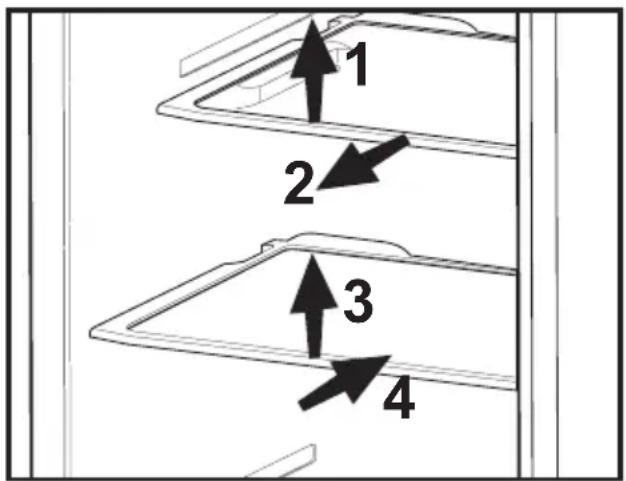
text_image
1 2 3 4Blue light
Foodstuff stored in the crispers that are enlightened with a blue light continue their photosynthesis by means of the wavelength effect of blue light and thus, preserve their freshness and increase their vitamin content.
natural_image
Line drawing of a mechanical device with a transparent screen and side panels (no text or symbols)Crisper humidity control sliders
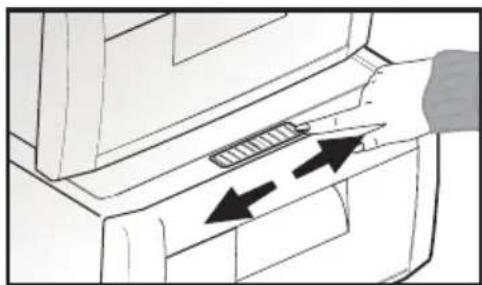
Crisper of your refrigerator is designed specially to keep your vegetables freshly without loosing their humidity. Cold air circulates basically around the crisper and the amount of the cold air passing through the crisper is controlled by the sliders on the front side of the crisper cover.
You can adjust the humidity control sliders to a suitable position according to the humidity and cooling condition of your food in the crisper.
If you want your food in the crisper to cool more, open the holes of the humidity control sliders and if you want them to cool less and keep their humidity for a longer time, close the holes.
natural_image
Diagram of a printer's door with two arrows indicating insertion or disassembly (no text or symbols present)lon:
Air is ionized by means of the ionizer system in the fridge compartment air duct. Thanks to this system, air-borne bacteria and particles that cause odor are removed.
Recommendations for preservation of frozen food
food should be stored in accordance with the frozen food manufacturer's instructions for a ✦ (4 star) frozen food storage compartment.
supplied by the frozen food manufacturer and the food retailer is maintained, following points should be noted:
- Put packets in the freezer as quickly as possible after purchase.
- Ensure that contents are labelled and dated.
not expired.
If there is a power failure do not open the freezer door. Even if the power failure lasts up to the time
the refrigerator), frozen food will not be affected. In case the failure lasts longer, the food must be checked and when necessary, must be consumed immediately or must be frozen after cooked.
Defrosting
The fridge and freezer compartments defrost automatically.
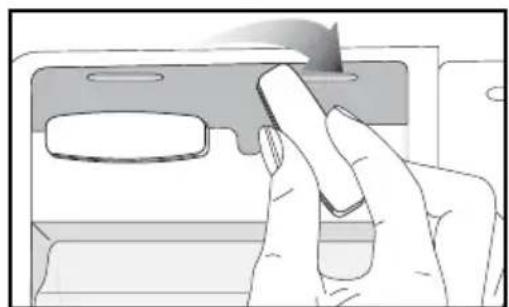
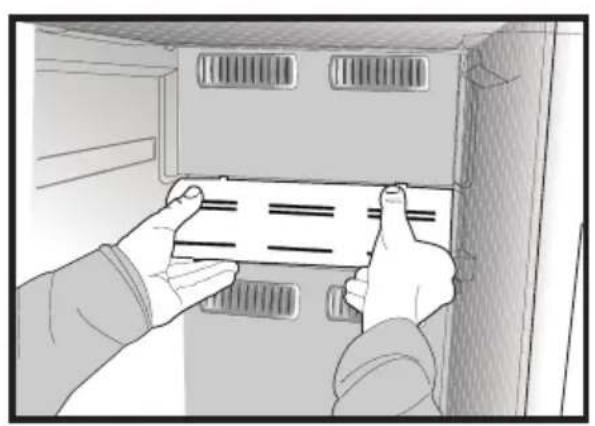
Replacing the Interior Light Bulb
Should the light fail to work, proceed as follows:
- Switch off at the socket outlet and pull out the mains plug.
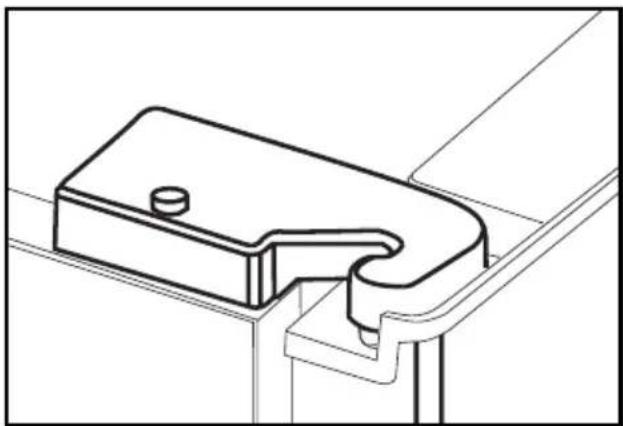
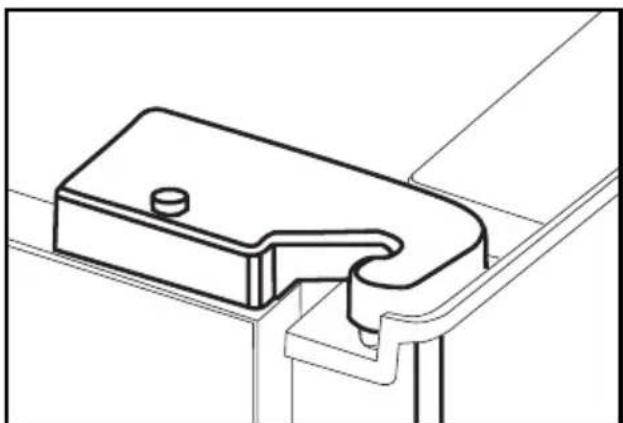
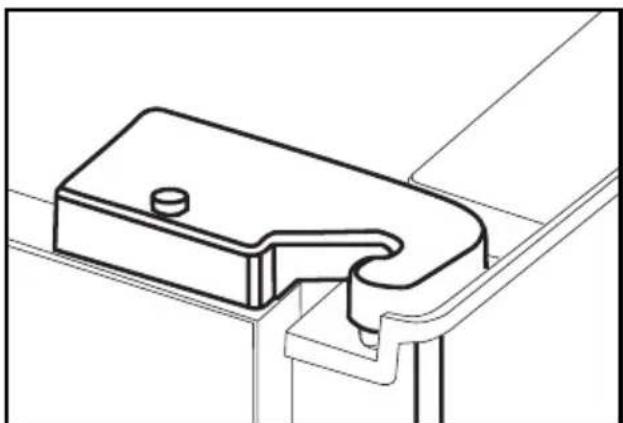
easy access. - Illumination covers in freezer and fridge sections are opened by pressing by hand; first release one side and then the other by pressing on the sides as shown in the figures.
- First check that the bulb has not worked loose by ensuring that it is screwed securely in the holder.
bulb works, reinstall the light cover by inserting the rear lug and pushing up to locate the front two lugs.
- If the light still fails to work, switch off at the socket outlet and pull out
a new 15 watt (max) screw cap E14 (SES) bulb. - Carefully dispose of the burnt-out light bulb immediately.
obtained from a good local electrical or DIY store.
natural_image
Illustration of two hands installing or adjusting a panel inside a cabinet (no text or symbols visible)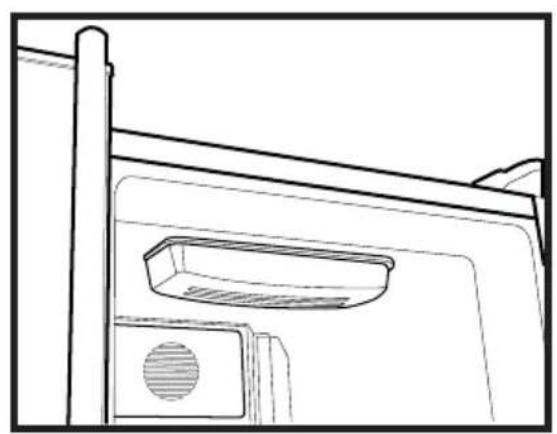
natural_image
Line drawing of a door frame with a vent and handle (no text or symbols)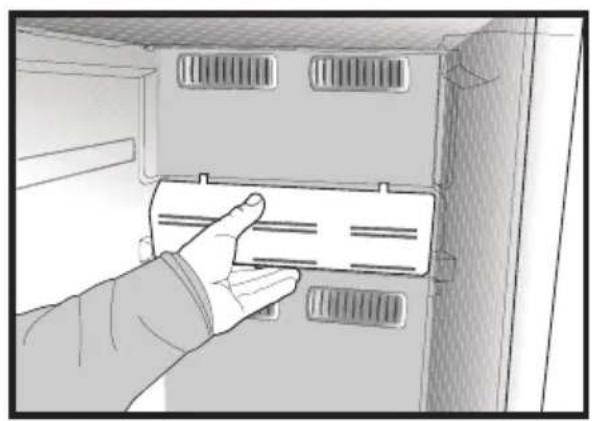
natural_image
Hand inserting a card into a cabinet or rack unit (no text or symbols visible)
natural_image
Line drawing of hands installing or adjusting a component on a cabinet (no text or symbols)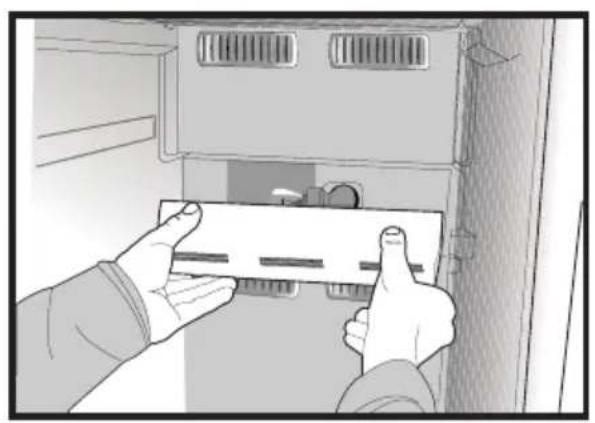
natural_image
Illustration of hands installing or adjusting a component inside a cabinet (no text or symbols visible)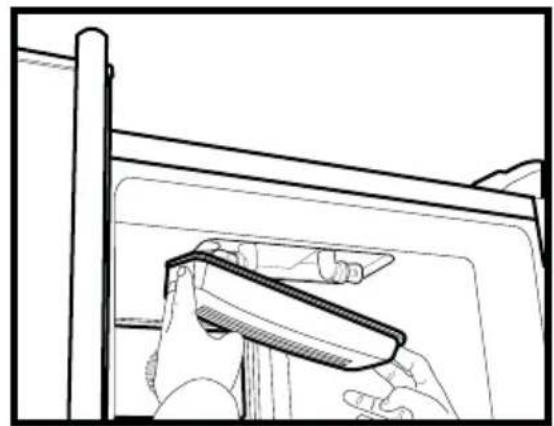
natural_image
Line drawing of a hand holding a tool near a window frame (no text or symbols)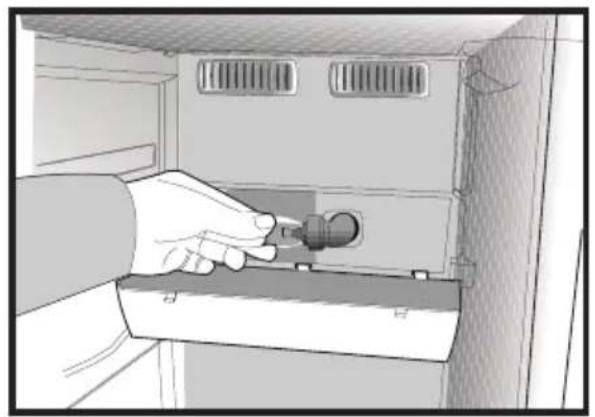
natural_image
Illustration of a hand inserting a plug into a cabinet (no text or symbols visible)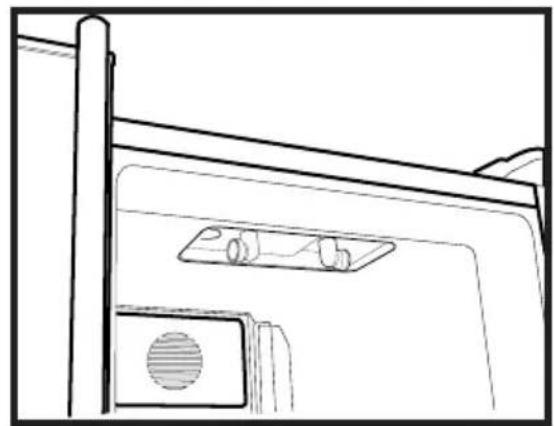
natural_image
Line drawing of a door with a mounted device and ventilation slots (no text or symbols)Icematic
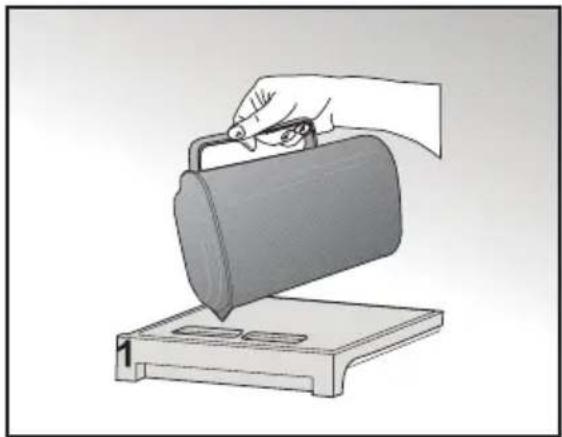
* When the Icematic water supply reservoir (1) is removed from its place in order to fill it up, it must be replaced within two minutes after it is filled with water. The nozzle of the system will open and the Icematic cells will be filled with water automatically as soon as the cartridge is seated in its place. Your ice will be ready approximately in two 2 hours.
its seating to take ice.
illustrated in the figure.
Ice cubes in the cells will fall down in to the ice bank (3) below.
serve the ice cubes.
cubes in the ice bank.
The ice bank is just for accumulating ice cubes. Do not put water in it. Otherwise, it will break.
About water supply reservoir
fill it up with water. After filled up with water, the reservoir must be pushed forward into its seating until a “click” sound is heard. If there is any ice in the reservoir, wait until it melts. Water supply reservoir has a capacity of approximately 290 ml.
natural_image
Illustration of a hand using a tool to lift a cylindrical container on a base (no text or symbols)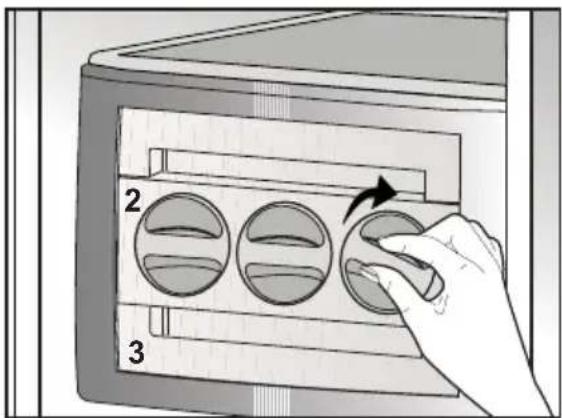
text_image
2 3Using the Icematic
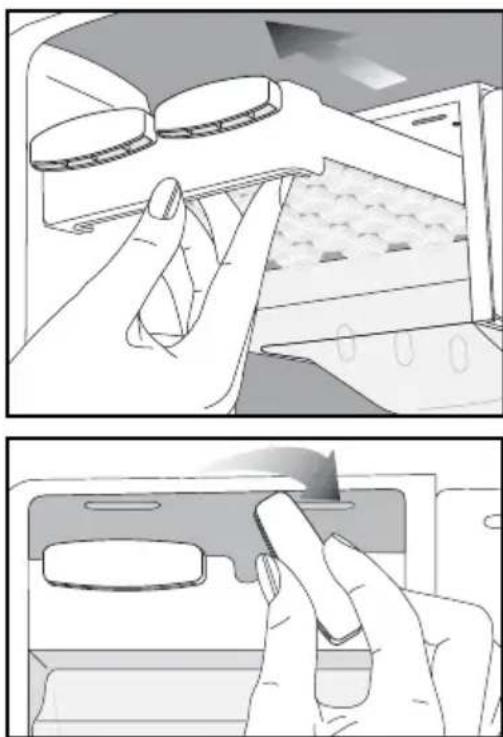
it into its seat. Your ice will be ready approximately in two hours. Do not remove the Icematic from its seating to take ice.
degrees. Ice cubes in the cells will fall down into the ice storage container below.
container and serve the ice cubes.
cubes in the ice storage container.
accumulating ice cubes. Do not freeze water in it. Otherwise, it may break.
(The illustrated figure is only an example and does not match exactly with your product.)
natural_image
Two-panel illustration showing hands using a device to interact with a screen (top) and a card (bottom), both without any visible text or symbols.Chiller compartment
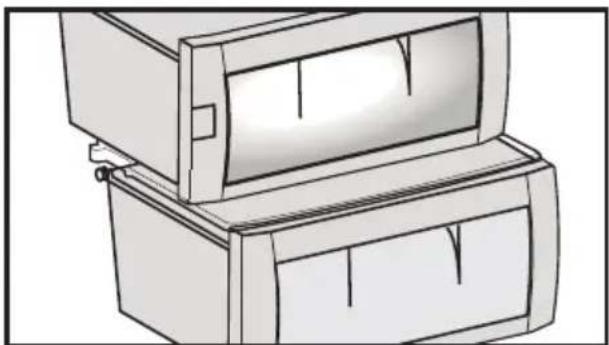
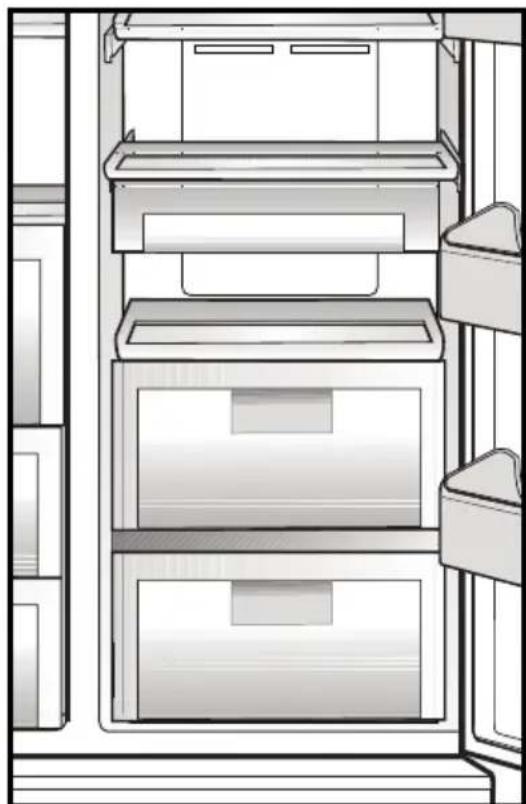
If you wish to use the storage container under the shelf as the Chiller compartment, the storage container under the shelf should be placed as shown in the picture.
Chiller compartments enable the foods to be frozen become ready for freezing. You can also use these compartments to store your food at a temperature a few degrees below the fridge compartment.
You can increase the inner volume of your refrigerator by removing any of the chiller compartments. To do this, pull the compartment towards yourself; the compartment will lean against the stopper and stop. This compartment will be released when you lift it about 1 cm and pull it towards yourself.
natural_image
Line drawing of a refrigerator interior showing three shelves and doors (no text or symbols)6 Cleaning and care
⚠️ Never use gasoline, benzene or similar substances for cleaning purposes.
⚠️ We recommend that you unplug the appliance before cleaning.
i Never use any sharp abrasive instrument, soap, household cleaner, detergent and wax polish for cleaning.
Use lukewarm water to clean the cabinet of your refrigerator and wipe it dry.
Use a damp cloth wrung out in a solution of one teaspoon of bicarbonate of soda to one pint of water to clean the interior and wipe it dry.
⚠ Make sure that no water enters the lamp housing and other electrical items.
⚠️ If your refrigerator is not going to be used for a long period of time, unplug the power cable, remove all food, clean it and leave the door ajar.
Check door seals regularly to ensure they are clean and free from food particles.
⚠️ To remove door racks, remove all the contents and then simply push the door rack upwards from the base.
i Tea is one of the best deodorants. Open hydroxyl (OH) ends of Catechin substance molecules in the tea hold the odor creating volatile organics to remove unpleasant odors.
Protection of plastic surfaces
Do not put the liquid oils or oil-cooked meals in your refrigerator in unsealed containers as they damage the plastic surfaces of your refrigerator. In case of spilling or smearing oil on the plastic surfaces, clean and rinse the relevant part of the surface at once with warm water.
7 Recommended solutions for the problems
Please review this list before calling the service. It might save you time and money. This list includes frequent complaints that are not arising from defective workmanship or material usage. Some of the features described here may not exist in your product.
| The refrigerator does not operate. |
| fuse blown out? Check the fuse. |
| Highly humid ambient conditions. Storage of food containing liquid in open degree. |
| Compressor is not running |
| failures or plug-out plug-ins as the refrigerant pressure in the cooling system of the refrigerator has not been balanced yet. Your refrigerator will start running approximately after 6 minutes. Please call the service if the refrigerator does not startup at the end of this period.defrosting refrigerator. Defrosting cycle occurs periodically.properly fit into the socket. |
| The fridge is running frequently or for a long time. |
| loaded with food. Cooling down of the refrigerator completely may last for a couple of hours longer.Hot food causes longer running of the refrigerator until they reach the safe storage temperature.warm air that has entered into the refrigerator causes the refrigerator to run for longer periods. Open the doors less frequently.doors are tightly closed.temperature to a warmer degree and wait until the temperature is achieved.the refrigerator to run for a longer period of time in order to maintain the current temperature. |
| Freezer temperature is very low while the fridge temperature is sufficient. |
| freezer temperature to a warmer degree and check. |
| Fridge temperature is very low while the freezer temperature is sufficient. |
| temperature. Adjust the fridge temperature to a warmer degree and check. |
| Food kept in the fridge compartment drawers are freezing. |
| temperature. Adjust the fridge temperature to a warmer degree and check. |
| Temperature in the fridge or freezer is very high. |
| Fridge adjustment has an effect on the temperature of the freezer.Change the temperature of the fridge or freezer until the fridge or freezer temperature reaches to a sufficient level.them less frequently.Wait until the fridge or freezer reaches the desired temperature.refrigerator completely takes time. |
| The operation noise increases when the refrigerator is running. |
| changes in the ambient temperature. It is normal and not a fault. |
| Vibrations or noise. |
| slowly. Make sure that the floor is strong enough to carry the refrigerator, and level. top of the refrigerator should be removed. |
| There are noises coming from the refrigerator like liquid spilling or spraying. |
| your refrigerator. It is normal and not a fault. |
| There is a noise like wind blowing. |
| Condensation on the inner walls of refrigerator. |
| not a fault. them less frequently. |
| Humidity occurs on the outside of the refrigerator or between the doors. |
| When the humidity is less, condensation will disappear. |
| refrigerator with a sponge, lukewarm water or carbonated water. different container or different brand packaging material. |
| The door is not closing. |
| are obstructing the door. slightly moved. Adjust the elevation screws. to carry the refrigerator. |
| Crispers are stuck. |
| drawer. |
text_image
Technical diagram of a refrigerator with numbered compartments and storage areas markednatural_image
Diagram showing a device with a lightning bolt and cable, no text or symbols presentnatural_image
Diagram of a mechanical or electrical setup with directional arrows indicating motion, no text or symbols present(A)
text_image
117 cm 154 cmSchéma B)
text_image
4 1 2 3(B)
text_image
72 cm 92 cmnatural_image
Technical diagram showing a mechanical assembly with an inset close-up of a gear mechanism (no text or symbols present)natural_image
Simple line drawing of a two-panel cabinet or enclosure with vertical and horizontal arrows indicating measurement directions (no text or symbols)natural_image
Technical line drawing of a mechanical component with an upward arrow indicating motion (no text or symbols)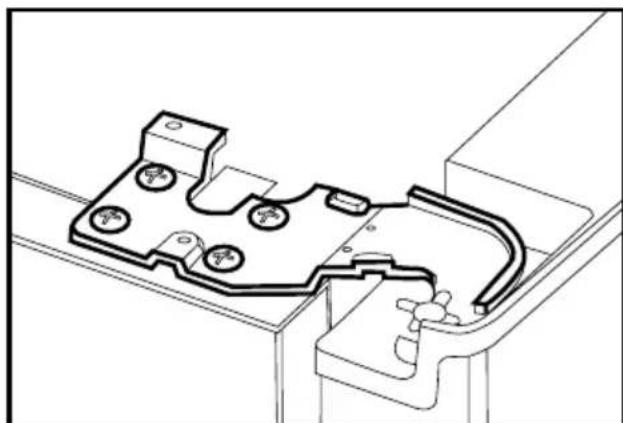
natural_image
Technical line drawing of a mechanical housing or enclosure component (no text or symbols)serrant les vis sans modifier la position de la porte.
natural_image
Technical line drawing of a mechanical assembly with mounting brackets and housing (no text or symbols)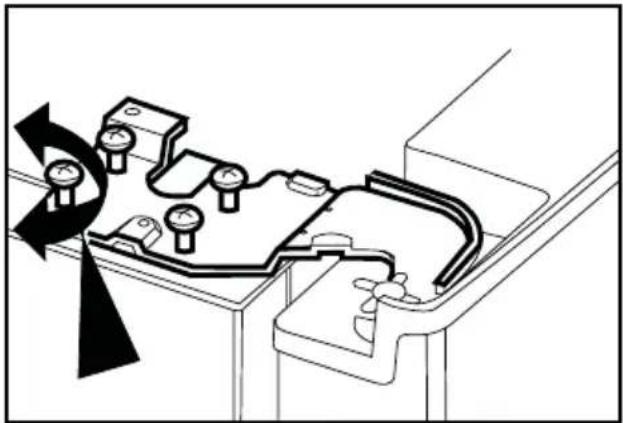
natural_image
Technical diagram of a mechanical assembly with pressure gauges and a rotating component (no text or labels)la vis.
natural_image
Technical line drawing of a mechanical bracket or clamp component (no text or symbols)4 Préparation
natural_image
Line drawing of a mechanical device with a transparent screen and side panels (no text or symbols)de son couvercle.
natural_image
Diagram of a printer's door with two arrows indicating insertion or disassembly (no text or symbols present)lon :
natural_image
Illustration of two hands installing or adjusting a wall-mounted panel inside a cabinet (no text or symbols visible)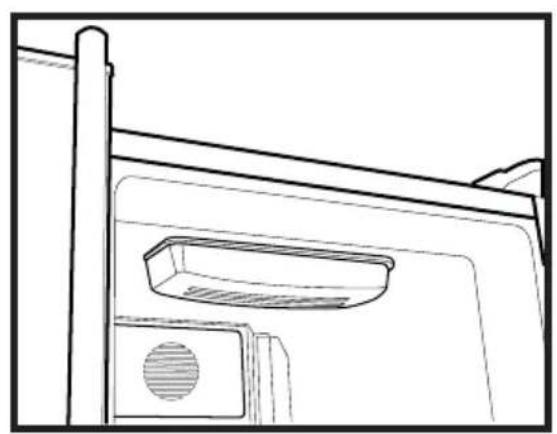
natural_image
Line drawing of a door frame with a vent and handle (no text or symbols)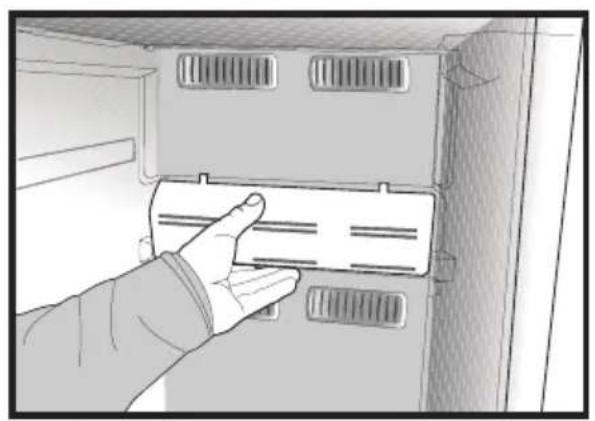
natural_image
Hand inserting a card into a cabinet or rack unit (no text or symbols visible)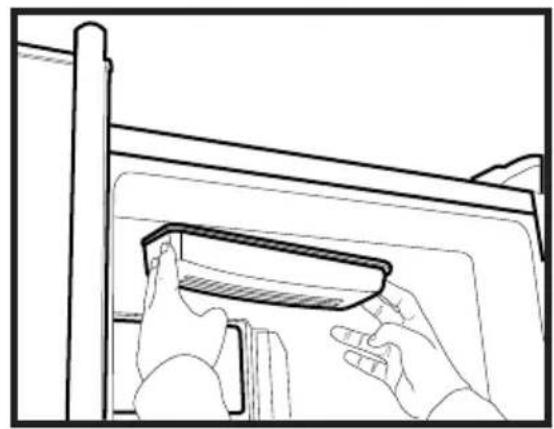
natural_image
Line drawing of hands installing or adjusting a component on a cabinet (no text or symbols)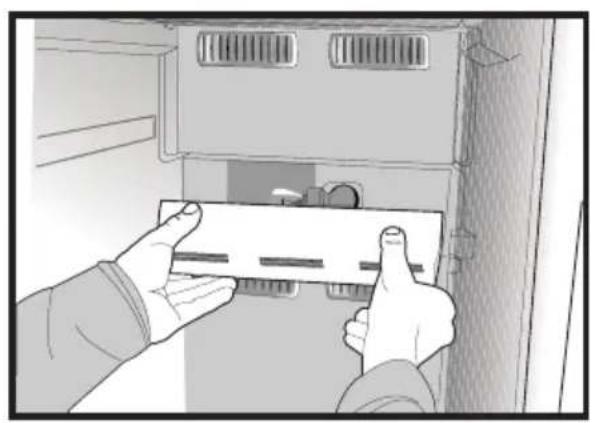
natural_image
Illustration of hands installing or adjusting a component inside a cabinet (no text or symbols visible)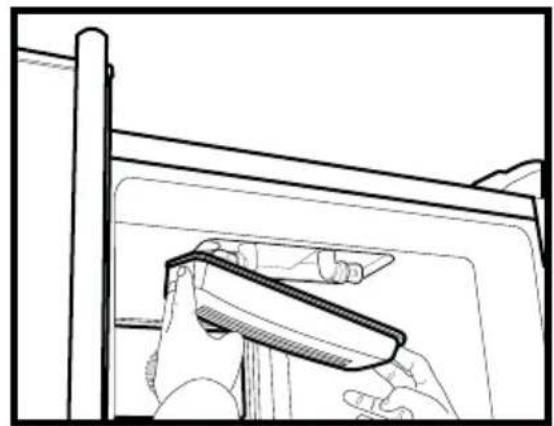
natural_image
Line drawing of a hand holding a tool near a window frame (no text or symbols)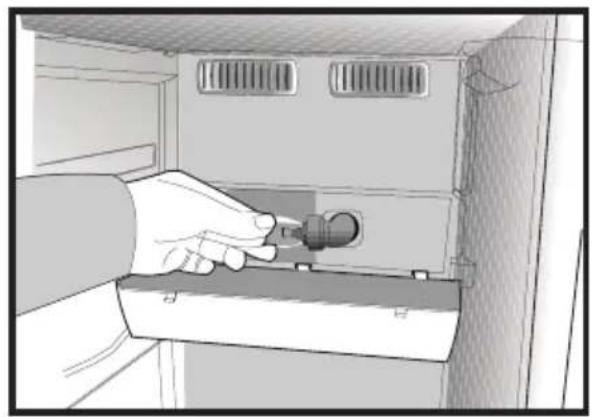
natural_image
Illustration of a hand inserting a plug into a cabinet (no text or symbols visible)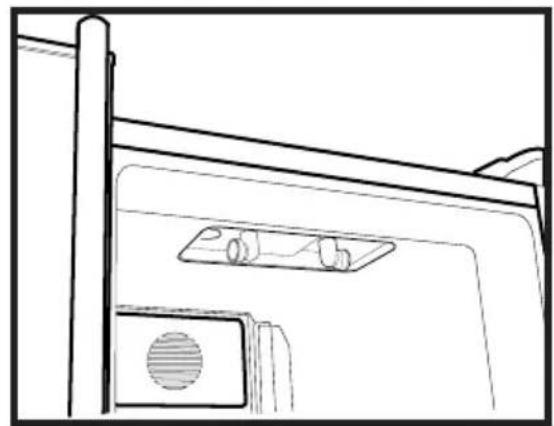
natural_image
Line drawing of a door with a mounted device and ventilation slots (no text or symbols)natural_image
Illustration of a hand using a tool to lift a cylindrical container on a base (no text or symbols)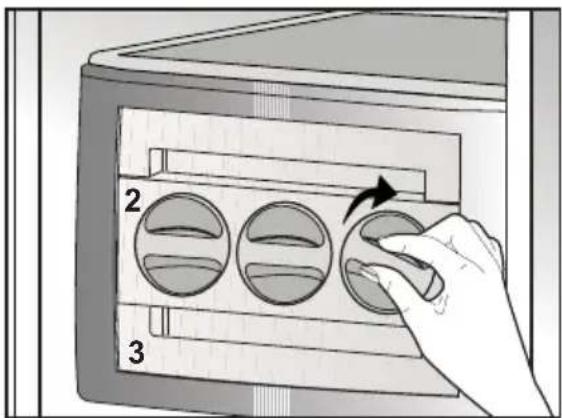
text_image
2 3natural_image
Two-panel illustration showing hands using a device to interact with a screen (top) and a smartphone (bottom), both without any visible text or symbols.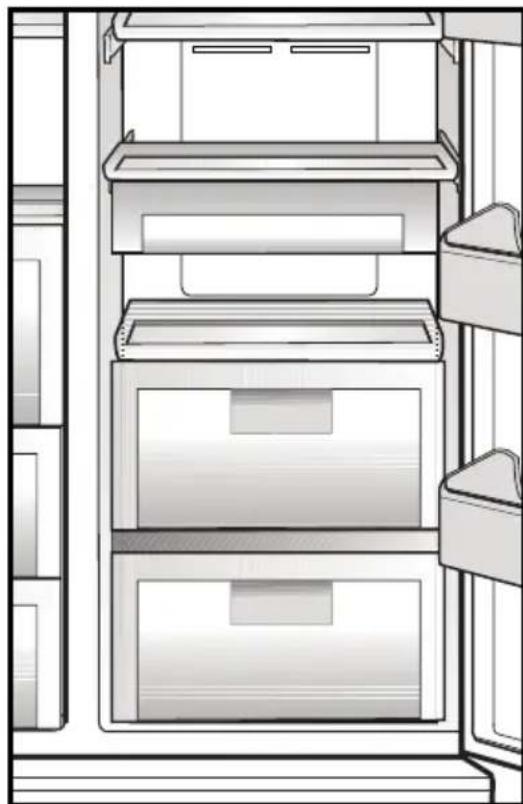
natural_image
Line drawing of a refrigerator interior showing three shelves with drawers and doors (no text or symbols)natural_image
Pure electrical circuit lines without any symbolstext_image
Technical diagram of a refrigerator with numbered compartments and storage areas markednatural_image
Diagram showing a lightning bolt striking down on a wall-mounted device, with a cable and plug attached (no text or symbols)gefährden kann.
natural_image
Diagram of a computer monitor rear panel showing internal compartments and mounting points (no text or labels)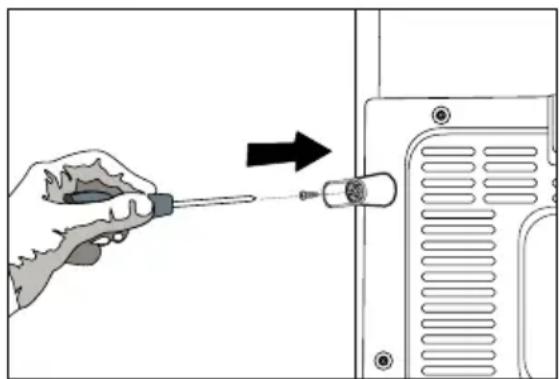
natural_image
Illustration of a hand using a screwdriver to adjust or install a component, with an arrow indicating the process (no text or symbols present)natural_image
Diagram of a mechanical or electrical setup with directional arrows indicating motion, no text or symbols present(A)
text_image
2(C)
text_image
117 cm 154 cm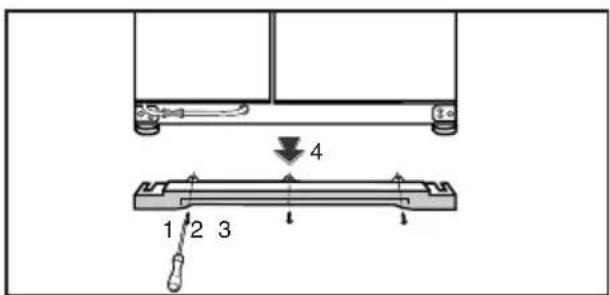
text_image
4 1 2 3(B)
text_image
72 cm 92 cmnatural_image
Technical diagram showing a mechanical assembly with an inset close-up of a gear mechanism (no text or symbols present)natural_image
Simple line drawing of a two-panel cabinet or enclosure with vertical and horizontal arrows indicating measurement or alignment (no text or symbols)natural_image
Technical line drawing of a mechanical component with an upward arrow indicating motion (no text or symbols)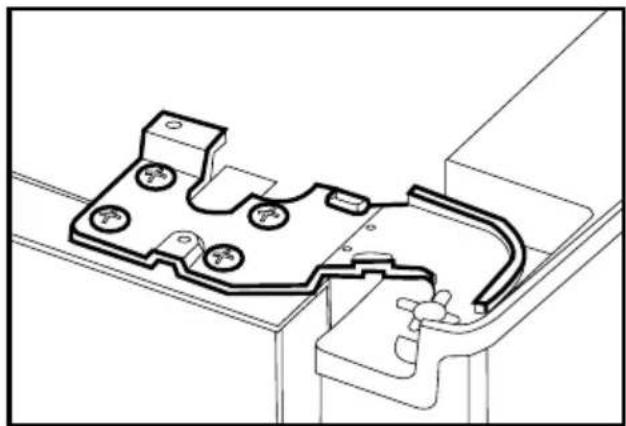
natural_image
Technical line drawing of a mechanical component with mounting holes and a curved internal structure (no text or symbols)natural_image
Technical line drawing of a mechanical assembly with no visible text or symbols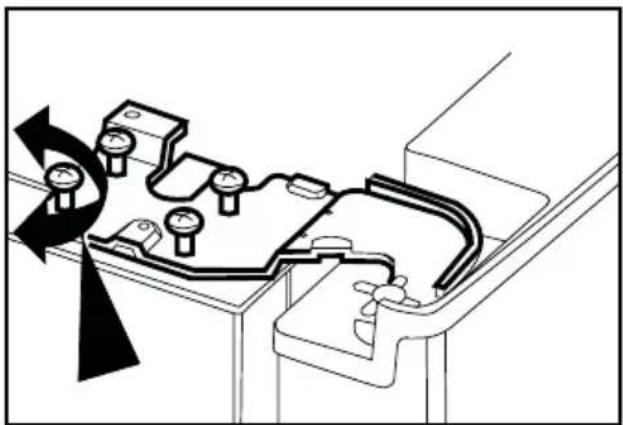
natural_image
Technical diagram of a mechanical assembly with pressure gauges and housing (no text or labels)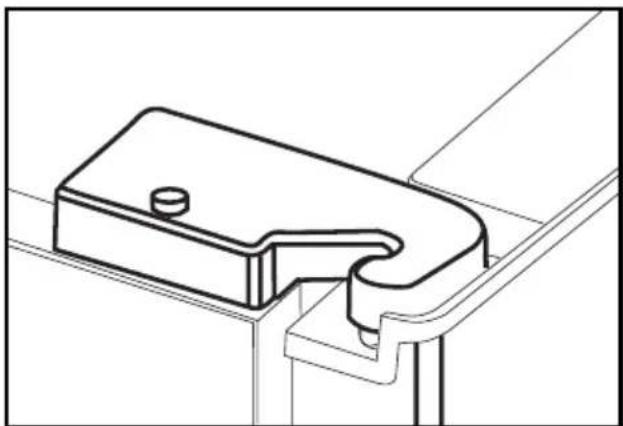
natural_image
Technical line drawing of a mechanical bracket or clamp component (no text or symbols)4 Vorbereitung
natural_image
Line drawing of a mechanical device with a transparent screen and side panels (no text or symbols)natural_image
Line drawing of a printer with two arrows indicating print direction (no text or symbols)lonen:
natural_image
Illustration of two hands installing or adjusting a panel inside a cabinet (no text or symbols visible)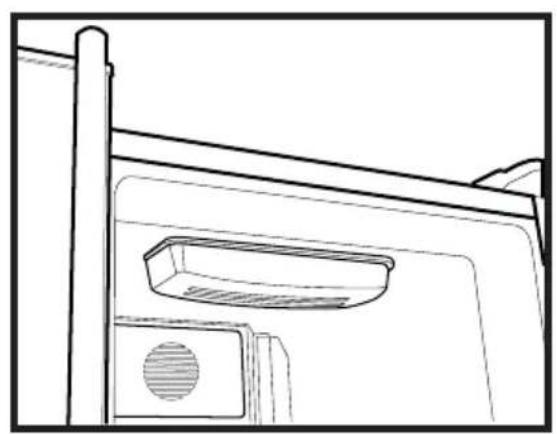
natural_image
Line drawing of a door frame with a vent and lid (no text or symbols)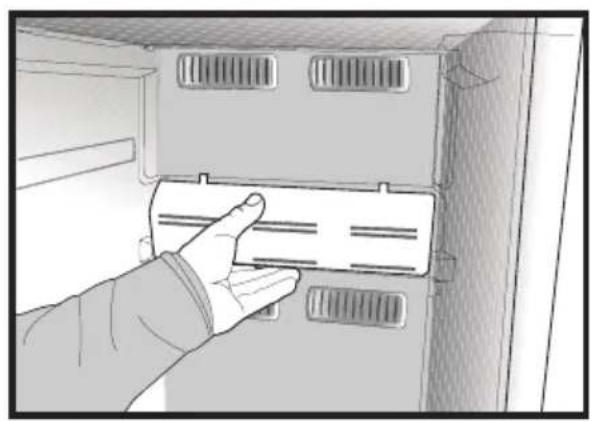
natural_image
Hand inserting a card into a cabinet or rack unit (no text or symbols visible)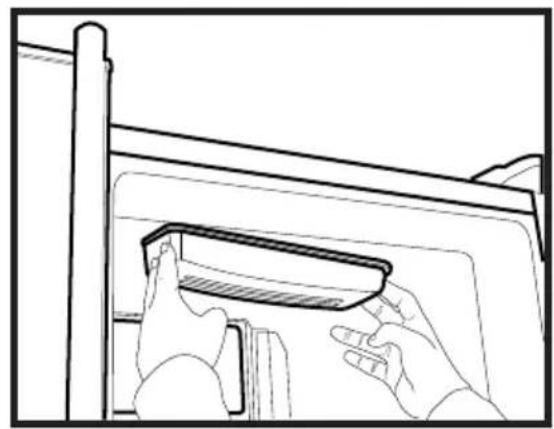
natural_image
Line drawing of hands installing or adjusting a component on a cabinet (no text or symbols)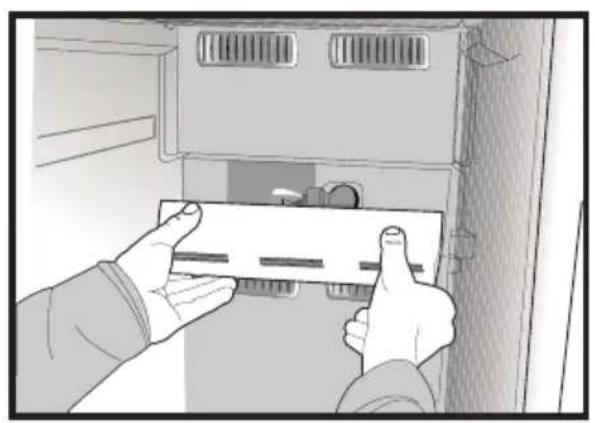
natural_image
Illustration of hands installing or adjusting a component inside a cabinet (no text or symbols visible)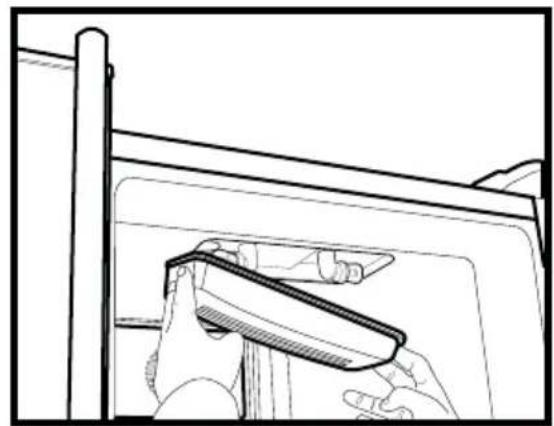
natural_image
Line drawing of a hand holding a tool near a window frame (no text or symbols)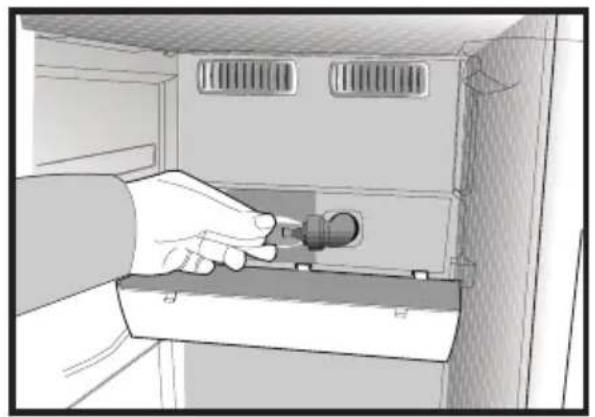
natural_image
Illustration of a hand inserting a plug into a cabinet (no text or symbols visible)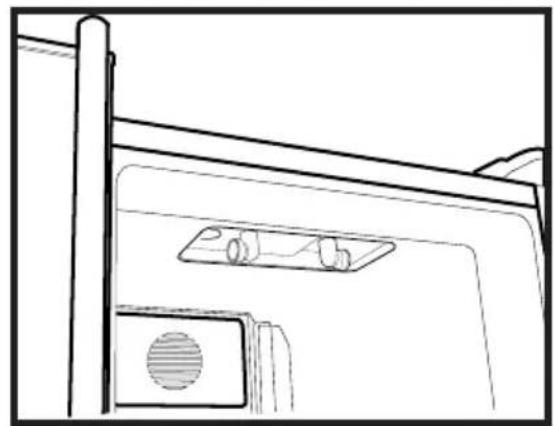
natural_image
Line drawing of a door with a mounted device and ventilation slots (no text or symbols)Eiswürfelmaschine
natural_image
Illustration of a hand using a tool to lift a cylindrical container on a base (no text or symbols)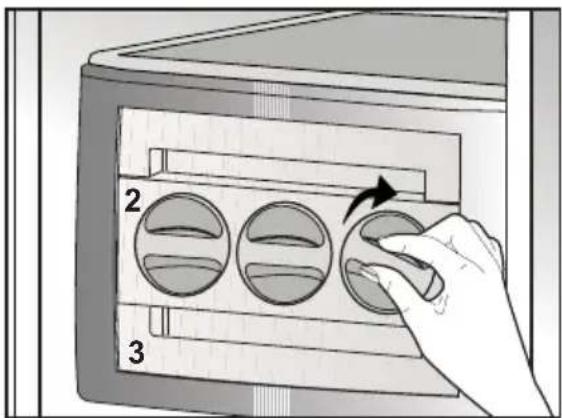
text_image
2 3natural_image
Two-panel illustration showing hands interacting with a device: top panel shows hand pressing down on screen, bottom panel shows hand holding a card (no text or symbols)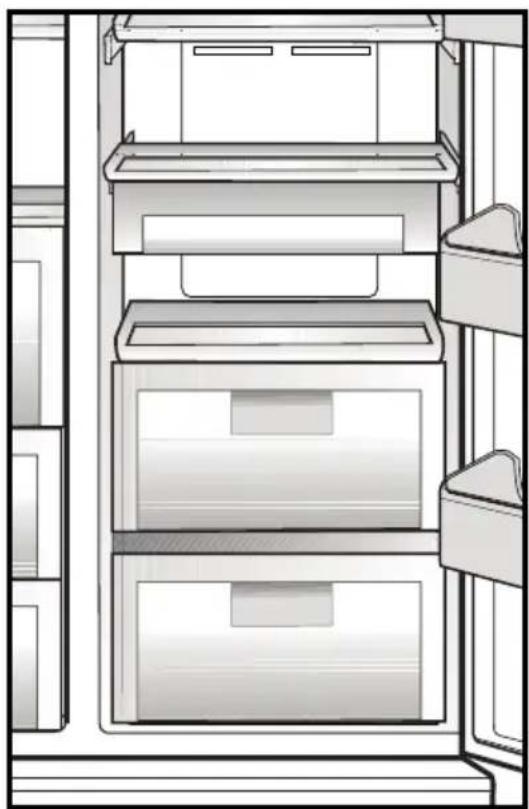
natural_image
Line drawing of a refrigerator interior showing three shelves with drawers and doors (no text or symbols)text_image
Technical diagram of a refrigerator with numbered compartments and storage areas markednatural_image
Diagram showing a device with a lightning bolt and cable, no text or symbols presentwandcontactdoos los zit.
text_image
Diagram showing a device component being inserted into a rack, with arrows indicating the process and a hand holding a screwdriver.natural_image
Diagram of a mechanical or electrical setup with directional arrows indicating motion, no text or symbols present(A)
natural_image
Diagram showing a mechanical assembly with an inset close-up of a gear mechanism, labeled (D), no text or symbols present.natural_image
Simple line drawing of a two-panel cabinet or enclosure with vertical and horizontal arrows indicating measurement or alignment (no text or symbols)natural_image
Technical line drawing of a mechanical component with an upward arrow indicating motion (no text or symbols)natural_image
Technical line drawing of a mechanical component with mounting holes and internal channels (no text or symbols)natural_image
Technical line drawing of a mechanical assembly with no visible text or symbols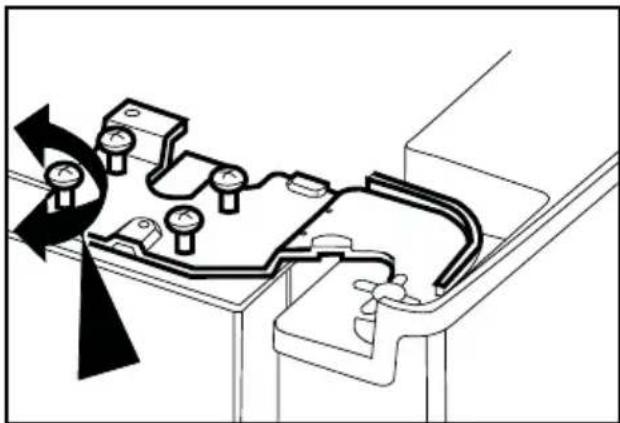
natural_image
Technical diagram of a mechanical assembly with pressure gauge and directional arrows indicating motion (no text or symbols)natural_image
Technical line drawing of a mechanical bracket or bracket component (no text or symbols)4 Voorbereiding
natural_image
Line drawing of a mechanical device with a transparent lid and internal compartments (no text or symbols)Vochtregeling van groenteladen
natural_image
Line drawing of a printer's door with two arrows indicating left and right motion (no text or symbols)lon:
natural_image
Illustration of two hands installing or adjusting a wall-mounted panel inside a cabinet (no text or symbols visible)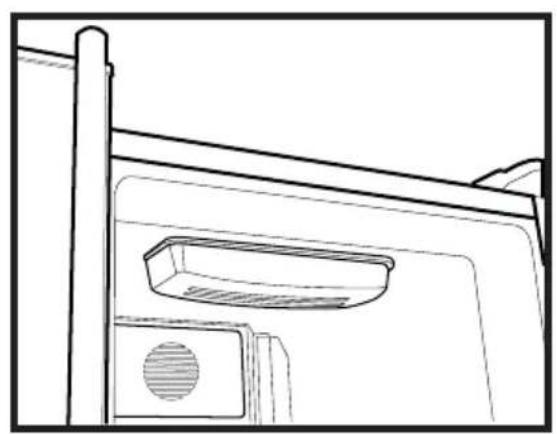
natural_image
Line drawing of a door frame with a vent and handle (no text or symbols)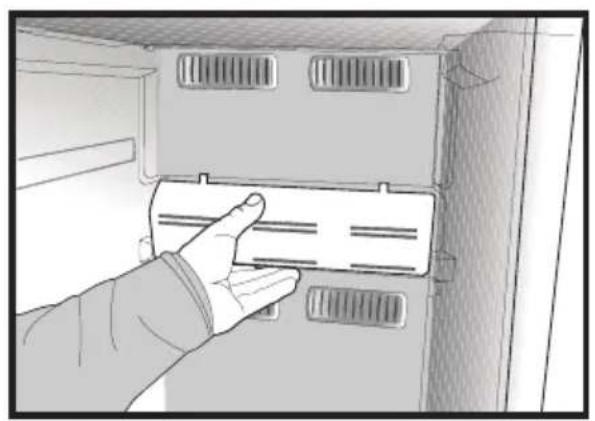
natural_image
Hand inserting a card into a cabinet or rack unit (no text or symbols visible)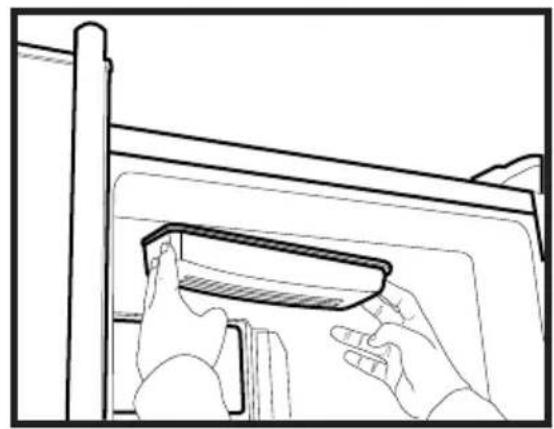
natural_image
Line drawing of hands installing or adjusting a component on a cabinet (no text or symbols)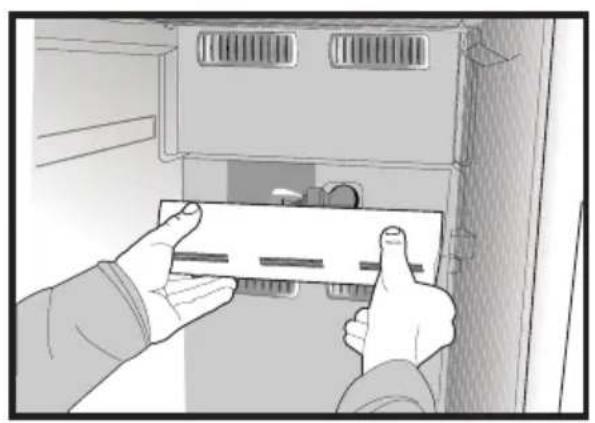
natural_image
Illustration of hands installing or adjusting a component inside a cabinet (no text or symbols visible)
natural_image
Line drawing of a hand holding a tool near a window frame (no text or symbols)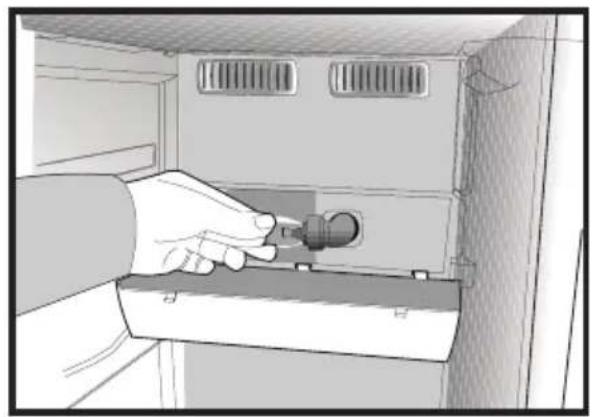
natural_image
Illustration of a hand inserting a plug into a cabinet (no text or symbols visible)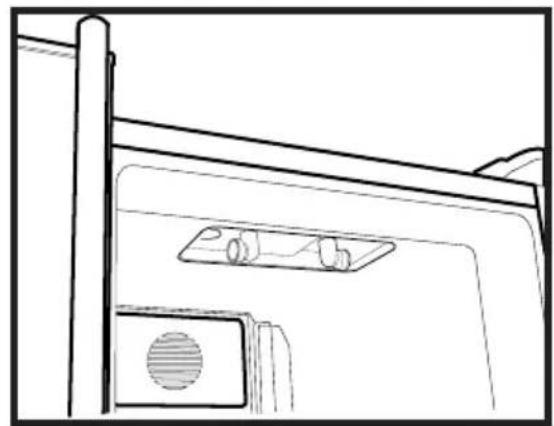
natural_image
Line drawing of a door with a mounted device and ventilation slots (no text or symbols)Icematic
natural_image
Illustration of a hand using a tool to lift a cylindrical container on a base (no text or symbols)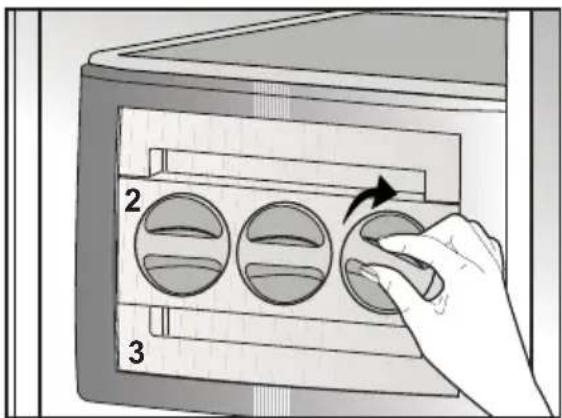
text_image
2 3natural_image
Illustration of a hand using a computer to interact with a device, showing screen and keyboard (no text or symbols)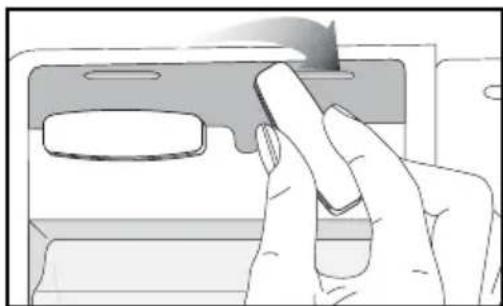
natural_image
Illustration of a hand pressing a button on a device (no text or symbols visible)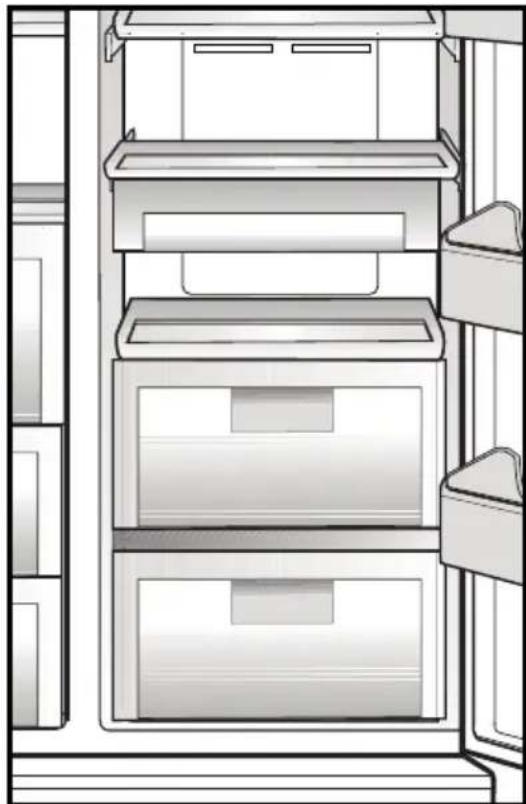
natural_image
Line drawing of a refrigerator interior showing three shelves with drawers and doors (no text or symbols)text_image
Technical diagram of a refrigerator with numbered compartments and storage areas markednatural_image
Diagram showing a device with a lightning bolt and cable, no text or symbols presentyra atsilaisvines.
natural_image
Technical diagram of a computer chassis panel with mounting holes and ventilation slots (no text or labels)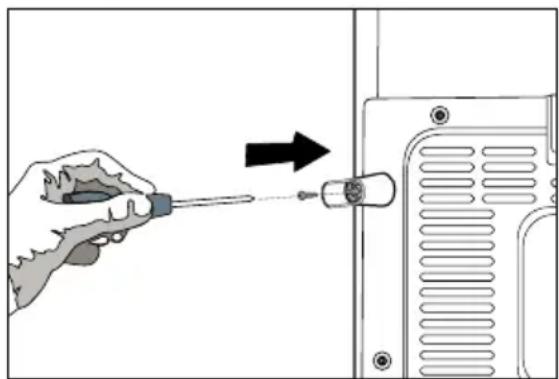
natural_image
Illustration of a hand using a screwdriver to adjust or install a component, with an arrow indicating the process (no text or symbols present)Elektros prijungimas
natural_image
Diagram of a mechanical or electrical setup with directional arrows indicating motion, no text or symbols present.natural_image
Diagram showing a mechanical device connected to a motor, with an inset close-up of the motor assembly (no text or symbols present)natural_image
Simple line drawing of a two-panel cabinet or enclosure with vertical and horizontal arrows indicating measurement or alignment (no text or symbols)natural_image
Technical line drawing of a mechanical component with an upward arrow indicating motion (no text or symbols)i Tinkamai pareguliuokite dureles, atsukdami varžtus.
natural_image
Technical line drawing of a mechanical component with mounting holes and internal channels (no text or symbols)natural_image
Technical line drawing of a mechanical component with mounting holes and internal structure (no text or symbols)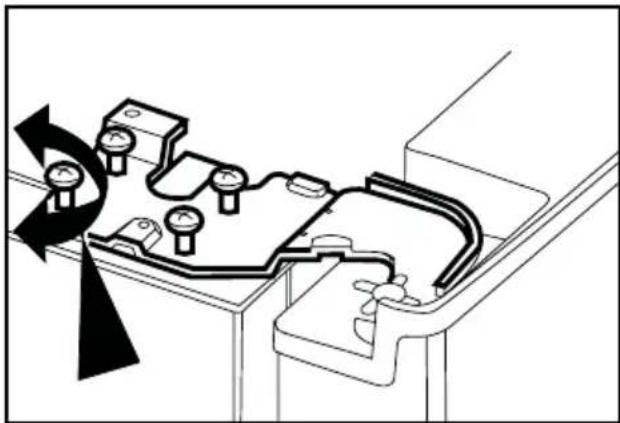
natural_image
Technical diagram of a mechanical assembly with pressure gauge and housing (no text or labels)natural_image
Technical line drawing of a mechanical bracket or bracket component (no text or symbols)4 Paruošimas
natural_image
Line drawing of a mechanical device with open lid and internal compartments (no text or symbols)natural_image
Line drawing of a printer's door with two arrows indicating left and right motion (no text or symbols)Funkcija „lon“:
natural_image
Illustration of two hands installing or adjusting a wall-mounted panel inside a cabinet (no text or symbols visible)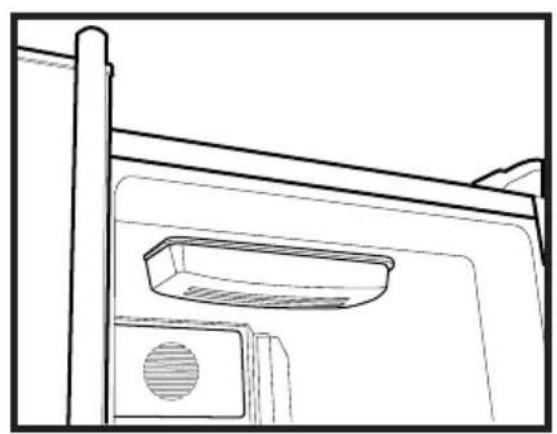
natural_image
Line drawing of a door frame with a vent and lid (no text or symbols)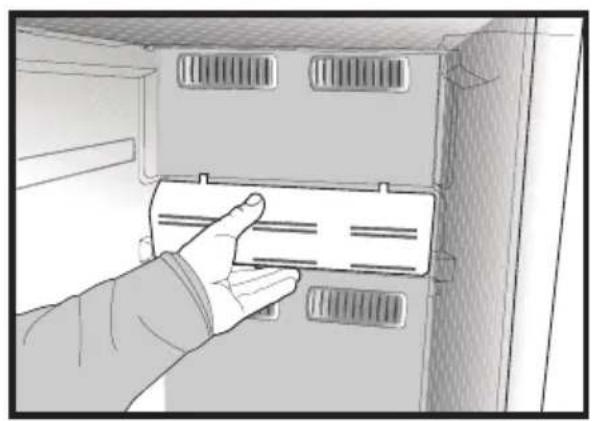
natural_image
Hand inserting a card into a cabinet or rack unit (no text or symbols visible)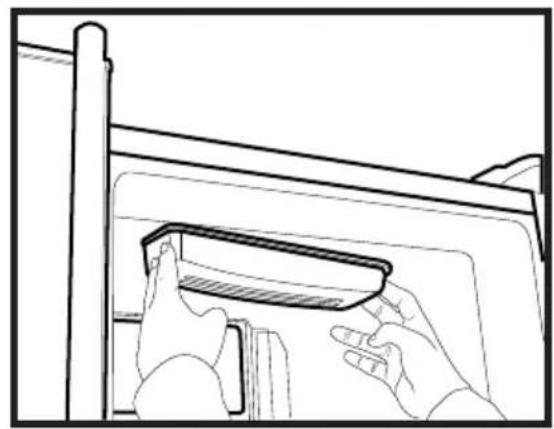
natural_image
Line drawing of hands installing or adjusting a component on a cabinet (no text or symbols)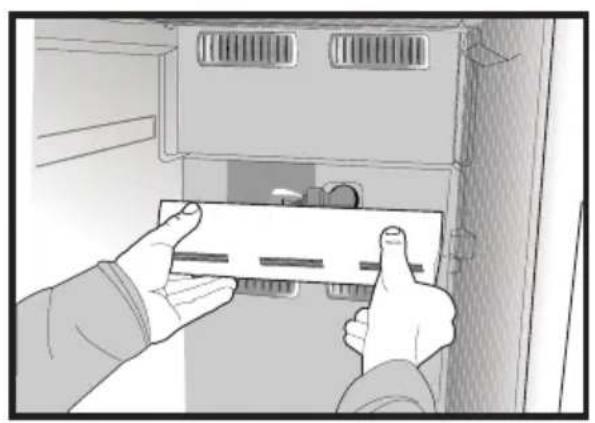
natural_image
Illustration of hands installing or adjusting a component inside a cabinet (no text or symbols visible)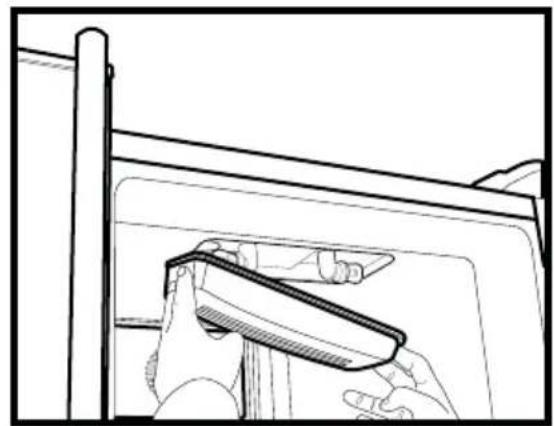
natural_image
Line drawing of a hand holding a tool near a window frame (no text or symbols)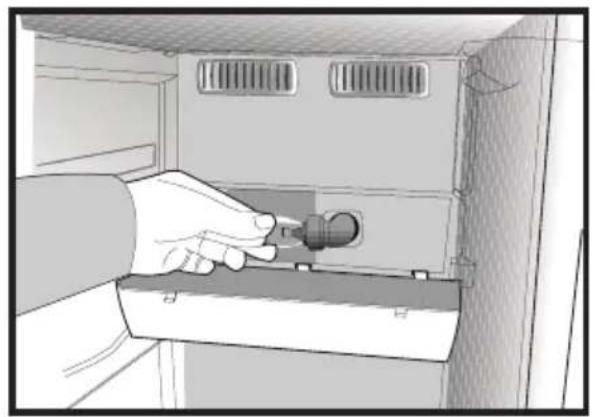
natural_image
Illustration of a hand inserting a plug into a cabinet (no text or symbols visible)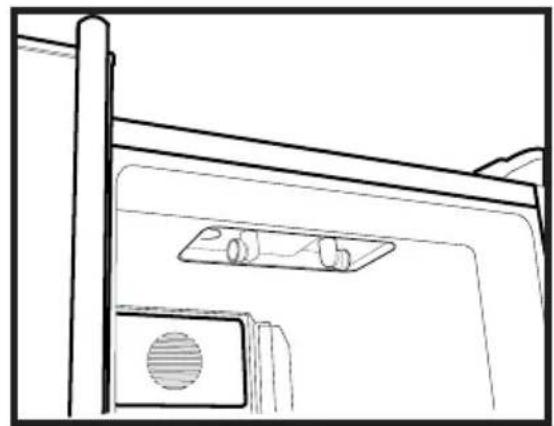
natural_image
Line drawing of a door with a mounted device and ventilation slots (no text or symbols)Ledo gaminimo jtaisas "Icematic"
natural_image
Illustration of a hand using a tool to lift a cylindrical container on a base (no text or symbols)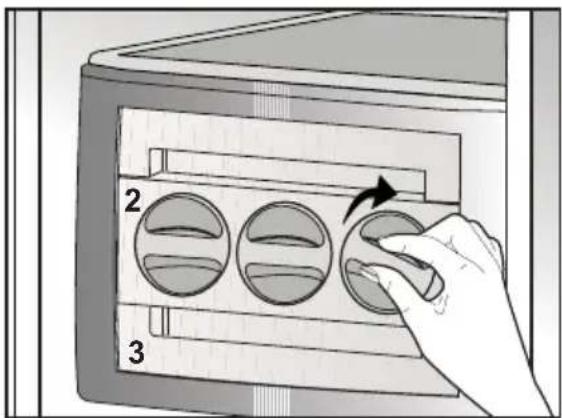
text_image
2 3natural_image
Two-panel illustration showing hands interacting with a device: top panel shows a hand holding a device, bottom panel shows a hand inserting a card into a device (no text or symbols present)Aušinimo skyrius
natural_image
Line drawing of a refrigerator interior showing three drawers and shelves (no text or symbols)text_image
Technical diagram of a refrigerator with numbered compartments and storage areas markednatural_image
Diagram showing a device with a lightning bolt and cable, no text or symbols presentnatural_image
Technical diagram of a computer chassis back panel with mounting holes and ventilation slots (no text or labels)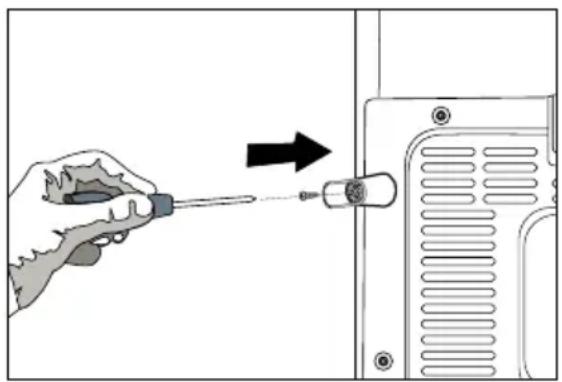
natural_image
Illustration of a hand using a screwdriver to adjust or install a device component (no text or symbols visible)natural_image
Diagram of a mechanical or electrical component with directional arrows indicating motion, no text or symbols present(A)
natural_image
Diagram showing a mechanical assembly with an inset close-up of a component, labeled (D), no text or symbols present.natural_image
Simple line drawing of a two-panel cabinet or enclosure with vertical and horizontal arrows indicating measurement or alignment (no text or symbols)natural_image
Technical diagram of a mechanical component with an upward arrow indicating motion or force (no text or symbols present)natural_image
Technical line drawing of a mechanical component with mounting holes and a curved internal structure (no text or symbols)natural_image
Technical line drawing of a mechanical assembly with mounting holes and internal components (no text or symbols)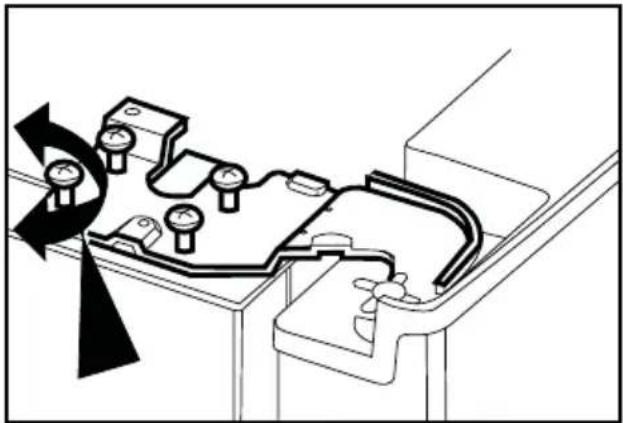
natural_image
Technical diagram of a mechanical assembly with pressure gauges and directional arrows indicating motion (no text or labels)natural_image
Technical line drawing of a mechanical bracket or clamp assembly (no text or symbols)4 Подготовка
natural_image
Line drawing of a mechanical device with a transparent lid and internal compartments (no text or symbols)natural_image
Diagram of a printer's door with two arrows indicating insertion or disassembly (no text or symbols present)Ионизация:
natural_image
Illustration of two hands installing or adjusting a wall-mounted panel inside a cabinet (no text or symbols visible)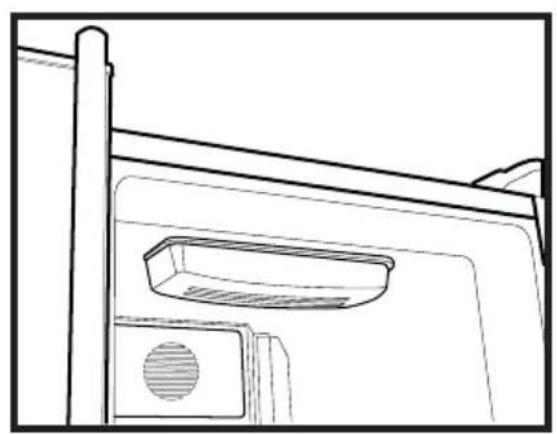
natural_image
Line drawing of a door frame with a vent and handle (no text or symbols)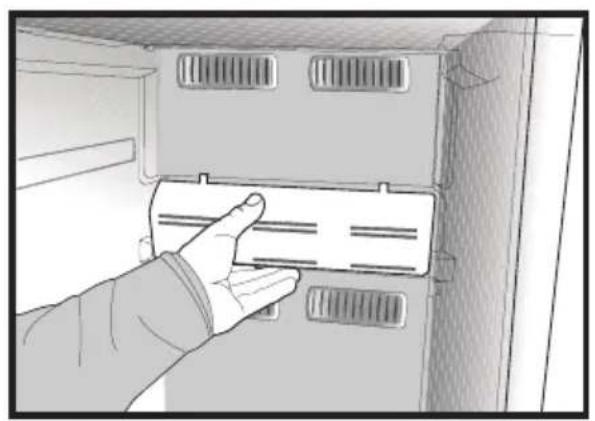
natural_image
Hand inserting a card into a cabinet or rack unit (no text or symbols visible)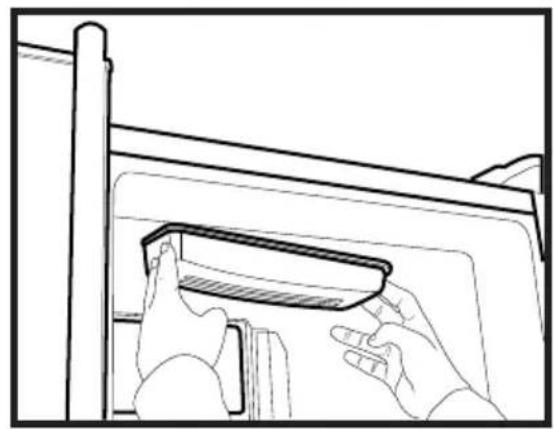
natural_image
Line drawing of hands installing or adjusting a component on a cabinet (no text or symbols)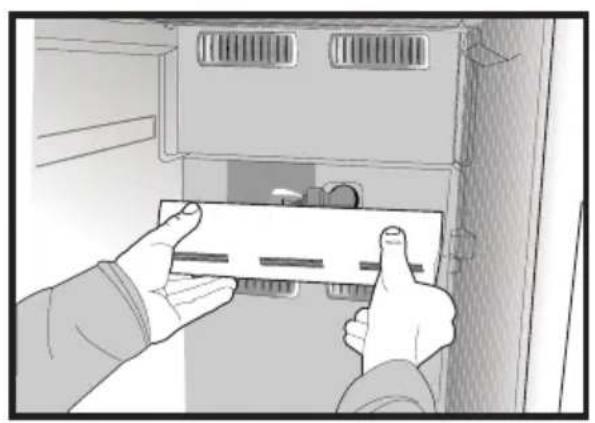
natural_image
Illustration of hands installing or adjusting a component inside a cabinet (no text or symbols visible)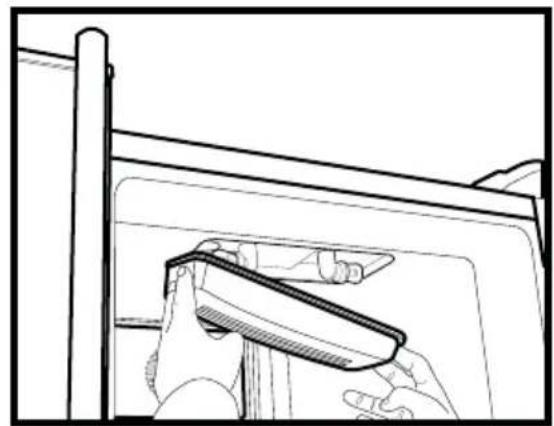
natural_image
Line drawing of a hand holding a tool near a window frame (no text or symbols)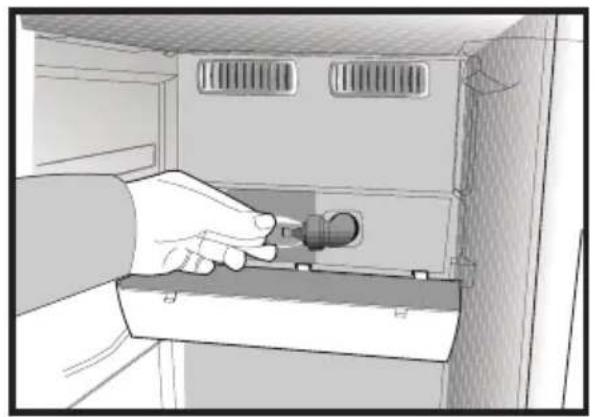
natural_image
Illustration of a hand inserting a plug into a cabinet (no text or symbols visible)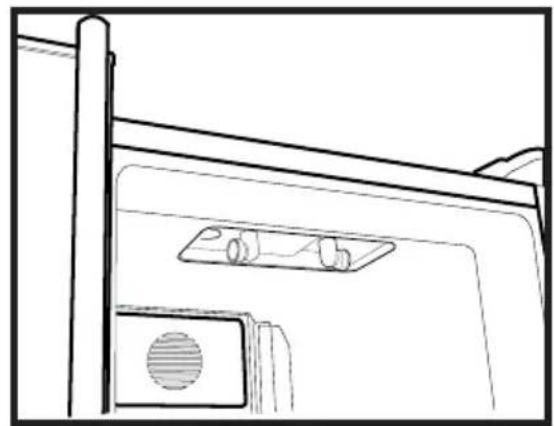
natural_image
Line drawing of a door with a mounted device and ventilation slots (no text or symbols)Icematic (ледогенератор)
natural_image
Illustration of a hand using a tool to lift a cylindrical container on a base (no text or symbols)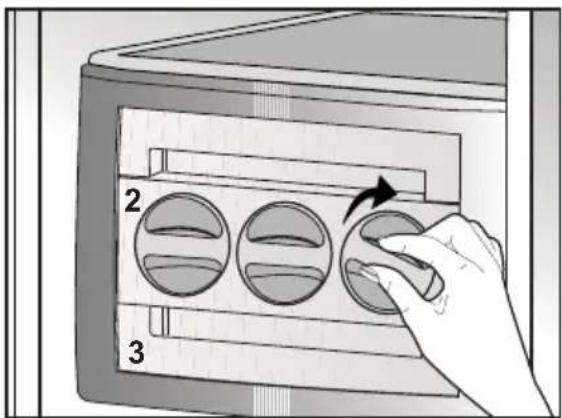
text_image
2 3natural_image
Illustration of a hand using a computer to interact with a device (no text or symbols visible)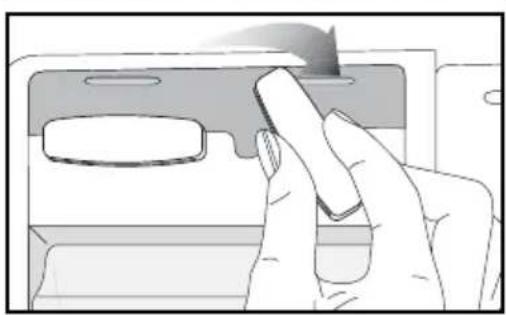
natural_image
Illustration of a hand pressing down on a device component (no text or symbols visible)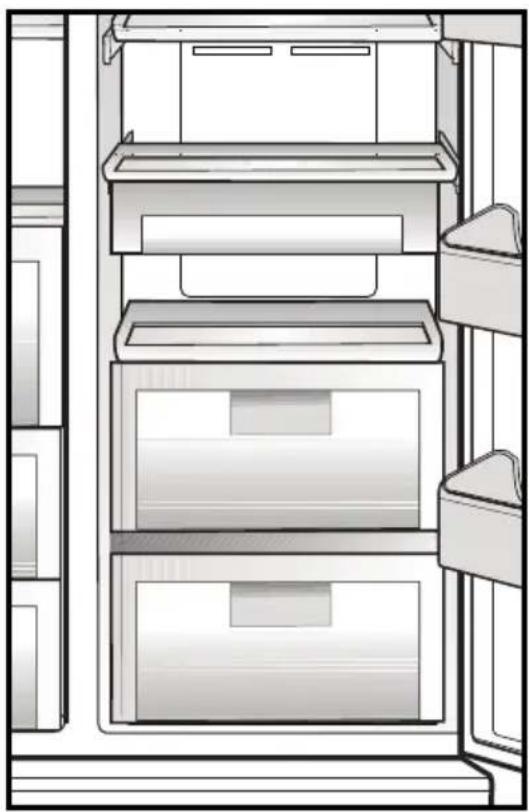
natural_image
Line drawing of a refrigerator interior showing three shelves with drawers and doors (no text or symbols)6 Чистка и уход
text_image
Technical diagram of a refrigerator with numbered compartments and storage areas markednatural_image
Diagram showing a device with a lightning bolt and cable, no text or symbols presentnatural_image
Diagram of a computer monitor rear panel showing internal compartments and mounting points (no text or labels)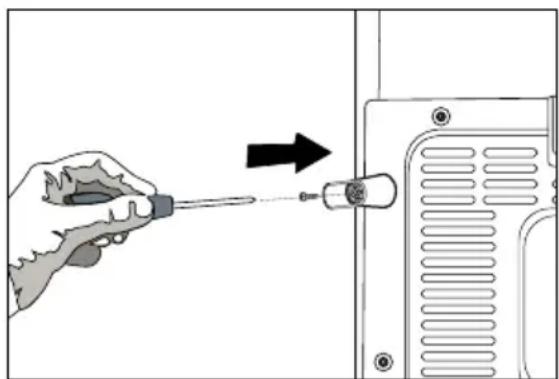
natural_image
Illustration of a hand using a screwdriver to adjust a component on a device (no text or symbols visible)natural_image
Diagram of a mechanical or electrical setup with directional arrows indicating motion, no text or symbols present(A)
natural_image
Technical diagram showing a mechanical assembly with an inset close-up of a gear mechanism (no text or symbols present)natural_image
Simple line drawing of a two-panel cabinet or enclosure with vertical and horizontal arrows indicating measurement or alignment (no text or symbols)natural_image
Technical diagram of a mechanical component with an upward arrow indicating motion or force (no text or symbols present)natural_image
Technical line drawing of a mechanical housing or enclosure component (no text or symbols)natural_image
Technical line drawing of a mechanical component with multiple ports and mounting brackets (no text or symbols)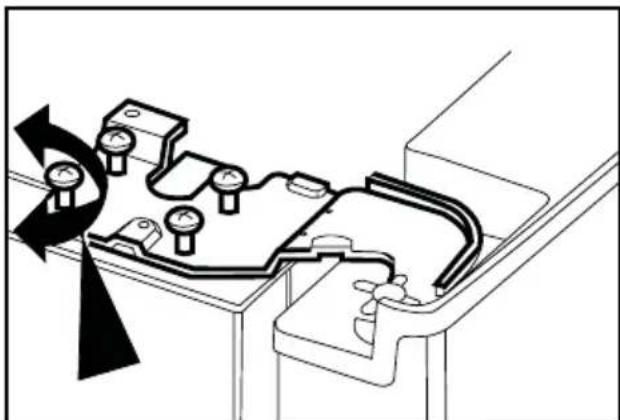
natural_image
Technical diagram of a mechanical assembly with rotating components and directional arrows (no text or labels)natural_image
Technical line drawing of a mechanical bracket or clamp component (no text or symbols)4 Підготовка
natural_image
Line drawing of a mechanical device with a transparent screen and side panels (no text or symbols)natural_image
Diagram of a printer's door with two arrows indicating insertion or disassembly (no text or symbols present)LOH:
natural_image
Illustration of two hands installing or adjusting a wall-mounted panel inside a cabinet (no text or symbols visible)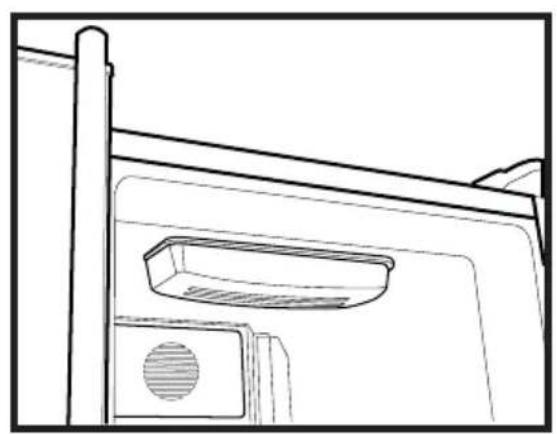
natural_image
Line drawing of a door frame with a vent and handle (no text or symbols)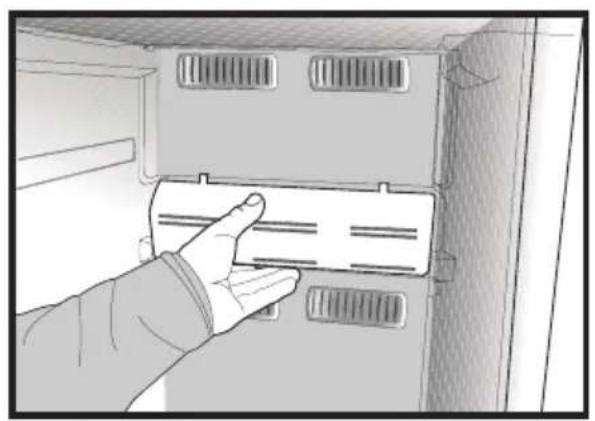
natural_image
Hand inserting a card into a cabinet or rack unit (no text or symbols visible)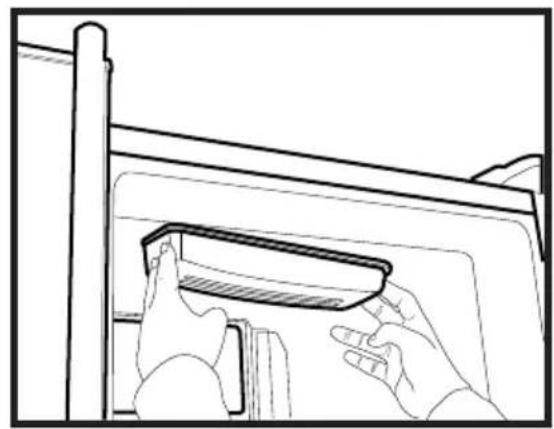
natural_image
Line drawing of hands installing or adjusting a component on a cabinet (no text or symbols)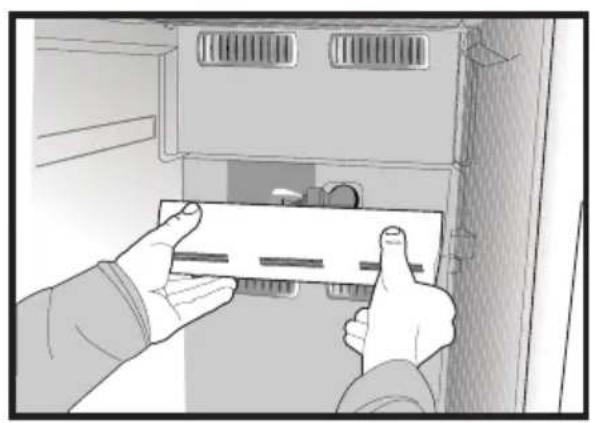
natural_image
Illustration of hands installing or adjusting a component inside a cabinet (no text or symbols visible)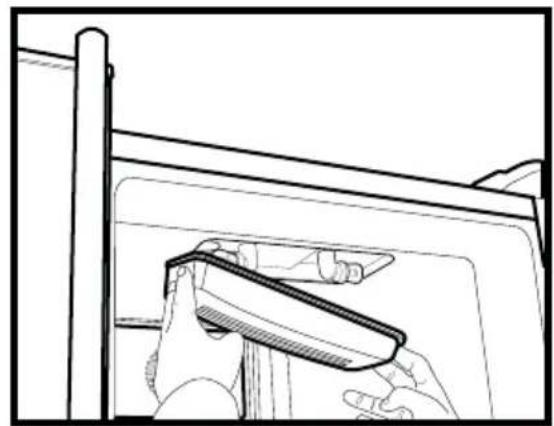
natural_image
Line drawing of a hand holding a tool near a window frame (no text or symbols)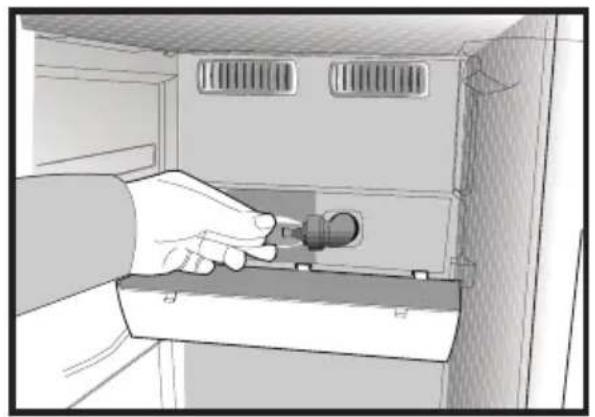
natural_image
Illustration of a hand inserting a plug into a cabinet (no text or symbols visible)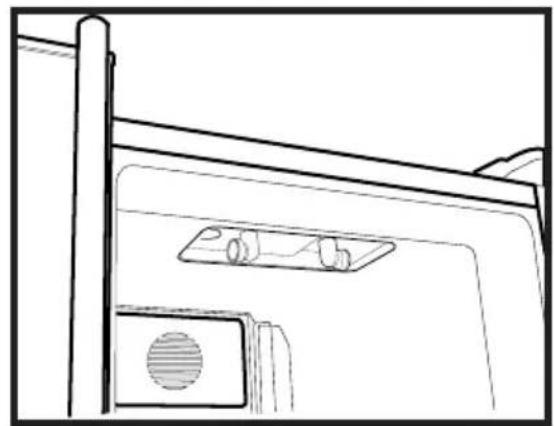
natural_image
Line drawing of a door with a mounted device and ventilation slots (no text or symbols)Льодогенератор
natural_image
Illustration of a hand using a tool to lift a cylindrical container on a base (no text or symbols)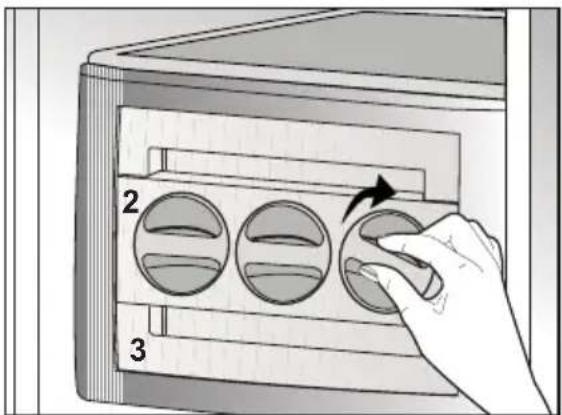
text_image
2 3natural_image
Two-panel illustration showing hands using a device to interact with a screen (top) and a smartphone (bottom), both without any visible text or symbols.Охолоджувач
natural_image
Line drawing of a refrigerator interior showing three shelves with drawers and doors (no text or symbols)6 Чищення та догляд
text_image
Technical diagram of a refrigerator with numbered compartments and storage areas markednatural_image
Diagram showing a device with a lightning bolt and cable, no text or symbols presentnatural_image
Technical diagram of a computer monitor rear panel with mounting holes and ventilation slots (no text or labels)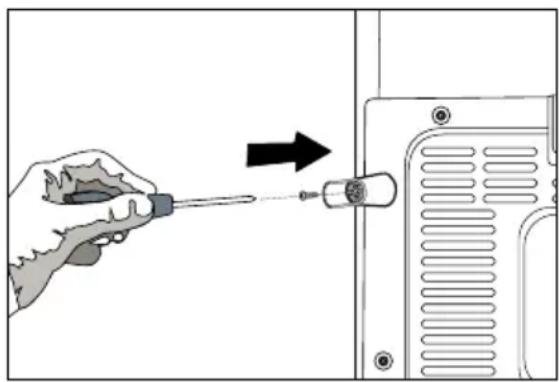
natural_image
Illustration of a hand using a screwdriver to adjust or install a device component (no text or symbols visible)natural_image
Diagram of a mechanical or electrical setup with directional arrows indicating motion, no text or symbols present(A)
natural_image
Diagram showing a mechanical assembly with an inset close-up of a gear mechanism, labeled (D), no text or symbols present.natural_image
Simple line drawing of a two-panel cabinet or enclosure with vertical and horizontal arrows indicating measurement or alignment (no text or symbols)natural_image
Technical line drawing of a mechanical component with an upward arrow indicating motion (no text or symbols)natural_image
Technical line drawing of a mechanical component with mounting holes and a curved internal structure (no text or symbols)natural_image
Technical line drawing of a mechanical assembly with no visible text or symbols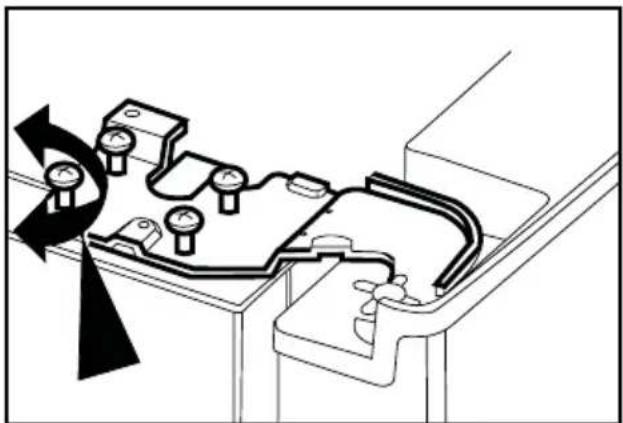
natural_image
Technical diagram of a mechanical assembly with rotating components and a curved component (no text or symbols)natural_image
Technical line drawing of a mechanical bracket or clamp component (no text or symbols)4 Voorbereiding
natural_image
Line drawing of a mechanical device with a transparent lid and internal compartments (no text or symbols)Vochtregeling van groenteladen
natural_image
Line drawing of a printer's door with two arrows indicating left and right motion (no text or symbols)lon:
natural_image
Illustration of two hands installing or adjusting a wall-mounted panel inside a cabinet (no text or symbols visible)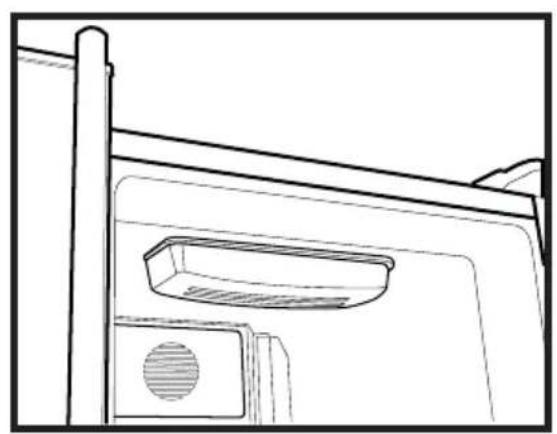
natural_image
Line drawing of a door frame with a vent and handle (no text or symbols)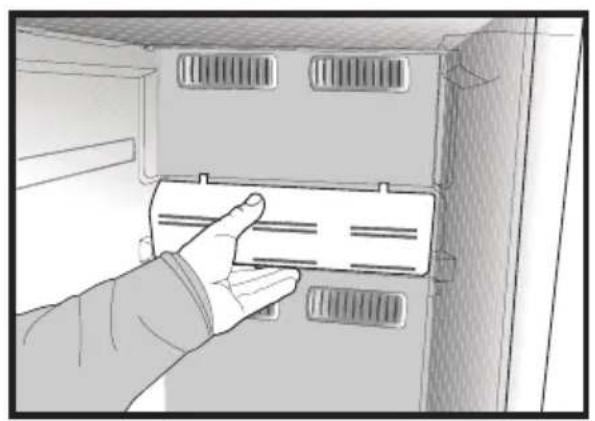
natural_image
Hand inserting a card into a cabinet or rack unit (no text or symbols visible)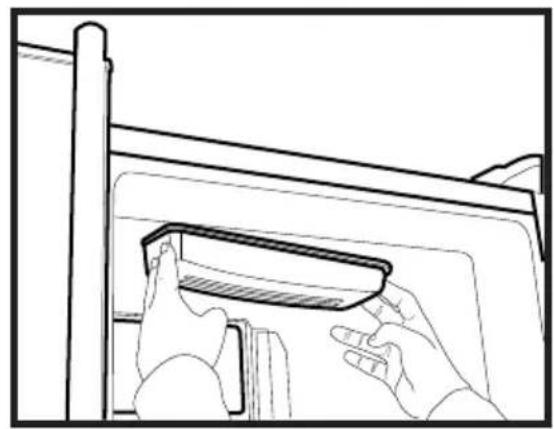
natural_image
Line drawing of hands installing or adjusting a component on a cabinet (no text or symbols)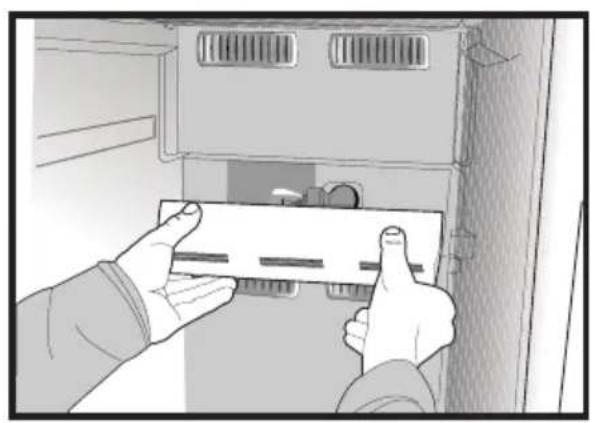
natural_image
Illustration of hands installing or adjusting a component inside a cabinet (no text or symbols visible)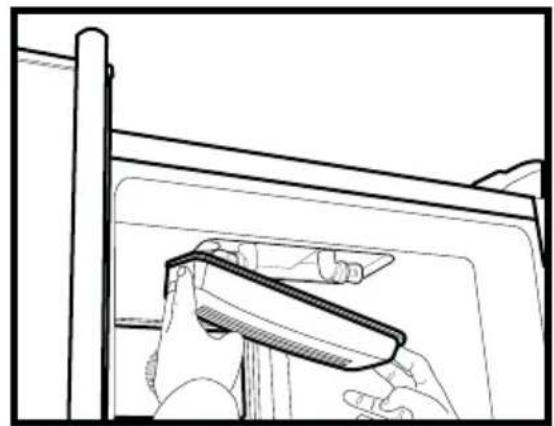
natural_image
Line drawing of a hand holding a tool near a window frame (no text or symbols)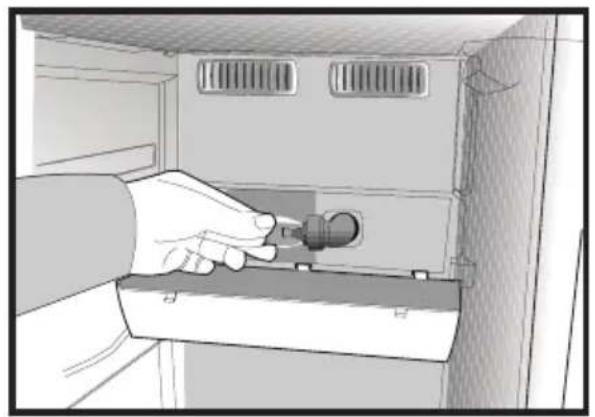
natural_image
Illustration of a hand inserting a plug into a cabinet (no text or symbols visible)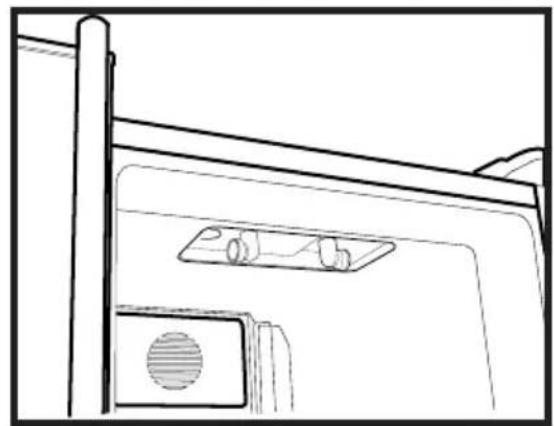
natural_image
Line drawing of a door with a mounted device and ventilation slots (no text or symbols)Icematic
natural_image
Illustration of a hand using a tool to lift a cylindrical container on a base (no text or symbols)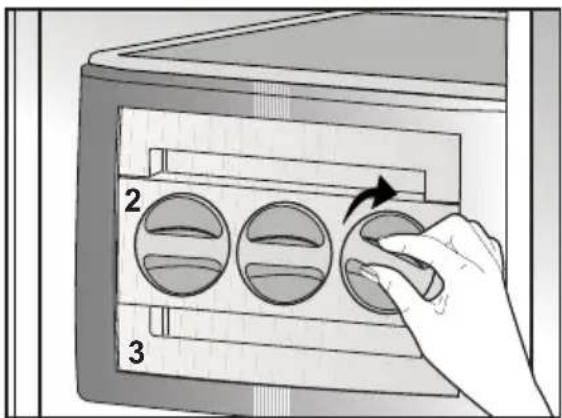
text_image
2 3natural_image
Two-panel illustration showing hands interacting with a device: top panel shows a hand pressing down on a screen, bottom panel shows hands holding a card (no text or symbols)Chillervak
natural_image
Line drawing of a refrigerator interior showing three drawers and shelves (no text or symbols)text_image
Technical diagram of a refrigerator with numbered compartments and storage areas markednatural_image
Diagram showing a lightning bolt striking down on a wall-mounted device with a plug, no text or symbols presentnatural_image
Technical diagram of a computer monitor rear panel showing internal compartments and mounting points (no text or labels)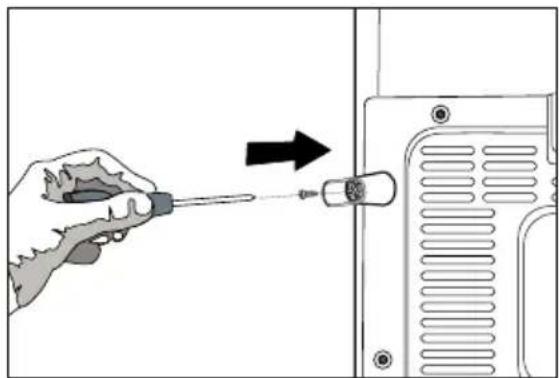
natural_image
Illustration of a hand using a screwdriver to adjust or install a component, with an arrow indicating the process (no text or symbols present)natural_image
Diagram of a mechanical or electrical component with directional arrows indicating motion, no text or symbols present(A)
natural_image
Diagram showing a mechanical assembly with an inset close-up of a mechanical component, labeled (D), no text or symbols present.natural_image
Technical line drawing of a mechanical component with mounting holes and housing (no text or symbols)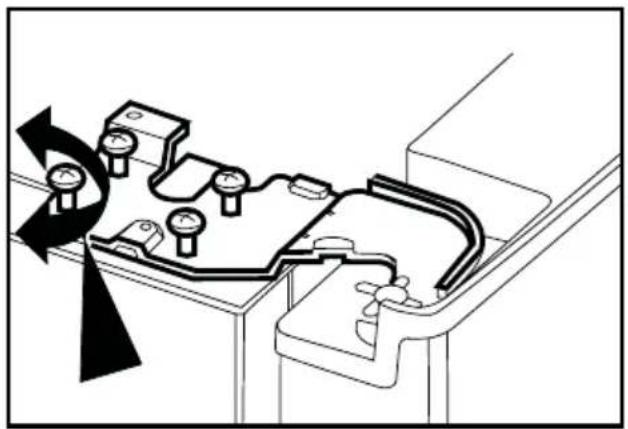
natural_image
Technical diagram of a mechanical assembly with pressure gauges and a rotating component (no text or labels)natural_image
Technical line drawing of a mechanical bracket or clamp component (no text or symbols)natural_image
Simple line drawing of a two-panel cabinet with vertical and horizontal arrows indicating measurement or alignment (no text or symbols)natural_image
Technical line drawing of a mechanical component with an upward arrow indicating motion (no text or symbols)natural_image
Technical line drawing of a mechanical component with mounting holes and internal channels (no text or symbols)natural_image
Diagram of a hand pressing down on a printer's side panel with two arrows indicating movement (no text or symbols present)الأيون:
natural_image
Line drawing of a mechanical device with a lid and frame (no text or symbols)natural_image
Illustration of two hands installing or adjusting a panel inside a cabinet (no text or symbols visible)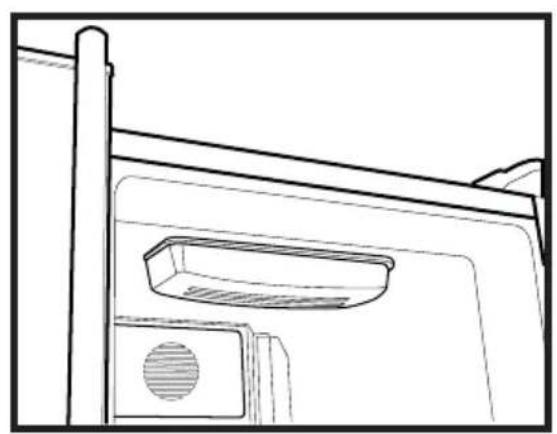
natural_image
Line drawing of a door frame with a vent and lid (no text or symbols)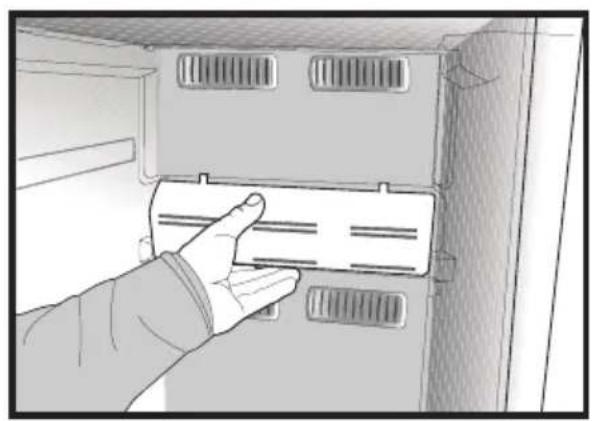
natural_image
Hand inserting a card into a cabinet or rack unit (no text or symbols visible)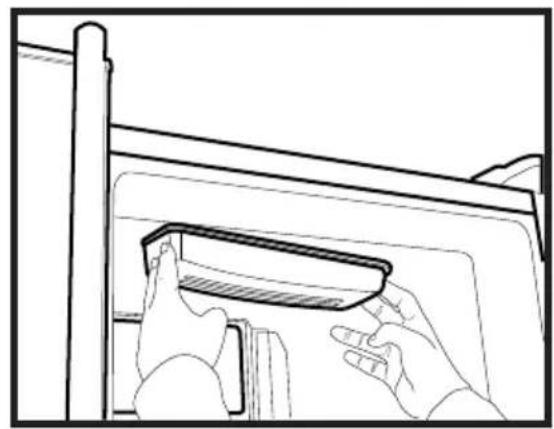
natural_image
Line drawing of hands installing or adjusting a component on a cabinet (no text or symbols)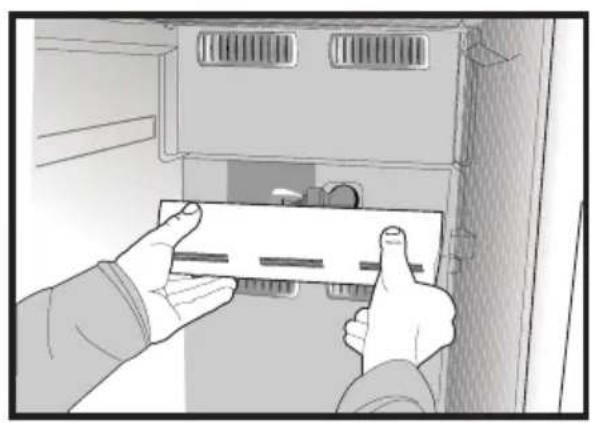
natural_image
Illustration of hands installing or adjusting a component inside a cabinet (no text or symbols visible)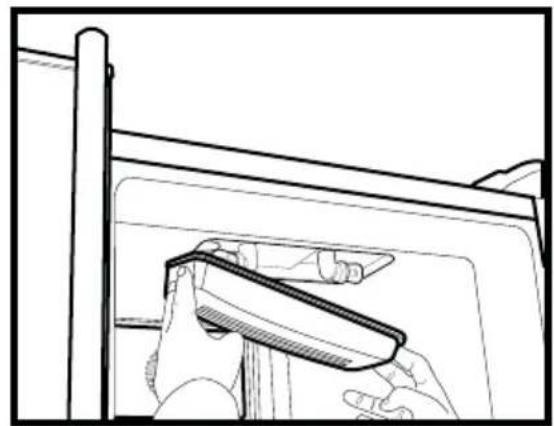
natural_image
Line drawing of a hand holding a tool near a window frame (no text or symbols)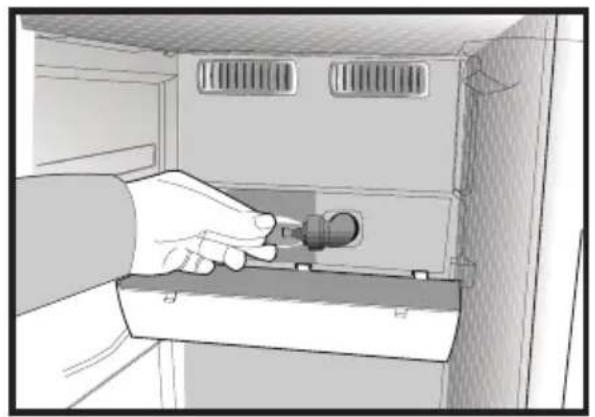
natural_image
Illustration of a hand inserting a plug into a cabinet (no text or symbols visible)
natural_image
Line drawing of a door with a mounted device and ventilation slots (no text or symbols)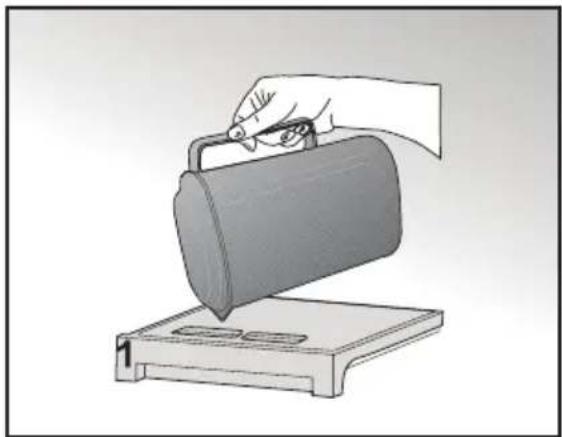
natural_image
Illustration of a hand using a tool to lift a cylindrical container on a base (no text or symbols)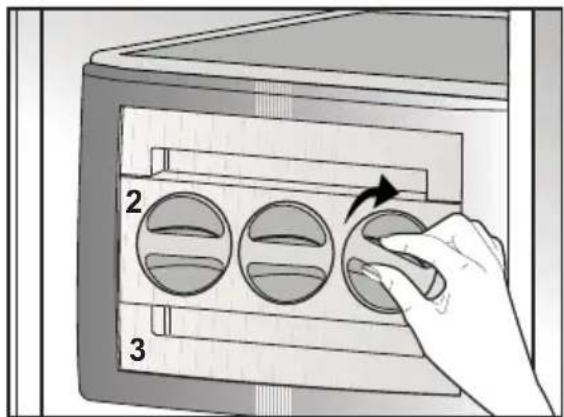
text_image
2 3جلثلا قودنص
natural_image
Line drawing of a refrigerator interior showing three shelves with drawers and doors (no text or symbols)natural_image
Illustration of a hand using a computer to interact with a device, showing screen and screen layout (no text or symbols)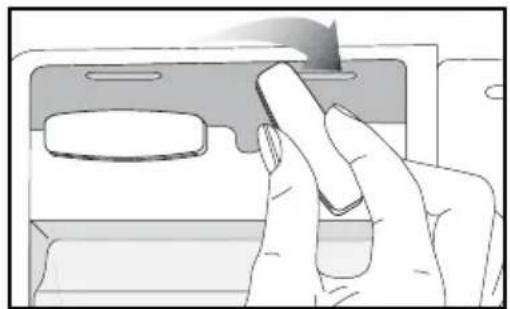
natural_image
Illustration of a hand pressing down on a device panel (no text or symbols visible)text_image
Technical diagram of a refrigerator with numbered compartments and storage areas markednatural_image
Diagram showing a device with a lightning bolt and cable, no text or symbols presentnatural_image
Technical diagram of a computer monitor rear panel showing internal components and mounting points (no text or labels)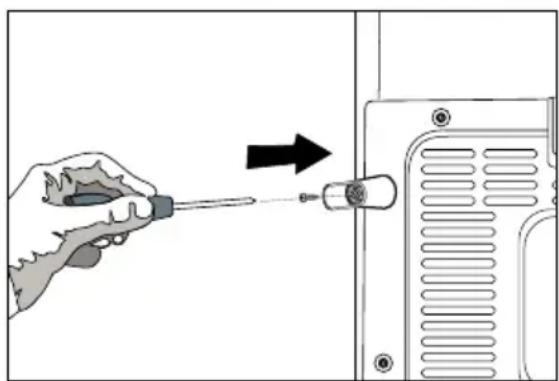
natural_image
Hand using a screwdriver to adjust or install a component on a device (no text or symbols visible)natural_image
Diagram of a mechanical or electrical setup with directional arrows indicating motion, no text or symbols present.natural_image
Diagram showing a mechanical assembly with an inset close-up of a gear mechanism, labeled (D), no text or symbols present.natural_image
Simple line drawing of a two-panel cabinet or enclosure with vertical and horizontal arrows indicating measurement or alignment (no text or symbols)natural_image
Technical diagram of a mechanical component with an upward arrow indicating motion or force (no text or symbols present)natural_image
Technical line drawing of a mechanical component with mounting holes and internal channels (no text or symbols)natural_image
Technical line drawing of a mechanical component with mounting holes and internal channels (no text or symbols)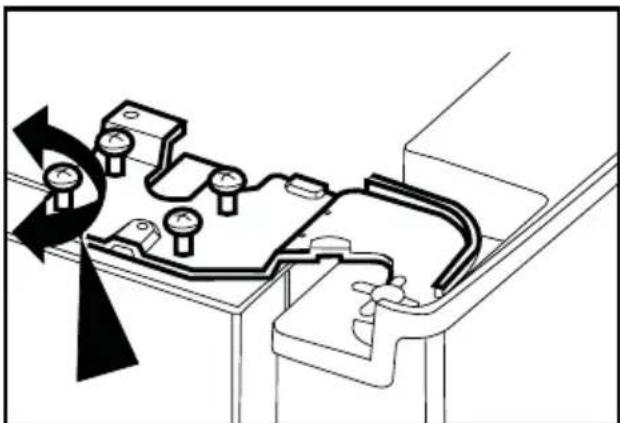
natural_image
Technical diagram of a mechanical assembly with rotating components and directional arrows (no text or labels)natural_image
Technical line drawing of a mechanical bracket or clamp component (no text or symbols)4 Preparazione
natural_image
Line drawing of a mechanical device with a lid and frame (no text or symbols)natural_image
Line drawing of a printer's door with two arrows indicating left and right motion (no text or symbols)lonizzazione:
natural_image
Illustration of two hands installing or adjusting a wall-mounted panel inside a cabinet (no text or symbols visible)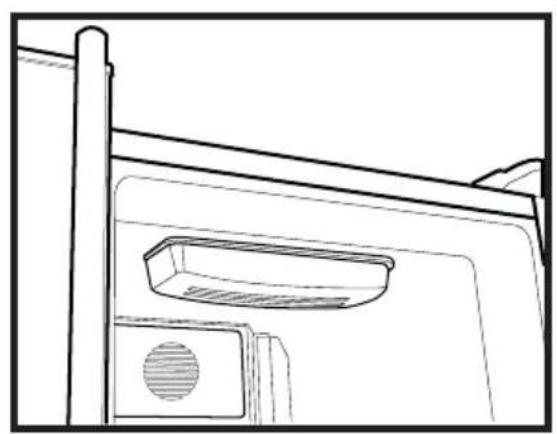
natural_image
Line drawing of a door frame with a vent and handle (no text or symbols)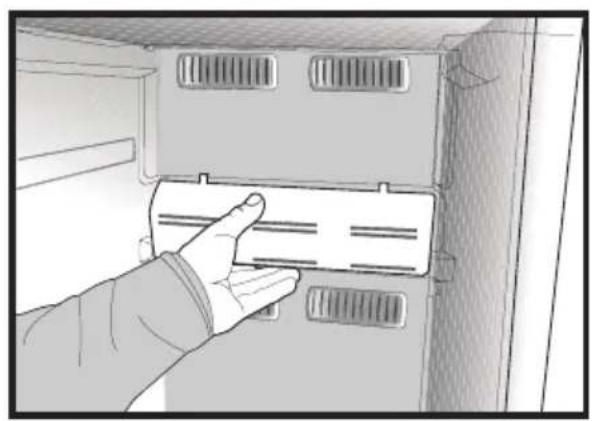
natural_image
Hand inserting a card into a cabinet or rack unit (no text or symbols visible)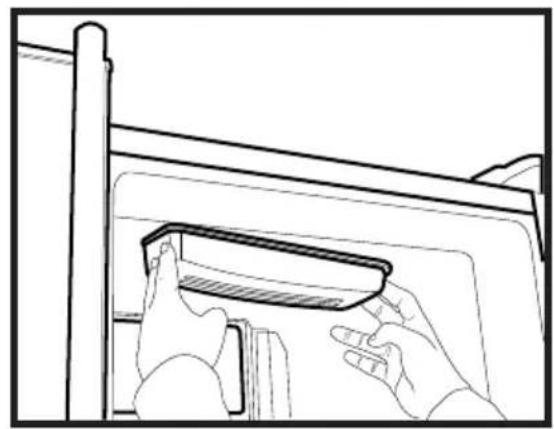
natural_image
Line drawing of hands installing or adjusting a component on a cabinet (no text or symbols)
natural_image
Illustration of hands installing or adjusting a component inside a cabinet (no text or symbols visible)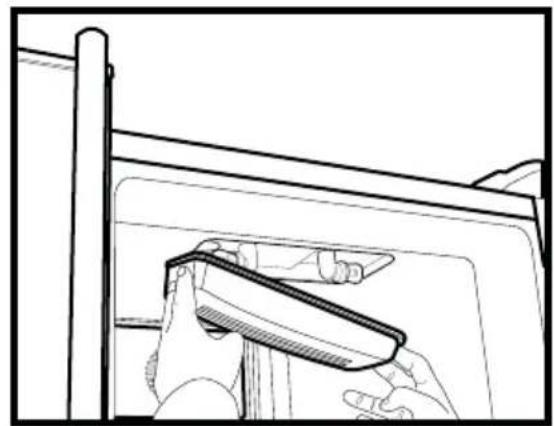
natural_image
Line drawing of a hand holding a tool near a window frame (no text or symbols)
natural_image
Illustration of a hand inserting a plug into a cabinet (no text or symbols visible)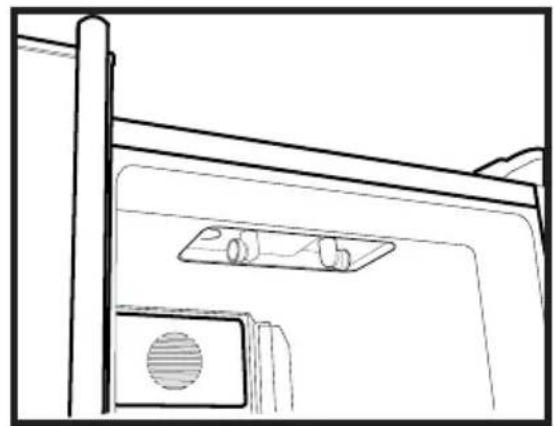
natural_image
Line drawing of a door with a mounted device and ventilation slots (no text or symbols)Icematic
natural_image
Illustration of a hand using a tool to lift a cylindrical container on a base (no text or symbols)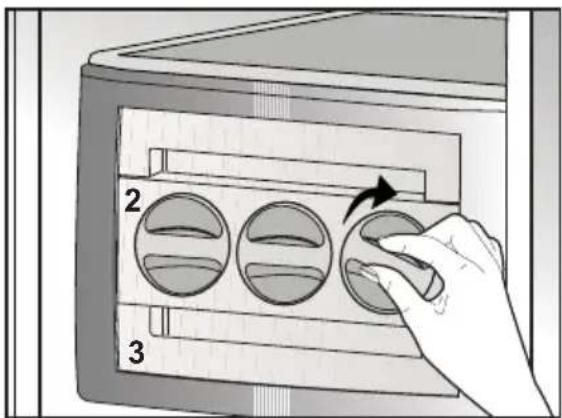
text_image
2 3Uso di Icematic
natural_image
Two-panel illustration showing hands interacting with a device: top panel shows hand pressing down on screen, bottom panel shows hand holding a card (no text or symbols)Scomparto Chiller
natural_image
Line drawing of a refrigerator interior showing three shelves with drawers and doors (no text or symbols)text_image
Technical diagram of a refrigerator with numbered compartments and storage areas markednatural_image
Diagram showing a device with a lightning bolt and cable, no text or symbols presenttomada de parede estiver solta.
natural_image
Diagram of a computer monitor rear panel showing internal compartments and mounting points (no text or labels)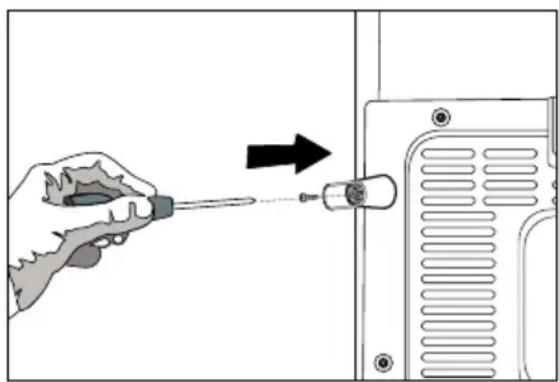
natural_image
Illustration of a hand using a screwdriver to adjust or install a component, with an arrow indicating the process (no text or symbols present)Ligação eléctrica
natural_image
Diagram of a mechanical or electrical setup with directional arrows indicating motion, no text or symbols presentnatural_image
Diagram showing a mechanical assembly with an inset close-up of a gear mechanism, labeled (D), no text or symbols present.natural_image
Simple line drawing of a two-panel cabinet or enclosure with vertical and horizontal arrows indicating measurement or alignment (no text or symbols)natural_image
Technical line drawing of a mechanical component with an upward arrow indicating motion (no text or symbols)conforme pretendido, apertando os parafusos.
natural_image
Technical line drawing of a mechanical housing or bracket component (no text or symbols)natural_image
Technical line drawing of a mechanical assembly with no visible text or symbols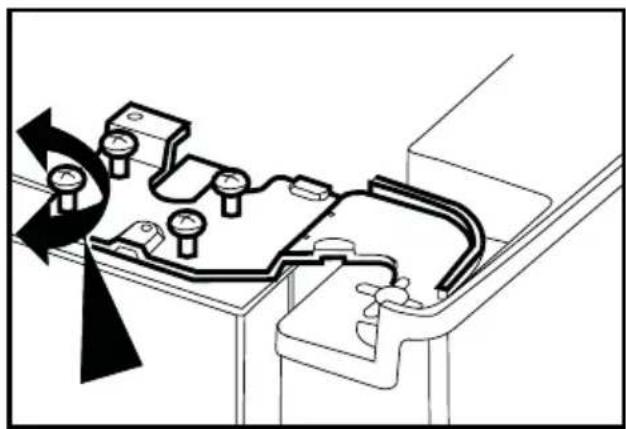
natural_image
Technical diagram of a mechanical assembly with rotating components and a curved arrow indicating rotation (no text or symbols)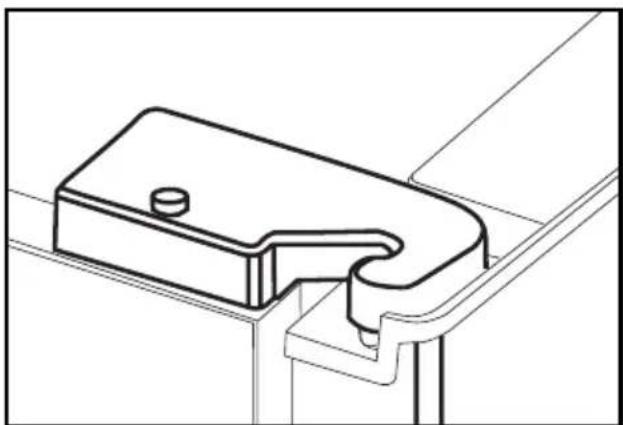
natural_image
Technical line drawing of a mechanical bracket or bracket component (no text or symbols)4 Preparação
quaisquer fontes de calor, tais como placas, fornos, aquecimento central e fogões e de 5 cm de fornos eléctricos e
luz solar.
natural_image
Line drawing of a mechanical device with a transparent screen and side panels (no text or symbols)natural_image
Diagram of a printer's door with two arrows indicating left and right motion (no text or symbols)lão:
natural_image
Illustration of two hands installing or adjusting a wall-mounted panel inside a cabinet (no text or symbols visible)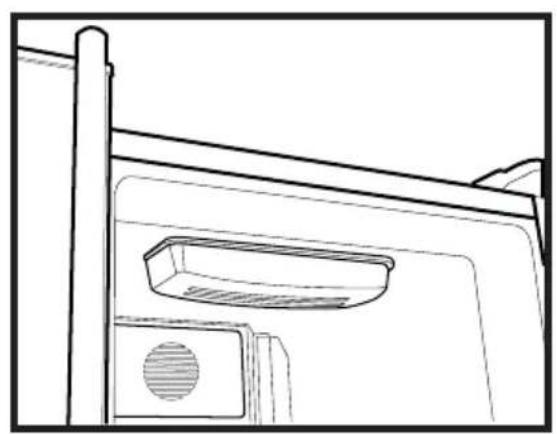
natural_image
Line drawing of a door frame with a vent and handle (no text or symbols)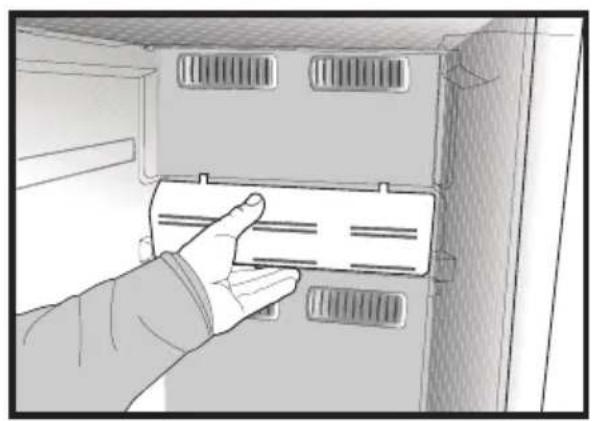
natural_image
Hand inserting a card into a cabinet or rack unit (no text or symbols visible)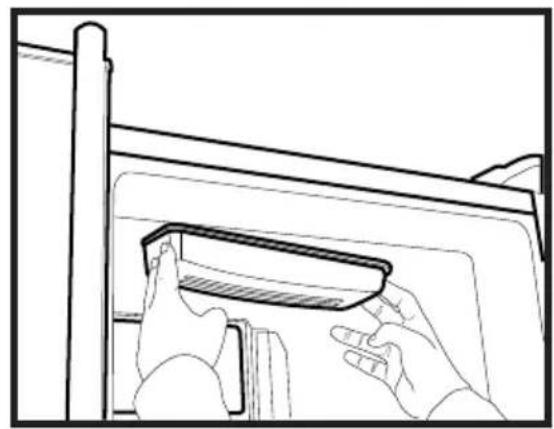
natural_image
Line drawing of hands installing or adjusting a component on a cabinet (no text or symbols)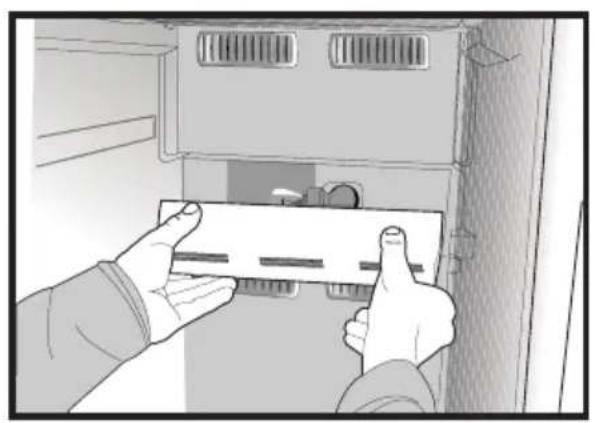
natural_image
Illustration of hands installing or adjusting a component inside a cabinet (no text or symbols visible)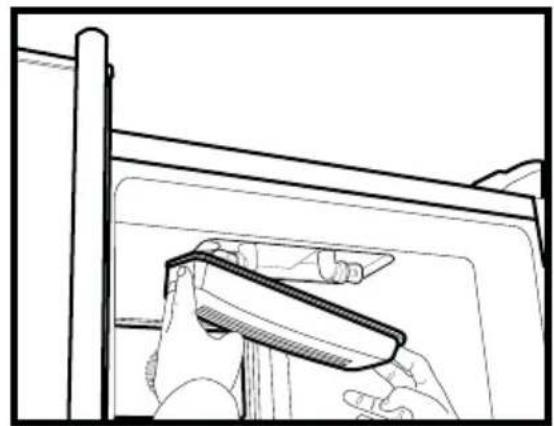
natural_image
Line drawing of a hand holding a tool near a window frame (no text or symbols)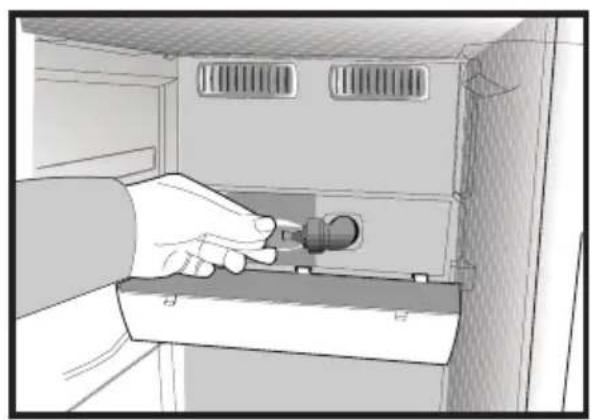
natural_image
Illustration of a hand inserting a plug into a server rack (no text or symbols visible)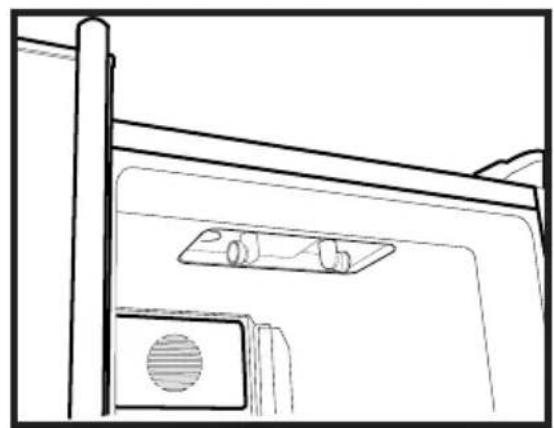
natural_image
Line drawing of a door with a mounted device and ventilation slots (no text or symbols)Icematic
natural_image
Illustration of a hand using a tool to lift a cylindrical object on a base, labeled with number 1 (no text or symbols on the object itself)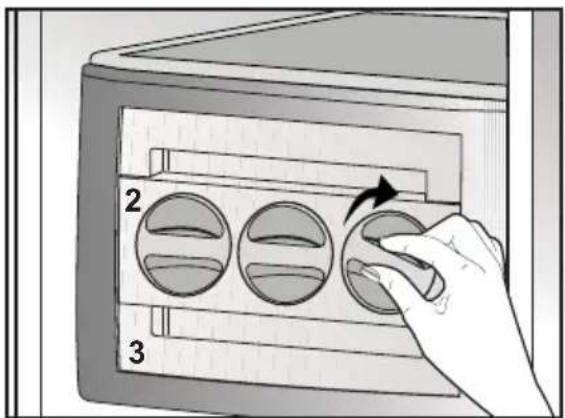
text_image
2 3natural_image
Two-panel illustration showing hands using a device to interact with a screen (top) and a smartphone (bottom), both without any visible text or symbols.natural_image
Line drawing of a refrigerator interior showing three shelves and drawers (no text or symbols)text_image
Technical diagram of a refrigerator with numbered compartments and storage areas markednatural_image
Diagram showing a device with a lightning bolt and cable, no text or symbols presentnatural_image
Technical diagram of a computer chassis showing front panel and side panels with mounting holes (no text or labels)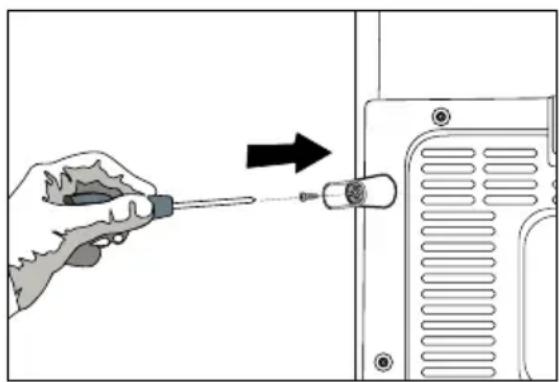
natural_image
Illustration of a hand using a screwdriver to adjust or install a component, with an arrow indicating direction (no text or symbols present)natural_image
Diagram of a mechanical or electrical setup with directional arrows indicating motion, no text or symbols present(A)
text_image
117 cm 154 cmnatural_image
Diagram showing a mechanical assembly with an inset close-up of a gear mechanism, labeled (D), no text or symbols present.natural_image
Simple line drawing of a two-panel cabinet or enclosure with vertical and horizontal arrows indicating measurement or alignment (no text or symbols)i Pomocou skrutkovača vyberte
natural_image
Technical line drawing of a mechanical assembly with no visible text or symbols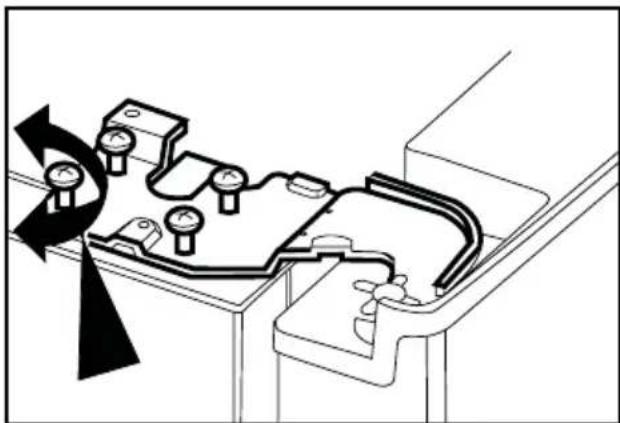
natural_image
Technical diagram of a mechanical assembly with rotating components and a curved arrow indicating motion (no text or symbols)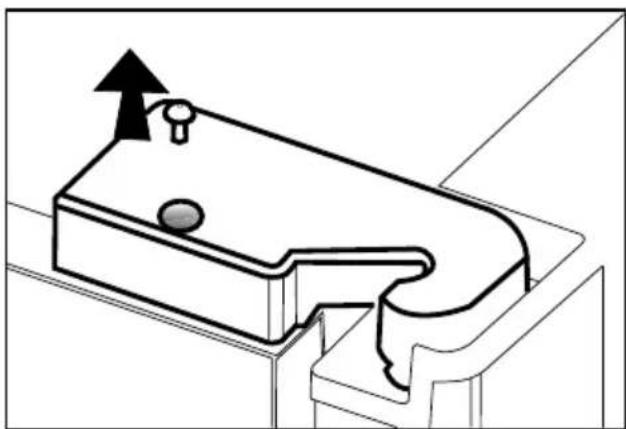
natural_image
Technical line drawing of a mechanical component with an upward arrow indicating motion (no text or symbols)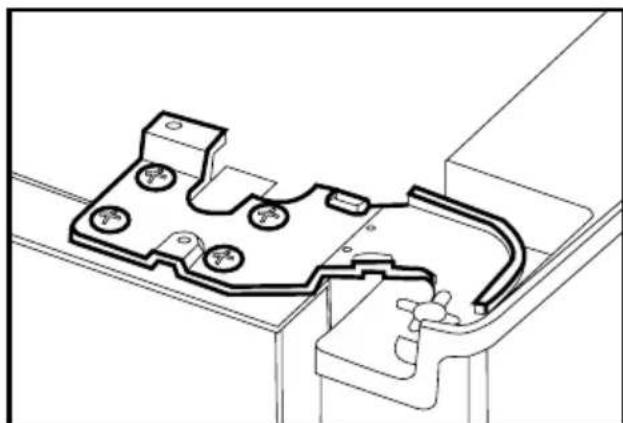
natural_image
Technical line drawing of a mechanical housing or enclosure component (no text or symbols)dotiahnite ho skrutkou.
natural_image
Technical line drawing of a mechanical bracket or clamp component (no text or symbols)4 Príprava
natural_image
Line drawing of a mechanical device with a transparent screen and handle (no text or symbols)natural_image
Diagram of a printer's internal structure with two arrows indicating movement or insertion (no text or symbols present)lon:
natural_image
Illustration of two hands installing or adjusting a panel inside a cabinet (no text or symbols visible)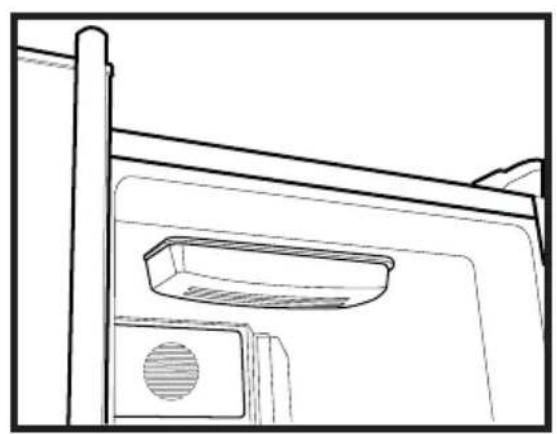
natural_image
Line drawing of a door frame with a vent and handle (no text or symbols)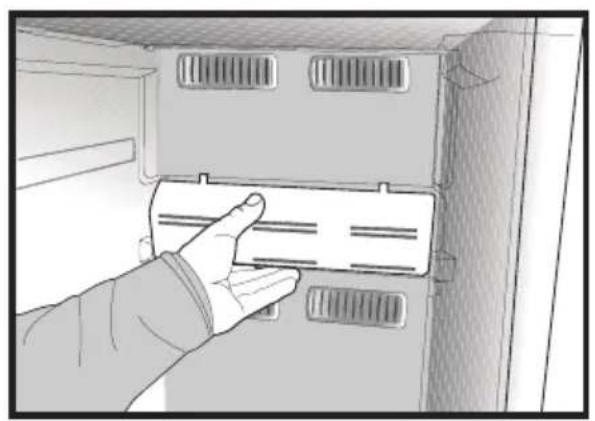
natural_image
Hand inserting a card into a cabinet or rack unit (no text or symbols visible)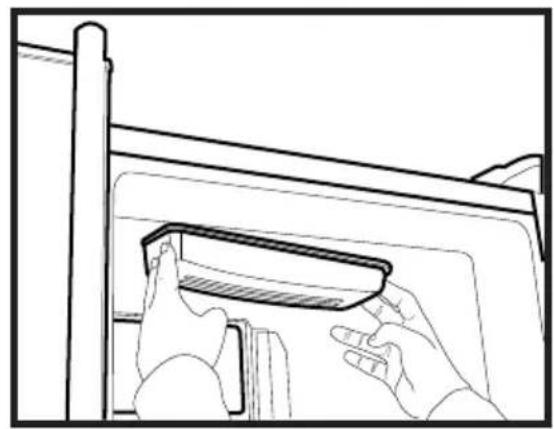
natural_image
Line drawing of hands installing or adjusting a component on a cabinet (no text or symbols)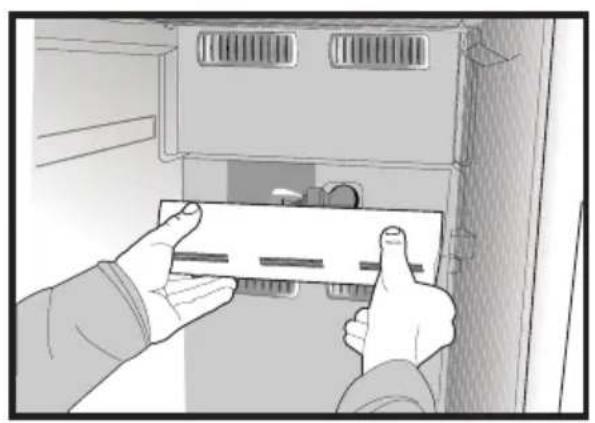
natural_image
Illustration of hands installing or adjusting a component inside a cabinet (no text or symbols visible)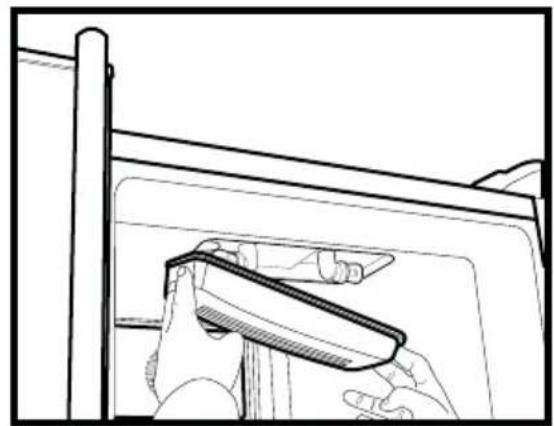
natural_image
Line drawing of a hand holding a tool near a window frame (no text or symbols)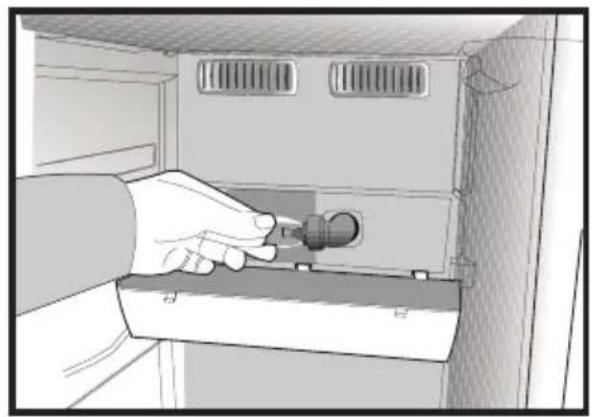
natural_image
Illustration of a hand inserting a plug into a cabinet (no text or symbols visible)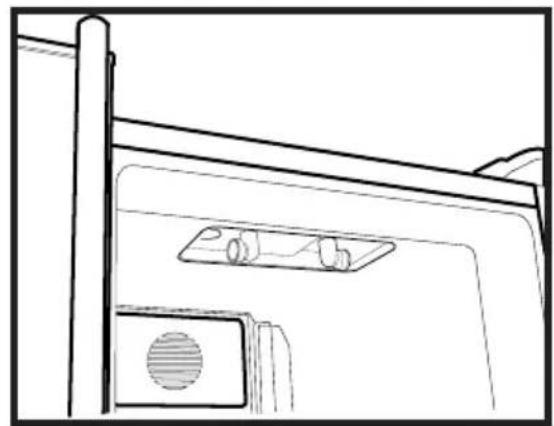
natural_image
Line drawing of a door with a mounted device and ventilation slots (no text or symbols)Icematic
natural_image
Illustration of a hand using a tool to lift a cylindrical container on a base (no text or symbols)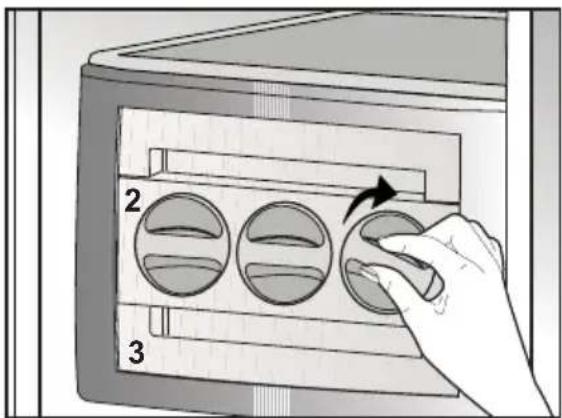
text_image
2 3natural_image
Two-panel illustration showing hands using a device to interact with a screen (top) and a smartphone (bottom), both without any visible text or symbols.Priečinok ochladzovača
natural_image
Line drawing of a refrigerator interior showing three shelves with drawers and doors (no text or symbols)6 Čistenie a údržba
text_image
Technical diagram of a refrigerator with numbered compartments and storage areas marked-
Zamrzovalni del
-
Hladilni del
-
Notranja luč hladilnega dela
-
Ventilator
-
Ionizator
-
Vratne police hladilnega dela
-
Nosilec steklenic
-
Modra luč
-
Ledomat
-
Notranja luč zamrzovalnega dela
natural_image
Diagram showing a lightning bolt striking down on a wall-mounted device with wiring and plug (no text or symbols)vtičnico.
text_image
Diagram showing a computer monitor case with screwdriver inserted into a device, illustrating the process of mounting and disassembly.Električna povezava
natural_image
Diagram of a mechanical or electrical setup with directional arrows indicating motion, no text or symbols present.- Odstranite spodnji pokrov ventilatorja, tako da odvijete vijake kot je prikazano na spodnji sliki. (Glejte
text_image
4 1 2 3 (B)natural_image
Diagram showing a mechanical assembly with an inset close-up of a gear mechanism, labeled (D), no text or symbols present.natural_image
Simple line drawing of a two-panel cabinet or enclosure with vertical and horizontal arrows indicating measurement or alignment (no text or symbols)i Z izvijačem odstranite vijak zgornjega pokrova tečaja vrat, ki jih želite prilagoditi.
natural_image
Technical line drawing of a mechanical component with an upward arrow indicating motion (no text or symbols)zrahljate vijake.
natural_image
Technical line drawing of a mechanical housing or bracket assembly (no text or symbols)tako da pričvrstite vijake, brez da bi spremenili položaj vrat.
natural_image
Technical line drawing of a mechanical component with multiple ports and mounting brackets (no text or symbols)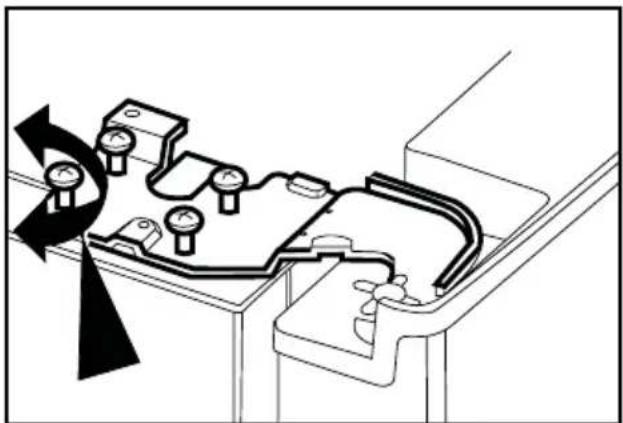
natural_image
Technical diagram of a mechanical assembly with rotating components and a curved component (no text or symbols)i Zamenjajte pokrov tečaja in ga pritrdite z vijakom.
natural_image
Technical line drawing of a mechanical bracket or clamp component (no text or symbols)4 Priprava
natural_image
Line drawing of a mechanical device with a transparent screen and side panels (no text or symbols)natural_image
Diagram of a printer's door with two arrows indicating insertion or disassembly (no text or symbols present)lon:
natural_image
Illustration of two hands installing or adjusting a wall-mounted panel inside a cabinet (no text or symbols visible)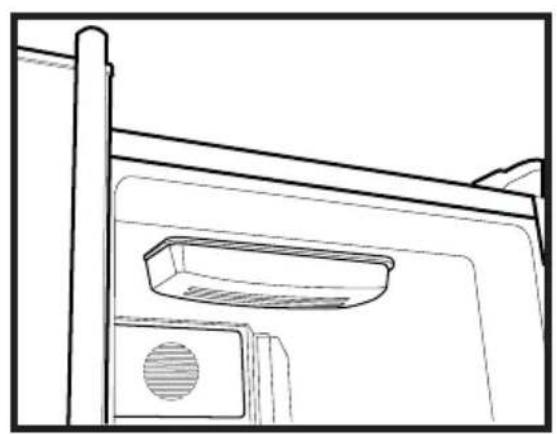
natural_image
Line drawing of a door frame with a vent and handle (no text or symbols)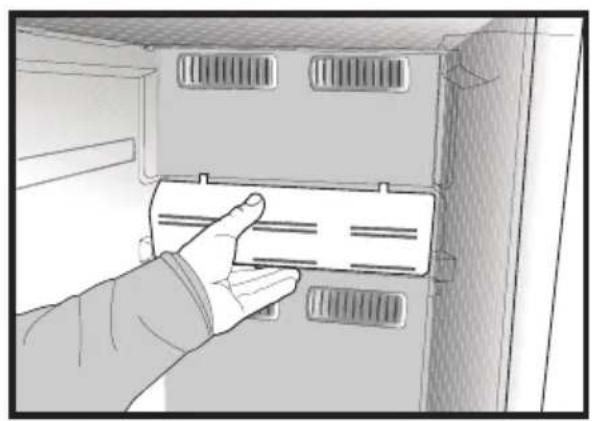
natural_image
Hand inserting a card into a cabinet or rack unit (no text or symbols visible)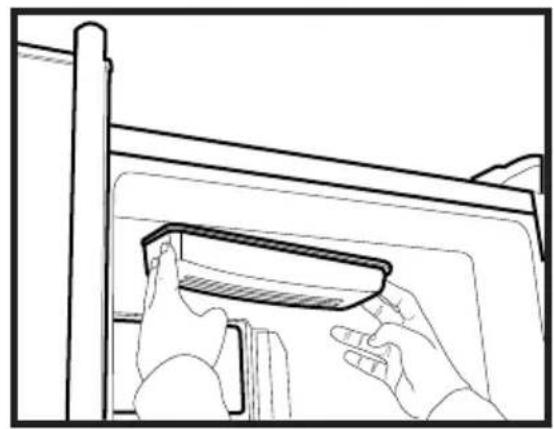
natural_image
Line drawing of hands installing or adjusting a component on a cabinet (no text or symbols)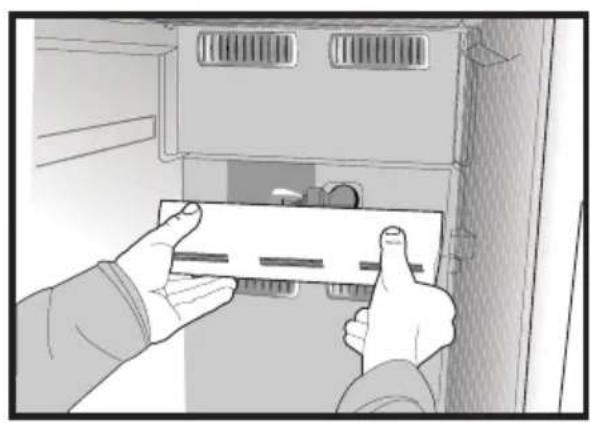
natural_image
Illustration of hands installing or adjusting a component inside a cabinet (no text or symbols visible)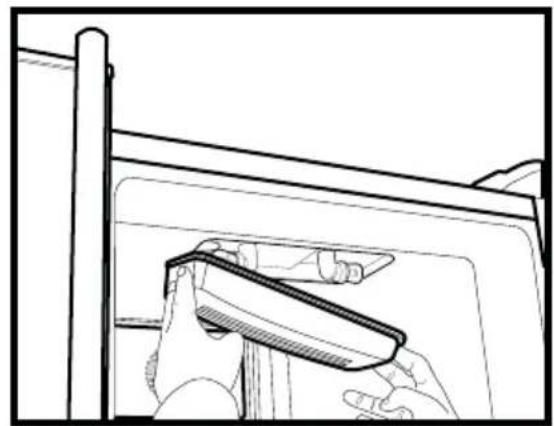
natural_image
Line drawing of a hand holding a tool near a window frame (no text or symbols)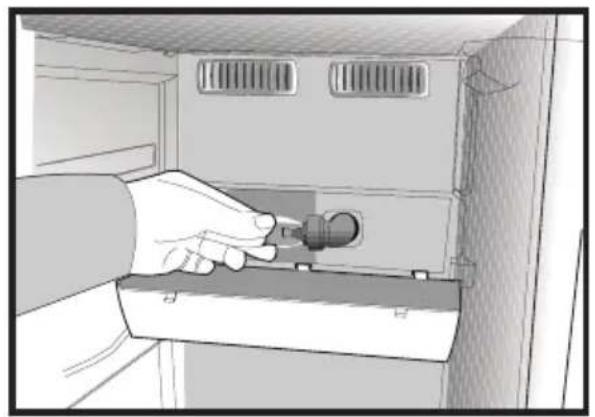
natural_image
Illustration of a hand inserting a plug into a cabinet (no text or symbols visible)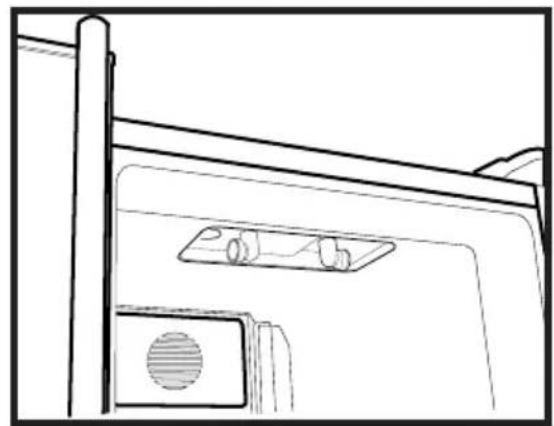
natural_image
Line drawing of a door with a mounted device and ventilation slots (no text or symbols)Ledomat
natural_image
Illustration of a hand using a tool to lift a cylindrical container on a base (no text or symbols)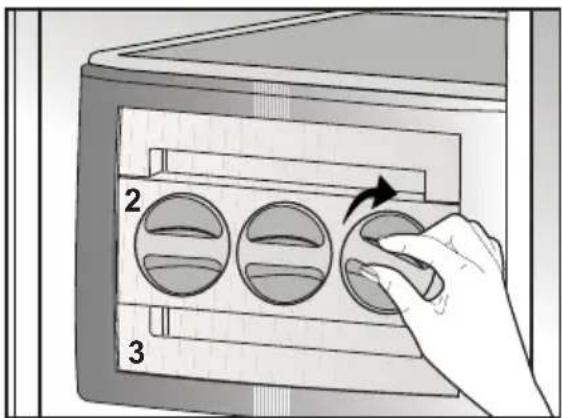
text_image
2 3Uporaba ledomata
natural_image
Two-panel illustration showing hands using a device to interact with a screen (top) and a card (bottom), both without any visible text or symbols.Predel za hlajenje
natural_image
Line drawing of a refrigerator interior showing three shelves and drawers (no text or symbols)text_image
Technical diagram of a refrigerator with numbered compartments and storage areas markednatural_image
Diagram showing a device with a lightning bolt and cable, no text or symbols presentlaza konnektorba.
natural_image
Diagram of a mechanical or electrical setup with directional arrows indicating motion, no text or symbols present.natural_image
Diagram showing a mechanical assembly with an inset close-up of a gear mechanism, labeled (D), no text or symbols present.natural_image
Simple line drawing of a two-panel cabinet or enclosure with vertical and horizontal arrows indicating measurement or alignment (no text or symbols)natural_image
Technical line drawing of a mechanical component with an upward arrow indicating motion (no text or symbols)natural_image
Technical line drawing of a mechanical component with mounting holes and internal channels (no text or symbols)natural_image
Technical line drawing of a mechanical assembly with no visible text or symbols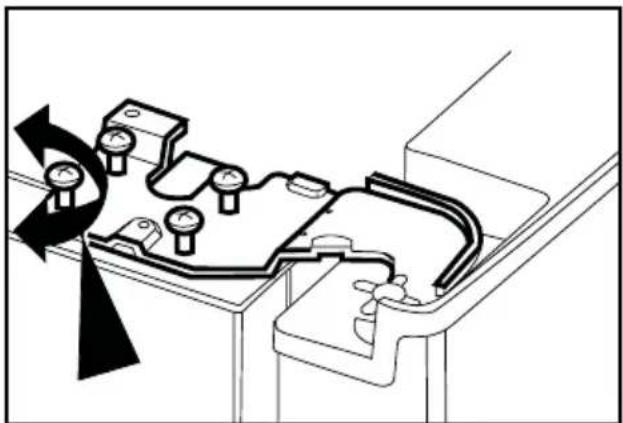
natural_image
Technical diagram of a mechanical assembly with rotating components and directional arrows (no text or labels)natural_image
Technical line drawing of a mechanical bracket or clamp component (no text or symbols)4 Előkészületek
natural_image
Line drawing of a mechanical device with open lid and internal compartments (no text or symbols)natural_image
Line drawing of a printer's door with two arrows indicating left and right motion (no text or symbols)lon:
natural_image
Illustration of two hands installing or adjusting a panel inside a cabinet (no text or symbols visible)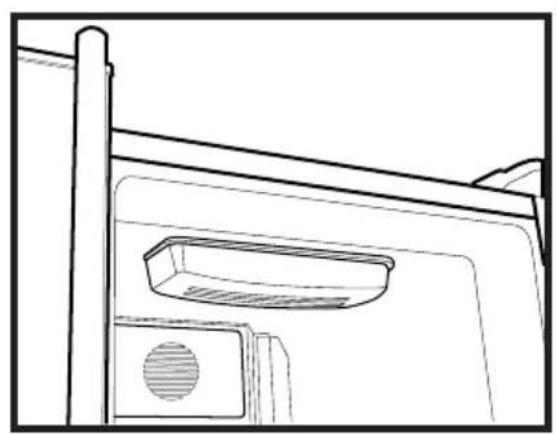
natural_image
Line drawing of a door frame with a vent and handle (no text or symbols)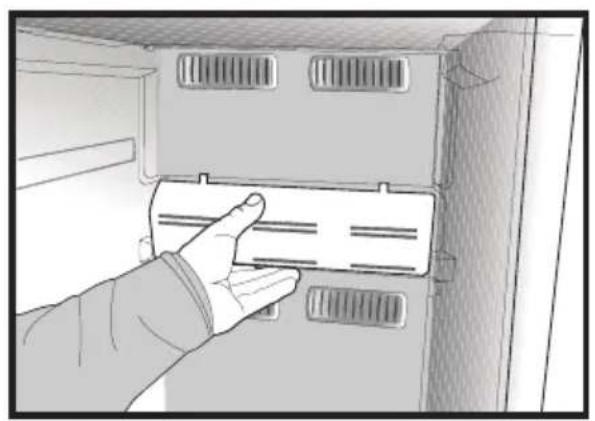
natural_image
Hand inserting a card into a cabinet or rack unit (no text or symbols visible)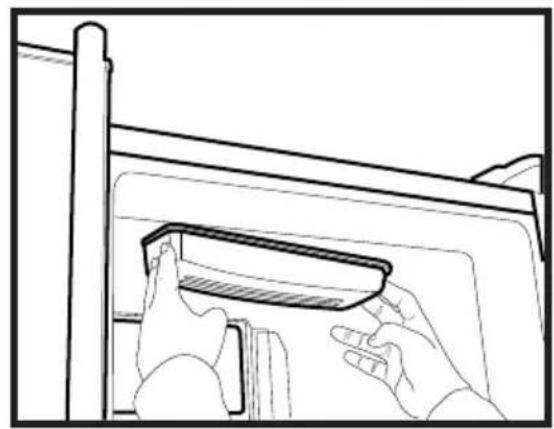
natural_image
Line drawing of hands installing or adjusting a component on a cabinet (no text or symbols)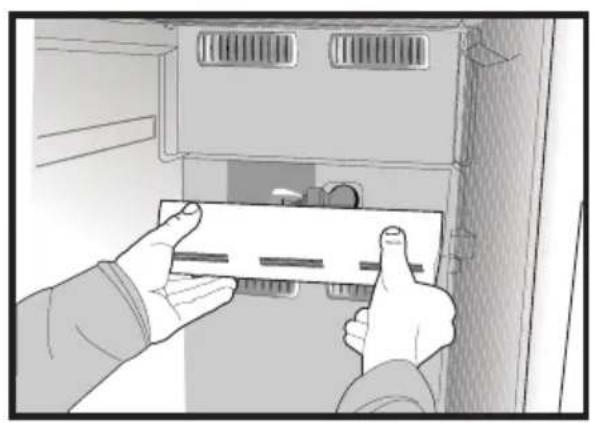
natural_image
Illustration of hands installing or adjusting a component inside a cabinet (no text or symbols visible)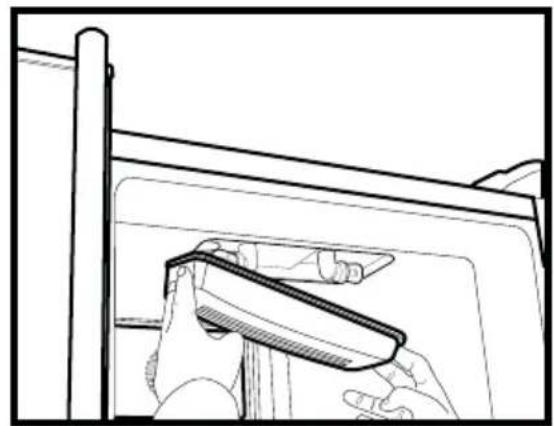
natural_image
Line drawing of a hand holding a tool near a window frame (no text or symbols)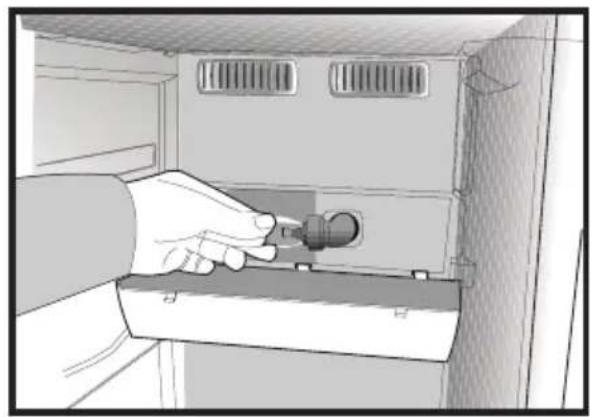
natural_image
Illustration of a hand inserting a plug into a cabinet (no text or symbols visible)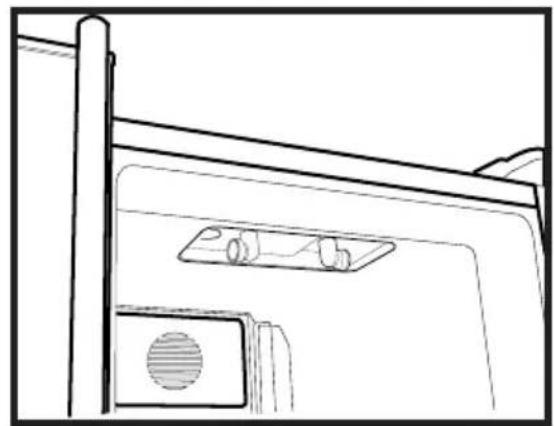
natural_image
Line drawing of a door with a mounted device and ventilation slots (no text or symbols)Icematic
natural_image
Illustration of a hand using a tool to lift a cylindrical container on a base (no text or symbols)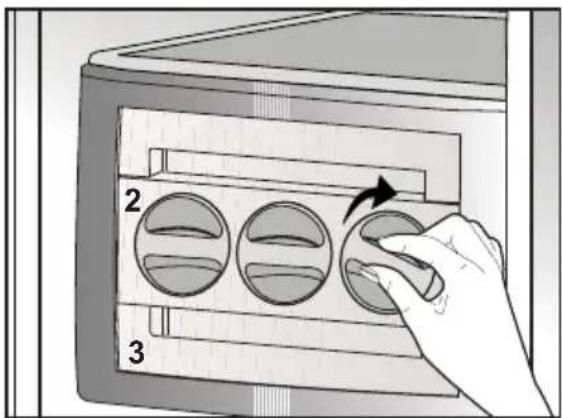
text_image
2 3natural_image
Illustration of a hand holding a magnifying glass over a textured surface, with no visible text or symbols.