
DDR070EAPWDB - Humidifier DANBY - Free user manual and instructions
Find the device manual for free DDR070EAPWDB DANBY in PDF.


| Product type | Portable dehumidifier |
| Brand | Danby |
| Model | DDR070EAPWDB |
| Power supply | 120 V ~ 60 Hz, 15 A circuit, 3-prong grounded plug |
| Energy consumption | Not specified, dedicated 15 A circuit required |
| Dehumidification capacity | Not specified, suitable for residential rooms |
| Adjustable humidity range | 35% to 80% RH in 5% increments |
| Operating temperature | 5°C to 32°C (41°F to 90°F) |
| Operating modes | Normal dehumidification, continuous mode (CO), timer (start/stop 0-24 h) |
| Fan speed | 2 speeds: low and high |
| Water tank capacity | Not specified, visual full level indicator |
| Drainage options | Removable tank, gravity continuous drain (standard hose), pump drain (hose provided, max height 5 m) |
| Air filter | Washable, cleaning indicator after 250 hours |
| Special features | Settings memory, automatic restart after power failure, automatic defrost |
| Display | Digital display showing ambient humidity (±5%) |
| Controls | Touch with indicator lights: on/off, mode, fan, timer, pump, filter reset |
| Safety | Grounding required, automatic shut-off if tank full or mispositioned, compressor protection (3 min delay) |
| Routine maintenance | Clean tank every 2 weeks, air filter every 2 weeks, exterior cleaning with mild detergent |
| Long-term storage | Let dry for 24 h, clean, protect from dust, store in dry, ventilated place |
| Warranty | 2 years functional parts (24 months), plastic parts 30 days |
| Customer service | 1-800-263-2629 (Danby) |
Frequently Asked Questions - DDR070EAPWDB DANBY
User questions about DDR070EAPWDB DANBY
0 question about this device. Answer the ones you know or ask your own.
Ask a new question about this device
Download the instructions for your Humidifier in PDF format for free! Find your manual DDR070EAPWDB - DANBY and take your electronic device back in hand. On this page are published all the documents necessary for the use of your device. DDR070EAPWDB by DANBY.
USER MANUAL DDR070EAPWDB DANBY
This product is factory equipped with a power supply cord that has a three-pronged grounded plug. It must be plugged into a mating grounding type receptacle in accordance with the National Electrical Code and applicable local codes and ordinances. If the circuit does not have a grounding type receptacle, it is the responsibility and obligation of the customer to exchange the existing receptacle in accordance with the National Electrical Code and applicable local codes and ordinances. The third ground prong should not, under any circumstances, be cut or removed. Never use the cord, the plug or the appliance when they show any sign of damage. Do not use your appliance with an extension cord. Improper connection of the grounding plug can result in risk of fire, electric shock and/or injury to persons associated with the appliance. Check with a qualified service representative if in doubt that the appliance is properly grounded.

IMPORTANT - GROUNDING METHOD
Owner's Use and Care Guide 1-13
- Welcome
- Important Safety Information
- Installation Instructions Operation Instructions Care and Maintenance
- Troubleshooting Warranty
PORTABLE DEHUMIDIFIER
Read and follow all safety rules and operating instructions before first use of this product.
Welcome to the Danby family. We are proud of our quality products, and we believe in dependable service. We suggest that you read this Owner's Manual before plugging in your new appliance as it contains important operational information, safety information, troubleshooting and maintenance tips to ensure the reliability and longevity of your appliance. Visit www.Danby.com to access self-service tools, FAQs and much more. For additional assistance call 1-800-263-2629.
Note the information below; you will need this information to obtain service under warranty. To receive service, you must provide the original receipt.
Model Number:
Serial Number:
Date of Purchase:
NEED HELP?
Before you call for service, here are a few things you can do to help us serve you better:
Read this Owner's Use and Care Guide:
It contains instructions to help you use and maintain your appliance properly.
If you received a damaged appliance:
Immediately contact the retailer (or builder) that sold you the appliance.
Save time and money:
Check the Troubleshooting section at the end of the guide before calling. This section helps you solve common problems that may occur.
If you do need service, you can relax, knowing help is only a phone call away.

1-800-26-Danby
(1-800-263-2629)
NOTE
The instructions issued in this manual are not meant to cover all possible conditions and situations that may occur. Person(s) installing, maintaining, or operating the appliance must exercise caution and care. Failure to install, maintain, and/or operate the equipment according to the manufacturer's instructions may result in conditions which can produce personal injury and damage to your unit and/or property damage. Contact your dealer, service agent, and/or the manufacturer about any problems or conditions you do not fully understand.
For Danby Consumer Service call (1-800-263-2629).
ELECTRICAL REQUIREMENTS
To reduce the risk of fire, electric shock, or personal injury, all wiring and grounding must conform with the latest edition of Local and National Electrical codes.
- It is the customer's responsibility to have the wiring and fuses checked by a qualified electrician to make sure adequate electrical power is available.
- This appliance is designed to operate on an effectively grounded, separately branched, polarized, 3-wire, 120 Volt 60 Hertz (alternating current) circuit protected by a 15 ampere fuse, equivalent fuse or circuit breaker. The three-prong grounding plug on the power cord should be plugged directly into the aforementioned receptacle rated 110/120 V.A.C.
- Do not connect the dehumidifier to a multiple socket outlet that is also being used for other electrical appliances.
FOR YOUR SAFETY: To reduce the risk of fire or explosion, do not store or use gasoline or other flammable vapors or liquids in the vicinity of this or any other appliance.
GROUNDING INSTRUCTIONS
Improper connection of the equipment-grounding conductor can result in a risk of electrical shock. Check with a qualified electrician or serviceperson if you are in doubt as to whether your appliance outlets are properly grounded.
- This appliance must be grounded. In the event of malfunction or breakdown, grounding will reduce the risk of electrical shock by providing a path of least resistance for electrical current. This appliance is equipped with a cord that has an equipment-grounding conductor and 3 prong grounding plug. The plug must be connected into an outlet that is properly installed and grounded in accordance with all local codes and ordinances.
- Do not modify the plug provided with this appliance. If it will not fit the outlet, have a proper outlet installed by a qualified electrician.
- If the household electrical supply does not meet the above specifications, or if you are not sure your home has an effective ground, have a qualified electrician or your local electrical utility company check it and correct any problems.
SAFETY PRECAUTIONS
When using this dehumidifier, always follow basic safety precautions, including the following:
- Use this appliance only for its intended purpose as described in this Owner's Manual. This dehumidifier must be properly installed and grounded as described in this manual before it is used.
- Never operate this dehumidifier in an area that is likely to accumulate standing water. If this condition develops, disconnect the power supply before stepping into the water.
- Never unplug your dehumidifier by pulling on the power cord. Always grip the plug firmly and pull straight out from the receptacle.
- Immediately replace all electric service cords that have become frayed or damaged. A damaged power supply cord must be replaced with a new power supply cord obtained from the manufacturer and not repaired. Do not use a cord that shows cracks or abrasion damage along its length or at either the plug or connector end.
- If the receptacle does not match the plug, the receptacle must be changed out by a qualified electrician.
- Turn the dehumidifier OFF and unplug it before cleaning.
- All dehumidifiers contain refrigerants, which under federal law must be removed prior to product disposal. If you are disposing of a product with refrigerants, check with the company handling disposal about what to do. Check for local regulatory compliance regarding the approved and safe disposal of this appliance.
- This dehumidifier is intended for indoor residential applications only. This dehumidifier should not be used for commercial or industrial applications. Do not use outdoors. Children must be supervised to ensure that they do not play with the appliance.
- Do not store or use combustible materials, gasoline or other flammable vapors or liquids in the vicinity of this or any other appliance.
- Do not remove the Styrofoam in the float which is located in the bucket.
- Do not use an extension cord, this unit must be plugged directly into the receptacle.
- This appliance is not intended for use by persons (including children) with reduced physical, sensory or mental capabilities or lack of experience or knowledge unless they have been given supervision or instruction concerning the unit of the appliance by a person responsible for their safety.
SAVE THESE INSTRUCTIONS

Installation Instructions
LOCATION
- Select a suitable location, ensuring there is easy access to an electrical outlet.
- Make sure there are no obstructions restricting airflow through the front air intake grill.
- Maintain a minimum clearance of at least 30-45 cm (12-18") on all sides of the unit to allow for proper air circulation.
- The unit should be operated in an enclosed area; keep all nearby doors and windows closed.
- Place the unit on a smooth, level floor that is strong enough to support the unit with a full bucket of water.
- The unit has four rolling castor feet. Use care when moving the unit on carpet as the castors may not be able to roll correctly.
- Do not move the unit with water in the bucket; the unit may tip over and spill water.
- Protect wood and carpet floors from spillage or scratches when moving the unit. The recommended operating ambient room temperature is between 5°C (41°F) and 32°C (90°F).
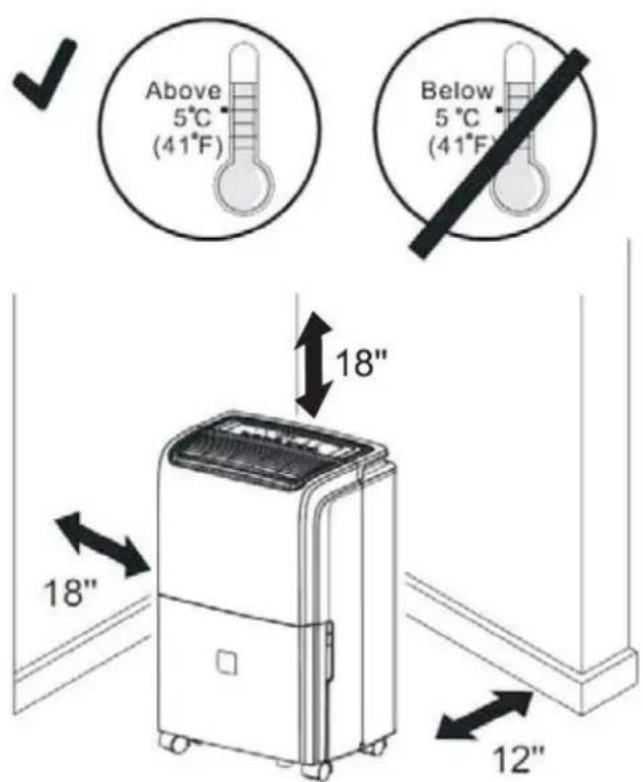
Important: If the unit is placed on its side or back, ensure that the unit is allowed to stand upright and undisturbed for a minimum of 4 hours before plugging in to allow the coolant to settle.
CONTROL PANEL INSTRUCTIONS
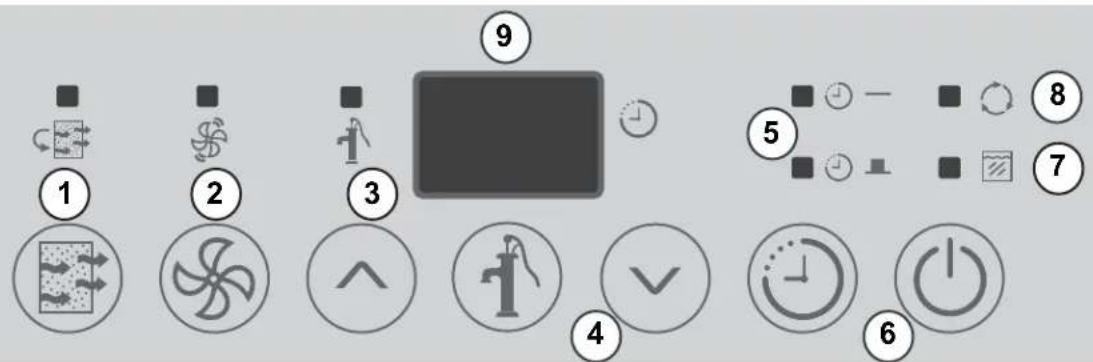
When you push the button to change operation modes, the unit will make a beeping sound to indicate that it is changing modes.
- Filter Button and Indicator Light: The check filter light will illuminate after 250 hours of operation. After cleaning the filter, press the filter button to reset this function and the light will go off.
- Fan button and Indicator Light: Controls the fan speed. Press to select either low or high fan speed. The indicator light will illuminate on high fan speed and will turn off on low fan speed.
- Drain Pump Button and Indicator Light: Connect the provided drain hose and press this button to activate the drain pump. The pump light will illuminate to indicate that the pump drain is active. Note: If water collects in the bucket while the pump drain is active, check to make sure the unit is level. If the unit is not level, water can bypass the drain hose and collect in the bucket.
- (V/ A) Buttons: The humidity level can be set within a range of 35% RH (Relative Humidity) to 80% RH in 5% increments using these buttons. For drier air, press the button and set to a lower percentage value (%). For more damp air, press the button and set a higher percentage value (%).
- Timer Button and Indicator Lights: Press to initiate the auto-start and auto-stop feature. Set a start or stop time from 0.0 to 24 hours using the ( ) buttons.
- Power Button: Press to turn the dehumidifier on or off.
- Bucket Full Indicator Light: When the bucket is full or incorrectly positioned inside the unit, the bucket full light will turn on and remain on until the bucket is emptied or correctly re-positioned. The compressor and fan motor operation will stop. When the bucket is emptied or correctly repositioned, the dehumidifier will resume operation automatically.
Note: It may take 2-3 minutes before operating conditions resume.
- Continuous Mode: To reach continuous mode, press the (V) button until CO shows on the display. This setting will disregard the ambient humidity and will run the compressor continuously to reach the driest conditions possible.
- Display: Shows the actual (± 5% accuracy) room humidity level in a range of 35% RH to 80% RH. Otherwise, displays selection when programming humidity or timer.
Note: The fan does not shut off the moment you remove the bucket, the fan will shut off after 2-3 minutes.

Operating Instructions
DEHUMIDIFYING MODE INSTRUCTIONS
When the power button is pressed, the power light turns on and the dehumidifier automatically defaults to:
Display: Current ambient room humidity (RH%)
Humidity Setting: 50% RH
Fan Speed: Low
Note: Depending on humidity conditions of the surrounding environment, the dehumidifier may not start automatically under the default setting. This indicates that the humidity level of the surrounding environment is lower than the default setting of 50% RH.
Press the down button to lower the set humidity until the humidity sensor recognizes conditions that will allow the unit to operate. When the set humidity reaches a point lower than the surrounding environment, the compressor will turn on and the unit will begin collecting water from the air.
Dehumidifying Mode Selection:
- The unit enters dehumidify mode when the power button is pressed.
2a. Press the up and down buttons to select a desired RH operating value (35% - 80%). Each press will change the set humidity by 5%.
OR
2b. Press the button until CO shows on the display to reach continuous mode. When continuous mode is selected, the humidity sensor will be by-passed and the compressor will operate non-stop regardless of humidity conditions.
Fan Speed Selection:
- You can choose a fan speed (low or high) using the keypad. The indicator light will illuminate on high fan speed and will turn off on low fan speed.
For optimal performance, ensure that the unit is set at least 10% lower than the relative humidity level in the surrounding environment. It is normal for the humidity to vary by 5% above or below the set humidity.
It is recommended that in normal conditions the humidity be set at 40 - 45%.
During operation, it is normal for the dehumidifier to exhaust warm air from the top of the unit.

Operating Instructions
Timer Functions
Follow these steps to program the Auto-on or Auto-off feature using the control panel:
Auto-off:
- When the unit is on, press the Timer button to activate the Auto-off timer. The Auto-off indicator light will illuminate.
- Press or hold the ( ) buttons to change the 'Auto' time by 0.5 hour increments, up to 10 hours, then at 1 hour increments up to 24 hours. The unit display will count down the time remaining until start.
- Within 5 seconds of setting auto-off time, press the Timer button again to complete the auto-off program.
Auto-on:
- When the unit is off, press the Timer button to activate the auto-on program. Set the auto-on time as in step 2 above. Within 5 seconds of setting auto-on time, press the Timer button again to complete the auto-on program.
Note: Turning the unit ON or OFF at any time or changing the on/off timer setting to 0.0 will cancel the timer settings.
Memory Setting
Each time the unit is disconnected / re-connected and/or in the event of a power failure, the electronic circuit board automatically defaults to the last program setting that was used. After the unit has stopped, it may take several minutes before operating conditions resume.
Auto-Restart
If the unit shuts off unexpectedly due to a power outage, it will restart with the previous function settings automatically when the power resumes.
AUTOMATIC DEFROST
If the unit is operating in an environment where the ambient temperature is very cold, frost may form on the evaporator coils. The compressor will cycle off but the fan will continue to run until the frost melts. An error code may show on the control panel display.
When the frost has melted, the compressor function will resume and the unit will return to regular operation.
To ensure frost does not form on the evaporator coils, ensure the ambient temperature around the unit is at a comfortable level. Higher ambient temperature will also help to remove humidity from the air.

Operating Instructions
WATER BUCKET OPERATION
The water bucket holds accumulated condensed water and by means of a safety switch, controls both the water level and operation of the dehumidification process.
When the water bucket is full or displaced inside the unit, the float switch actuator (inside the bucket) breaks contact with the safety switch. This results in the immediate shut down of the compressor, preventing moisture from being condensed. The fan will continue to run for approximately 2-3 minutes. Water may drip from the tray onto the base of the unit, and then onto the floor. Ensure that you protect your flooring when emptying the water bucket.
Never tamper with or attempt to defeat the water level safety float switch system. Proper installation of the water bucket is crucial in maintaining reliable dehumidifier operation.
Never place a full bucket of water on the floor. The bottom of the bucket is uneven and it will tip over and spill water onto the floor.
The bucket should be cleaned every few weeks to prevent mold growth. Only use mild detergent to clean the bucket; do not use harsh chemicals or bleach.
NOTE: Hold bucket with both hands when emptying.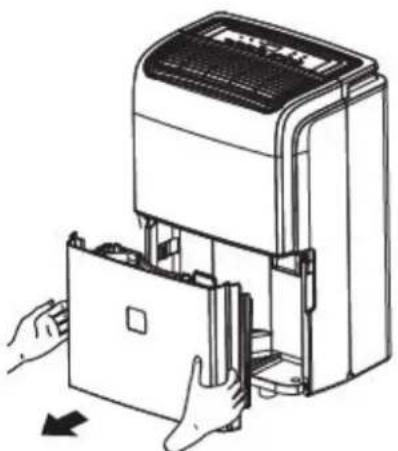
*There is no handle on the bucket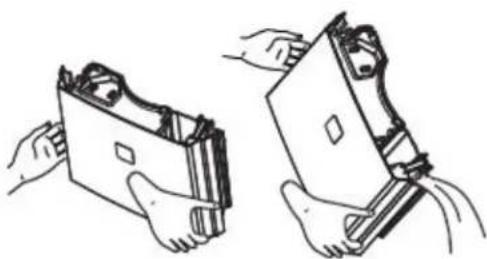
AIR FILTER
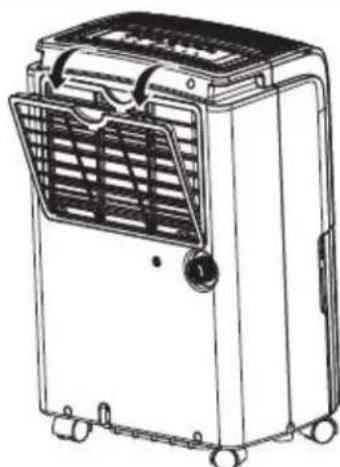
The filter indicator will illuminate after 250 hours of use, indicating that the filter should be cleaned.
- Remove the filter from the back of the unit.
- Use a vacuum to remove dust from the filter or wash with warm water and mild detergent.
- Ensure the filter is completely dry before replacing it in the unit.
- Press the filter button to reset the filter indicator.
CAUTION: Do not operate the unit without the filter.

Operating Instructions
CONTINUOUS DRAIN
Water can be automatically drained from the unit by attaching a standard garden hose (not provided) to the continuous drainage port on the back of the unit. When the drain hose is connected, water collected by the unit will bypass the water bucket and will drain directly through the hose.
- Ensure the unit is on a level surface. If the unit is not level, water may bypass the drain hose and collect in the water bucket.
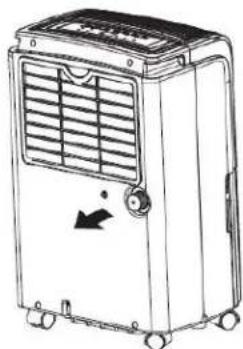
- Unscrew the cap on the back of the unit to access the drain port.
- Attach a garden hose onto the drain nozzle and lead it to a floor drain.
- Cut the garden hose to ensure it is no longer than 1.8 m (6 feet).
Note: The thread standard for garden hoses is known as GHT or "garden hose thread" which has an outer diameter of 27 mm (1 1/16 inches) and a pitch of 11.5 TPI or "threads per inch".
Note: Do not use the provided drain hose with the continuous drain; the provided drain hose is too long for the continuous drain and will not drain water correctly.
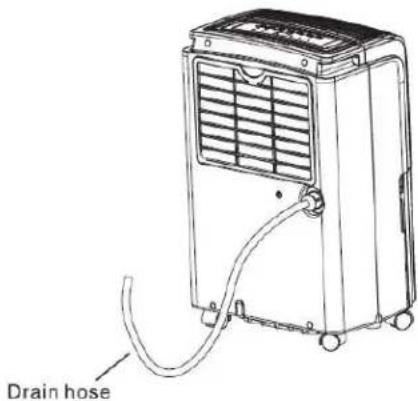
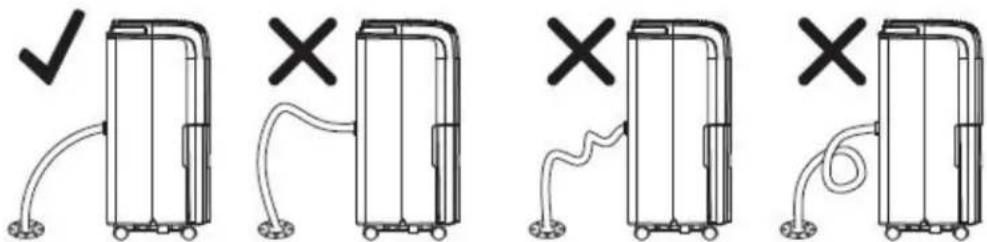
Ensure that there are no bends in the drain hose as this can cause water to back up into the water bucket.
Note: the continuous drain is activated by gravity alone.
Drain Hose Installation Reference Guide

Operating Instructions
PUMP DRAIN
In situations where the drain hose cannot reach a floor drain or if the drain hose needs to reach a receptacle that is above the level of the unit, water can be automatically drained from the unit using the pump.
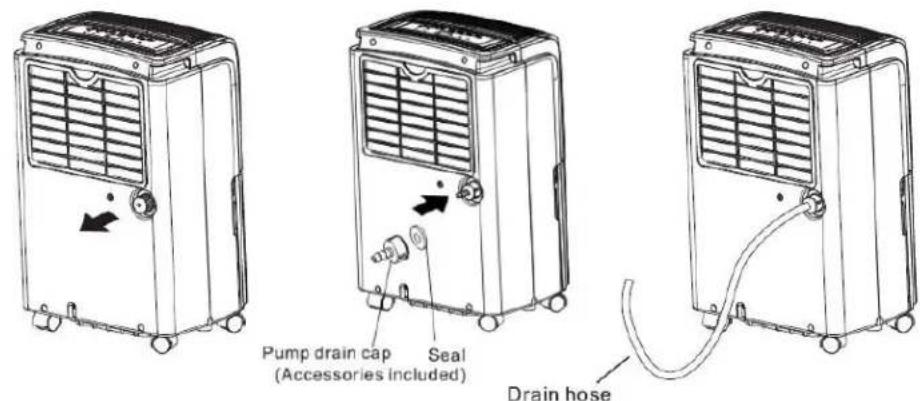
- Unscrew the cap on the back of the unit to access the drain port.
- Connect the provided drain hose to the drain port on the back of the unit.
- Ensure that there are no bends in the drain hose.
- Press the Pump button to initiate the pump drain.
- The maximum length of the pump drain hose is 5 m (16 feet).
Note: The pump drain should be used with the provided drain hose.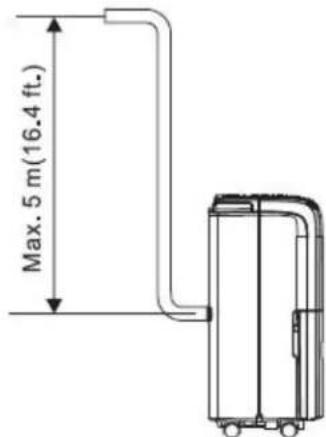
INTERNAL PUMP ARM
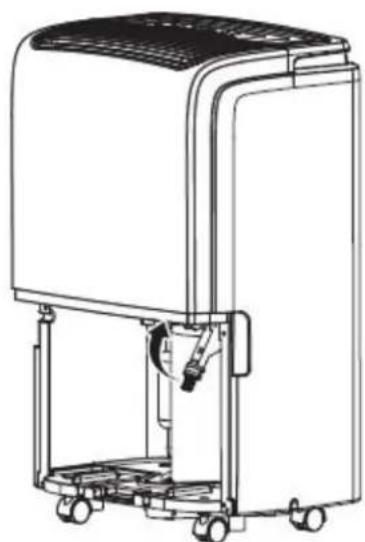
Inside the unit there is a pump arm that will draw water out of the bucket and then drain it out through the drain hose. When replacing the bucket in the unit after emptying it, ensure that the pump arm has not fallen down or the bucket will not go back into the unit.
If the pump arm has fallen down, gently push it up toward the top of the unit until it clicks into place.
CLEANING
1. Clean the grill and case
Use water and a mild detergent. Do not use bleach or abrasives. Do not splash water directly onto the main unit; doing so may cause an electric shock, cause the insulation to deteriorate, or cause the unit to rust. Use a vacuum attachment or brush to clean the air intake and outlet grills.
2. Clean the bucket
Clean the water bucket every few weeks to prevent growth of mold, mildew and bacteria. Partially fill the bucket with clean water and add a small amount of mild detergent. Swish it around in the bucket, empty and rinse.
Note: Do not use a dishwasher to clean the bucket. After cleaning, the bucket must be placed and properly positioned for the dehumidifier to operate.
3. Clean the air filter
Remove and clean the filter every few weeks based on normal operating conditions.
- Be sure to unplug the unit before cleaning or servicing.
- Do not use gasoline, paint thinner or other chemicals to clean the unit.
- Do not wash the unit directly under a tap or using a hose; it may cause electrical damage.
LONG TERM STORAGE
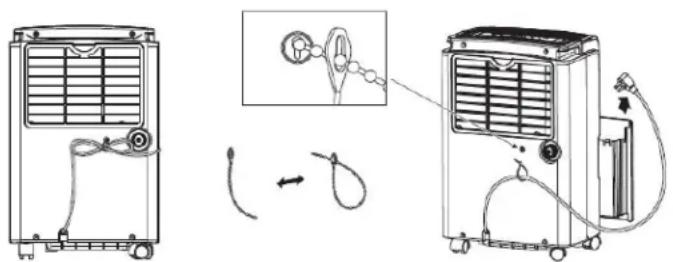
Before placing the unit in storage, allow the unit to stand undisturbed and turned off for at least 24 hours to ensure the inside of the unit is completely dry. Clean the unit and ensure all parts are completely dry before storage. Secure the power cord with the power cord strap as per the below and then cover the unit with a plastic bag to protect it from dust. Make sure to store the unit upright in a dry, well ventilated place.
ERROR CODES
EH - humidity sensor fault
E1 or E2 - temperature sensor fault
E5 - water pump fault
P1 - water bucket is not installed correctly
To clear error codes, turn off and unplug the unit, wait 2 minutes, plug back in and power on. If error code persists, call for service.
PROBLEM POSSIBLE CAUSE SOLUTION
| Dehumidifi er does not start | The dehumidifi er is unplugged • The fuse is blown/circuit breaker is tripped • Dehumidifi er has reached its preset level or bucket is full • Bucket is not in the proper position • Power failure | Make sure the plug is pushed completely into the outlet • Check the house fuse/circuit breaker box and replace the fuse or reset the breaker • The unit turns off automatically when either condition occurs. Change to a lower setting or empty the bucket and replace properly • The bucket must be in place and securely seated for the unit to operate. • There is a protective time delay (up to 3 minutes) to prevent tripping of the compressor overload. For this reason, the unit may not start normally for 3 minutes after it is turned back on. |
| Dehumidifi er does not dry the air as it should | Did not allow enough time to remove the moisture • Airflow is restricted • Dirty fi liter • The humidity control may not be set low enough • Doors and windows may not be closed tightly • Clothes dryer may be blowing moisture-laden air into the room • Room temperature is too low | When fi rst installed, allow at least 24 hours to maintain the desired dryness • Make sure there are no curtains, blinds or furniture blocking the front or back of the dehumidifi er. See the “Location” section. • See the “Air fi liter” section • For drier air, press the down button and set to a lower percent value (%) • Check that all doors, windows and other openings are securely closed • Install the dehumidifi er away from the dryer. The dryer should be vented to the outside. • Moisture removal is best at higher room temperatures. Lower room temperatures will reduce the moisture removal rate. Modes are designed to be operated at temperatures above 5°C (41°F) |
| Dehumidifi er runs too much but does not collect water | Need to reset controller | Set to lowest humidity setting. Allow bucket to fill and then empty bucket. Adjust controller to desired % RH. |
| Dehumidifer runs too much collects water | Area to be dehumidified is too large • Doors and windows are open | The capacity of your dehumidifi er may not be adequate • Close all doors and windows |
| Frost appears on the coils | Unit has been recently turned on, or room temperature is too cold | This is normal. Frost will usually disappear within 60 minutes. See the “Defrost” section |
| Controls cannot be set | The compressor will turn off and the fan will automatically continue to run for approx. 3 minutes at a fixed setting | This is normal. Wait approximately 3 minutes and set the fan as desired. |
| Fan noise · Air is moving through the dehumidifi er | Hose connection may be loose • Bucket used to collect water, but the hose is attached | This is normal |
| Water on floor | • Hose connection may be loose • Bucket used to collect water, but the hose is attached | Check the hose connection. See “Continuous Drain” section Disconnect the hose if using the bucket to collect water, see “Continuous Drain” section. |
LIMITED CARRY-IN APPLIANCE WARRANTY
This quality product is warranted to be free from manufacturer's defects in material and workmanship, provided that the unit is used under the normal operating conditions intended by the manufacturer.
This warranty is available only to the person to whom the unit was originally sold by Danby Products Limited (Canada) or Danby Products Inc. (U.S.A.) (hereafter "Danby") or by an authorized distributor of Danby, and is non-transferrable.
TERMS OF WARRANTY
Plastic parts are warranted for thirty (30) days only from purchase date, with no extensions provided.
First 24 months: During the first twenty-four (24) months, any functional parts of this product found to be defective will be repaired or replaced, at warrantor's option, at no charge to the ORIGINAL purchaser.
To obtain service: Danby reserves the right to limit the boundaries of "In Home Service" to the proximity of an Authorized Service Depot. Any appliance requiring service outside the limited boundaries of "In Home Service" will be the consumer's responsibility to transport the appliance (at their own expense) to the original retailer (point of purchase) or a service depot for repair. See "Boundaries of In Home Service" below. Contact your dealer from whom your unit was purchased, or contact your nearest authorized Danby service depot, where service must be performed by a qualified service technician. If service is performed on the units by anyone other than an authorized service depot, or the unit is used for commercial application, all obligations of Danby under this warranty shall be void.
Boundaries of In Home Service: If the appliance is installed in a location that is 100 kilometers (62 miles) or more from the nearest in-home service center, your unit must be delivered to the nearest authorized Danby Service Depot, as service must only be performed by a technician qualified and certified for warranty service by Danby. Transportation charges to and from the service location are not protected by this warranty and are the responsibility of the purchaser.
Nothing within this warranty shall imply that Danby will be responsible or liable for any spoilage or damage to food or other contents of this appliance, whether due to any defect of the appliance, or its use, whether proper or improper.
EXCLUSIONS
Save as herein provided, by Danby, there are no other warranties, conditions, representations or guarantees, express or implied, made or intended by Danby or its authorized distributors and all other warranties, conditions, representations or guarantees, including any warranties, conditions, representations or guarantees under any Sale of Goods Act or like legislation or statute is hereby expressly excluded. Save as herein provided, Danby shall not be responsible for any damages to persons or property, including the unit itself, howsoever caused or any consequential damages arising from the malfunction of the unit and by the purchase of the unit, the purchaser does hereby agree to indemnify and hold harmless Danby from any claim for damages to persons or property caused by the unit.
GENERAL PROVISIONS
No warranty or insurance herein contained or set out shall apply when damage or repair is caused by any of the following: 1) Power failure. 2) Damage in transit or when moving the appliance. 3) Improper power supply such as low voltage, defective house wiring or inadequate fuses. 4) Accident, alteration, abuse or misuse of the appliance such as inadequate air circulation in the room or abnormal operating conditions (extremely high or low room temperature). 5) Use for commercial or industrial purposes (ie. If the appliance is not installed in a domestic residence). 6) Fire, water damage, theft, war, riot, hostility, acts of God such as hurricanes, floods etc. 7) Service calls resulting in customer education. 8) Improper Installation (ie. Building-in of a free standing appliance or using an appliance outdoors that is not approved for outdoor application). Proof of purchase date will be required for warranty claims; so, please retain bills of sale. In the event warranty service is required, present this document to our AUTHORIZED SERVICE DEPOT.
Warranty Service
Carry-In
Danby Products Limited
PO Box 1778, Guelph, Ontario, Canada N1H 6Z9
Telephone: (519) 837-0920 FAX: (519) 837-0449
1-800-263-2629
07/14
Danby Products Inc.
PO Box 669, Findlay, Ohio, U.S.A. 45840
Telephone: (419) 425-8627 FAX: (419) 425-8629
PROBLEM CAUSE POSSIBLE SOLUTION
PROBLEMA POSIBLE CAUSA SOLUCION
All repair parts are available for purchase or special order when you visit your nearest service depot. To request service and/or the location of the service depot nearest you, call the TOLL FREE number.
When requesting service or ordering parts, always provide the following information:
- Product Type, Model Number, Part Number, Part Description
PORTABLE DEHUMIDIFIER



- IMPORTANT - GROUNDING METHOD
- PORTABLE DEHUMIDIFIER
- NEED HELP
- READ THIS OWNER'S USE AND CARE GUIDE
- IF YOU RECEIVED A DAMAGED APPLIANCE
- SAVE TIME AND MONEY
- NOTE
- ELECTRICAL REQUIREMENTS
- GROUNDING INSTRUCTIONS
- SAFETY PRECAUTIONS
- SAVE THESE INSTRUCTIONS
- INSTALLATION INSTRUCTIONS
- LOCATION
- CONTROL PANEL INSTRUCTIONS
- OPERATING INSTRUCTIONS
- DEHUMIDIFYING MODE INSTRUCTIONS
- DEHUMIDIFYING MODE SELECTION
- OR
- FAN SPEED SELECTION
- TIMER FUNCTIONS
- AUTO-OFF
- AUTO-ON
- MEMORY SETTING
- AUTO-RESTART
- AUTOMATIC DEFROST
- WATER BUCKET OPERATION
- AIR FILTER
- CONTINUOUS DRAIN
- PUMP DRAIN
- INTERNAL PUMP ARM
- CLEANING
- CLEAN THE GRILL AND CASE
- CLEAN THE BUCKET
- CLEAN THE AIR FILTER
- LONG TERM STORAGE
- ERROR CODES
- LIMITED CARRY-IN APPLIANCE WARRANTY
- TERMS OF WARRANTY
- EXCLUSIONS
- GENERAL PROVISIONS
- WARRANTY SERVICE
Brand : DANBY
Model : DDR070EAPWDB
Category : Humidifier