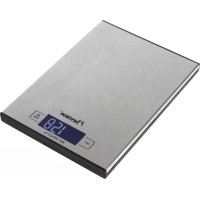
AKS1000S - Kitchen scale BESTRON - Free user manual and instructions
Find the device manual for free AKS1000S BESTRON in PDF.



| Product Type | Kitchen Scale |
| Brand | Bestron |
| Model | AKS1000S |
| Maximum Capacity | 5 kg |
| Precision | 1 g |
| Measurement Units | Grams (g), Ounces (oz) |
| Tare Function | Yes, resets net weight to zero |
| Display | LCD with backlight |
| Backlight | Yes, turns off after about 20 seconds of inactivity |
| Auto Shut-off | Yes, after about 3 minutes of inactivity |
| Power Supply | 2 AAA batteries (not included) |
| Low Battery Indicator | Yes, displays "LO" |
| Overload Indicator | Yes, displays "ERR" |
| Material | Plastic |
| Dimensions (approx.) | 20 x 15 x 2 cm |
| Weight (approx.) | 200 g |
| Warranty | 60 months (5 years) |
| Cleaning | Soft damp cloth, do not use abrasive products |
| Safety | Household use only, keep out of reach of children under 8 years |
| Included Accessories | None (bowl not included) |
Frequently Asked Questions - AKS1000S BESTRON
User questions about AKS1000S BESTRON
0 question about this device. Answer the ones you know or ask your own.
Ask a new question about this device
Download the instructions for your Kitchen scale in PDF format for free! Find your manual AKS1000S - BESTRON and take your electronic device back in hand. On this page are published all the documents necessary for the use of your device. AKS1000S by BESTRON.
USER MANUAL AKS1000S BESTRON
WAT U MOET WETEN OVER DIT APPARAAT
Congratulations with the purchase of this Bestron product. These instructions tell you how the product works and how to use it. Read the instructions carefully before you start using the appliance. Only use the appliance in the manner described in the instructions. Keep these instructions in a safe place for future reference.
Defects:
If the appliance is defective, do not try to repair it yourself. Always have a qualified mechanic carry out any repairs.
Children:
- This appliance may be used by children over the age of 8 years old and persons with reduced physical, sensory or mental capabilities or lack of experience and know-how, but only if supervised or if they have been instructed on how to use the appliance safely and are aware of its potential dangers.
- Children are not allowed to clean and maintain the appliance, except if they are over the age of 8 years old and supervised.
- Keep the appliance out of reach of children under the age of 8 years old.
- Keep an eye on children to ensure that they do not play with the appliance.
WHAT YOU SHOULD KNOW ABOUT THIS APPLIANCE
- Be careful when using the appliance outdoors.
- Never use the appliance in damp or wet locations.
- Thoroughly clean the appliance after use (see Cleaning and Maintenance).
ENVIRONMENT
- Dispose of packaging material such as plastic and cardboard boxes in the designated containers.
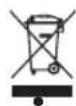
Do not dispose of this product as normal domestic waste at the end of its life, but hand it in at a collection point for the reuse of electric and electronic equipment. Look for the symbol on the product, the user instructions or the packaging showing the type of waste.
- The materials can be used as indicated. By helping us reuse and process the materials or otherwise recycle the old equipment, you will be making an important contribution towards the protection of the environment.
- Your municipality can tell you where to find the designated waste collection point in your neighbourhood.
CE DECLARATION OF CONFORMITY
This product conforms to the requirements of the following European Directives on safety:
EMC Directive 2014/30/EU
- Low Voltage Directive 2014/35/EU
RoHS Directive 2011/65/EU
R. Neyman
Quality control
OPERATION - General
The appliance is intended only for domestic use, not for professional use.
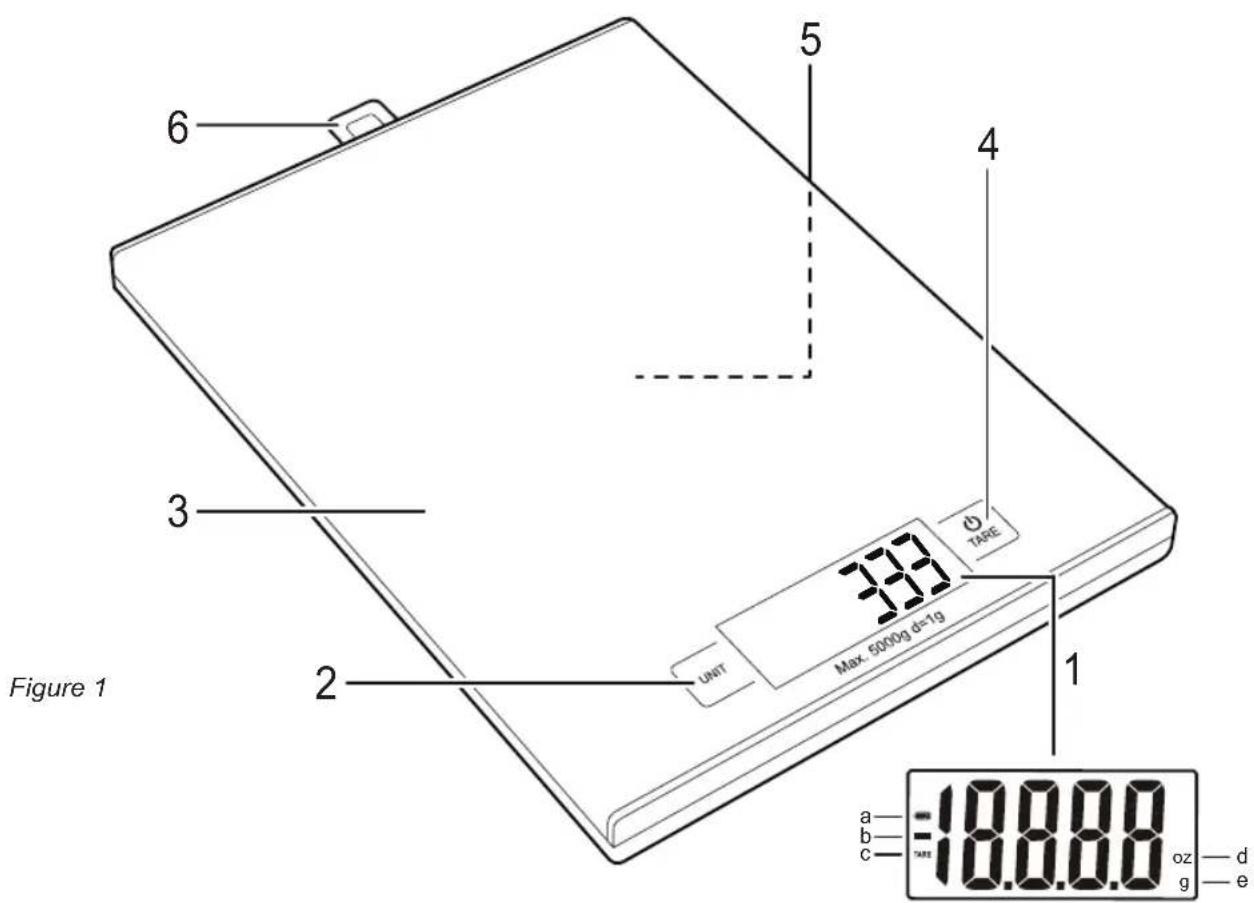
- The LCD-display shows that:
a. the battery is full or running low
b. a negative value is measured
c. the tare function is used
d. the weight is measured in ounces
e. the weight is measured in grams - Unit button
- Weighing platform
- On/Off button and Tare button for tare function
- Battery compartment (bottom side)
- Hang-up loop
Before use, two AAA batteries should be placed in the appliance.
- Open the battery compartment (figure 1, no. 5) at the bottom of the appliance, by pulling back the cap (figure 2).
- Insert the batteries (2x AAA) in the right manner. Batteries are not included.
- Close the battery compartment.
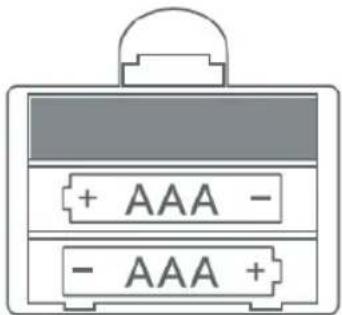
Figure 2
OPERATION - Weighing
- Place the appliance on a solid and flat surface.
- Optionally, you can place a bowl on the weighing platform (figure 1, no. 3) to add all the to be weighed goods into. Always do this before turning on the appliance.
- Turn on the appliance by pressing the On/Off button (4). Wait until the display has settled.
- Select the weighing system of your choice by pressing the Unit button (2). The display (1) alternately shows g (grams) or oz (ounces).
- Place the to be weighed goods on the weighing platform (or in the bowl). The display will now show the weight.
- You can turn off the appliance by pressing the On/Off button for about 3 seconds.
WARNING:
- You can weigh up to 5kg max.
- The backlight of the display extinguishes when the appliance hasn't been used for about 20 seconds. The appliance switches itself off after about 3 minutes. Your system choice will be remembered after switch-off.
If you want to weigh multiple goods after another without emptying the scale, you can use the tare function:
- Place the appliance on a solid and flat surface.
- Optionally, you can place a bowl on the weighing platform (figure 1, no. 3) to add all the to be weighed goods into. Always do this before turning on the appliance.
- Turn on the appliance by pressing the On/Off button (4). Wait until the display has settled.
- Place the first to be weighed goods on the weighing platform (or in the bowl). The display will now show the weight.
- Now press the Tare button (figure 1, no. 4) to reset the value in the display to zero. The display indicates that the tare function is being used.
- Repeat steps 4 and 5 until you have weighed all the goods.
- After you have removed everything from the weighing platform, the display will show a negative value. Press the Tare button to reset the value in the display to zero. The appliance is now ready to use again.
- You can turn off the appliance by pressing the On/Off button for about 3 seconds.
OPERATION - Warning signs
L0: The battery is running low. Replace the battery as soon as possible (see 'Replacing the battery').
ERR: The scale is overloaded. Remove some goods from the weighing platform to prevent damage.
UNST: The scale is placed on an unstable surface. Turn off the appliance, place it on a solid and flat surface and turn it on again.
OPERATION - Replacing the battery
- Open the battery compartment (figure 1, no. 5) at the bottom of the appliance, by pulling back the cap (figure 2).
- Remove the batteries and insert two new batteries (type AAA).
- Close the battery compartment.
CLEANING AND MAINTENANCE
This kitchen scale is a precision instrument. We advise not to load the scale with goods for a longer period of time.
Use a soft damp cloth to clean the appliance and then dry it with a soft dry cloth.
- Don't use harsh or abrasive cleaning agents or solvents.
WARRANTY CONDITIONS
Bestron offers a 60-month warranty on this equipment against defects resulting from manufacturing and/or material errors, subject to the following conditions.
- No labour or material costs will be charged during this warranty period.
- Any repairs carried out under the warranty will not extend the warranty period.
- Faulty parts, or in the event of exchange, the faulty equipment itself, will automatically become the property of Bestron.
- The warranty is valid for the first buyer only and is non-transferable.
- The warranty is not valid for damage caused by:
Accidents
- Improper use
- Wear and tear
Neglect
- Faulty installation
- Connection to a different mains voltage than indicated on the type plate
- Unauthorised changes
- Repairs carried out by unqualified third parties
- Use in violation with the applicable statutory, technical or safety standards
-
Careless transport without suitable packaging or other protection
-
Warranty cannot be claimed:
-
For damage during transport
-
If the serial number of the appliance is removed or changed
-
Items excluded from warranty are:
Cords
Lamps
Glass parts
- The warranty does not entitle the purchaser to compensation for any damage other than replacement or repair of the faulty parts. Bestron cannot in any event be held liable for any indirect or consequential losses caused by or in relation to the equipment it has provided.
- Claims under a warranty may only be submitted to your (online) retailer or directly to the Bestron Service Department. Never send items without being asked to. We may refuse the parcel and you will be liable for the costs. Contact us first and we tell you how the appliance should be packaged and sent. Each claim under a warranty must be accompanied by the relevant receipt.
SERVICE
If an unexpected problem occurs, please contact the BESTRON service department: www.bestron.com/service
COMPLIMENT!
NEED HELP?chat WITH US! WHATSAPPCUSTOMER SERVICE

BESTRON.COM/WHATSAPP


- WAT U MOET WETEN OVER DIT APPARAAT
- Defects:
- Children:
- WHAT YOU SHOULD KNOW ABOUT THIS APPLIANCE
- ENVIRONMENT
- CE DECLARATION OF CONFORMITY
- OPERATION - General
- OPERATION - Weighing
- WARNING:
- OPERATION - Warning signs
- OPERATION - Replacing the battery
- CLEANING AND MAINTENANCE
- WARRANTY CONDITIONS
- SERVICE
- COMPLIMENT!
Brand : BESTRON
Model : AKS1000S
Category : Kitchen scale