CANDY CBTD 7A1TES - Dryer

CBTD 7A1TES - Dryer CANDY - Free user manual and instructions

Find the device manual for free CBTD 7A1TES CANDY in PDF.

📄 124 pages PDF ⬇️ English EN 💬 AI Question 🖨️ Print
Notice CANDY CBTD 7A1TES - page 2
Manual assistant
Powered by ChatGPT
Waiting for your message
Product information

Brand : CANDY

Model : CBTD 7A1TES

Category : Dryer

Download the instructions for your Dryer in PDF format for free! Find your manual CBTD 7A1TES - CANDY and take your electronic device back in hand. On this page are published all the documents necessary for the use of your device. CBTD 7A1TES by CANDY.

USER MANUAL CBTD 7A1TES CANDY

Index Please read and follow these instructions carefully and operate the machine accordingly. This booklet provides important guidelines for safe use, installation, maintenance and some useful advice for best results when using your machine. Keep all documentation in a safe place for future reference or for any future owners. Please check that the following items are delivered with the appliance:● Instruction manual● Guarantee card● Energy label By placing the mark on this product, we are confirming compliance to all relevant European safety, health and environmental requirements which are applicable in legislation for this product. Check that no damage has occurred to the machine during transit. If it has, call for service by GIAS. Failure to comply with the above can compromise the safety of the appliance. You may be charged for a service call if a problem with your machine is caused by misuse.1. SAFETY REMINDERS2. PREPARING THE LOAD3. CLEANING AND ROUTINE MAINTENANCE4. WATER CONTAINER5. DOOR AND FILTER AND CONDENSER6. CONTROLS AND INDICATORS 7. SELECTING THE PROGRAMME AND SET THE FUNCTION8. TROUBLESHOOTING CUSTOMER SERVICE1. SAFETY REMINDS This appliance can be used by children aged from 8 years and above and persons with reduced physical,sensory or mental capabilities or lack of experience and knowledge if they have been given supervision or instruction concerning use of the appliance in a safe way and understand the hazards involved.Children shall not play with the appliance. Cleaning and user maintenance should not be made by children without supervision.Children of less than 3 year s should be kept away unless continuously supervised. dryer may create

This appliances is intended to be used in household and similar applications such as: - Staff kitchen areas in shops , offices and other working environments; - Farm houses - By clients in hotels, motels and o t h e r r e s i d e n t i a l t y p e environments; - Bed and breakfast type environments" A different use of this appliance from house hold environment or from typical housekeeping functions,as commercial use by expert or trained users, is excluded even in the above applications. If the appliance is used in a manner inconsistent with this it may reduce the life of the appliance and may void the manufacturer’s warranty. Any damage to the appliance or other damage or loss arising through use that is not consistent with domestic or household use ( even if located in a domestic or household environment) shall not be accepted by the manufacturer to the fullest extent permitted by law. This machine should only be used for its intended purpose as described in this manual. Ensure that the instructions for installation and use are fully understood before operating the appliance. Do not touch the applia nce when hands or feet are damp or wet. Do not lean on the door when loading the machine or use the door to lift or move the machine. Do not allow children to play with the machine or its controls.

WARNING Misuse of a tumbleDo not use the product if the fluff filter is not in position or is damaged; fluff could be ignited. Where the hot surface symbol is located the temperature rise during operation of the tumble dryer may be in excess of 60 degrees

Remove the plug from the electricity supply. Always remove the plug before cleaning the appliance. Do not continue to use this machine if it appears to be faulty. Lint and fluff must not be allowed to collect on the floor around the outside of t

machine. The final part of a tumble dryer cycle occurs without heat (cool down cycle) to ensure that the items are left at a temperature that ensures that the items will not be damaged. The tumble dryer is not to be used if industrial chemicals have been used for cleaning. Never stop a tumble dryer before the end of the drying cycle unless all items are quickly removed and spread out so that the heat is dissipated. Maximum load drying weight: see energy label.

Installation Do not use adapters, multiple connectors and/or extensions. Never install the dryer against curtains and be sure to prevent items from falling or collecting behind the dryer. The appliance must not be installed behind a lockable door, a sliding door or a door with a hinge on the opposite side to that of the tumble dryer.

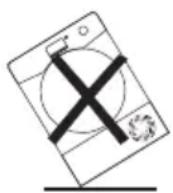
Important: During transport ensure that the dryer is in an upright position, if it's necessary you can only flip in the side shown; different side, wait at least 4 hours before switching on so that the oil c a n f l o w b a c k i n t o t h e compressor. Failure to do this could result in damage to the compressor. WARNING Do not use the p he fluff filter is not in position or is damaged; fluff could be ignited. WARNING Where the hot ymbol is located the temperature rise during operation of the tumble dryer may be in excess of 60 degrees
Remove the plug from the electricity supply. Always remove the plug before cleaning the appliance. Do not continue to use this machine if it appears to be faulty. Lint and fluff must not be allowed to collect on the floor around the outside of t

machine. The final part of a tumble dryer cycle occurs without heat (cool down cycle) to ensure that the items are left at a temperature that ensures that the items will not be damaged. The tumble dryer is not to be used if industrial chemicals have been used for cleaning.

WARNING: Never stop a tumble

e the end of the drying cycle unless all items are quickly removed and spread out so that the heat is dissipated. Maximum load drying weight: see energy label.

Installation Do not use adapters, multiple connectors and/or extensions. Never install the dryer against curtains and be sure to prevent items from falling or collecting behind the dryer. The appliance must not be installed behind a lockable door, a sliding door or a door with a hinge on the opposite side to that of the tumble dryer.

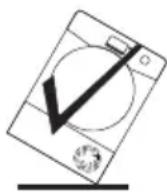
Important: During transport ensure that the dryer is in an upright position, if it's necessary you can only flip in the side shown; Caution: If the product is in before switching on so that the oil c a n f l o w b a c k i n t o t h e compressor. Failure to do this could result in damage to the compressor. WARNING Do not use the product if the fluff filter is not in position or is damaged; fluff could be ignited. WARNING Where the hot mbol is located the temperature rise during operation of the tumble dryer may be in excess of 60 degrees Remove the plug from the electricity supply. Always remove the plug before cleaning the appliance. Do not continue to use this machine if it appears to be faulty. Lint and fluff must not be allowed to collect on the floor around the outside of t
machine. The final part of a tumble dryer cycle occurs without heat (cool down cycle) to ensure that the items are left at a temperature that ensures that the items will not be damaged. The tumble dryer is not to be used if industrial chemicals have been used for cleaning.

WARNING: Never stop a tumble

dryer before the end of the drying cycle unless all items are quickly removed and spread out so that the heat is dissipated. oad drying weight: see energy label.

Installation Do not use adapters, multiple connectors and/or extensions. Never install the dryer against curtains and be sure to prevent items from falling or collecting behind the dryer. The appliance must not be installed behind a lockable door, a sliding door or a door with a hinge on the opposite side to that of the tumble dryer.

Important: During transport ensure that the dryer is in an upright position, if it's necessary you can only flip in the side shown; Caution: If the product is in different side, wait at least 4 hours before switching on so that the oil c a n f l o w b a c k i n t o t h e compressor. Failure to do this compressor. WARNING Do not use the product if the fluff filter is not in position or is damaged; fluff could be ignited. WARNING Where the hot surface symbol is located the temperature rise during operation of the tumble dryer may be in excess of 60 degrees

Remove the plug from the electricity supply. Always remove the plug before cleaning the appliance. Do not continue to use this machine if it appears to be faulty. Lint and fluff must not be allowed to collect on the floor around the outside of t

machine. The final part of a tumble dryer cycle occurs without heat (cool down cycle) to ensure that the items are left at a temperature s that the items will not be damaged. The tumble dryer is not to be used if industrial chemicals have been used for cleaning.

WARNING: Never stop a tumble

dryer before the end of the drying cycle unless all items are quickly removed and spread out so that the heat is dissipated. Maximum load drying weight: see energy label.

Installation Do not use adapters, multiple connectors and/or extensions. Never install the dryer against curtains and be sure to prevent items from falling or collecting behind the dryer. The appliance must not be installed behind a lockable door, a sliding door or a door with a hinge on the opposite side to that of the tumble dryer.

Important: During transport ensure that the dryer is in an upright position, if it's necessary you can only flip in the side shown; Caution: If the product is in different side, wait at least 4 hours before switching on so that the oil c a n f l o w b a c k i n t o t h e compressor. Failure to do this could result in damage to the compressor. WARNING Do not use the product if the fluff filter is not in position or is damaged; fluff could be ignited. WARNING Where the hot surface symbol is located the temperature rise during operation of the tumble dryer may be in excess of 60 degrees

Remove the plug from the electricity supply. Always remove the plug before cleaning the appliance. Do not continue to use this machine if it appears to be faulty. Lint and fluff must not be allowed to collect on the floor around the outside of t

machine. The final part of a tumble dryer s without heat (cool down cycle) to ensure that the items are left at a temperature that ensures that the items will not be damaged. The tumble dryer is not to be used if industrial chemicals have been used for cleaning.

WARNING: Never stop a tumble

dryer before the end of the drying cycle unless all items are quickly removed and spread out so that the heat is dissipated. Maximum load drying weight: see energy label.

Installation Do not use adapters, multiple connectors and/or extensions. Never install the dryer against curtains and be sure to prevent items from falling or collecting behind the dryer. The appliance must not be installed behind a lockable door, a sliding door or a door with a hinge on the opposite side to that of the tumble dryer.

Important: During transport ensure that the dryer is in an upright position, if it's necessary Caution: If the product is in different side, wait at least 4 hours before switching on so that the oil c a n f l o w b a c k i n t o t h e compressor. Failure to do this could result in damage to the compressor. WARNING Do not use the product if the fluff filter is not in position or is damaged; fluff could be ignited. WARNING Where the hot surface symbol is located the temperature rise during operation of the tumble dryer may be in excess of 60 degrees

Remove the plug from the electricity supply. Always remove the plug before cleaning the appliance. Do not continue to use this machine if it appears to be faulty. fluff must not be allowed to collect on the floor around the outside of t

machine. The final part of a tumble dryer cycle occurs without heat (cool down cycle) to ensure that the items are left at a temperature that ensures that the items will not be damaged. The tumble dryer is not to be used if industrial chemicals have been used for cleaning.

WARNING: Never stop a tumble

dryer before the end of the drying cycle unless all items are quickly removed and spread out so that the heat is dissipated. Maximum load drying weight: see energy label.

Installation Do not use adapters, multiple connectors and/or extensions. Never install the dryer against curtains and be sure to prevent items from falling or collecting behind the dryer. The appliance must not be installed behind a lockable door, a sliding door or a door with a hinge on the opposite side to that of the tumble dryer.

Important: During transport ensure that the dryer is in an upright position, if it's necessary you can only flip in the side shown; Caution: If the product is in different side, wait at least 4 hours before switching on so that the oil c a n f l o w b a c k i n t o t h e compressor. Failure to do this could result in damage to the compressor. WARNING WARNING WARNING CAUTION:

,I WKH SURGXFW LV LQ

by hair care products be placed in a washer dryer they should first be washed in hot water with extra detergent - this will reduce, but not eliminate, the hazard. Remove all objects from pockets such as lighters and matches. To consult the product technical specification please refer to the manufacturer website.

Before cleaning or maintaining the washing machine, unplug the appliance and turn off the water tap. Make sure the electrical system

earthed . Otherwise, seek qualified professional assistance. Please do not use converters, multiple sockets or extension cords.

Make sure there is no water in the drum before opening the door. Do not pull on the power cord or appliance to unplug the machine. Do not expose the washing machine to rain, direct sunlight or other weather elements. Protect from possible freezing. When moving, do not lift the washing machine by the knobs or detergent drawer; during transport, never rest the door on the trolley. We recommend two people lift the washing machine. In the event of fault and/or malfunction, turn off the washing machine, close the water tap and do not tamper with the appliance. Immediately contact the Customer Service Centre and only use original spare parts. Failure to observe these instruction may jeopardise appliance safety.

By placing the mark on this product, we are confirming compliance to all relevant European safety, health and environmental requirements which are applicable in legislation for this product.

water may reach very high temperatures during the wash cycle.

,WHPV WKDW KDYH EHHQ VRLOHG

ZLWK VXEVWDQFHV VXFK DV

FRRNLQ LO DFHWRQH DOFRKROJ R

WKHWXPEOHGU\HULVORFDWHGWR

GXULQJ RSHUDWLRQ RI WKH

1(9(5EH S XW L Q W KLV P DFKLQH PXVWQRWEHREVWUXFWHG

:$51,1* 'R QRW WXPEOH GU\

,WHPV WKDW KDYH EHHQ VRLOHG

ZLWK VXEVWDQFHV VXFK DV

FRRNLQ LO DFHWRQH DOFRKROJ R

WKHWXPEOHGU\HULVORFDWHGWR

GXULQJ RSHUDWLRQ RI WKH

Release the power chord and drain hose from the securing clip at the rear of the machine. Remove the 2 or 4 transportation screws (A) on the back and remove the 2 or 4 flat washers, rubber bungs and plastic spacer tubes (B) as illustrated in figure 1. If the washing machine is built- in, unscrew the 3 or 4 transportation screws (A) and remove the 3

4 flat washers, rubber bungs and plastic spacer tubes (B).

During the removal of the screws occasionally spacer tubes fall inside the product, these can be remove by tilting the product forward and recovering them from the floor or inside the base of the machine.

Cover the open transportation screw holes with the 2 or 4

plastic caps included in the instruction bag.

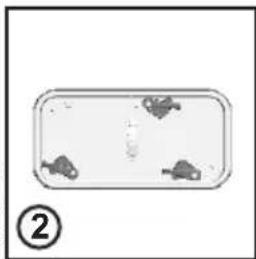
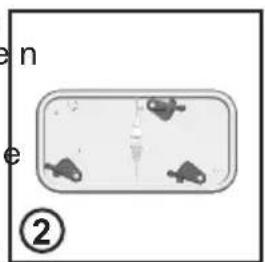
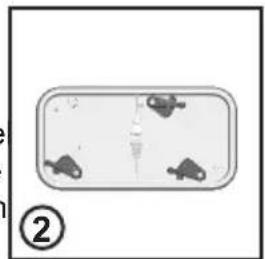
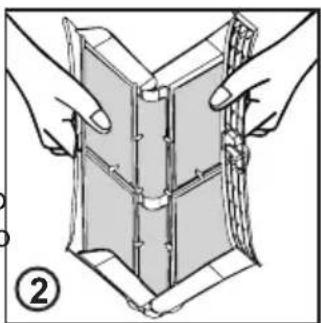
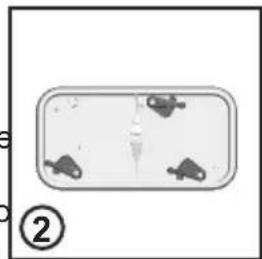
Place the corrugated plastic sheet, found on top of the appliance during the unpacking process, into the base of the appliance as shown in figure 2

(according to the model, consider version A, B or C).

keep packaging materials away from children. 'RQRWLQVWDOOWKHSURGXFWLQD

IUHH]LQJ SRLQW WKH SURGXFW PD\

RSHUDWLQJ LQ FROG FRQGLWLRQ

LW PXVW EH UHSODFHG E\ WKH

IUHH]LQJ SRLQW WKH SURGXFW PD\

RSHUDWLQJ LQ FROG FRQGLWLRQ

LW PXVW EH UHSODFHG E\ WKH

Connect the water hose to the water supply tap (fig. 3) only using the hose supplied with the appliance (do not reuse old hose-sets).

Some models may include one or more of the following features: HOT&COLD (fig. 4): water mains connection settings with hot and cold water for higher energy savings. Connect the grey tube to the cold water tap and the red one to the hot water tap. The machine can be connected to the cold water tap only: in this case, some programs may start a few minutes later. AQUASTOP (fig. 5): a device located on the supply tube that stops water flow if the tube deteriorates; in this case, a red mark will appear in the window “A” and the tube must be replaced. To unscrew the nut, press the one-way lock device "B".

AQUAPROTECT – SUPPLY TUBE WITH

GUARD (fig. 6): Should water leak from the primary internal tube "A", the transparent containment sheath "B" will contain water to permit the washing cycle to complete. At the end of the cycle, contact the Customer Service Centre to replace the supply tube. The washing machine should be installed in its final position such that the water fill hose is not kinked or trapped. The corrugated drain hose should be inserted into suitable drain pipe of between 50 cm and 85 cm height above the floor using the curved drain hose support. If an under sink connection is used the drain hose must be routed above the sink overfill opening to prevent back siphoning. Care must be taken to avoid kinking or trapping the drain hose (fig. 7).

Hydraulic connections Setting

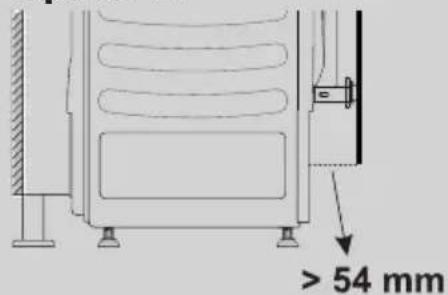
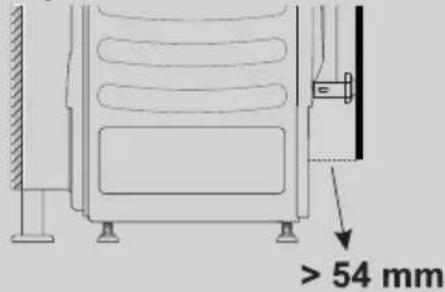
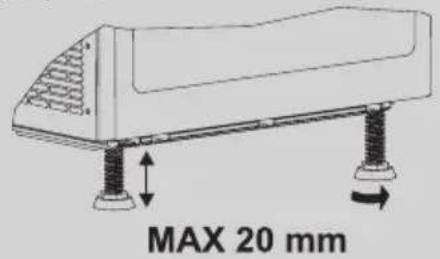
Regulate the height of the dryer The 4 adjustable feet allow the height of the dryer to be adjusted from 827 mm to a maximum of 847 mm . To adjust the height, you should rotate the adjustable feet, ensuring that the machine is level (figure 1). Note : we suggest to Put the dryer at the maximum height possible in order to avoid tilting, lefting at least 5mm from the top of the furniture. Before to fix the hinges it’s necessary to determinate the depth of the dryer from the front part of the kitchen accordingly with the dept of the kick plate (check picture) and chose the right installation option (figure 2).

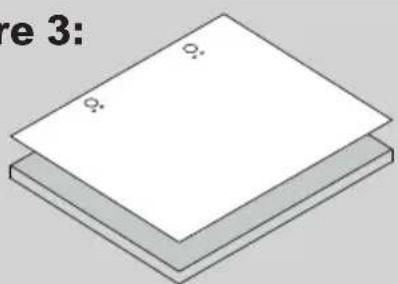
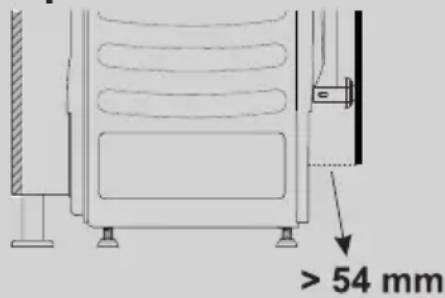
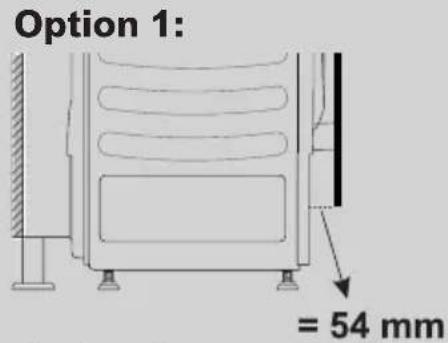
he position of the plinth of the dryer is set back less than 54 mm from the front of the furniture. Position the template onto the reverse of the furniture door. It is possible to mount the hinges and closure magnet on the right or left-hand side depending on your requirements. Mark the screw hole positions, then drill out these positions (figure 3).

Figure 3: We suggest mounting the furniture door so that it opens towards the left, same direction as the porthole door. Instructions for mounting the furniture door consider the thickness of the kickplate of the kitchen

Regulate the height of the dryer

The 4 adjustable feet allow the height of the dryer to be adjusted from 827 mm to a maximum of 847 mm . To adjust the height, you should rotate the adjustable feet, ensuring that the machine is level (figure 1).

dryer at the maximum height possible in order to avoid tilting, leaving at least 5mm from the top of the furniture.

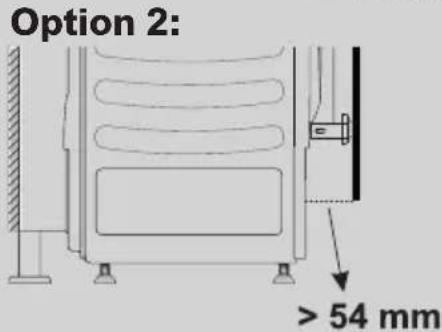
Before fixing the hinges it’s necessary to determine the depth of the dryer from the front part of the kitchen according to the depth of the kick plate (check picture) and chose the right installation option (figure 2). Option 1 The position of the plinth of the dryer is set back less than 54 mm from the front of the furniture. Position the template onto the reverse of the furniture door. It is possible to mount the hinges and closure magnet on the right or left-hand side depending on your requirements. Mark the screw hole positions, then drill out these positions (figure 3).

Figure 1: Figure 2: Option 1: Option 2: Figure 3: Instructions for mounting the furniture door Note: That distance don’t consider the thickness of the kickplate of the kitchen.
IUHH]LQJ SRLQW WKH SURGXFW PD\

RSHUDWLQJ LQ FROG FRQGLWLRQ

LW PXVW EH UHSODFHG E\ WKH

Note : we suggest to put the distance Note: That does not

evel the appliance using the feet as illu strated in figure 8:

urn the nut clockwise to release the scr ew; b. rotate the foot to raise or lower it until it touches to the floor;

lock the foot, screwing in the nut, until it

The det ergent draw is split into 3

ompartments as illustrated in figure 9:

com partment "1": for prewash detergent;

for special additives,

ofteners, starch fragrances, etc.;

com partment "2": for washing detergent. liquid detergent cup is also included

This way, liquid detergent will only enter the drum at the

ght time. T he c up can also be used for bleach when the “Rinse” program is

ARNING: contact the Customer Service Centre should the power cord need replacement.

ARNING: only use liquid products; the washing machine is set to automatically dose additives at each cycle during the last rinse.

ARNING: some detergents are hard to remove. In this case we recommend using the specific container to be placed in the drum (example in figure 11).

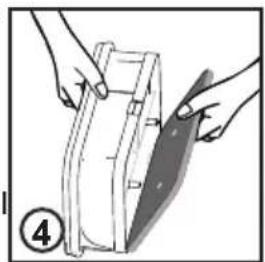
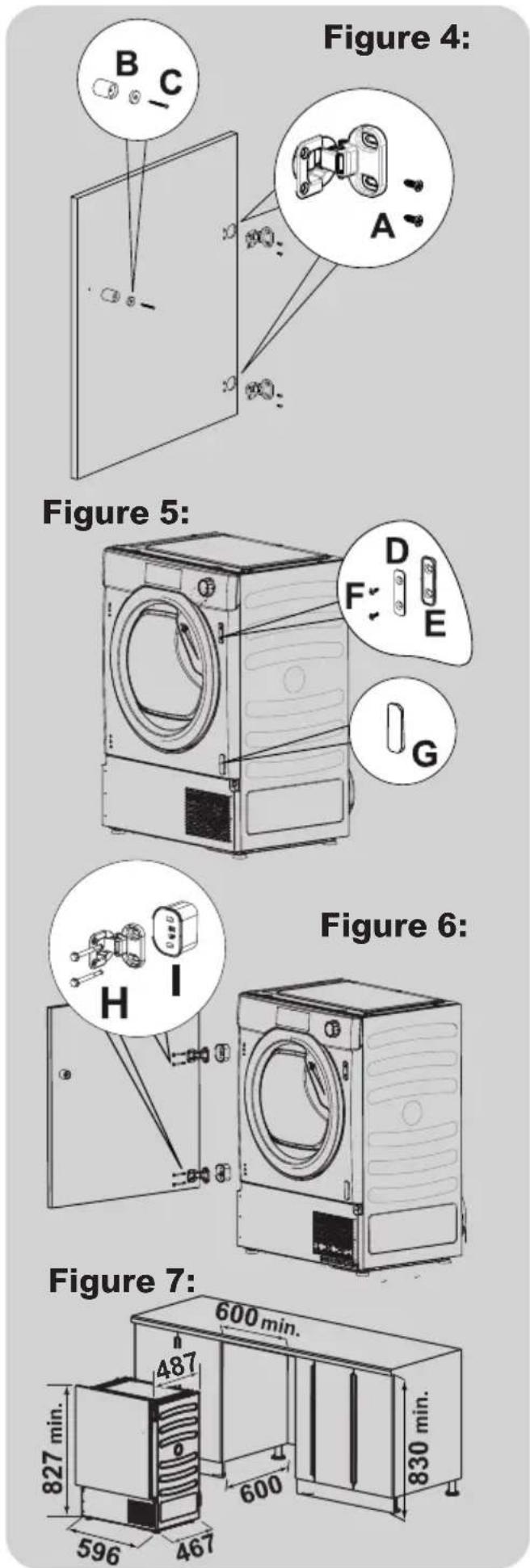
Fix the hinges in place (on the door) with the 4 screws provided (A) (figure 4).

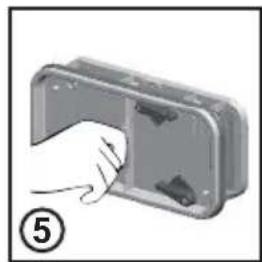
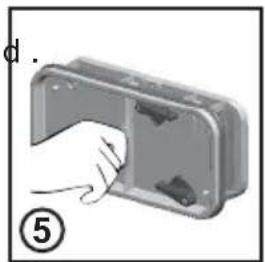
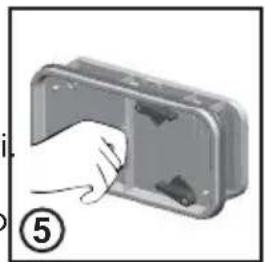
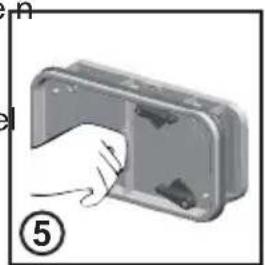
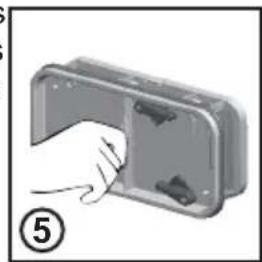
Mount the plate (D) on the right or left- hand side, depending on your installation requirements (figure 5).

Place the plastic support (E) under the plate and fix it in posit ion with screw (F) (figure 5)

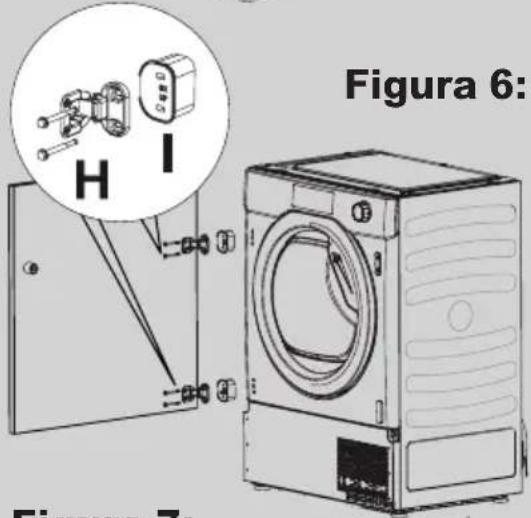
Mount the furniture door to the front of the dryer using the hinges. Place the spacers under the hinges (I) (figure 6)

and then fix in posit ion with screw (H).

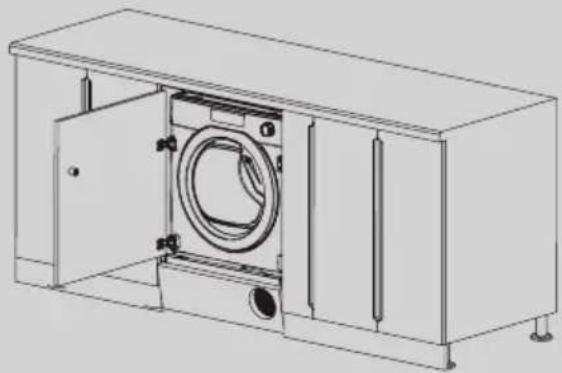
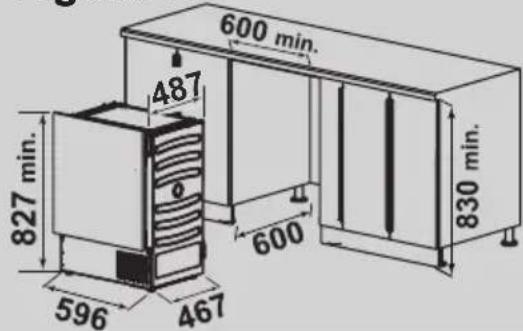
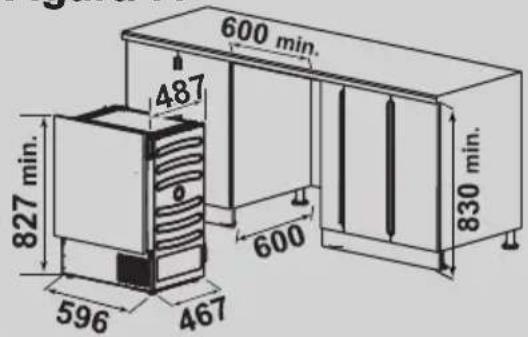
Slide the dryer into an opening of the size indicated in the diagram (figure 7). Figure 4: Figure 5: Figure 6: Figure 7
Fix the hinges in place (on the door) with the 4 screws provided (A) (figure 4).

Mount the plate (D) on the right or left- hand side, depending on your installation requirements (figure 5).

Place the plastic support (E) under the plate and fix it in posit ion with screw (F) (figure 5)

Mount the furniture door to the front of the dryer using the hinges. Place the spacers under the hinges (I) (figure 6)

and then fix in posit ion with screw (H).

Slide the dryer into an opening of the size indicated in the diagram (figure 7).

Figure 4: Figure 5: Figure 6: Figure 7

QRWLQVWDOOWKHSURGXFWLQD

IUHH]LQJ SRLQW WKH SURGXFW PD\

RSHUDWLQJ LQ FROG FRQGLWLRQ

LW PXVW EH UHSODFHG E\ WKH

CTICAL TIPS ARNING: when sorting laundry, make sure: have eliminated metallic objects such as hair clips, pins, coins, from laundry; to have buttoned pillow cases, closed zips, tied loose belts and long robe ribbons; to have removed rollers, hooks or clips from curtains; to have carefully read clothing washing labels; to have removed any persistent stains using specific detergents.

hen washing rugs, bedcovers or other heavy clothing, we recommend you avoid the spinning cycle.

To w ash wool, make sure the item can be machine washed. Check the fabric label. guide environmentally friendly and economic use of your appliance. aximise The Load Size

chieve the best use of energy, water, detergent and time by using the recommended maximum load size. Save up to 50% energy by washing a full load instead of 2 half loads. o you need to pre-wash?

For heavily soiled laundry only! SAVE detergent, time, water and between 5 to 15% energy consumption by NOT selecting Prewash for slight to normally soiled laundry.

ied in stains in water before washing to Fol lowing is a quick guide with tips and recommendations on detergent use at the various temperatures. In any case, always read the instructions on the detergent for correct use and doses. Loa d tips

elpful suggestions for the user

hen washing heavily soiled whites, we recommend using cotton programs of 60°C or above and a normal washing powder (heavy duty) that contains bleaching agents that at

Option 2 the position of the plinth is set back more than 55 mm from the front of the furniture. Note: components not supplied -hinges -supports -door stop

Firstly , slide the dryer into an opening of the size indicated in the diagram (figure 7). Note: As soon as the hinges are fixed on the furniture is not possible to slide IN/OUT the dryer.

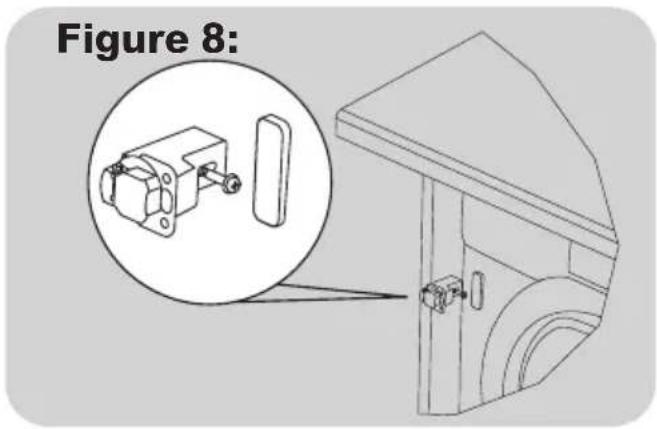
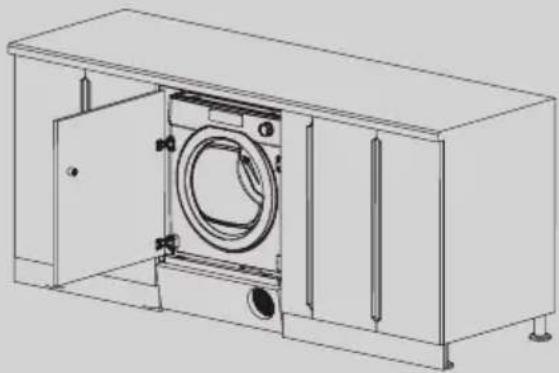
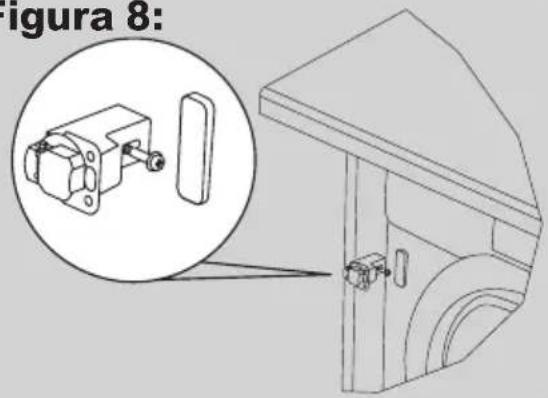
Fix the door to the furniture with standard hinges and supports (not supplied) and stop the door with a std hook (not supplied) (figure 8).

Now it ’s possible to fix the hinges to the door of the furniture.

Use the N° 4 mount caps (G) to cover all the holes on the front panel of the dry er.

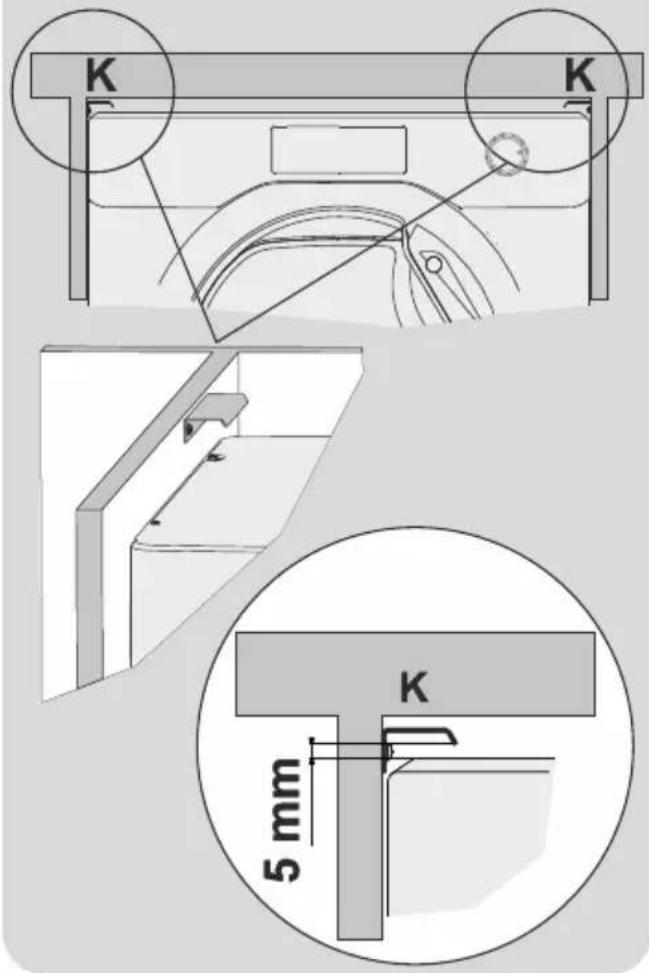
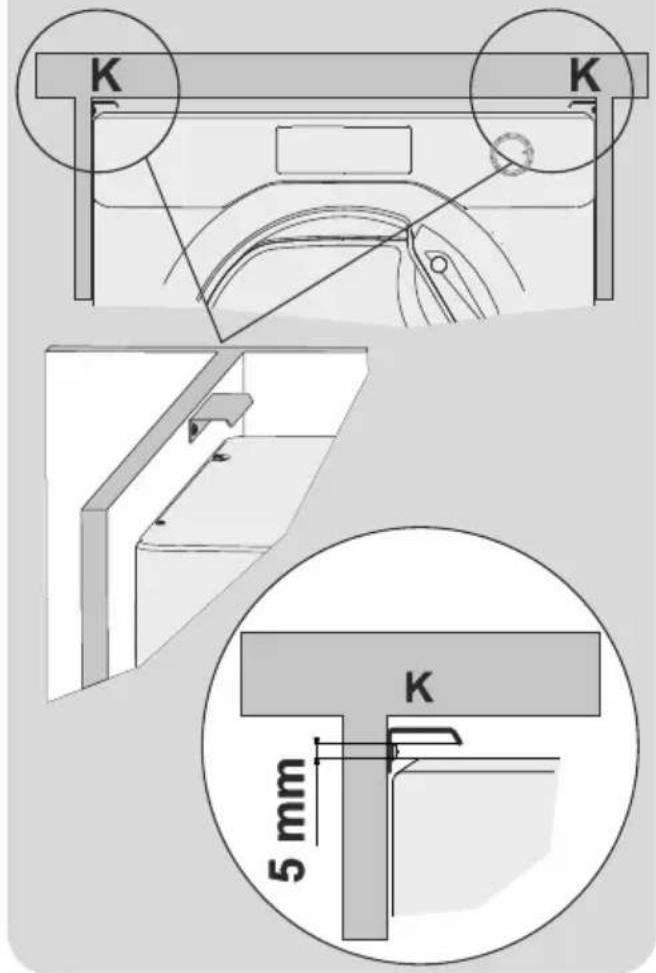
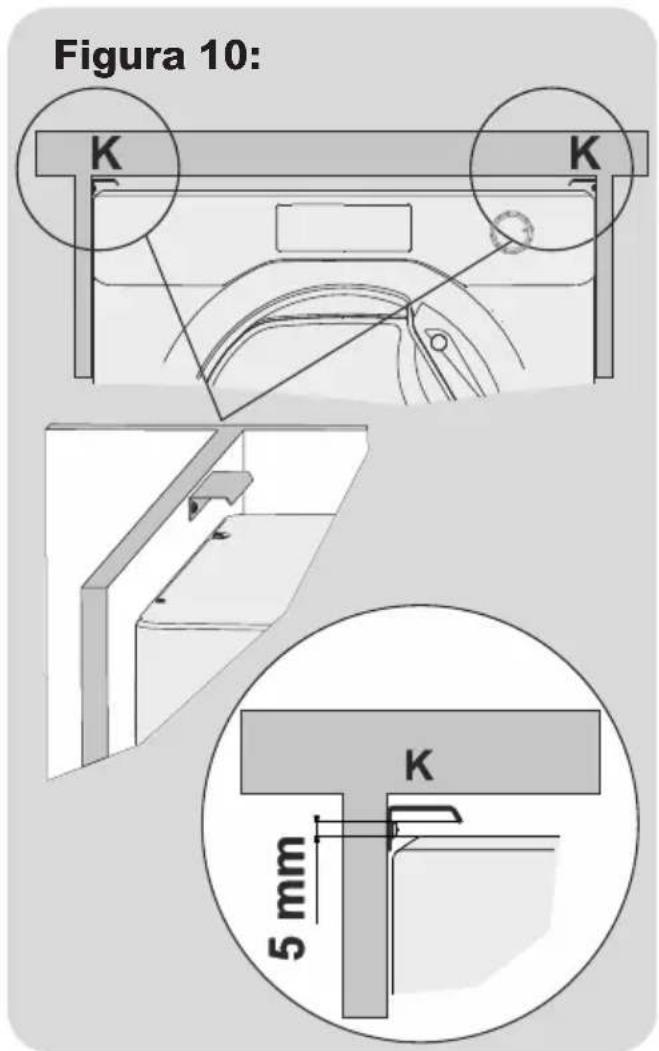
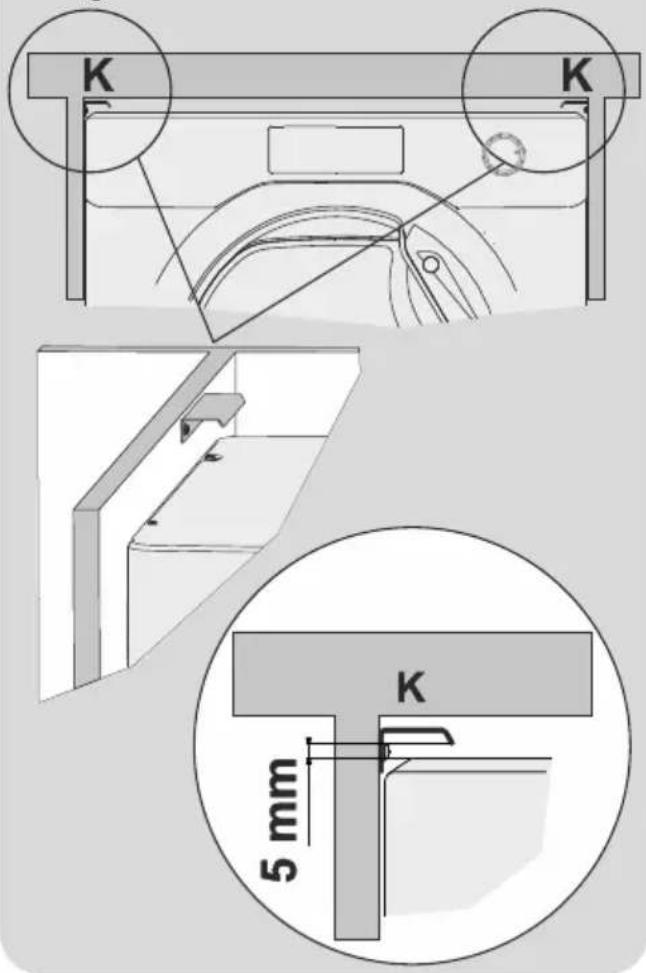
If the distance from the top of of the dryer and the Top of the furniture is more than 10 mm,

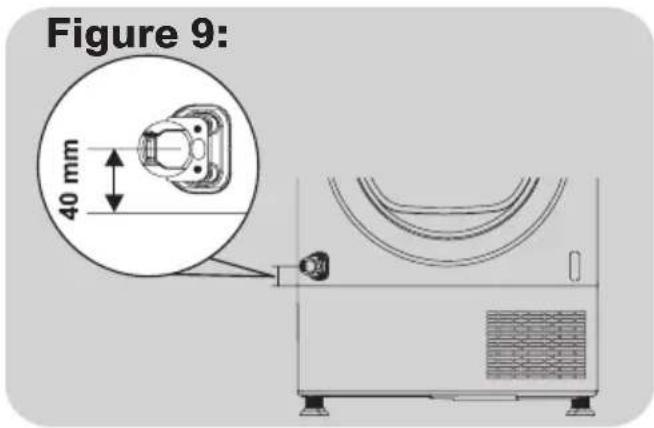
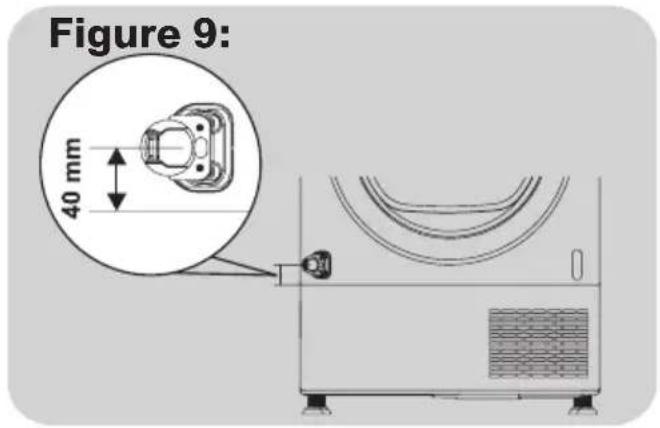
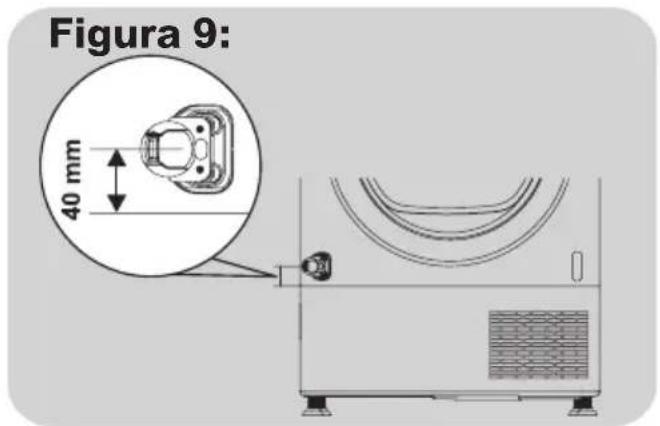
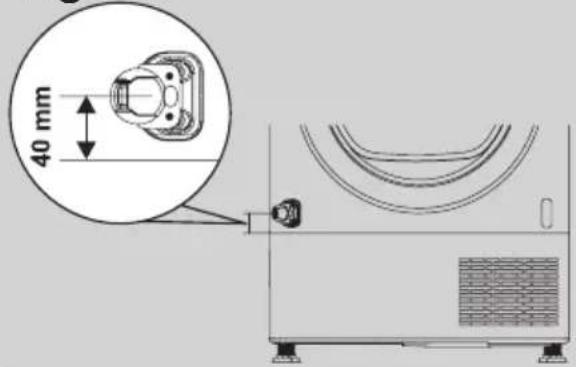
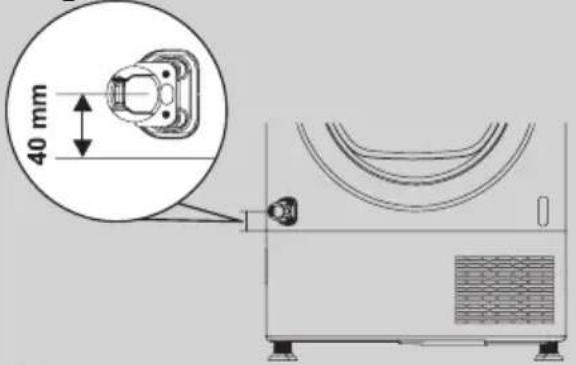
Pay attenti on to position the bottom hinge 40 mm above the kick plate in order to facilitate its removal (figure 9).

Option 2 the position of the plinth is set back more than 55 mm from the front of the furniture. Note: c omponents not supplied -hinges -supports -door stop

Firstly , slide the dryer into an opening of the size indicated in the diagram (figure 7). Note: As soon as the hinges are fixed on the furniture it is not possible to slide the dryer in and out.

Fix the door to the furniture with standard hinges and supports (not supplied) and stop the door with a std hook (not supplied) (figure 8).

Now it ’s possible to fix the hinges to the door of the furniture.

Use the N° 4 mount caps (G) to cover all the holes on the front panel of the dry er. GENERA

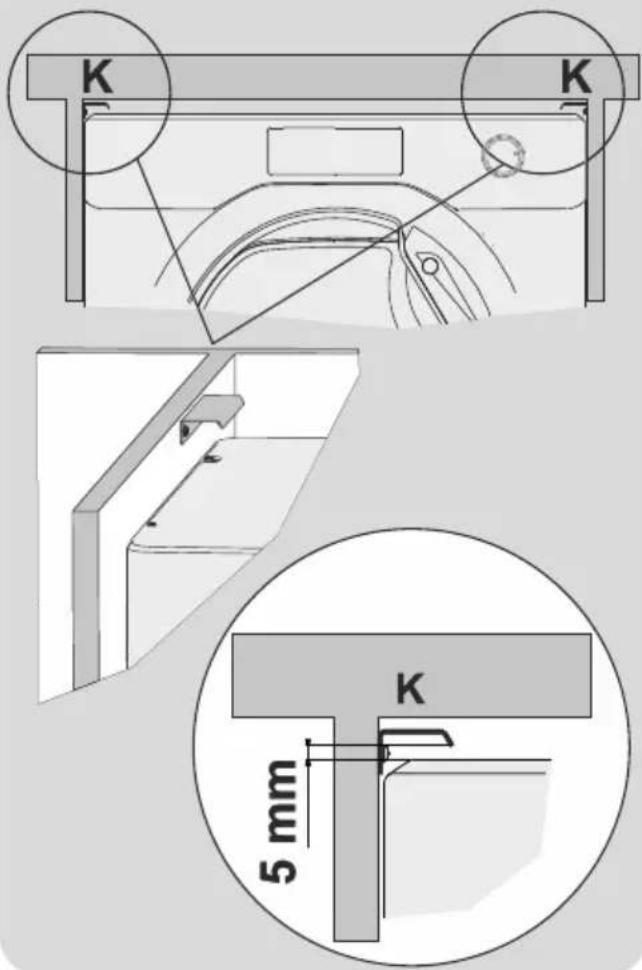
of the dryer and the top of the furniture is more than 10 mm, possible tilting (figure 10).

Pay attenti on to position the bottom hinge 40 mm above the kick plate in order to facilitate its removal (figure 9).

SUHYHQW FKLOGUHQ VKXWWLQJ WKHPVHOYHV LQ

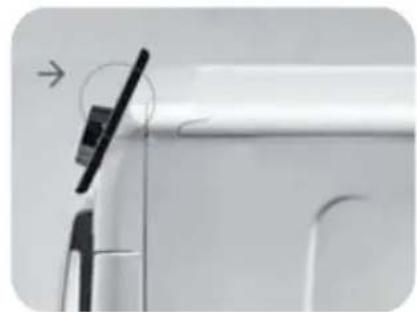
the distance between the top fix the N° 2 L metal brackets (K) to the furniture sides , to avoid Figure 10:

CLEANING To clean the washing machine exterior, use a damp cloth, avoiding abrasives, alcohol and/or solvents. To maintain a good wash performance we recommend that the soap drawer and pump filters are regularly cleaned. A monthly service wash, using a proprietary cleaner is also recommended.

We recommend you clean the drawer to avoid accumulating detergent and additive residue. To do this, extract the drawer using slight force, clean it with running water and reinsert it in its housing. Ensure the siphon cap is correctly refitted.

The washing machine comes with a special filter able to trap large residue, such as buttons or coins, which could clog the drain. ONLY AVAILABLE ON CERTAIN MODELS: pull out the corrugated hose, remove the stopper and drain the water into a container. Ensure all the water has been emptied from the drum. Before unscrewing the filter, we recommend you place an absorbent cloth under it to keep the floor dry. A small amount of water will come out of the filter as you remove it - this is normal. Turn the filter counter-clockwise to the limit stop. Remove and clean the filter; when finished, replace it turning it clockwise. The filter handle will be locked when it is not possible to turn any further and the handle is horizontal. Smearing a small amount of liquid soap on the filter seal will help refitting. Repeat the previous steps in reverse order to reassemble all parts. Should the washing machine be stored in an unheated room for a long period of time, drain all water from tubes. Unplug the washing machine. Detach the tube from the drainage system and clip on the rear of the machine and lower it, fully draining water into a bowl. Secure the drain tube with the drainage system and clip on the rear of the machine when finished. Keep the door glass and gasket clean. Drawer cleaning Filter cleaning Suggestions for moves or prolonged disuse The manufacturers warranty only covers faults within the product of a mechanical or electrical nature

Faults caused by handling, installation or miss use are not covered and may incur a charge for any repair visit to resolve.

CLEANING To clean the washing machine exterior, use a damp cloth, avoiding abrasives, alcohol and/or solvents. To maintain a good wash performance we recommend that the soap drawer and pump filters are regularly cleaned. A monthly service wash, using a proprietary cleaner is also recommended.

We recommend you clean the drawer to avoid accumulating detergent and additive residue.

To do this, extract the drawer using slight force, clean it with running water and reinsert it in its housing.

Ensure the siphon cap is correctly refitted.

The washing machine comes with a special filter able to trap large residue, such as buttons or coins, which could clog the drain.

ONLY AVAILABLE ON CERTAIN MODELS: pull out the corrugated hose, remove the stopper and drain the water into a container.

Ensure all the water has been emptied from the drum.

Before unscrewing the filter, we recommend you place an absorbent cloth under it to keep the floor dry. A small amount of water will come out of the filter as you remove it - this is normal.

Turn the filter counter-clockwise to the limit stop. Remove and clean the filter; when finished, replace it turning it clockwise. The filter handle will be locked when it is not possible to turn any further and the handle is horizontal. Smearing a small amount of liquid soap on the filter seal will help refitting. Repeat the previous steps in reverse order to reassemble all parts.

Should the washing machine be stored in an unheated room for a long period of time, drain all water from tubes. Unplug the washing machine. Detach the tube from the drainage system and clip on the rear of the machine and lower it, fully draining water into a bowl. Secure the drain tube with the drainage system and clip on the rear of the machine when finished. Keep the door glass and gasket clean.

Drawer cleaning Filter cleaning Suggestions for moves or prolonged disuse

The manufacturers warranty only covers faults within the product of a mechanical or electrical nature

Faults caused by handling, installation or miss use are not covered and may incur a charge for any repair visit to resolve.

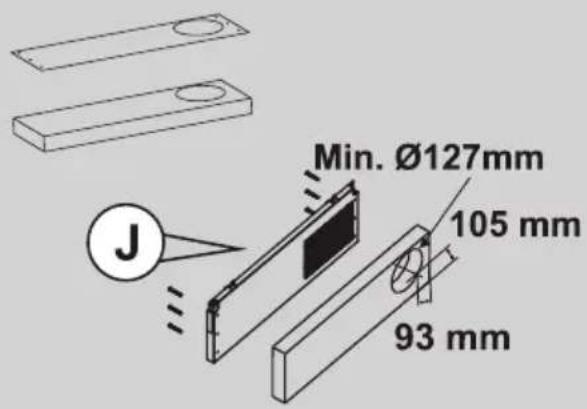
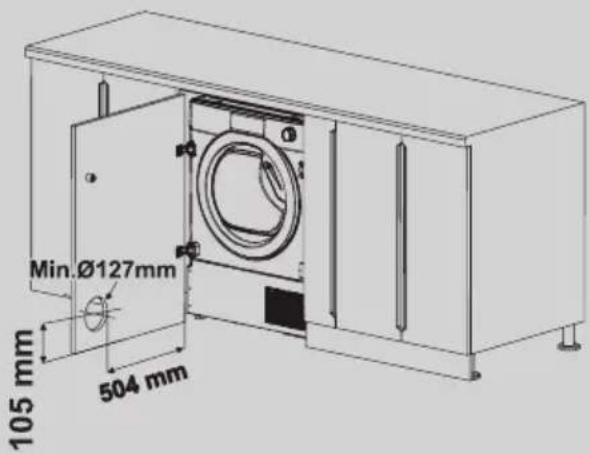
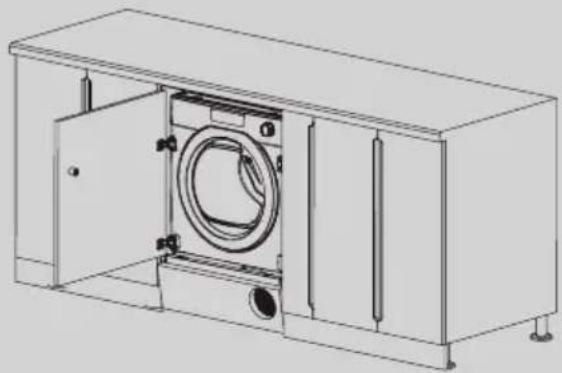
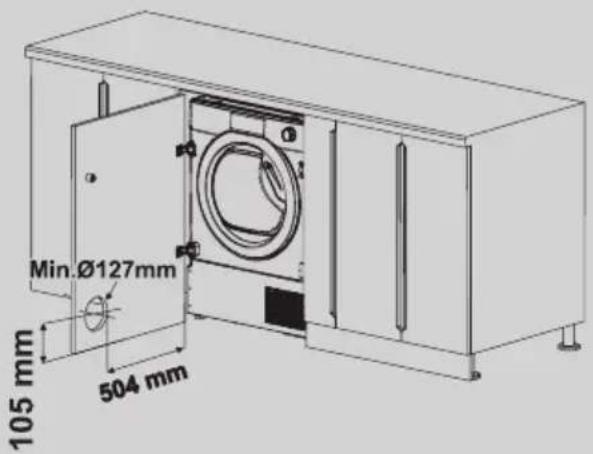
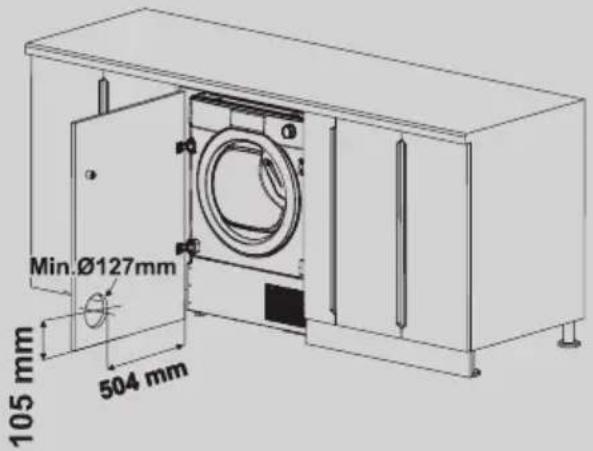
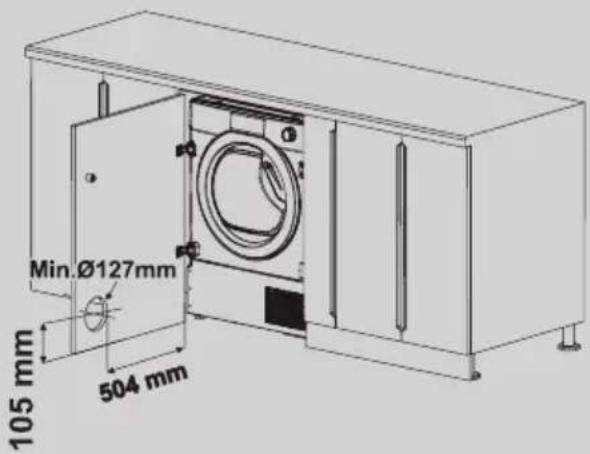
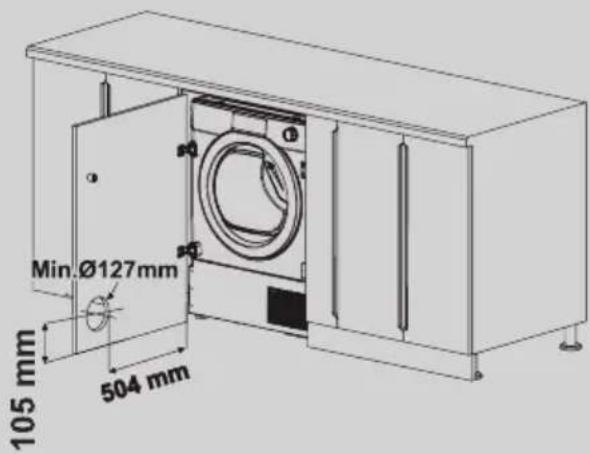
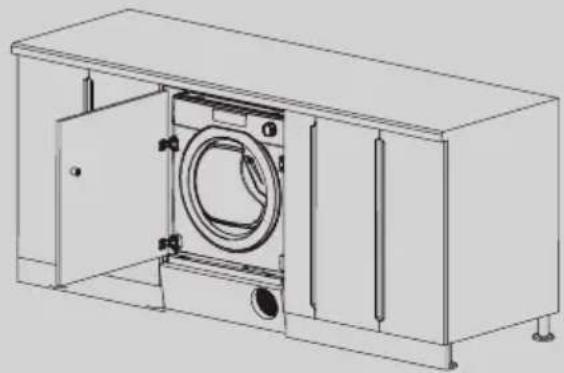
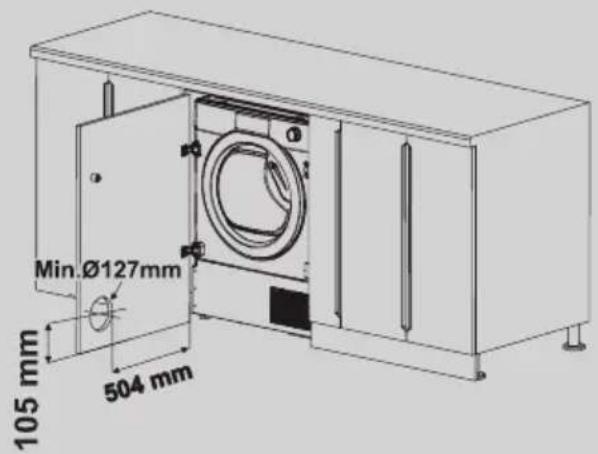
A furniture plinth may be run across the front of the dryer, but its height will be dictated by the front kickplate. Plinth must have ventilation slots (min. Side/diameter 127mm hole) according to the dimensions on fixing template. If the plinth is not high enough to accommodate the whole hole, cut only part of it.

reverse of plinth. Mark the screw hole positions, then drill out these positions (figure 11). Fix the plinth to the kickplate using 6 screws provided. (J) Note : it’s possible only some types of kickplate (eg. wood or plastic) . We suggest to check with the kitcken supplier. Fix the kickplate to the dryer.

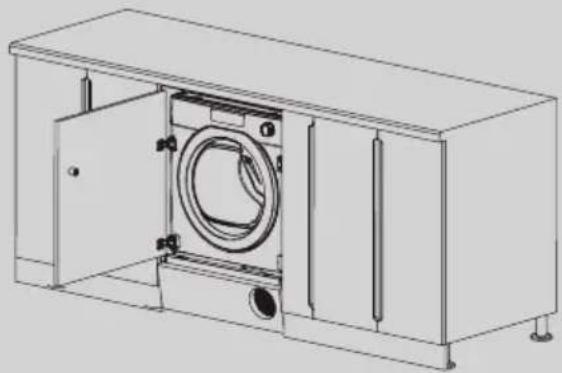
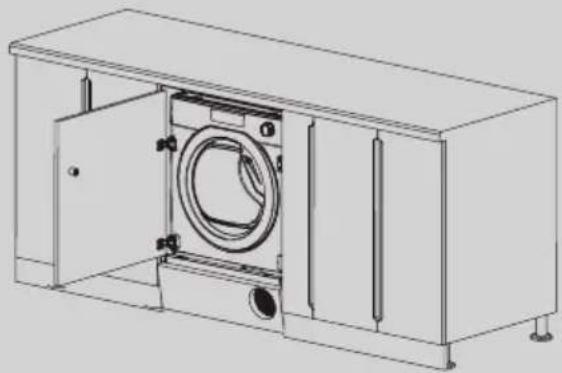
In case of using full door, door must have min. Ø127mm hole across the slots of kickplate (figure 12).

Figure 11: Figure 12:

WITHOUT the airflow ventilation hole in the furniture door/plinth we cannot guarantee the correct functionality of the appliance.

A furniture plinth may be run across the front of the dryer, but its height will be dictated by the front kickplate. Plinth must have ventilation slots (min. Side/diameter 127mm hole) according to the dimensions on fixing template. If the plinth is not high enough to accommodate the whole hole, cut only part of it. Place the template onto the reverse of plinth. Mark the screw hole positions, then drill out these positions (figure 11). Fix the plinth to the kickplate using 6 screws provided. (J) Note : it’s possible only some types of kickplate (eg. wood or plastic) . We suggest to check with the kitcken supplier. Fix the kickplate to the dryer. In case of using full door, door must have min. Ø127mm hole across the slots of kickplate (figure 12). Figure 11:Figure 12:

WITHOUT the airflow ventilation hole in the furniture door/plinth we cannot guarantee the correct functionality of the appliance.

This washing machine automatically adjusts the level of the water to the type and quantity of washing. This system gives a reduction in energy consumption and a saving in washing times.

Turn on the washing machine and select the required program. Adjust the washing temperature if necessary and press the required "option" buttons.

Press the START/PAUSE button to start washing. At the end of the programme, the message "End" will appear on the display or, on some models, all wash stage indicator lights will turn on.

Turn off the washing machine. For any type of wash, see the program table and follow the operating sequence as indicated.

Water pressure: min 0.05 Mpa / max 0.8 Mpa (0.05 MPa dispenses approximately 1 litre of water in 10 seconds) Spin r.p.m.: See rating plate. Power input / Power current fuse amp / Supply voltage: See rating plate.

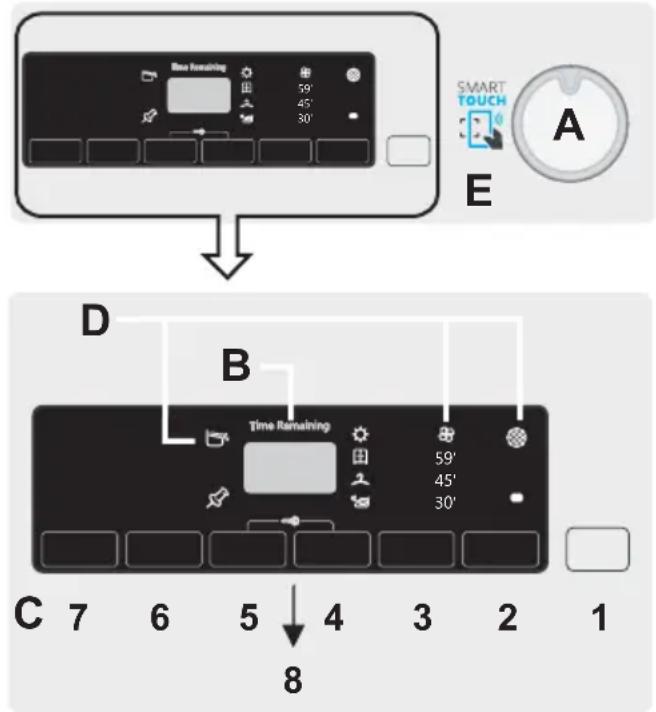
A Programme selector with OFF position

Program selection DRYING If you would like the drying cycle to begin automatically after washing, select the programme required using the DRYING SELECTION button. Or you can finish the wash and then select the drying programme and

load size. Wait until the DOOR LOCKED light has gone out before opening the door. Technical data

Press the START/PAUSE button to start the selected cycle. Once a programme is selected the programme selector remains stationary on the selected programme till cycle ends. "End" will appear in the display at the end of the program and the DOOR LOCKED light will go off, it is now possible to open the door. Switch off the washing machine by turning the selector to OFF.

Press to start the selected cycle.

ADD OR REMOVE ITEMS AFTER THE

PROGRAMMES HAS STARTED (PAUSE) Press and hold the START/PAUSE button for about 2 seconds (some indicator light and the time remaining indicator will flash, showing that the machine has been paused). Wait until the DOOR LOCKED light has gone out before opening the door. After you have added or removed items, close the door and press the START/PAUSE button (the programme will start from where it left off).

CANCELLING THE PROGRAMME

To cancel the programme, set the selector to the OFF position. Wait 2 minutes until the safety device unlocks the door. This button allows you to pre-programme the wash cycle to delay the start of the cycle for up to 24 hours.

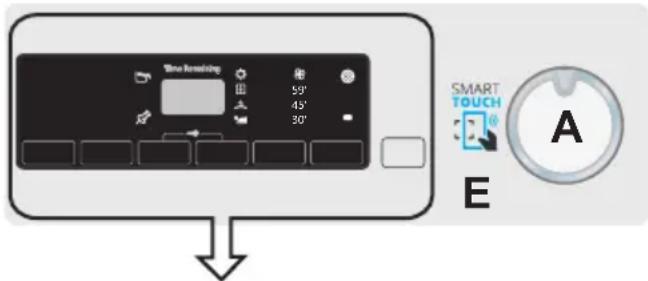
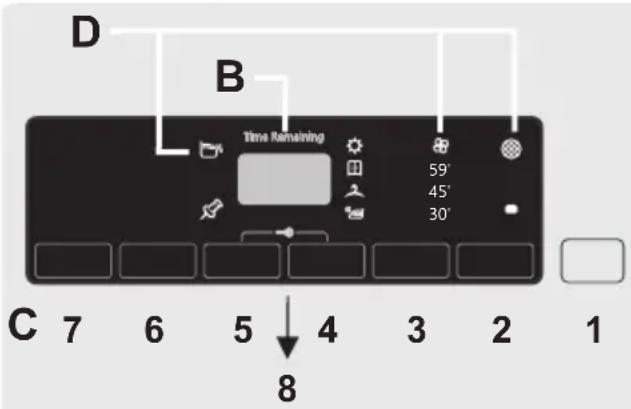
Don’t touch the display while inserting the plug because the machines calibrates the systems during the first seconds: touching the display, the machine couldn’t work property. In this case, remove the plug and repeat the operation. PROGRAMME selector with OFF position When the programme selector is turned the display lights up to show the settings for the programme selected. For energy saving, at the end of the cycle or with an inactivity period, the display level contrast will decrease. N.B.: To switch the machine off, turn the programme selector to the OFF position. The programme selector must be returned to the OFF position at the end of each cycle or when starting a subsequent wash cycle prior to the next programme being selected and started. START/PAUSE button Close the door BEFORE selecting the button START/PAUSE. When the START/PAUSE button has been pressed, the appliance can take few seconds before it starts working. Before you open the door, please check water level is below the door opening to avoid flooding. DELAY START button

WKH ODXQGU\ WKH VKRUWHU WKH GU\LQJ WLPH WKXV VDYLQJHOHFWULFLW\ $/:$<6 Ⴠ&KHFN WKDW WKH ILOWHU LV FOHDQ EHIRUH HYHU\

&RWWRQVOLQHQ7RZHOV FRWWRQ MHUVH\EHG

EHIRUHHDFKGU\LQJF\FOH

XVLQJDVRIWEUXVKRU \RXUILQJHUWLSV

,IWKHODXQGU\LVQRWGU\LQJFKHFNWKDWWKHILOWHU

FORWKIURPWKHILOWHU'R

QRW XVH ZDWHU WR FOHDQ

WKHILOWHU 5HPRYHWKHVSRQJH

OHYHUV E\ WXUQLQJ WKHP

To delay the start use the following procedure: - Select the required programme. - Press the delay start button once to activate it (h00 appears on the display) and then press it again to set a 1 hour delay (h01 appears on the display). The pre-set delay increases by 1 hour each time the button is pressed, until h24 appears on the display, at which point pressing the button again will reset the delay start to zero. - Confirm by pressing the START/PAUSE button. The delay countdown will begin and when it has finished the programme will start automatically. It is possible to cancel the delay start by turning the programme selector to OFF. If there is any break in the power supply while the machine is operating, a special memory stores the selected programme and, when the power is restored, it continues where it left OFF. This button allows you to choose between two different options: - DRYING SELECTION For automatic washing/drying cycle: after the selection of washing programme according to laundry type, select a degree of dryness by pressing this button. At the end of the washing programme, the selected drying cycle will start automatically. If a washing programme is not compatible with automatic drying selected, this function will not be activated.

If you want delete the selection before the programme starts, please press repeatedly the button until the lights go off or reposition the programme selector to the OFF position. Drying only cycle: select via the knob the desired drying programme in conjunction with your fabrics, by pressing this button it is possible to select a degree of dryness that is different to the default one (except for the wool drying programme). To cancel the cycle during the drying phase, please press the button for about 3 seconds.

"End" will appear in the display at the end of the program and the DOOR LOCKED light will go off, it is now possible to open the door.

The option buttons should be selected before pressing the START/PAUSE button. If an option is selected that is not compatible with the selected programme then the option indicator light first flashes and then goes off.

DRYING SELECTION / STEAM

FUNCTION button If you exceed the maximum dryable load of laundry indicated in the programme table, the laundry may not be dried satisfactory.

After cancelling the drying programme, the cool down phase will begin and please wait for about 10/20 minutes before opening the door. It is also possible to cancel the drying cycle by turning the programme selector to the OFF position. It is necessary to wait for the cooling phase’s end (10/20 minutes) and the DOOR LOCKED light to go off before opening the door.

LQVHUW WKH EDVH RI WKH

UHPDLQLQJ WLPH IRU GU\LQJ WKH SRVWSRQHG

WKHLURQLGU\LQJOHYHOWKHGU\LQJOHYHOVHWWLQJ

LQFRPSDWLELOLW\ DOO /('V IODVK TXLFNO\ IRU

'U\LQJ6HOHFWLRQ%XWWRQ

,WDOORZVWRVHWWKHGHVLUHGGU\QHVVOHYHO HGLWDEOHRSWLRQXSWRPLQXWHVDIWHUWKH VWDUWLQJRIWKHF\FOH

5HDG\ WR ,URQ ,W OHDYHV WKH

LQFRPSDWLELOLW\DOO/('VIODVKTXLFNO\IRU

SUHVVLQJ WKH 67$57 EXWWRQ WKH WLPH

$IWHU WKLV VHOHFWLRQ WR UHVHW WKH

DXWRPDWLF G\LQJ IXQFWLRQLQJ LV

QHFHVVDU\WRVZLWFKRIIWKHGU\HU,QFDVH

RILQFRPSDWLELOLW\DOO/('VIODVKTXLFNO\IRUWLPHV

- STEAM FUNCTION After the selection of "EASY IRON" programme, select between three different intensity of steam treatments that are (default selection) P1 appears on the display This programme is suitable for synthetics and mixed clothes. In the case of wet clothes (i.e. after washing) If relax creases is selected after spin the dry clothes will reach the ideal moisture level for an easy ironing. Medium time. - Easy Iron Cotton (only a button push) P2 appears on the display This programme is for cotton clothes. In the case of wet clothes (i.e. after washing) If relax creases is selected after spin the dry clothes will reach the ideal moisture level for an easy ironing. Medium time. - Steam Refresh (two button pushes) P3 appears on the display Thanks to the steam action, the cycle lets to refresh and relax clothes’ creases after use. This programme consists of a start phase in which the steam in introduced and the excess moisture is removed at the final stage to allow prompt use. This cycle is suitable for dry clothes. The function is suitable for max up to 1,5 kg load.

This button allows you to choose between two different options, depending on the selected programme: - RAPID The button becomes active when you select the RAPID (14/30/44 Min.) programme on the knob and allows you to select one of three durations indicated. - STAIN LEVEL button

Once the programme has been selected the wash time set for that programme will be automatically shown.

This option allows you to choose between 3 levels of wash intensity modifying the length of the programme, depending on how much the fabrics are soiled (can only be used on some programmes as shown in the table of programmes).

This button allows you to choose between three different options: - PREWASHING

This option allows you to make a prewash and it is particularly useful for heavily soiled loads (can be used only on some programmes as shown in the table of programmes).

We recommend you use only 20% of the recommended quantities shown on the detergent pack. - AQUAPLUS

This option (available only in some programmes) allows you to wash the load in a much larger quantity of water and this, together with the new combined action of the drum rotation cycles, where water is filled and emptied, will give you garments which have been cleaned and rinsed to perfection so that the detergent dissolves completely, ensuring an efficient cleaning action.

This function is for the people with delicate and sensitive skin. RAPID / STAIN LEVEL button OPTIONS button

EHIRUHHDFKGU\LQJF\FOH

XVLQJDVRIWEUXVKRU \RXUILQJHUWLSV

,IWKHODXQGU\LVQRWGU\LQJFKHFNWKDWWKHILOWHU

FORWKIURPWKHILOWHU'R

QRW XVH ZDWHUWRFOHDQ

WKHILOWHU 5HPRYHWKHVSRQJH

VSRQJH E\ KROGLQJ LW

OHYHUV E\ WXUQLQJ WKHP

WKHILQDOFRROLQJSKDVH

SRVLWLRQLVVHOHFWHGRQWKHSURJUDPPHNQRE

SURGXFWV SURYLGHG WKDW WKH

use the drum and door may be VERY HOT. WARNING When the tumble dryer is in

This function can be used for children’s items and for washing of very dirty items, for which you are required to use a lot of detergent, or for washing of Towels whose fibres have the tendency to hold the detergent. - HYGIENE + Activated when you set 60°C of temperature. This option allows deep cleaning of your clothes by maintaining the same temperature for the whole wash.

This button allows you to change the temperature of the wash cycles. It is not possible to raise the temperature over the maximum allowed for the programme, in order to protect the fabrics. If you want carry out a cold wash all the indicators must be off.

By pressing this button, it is possible to reduce the maximum speed, and if you wish, the spin cycle can be cancelled. If the label does not indicate specific information, it is possible to use the maximum spin expected in the program. To reactivate the spin cycle press the button until you reach the spin speed you would like to set.

It is possible to modify the spin speed without pausing the machine.

Simultaneously pressing the START/PAUSE and OPTIONS buttons allows a previously downloaded cycle to be started whilst the Smart Touch position is selected on the programme knob (for downloading cycles from the App see the relevant section of this user manual).

Pressing simultaneously the buttons TEMPERATURE SELECTION and SPIN SELECTION for about 3 seconds, the machine allows you to lock the keys. In this way, you can avoid making accidental or unwanted changes if a button on the display is pressed accidently during a cycle.

The key lock can be simply cancelled by pressing the two buttons simultaneously again or turning off the appliance. TEMPERATURE SELECTION button SPIN SELECTION button To prevent damage to the fabrics, it is not possible to increase the speed over the maximum allowed for the programme. An over dosing of detergent can cause excessive foaming. If the appliance detects the presence of excessive foam, it may exclude the spinning phase or extend the duration of the program and increase water consumption. The machine is fitted with a special electronic device, which prevents the spin cycle should the load be unbalanced. This reduces the noise and vibration in the machine and so prolongs the life of your machine.

'U\LQJ6HOHFWLRQ%XWWRQThis allows you to select the required dryness level, it is possible to choose for up to five minutes after the start of a drying cycle: 5HDG\ WR ,URQ ,W OHDYHV WKHJDUPHQWV VOLJKWO\ ZHW WR IDFLOLWDWH

LQFRPSDWLELOLW\ DOO/('V IODVKTXLFNO\ WLPHV

TROUBLESHOOTING What Might be the Cause of... Defects you can remedy yourself Before calling service for technical advice please run through the following checklist. A charge will be made if the machine is found to be working or has been installed incorrectly or used incorrectly. If the problem persists after completing the recommended checks, please call Service, they may be able to assist you over the telephone. Time display to end could change during drying cycle. The time to end is continuously checked during th e drying cycle and the time is adjusted to give the best estimation time. The displayed time may increase or decrease during the cycle and this is normal. Drying time is too long/clothes are not dry enough… ● Have you selected the correct drying time/programme? ● Were the clothes too wet? Were the clothes thoroughly wrung or spindried? ● Does the filter need cleaning? ● Is the dryer overloaded? The dryer does not operate… ● Is there a working electricity supply to th

dryer? Check using another appliance such as a table lamp. ● Is the plug properly connected to the mains supply? ● Is there a power failure? ● Has the fuse blown? ● Is the door fully closed? ● Is the dryer switched on, both at the mains supply and at the machine? ● Has the drying time or the programme been selected? ● Has the machine been switched on again after opening the door? The dryer is noisy… Switch off the dryer and contact GIAS Service for advice. The Indicator is on… ● Does the filter need cleaning? The Indicator is on… Does the water container need emptying? CUSTOMER SERVICE Should there still be a problem with your dryer after comp l e ting all the recommended checks, please call service for advice. They may be able to assist you over the telephone or arrange for a suitable appointment for an engineer to call under the terms of your guarantee. However, a charge may be made if any of the following applies to your machine: ● Is found to be in working order. ● Has not been installed in accordance with the installation instructions. ● Has been used incorrectly. SparesService Always use genuine spares, available direct from service. For service and repairs call your local service engineer. The manufacturer declines all responsibility in the event of any printing mistakes in this booklet. The manufacturer also reserves the right to make appropriate modifications to its products without changing the essential characteristics.

FOR SMART TOUCH MODELS

The Candy simply-Fi app has a Smart Check-up function that allows you to confirm the functionality and status of the product at any time. To use the Candy simply-Fi APP you will need an Android smartphone with NFC technology. More info can be found on the App. If the display of the machine is showing an error (by a code or blinking LEDs), you should turn on the App on your Android smartphone, with NFC on, selecting "Read the error" on the "Help on line" menu place your smart phone against the Smart Touch logo on the control panel. You should now be able to read the fault directory to solve the issue. Drying Guide7KHVWDQGDUGF\FOH&27721'5< LV WKH PRVW HQHUJ\ HIILFLHQW DQG EHVW VXLWHG IRU GU\LQJ QRUPDO ZHW FRWWRQODXQGU\ 7KH WDEOH LQ ODVW SDJH VKRZV WKH DS S U R [ LP D W H WL P H DQ G HQ H U J \ FRQVXPSWLRQ RI WKH PDLQ GU\LQJSURJUDPPHV Technical Specifications EN 61121 Programme To Use -DRY COTTON - COTTON OR

Max.capacity declared Max.4 Kg Maximum Drying Weight Cottons Synthetics or Delicates 7KH UHDO GXUDWLRQ RI GU\LQJ F\FOH

Max.capacity declared Max.4 Kg Maximum Drying Weight Cottons Synthetics or Delicates 7KH UHDO GXUDWLRQ RI GU\LQJ F\FOH

SURGXFWV SURYLGHG WKDW WKH

Max.capacity declared Max.4 Kg Maximum Drying Weight Cottons Synthetics or Delicates 7KH UHDO GXUDWLRQ RI GU\LQJ F\FOH

SURGXFWV SURYLGHG WKDW WKH

Max.capacity declared Max.4 Kg Maximum Drying Weight Cottons Synthetics or Delicates 7KH UHDO GXUDWLRQ RI GU\LQJ F\FOH

SURGXFWV SURYLGHG WKDW WKH

Max.capacity declared Max.4 Kg Maximum Drying Weight Cottons Synthetics or Delicates 7KH UHDO GXUDWLRQ RI GU\LQJ F\FOH

SURGXFWV SURYLGHG WKDW WKH

hldsk certain programmes) During the first minutes of the cycle, the "Kg Check" indicator remain on while the intelligent sensor will weigh the laundry and adjust the cycle time, water and electricity consumption accordingly.

Through every wash phase "Kg Check" allows to monitor information on the wash load in the drum and in the first minutes of the wash it: - adjusts the amount of water required; - determines the length of the wash cycle; - controls rinsing according to the type of fabric selected to be washed it; - adjusts the rhythm of drum rotation for - recognizes the presence of lather, increasing, if necessary, the amount of water during rinsing; - adjusts the spin speed according to the load, thus avoiding any imbalance.

The indicators display the degrees of dryness that can be selected by the relevant button: Automatic drying programmes EXTRA DRY (suitable for towels, bathrobe s and bulky loads). IRON DRY (that leaves the laundry ready for ironing). CUPBOARD DRY (for items that will be put away without ironing). Timed drying programmes

They may be used to select ti med drying programmes. Cool down phase Activated during the final cool down period, in the last 10/20 minutes of each drying phase.

10) OPTIONS INDICATOR LIGHTS

The indicator lights show the option that can be selected by the relevant button.

SHUIRUP UHPRWH RSHUDWLRQV HJ IURP

UHTXLUHPHQWVRIWKH'LUHFWLYH(8 7R UHFHLYH D FRS\ RI WKH GHFODUDWLRQ RI

energy consumption Suitable for cottons andlinens. dryalltogetherdifferent kind offabrics cotton linen

dry delicate and synthetic fabrics that need

accurate6\QWKHWLFV and specific treatment.This specifics cyclehasbeenconceived dryshirtsminimizing6KLUWVtanglesand folds thanks specific movements

thedrum.It' recommended take out thelinensimmediately after dryingcycle. Specific cyclededicated dry oversizedlinenlikecurtains %HG%DWKsheetsandtablecloths.Thanks

denim .It' -HDQVrecommended flip over thegarmentsbefore drying Perfect cycle dryduvetsandrevitalizingthe smoothness of'RZQ-DFNHWVthe feathers . toforsportandfitness, drying gently withspecial care toavoid shrinking anddeteriorationof elastic fibers. Woolen clothes the program can

laundry around 3jumpers).It recommendedto reverse allclothesbefore drying Timing can change duetodimensions and thickness load and tospinning chosen duringwashing.Atthe end ofthe cycle clothes are readyto

worn ,butif they are heavier, edges can

notindicatedfor acrylic clothes

One specifics cyclethatdry and

warm cyclethat only minutes helps

relax folds 5HOD[&UHDVHVand creases The perfect cycle

Customizable setting that interacts withthe App

your android smartphone and

The factory sets the default programme Auto Hygiene,which will sanitizethemachine

The real duration ofdryingcycledependsby the startinghumidity level the laundry due tospinspeed, type and amountofloadcleanlinessoffilters and ambienttemperature

(To check programmes and options compatibility refer to next page). hldsk certain programmes) During the first minutes of the cycle, the "Kg Check" indicator remain on while the intelligent sensor will weigh the laundry and adjust the cycle time, water and electricity consumption accordingly.

Through every wash phase "Kg Check" allows to monitor information on the wash load in the drum and in the first minutes of the wash it: - adjusts the amount of water required; - determines the length of the wash cycle; - controls rinsing according to the type of fabric selected to be washed it;

the type of fabric being washed; - recognizes the presence of lather, increasing, if necessary, the amount of water during rinsing; - adjusts the spin speed according to the load, thus avoiding any imbalance.

The indicators display the degrees of dryness that can be selected by the relevant button: Automatic drying programmes EXTRA DRY (suitable for towels, bathrobe s and bulky loads). IRON DRY (that leaves the laundry ready for ironing). CUPBOARD DRY (for items that will be put away without ironing). Timed drying programmes

They may be used to select ti med drying programmes. Cool down phase Activated during the final cool down period, in the last 10/20 minutes of each drying phase.

10) OPTIONS INDICATOR LIGHTS

The indicator lights show the option that can be selected by the relevant button.

UHTXHVWHGWRGRVRE\WKH$SS

SHUIRUP UHPRWH RSHUDWLRQV HJ IURP

UHTXLUHPHQWVRIWKH'LUHFWLYH(8 7R UHFHLYH D FRS\ RI WKH GHFODUDWLRQ RI

energy consumption Suitable for cottons andlinens. dryalltogetherdifferent kind offabrics cotton linen

dry delicate and synthetic fabrics that need

accurate6\QWKHWLFV and specific treatment.This specifics cyclehasbeenconceived dryshirtsminimizing6KLUWVtanglesand folds thanks specific movements

thedrum.It' recommended take out thelinensimmediately after dryingcycle. Specific cyclededicated dry oversizedlinenlikecurtains %HG%DWKsheetsandtablecloths.Thanks

denim .It' -HDQVrecommended flip over thegarmentsbefore drying Perfect cycle dryduvetsandrevitalizingthe smoothness of'RZQ-DFNHWVthe Dedicatedtotechnicalgarmentsforsportandfitness, drying gently withspecial care toavoid shrinking anddeteriorationof elastic fibers. Woolen clothes the program can

laundry around 3jumpers).It recommendedto reverse allclothesbefore drying Timing can change duetodimensions and thickness load and tospinning chosen duringwashing.Atthe end ofthe cycle clothes are readyto

worn ,butif they are heavier, edges can

notindicatedfor acrylic clothes

One specifics cyclethatdry and

warm cyclethat only minutes helps

relax folds 5HOD[&UHDVHVand creases The perfect cycle

Customizable setting that interacts withthe App

your android smartphone and

The factory sets the default programme Auto Hygiene,which will sanitizethemachine

The real duration ofdryingcycledependsby the startinghumidity level the laundry due tospinspeed, type and amountofloadcleanlinessoffilters and ambienttemperature

(To check programmes and options compatibility refer to next page). hldsk certain programmes) During the first minutes of the cycle, the "Kg Check" indicator remain on while the intelligent sensor will weigh the laundry and adjust the cycle time, water and electricity consumption accordingly.

Through every wash phase "Kg Check" allows to monitor information on the wash load in the drum and in the first minutes of the wash it: - adjusts the amount of water required; - determines the length of the wash cycle;

- controls rinsing according to the type of fabric selected to be washed it;

the type of fabric being washed; - recognizes the presence of lather, increasing, if necessary, the amount of water during rinsing; - adjusts the spin speed according to the load, thus avoiding any imbalance.

The indicators display the degrees of dryness that can be selected by the relevant button: Automatic drying programmes EXTRA DRY (suitable for towels, bathrobe s and bulky loads). IRON DRY (that leaves the laundry ready for ironing). CUPBOARD DRY (for items that will be put away without ironing). Timed drying programmes

They may be used to select ti med drying programmes. Cool down phase Activated during the final cool down period, in the last 10/20 minutes of each drying phase.

10) OPTIONS INDICATOR LIGHTS

The indicator lights show the option that can be selected by the relevant button.

UHTXHVWHGWRGRVRE\WKH$SS

SHUIRUP UHPRWH RSHUDWLRQV HJ IURP

UHTXLUHPHQWVRIWKH'LUHFWLYH(8 7R UHFHLYH D FRS\ RI WKH GHFODUDWLRQ RI

energy consumption Suitable for cottons andlinens. dryalltogetherdifferent kind offabrics cotton linen

dry delicate and synthetic fabrics that need

accurate6\QWKHWLFV and specific treatment.This specifics cyclehasbeenconceived dryshirtsminimizing6KLUWVtanglesand folds thanks specific movements

thedrum.It' recommended take out thelinensimmediately after dryingcycle. Specific cyclededicated

dry oversizedlinen like curtains

%HG%DWK sheets and tablecloths Thanks

the drum the linens will

It' -HDQVrecommended flip over thegarmentsbefore drying Perfect cycle dryduvetsandrevitalizingthe smoothness of'RZQ-DFNHWV Dedicatedtotechnicalgarmentsforsportandfitness, drying gently withspecial care toavoid shrinking anddeteriorationof elastic fibers. Woolen clothes the program can

laundry around 3jumpers).It recommendedto reverse allclothesbefore drying Timing can change duetodimensions and thickness load and tospinning chosen duringwashing.Atthe end ofthe cycle clothes are readyto

worn ,butif they are heavier, edges can

notindicatedfor acrylic clothes

One specifics cyclethatdry and

warm cyclethat only minutes helps

relax folds 5HOD[&UHDVHVand creases The perfect cycle

Customizable setting that interacts withthe App

your android smartphone and

The factory sets the default programme Auto Hygiene,which will sanitizethemachine

The real duration ofdryingcycledependsby the startinghumidity level the laundry due tospinspeed, type and amountofloadcleanlinessoffilters and ambienttemperature

(To check programmes and options compatibility refer to next page). hldsk certain programmes) During the first minutes of the cycle, the "Kg Check" indicator remain on while the intelligent sensor will weigh the laundry and adjust the cycle time, water and electricity consumption accordingly.

Through every wash phase "Kg Check" allows to monitor information on the wash load in the drum and in the first minutes of the wash it: - adjusts the amount of water required; - determines the length of the wash cycle; - controls rinsing according to the type of fabric selected to be washed it;

the type of fabric being washed; - recognizes the presence of lather, increasing, if necessary, the amount of water during rinsing; - adjusts the spin speed according to the load, thus avoiding any imbalance.

The indicators display the degrees of dryness that can be selected by the relevant button: Automatic drying programmes EXTRA DRY (suitable for towels, bathrobe s and bulky loads). IRON DRY (that leaves the laundry ready for ironing). CUPBOARD DRY (for items that will be put away without ironing). Timed drying programmes

They may be used to select ti med drying programmes. Cool down phase Activated during the final cool down period, in the last 10/20 minutes of each drying phase.

10) OPTIONS INDICATOR LIGHTS

The indicator lights show the option that can be selected by the relevant button.

UHTXHVWHGWRGRVRE\WKH$SS

SHUIRUP UHPRWH RSHUDWLRQV HJ IURP

UHTXLUHPHQWVRIWKH'LUHFWLYH(8 7R UHFHLYH D FRS\ RI WKH GHFODUDWLRQ RI

energy consumption Suitable for cottons andlinens. dryalltogetherdifferent kind offabrics cotton linen

dry delicate and synthetic fabrics that need

accurate6\QWKHWLFV and specific treatment.This specifics cyclehasbeenconceived dryshirtsminimizing6KLUWVtanglesand folds thanks specific movements

thedrum.It' recommended take out thelinensimmediately after dryingcycle. Specific cyclededicated dry oversizedlinenlikecurtains %HG%DWKsheetsandtablecloths.Thanks

dry uniformfabrics like jeans

-HDQV recommended flip over the garmentsbefore drying

Perfect cycle dryduvetsandrevitalizingthe smoothness of'RZQ-DFNHWVthe Dedicatedtotechnicalgarmentsforsportandfitness, drying gently withspecial care toavoid shrinking anddeteriorationof elastic fibers. Woolen clothes the program can

laundry around 3jumpers).It recommendedto reverse allclothesbefore drying Timing can change duetodimensions and thickness load and tospinning chosen duringwashing.Atthe end ofthe cycle clothes are readyto

worn ,butif they are heavier, edges can

notindicatedfor acrylic clothes

One specifics cyclethatdry and

warm cyclethat only minutes helps

relax folds 5HOD[&UHDVHVand creases The perfect cycle

Customizable setting that interacts withthe App

your android smartphone and

The factory sets the default programme Auto Hygiene,which will sanitizethemachine

The real duration ofdryingcycledependsby the startinghumidity level the laundry due tospinspeed, type and amountofloadcleanlinessoffilters and ambienttemperature

(To check programmes and options compatibility refer to next page). hldsk certain programmes) During the first minutes of the cycle, the "Kg Check" indicator remain on while the intelligent sensor will weigh the laundry and adjust the cycle time, water and electricity consumption accordingly.

Through every wash phase "Kg Check" allows to monitor information on the wash load in the drum and in the first minutes of the wash it: - adjusts the amount of water required; - determines the length of the wash cycle; - controls rinsing according to the type of fabric selected to be washed it;

the type of fabric being washed; - recognizes the presence of lather, increasing, if necessary, the amount of water during rinsing; - adjusts the spin speed according to the load, thus avoiding any imbalance.

The indicators display the degrees of dryness that can be selected by the relevant button: Automatic drying programmes EXTRA DRY (suitable for towels, bathrobe s and bulky loads). IRON DRY (that leaves the laundry ready for ironing). CUPBOARD DRY (for items that will be put away without ironing). Timed drying programmes

They may be used to select ti med drying programmes. Cool down phase Activated during the final cool down period, in the last 10/20 minutes of each drying phase.

10) OPTIONS INDICATOR LIGHTS

The indicator lights show the option that can be selected by the relevant button.

UHTXHVWHGWRGRVRE\WKH$SS

SHUIRUP UHPRWH RSHUDWLRQV HJ IURP

UHTXLUHPHQWVRIWKH'LUHFWLYH(8 7R UHFHLYH D FRS\ RI WKH GHFODUDWLRQ RI

energy consumption Suitable for cottons andlinens. dryalltogetherdifferent kind offabrics cotton linen

dry delicate and synthetic fabrics that need

accurate6\QWKHWLFV and specific treatment.This specifics cyclehasbeenconceived dryshirtsminimizing6KLUWVtanglesand folds thanks specific movements

thedrum.It' recommended take out thelinensimmediately after dryingcycle. Specific cyclededicated dry oversizedlinenlikecurtains %HG%DWKsheetsandtablecloths.Thanks

denim .It' -HDQVrecommended flip over thegarmentsbefore drying Perfect cycle dryduvetsandrevitalizingthe smoothness of'RZQ-DFNHWVthe Dedicatedtotechnicalgarmentsforsportandfitness, drying gently withspecial care toavoid shrinking anddeteriorationof elastic fibers. Woolen clothes the program can

laundry around 3jumpers).It recommendedto reverse allclothesbefore drying Timing can change duetodimensions and thickness load and tospinning chosen duringwashing.Atthe end ofthe cycle clothes are readyto

worn ,butif they are heavier, edges can

notindicatedfor acrylic clothes

One specifics cycle that dry and

pollens and residual

powder detergentsThisis

warm cyclethat only minutes helps

relax folds 5HOD[&UHDVHVand creases The perfect cycle

Customizable setting that interacts withthe App

your android smartphone and

The factory sets the default programme Auto Hygiene,which will sanitizethemachine

The real duration ofdryingcycledependsby the startinghumidity level the laundry due tospinspeed, type and amountofloadcleanlinessoffilters and ambienttemperature

(To check programmes and options compatibility refer to next page).

hldsk certain programmes) During the first minutes of the cycle, the "Kg Check" indicator remain on while the intelligent sensor will weigh the laundry and adjust the cycle time, water and electricity consumption accordingly.

Through every wash phase "Kg Check" allows to monitor information on the wash load in the drum and in the first minutes of the wash it: - adjusts the amount of water required; - determines the length of the wash cycle; - controls rinsing according to the type of fabric selected to be washed it; - adjusts the rhythm of drum rotation for - recognizes the presence of lather, increasing, if necessary, the amount of water during rinsing; - adjusts the spin speed according to the load, thus avoiding any imbalance.

The indicators display the degrees of dryness that can be selected by the relevant button: Automatic drying programmes EXTRA DRY (suitable for towels, bathrobe s and bulky loads). IRON DRY (that leaves the laundry ready for ironing). CUPBOARD DRY (for items that will be put away without ironing). Timed drying programmes

Activated during the final cool down period, in the last 10/20 minutes of each drying phase.

10) OPTIONS INDICATOR LIGHTS

The indicator lights show the option that can be selected by the relevant button.

SHUIRUP UHPRWH RSHUDWLRQV HJ IURP

UHTXLUHPHQWVRIWKH'LUHFWLYH(8 7R UHFHLYH D FRS\ RI WKH GHFODUDWLRQ RI

energy consumption Suitable for cottons andlinens. dryalltogetherdifferent kind offabrics cotton linen

dry delicate and synthetic fabrics that need

accurate6\QWKHWLFV and specific treatment.This specifics cyclehasbeenconceived dryshirtsminimizing6KLUWVtanglesand folds thanks specific movements

thedrum.It' recommended take out thelinensimmediately after dryingcycle. Specific cyclededicated dry oversizedlinenlikecurtains %HG%DWKsheetsandtablecloths.Thanks

denim .It' -HDQVrecommended flip over thegarmentsbefore drying Perfect cycle dryduvetsandrevitalizingthe smoothness of'RZQ-DFNHWVthe feathers . Dedicatedtosportandfitness, drying gently withspecial care toavoid shrinking anddeteriorationof elastic fibers. Woolen clothes the program can

laundry around 3jumpers).It recommendedto reverse allclothesbefore drying Timing can change duetodimensions and thickness load and tospinning chosen duringwashing.Atthe end ofthe cycle clothes are readyto

worn ,butif they are heavier, edges can

notindicatedfor acrylic clothes

One specifics cyclethatdry and

warm cyclethat only minutes helps

relax folds 5HOD[&UHDVHVand creases The perfect cycle

Customizable setting that interacts withthe App

your android smartphone and

The factory sets the default programme Auto Hygiene,which will sanitizethemachine

The real duration ofdryingcycledependsby the startinghumidity level the laundry due tospinspeed, type and amountofloadcleanlinessoffilters and ambienttemperature

(To check programmes and options compatibility refer to next page). hldsk certain programmes) During the first minutes of the cycle, the "Kg Check" indicator remain on while the intelligent sensor will weigh the laundry and adjust the cycle time, water and electricity consumption accordingly.

Through every wash phase "Kg Check" allows to monitor information on the wash load in the drum and in the first minutes of the wash it: - adjusts the amount of water required; - determines the length of the wash cycle; - controls rinsing according to the type of fabric selected to be washed it;

the type of fabric being washed; - recognizes the presence of lather, increasing, if necessary, the amount of water during rinsing; - adjusts the spin speed according to the load, thus avoiding any imbalance.

The indicators display the degrees of dryness that can be selected by the relevant button: Automatic drying programmes EXTRA DRY (suitable for towels, bathrobe s and bulky loads). IRON DRY (that leaves the laundry ready for ironing). CUPBOARD DRY (for items that will be put away without ironing). Timed drying programmes

They may be used to select timed drying programmes. Cool down phase Activated during the final cool down period, in the last 10/20 minutes of each drying phase.

10) OPTIONS INDICATOR LIGHTS

The indicator lights show the option that can be selected by the relevant button.

UHTXHVWHGWRGRVRE\WKH$SS

SHUIRUP UHPRWH RSHUDWLRQV HJ IURP

UHTXLUHPHQWVRIWKH'LUHFWLYH(8 7R UHFHLYH D FRS\ RI WKH GHFODUDWLRQ RI

energy consumption Suitable for cottons andlinens. dryalltogetherdifferent kind offabrics cotton linen

dry delicate and synthetic fabrics that need

accurate6\QWKHWLFV and specific treatment.This specifics cyclehasbeenconceived dryshirtsminimizing6KLUWVtanglesand folds thanks specific movements

thedrum.It' recommended take out thelinensimmediately after dryingcycle. Specific cyclededicated dry oversizedlinenlikecurtains %HG%DWKsheetsandtablecloths.Thanks

denim .It' -HDQVrecommended flip over thegarmentsbefore drying Perfect cycle dryduvetsandrevitalizingthe'RZQ-DFNHWVthe feathers Dedicatedtotechnicalgarmentsforsportandfitness, drying gently withspecial care toavoid shrinking anddeteriorationof elastic fibers. Woolen clothes the program can

laundry around 3jumpers).It recommendedto reverse allclothesbefore drying Timing can change duetodimensions and thickness load and tospinning chosen duringwashing.Atthe end ofthe cycle clothes are readyto

worn ,butif they are heavier, edges can

notindicatedfor acrylic clothes

One specifics cyclethatdry and

warm cyclethat only minutes helps

relax folds 5HOD[&UHDVHVand creases The perfect cycle

Customizable setting that interacts withthe App

your android smartphone and

The factory sets the default programme Auto Hygiene,which will sanitizethemachine

The real duration ofdryingcycledependsby the startinghumidity level the laundry due tospinspeed, type and amountofloadcleanlinessoffilters and ambienttemperature

(To check programmes and options compatibility refer to next page). hldsk certain programmes) During the first minutes of the cycle, the "Kg Check" indicator remain on while the intelligent sensor will weigh the laundry and adjust the cycle time, water and electricity consumption accordingly.

Through every wash phase "Kg Check" allows to monitor information on the wash load in the drum and in the first minutes of the wash it: - adjusts the amount of water required; - determines the length of the wash cycle; - controls rinsing according to the type of fabric selected to be washed it;

the type of fabric being washed; - recognizes the presence of lather, increasing, if necessary, the amount of water during rinsing; - adjusts the spin speed according to the load, thus avoiding any imbalance.

The indicators display the degrees of dryness that can be selected by the relevant button: Automatic drying programmes EXTRA DRY (suitable for towels, bathrobe s and bulky loads). IRON DRY (that leaves the laundry ready for ironing). CUPBOARD DRY (for items that will be put away without ironing). Timed drying programmes

They may be used to select ti med drying programmes. Cool down phase Activated during the final cool down period, in the last 10/20 minutes of each drying phase.

10) OPTIONS INDICATOR LIGHTS

The indicator lights show the option that can be selected by the relevant button.

UHTXHVWHGWRGRVRE\WKH$SS

SHUIRUP UHPRWH RSHUDWLRQV HJ IURP

UHTXLUHPHQWVRIWKH'LUHFWLYH(8 7R UHFHLYH D FRS\ RI WKH GHFODUDWLRQ RI

energy consumption Suitable for cottons andlinens. dryalltogetherdifferent kind offabrics cotton linen

dry delicate and synthetic fabrics that need

accurate6\QWKHWLFV and specific treatment.This specifics cyclehasbeenconceived dryshirtsminimizing6KLUWVtanglesand folds thanks specific movements

thedrum.It' recommended take out thelinensimmediately after dryingcycle. Specific cyclededicated dry oversizedlinenlikecurtains %HG%DWK sheetsandtablecloths.Thanks

denim .It' -HDQVrecommended flip over thegarmentsbefore drying Perfect cycle dryandrevitalizingthe'RZQ-DFNHWVthe feathers Dedicatedtotechnicalgarmentsforsportandfitness, drying gently withspecial care toavoid shrinking anddeteriorationof elastic fibers. Woolen clothes the program can

laundry around 3jumpers).It recommendedto reverse allclothesbefore drying Timing can change duetodimensions and thickness load and tospinning chosen duringwashing.Atthe end ofthe cycle clothes are readyto

worn ,butif they are heavier, edges can

notindicatedfor acrylic clothes

One specifics cyclethatdry and

warm cyclethat only minutes helps

relax folds 5HOD[&UHDVHVand creases The perfect cycle

Customizable setting that interacts withthe App

your android smartphone and

The factory sets the default programme Auto Hygiene,which will sanitizethemachine

The real duration ofdryingcycledependsby the startinghumidity level the laundry due tospinspeed, type and amountofloadcleanlinessoffilters and ambienttemperature

(To check programmes and options compatibility refer to next page). hldsk certain programmes) During the first minutes of the cycle, the "Kg Check" indicator remain on while the intelligent sensor will weigh the laundry and adjust the cycle time, water and electricity consumption accordingly.

Through every wash phase "Kg Check" allows to monitor information on the wash load in the drum and in the first minutes of the wash it: - adjusts the amount of water required; - determines the length of the wash cycle; - controls rinsing according to the type of fabric selected to be washed it;

the type of fabric being washed; - recognizes the presence of lather, increasing, if necessary, the amount of water during rinsing; - adjusts the spin speed according to the load, thus avoiding any imbalance.

The indicators display the degrees of dryness that can be selected by the relevant button: Automatic drying programmes EXTRA DRY (suitable for towels, bathrobe s and bulky loads). IRON DRY (that leaves the laundry ready for ironing). CUPBOARD DRY (for items that will be put away without ironing). Timed drying programmes

They may be used to select ti med drying programmes. Cool down phase Activated during the final cool down period, in the last 10/20 minutes of each drying phase.

10) OPTIONS INDICATOR LIGHTS

The indicator lights show the option that can be selected by the relevant button.

UHTXHVWHGWRGRVRE\WKH$SS

SHUIRUP UHPRWH RSHUDWLRQV HJ IURP

UHTXLUHPHQWVRIWKH'LUHFWLYH(8 7R UHFHLYH D FRS\ RI WKH GHFODUDWLRQ RI

energy consumption Suitable for cottons andlinens. dryalltogetherdifferent kind offabrics cotton linen

dry delicate and synthetic fabrics that need

accurate6\QWKHWLFV and specific treatment.This specifics cyclehasbeenconceived dryshirtsminimizing6KLUWVtanglesand folds thanks specific movements

thedrum.It' recommended take out thelinensimmediately after dryingcycle. Specific cyclededicated dry oversizedlinenlikecurtains %HG%DWKsheetsandtablecloths.Thanks

denim .It' -HDQVrecommended flip over thegarmentsbefore drying Perfect cycle dryandrevitalizingthe'RZQ-DFNHWVthe feathers Dedicatedtotechnicalgarmentsforsportandfitness, drying gently withspecial care toavoid shrinking anddeteriorationof elastic fibers. Woolen clothes the program can

laundry around 3jumpers).It recommendedto reverse allclothesbefore drying Timing can change duetodimensions and thickness load and tospinning chosen duringwashing.Atthe end ofthe cycle clothes are readyto

worn ,butif they are heavier, edges can

notindicatedfor acrylic clothes

One specifics cyclethatdry and

warm cyclethat only minutes helps

relax folds 5HOD[&UHDVHVand creases The perfect cycle

Customizable setting that interacts withthe App

your android smartphone and

The factory sets the default programme Auto Hygiene,which will sanitizethemachine

The real duration ofdryingcycledependsby the startinghumidity level the laundry due tospinspeed, type and amountofloadcleanlinessoffilters and ambienttemperature

(To check programmes and options compatibility refer to next page). hldsk certain programmes) During the first minutes of the cycle, the "Kg Check" indicator remain on while the intelligent sensor will weigh the laundry and adjust the cycle time, water and electricity consumption accordingly.

Through every wash phase "Kg Check" allows to monitor information on the wash load in the drum and in the first minutes of the wash it: - adjusts the amount of water required; - determines the length of the wash cycle; - controls rinsing according to the type of fabric selected to be washed it;

the type of fabric being washed; - recognizes the presence of lather, increasing, if necessary, the amount of water during rinsing; - adjusts the spin speed according to the load, thus avoiding any imbalance.

The indicators display the degrees of dryness that can be selected by the relevant button: Automatic drying programmes EXTRA DRY (suitable for towels, bathrobe s and bulky loads). IRON DRY (that leaves the laundry ready for ironing). CUPBOARD DRY (for items that will be put away without ironing). Timed drying programmes

They may be used to select ti med drying programmes. Cool down phase Activated during the final cool down period, in the last 10/20 minutes of each drying phase.

10) OPTIONS INDICATOR LIGHTS

The indicator lights show the option that can be selected by the relevant button.

UHTXHVWHGWRGRVRE\WKH$SS

SHUIRUP UHPRWH RSHUDWLRQV HJ IURP

UHTXLUHPHQWVRIWKH'LUHFWLYH(8 7R UHFHLYH D FRS\ RI WKH GHFODUDWLRQ RI

energy consumption Suitable for cottons andlinens. dryalltogetherdifferent kind offabrics cotton linen

dry delicate and synthetic fabrics that need

accurate6\QWKHWLFV and specific treatment.This specifics cyclehasbeenconceived dryshirtsminimizing6KLUWVtanglesand folds thanks specific movements

thedrum.It' recommended take out thelinensimmediately after dryingcycle. Specific cyclededicated dry oversizedlinenlikecurtains %HG%DWKsheetsandtablecloths.Thanks

denim .It' -HDQVrecommended flip over thegarmentsbefore drying Perfect cycle 'RZQ-DFNHWVthe feathers Dedicatedtotechnicalgarmentsforsportandfitness, drying gently withspecial care toavoid shrinking anddeteriorationof elastic fibers. Woolen clothes the program can

laundry around 3jumpers).It recommendedto reverse allclothesbefore drying Timing can change duetodimensions and thickness load and tospinning chosen duringwashing.Atthe end ofthe cycle clothes are readyto

worn ,butif they are heavier, edges can

notindicatedfor acrylic clothes

One specifics cyclethatdry and

warm cyclethat only minutes helps

relax folds 5HOD[&UHDVHVand creases The perfect cycle

Customizable setting that interacts withthe App

your android smartphone and

The factory sets the default programme Auto Hygiene,which will sanitizethemachine

The real duration ofdryingcycledependsby the startinghumidity level the laundry due tospinspeed, type and amountofloadcleanlinessoffilters and ambienttemperature

(To check programmes and options compatibility refer to next page).

SELECTABLE OPTIONS AUTOMATIC OPTIONS Rapids cycle Time selection Drying selection Super Easy Delay Start Memo Automatic Anti crease Drying Manager Whites

SMART TOUCHThis appliance is equipped with Smart Touch technology that allows you to interact, via the App, with smartphones based on Android operating system and equipped with NFC (Near Field Communication) function.● Download on your smartphone the Candy simply-Fi App.The Candy simply-Fi App is available for devices running both Android and iOS, both for tablets and for smartphones. However, you can interact with the machine and take advantage of the potential offered by Smart Touch only with Android smartphones equipped with NFC technology, according to following functional scheme:Android smartphonewith NFC technologyInteraction with themachine + contentsAndroid smartphonewithout NFC technology Contents only Android Tablet Apple iPhone Apple iPad Contents only Contents only Contents only FUNCTIONS The main functions available using the App are: ● Voice Assistant – A guide to help you choose the ideal cycle with only three voice inputs (clothes/fabrics, colour, drying level). ● Cycles – To download and launch new drying programmes.Get all the details of the Smart Touch functions, browsing the App in DEMO mode or go to:www.candysmarttouch.com

HOW TO USE SMART TOUCH

FIRST TIME - Machine registration Enter the "Settings" menu of your Android smartphone and activate the NFC function inside the "Wireless & Networks" menu.Depending on the smartphone model and its Android OS version, the process of the NFC activation may be different. Refer to the smartphone manual for more details. ● Turn the knob to the Smart Touch position to enable the sensor on the dashboard. ● Open the App, create the user profile and register the appliance following the instructions on the phone display or the "Quick Guide" attached on the machine.More information, F.A.Q. and the video for an easy registration are available on: www.candysmarttouch.com/how-to● Smart Care – -Smart Check-up and a troubleshooting guide. ● My Statistics – Drying statistics and tips for a more efficient use of your machine.20

NEXT TIME – Regular usage ● Every time you want to manage the machine through the App, first you have to enable the Smart Touch mode by turning the knob to the Smart Touch indicator.● Make sure you have unlocked your phone (from stand-by mode) and you have activated the NFC function; then, follow the steps mentioned earlier. ● If you want to start a dry cycle, load the laundry and close the door.● Select the desired function in the App (e.g.: starting a programme, the Smart Check- up cycle, update statistics, etc…).● Follow the instructions on the phone display, KEEPING IT ON the Smart Touch logo on the machine dashboard, when requested to do so by the App.NOTES:Place your smartphone so that the NFC antenna on its back matches the position of the Smart Touch logo on the appliance (as illustrate below).If you do not know the position of your NFC antenna, slightly move the smartphone in a circular motion over the Smart Touch logo until the App confirms the connection. In order for the data transfer to be successful, it is essential TO KEEP THE SMARTPHONE

ON THE DASHBOARD DURING THESE THE

FEW SECONDS OF THE PROCEDURE; a message on the device will inform about the correct outcome of the operation and advise you when it is possible to move the smartphone away.Thick cases or metallic stickers on your smartphone could affect or prevent the transmission of data between machine and telephone. If necessary, remove them.The replacement of some components of the smartphone (e.g. back cover, battery, etc...) with non-original ones, could result in the NFC antenna removal, preventing the full use of the App.The management and the control of the machine via App is only possible "by proximity": it is therefore not possible to perform remote operations (e.g.: from another room; outside of the house). WIRELESS PARAMETERS With this the Candy Hoover Group Srl, declares that this appliance marked with complies with the essential requirements of the Directive 2014/53/EU. To receive a copy of the declaration of c o n f o r m i t y, p l e a s e c o n t a c t t h e manufacturer at: www.candy-group.comWireless StandardISO/IEC 14443 Type A and NFC Forum Type 4Frequency bandMagnetic field limit13,553-13,567 MHz (centre frequency 13,560 MHz)< 42dBμA/m (at 10 meters)ParameterSpecifications

NEXT TIME – Regular usage ● Every time you want to manage the machine through the App, first you have to enable the Smart Touch mode by turning the knob to the Smart Touch indicator. ● Make sure you have unlocked your phone (from stand-by mode) and you have activated the NFC function; then, follow the steps mentioned earlier. ● If you want to start a dry cycle, load the laundry and close the door. ● Select the desired function in the App (e.g.: starting a programme, the Smart Check- up cycle, update statistics, etc…). ● Follow the instructions on the phone display, KEEPING IT ON the Smart Touch logo on the machine dashboard, when requested to do so by the App. NOTES: Place your smartphone so that the NFC antenna on its back matches the position of the Smart Touch logo on the appliance (as illustrate below). If you do not know the position of your NFC antenna, slightly move the smartphone in a circular motion over the Smart Touch logo until the App confirms the connection. In order for the data transfer to be successful, it is essential TO KEEP THE SMARTPHONE
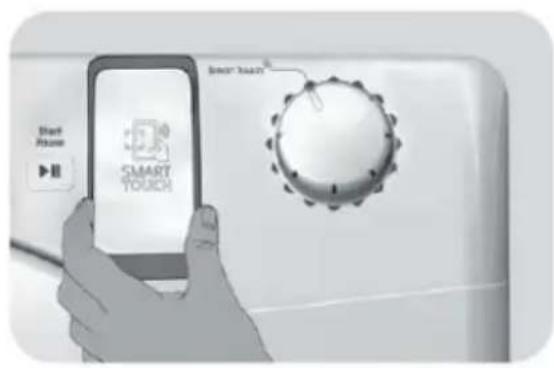
ON THE DASHBOARD DURING THESE THE

FEW SECONDS OF THE PROCEDURE; a message on the device will inform about the correct outcome of the operation and advise you when it is possible to move the smartphone away. Thick cases or metallic stickers on your smartphone could affect or prevent the transmission of data between machine and telephone. If necessary, remove them. The replacement of some components of the smartphone (e.g. back cover, battery, etc...) with non-original ones, could result in the NFC antenna removal, preventing the full use of the App. The management and the control of the machine via App is only possible "by proximity": it is therefore not possible to perform remote operations (e.g.: from another room; outside of the house). WIRELESS PARAMETERS With this the Candy Hoover Group Srl, declares that this appliance marked with complies with the essential requirements of the Directive 2014/53/EU. To receive a copy of the declaration of c o n f o r m i t y, p l e a s e c o n t a c t t h e manufacturer at: www.candy-group.comWireless Standard ISO/IEC 14443 Type A and NFC Forum Type 4 Frequency bandMagnetic field limit 13,553-13,567 MHz (centre frequency 13,560 MHz) < 42dBμA/m (at 10 meters) ParameterSpecifications

NEXT TIME – Regular usage ● Every time you want to manage the machine through the App, first you have to enable the Smart Touch mode by turning the knob to the Smart Touch indicator. ● Make sure you have unlocked your phone (from stand-by mode) and you have activated the NFC function; then, follow the steps mentioned earlier. ● If you want to start a dry cycle, load the laundry and close the door. ● Select the desired function in the App (e.g.: starting a programme, the Smart Check- up cycle, update statistics, etc…). ● Follow the instructions on the phone display, KEEPING IT ON the Smart Touch logo on the machine dashboard, when requested to do so by the App. NOTES: Place your smartphone so that the NFC antenna on its back matches the position of the Smart Touch logo on the appliance (as illustrate below). If you do not know the position of your NFC antenna, slightly move the smartphone in a circular motion over the Smart Touch logo until the App confirms the connection. In order for the data transfer to be successful, it is essential TO KEEP THE SMARTPHONE

ON THE DASHBOARD DURING THESE THE

FEW SECONDS OF THE PROCEDURE; a message on the device will inform about the correct outcome of the operation and advise you when it is possible to move the smartphone away. Thick cases or metallic stickers on your smartphone could affect or prevent the transmission of data between machine and telephone. If necessary, remove them. The replacement of some components of the smartphone (e.g. back cover, battery, etc...) with non-original ones, could result in the NFC antenna removal, preventing the full use of the App. The management and the control of the machine via App is only possible "by proximity": it is therefore not possible to perform remote operations (e.g.: from another room; outside of the house). WIRELESS PARAMETERS With this the Candy Hoover Group Srl, declares that this appliance marked with complies with the essential requirements of the Directive 2014/53/EU. To receive a copy of the declaration of c o n f o r m i t y, p l e a s e c o n t a c t t h e manufacturer at: www.candy-group.comWireless Standard ISO/IEC 14443 Type A and NFC Forum Type 4 Frequency bandMagnetic field limit 13,553-13,567 MHz (centre frequency 13,560 MHz) < 42dBμA/m (at 10 meters) ParameterSpecifications

NEXT TIME – Regular usage ● Every time you want to manage the machine through the App, first you have to enable the Smart Touch mode by turning the knob to the Smart Touch indicator. ● Make sure you have unlocked your phone (from stand-by mode) and you have activated the NFC function; then, follow the steps mentioned earlier. ● If you want to start a dry cycle, load the laundry and close the door. ● Select the desired function in the App (e.g.: starting a programme, the Smart Check- up cycle, update statistics, etc…). ● Follow the instructions on the phone display, KEEPING IT ON the Smart Touch logo on the machine dashboard, when requested to do so by the App. NOTES: Place your smartphone so that the NFC antenna on its back matches the position of the Smart Touch logo on the appliance (as illustrate below). If you do not know the position of your NFC antenna, slightly move the smartphone in a circular motion over the Smart Touch logo until the App confirms the connection. In order for the data transfer to be successful, it is essential TO KEEP THE SMARTPHONE

ON THE DASHBOARD DURING THESE THE

FEW SECONDS OF THE PROCEDURE; a message on the device will inform about the correct outcome of the operation and advise you when it is possible to move the smartphone away. Thick cases or metallic stickers on your smartphone could affect or prevent the transmission of data between machine and telephone. If necessary, remove them. The replacement of some components of the smartphone (e.g. back cover, battery, etc...) with non-original ones, could result in the NFC antenna removal, preventing the full use of the App. The management and the control of the machine via App is only possible "by proximity": it is therefore not possible to perform remote operations (e.g.: from another room; outside of the house). WIRELESS PARAMETERS With this the Candy Hoover Group Srl, declares that this appliance marked with complies with the essential requirements of the Directive 2014/53/EU. To receive a copy of the declaration of c o n f o r m i t y, p l e a s e c o n t a c t t h e manufacturer at: www.candy-group.comWireless Standard ISO/IEC 14443 Type A and NFC Forum Type 4 Frequency bandMagnetic field limit 13,553-13,567 MHz (centre frequency 13,560 MHz) < 42dBμA/m (at 10 meters) ParameterSpecifications

NEXT TIME – Regular usage ● Every time you want to manage the machine through the App, first you have to enable the Smart Touch mode by turning the knob to the Smart Touch indicator. ● Make sure you have unlocked your phone (from stand-by mode) and you have activated the NFC function; then, follow the steps mentioned earlier. ● If you want to start a dry cycle, load the laundry and close the door. ● Select the desired function in the App (e.g.: starting a programme, the Smart Check- up cycle, update statistics, etc…). ● Follow the instructions on the phone display, KEEPING IT ON the Smart Touch logo on the machine dashboard, when requested to do so by the App. NOTES: Place your smartphone so that the NFC antenna on its back matches the position of the Smart Touch logo on the appliance (as illustrate below). If you do not know the position of your NFC antenna, slightly move the smartphone in a circular motion over the Smart Touch logo until the App confirms the connection. In order for the data transfer to be successful, it is essential TO KEEP THE SMARTPHONE

ON THE DASHBOARD DURING THESE THE

FEW SECONDS OF THE PROCEDURE; a message on the device will inform about the correct outcome of the operation and advise you when it is possible to move the smartphone away. Thick cases or metallic stickers on your smartphone could affect or prevent the transmission of data between machine and telephone. If necessary, remove them. The replacement of some components of the smartphone (e.g. back cover, battery, etc...) with non-original ones, could result in the NFC antenna removal, preventing the full use of the App. The management and the control of the machine via App is only possible "by proximity": it is therefore not possible to perform remote operations (e.g.: from another room; outside of the house). WIRELESS PARAMETERS With this the Candy Hoover Group Srl, declares that this appliance marked with complies with the essential requirements of the Directive 2014/53/EU. To receive a copy of the declaration of c o n f o r m i t y, p l e a s e c o n t a c t t h e manufacturer at: www.candy-group.comWireless Standard ISO/IEC 14443 Type A and NFC Forum Type 4 Frequency bandMagnetic field limit 13,553-13,567 MHz (centre frequency 13,560 MHz) < 42dBμA/m (at 10 meters) ParameterSpecifications

NEXT TIME – Regular usage ● Every time you want to manage the machine through the App, first you have to enable the Smart Touch mode by turning the knob to the Smart Touch indicator. ● Make sure you have unlocked your phone (from stand-by mode) and you have activated the NFC function; then, follow the steps mentioned earlier. ● If you want to start a dry cycle, load the laundry and close the door. ● Select the desired function in the App (e.g.: starting a programme, the Smart Check- up cycle, update statistics, etc…). ● Follow the instructions on the phone display, KEEPING IT ON the Smart Touch logo on the machine dashboard, when requested to do so by the App. NOTES: Place your smartphone so that the NFC antenna on its back matches the position of the Smart Touch logo on the appliance (as illustrate below). If you do not know the position of your NFC antenna, slightly move the smartphone in a circular motion over the Smart Touch logo until the App confirms the connection. In order for the data transfer to be successful, it is essential TO KEEP THE SMARTPHONE

ON THE DASHBOARD DURING THESE THE

FEW SECONDS OF THE PROCEDURE; a message on the device will inform about the correct outcome of the operation and advise you when it is possible to move the smartphone away. Thick cases or metallic stickers on your smartphone could affect or prevent the transmission of data between machine and telephone. If necessary, remove them. The replacement of some components of the smartphone (e.g. back cover, battery, etc...) with non-original ones, could result in the NFC antenna removal, preventing the full use of the App. The management and the control of the machine via App is only possible "by proximity": it is therefore not possible to perform remote operations (e.g.: from another room; outside of the house). WIRELESS PARAMETERS With this the Candy Hoover Group Srl, declares that this appliance marked with complies with the essential requirements of the Directive 2014/53/EU. To receive a copy of the declaration of c o n f o r m i t y, p l e a s e c o n t a c t t h e manufacturer at: www.candy-group.comWireless Standard ISO/IEC 14443 Type A and NFC Forum Type 4 Frequency bandMagnetic field limit 13,553-13,567 MHz (centre frequency 13,560 MHz) < 42dBμA/m (at 10 meters) ParameterSpecifications

NEXT TIME – Regular usage ● Every time you want to manage the machine through the App, first you have to enable the Smart Touch mode by turning the knob to the Smart Touch indicator. ● Make sure you have unlocked your phone (from stand-by mode) and you have activated the NFC function; then, follow the steps mentioned earlier. ● If you want to start a dry cycle, load the laundry and close the door. ● Select the desired function in the App (e.g.: starting a programme, the Smart Check- up cycle, update statistics, etc…). ● Follow the instructions on the phone display, KEEPING IT ON the Smart Touch logo on the machine dashboard, when requested to do so by the App. NOTES: Place your smartphone so that the NFC antenna on its back matches the position of the Smart Touch logo on the appliance (as illustrate below). If you do not know the position of your NFC antenna, slightly move the smartphone in a circular motion over the Smart Touch logo until the App confirms the connection. In order for the data transfer to be successful, it is essential TO KEEP THE SMARTPHONE

ON THE DASHBOARD DURING THESE THE

FEW SECONDS OF THE PROCEDURE; a message on the device will inform about the correct outcome of the operation and advise you when it is possible to move the smartphone away. Thick cases or metallic stickers on your smartphone could affect or prevent the transmission of data between machine and telephone. If necessary, remove them. The replacement of some components of the smartphone (e.g. back cover, battery, etc...) with non-original ones, could result in the NFC antenna removal, preventing the full use of the App. The management and the control of the machine via App is only possible "by proximity": it is therefore not possible to perform remote operations (e.g.: from another room; outside of the house). WIRELESS PARAMETERS With this the Candy Hoover Group Srl, declares that this appliance marked with complies with the essential requirements of the Directive 2014/53/EU. To receive a copy of the declaration of c o n f o r m i t y, p l e a s e c o n t a c t t h e manufacturer at: www.candy-group.comWireless Standard ISO/IEC 14443 Type A and NFC Forum Type 4 Frequency bandMagnetic field limit 13,553-13,567 MHz (centre frequency 13,560 MHz) < 42dBμA/m (at 10 meters) ParameterSpecifications EN13

Air Outlets in the Base FR17

Air Outlets in the Base

Air Outlets in the Base

Air Outlets in the Base

Air Outlets in the Base

Air Outlets in the Base

Air Outlets in the Base

Air Outlets in the Base

Air Outlets in the Base

Air Outlets in the Base

Air Outlets in the Base

Air Outlets in the Base

Air Outlets in the Base

Air Outlets in the Base

Air Outlets in the Base

Air Outlets in the Base

Air Outlets in the Base

Air Outlets in the Base

Air Outlets in the Base

Air Outlets in the Base

Air Outlets in the Base

Air Outlets in the Base

Air Outlets in the Base

Air Outlets in the Base

Air Outlets in the Base

Air Outlets in the Base

Air Outlets in the Base

Air Outlets in the Base

Air Outlets in the Base

WRXUQH] OD PDQHWWH VXU $55(7 &HWWH

WRXUQH] OD PDQHWWH VXU $55(7 &HWWH

WRXUQH] OD PDQHWWH VXU $55(7 &HWWH

$86( HW SRVLWLRQQH] OD PDQHWWH

WRXUQH] OD PDQHWWH VXU $55(7 &HWWH

$86( HW SRVLWLRQQH] OD PDQHWWH

Figure 11: Figure 12:

WRXUQH] OD PDQHWWH VXU $55(7 &HWWH

SELECTABLE OPTIONS AUTOMATIC OPTIONS Rapids cycle Time selection Drying selection Super Easy Delay Start Memo Automatic Anti crease Drying Manager Whites

HLQJHWUDJHQHV:DUHQ]HLFKHQ

(UPLWWOXQJ GHU :H U W H DXI GHP (QHUJLHODEHO BAUMWOLLE ECO E L H W H Q G L H E H V W H Q (QHUJLHYHUEUDXFKVZHUWHXQGHLJQHQVLFK

GHU/DGHPHQJHGHU6DXEHUNHLWGHU)LOWHU

2SWLRQ DXWRPDWLVFK GHDNWLYLHUW'LH 7DVWHQVSHUUH

NDQQ ]X MHGHP =HLWSXQNW GHV =\NOXV PRGLIL]LHUW ZHUGHQ Automatische Knitterschutz-Option

'LHVH 2SWLRQ DNWLYLHUW GLH .QLWWHUVFKXW]

%HZHJXQJ GHU 7URPPHO DXWRPDWLVFK YRU

GHP =\NOXV LP )DOOH GHU $NWLYLHUXQJ GHU 9H U ] | J H UX Q J X Q G DP (Q G H GH V

HLQJHWUDJHQHV:DUHQ]HLFKHQ

(UPLWWOXQJ GHU :H U W H DXI GHP (QHUJLHODEHO BAUMWOLLE ECO E L H W H Q G L H E H V W H Q (QHUJLHYHUEUDXFKVZHUWHXQGHLJQHQVLFK

OHW]WHQ 6HLWH JLEW GLH XQJHIlKUHQ 3 U R J U D P P G D X H U Q X Q G

GHU/DGHPHQJHGHU6DXEHUNHLWGHU)LOWHU

2SWLRQ DXWRPDWLVFK GHDNWLYLHUW'LH 7DVWHQVSHUUH

NDQQ ]X MHGHP =HLWSXQNW GHV =\NOXV PRGLIL]LHUW ZHUGHQ Automatische Knitterschutz-Option

'LHVH 2SWLRQ DNWLYLHUW GLH .QLWWHUVFKXW]

%HZHJXQJ GHU 7URPPHO DXWRPDWLVFK YRU

GHP =\NOXV LP )DOOH GHU $NWLYLHUXQJ GHU 9H U ] | J H UX Q J X Q G DP (Q G H GH V

Air Outlets in the Base

Reinigung des Kondensatorfilters Please pay attention that overloading or bulky load can lead to door opening, in this case please reduce the load capacity to continue the drying cycle. Vor jedem Waschgang die Filter reinigen

Reinigung des Kondensatorfilters Please pay attention that overloading or bulky load can lead to door opening, in this case please reduce the load capacity to continue the drying cycle. Vor jedem Waschgang die Filter reinigen

GHU/DGHPHQJHGHU6DXEHUNHLWGHU)LOWHU

2SWLRQ DXWRPDWLVFK GHDNWLYLHUW'LH 7DVWHQVSHUUH

NDQQ ]X MHGHP =HLWSXQNW GHV =\NOXV PRGLIL]LHUW ZHUGHQ Automatische Knitterschutz-Option

'LHVH 2SWLRQ DNWLYLHUW GLH .QLWWHUVFKXW]

SELECTABLE OPTIONS AUTOMATIC OPTIONS Rapids cycle Time selection Drying selection Super Easy Delay Start Memo Automatic Anti crease Drying Manager Whites

Air Outlets in the Base

Air Outlets in the Base

Air Outlets in the Base

Air Outlets in the Base

Air Outlets in the Base

Air Outlets in the Base

Air Outlets in the Base

LPPHGLDWDPHQWH LO EXFDWR FRQVHQWH GL

(IIඈFඈHQ]D(QHUJHWඈFD

SELECTABLE OPTIONS AUTOMATIC OPTIONS Rapids cycle Time selection Drying selection Super Easy Delay Start Memo Automatic Anti crease Drying Manager Whites

Air Outlets in the Base

Air Outlets in the Base

Air Outlets in the Base

Air Outlets in the Base

Air Outlets in the Base

Air Outlets in the Base

SELECTABLE OPTIONS AUTOMATIC OPTIONS Rapids cycle Time selection Drying selection Super Easy Delay Start Memo Automatic Anti crease Drying Manager Whites

2. Ro d e a s d u as

rodapé. Please pay attention that overloading or bulky load can lead to door opening, in this case please reduce the load capacity to continue the drying cycle. Limpe os filtros antes de cada ciclo

SELECTABLE OPTIONS AUTOMATIC OPTIONS Rapids cycle Time selection Drying selection Super Easy Delay Start Memo Automatic Anti crease Drying Manager Whites