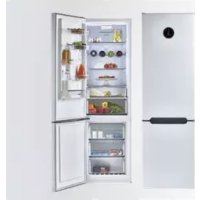
CMNR 6204WPUWIFI - Fridge CANDY - Free user manual and instructions
Find the device manual for free CMNR 6204WPUWIFI CANDY in PDF.



| Product type | Combined refrigerator-freezer |
| Brand | Candy |
| Model | CMNR 6204WPUWIFI |
| Climate class | SN, N, ST (from 10°C to 38°C) |
| Defrost type | Automatic (refrigerator and freezer) |
| Main functions | Smart ECO, Fast Cooling, Fast Freezing, Vacation, Wi-Fi, water dispenser, UVA antibacterial system |
| Interior lighting | LED (replaceable) |
| Refrigerant | R600a (isobutane) |
| Power supply | 220-240 V / 50 Hz |
| Energy class | Not specified |
| Total capacity | Not specified |
| Noise level | Not specified |
| Safety | Child lock, open door alarm, freezer overheating alarm, child safety |
| Maintenance and cleaning | Interior cleaning with water and baking soda, avoid abrasive products |
| Repairability | Replaceable LED lamp, reversible door possible |
| Connectivity | Built-in Wi-Fi (SmartFi+), simplyFi app |
Frequently Asked Questions - CMNR 6204WPUWIFI CANDY
User questions about CMNR 6204WPUWIFI CANDY
0 question about this device. Answer the ones you know or ask your own.
Ask a new question about this device
Download the instructions for your Fridge in PDF format for free! Find your manual CMNR 6204WPUWIFI - CANDY and take your electronic device back in hand. On this page are published all the documents necessary for the use of your device. CMNR 6204WPUWIFI by CANDY.
USER MANUAL CMNR 6204WPUWIFI CANDY
SISTEMA ANTIBATTERICO (se presente)
WATER DISPENSER
natural_image
Line drawing of a closed mechanical component with a flat top and flanged base (no text or symbols)natural_image
3D mechanical assembly diagram showing a bracket with mounting holes and a connecting rod (no text or symbols)natural_image
Technical illustration of a device with exploded and assembled views (no visible text or symbols)natural_image
Pure technical diagram of a mechanical component with no visible text, numbers, or symbols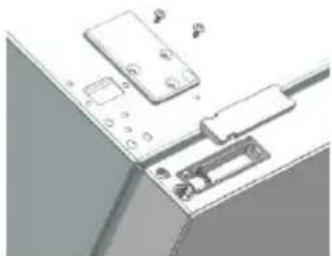
natural_image
Diagram of a computer interface with ports and connectors (no text or symbols visible)natural_image
3D rendering of an open refrigerator with shelves and doors (no text or symbols visible)natural_image
3D rendering of a window with metal fixtures and a small bracket, against a clear blue sky (no text or symbols)natural_image
3D rendering of a refrigerator with open door and side shelves (no text or symbols)natural_image
Exterior view of a modern office building (no signage)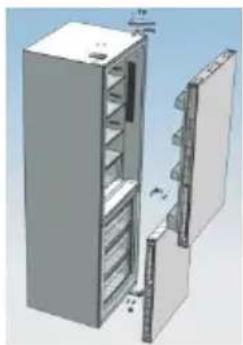
natural_image
3D rendering of a refrigerator with open door and internal shelves (no text or symbols visible)natural_image
Diagram showing two identical mechanical components with red arrows indicating direction, no text or symbols present.natural_image
Two views of a mechanical component with colored circular features, one showing a red arrow indicating transformation (no text or symbols)natural_image
3D mechanical assembly diagram showing a white base with red arrow indicating a component (no text or symbols)natural_image
Two identical mechanical components with hexagonal bases and cylindrical shafts, shown side by side (no text or symbols)natural_image
3D diagram of a mechanical component with a red arrow indicating direction, no visible text or symbolsnatural_image
Pure technical line drawing of a mechanical assembly without any text, numbers, or symbolsnatural_image
3D rendering of an open refrigerator with doors open, showing internal shelves and ventilation grilles (no text or symbols visible)natural_image
3D rendering of an open stainless steel refrigerator with multiple doors and side compartments (no text or symbols visible)natural_image
Warning symbol of a flame inside a triangle (no text or numbers)SAFETY INFORMATION....29
COMBI REFRIGERATOR CANDY.... 36
Climate Class.... 36
TRANSPORTATION INSTRUCTIONS.... 36
INSTALLATION INSTRUCTIONS 37
STARTING TO USE....37
COMBI OPERATION 38
VERTICAL DISPLAY 38
ROUNDED DISPLAY....40
INTERNAL USER INTERFACE....41
TECHNICAL FEATURES 42
Freshness Control....42
ANTIBACTERIAL SYSTEM (if present) 42
WATER DISPENSER....42
Tips for keeping food perfect in the Fridge 43
Where to store your foods in the fridge.... 43
Storing Frozen Food 44
ENERGY SAVING 45
TAKE CARE....45
Defrosng 45
Cleaning and Care 45
CHANGING THE INTERNAL LIGHT 46
REVERSING THE DOOR SWING 46
TROUBLE SHOOTING....51
Thank you for purchasing this product.
Before using your refrigerator, please carefully read this instrucon manual in order to maximize its performance. Store all documentaon for subsequent use or for other owners. This product is intended solely for household use or similar applicaons such as:
- the kitchen area for personnel in shops, oces and other working environments
- on farms, by clientele of hotels, motels and other environments of a residential type
-at-bed and breakfasts (B & B) - for catering services and similar applicaons not for retail sale.
This appliance must be used only for purposes of storage of food, any other use is considered dangerous and the manufacturer will not be responsible for any omissions. Also, it is recommended that you take note of the warranty conditions. Please, to obtain the best possible performance and trouble free operaon from your appliance it is very important to carefully read these instrucons. Failure to observe these instrucons may invalidate your right to free service during the guarantee period.
SAFETY INFORMATION
This guide contains many important safety informaon.
Please, we suggest you keep these instrucons in a safe place for easy reference and a good experience with the appliance.
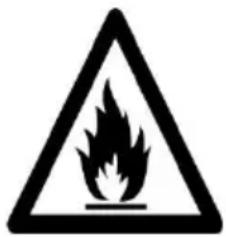
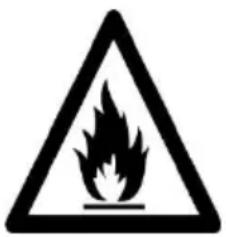
The refrigerator contains a refrigerant gas (R600a: isobutane) and insulang gas (cyclopentane), with high compatibility with the environment, that are, however, inammable.
Cauon: risk of re
If the refrigerant circuit should be damaged:
- Avoid opening ames and sources of ignition.
Thoroughly venlate the room in which the appliance is situated
WARNING!
- Care must be taken while cleaning/carrying the appliance to avoid touching the condenser metal wires at the back of the appliance, as you might injure your ngers and hands or damage your product.
- This appliance is not designed for stacking with any other appliance. Do not aempt to sit or stand on top of your appliance as it is not designed for such use. You could injure yourself or damage the appliance.
- Make sure that mains cable is not caught under the appliance during and aer carrying/moving the appliance, to avoid the mains cable becoming cut or damaged.
- When poisoning your appliance take care not to damage your ooring, pipes, wall coverings etc. Do not move the appliance by pulling by the lid or handle. Do not allow children to play with the appliance or tamper with the controls. Our company declines to accept any liability should the instrucons not be followed.
- Do not install the appliance in humid, oily or dusty places, nor expose it to direct sunlight and to water.
- Do not install the appliance near heaters or inammable materials.
- If there is a power failure do not open the lid.
Frozen food should not be aected if the failure lasts for less than 20 hours. If the failure is longer, then the food should be checked and eaten immediately or cooked and then refrozen.
- If you nd that the lid of the chest freezer is dicult to open just aer you have closed it, don't worry. This is due to the pressure dierence which will equalize and allow the lid to be opened normally aer a few minutes.
- Do not connect the appliance to the electricity supply until all packing and transit protectors have been removed.
- Leave to stand for at least 4 hours before switching on to allow compressor oil to sele if transported horizontally.
- This freezer must only be used for its intended purpose (i.e. storing and freezing of edible foodstu).
- Do not store medicine or research materials in the Wine Coolers. When the material that requires a strict control of storage temperatures is to be stored, it is possible that it will deteriorate or an uncontrolled beacon may occur that can cause risks.
- Before performing any operaon, unplug the power cord from the power socket.
- On delivery, check to make sure that the product is not damaged and that all the parts and accessories
are in perfect condition.
- If in the refrigeraon system a leak is noted, do not touch the wall outlet and do not use open ames. Open the window and let air into the room. Then call a service center to ask for repair.
- Do not use extension cords or adapters.
- Do not excessively pull or fold the power cord or touch the plug with wet hands.
- Do not damage the plug and/or the power cord; this could cause electrical shocks or res.
- If the supply cord is damaged, it must be replaced by the manufacturer, its service agent or similarly qualified person in order to avoid a hazard.
- Do not place or store inammable and highly volale materials such as ether, petrol, LPG, propane gas, aerosol spray cans, adhesives, pure alcohol, etc. These materials may cause an explosion.
- Do not use or store inammable sprays, such as spray paint, near the Wine Coolers. It could cause an explosion or re.
- Do not place objects and/or containers lled with water on the top of the appliance.
- We do not recommend the use of extension leads and mul-way adapters.
- Do not dispose of the appliance on a re. Take care not to damage, the cooling circuit/pipes of the appliance in transportaon and in use. In case of
damage do not expose the appliance to re, potenal ignition source and immediately venlate the room where the appliance is situated.
- The refrigeration system posioned behind and inside the Wine Coolers contains refrigerant. Therefore, avoid damaging the tubes.
- Do not use electrical appliances inside the food storage compartments of the appliance, unless they are of the type recommended by the manufacturer.
- Do not damage the refrigerant circuit.
- Do not use mechanical devices or other means to accelerate the defrosng process, other than those recommended by the manufacturer.
- Do not use electrical appliances inside the food storage compartments, unless they are of the type recommended by the manufacturer.
- Do not touch internal cooling elements, especially with wet hands, to avoid cracks or injuries.
- Maintain the venlaon openings in the appliance enclosure or in the built-in structure, free of obstrucon.
- Do not use pointed or sharp-edged objects such as knives or forks to remove the frost.
- Never use hairdryers, electrical heaters or other such electrical appliances for defrosng.
- Do not scrape with a knife or sharp object to
remove frost or ice that occurs. With these, the refrigerant circuit can be damaged, the spill from which can cause a re or damage your eyes.
- Do not use mechanical devices or other equipment to hasten the defrosng process.
- Absolutely avoid the use of open ame or electrical equipment, such as heaters, steam cleaners, candles, oil lamps and the like in order to speed up the defrosng phase.
- Never use water wash the compressor posion, wipe it with a dry cloth thoroughly aer cleaning to prevent rust.
- It is recommended to keep the plug clean, any excessive dust residues on the plug can be the cause re.
- The product is designed and built for domestic household use only.
- The guarantee will be void if the product is installed or used in commercial or non-residential domesc household premises.
- The product must be correctly installed, located and operated in accordance with the instrucons contained in the User Instrucons Booklet provided.
- The guarantee is applicable only to new products and is not transferable if the product is resold.
- Our company disclaims any liability for incidental or consequential damages.
- The guarantee does not in any way diminish your statutory or legal rights.
- Do not perform repairs on this Wine Coolers. All intervenons must be performed solely by qualified personnel.
- If you are discarding an old product with a lock or latch ed to the door, ensure that it is le in a safe condion to prevent the entrapment of children.
- This appliance can be used by children aged from 8 years and above and by persons with reduced physical, sensory or mental capabilities or with a lack of experience and knowledge; provided that they have been given adequate supervision or instrucon concerning how to use the appliance in a safe way and understand the hazards involved.
- Children should not play with the appliance. Cleaning and user maintenance should not be made by children without supervision.
- Locks :If your Fridge/Freezer is ed with a lock, to prevent children being entrapped keep the key out of reach and not in the vicinity of the appliance. If disposing of an old Fridge/Freezer break o any old locks or latches as a safeguard.
COMBI REFRIGERATOR CANDY
Climate Class
The appliance is designed to operate at the limited range of ambient temperature, depending on climate zones. Do not use the appliance at the temperature out of the limit. Climate class of your appliance is indicated on the label with technical descripon inside the fridge compartment.
| Climate Class | Amb. T. (°C) | Amb. T. (°F) |
| SN | From 10 to 32 | From 50 to 90 |
| N | From 16 to 32 | From 61 to 90 |
| ST | From 16 to 38 | From 61 to 100 |
| T | From 16 to 43 | From 61 to 110 |
TRANSPORTATION INSTRUCTIONS
The appliance should be transported only in a vercal upright posion. The packing as supplied must be intact during transportaon. If during the course of transport the product has been transported horizontally, it must only be laid on its le hand side (when facing the door front) and it must not be operated for at least 4 hours to allow the system to sele aer the appliance is brought back to upright posion.
- Failure to comply with the above instrucons could result in damage occurring to the appliance. The manufacturer will not be held responsible if these instrucons are disregarded.
- The appliance must be protected against rain, moisture and other atmospheric influences.
INSTALLATION INSTRUCTIONS
- If possible avoid placing the appliance near cookers, radiators or in direct sunlight as this will cause the compressor to run for long periods. If installed next to a source of heat or refrigerator, maintain the following minimum side clearances:
From Cookers 4" (100 mm)
From Radiators 12" (300 mm)
From Fridges 4" (100 mm)
- Make sure that sufficient room, with an average temperature of between 16^ C and 32^ C, is provided around the appliance to ensure free air circulaon. Ideally, a space of no less than 9cm on the back and 2cm on the sides.
- The appliance should be located on a smooth surface.
- It is forbidden to use the refrigerator outdoors.
- Protecon from moisture. Do not locate the freezer in moist space to avoid the metal parts rusty. And do not spray water to the freezer, otherwise it will weaken the insulaon and causes current leakage.
- Refer to "Cleaning and Care" secon to prepare your appliance for use.
- If the freezer is installed in unheated areas, garages etc., in cold weather condensaon may form on the outer surfaces. This is quite normal and is not a fault. Remove the condensaon by wiping with a dry cloth.
- Never place Refrigerator in a wall recessed or into fied cabinets or furniture when it is working, the grille at the back may become hot and the sides warm. Do not drape the Refrigerator with any covering.
STARTING TO USE
Before you starng to use the freezer, please check that:
- The interior is dry and air can circulate freely at the rear.
- Clean the interior as recommended under "TAKE CARE" secon (electric parts of the refrigerator can only be wiped by dry cloth).
- Do not switch on unl 4 hours aer moving the fridge/freezer. The coolant uid needs me to sele. If the appliance is switched o at any me, wait 30 minutes before switching back on to allow the coolant uid to sele.
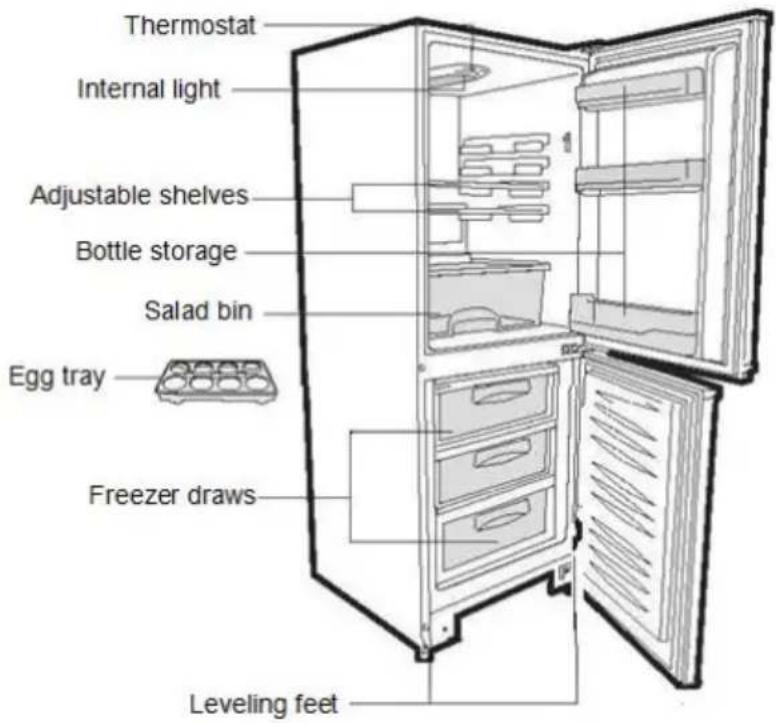
- Before connecng the Refrigerator to the mains supply posion. The thermostat control dias is located inside the Fridge compartment.
- Turn the thermostat knob to the "3" posion and turn on the electricity. The compressor and the light inside the refrigerator will begin to work.
- Before storing foods in your refrigerator, turn the refrigerator on and wait for 24 hours, to make sure it is working properly and to allow the Fridge/Freezer to fail to the correct temperature.
- Open the door 30 minutes later, if the temperature in the refrigerator decreased obviously, it shows that the refrigerator system works well. When the refrigerator operates for a period of me, the temperature controller will automacally set the temperature within limits it opens.
COMBI OPERATION
Appliance connected to power at the rst me: When the appliance is connected to power at the rst me, the display will be lit for 2 seconds before going normal and the appliance runs with intelligence funcon.
Display Control: When the refrigerator door is closed and there is no buon operaon in 3 minutes, the display light goes o.
When the display light is o, open the refrigerator door or click any buon to light it up.
VERTICAL DISPLAY
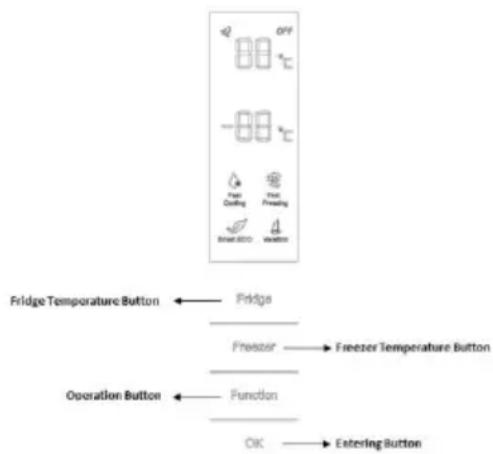
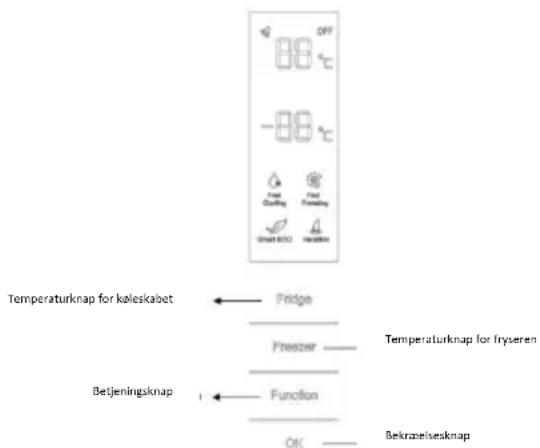
TEMPERATURE SETTING: Click the "Fridge" or "Freezer" buon and when it ickers in the symbol, temperatures can be set. Each me when the buon is clicked, the temperature changes accordingly. Temperatures cannot be set under funcons of fast cooling, fast freezing, Smart ECO and vacaon. Under temperature seng, if there is no buon operaon in 5 seconds, the buon stops ickering and the set temperature comes into eect.
SMART ECO: Acvate the Smart Eco buon to set the temperatures of the fridge in max. energy eciency condions (+4°C for fridge temperature, -18°C for freezer temperature).
To enter Smart Eco: Click "opon" unl it ickers and then click "OK" to enter this funcon.
To deacvate Smart Eco: Click “opon” until it goes to Smart ECO, click “OK” to quit this funcon and the light goes o.
FAST COOLING: Acvate Fast Cooling mode to start an additional pulse for a fast freezing of the fridge compartment. The funcon is acvated and conrmed by the switching on of the dedicated LED icon.
To enter Fast Cooling: Click "opon" until it ickers in "Fast Cooling" and then click "OK" to enter this funcon.
To deacvate Fast Cooling: Click "opon" unl it goes to "fast cooling" and then click "OK" to deacvate this funcon.
FAST FREEZING: Acvate Fast Freezing to rapidly freeze big quanes of food keeping intact nutritional food properes. When the light in Fast Freezing goes o and the freezer temperature goes back to the value before fast freezing. When Fast Freezing me is up (26 hours), it deacvates automacally. When it goes to Vacaon, Fast Freezing stops.
To enter Fast Freezing: Click "opon" until it ickers in "Fast Freezing" and then click "OK" to enter
this funcon.
To deacvate Fast Freezing: Click "opon" until it goes to "fast freezing" and then click "OK" to quit this funcon.
VACATION: In case of long stops, the Vacaon funcon can be used. This funcon deacvates the fridge compartment, while leaving the freezer on. Ensure that there is no food inside the fridge compartment before using this funcon. The funcon is acvated and conrmed by the switching on of the dedicated LED icon. The light in Vacaon goes o and the refrigerator temperature goes back to the value before Vacaon.
Vacaoon quits under funcons of Smart ECO and Fast Cooling.
To enter Vacaon: Click "opon" unl it ickers in "Fast Freezing" and then click "OK" to enter this funcon.
To deacvate Vacaon: Click "opon" until it goes to "Vacaon" and then click "OK" to quit this funcon.
POWER OFF MEMORY: Refrigerator can automatically keep all the seng in case of power o. When the unit is plugged in again, the refrigerator will run with the seng before power o.
POWER-ON DELAY: To prevent harm to the refrigerator in case of sudden power cut and power on, the unit does not start immediately if the power o me is less than 5 minutes.
FREEZER OVER-TEMPERATURE ALARM (only in case of power on): When the freezer temperature is higher than 10^ . Cat the rst me connected to power, the symbol light of the freezer chamber goes on and the number representing temperature ickers.
Press any buon or wait for 5 seconds, ickering stops and it goes back to the temperature that was set.
REFRIGERATOR DOOR OPENING ALARM: When the refrigerator is open over 3 minutes, the buzzer will buzz. Close the door or press any buon to stop the alarm, but for the laer, the alarm will go again aer 3 minutes.
SENSOR FAULT ALARM: When it shows "E0", "E1", "E2" or other abnormal symbols, it means sensor faults and the refrigerator needs repair.
ROUNDED DISPLAY
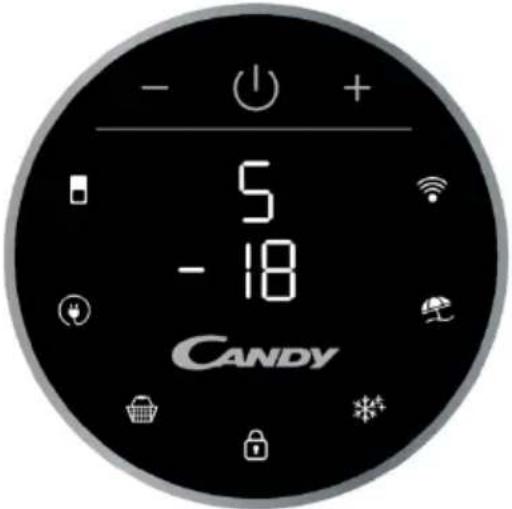
Rounded Display is a touch user interface. When the refrigerator is turned on, white LED lights will be enlightened. When the funcons is pressed the icon lights change from white to blue.
SETTING TEMPERATURE: Press MODE icon to change the temperature
-Refrigerator Temperature: Press one me MODE icon, refrigerator digit blinks, and manage temperature of refrigerator with "+" and "-" buons.
-Freezer Temperature: Press two mes MODE icon, freezer digit blinks, and manage temperature of freezer with "+" and "-" buons.
ECO MODE Icon: Press Eco Mode icon to set temperatures of the fridge in max. energy eciency condions (+5°C for fridge temperature, -18°C for freezer temperature). The funcon is acvated and conrmed when the icon LED changes from white to blue.
If you want to exit the ECO mode funcon, you need to press the Eco Mode icon again and the refrigerator temperature turns back to normal operaon.
SUPER COOLING Icon: Press Super Cooling icon to start an additional pulse for a fast freezing of the fridge compartment. The funcon is acvated and conrmed when the icon LED changes from white to blue.
If you want to exit the Super Cooling funcon, you need to press the Super Cooling icon again and refrigerator temperature turns back to normal operaon.
LOCK Icon: Press Lock icon to block display user interface. If the lock funcon is selected, the icon (LED) should turn into blue. When Lock funcon is turned on the user cannot set any new funcons. To turn o Lock funcon, the user must perform a long press on the icon for 3 seconds to unlock display.
SUPER FREEZING Icon: Press Super Freezing icon to rapidly freeze big quanes of food keeping intact nutritional food properes. The funcon is acvated and conrmed when the icon LED changes from white to blue.
If you want to exit the Super Freezing funcon, you need to press the Super Freezing icon again and the freezer temperature turns back to normal operaon.
HOLIDAY Icon: In case of long stops, the Holiday funcon can be used. This funcon deacvates the fridge compartment, while leaving the freezer on. Ensure that there is no food inside the fridge compartment before using this funcon. The funcon is acvated and conrmed when the icon LED changes from white to blue.
If you want to exit the Holiday funcon, you will need to press the Holiday icon again, the light in Holiday goes o and the refrigerator temperature goes back to the value before Holiday.
WI-FI Icon: This appliance is equipped with SmartFi+ technology that allows you to control it remotely via App. Press Wi-Fi icon for 3 seconds to acvate Wi-Fi funcon and the icon light changes from white to blue.
Machine Enrollment (on App): Download the SimplyFi App on your device. The Candy SimplyFi App is available for devices running both Android and iOS, both for tablets and for smartphones. Get all the details of the SmartFi+ funcons by browsing the App in DEMO mode.
Open the App, create the user prole and enroll the appliance following the instrucons on the device display or the "Quick Guide" aached on the machine. This operaon is necessary just for the rst installaon. To finalize the enrollment following the instrucon on the smartphone's screen.
Refrigerator usage from remote by App: When the enrollment is completed, there will be Wi-Fi LED switched on. From now on it will be possible to manage the product by using the buons on the display or using the App: both of them will be aligned according to the last command given.
INTERNAL USER INTERFACE

SET Buon: Press SET button for setting the temperature until you reach the level you want where level 1 is the warmest and level 4 is the coldest. Under normal operating conditions, we recommend using an intermediate setting (level 2).
Once the seng takes eect, it immediately enters the corresponding stall for operaon control, and the stall indicator lights up 3s3min and then goes out. Factory default temperature is set to 2. Long press "SET" key to exceed 3s and enter the hardware self-check program. The hardware self-check operaon is eecve within 10min, and the long buon operaon aer 10min is invalid.
WI-FI Buon: This appliance is equipped with SmartFi+ technology that allows you to control it remotely via App. Press Wi-Fi icon for 3 seconds to acvate Wi-Fi funcon and the icon light changes from white to blue.
Machine Enrollment (on App): Download the SimplyFi App on your device. The Candy SimplyFi App is available for devices running both Android and iOS, both for tablets and for smartphones. Get all the details of the SmartFi+ funcons by browsing the App in DEMO mode.
Open the App, create the user prole and enroll the appliance following the instrucons on the device display or the "Quick Guide" aached on the machine. This operaon is necessary just for the rst installaon. To finalize the enrollment following the instrucon on the smartphone's screen.
Refrigerator usage from remote by App: When the enrollment is completed, there will be Wi-Fi LED switched on. From now on it will be possible to manage the product by using the buons on the display or using the App: both of them will be aligned according to the last command given.
FAST COOL Button: when "FAST COOL" buon is pressed, rapid cooling funcon is acvated, according to the 21°C to refrigeraon control gear. Maximum running me is 3h, aer this me temperature will be set to 1.
If the "SET" buon is pressed in the process of speed cooling, the instant cooling funcon is immediately withdrawn and the default is entered into the next gear.
TECHNICAL FEATURES
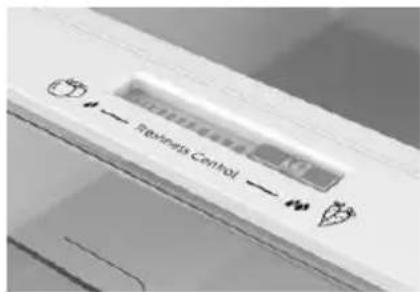
FRESHNESS CONTROL
Thanks to freshness control, you can guarantee the right humidity level for vegetables and fruits in the crisper drawer (Fresh drawer). The humidity gets bigger as the rod goes from le to right.
ANTIBACTERIAL SYSTEM (if present)
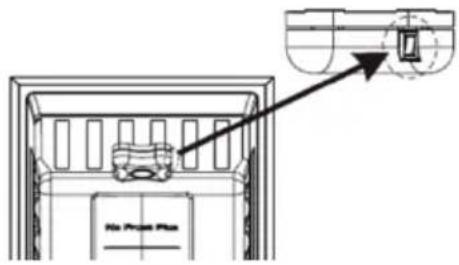
LED UVA Lights acvate a Titanium Filter producing a "photocatalysis" reacon which will destroy bacteria within the refrigerator air. This reacon works when the refrigerator door is closed to avoid puried air leakage.
In Total No Frost products, it is inserted in sky box and it works every me the compressor works. Filter is permanent and therefore does not need changing.
The anbacterial system has to be turned o during the energy consumpon test.
WATER DISPENSER
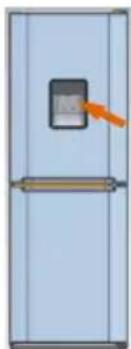
The water dispenser allows you to get chilled water without opening the fridge compartment door.
Before rst use
Before using the water dispenser for the rst me, remove and clean the water tank located inside the fridge compartment.
- Li the water tank out of the fridge compartment.
- Open the water tank cover and then clean the water tank and cover in warm soapy water. Rinse thoroughly.
- Aer cleaning, each the cover to the water tank and then replace the water tank back on the fridge door.
natural_image
Illustration of a refrigerator with a door and a digital display (no text or symbols)- Clean the dispenser pad outside the fridge door.
Filling the water tank with water
- Open the small cover.
- Fill the water tank with drinkable water up to the Max line.
- Close the small cover.
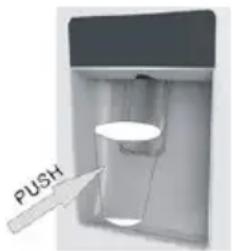
Dispensing
To dispense water, push the dispenser pad gently, using a glass or container. To stop the ow of water, pull your glass away from the dispenser pad.
Tips for keeping food perfect in the Fridge
Take extra care with meat and sh: cooked meats should always be stored on a shelf above raw meats to avoid bacterial transfer. Keep raw meats on a plate which is large enough to collect juices and cover it with cling lm or foil.
Leave space around food: this allows cold air to circulate around the Fridge, ensuring all parts of the Fridge are kept cool.
Wrap up food!: to prevent transfer of avors and drying out, food should be separately packed or covered. Fruit and vegetables need not be wrapped.
Pre-cooked food should be cooled properly: allow pre-cooked food to cool down before placing in the Fridge. This will help to stop the internal temperature of the Fridge from rising.
Shut the door!: to prevent cold air escaping, try to limit the number of mes you open the door. When retuning from shopping, sort foods to be kept in your Fridge before opening the door. Only open the door to put food in or take it out.
Where to store your foods in the fridge
Cool area: this is where to store foods which will keep longer if they are kept cool. Milk, eggs, yogurt, fruit juices, hard cheeses eg. Cheddar. Opened jars and boles of salad dressings, sauces and jams. Fats, eg. Buer, margarine, low-fat speads, cooking fats and lard.
Coldest area (0°C to 5°C): this is where foods which must be cold to keep them safe should be kept:
- Raw and uncooked foods should always be wrapped.
- Pre-cooked chilled foods, eg. Ready meals, meat pies, so cheeses.
- Pre-cooked meats eg. Ham,
- Prepared salads(including pre-packed mixed green salads, rice, potato salad etc).
·Desserts, eg. Fromage frais, home-prepared food and leovers or cream cakes.
Crisper: this is the most humid part of the Fridge. Vegetables, fruit, fresh salad items eg. Unwashed whole leuce, whole tomatoes, radishes etc can be stored here.
WE RECOMMEND THAT ALL PRODUCE KEPT IN THE SALAD BIN IS WRAPPED.
NOTE: Always wrap and store raw meat, poultry and sh on the lowest shelf at the boom of the fridge. This will stop them dripping onto, or touching other foods. Do not store inammable gasses or liquids in the fridge.
Electrical operaon aer 3h on the freezer, the temperature in the cabinet above -12^ , the alarm light is lit, and buzzer sounds.
Storing Frozen Food
Prepackaged commercially frozen food should be stored in accordance with the frozen food manufacturer's instrucons for a freezer compartment.
To ensure that the high quality achieved by the frozen food manufacturer and the food retailer is maintained the following should be remembered:
- Put packets in the freezer as quickly as possible aer purchase.
- Do not exceed "Use By", "Best Before" dates on the packaging.
DO
Defrost food from the freezer thoroughly in a fridge or in a microwave oven following defrosng and cooking instrucons.
Defrost frozen meat completely before cooking.
Store commercially frozen food in accordance with the instrucons given on the packets that you buy.
Check contents of the refrigerator at regular intervals.
DON'T
Use pointed sharp edged objects such as knives, forks to remove the ice.
Put hot food in the freezer. Let it cool down rst.
Put liquid-llled boles or sealed cans containing carbonated liquids into the freezer as they may burst.
Remove items from the freezer with wet hands.
| Clean and defrost your refrigerator regularly. | Freeze zzy drinks. |
| Prepare fresh food for freezing in small porons to ensure rapid freezing. | Consume ice-cream and water ices direct from freezer. It may cause “freezer burns” on lips. |
| Always choose high quality fresh food and be sure it is thoroughly clean before you freeze it. | Store poisonous or dangerous substances in the freezer. |
| Wrap all foods in aluminum foil or freezer quality plasc bags and make sure any air is excluded. | |
| Wrap frozen food when you buy it and put it into the freezer shortly. | |
| Keep food for as short a me as possible and adhere to “Best Before”, “Use By” dates. |
For more about storing, download the App and visit "Tips & Hints".
ENERGY SAVING
For beer energy saving we suggest:
- Installing the appliance away from heat sources and not exposed to direct sunlight and in a well-venlated room.
- Avoid putting hot food into the refrigerator to avoid increasing the internal temperature and therefore causing connuous functionalizing of the compressor.
- Do not excessively stu foods so as to ensure proper air circulaon.
• Defrost the appliance in case there is ice to facilitate the transfer of cold. - In case of absence of electrical energy, it is advisable to keep the refrigerator door closed.
- Open or keep the doors of the appliance open as lile as possible.
- Avoid adjusng the seng to temperatures too cold.
- Remove dust present on the rear of the appliance.
TAKE CARE
Defrosting
This appliance has automac defrosng system, no need to defrost by hand.
Cleaning and Care
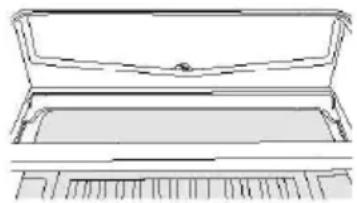
Aer defrosng you should clean the Fridge/Freezer internally with a weak soluon of bicarbonate of soda. Then rinse with warm water using a damp sponge or cloth and wipe dry. Wash the baskets in warm soapy water and ensure they are completely dry before replacing in the Fridge/Freezer. Condensaon will form on the back wall of the Fridge; however it will normally run down the back wall and into the drain hole behind the salad bin.
natural_image
Line drawing of a closed storage tray with a handle and spout (no text or symbols)The drain hole will have a “cleaning spike” inserted into it. This ensures that small pieces of food can not enter the drain. Aer you have cleaned the inside of your Fridge and removed any food residues from around the whole, use the “cleaning spike” to make sure that there are no blockages. Use standard furniture polish to clean the Fridge/Freezer exterior. Make sure that the doors are closed to prevent polish geng on the magnec door seal or inside.
The grille of the condenser at the back of the Fridge/Freezer and the adjacent components can be vacuumed using a so brush aachment.
Do not use harsh cleaners, scouring pads or solvents to clean any part of the Fridge/Freezer.
CHANGING THE INTERNAL LIGHT
-
Before carrying out the LED replacement always disconnect the mains supply.
-
Hold and li up the LED light cover.
-
Remove the old LED by unscrewing it in an an-clockwise direcon.
-
Replace with a new LED light by screwing it in a clockwise direcon marking sure that it is secure in the light holder.
-
Ret the light cover and re-connect your Fridge to the mains supply and switch on.
REVERSING THE DOOR SWING Dissemble the Refrigerator Door
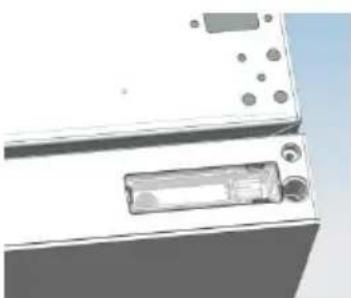
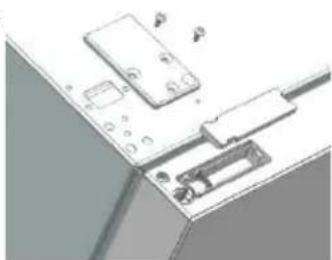
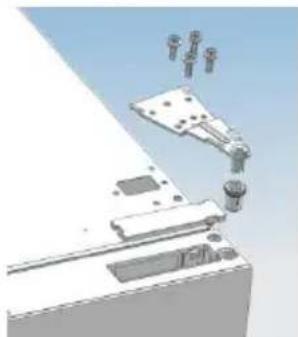
- a. Use a tool to remove the screw o the hinge cover, and then remove the laer. Insert the communicaon line to the hole on the cabinet top.
b. Use a tool to remove the 4 screws o the upper hinge cover and then remove the laer.
Pry up the door bush and small end cap cover on the door.
natural_image
3D rendering of a white electronic device with ports and a rectangular internal component (no visible text or symbols)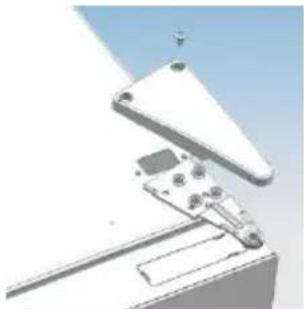
natural_image
3D mechanical assembly diagram showing internal components and mounting bracket (no text or symbols)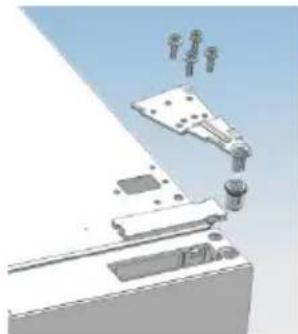
natural_image
3D rendering of a robotic arm interacting with a mechanical device (no text or symbols visible)c. Insert the door bush and door communicaon line into the hole on the door and then put on the small end cap cover.
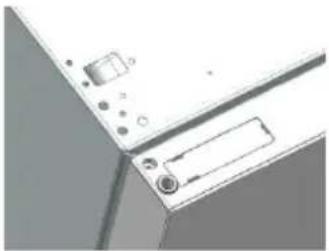
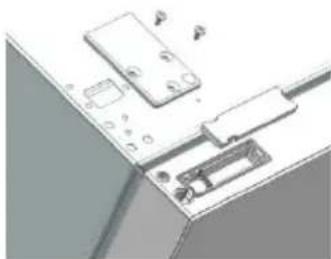
d. Use a tool to remove the 2 screws as shows in the below gure to remove the hole cover on the cabinet top and get the
natural_image
Diagram of a device with labeled components, possibly a laptop or scanner, showing no readable text or symbols.cabinet communicaon line out of the hole.
Pry up the small end cap cover on the door and get out the door bush and door communicaon line.
natural_image
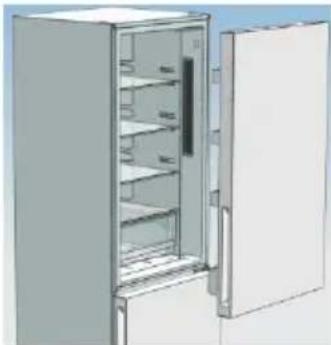
Close-up of a kitchen appliance panel with buttons and a door (no visible text or symbols)e. Insert the door bush into the round hole on the door and then put on the small end cap cover.
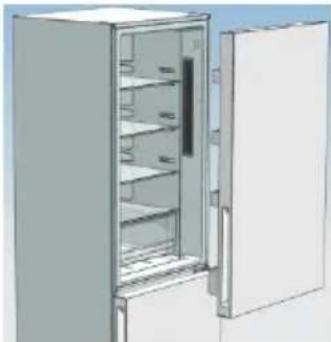
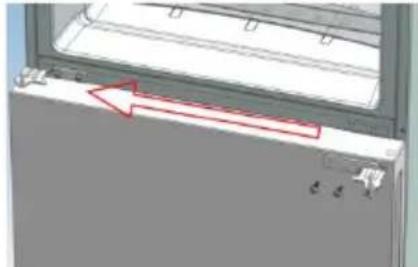
f. Move the refrigerator door upward over 500mm to remove the door.
natural_image
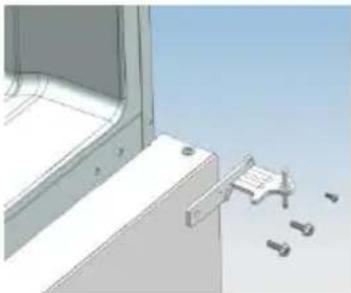
Illustration of an open refrigerator with shelves and doors (no text or symbols)- a. Use a tool to remove the 3 screws o the middle hinge cover and then remove the middle hinge.
natural_image
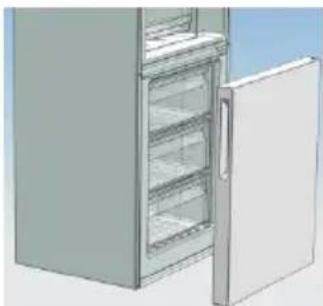
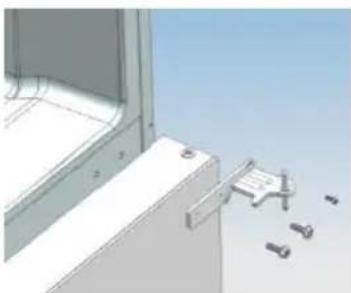
3D technical illustration of a mechanical bracket with mounting holes and a tool holder (no text or symbols)b. move the freezer door upward over 500mm to remove the door.
natural_image
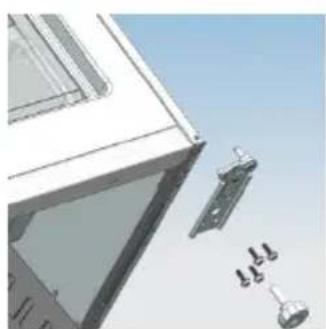
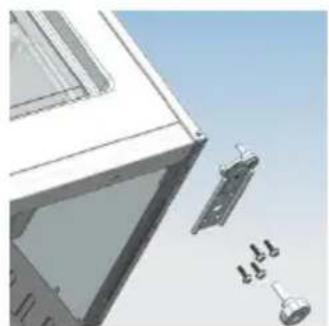
Illustration of a refrigerator with open door and side shelves (no text or symbols)c. Remove the adjustable front feet under the lower hinge; use a tool to remove the 4 screws from the lower hinge and then disassemble the lower hinge. Door disassembly is nished.
natural_image
Architectural detail of a window frame with metal latch and multiple bracket components (no text or symbols)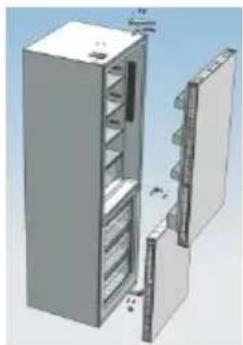
natural_image
3D rendering of a cabinet with open door and internal compartments (no text or symbols visible)Assemble door, lower hinge accessories to the corresponding positions
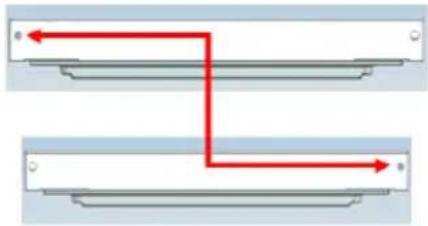
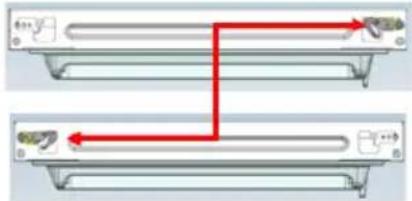
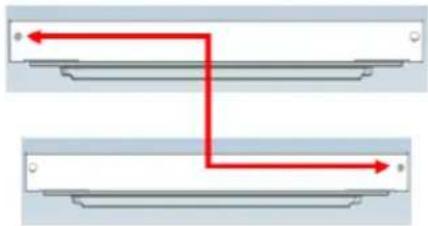
- a. Use a tool to get the door bush out as shown in the below gure and assemble it to the corresponding posion of the other side.
flowchart
graph TD
    A["Top Path"] --> B["Bottom Path"]
    B --> C["Right Arrow"]
    style A fill:#f9f,stroke:#333
    style B fill:#bbf,stroke:#333
b. Use a tool to remove the screws o the stopper ass as shown in the below gure and then assemble them to the other side of the door.
natural_image
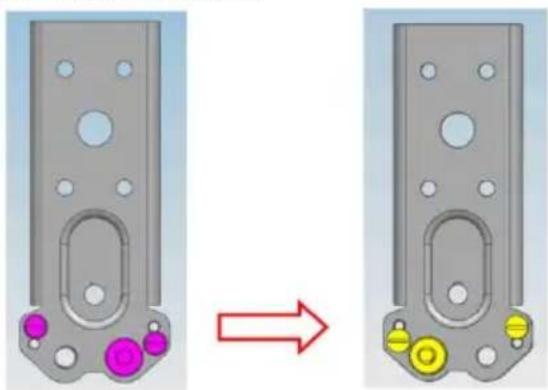
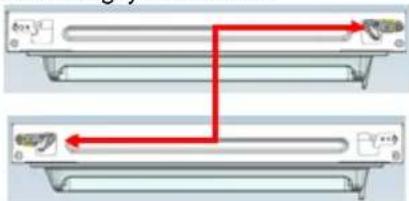
Diagram showing two identical mechanical components with red arrows indicating connection points (no text or symbols)c. Use a tool to remove the axle and two stoppers on the lower hinge and then assemble them to the posion as shown in the below gure.
natural_image
Two views of a mechanical component with colored circular features, one showing a red arrow indicating transformation (no text or symbols)This situaon apply to open door in right side This situaon apply to le side
Assemble the refrigerator door and freezer door to the opposite side
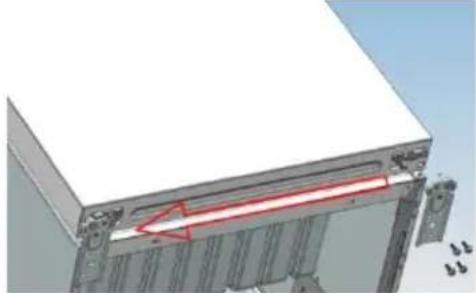
- a. Remove the adjustable front foot as shown below by hand and then assemble the lower hinge to the other side of the cabinet and x the screws by using a tool.
natural_image
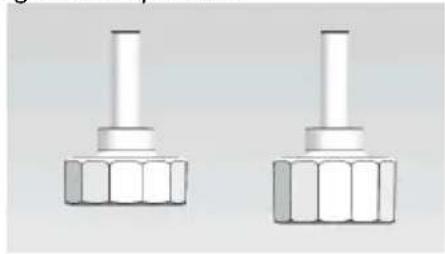
3D mechanical assembly diagram showing a layered structure with mounting brackets and a red arrow indicating direction (no text or symbols)b. Assemble the shorter adjustable front foot to the lower hinge side and adjust the height of the foot to make the refrigerator stay in level.
natural_image
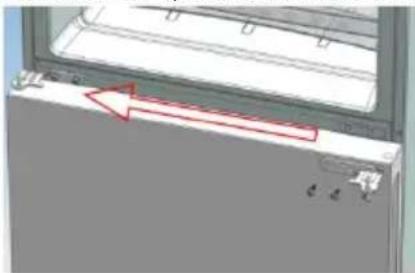
Two identical mechanical components with hexagonal bases, no visible text or symbols- Put on the freezer door and turn the middle hinge by 180^ C and then assemble it to the other side of the cabinet; use a tool to screw up the 3 screws to x the middle hinge.
natural_image
Close-up of a mechanical component with red arrows indicating direction, no visible text or symbols- Put on the refrigerator door and assemble the upper hinge to the other side of the cabinet; use a tool to screw up the 4 screws to x the upper hinge.
Aer that, connect the door communicaon line and the cabinet communicaon line and then put on the upper hinge cover and x it using a screw.
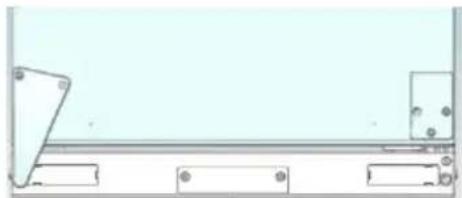
- Assemble the hole cover to the other side of the cabinet and use a tool to screw up the hole cover.
natural_image
Pure technical line drawing of a mechanical assembly without any text, numbers, or symbolsDoor disassembly is nished here.
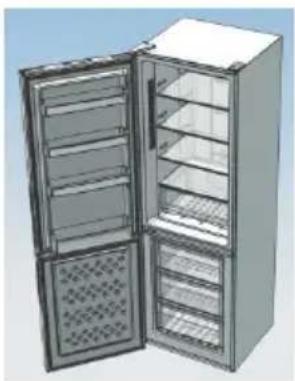
gure of door opening from the right
natural_image
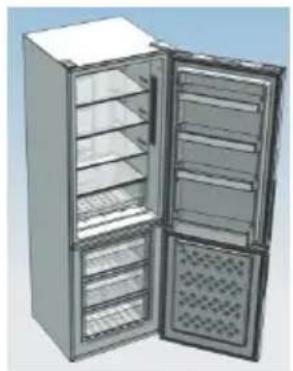
3D rendering of a stainless steel refrigerator with open doors and side shelves (no text or symbols visible)figure of door opening from the left
natural_image
Exterior view of a stainless steel refrigerator with open doors and side compartments (no text or symbols visible)
Double check that the door is aligned correctly and all the seals are closed on all sides. If necessary, re-adjust the levelling feet.
NOTE: If you want to have the door swing reversed, we recommend that your contact a qualified technician. You should only try to reverse the door yourself if you believe that you are qualified to do so. All parts removed must be saved to do the reinstallaon of the door. You should rest the fridge freezer on something solid so that it will not slip during the door change process. Do not lay the fridge freezer at as this may damage the coolant system. Ensure the fridge freezer is unplugged and empty. We recommend that 2 people handle the fridge freezer during assembly.
TROUBLE SHOOTING
- If the appliance does not operate when switched on, check.
- Power cut: If the internal temperature of the Fridge/Freezer compartment is -18^ C or less when the power returns, your food is safe. The food in your Fridge/Freezer will remain frozen for approx 16 hours with the door closed. Do not open the Fridge/Freezer door more than necessary.
- The product is designed and built for domesc household use only.
- The plug is inserted properly in the socket and that the power supply is on. (To check the power supply to the socket, plug in another appliance).
- The fuse has blown/circuit breaker has tripped/main distribuon switch has been turned off.
- The temperature control has been set correctly.
- If the refrigerator is exceptionally cold, you may have accidentally adjusted the thermostat control dial to a higher posion.
- If the refrigerator is exceptionally warm, the compressor may not be working. Turn the thermostat control dial to the maximum seng and wait a few minutes. If there is no humming noise, it is not working. Contact the local store where your purchase was made.
- If condensaon appears outside of the Refrigerator, this may be due to a change in the room temperature. Wipe o any residue of moisture. If the problem connues contact the local store where your purchase was made.
- If the provided plug has been replaced, make sure the new plug is properly connected. If the appliance is sill not operang aer the above checks, please contact Customer Service.
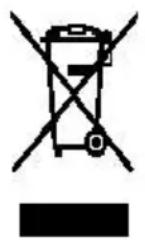
SCRAPPING OLD APPLIANCES
natural_image
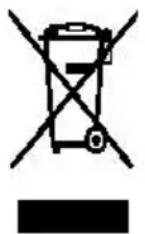
Warning symbol of a flame inside a triangle (no text or numbers)This appliance is marked according to the European direcve 2012/19/EU on Waste Electrical and Electronic Equipment (WEEE).
WEEE contains both pollung substances (which can cause negave consequences for the environment) and basic components (which can be re-used). It is important to have WEEE subjected to specific treatments, in order to remove and dispose properly all pollutants, and recover and recycle all materials.
Individuals can play an important role in ensuring that WEEE does not become an environmental issue; it is essenal to follow some basic rules:
WEEE should not be treated as household waste.
WEEE should be handed over to the relevant collecon points managed by the municipality or by registered companies. In many countries, for large WEEE, home collecon could be present.
In many countries, when you buy a new appliance, the old one may be returned to the retailer who has to collect it free of charge on a one-to-one basis, as long as the equipment is of equivalent type and has the same funcons as the supplied equipment.
Conformity
By placing the C€ mark on this product, we are conming compliance to all relevant European safety, health and environmental requirements which are applicable in legislaon for this product.
TABLE DES MATIÈRES
INFORMATIONS SUR LA SÉCURITÉ .... 54
COMBI CANDY 62
Classe climaque....62
INSTRUCTIONS DE TRANSPORT....62
INSTRUCTIONS D'INSTALLATION 63
DÉMARRAGE 63
FONCTIONNEMENT COMBINÉ....64
UNITÉ D'AFFICHAGE VERTICALE 64
UNITÉ D'AFFICHAGE RONDE....66
INTERFACE UTILISATEUR INTERNE 67
CARACTÉRISTIQUES TECHNIQUES 68
FRESHNESS CONTROL....68
DISTRIBUTEUR D'EAU
natural_image
Illustration of a refrigerator with a door and a hanging control panel (no text or symbols)natural_image
Line drawing of a two-tiered container or tray with a handle and side panel (no text or symbols)natural_image
Exploded view of a mechanical assembly showing internal components and mounting brackets (no text or symbols visible)natural_image
3D mechanical assembly diagram showing components like a bracket, housing, and mounting bracket (no text or labels)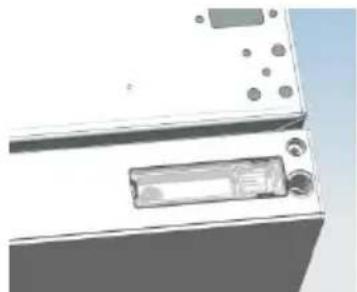
natural_image
Close-up of a white appliance with buttons and a rectangular label (no visible text or symbols)natural_image
Diagram of a computer interface with ports and connectors (no text or symbols visible)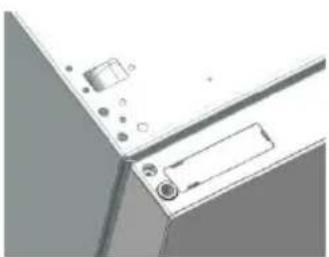
natural_image
Pure technical diagram of a mechanical component with no visible text, numbers, or symbolsnatural_image
3D rendering of an open refrigerator with shelves and doors (no text or symbols visible)natural_image
3D architectural rendering of a window frame with metal fixtures and a small mechanical bracket (no text or symbols visible)natural_image
3D rendering of a refrigerator with open door and side shelves (no text or symbols)natural_image
3D rendering of a window frame with attached metal components and small accessories (no text or symbols visible)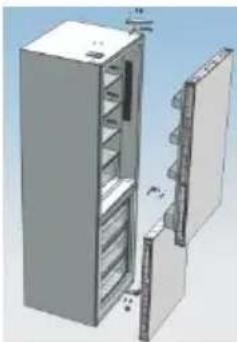
natural_image
3D rendering of a refrigerator with open door and shelf compartments (no text or symbols visible)flowchart
graph TD
    A["Point B"] --> B["Point C"]
    B --> C["Point D"]
    C --> D["Point E"]
natural_image
Diagram showing two identical mechanical components with red arrows indicating direction, no text or symbols present.natural_image
Two identical mechanical components with colored circular features, one shown before and after transformation (no text or symbols)natural_image
3D mechanical assembly diagram showing a white base with red annotation arrow pointing to a component (no text or symbols present)natural_image
Two identical white mechanical components with hexagonal bases, no text or symbols visiblenatural_image
3D mechanical component diagram showing a bracket with mounting holes and a red arrow indicating direction (no text or symbols)natural_image
Pure technical line drawing of a mechanical assembly without any text, numbers, or symbolsnatural_image
3D rendering of an open stainless steel refrigerator with multiple doors and side compartments (no visible text or labels)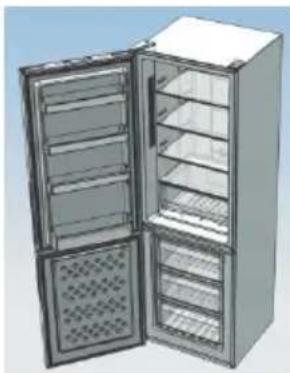
natural_image
3D rendering of an open refrigerator with doors open, showing internal shelves and ventilation grilles (no text or symbols visible)natural_image
Warning symbol of a flame inside a triangle (no text or numbers)AHORRO ENERGÉTICO....98
CUIDADOS....98
Descongelación 98
SISTEMA ANTIBACTERIANO (si está instalado)
DISPENSADOR DE AGUA
natural_image
Illustration of a refrigerator with a door and an orange arrow pointing to the door (no text or symbols)natural_image
Exterior view of a modern office building (no signage)natural_image
Line drawing of a two-tiered open box or tray with a handle and spout (no text or symbols)natural_image
3D mechanical assembly diagram showing internal components and mounting bracket (no text or symbols)natural_image
Close-up of a mechanical device with a rectangular component and circular ports (no visible text or symbols)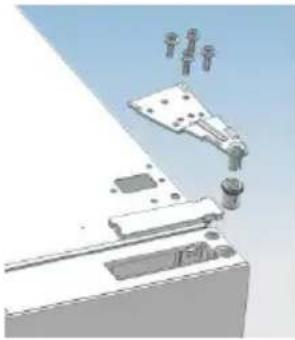
natural_image
3D mechanical assembly diagram showing a bracket with mounting holes and a robotic arm (no text or symbols)natural_image
Diagram of a computer monitor with ports and cables (no text or symbols visible)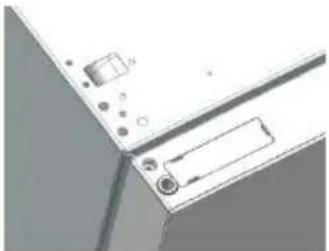
natural_image
Close-up of a white electronic device with buttons and a label (no visible text or symbols)natural_image
Illustration of an open refrigerator with shelves and doors (no text or symbols)natural_image
3D rendering of a window frame with metal fixtures and scattered tools (no text or symbols visible)natural_image
3D rendering of a refrigerator with open door and side shelves (no text or symbols visible)natural_image
Diagram showing two identical mechanical components with red arrows indicating connection points (no text or symbols)natural_image
Two views of a mechanical component with colored circular features, one showing a transformation arrow (no text or symbols)natural_image
3D diagram of a mechanical assembly with a red arrow indicating a specific component (no text or symbols present)natural_image
Two identical mechanical components with flanged ends and cylindrical tops, shown in 3D rendering (no text or symbols)natural_image
3D diagram of a mechanical component with a red arrow indicating direction, no visible text or symbolsnatural_image
Pure technical line drawing of a mechanical assembly without any text, numbers, or symbolsnatural_image
3D rendering of an open stainless steel refrigerator with multiple doors and side grilles (no text or symbols visible)
natural_image
3D rendering of a stainless steel refrigerator with open doors and side grilles (no text or symbols visible)WASSERSPENDER
natural_image
Illustration of a refrigerator with a door and a small door (no text or symbols)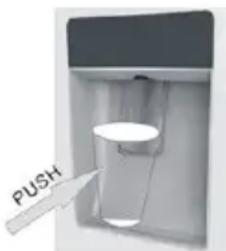
natural_image
Line drawing of a closed mechanical component with no text or symbolsnatural_image
3D mechanical assembly diagram showing a component with mounting holes and internal components (no text or symbols visible)natural_image
3D mechanical assembly diagram showing components like a bracket, mounting base, and mounting bracket (no text or labels)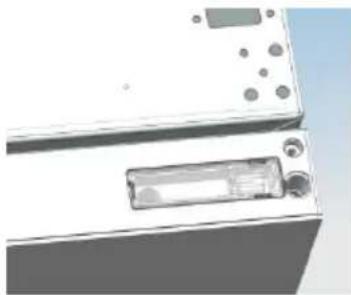
natural_image
Close-up of a white electronic device with buttons and a display panel (no visible text or symbols)natural_image
Diagram of a computer interface with ports and connectors (no text or symbols visible)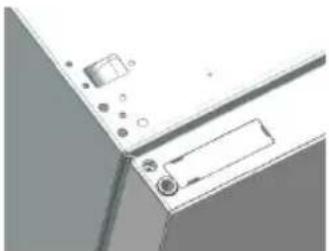
natural_image
Close-up of a computer monitor with ports and buttons (no visible text or symbols)natural_image
3D rendering of an open refrigerator with shelves and doors (no text or symbols visible)natural_image
3D rendering of a stainless steel refrigerator with open door and side shelves (no text or symbols visible)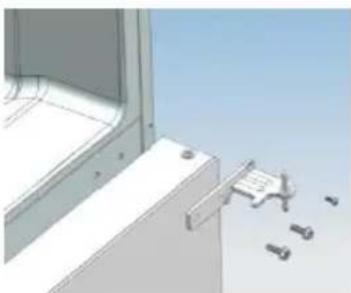
natural_image
3D CAD model of a window frame with a bracket and mechanical components, no visible text or symbolsnatural_image
Architectural detail showing window frame, door lock, and mechanical components (no text or symbols)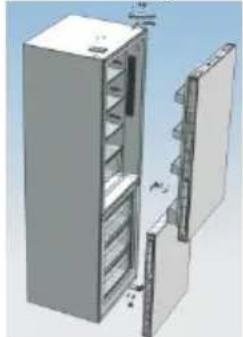
natural_image
3D rendering of a refrigerator with doors open and shelves inside (no text or symbols visible)natural_image
Diagram showing two identical mechanical components with red arrows indicating connection points (no text or symbols)natural_image
Two identical mechanical components with colored circular features, one shown before and after transformation (no text or symbols)natural_image
3D mechanical assembly diagram showing a white base with red highlighted component (no text or symbols)natural_image
Two identical mechanical components with hexagonal bases and cylindrical shafts, shown side by side (no text or symbols)natural_image
3D mechanical component diagram showing a bracket with mounting holes and a red arrow indicating direction (no text or symbols)natural_image
Pure technical line drawing of a mechanical assembly without any text, numbers, or symbolsnatural_image
3D rendering of an open refrigerator with multiple doors and side compartments (no text or symbols visible)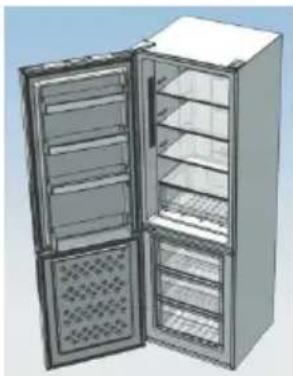
natural_image
3D rendering of an open refrigerator with doors open, showing internal compartments and ventilation slots (no text or symbols visible)SISTEMA ANTIBACTERIANO (se presente)
DISPENSADOR DE ÁGUA
natural_image
Illustration of a refrigerator with a digital display showing an orange arrow pointing to the screen (no text or symbols)natural_image
Line drawing of a closed storage tray or container with no text or symbolsnatural_image
Exploded view of a mechanical assembly with no visible text or symbolsnatural_image
Close-up of a white electronic device with buttons and a rectangular display (no visible text or symbols)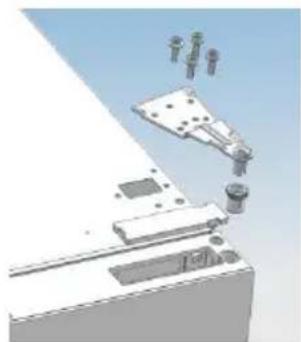
natural_image
3D mechanical assembly diagram showing components like a bracket, mounting base, and clamping device (no text or labels)natural_image
Diagram of a computer monitor with ports and cables (no text or symbols visible)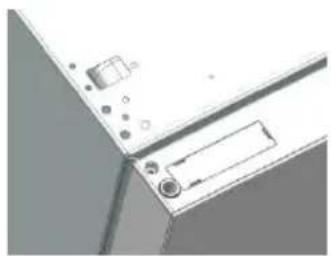
natural_image
Pure technical diagram of a mechanical component with no visible text, numbers, or symbolsnatural_image
3D rendering of an open refrigerator with shelves and doors (no text or symbols visible)natural_image
3D architectural rendering of a window with door and wall-mounted fixtures, showing no text or symbolsnatural_image
3D rendering of a refrigerator with open door and side shelves (no text or symbols)natural_image
Diagram showing two identical mechanical components with red arrows indicating connection points (no text or symbols)natural_image
Diagram showing a mechanical component before and after transformation, with no visible text or symbolsnatural_image
3D mechanical assembly diagram showing a component with a red arrow indicating direction (no text or symbols present)natural_image
Two identical mechanical components with hexagonal bases, no text or symbols visiblenatural_image
Diagram of a door panel with a red arrow pointing to the left side (no text or symbols present)natural_image
Pure technical line drawing of a mechanical assembly without any text, numbers, or symbolsnatural_image
3D rendering of a stainless steel refrigerator with open doors and side grilles (no text or symbols visible)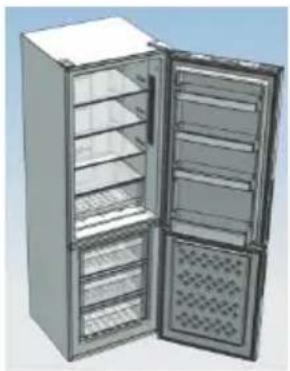
natural_image
3D rendering of an open stainless steel refrigerator with multiple doors and internal compartments (no text or symbols visible)WATERDISPENSER....173
WATERDISPENSER
natural_image
Illustration of a door with a small control panel and an orange arrow pointing to it (no text or symbols)natural_image
Line drawing of a two-tiered container or tray with no text or symbolsnatural_image
3D mechanical assembly diagram showing a bracket with mounting holes and internal components (no text or symbols)natural_image
3D mechanical assembly diagram showing components like a bracket, mounting holes, and a cylindrical part (no text or labels)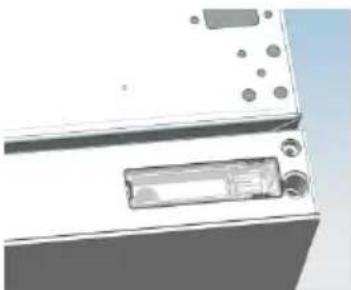
natural_image
Close-up of a white electronic device with buttons and a display (no visible text or symbols)natural_image
Diagram of a computer monitor with ports and cables (no text or symbols visible)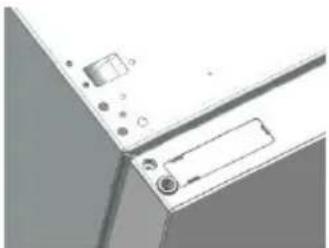
natural_image
Close-up of a computer monitor with ports and cables (no visible text or symbols)natural_image
Illustration of a refrigerator with open door and shelves (no text or symbols)natural_image
3D rendering of a window frame with metal bracket and mechanical components (no text or symbols visible)natural_image
3D rendering of a refrigerator with open door and side shelves (no text or symbols)natural_image
Architectural detail of a window frame with attached metal fixtures and screws (no text or symbols visible)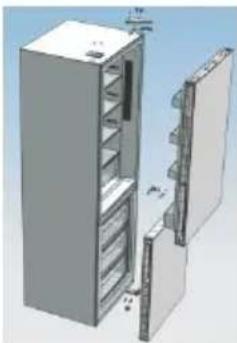
natural_image
3D rendering of a refrigerator with open door and shelf compartments (no text or symbols visible)natural_image
Two identical mechanical components with colored circular features, one shown before and after transformation (no text or symbols)natural_image
3D mechanical assembly diagram showing a component with a red arrow indicating a specific section (no text or symbols present)natural_image
Two identical mechanical components with hexagonal bases, no text or symbols visiblenatural_image
Diagram of a mechanical component with a red arrow indicating direction, no visible text or symbolsnatural_image
Pure technical line drawing of a mechanical assembly without any text, numbers, or symbolsnatural_image
3D rendering of a stainless steel refrigerator with open doors and side compartments (no text or symbols visible)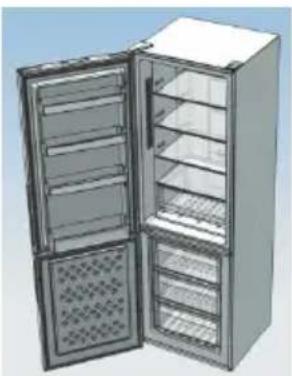
natural_image
3D rendering of a stainless steel refrigerator with open doors and side grilles (no text or symbols visible)natural_image
Technical line drawing of a vehicle interior with an inset showing a magnified view of the front portion (no text or symbols)natural_image
Illustration of a refrigerator with a door and a digital display (no text or symbols)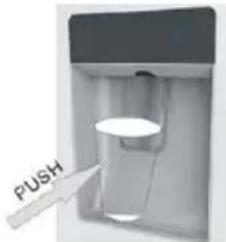
natural_image
Line drawing of a mechanical component or housing with no visible text, numbers, or symbolsnatural_image
3D mechanical assembly diagram showing a component with mounting holes and internal components (no text or symbols visible)natural_image
3D mechanical assembly diagram showing components like a bracket, mounting base, and mounting bracket (no text or labels)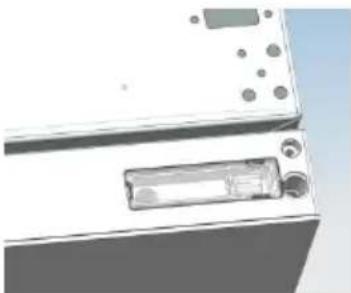
natural_image
Close-up of a white electronic device with a rectangular component and circular ports (no visible text or symbols)natural_image
Diagram of a computer interface with ports and connectors (no text or symbols visible)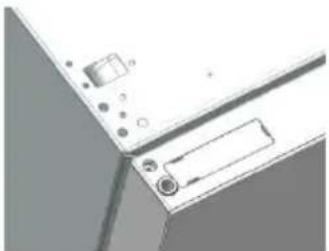
natural_image
Close-up of a mechanical component with mounting holes and a rectangular slot (no visible text or symbols)natural_image
3D rendering of an open refrigerator with shelves and doors (no text or symbols visible)natural_image
3D architectural rendering of a window frame with metal bracket and support fixtures (no text or symbols)natural_image
3D rendering of a refrigerator with open door and side shelves (no text or symbols)natural_image
3D rendering of a window frame with attached metal components and exploded view (no text or symbols)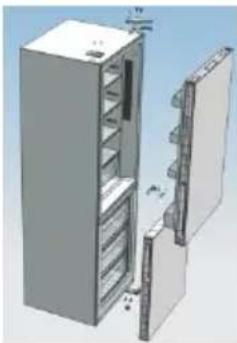
natural_image
3D rendering of a refrigerator with open door and shelf, no visible text or symbolsnatural_image
Diagram showing two identical mechanical components with red arrows indicating connection points (no text or symbols)natural_image
Two identical mechanical components with colored circular features, one shown before and after transformation (no text or symbols)natural_image
3D mechanical assembly diagram showing a bracket with mounting flanges and a red arrow indicating a specific component (no text or symbols present)natural_image
Two identical mechanical components with hexagonal bases, no text or symbols visiblenatural_image
Technical diagram showing a mechanical component with red arrows indicating direction (no text or symbols present)natural_image
Pure technical line drawing of a mechanical assembly without any text, numbers, or symbolsnatural_image
3D rendering of a double-door refrigerator with open doors and grilles (no text or symbols visible)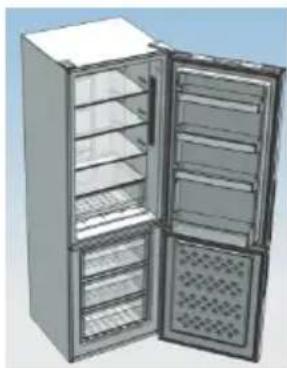
natural_image
3D rendering of an open stainless steel refrigerator with multiple doors and side shelves (no visible text or labels)DET VERTIKALE DISPLAY
natural_image
Technical line drawing of a mechanical component with an inset view showing a close-up detail (no text or symbols)VANDDISPENSER
natural_image
Illustration of a refrigerator with a door and a hanging control panel (no text or symbols)Fyld glasset
natural_image
Line drawing of a mechanical component or housing with no visible text, numbers, or symbolsnatural_image
Close-up of a white electronic device with buttons and a rectangular component (no visible text or symbols)natural_image
3D diagram of a device with internal components and mounting bracket (no text or symbols)
natural_image
3D mechanical assembly diagram showing a robotic arm and mounting bracket (no text or symbols)natural_image
Diagram of a computer monitor with ports and connectors (no text or symbols visible)
natural_image
Close-up of a computer monitor with control buttons and a blank drive (no visible text or symbols)natural_image
Illustration of an open refrigerator with shelves and doors (no text or symbols visible)natural_image
3D technical illustration of a window frame with metal bracket and mounting hardware (no text or symbols)natural_image
Architectural detail showing window frame, wall-mounted fixtures, and floor-mounted fixtures against a clear sky (no text or symbols)
natural_image
3D rendering of a refrigerator with open door and side panel (no text or symbols visible)natural_image
Diagram showing two identical mechanical components with red arrows indicating direction, no text or symbols present.natural_image
Two views of a mechanical component with colored circular features, one showing a red arrow indicating transformation (no text or symbols)natural_image
3D mechanical assembly diagram showing a bracket with a red arrow indicating a specific component (no text or symbols present)natural_image
Two identical mechanical components with hexagonal bases and cylindrical shafts, shown side by side (no text or symbols)natural_image
Diagram of a mechanical component with a red arrow indicating direction, no visible text or symbolsnatural_image
Pure technical line drawing of a mechanical assembly without any text, numbers, or symbolsnatural_image
3D rendering of a double refrigerator with open doors and side grilles (no text or symbols visible)natural_image
3D rendering of a stainless steel refrigerator with open doors and side compartments (no text or symbols visible)natural_image
Warning symbol of a flame inside a triangle (no text or numbers)ANTIBAKTERIELLT SYSTEM (om så utrustad)
VATTENAUTOMAT
natural_image
Illustration of a refrigerator with a door and a hanging control panel (no text or symbols)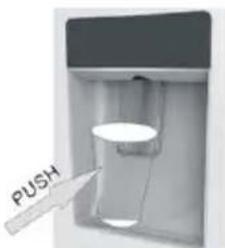
natural_image
Line drawing of a closed mechanical component with no text or symbolsnatural_image
3D mechanical assembly diagram showing a component with mounting holes and internal components (no text or symbols visible)natural_image
3D mechanical assembly diagram showing a robotic arm interacting with a bracket (no text or symbols visible)
natural_image
Close-up of a mechanical device with a rectangular component and circular holes (no visible text or symbols)natural_image
Diagram of a computer monitor with ports and connectors (no text or symbols visible)
natural_image
Pure electrical circuit lines without any symbolsnatural_image
3D rendering of an open refrigerator with shelves and doors (no text or symbols visible)natural_image
3D rendering of a window frame with metal bracket and mounting bracket, showing mechanical components (no text or symbols)natural_image
Diagram showing two identical mechanical components with red arrows indicating connection points (no text or symbols)natural_image
Two identical mechanical components with colored circular features, one shown before and after transformation (no text or symbols)natural_image
3D mechanical assembly diagram showing a white frame with mounting brackets and a red arrow indicating a specific component (no text or symbols present)natural_image
Two identical mechanical components with hexagonal bases and cylindrical shafts, shown side by side (no text or symbols)natural_image
3D diagram of a mechanical component with a red arrow indicating direction, no visible text or symbolsnatural_image
Pure technical line drawing of a mechanical assembly without any text, numbers, or symbolsnatural_image
3D rendering of a refrigerator with open doors and side shelves (no text or symbols visible)SKROTNING AV GAMLA APPARATER
ANTIBAKTEERINEN JÄRJESTELMÄ (jos varusteena)
natural_image
Illustration of a refrigerator with a door and a small screen showing an orange arrow pointing to the screen (no text or symbols)natural_image
Line drawing of a mechanical component or housing with no visible text, numbers, or symbolsnatural_image
3D mechanical assembly diagram showing a component with mounting holes and internal components (no text or symbols)natural_image
3D mechanical assembly diagram showing a bracket with mounting holes and a lever mechanism (no text or symbols)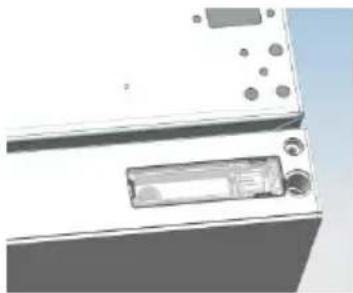
natural_image
Exterior view of a modern kitchen appliance with control panel and buttons (no visible text or symbols)natural_image
Diagram of a device with ports and connectors, no visible text or symbols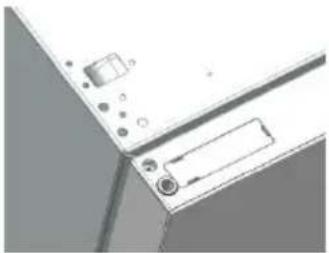
natural_image
Close-up of a computer monitor with control buttons and a paper tab (no visible text or symbols)natural_image
Illustration of a refrigerator with open door and shelves (no text or symbols)natural_image
3D rendering of a window frame with metal bracket and mechanical components (no text or symbols visible)natural_image
3D rendering of a refrigerator with open door and side shelves (no text or symbols)natural_image
3D technical illustration of a refrigerator assembly with door, shelf, and door lock components (no text or symbols)natural_image
Diagram showing two identical mechanical components with red arrows indicating connection points (no text or symbols)natural_image
Two views of a mechanical component with colored pins, one showing a red arrow indicating transformation (no text or symbols)natural_image
3D mechanical assembly diagram showing a white base with red arrow indicating a component (no text or symbols)natural_image
Two identical mechanical components with hexagonal bases, no text or symbols visiblenatural_image
Diagram of a device with a red arrow pointing to a component, no visible text or symbolsnatural_image
Pure technical line drawing of a mechanical assembly without any text, numbers, or symbolsnatural_image
3D rendering of a stainless steel refrigerator with open doors and side grilles (no text or symbols visible)
natural_image
3D rendering of an open stainless steel refrigerator with multiple doors and side compartments (no text or symbols visible)natural_image
Warning symbol of a flame inside a triangle (no text or numbers)RUNDT DISPLAY....296
INTERNT BRUKERGRENSENITT....297
TEKNISKE FUNKSJONER 298
FRESHNESS CONTROL.... 298
ANTIBAKTERIELT SYSTEM (om I stede).... 298
VANNDISPENSER....298
VANNDISPENSER
natural_image
Illustration of a refrigerator with a door and a scroll, featuring an orange arrow pointing to the door (no text or symbols)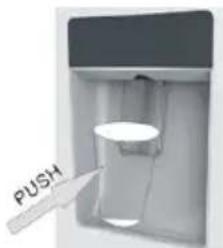
natural_image
Line drawing of a closed mechanical component or tray with no visible text or symbolsnatural_image
3D cutaway view of a mechanical device showing internal components and mounting holes (no text or symbols)natural_image
3D mechanical assembly diagram showing a robotic arm interacting with a mounted component (no text or symbols visible)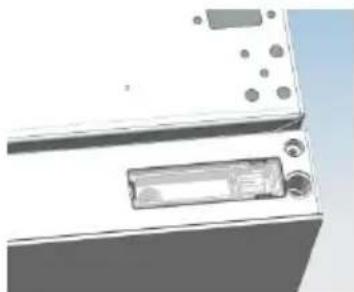
natural_image
Exterior view of a white appliance with buttons and a display (no visible text or symbols)natural_image
Diagram of a computer interface showing ports, connectors, and memory compartment (no text or labels)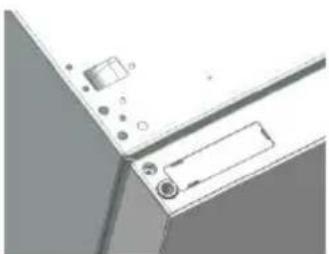
natural_image
Close-up of a computer monitor with control buttons and a scroll (no visible text or symbols)natural_image
Diagram showing two identical mechanical components with red arrows indicating connection points (no text or symbols)natural_image
Two views of a mechanical component with colored circular features, one showing a red arrow indicating transformation (no text or symbols)natural_image
3D mechanical assembly diagram showing a frame structure with red arrows indicating motion or force direction (no text or symbols)natural_image
Two identical mechanical components with hexagonal bases and cylindrical protrusions (no text or symbols)natural_image
Technical diagram showing a mechanical component with red arrows indicating direction (no text or symbols present)natural_image
Pure technical line drawing of a mechanical assembly without any text, numbers, or symbolsDørene er ferdigmontert.
natural_image
3D rendering of a stainless steel refrigerator with open doors and side panels (no text or symbols visible)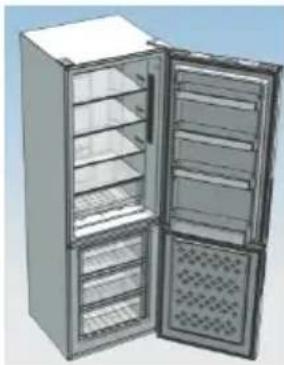
natural_image
3D rendering of an open stainless steel refrigerator with multiple doors and side shelves (no text or symbols visible)Gumb SET: Prisnite gumb „SET“ da biste postavili temperaturu dok ne dođete do željene razine, pri čemu razina 1 predstavlja najvišu, a razina 4 najnižu temperaturu. U normalnim radnim uvjema preporučujemo upotrebu srednje razine (razina 2).
Kada postavka stupi na snagu, ona odmah pokreće odgovarajuće zaustavljanje za operavnu kontrolu, a pokazatelj zaustavljanja osvijetljen je 3 minuta i nakon toga se gasi. Standardna tvornička temperatura postavljena je na 2.
Prisnite gumb „SET“ i držite dulje od tri sekunde da biste ušli u program samostalne provjere računalne opreme. Operacija samostalne provjere računalne opreme pokreće se u roku od 10 minuta, a dugo držanje gumba nije važeće nakon 10 minuta.
Gumb WI-FI: Uređaj je opremljen tehnologijom SmartFi+ koja omogućava daljinsko upravljanje uređajem s pomoću aplikacije. Prisnite i držite ikonu Wi-Fi tri sekunde da biste akvirali funkciju Wi-Fi, svjetlo ikone prelazi iz bijele u plavu boju.
Povezivanje uređaja (s pomoću aplikacije): Preuzmite aplikaciju SimplyFi na svoj uređaj. Aplikacija Candy SimplyFi dostupna je za uređaje koji koriste Android i iOS operavne sustave, za tablete i pametne telefone. Saznajte sve o SmartFi+ funkcijama pretražujući aplikaciju u načinu rada DEMO. Otvorite aplikaciju, kreirajte korisnički prol i povežite uređaj prateći upute na zaslonu ili „Brzi vodič“ koji ste dobili uz uređaj. Ova radnja nužna je samo prilikom prve instalacije. Da biste završili povezivanje, prate upute prikazane na zaslonu pametnog telefona.
ANTIBAKTERIJSKI SUSTAV (ako postoji)
natural_image
Technical line drawing of a mechanical component with an inset view showing a close-up detail (no text or symbols)DISPENZER ZA VODU
natural_image
Illustration of a refrigerator with a door and a small electronic device on top (no text or symbols)
Ulijevanje
Da biste ulili vodu, nježno prisnite slavinu dispenzera s pomoću čaše ili posude. Da biste zaustavili protok vode, odvojite čašu od slavine dispenzera.
natural_image
Line drawing of a closed mechanical component with no text or symbolsnatural_image
3D rendering of a device with internal components and a small component (no visible text or symbols)b. S pomoću alata uklonite čeri vijka s gornjeg poklopca okova, a zam ga uklonite.
Podignite čahuru vrata i poklopac male završne kapice na vrama.
natural_image
3D mechanical assembly diagram showing a robotic arm and mounting bracket (no text or symbols)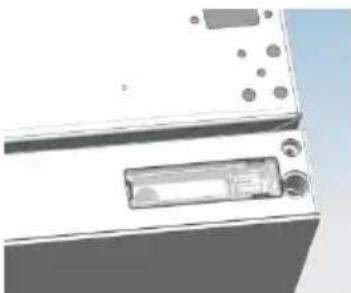
natural_image
Close-up of a white electronic device with a rectangular component and circular ports (no visible text or symbols)kapice.
c. Unesite čahuru vrata i spojnu liniju u rupu na vratima, a zam stavite poklopac male završne
d. S pomoću alata uklonite dva vijka, kao što je prikazano na slici u nastavku, da biste uklonili poklopac rupe na vrhu komore, a zam izvadite spojnu liniju komore iz rupe.
Podignite poklopac male završne kapice na vrama i izvadite čahuru vrata i spojnu liniju vrata.
natural_image
Diagram of a computer monitor with ports and cables (no text or symbols visible)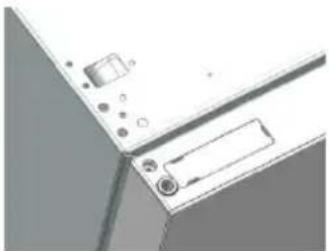
natural_image
Close-up of a computer monitor with ports and a scroll wheel (no visible text or symbols)e. Unesite čahuru vrata u okruglu rupu na vrama, a zam stavite poklopac male završne kapice.
natural_image
Illustration of an open refrigerator with shelves and doors (no text or symbols)f. Pomaknite vrata hladnjaka prema gore više od 500 mm da biste uklonili vrata.
- a. S pomoću alata uklonite 3 vijka sa srednjeg poklopca okova, a zam uklonite srednji okov.
natural_image
3D architectural detail showing a window frame with metal fixtures and a small bracket (no text or symbols visible)b. Pomaknite vrata zamrzivača prema gore više od 500 mm da biste uklonili vrata.
c. Uklonite prilagodljivu prednju stopu ispod donjeg okova; s pomoću alata uklonite 4 vijka s donjeg okova, a zam rastavite donji okov. Demonranje vrata je završeno.
natural_image
Architectural detail showing a window frame, hanging lock, and multiple small components (no text or symbols visible)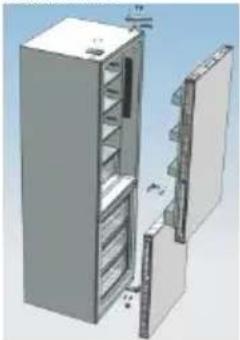
natural_image
3D rendering of a refrigerator with open door and shelf compartments (no text or symbols visible)Montiranje vrata, dodataka donjeg okova na odgovarajućim pozicijama
- a. S pomoću alata izvadite čahuru vrata, kao što je prikazano na slici u nastavku, i sastavite ju na odgovarajućoj poziciji na drugoj strani.
flowchart
graph TD
    A["Start"] --> B["Path 1"]
    B --> C["Path 2"]
    C --> D["End"]
b. S pomoću alata uklonite vijke s čepa, kao što je prikazano na slici u nastavku, a zam ih sastavite na drugoj strani vrata.
natural_image
Diagram showing two identical mechanical components with red arrows indicating connection points (no text or symbols)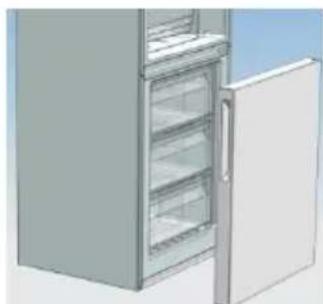
natural_image
3D rendering of a refrigerator with open door and side shelves (no text or symbols visible)c. S pomoću alata uklonite osovinu i dva čepa na donjem okovu, a zam ih sastavite na poziciji kao što je prikazano na slici u nastavku.
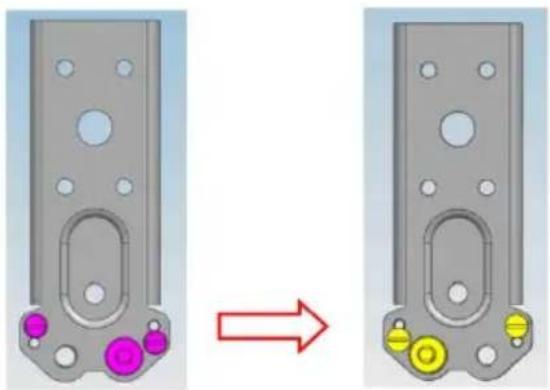
natural_image
Two views of a mechanical component with colored circular features, one showing a red arrow indicating transformation (no text or symbols)natural_image
3D mechanical assembly diagram showing a bracket with mounting holes and a red arrow indicating a specific component (no text or symbols present)b. Sastavite kraću prilagodljivu prednju stopu na strani nižeg okova i uskladite visinu stope tako da hladnjak bude poravnan.
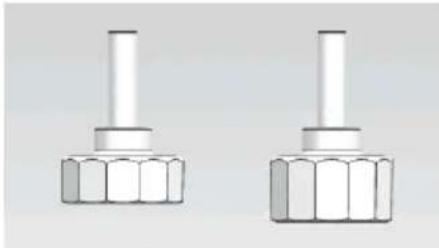
natural_image
Two identical mechanical components with hexagonal bases, no text or symbols visible- Postavite vrata zamrzivača i okrenite srednji okov za 180 stupnjeva, a zam ga postavite na drugoj strani komore; s pomoću alata zavrnite 3 vijka da biste pričvrsli srednji okov.
natural_image
Pure mechanical component diagram without any text, numbers, or symbols- Postavite vrata hladnjaka i sastavite gornji okov na drugoj strani komore; s pomoću alata zavrnite 4 vijka da biste pričvrsli gornji okov.
Nakon toga povežite spojnu liniju vrata i spojnu liniju komore, a zam postavite poklopac gornjeg okova i pričvrste ga vijkom.
- Sastavite poklopac rupe na drugoj strani komore i s pomoću alata pričvrste vijke poklopca rupe.
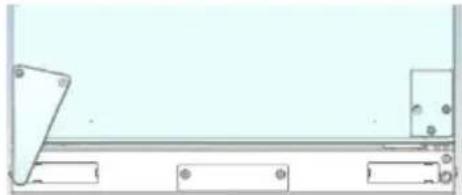
natural_image
Pure mechanical assembly diagram without any text, numbers, or symbolsnatural_image
3D rendering of a stainless steel refrigerator with open doors and side grilles (no text or symbols visible)
natural_image
3D rendering of an open stainless steel refrigerator with multiple doors and ventilation grilles (no text or symbols visible)natural_image
Warning symbol of a flame inside a triangle (no text or numbers)Ovaj uređaj označen je sukladno Direkvi 2012/19/EZ o otpadnoj električnoj i elektroničkoj opremi (WEEE).
Dugme SET: Prisnite dugme SET da biste podesili temperaturu dok ne dođete do željenog nivoa gde nivo 1 predstavlja najtopliju, a nivo 4 najhladniju temperaturu. U normalnim radnim uslovima preporučujemo upotrebu srednjeg nivoa (nivo 2).
Kada postavka stupi na snagu, ona odmah pokreće odgovarajuće zaustavljanje za operavnu kontrolu, a pokazatelj zaustavljanja je osvetljen 3min i nakon toga se gasi. Standardna fabrička temperatura je postavljena na 2.
Prisnite dugme „SET“ i držite duže od 3 sekunde da biste ušli u program samostalne provere hardvera. Operacija samostalne provere hardvera se pokreće u roku od 10 minuta, a dugo držanje dugmeta nije važeće nakon 10 minuta.
ANTIBAKTERIJSKI SISTEM (ako postoji)
DISPENZER ZA VODU
Dispenzer za vodu vam omogućava da dobijete hladnu vodu bez otvaranja vrata odeljka frižidera.
Pre prve upotrebe
Pre prve upotrebe dispenzera za vodu, uklonite i očiste posudu za vodu koja se nalazi unutar odeljka frižidera.
- Podignite i izvadite posudu za vodu iz odeljka frižidera.
- Otvorite poklopac posude za vodu, a zam očiste posudu za vodu i poklopac u toploj sapunici. Temeljno isperite.
- Nakon čišćenja, stavite poklopac na posudu za vodu, a zam vrate posudu za vodu na vrata frižidera.
- Očiste slavinu dispenzera izvan vrata frižidera.
natural_image
Illustration of a refrigerator with a door and a hanging control panel (no text or symbols)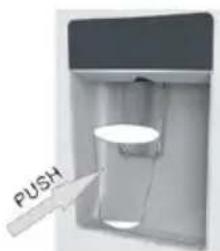
Sveže namirnice: ovo je prostor u frižideru s najviše vlage. Ovde se može držati povrće, voće, namirnice za svežu salatu, npr. neoprana cela salata, celi paradajz, rotkvica itd.
SAVETUJEMO VAM DA SVE NAMIRNICE U POSUDI ZA SALATE BUDU UMOTANE.
natural_image
Line drawing of a mechanical component or housing with no visible text, numbers, or symbolsUnutar otvora za pražnjenje biće umetnut „vrh za čišćenje“. To će spreči da sitni komadići namirnica upadnu u taj otvor. Nakon čišćenja unutrašnjos svog frižidera i uklanjanja ostataka hrane oko tog otvora, upotrebite „vrh za čišćenje“ da biste proverili da li je došlo do začepljenja otvora. Za čišćenje spoljašnjos frižidera/zamrzivača, koriste uobičajena sredstva za poliranje nameštaja. Vodite računa da vrata uređaja budu zatvorena kako sredstvo za poliranje ne bi dospelo na magnetnu zapvnu traku na vrama ili u unutrašnjost uređaja.
natural_image
3D mechanical assembly diagram showing internal components (no text or symbols)natural_image
3D mechanical assembly diagram showing a robotic arm interacting with a base platform (no text or symbols visible)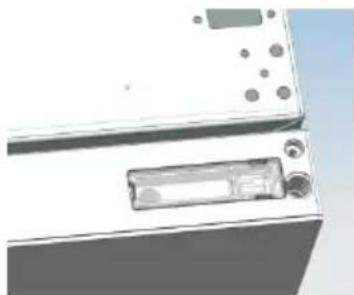
natural_image
Close-up of a white electronic device with a rectangular component and circular ports (no visible text or symbols)c. Unesite čauru vrata i spojnu liniju u rupu na vrama a zam stavite poklopac male završne kapice.
d. Pomoću alata uklonite dva zavrtnja kao što je prikazano na slici u nastavku da biste uklonili poklopac rupe na vrhu komore, a zam izvadite spojnu liniju komore iz rupe.
Podignite poklopac male završne kapice na vrama i izvadite čauru vrata i spojnu liniju vrata.
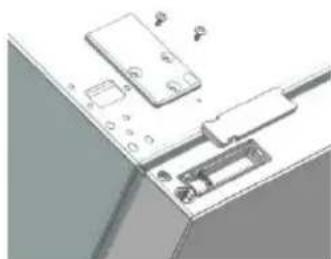
natural_image
Diagram of a computer interface with ports and connectors (no text or symbols visible)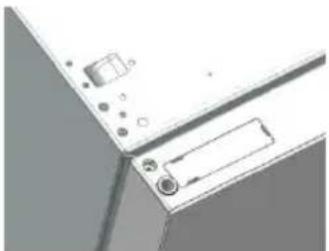
natural_image
Close-up of a computer monitor with ports and a scroll wheel (no visible text or symbols)e. Unesite čauru vrata u okruglu rupu na vrama, a zam stavite poklopac male završne kapice.
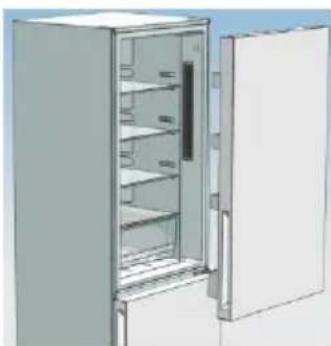
natural_image
3D rendering of an open refrigerator with shelves and doors (no text or symbols visible)f. Pomerite vrata frižidera nagore preko 500mm da biste uklonili vrata.
- a. Pomoću alata uklonite 3 zavrtnja sa srednjeg poklopca šarke, a zam uklonite srednju šarku.
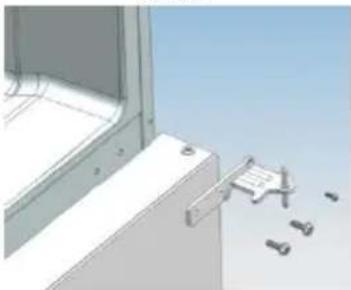
natural_image
3D rendering of a window frame with a bracket and mechanical components, no visible text or symbolsb. Pomerite vrata zamrzivača nagore preko 500mm da biste uklonili vrata.
c. Uklonite podesivu prednju stopu ispod donje šarke; pomoću alata uklonite 4 zavrtnja sa donje šarke, a zam rastavite donju šarku. Rastavljanje vrata je završeno.
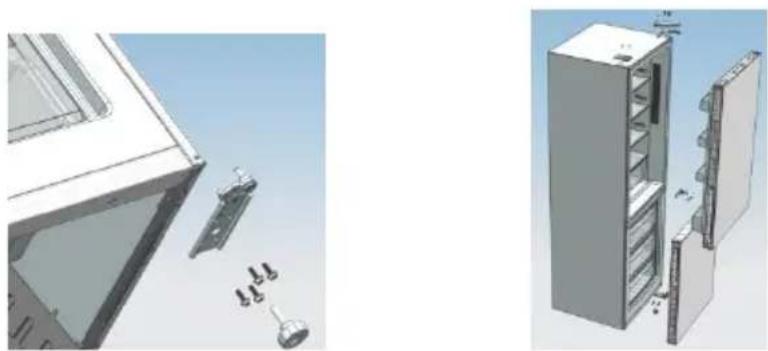
Sastavljanje vrata, dodataka donje šarke na odgovarajućim pozicijama.
- a. Pomoću alata izvadite čauru vrata kao što je prikazano na slici u nastavku i sastavite je na odgovarajućoj poziciji na drugoj strani.
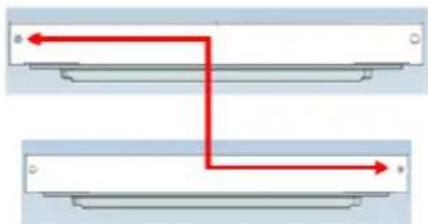
flowchart
graph TD
    A["Start"] --> B{Path 1}
    B --> C["End"]
    style A fill:#f9f,stroke:#333
    style B fill:#ccf,stroke:#333
b. Pomoću alata uklonite zavrtnje sa čepa kao što je prikazano na slici u nastavku, a zam ih sastavite na drugoj strani vrata.
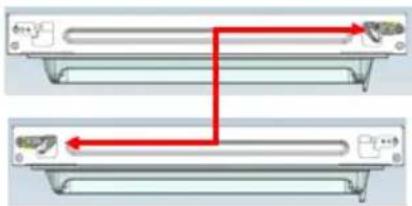
natural_image
Diagram showing two identical mechanical components with red arrows indicating connection points (no text or symbols)c. Pomoću alata uklonite osovinu i dva čepa na donjoj šarki, a zam ih sastavite na poziciji kao što je prikazano na slici u nastavku.
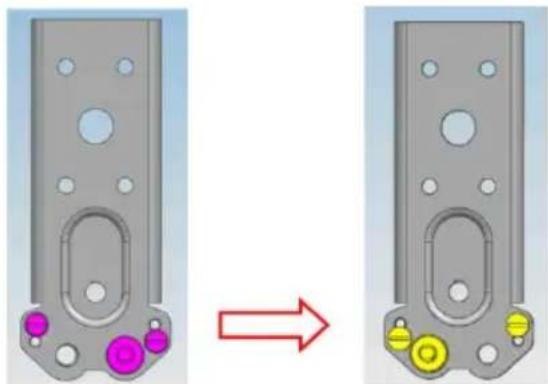
natural_image
Two views of a mechanical component with colored pins, one showing a red arrow indicating transformation (no text or symbols)Primenite ovu situaciju za otvaranje vrata na desnoj strani. Primenite ovu situaciju na levu stranu.
Sastavljanje vrata frižidera i vrata zamrzivača na suprotnoj strani
- a. Ručno uklonite podesivu prednju stopu kao što je prikazano u nastavku, a zam sastavite donju šarku na drugoj strani komore i pričvrste zavrtnje pomoću alata.
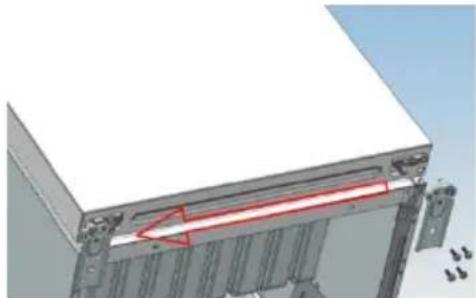
natural_image
3D mechanical assembly diagram showing a white base with red highlighted section and multiple metal components (no text or symbols)natural_image
Two identical mechanical components with hexagonal bases, no text or symbols visible- Postavite vrata zamrzivača i okrenite srednju šarku za 180 stepeni, a zam je postavite na drugoj strani komore; pomoću alata zavrnite 3 zavrtnja da biste pričvrsli srednju šarku.
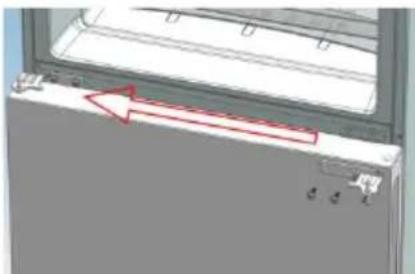
natural_image
3D diagram of a mechanical component with a red arrow pointing to a feature, no visible text or symbols-
Postavite vrata frižidera i sastavite gornju šarku na drugoj strani komore; pomoću alata zavrnite 4 zavrtnja da biste pričvrsli gornju šarku. Nakon toga, povežite spojnu liniju vrata i spojnu liniju komore, a zam postavite poklopac gornje šarke i pričvrste ga zavrtnjem.
-
Sastavite poklopac rupe na drugoj strani komore i pomoću alata pričvrste zavrtnje poklopca rupe.
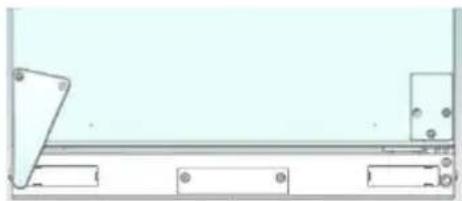
natural_image
Pure technical line drawing of a mechanical assembly without any text, numbers, or symbolsnatural_image
3D rendering of a double-door refrigerator with open doors and ventilation grilles (no text or symbols visible)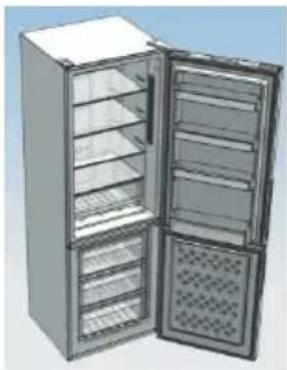
natural_image
3D rendering of an open refrigerator with multiple doors and ventilation grilles (no text or symbols visible)slika vrata koja se otvaraju sa leve strane

Uverite se da su vrata pravilno poravnata i da su prianjajuće gume zatvorene sal svih strana. Po potrebi ponovo uskladite stope za nivelisanje.
NAPOMENA: Ako želite da promenite smer otvaranja vrata, preporučujemo da se obratite kvalikovanom tehničaru. Pokušajte sami da promenite smer otvaranja vrata samo ako smatrate da ste za to kvalikovani. Morate sačuva sve skinute delove kako biste ponovo postavili vrata. Naslonite frižider/zamrzivač na nešto stabilno kako ne bi skliznuo tokom procesa promene smera otvaranja vrata. Nemojte polaga frižider/zamrzivač na zadnju stranu kako ne biste ošteli sistem hlađenja. Proverite da li je frižider/zamrzivač isključen iz struje i prazan. Preporučujemo da dve osobe rukuju frižiderom/zamrzivačem tokom sklapanja.
OTKRIVANJE I OTKLANJANJE PROBLEMA/KVAROVA
natural_image
Warning symbol of a flame inside a triangle (no text or numbers)ANTIBAKTERIÁLNÍ SYSTÉM (pokud je k dispozici)
natural_image
Technical line drawing of a mechanical component with an inset view showing a close-up detail (no text or symbols)DÁVKOVAČ VODY
natural_image
Illustration of a refrigerator with a door and a hanging control panel (no text or symbols)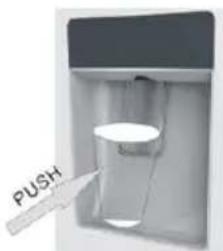
natural_image
Line drawing of a closed mechanical component with no text or symbolsnatural_image
3D mechanical assembly diagram showing internal components and mounting points (no text or symbols)natural_image
3D mechanical assembly diagram showing a robotic arm interacting with a base platform (no text or symbols visible)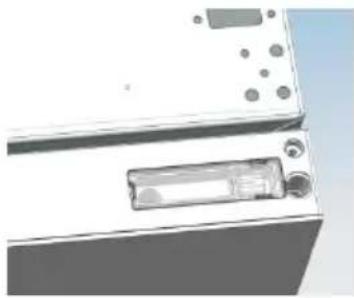
natural_image
Close-up of a white electronic device with a rectangular component and circular ports (no visible text or symbols)natural_image
Diagram of a device with labeled components, showing a door, battery, and socket (no text or symbols present)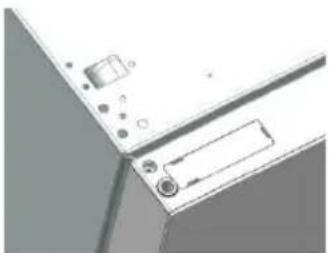
natural_image
Close-up of a computer monitor with buttons and a label (no visible text or symbols)natural_image
Interior view of a refrigerator with open door and shelves (no text or symbols visible)natural_image
3D architectural rendering of a window with a small bench and scattered objects (no text or symbols)natural_image
3D technical illustration of a refrigerator assembly with labeled parts (no text or symbols)natural_image
Two identical mechanical components with colored circular features, one shown before and after transformation (no text or symbols)natural_image
3D mechanical assembly diagram showing a white base with red annotation arrows indicating a specific component (no text or symbols present)natural_image
Two identical white mechanical components with hexagonal bases, no text or symbols visiblenatural_image
3D diagram of a mechanical component with a red arrow indicating direction, no visible text or symbolsnatural_image
Pure technical line drawing of a mechanical assembly without any text, numbers, or symbolsnatural_image
3D rendering of a double refrigerator with open doors and side grilles (no text or symbols visible)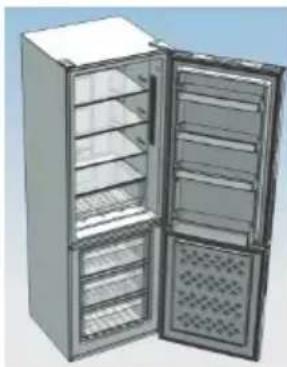
natural_image
3D rendering of an open stainless steel refrigerator with multiple doors and ventilation grilles (no text or symbols visible)natural_image
Warning symbol of a flame inside a triangle (no text or numbers)DYSTRYBUTOR WODY....399
natural_image
Technical line drawing of a mechanical component with an inset showing a close-up view (no text or symbols)DYSTRYBUTOR WODY
natural_image
Illustration of a refrigerator with a small door and an orange arrow pointing to it (no text or symbols)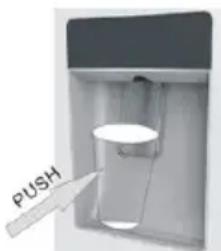
natural_image
Line drawing of a two-tiered open box or tray (no text or symbols)natural_image
3D mechanical assembly diagram showing a component with mounting holes and internal components (no text or symbols visible)natural_image
Close-up of a white appliance with buttons and a partially visible internal component (no text or symbols)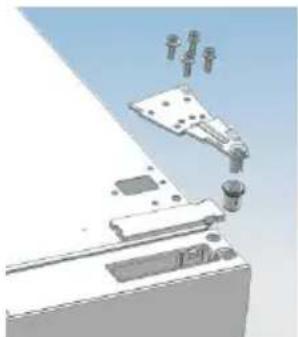
natural_image
3D mechanical assembly diagram showing components like a bracket, mounting base, and clamping mechanism (no text or labels)natural_image
Diagram of a computer monitor with ports and connectors (no text or symbols visible)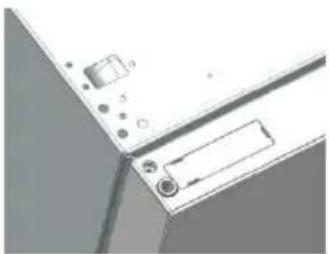
natural_image
Close-up of a mechanical component with mounting holes and a rectangular slot (no visible text or symbols)natural_image
Illustration of an open refrigerator with shelves and doors (no text or symbols)natural_image
3D rendering of a window frame with metal clamps and a small mechanical component, no visible text or symbolsnatural_image
3D rendering of a refrigerator with open door and side shelves (no text or symbols)natural_image
Diagram showing two identical mechanical components with red arrows indicating direction, no text or symbols present.natural_image
Two identical mechanical components with colored circular features, one shown before and after transformation (no text or symbols)natural_image
3D mechanical assembly diagram showing a white base with red arrow indicating a component (no text or symbols)natural_image
Two identical mechanical components with hexagonal bases and cylindrical shafts, shown side by side (no text or symbols)natural_image
Diagram of a door handle with red arrows indicating direction, no text or symbols presentnatural_image
Pure mechanical assembly diagram without any text, numbers, or symbolsnatural_image
3D rendering of a stainless steel refrigerator with open doors and side grilles (no text or symbols visible)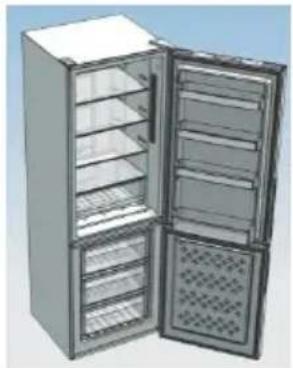
natural_image
3D rendering of an open stainless steel refrigerator with multiple doors and side compartments (no text or symbols visible)ANTIBAKTERIJSKI SISTEM (če obstaja)
VODOMAT
natural_image
Illustration of a refrigerator with a door and a small touchscreen display (no text or symbols)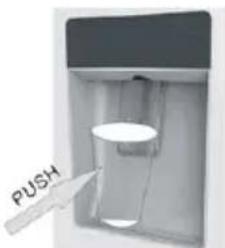
natural_image
Line drawing of a mechanical component or housing with no visible text, numbers, or symbolsnatural_image
3D mechanical assembly diagram showing a component with internal parts and mounting holes (no text or symbols visible)natural_image
3D mechanical assembly diagram showing a robotic arm and mounting bracket (no text or symbols)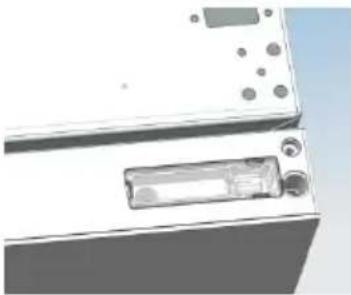
natural_image
Close-up of a white electronic device with buttons and a rectangular lens (no visible text or symbols)natural_image
Diagram of a device with labeled components, showing internal components and connections (no text or symbols)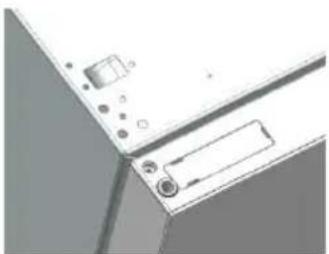
natural_image
Close-up of a computer monitor with control buttons and a paper tab (no visible text or symbols)natural_image
3D rendering of an open refrigerator with shelves and doors (no text or symbols visible)natural_image
3D technical illustration of a window frame with metal clamps and bolts, no visible text or symbolsnatural_image
3D rendering of a refrigerator with open door and side shelves (no text or symbols visible)natural_image
Architectural detail of a window frame with metal components and a close-up view of a door handle (no text or symbols visible)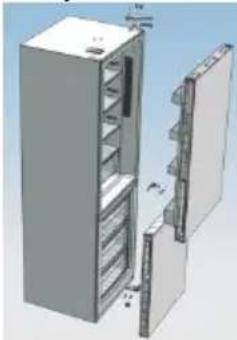
natural_image
3D rendering of a refrigerator with open door and shelf compartments (no text or symbols visible)natural_image
Diagram showing two identical mechanical components with red arrows indicating connection points (no text or symbols)natural_image
Two views of a mechanical component with colored pins, one showing a red arrow indicating transformation (no text or symbols)natural_image
3D mechanical assembly diagram showing a bracket with mounting holes and a red arrow indicating a specific component (no text or symbols present)natural_image
Two identical mechanical components with hexagonal bases, no text or symbols visible- Nameste vrata zamrzovalnika in obrnite srednji tečaj za 180 °C in ga pritrdite na drugi strani omarice tako, da z orodjem privijete 3 vijake in z njimi pritrdite srednji tečaj.

natural_image
Diagram of a mechanical component with a red arrow indicating direction, no visible text or symbols- Nameste vrata hladilnika in nameste zgornji tečaj na drugi strani omarice tako, da z orodjem privijete 4 vijake in z njimi pritrdite zgornji tečaj.
Po tem priključite komunikacijski vod vrat in komunikacijski vod omarice, nato pa nameste pokrov zgornjega tečaja in ga pritrdite s pomočjo vijaka.
natural_image
Pure technical line drawing of a mechanical assembly without any text, numbers, or symbolsnatural_image
3D rendering of an open stainless steel refrigerator with multiple doors and side compartments (no text or symbols visible)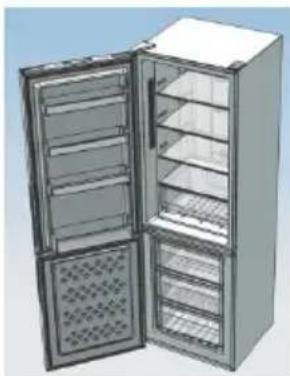
natural_image
3D rendering of a double-door refrigerator with open doors and ventilation grilles (no text or symbols visible)natural_image
Warning symbol of a flame inside a triangle (no text or numbers)DÁVKOVAČ VODY
natural_image
Illustration of a refrigerator with a door and a hanging control panel (no text or symbols)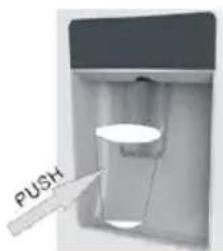
Tipy na dokonalé uskladnenie potravín v chladničke
natural_image
Line drawing of a two-tiered container or tray structure (no text or symbols)natural_image
3D mechanical assembly diagram showing a component with internal parts and a small protrusion (no text or symbols visible)natural_image
3D mechanical assembly diagram showing components like a bracket, mounting base, and cylindrical parts (no text or symbols visible)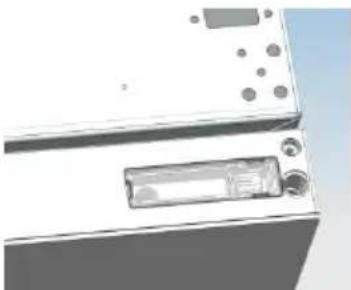
natural_image
Close-up of a white electronic device with buttons and a display (no visible text or symbols)natural_image
3D diagram of a computer monitor with ports and connectors (no text or symbols visible)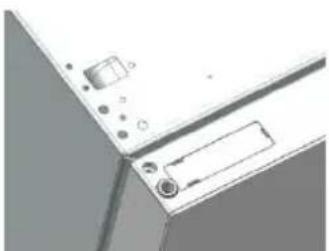
natural_image
Close-up of a computer monitor with ports and buttons (no visible text or symbols)natural_image
Illustration of an open refrigerator with shelves and doors (no text or symbols visible)natural_image
Architectural detail showing a window frame with metal fixtures and a bracket (no text or symbols visible)natural_image
Illustration of a refrigerator with open door and side shelves (no text or symbols)natural_image
Exterior view of a modern office building (no signage)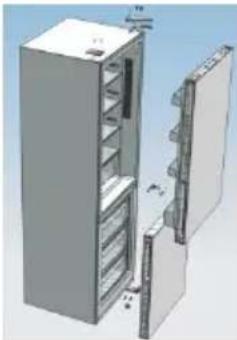
natural_image
3D rendering of a refrigerator with open door and side shelves (no text or symbols visible)natural_image
Diagram showing two identical mechanical components with red arrows indicating connection points (no text or symbols)natural_image
Two views of a mechanical component with colored circular features, one showing a red arrow indicating transformation (no text or symbols)natural_image
3D mechanical assembly diagram showing a white base with a red arrow indicating a specific component (no text or symbols present)natural_image
Two identical mechanical components with hexagonal bases and cylindrical shafts, shown side by side (no text or symbols)natural_image
Diagram of a mechanical component with a red arrow indicating direction, no visible text or symbols- Nasad'te dvere chladničky a namontujte horný záves na druhú stranu skrinky; priskrutkovaním 4 skruek pomocou nástroja upevnite horný záves.
natural_image
Pure technical diagram of a mechanical assembly without any text, numbers, or symbolsnatural_image
3D rendering of a double refrigerator with open doors and grilles (no text or symbols visible)natural_image
3D rendering of an open stainless steel refrigerator with multiple doors and ventilation grilles (no text or symbols visible)natural_image
Warning symbol of a flame inside a triangle (no text or numbers)DOZATORUL DE APĂ
natural_image
Illustration of a refrigerator with a door and a small orange button (no text or symbols)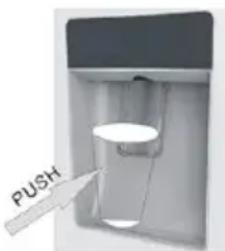
natural_image
Illustration of a multi-level refrigerator with open doors and internal compartments (no visible text or symbols)natural_image
Line drawing of a mechanical component or housing with no visible text, numbers, or symbolsnatural_image
3D mechanical assembly diagram showing a component with mounting holes and internal components (no text or symbols visible)natural_image
3D mechanical assembly diagram showing components like screws, bolts, and housing (no text or labels)natural_image
3D rendering of a white electronic device with buttons and a display (no visible text or symbols)natural_image
Diagram of a device with labeled components and connectors (no readable text or symbols)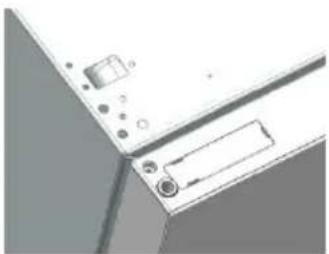
natural_image
Close-up of a mechanical device with ports and a label (no readable text or symbols)natural_image
3D rendering of an open refrigerator with shelves and doors (no text or symbols visible)natural_image
3D architectural rendering of a window frame with metal fixtures and a small bracket (no text or symbols visible)natural_image
3D rendering of a refrigerator with open door and side shelves (no text or symbols visible)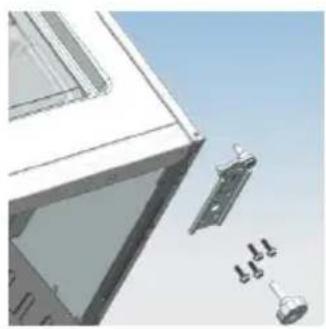
natural_image
Architectural detail of a window frame with attached door lock and door holders (no text or symbols visible)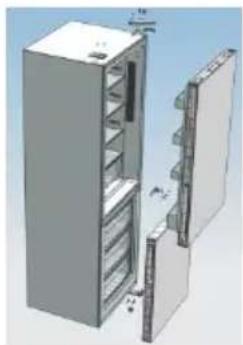
natural_image
3D rendering of a refrigerator with open door and side panel (no text or symbols visible)natural_image
Diagram showing two identical mechanical components with red directional arrows indicating movement or force (no text or symbols)natural_image
Two identical mechanical components with colored circular features, one showing a red arrow indicating transformation (no text or symbols)natural_image
3D diagram of a mechanical assembly with a red arrow indicating a specific component (no text or symbols present)natural_image
Two identical mechanical components with hexagonal bases and cylindrical shafts, shown side by side (no text or symbols)natural_image
3D diagram of a mechanical component with red arrows indicating direction, no visible text or symbolsnatural_image
3D rendering of a stainless steel refrigerator with open doors and side shelves (no text or symbols visible)natural_image
3D rendering of an open stainless steel refrigerator with multiple doors and side compartments (no text or symbols visible)АНТИБАКТЕРИАЛНА СИСТЕМА (ако е налична)
ДИСПЕНСЕР ЗА ВОДА
natural_image
Illustration of a refrigerator with a door and a small orange button (no text or symbols)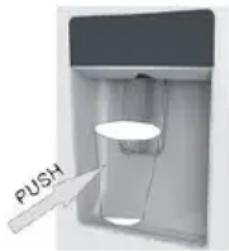
natural_image
Line drawing of a rectangular container with a side panel, no text or symbols presentnatural_image
3D mechanical assembly diagram showing a component with mounting holes and a central display (no text or symbols visible)natural_image
3D mechanical assembly diagram showing a bracket with mounting holes and a connecting rod (no text or symbols visible)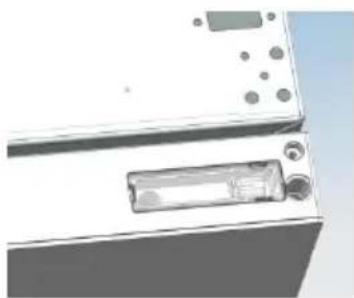
natural_image
Close-up of a white electronic device with a rectangular component and circular ports (no visible text or symbols)natural_image
Diagram of a computer monitor with ports and cables (no text or symbols visible)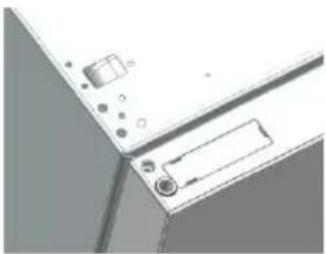
natural_image
Pure technical diagram of a mechanical component with no visible text, numbers, or symbolsnatural_image
3D rendering of an open refrigerator with shelves and doors (no text or symbols visible)natural_image
3D technical illustration of a mechanical assembly with mounting bracket and clamping mechanism (no text or symbols)natural_image
3D rendering of a refrigerator with open door and side shelves (no text or symbols)natural_image
Diagram showing two identical mechanical components with red arrows indicating connection points (no text or symbols)natural_image
Two views of a mechanical component with colored pins, one showing a red arrow indicating transformation (no text or symbols)natural_image
3D mechanical assembly diagram showing a white base with metal components and a red arrow indicating a specific component (no text or symbols present)natural_image
Two identical mechanical components with hexagonal bases and cylindrical shafts, shown side by side (no text or symbols)natural_image
Technical diagram showing a mechanical component with a red arrow indicating a specific feature (no text or symbols present)natural_image
Pure technical line drawing of a mechanical assembly without any text, numbers, or symbolsnatural_image
3D rendering of a double refrigerator with open doors and side grilles (no text or symbols visible)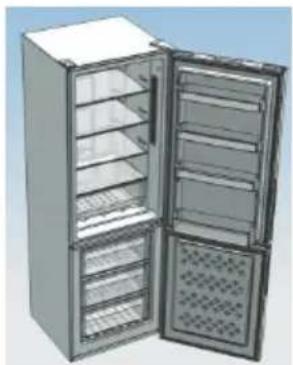
natural_image
3D rendering of a stainless steel refrigerator with open doors and internal compartments (no text or symbols visible)ANTIBAKTERIÁLIS RENDSZER (ha van)
natural_image
Technical line drawing of a door frame with an inset showing a close-up of the interior (no text or symbols)VÍZADAGOLÓ
natural_image
Illustration of a refrigerator with a door and a digital display (no text or symbols)hűtőajtóba.
natural_image
Line drawing of a rectangular container with a side panel (no text or symbols)natural_image
3D rendering of a mechanical device with exploded view showing internal components (no text or symbols visible)natural_image
3D mechanical assembly diagram showing a bracket with mounting holes and a lever mechanism (no text or symbols)
natural_image
Exterior view of a white appliance with buttons and a rectangular label (no visible text or symbols)natural_image
3D diagram of a computer interface with ports and connectors (no text or symbols visible)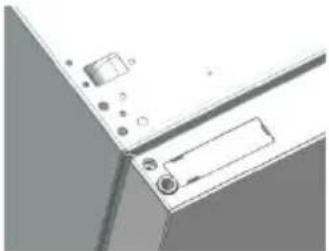
natural_image
Pure technical diagram of a mechanical or electrical component with no visible text, numbers, or symbolsnatural_image
3D rendering of an open refrigerator with shelves and doors (no text or symbols visible)natural_image
3D rendering of a window frame with a bracket and mechanical components, no visible text or symbolsnatural_image
3D rendering of a refrigerator with open door and side shelves (no text or symbols visible)natural_image
Exterior view of a modern office building (no signage)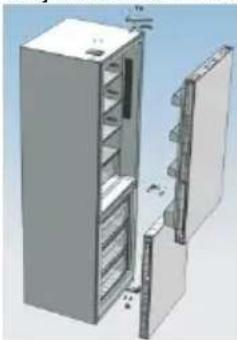
natural_image
3D rendering of a refrigerator with open door and side shelves (no text or symbols visible)natural_image
Diagram showing two identical mechanical components with red arrows indicating connection points (no text or symbols)natural_image
Two views of a mechanical component with colored pins, one showing a red arrow indicating transformation (no text or symbols)natural_image
3D mechanical assembly diagram showing a bracket with mounting holes and a red arrow indicating a specific component (no text or symbols present)natural_image
Two identical white mechanical components with hexagonal bases, no text or symbols visible.natural_image
Diagram of a mechanical component with a red arrow indicating direction, no visible text or symbolsnatural_image
Pure technical line drawing of a mechanical assembly without any text, numbers, or symbolsnatural_image
3D rendering of a double refrigerator with open doors and side shelves (no text or symbols visible)natural_image
3D rendering of an open refrigerator with multiple doors and ventilation grilles (no text or symbols visible)
natural_image
Warning symbol of a flame inside a triangle (no text or numbers)natural_image
Technical line drawing of a mechanical component with an inset view showing a close-up detail (no text or symbols)ДИСПЕНСЕР ДЛЯ ВОДЫ
natural_image
Illustration of a blue refrigerator with a hand pointing to the door (no text or symbols)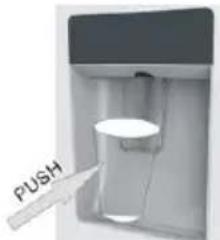
natural_image
Line drawing of a two-tiered container or tray with a handle and side panel (no text or symbols)natural_image
3D mechanical assembly diagram showing a component with mounting holes and internal components (no text or symbols)natural_image
3D mechanical assembly diagram showing components like bolts, gears, and housing (no text or labels)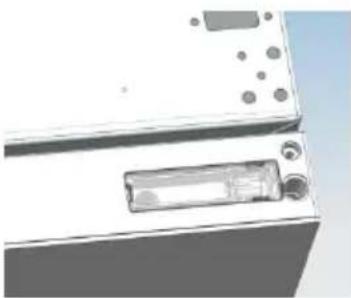
natural_image
Close-up of a white electronic device with a rectangular component and circular ports (no visible text or symbols)natural_image
Diagram of a computer interface with ports and connectors (no text or symbols visible)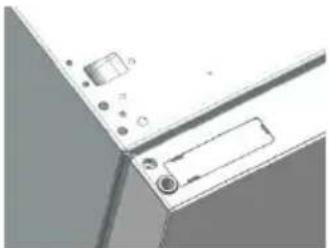
natural_image
Close-up of a computer monitor with buttons and a paperclip (no visible text or symbols)natural_image
3D rendering of an open refrigerator with shelves and doors (no text or symbols visible)natural_image
3D rendering of a window frame with metal clamps and a tool, no visible text or symbolsnatural_image
Exterior view of a modern office building (no signage)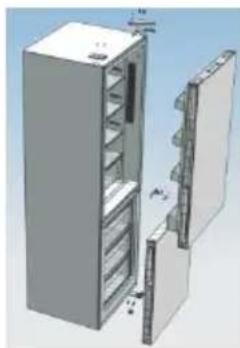
natural_image
3D rendering of a refrigerator with open door and side panel (no text or symbols visible)natural_image
Diagram showing two identical mechanical components with red arrows indicating connection points (no text or symbols)natural_image
Two identical mechanical components with colored circular features, one shown before and one after transformation (no text or symbols)natural_image
3D rendering of a mechanical assembly with a red arrow indicating a specific component (no text or symbols visible)natural_image
Two identical white mechanical components with hexagonal bases, no text or symbols visiblenatural_image
3D diagram of a mechanical component with a red arrow indicating a directional movement or force (no text or symbols present)natural_image
Pure technical line drawing of a mechanical assembly without any text, numbers, or symbolsnatural_image
3D rendering of a stainless steel refrigerator with open doors and side compartments (no text or symbols visible)natural_image
3D rendering of an open refrigerator with multiple doors and side compartments (no visible text or labels)

- SISTEMA ANTIBATTERICO (se presente)
- WATER DISPENSER
- SAFETY INFORMATION
- WARNING!
- COMBI REFRIGERATOR CANDY
- Climate Class
- TRANSPORTATION INSTRUCTIONS
- INSTALLATION INSTRUCTIONS
- STARTING TO USE
- COMBI OPERATION
- VERTICAL DISPLAY
- INTERNAL USER INTERFACE
- TECHNICAL FEATURES
- FRESHNESS CONTROL
- ANTIBACTERIAL SYSTEM (if present)
- Before rst use
- Filling the water tank with water
- Dispensing
- Tips for keeping food perfect in the Fridge
- Where to store your foods in the fridge
- Storing Frozen Food
- DO
- DON'T
- ENERGY SAVING
- TAKE CARE
- Defrosting
- Cleaning and Care
- CHANGING THE INTERNAL LIGHT
- REVERSING THE DOOR SWING Dissemble the Refrigerator Door
- Assemble door, lower hinge accessories to the corresponding positions
- Assemble the refrigerator door and freezer door to the opposite side
- TROUBLE SHOOTING
- SCRAPPING OLD APPLIANCES
- Conformity
- TABLE DES MATIÈRES
- DISTRIBUTEUR D'EAU
- SISTEMA ANTIBACTERIANO (si está instalado)
- DISPENSADOR DE AGUA
- WASSERSPENDER
- SISTEMA ANTIBACTERIANO (se presente)
- DISPENSADOR DE ÁGUA
- WATERDISPENSER
- DET VERTIKALE DISPLAY
- VANDDISPENSER
- Fyld glasset
- ANTIBAKTERIELLT SYSTEM (om så utrustad)
- VATTENAUTOMAT
- SKROTNING AV GAMLA APPARATER
- ANTIBAKTEERINEN JÄRJESTELMÄ (jos varusteena)
- VANNDISPENSER
- ANTIBAKTERIJSKI SUSTAV (ako postoji)
- DISPENZER ZA VODU
- Ulijevanje
- Montiranje vrata, dodataka donjeg okova na odgovarajućim pozicijama
- ANTIBAKTERIJSKI SISTEM (ako postoji)
- Pre prve upotrebe
- Sastavljanje vrata, dodataka donje šarke na odgovarajućim pozicijama.
- OTKRIVANJE I OTKLANJANJE PROBLEMA/KVAROVA
- ANTIBAKTERIÁLNÍ SYSTÉM (pokud je k dispozici)
- DÁVKOVAČ VODY
- DYSTRYBUTOR WODY
- ANTIBAKTERIJSKI SISTEM (če obstaja)
- VODOMAT
- Tipy na dokonalé uskladnenie potravín v chladničke
- DOZATORUL DE APĂ
- АНТИБАКТЕРИАЛНА СИСТЕМА (ако е налична)
- ДИСПЕНСЕР ЗА ВОДА
- ANTIBAKTERIÁLIS RENDSZER (ha van)
- VÍZADAGOLÓ
- ДИСПЕНСЕР ДЛЯ ВОДЫ
Brand : CANDY
Model : CMNR 6204WPUWIFI
Category : Fridge