
SRDF101 - Rice cooker PANASONIC - Free user manual and instructions
Find the device manual for free SRDF101 PANASONIC in PDF.
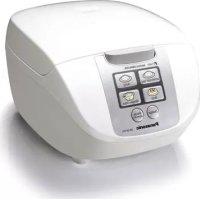



| Product Type | Electric Rice Cooker |
| Brand | Panasonic |
| Model | SR-DF101 |
| Power Supply | 120 V ~ 60 Hz |
| Rated Power (Rice Cooking) | 750 W |
| Nominal Inner Pot Volume | 3.0 L |
| Cooking Capacity (White Rice/Quick Cooking) | 0.18 to 1.0 L (1 to 5.5 cups) |
| Cooking Capacity (Brown Rice) | 0.18 to 0.54 L (1 to 3 cups) |
| Cooking Capacity (Porridge) | 0.09 to 0.18 L (1/2 to 1 cup) |
| Dimensions (W × D × H) | 24.5 × 33.9 × 19.9 cm |
| Net Weight | Approx. 2.5 kg |
| Power Cord Length | Approx. 1.0 m |
| Cooking Functions | White Rice, Quick Cooking, Brown Rice, Porridge/Soup, Keep Warm |
| Included Accessories | Non-stick Inner Pot, Measuring Cup, Rice Paddle, Steaming Basket, Moisture Cap |
| Inner Pot Material | Non-stick Coating |
| Safety | Polarized plug, automatic shutdown, overheat protection, lid lock |
| Care and Cleaning | Clean the inner pot and inner lid with a mild detergent and a non-abrasive sponge; do not immerse the main body; do not use a dishwasher. |
| Warranty | 1 year (Canada); repair or replacement at Panasonic's discretion |
Frequently Asked Questions - SRDF101 PANASONIC
User questions about SRDF101 PANASONIC
0 question about this device. Answer the ones you know or ask your own.
Ask a new question about this device
Download the instructions for your Rice cooker in PDF format for free! Find your manual SRDF101 - PANASONIC and take your electronic device back in hand. On this page are published all the documents necessary for the use of your device. SRDF101 by PANASONIC.
USER MANUAL SRDF101 PANASONIC
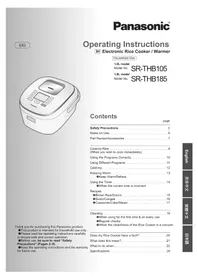
Operating Instructions
Electronic Rice Cooker Household Use Only
User Manual
Safety Precautions...4-5
Parts identification 6
Control panel.. 6 Entire unit 6
Preparations 7
Functions 8
Quick Cook/Steam 8 - White Rice - Keep Warm 9 Brown Rice 10 Porridge/Soup 11
Recipes 12~13
Cleaning and
maintenance 14
Troubleshooting 15
Specifications 15
Table of Contents
Thank you for purchasing the Panasonic product.
- This product is intended for household use only.
- Please read these instructions carefully and follow safety precautions when using this product. Before using this product, please give your special attention to "Safety Precautions" (Page 4~5).
- Please make sure the date and name of store of purchase are stamped and keep it with this Operating Instructions.
Save these documents.
When using electrical appliances, basic safety precautions should always be followed including the following:
- Read all instructions.
- Do not touch hot surfaces. Use handles or knobs.
- To protect against electrical shock, do not immerse cord, plugs, or Rice Cooker except the pan in water or other liquid.
- Close supervision is necessary when any appliance is used by or near children.
- Remove plug from outlet when the appliance is not in use, before putting on or taking off parts, and before cleaning. Allow to cool before handling.
- Do not operate any appliance with a damaged cord or plug or after the appliance malfunctions or has been damaged in any manner. Return appliance to the nearest authorized service facility for examination, repair, or adjustment.
- The use of accessory attachments not recommended by the appliance manufacturer may cause injuries.
- Do not use outdoors.
- Do not let cord hang over edge of table or counter, or touch hot surfaces.
- Do not place on or near a hot gas or electric burner, or in a heated oven.
- Extreme caution must be used when moving an appliance containing hot oil or other hot liquids.
- Always attach plug to appliance before plugging cord into wall outlet. To disconnect, turn the control to "off", then remove plug from wall outlet.
- Do not use appliance for other than intended use.
- This product is intended for household use.
15. SAVE THESE INSTRUCTIONS.
NOTE
a) A short power-supply cord (or detachable power-supply cord) is to be provided to reduce the risk resulting from becoming entangled in or tripping over a longer cord. b) Longer detachable power-supply cords or extension cords are available and may be used if care is exercised in their use. c) If a longer detachable power-supply cord or extension cord is used,
1) The marked electrical rating of the cord set or extension cord should be at least as great as the electrical rating of the appliance, and 2) The cord should be arranged so that it will not drape over the countertop or tabletop where it can be pulled on by children or tripped over unintentionally.
This appliance has a polarized plug (one blade is wider than the other). To reduce the risk of electric shock, this plug is intended to fit into a polarized outlet only one way. If the plug does not fit fully into the outlet, reverse the plug. If it still does not fit, contact a qualified electrician. Do not attempt to modify the plug in any way.
In order to prevent accidents or injuries to the users, other people, and damage to property, please follow the instructions below.
The following charts indicate the degree of damage caused by wrong operation.

Warning:
Indicates hazard that may cause death or severe injury.

Caution:
Indicates hazard that may cause personal injury or property damage.
The symbols are classified and explained as follows.


These symbols indicate prohibition.

This symbol indicates a requirement that must be followed.

Warning
Do not use the appliance if the power cord or power plug is damaged or the power plug is loosely connected to the power outlet.

(It may cause an electric shock, short circuit, or fire.)
- Do not insert any objects into the vent or gap.

Especially metal objects such as pins or wires. (It may cause an electric shock or malfunction.)
This appliance is not intended for use by persons (including children) with reduced physical, sensory, or mental capabilities, or lack of experience and knowledge, unless they have been given supervision or instruction concerning use of the appliance by a person responsible for their safety. Children should be supervised to ensure that they do not play with the appliance.

(It may cause burn or injury.)
Clean the power plug regularly.

(A soiled power plug may cause insufficient insulation due to moisture, and may cause a fire.)
- Unplug the power plug, and wipe it with a dry cloth.
- Do not damage the power cord or power plug.

The following actions are strictly prohibited.
Modifying, placing near heating elements, bending, twisting, pulling, putting heavy objects on top, and bundling the cord. (It may cause an electric shock, short circuit, or fire.)
- If the supply cord is damaged, it must be replaced by the manufacturer, its service agent, or similarly qualified persons in order to avoid a hazard.
- Do not immerse the appliance in water or splash it with water.

(It may cause a short circuit or electric shock.)
- Please enquire with an authorized dealer if water gets inside the appliance.
Use only a power outlet rated at a minimum of 10 amperes and alternating electric current at 120 volts.

(Plugging other devices into the same outlet may cause electric overheating, which may cause a fire.)
- Use only an extended cord rated at 10 amperes minimum.
Discontinue using the appliance immediately and unplug the power connector in cases of abnormal situations or breakdown.

(It may cause smoking, a fire, or electric shock.)
(e.g. for abnormal situations or breaking down)
- The power plug and the power cord become abnormally hot.
- The power cord is damaged or power failure occurs when is touched.
- The main body is deformed or abnormally hot.
The unit gives out smoke or scorching smell
- There are cracks, looseness or wobbles of the appliance.
- The heating plate is warped or the pan is deformed.
→ Please make enquiries at Panasonic authorized service center for inspection and repair immediately.

Caution
Do not use the appliance on following places.
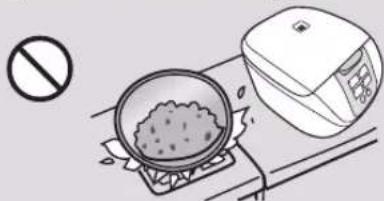
- The place where it may be splashed with water or near a heat source. (It may cause an electric shock, electric leak, or fire.)
- The place with an uneven surface or on non-heat-resistant carpet. (It may cause a burn, injury, or fire.)
- Near a wall or furniture. (It may cause discoloration or deformation.)
- Do not touch heating elements while the appliance is in use or after cooking.

Especially the heating plate (It may cause a burn.)
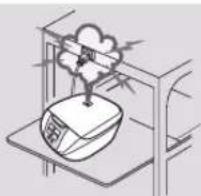
Do not expose the power plug to steam.

- Do not expose the power plug to steam when it is plugged in. (It may cause a short circuit or fire.) When using a cabinet with a sliding table, use the appliance where the power plug cannot be exposed to steam.
Do not touch the hook button while moving the appliance.

(It may cause the outer lid to open, resulting in a burn.)
Be sure to hold the power plug when unplugging the power plug.

(Otherwise it may cause an electric shock, short circuit, resulting in fire.)
- Do not use the cord set (for instrument plug and power plug) that is not specified for use with this appliance. Also do not transfer them.

(It may cause an electric shock, electric leak, or fire.)
Do not open the outer lid while cooking.

(It may cause a burn.)
Unplug the power plug from the power outlet when the appliance is not in use.

(Otherwise it may cause an electric shock and fire caused by a short circuit due to the insulation deterioration.)
Please allow the appliance to cool down before cleaning it.

(Touching hot elements may cause a burn.)
Do not use other pans than the one specified.

It may cause a burn and injury due to overheat or malfunction.
Precautions for Use
Please put in correct amount of rice and water and select functions correctly according to the operating instructions.
(So as to avoid overflow of rice water, half-cooked rice or scorched rice.)
Do not put ingredients to be cooked directly into the appliance in which no pan is placed.
(So as to prevent any impurities from causing failure.)
Do not use the appliance on any heat sensitive object such as carpet, electric heating carpet and tablecloth (made of vinyl plastics), etc.
(So as to avoid poor cooking or fire.)
Before using the appliance, remove the protective bag on the pan and the anti-tarnish paper between the pan and the cast heater. (So as to avoid poor cooking or fire.)
Do not cover the outer lid with cloth or other objects when the appliance is in use. (So as to avoid deformation, color change of the outer lid or failure.)
Avoid using the appliance under direct sunlight.
(So as to avoid color change.)
Do not serve out rice with any metal object. (So as to avoid scratching the pan coating and causing peeling of the coating.)
Please always clean the foreign objects such as rice on the pan, cast heater and temperature sensor.
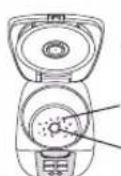
Cast heater
Temperature sensor
- Do not tilt or overturn the appliance.
- Before cleaning, turn off the power switch and pull out the power plug.
When there is any overflow of rice water from the steam vent, pull out the power plug immediately to disconnect the power supply. Do not resume the use until the rice water on the power plug and the instrument plug is cleaned with a dry cloth.
The appliance is for household use only. Do not use it for any commercial or industrial purposes or any purposes other than cooking.
When power failure occurs during the operation of the appliance, the cooking result may be affected.
Parts identification
Control panel ※Note:This unit does not produce a beep sound when buttons are pressed or at the end of a cycle.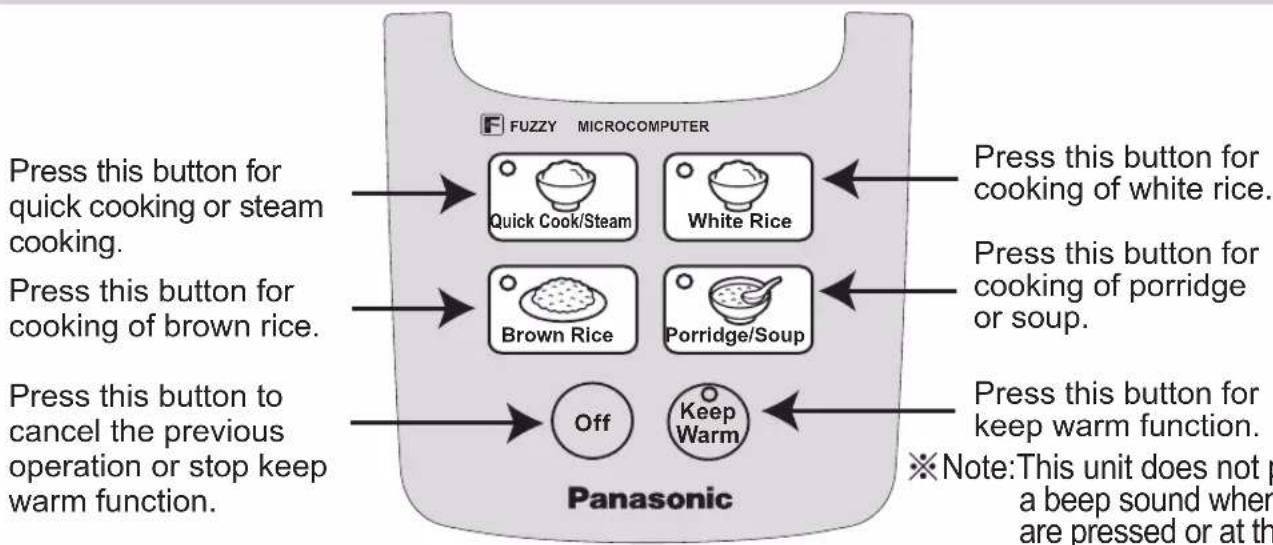
Entire unit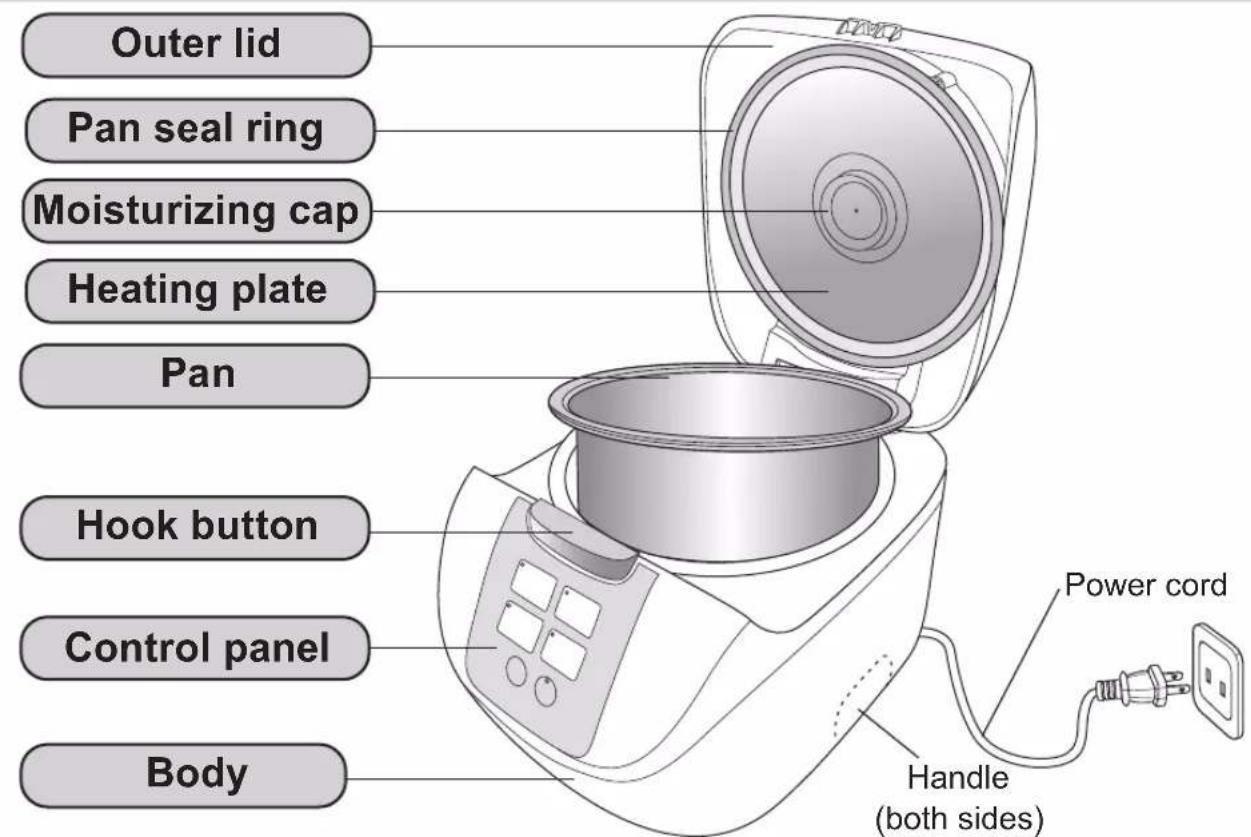
Accessories
※ Please clean the accessories before using.
Rice scoop (1)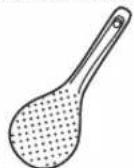
Measuring cup (about 180 mL) (1)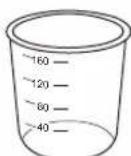
Steaming basket (1)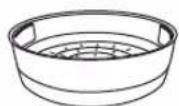
Preparations
1. Measure rice with the measuring cup provided.
The volume of the measuring cup is about 180 mL (150 g). Maximum quantity of rice to be cooked at once: P15. - When using 1.8 L model for quick cooking of rice or cooking of long-shaped rice, please keep the maximum quantity of rice within 8 cups.
Correct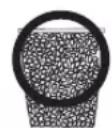
The cooking result may be affected.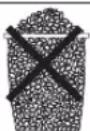
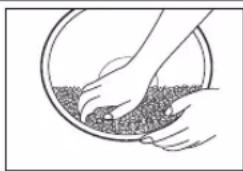
2. Wash the rice until the water turns relatively clear.
① Wash the rice quickly with plenty of water, stirring the rice lightly to wash it while changing the water. ② Repeat for several times [wash the rice → pour out water] until the water turns relatively clear.
Attentions
- In order to avoid scratching the non-stick coating on the pan surface, do not wash rice in the pan.
- Wash the rice thoroughly. Otherwise, rice crust may appear and the residual rice bran may affect the taste of the rice.
1
②
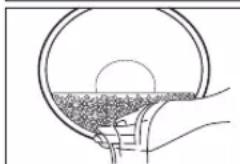
3 Place the washed rice into the pan
Add water until the corresponding waterline and dry the outside of the pan. - When adding water, pay attention to the scales at both sides and keep them at the same height. - When stewing soup, the total volume of ingredients and water shall not exceed the maximum waterline for "PORRIDGE". - When cooking mixed rice or glutinous rice, please add water according to the following table.
| Rice quantity (measuring cups) | Water quantity (measuring cup provided) | |||
| Mixed rice Glutinous rice | ||||
| 1.0 L Model | 1.8 L Model | 1.0 L Model | 1.8 L Model | |
| 1 | \( 1^{1}_{2} \) | \( 1^{1}_{2} \) | \( 1^{1}_{4} \) | \( 1^{1}_{4} \) |
| 2 | \( 2^{3}_{4} \) | \( 2^{3}_{4} \) | 2 | 2 |
| 3 | 4 | 4 | 3 | 3 |
| 4 | --- | 5 | --- | 4 |
| 5 | --- | \( 6^{1}_{4} \) | --- | 5 |
The above water quantities can be increased or decreased according to personal preference.
When the rice quantity is 6 measuring cups, wash the rice and put into the pan, then add water into the pan till the water surface reaches scale "6" at waterline of "WHITE RICE".
(Example: 1.8 L Model)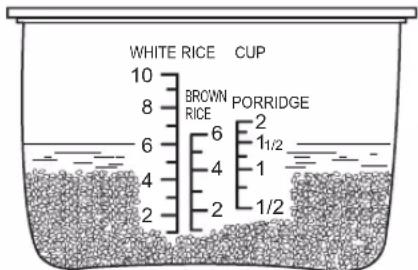
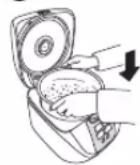
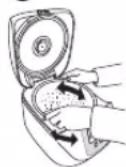
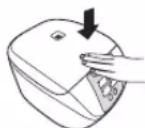
Put the pan into the body and close the outer lid
- In order that the pan bottom can be closely attached to the cast heater, please rotate the pan along the direction indicated by the arrow for 2 or 3 times.
- Please check whether the moisturizing cap is correctly positioned. (P14)
- When closing the outer lid, please confirm that there is a "click" sound.
①
2
③
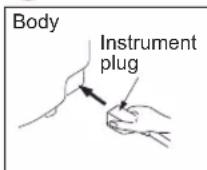
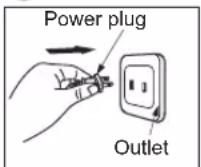
5 Connect the plugs
- Please connect the instrument plug to the body first and then connect the power plug to the electrical outlet. Make sure that both plugs are firmly connected.
1
(2)
Attentions
- When using the steaming basket while cooking rice, please refer to the table on the right for the maximum cooking volumes.
Maximum cooking volume (measuring cup provided)
| Model | 1.0 L Model 1 | 8 L Model |
| Maximum cooking volume | 2 | 5 |
Functions Quick Cook/Steam
Kind reminder
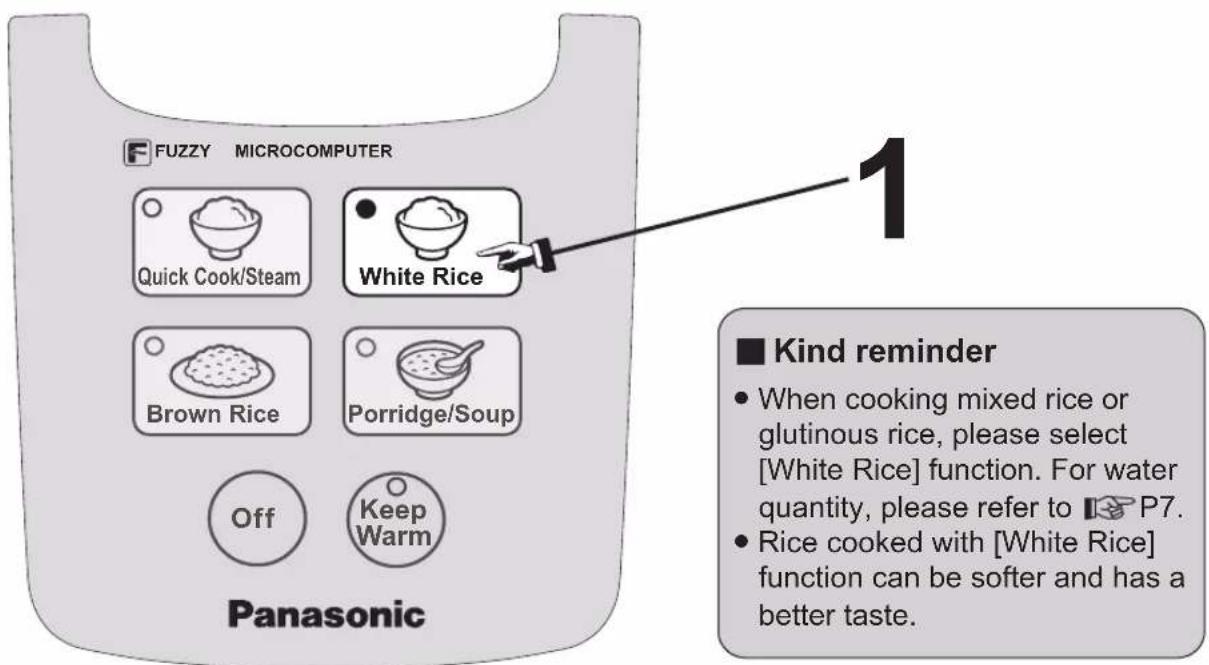
- When steaming food at the same time as cooking rice, please select [White Rice] function.
- The time of steam shall be determined according to the water quantity in the pan. Please adjust the water quantity according to the time required.
- After the water gets boiled and fully evaporated, the rice cooker will turn to the keep warm function automatically.
- If you want to stop steam function during cooking, press [Off] button.
- [Quick Cook/Steam] button can be used for quick cooking rice, please refer to P9 [White Rice] for detailed operations. As the cooking time is shortened, the rice may be harder or there may be rice crust.
Operations (For example: steam with [Quick Cook/Steam] function)
- Add a proper quantity of water (refer to the following table).
- Put the steaming basket into the pan.
- Put the foods to be steamed into the steaming basket.
- Close the outer lid.
![PANASONIC SRDF101 - Operations (For example: steam with [Quick Cook/Steam] function) - 1](/content/2026/03/463759/images/4ba3c7051f0ec00c0f0ee9641990f928096fe29f8cb8321fe4b3dd1a79e36468.jpg)
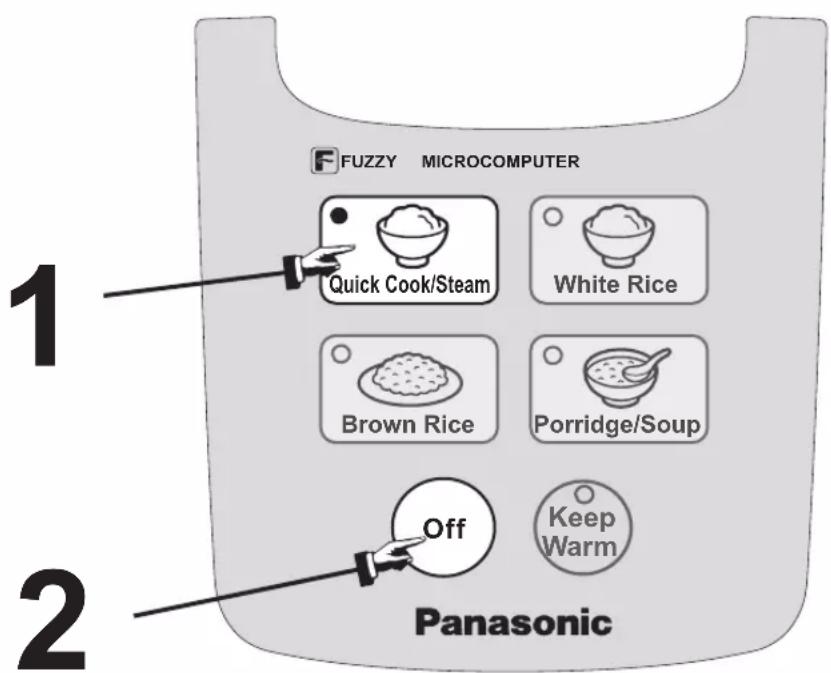
1 Press [Quick Cook/Steam] button
- The indicator for [Quick Cook/Steam] lights up and the steaming starts.
The indicator lights up
![PANASONIC SRDF101 - Press [Quick Cook/Steam] button - 1](/content/2026/03/463759/images/bb161306c26d9eb1c7daf9eb5d0a7fcaf54b95e3cd6e14bc047bf0c837ebf15d.jpg)
Table of steaming time and water quantity. The entire duration from the start to the end refers to the time shown in the following table.
| Water quantity (approx.) | 1/2 Measuring cup | 1 Measuring cup | 2 Measuring cups | 3 Measuring cups |
| Steaming time (approx.) | 15 Minutes | 30 Minutes | 50 Minutes | 65 Minutes |
- The maximum time of steaming is about 70 minutes. When the time is up, no matter the water is completely evaporated or not, the rice cooker will turn to keep warm function automatically.
The cooking is over
- After the water in the pan gets boiled and fully evaporated, the steaming function is ended and the rice cooker will turn to keep warm function automatically.
2 Press [Off] button
- No sound when the cooking process is over.
- At this time, the steaming basket is very hot. Please be careful when taking it out.
The indicator lights up turns off
![PANASONIC SRDF101 - Press [Off] button - 1](/content/2026/03/463759/images/dbfed4a7b63ea50fb5012a9489da16e2cb730930b7b88a900fcedf64e1a72407.jpg)
![PANASONIC SRDF101 - Press [Off] button - 2](/content/2026/03/463759/images/c19f5f11eef2a12ed7b38d52625395af52b136fdf88bc2377ae8ab1e73a0ee82.jpg)
![PANASONIC SRDF101 - Press [Off] button - 3](/content/2026/03/463759/images/026c347d6ce591ae7a758478236828b2025e440ce03b3409b83c5e5578e58d81.jpg)
Functions: White Rice, Keep Warm
Operations (For example: cook rice with [White Rice] function)
1. Press [White Rice] button
The indicator for [White Rice] lights up and the cooking starts.
The indicator lights up
![PANASONIC SRDF101 - Press [White Rice] button - 1](/content/2026/03/463759/images/662562b00644f2fe28fc9b2fdacc2990ba7cd8c58cfc35844570bb95d6aeb8f5.jpg)
Cooking time (reference)
| Quick Cook | About 30 minutes |
| White Rice | About 38 minutes |
- The reference time required for cooking at the voltage of 120 V, the room temperature of 20°C, the water temperature of 18°C and the medium rice quantity refers to the time listed in the left table. (1.0 L Model: 3 cups, 1.8 L Model: 5 cups)
- The cooking time may vary slightly according to different voltages, room temperatures, water temperatures, water quantities, rice quantities and rice qualities. The cooking time of mixed rice or glutinous rice may vary because of the different ingredients added into the rice.
The cooking is over
Loosen the rice
- When the cooking process is over, the rice cooker will turn to keep warm function automatically. To prevent the rice from sticking together, please loosen the rice after cooking.
- No sound when the cooking process is over.
The indicator lights up

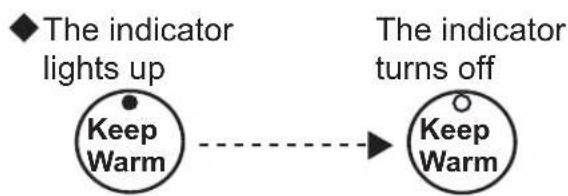
Keep Warm
- When the cooking process is over, all functions will turn to keep warm function automatically. But some functions are not recommended to use keep warm function, please press [Off] button after cooking.
- You can enjoy the rice within 5 hours in keep warm function, so as not to affect the taste or cause strange smell.
- When in keep warm function, there may be some droplets at the edge of the pan.
- The rice taste may be affected if the rice scoop is left in the rice cooker when the rice is in keep warm function.
→
| Menu | Keep warm | The result after kept warm |
| Quick Cook, White Rice, Soup | ○ | |
| Brown Rice, Mixed rice, Glutinous rice | × | Affects the taste or causes strange smell |
| Porridge | × | Causes porridge to thicken |
Functions Brown Rice

Kind reminder
- Do not use keep warm function for brown rice, so as not to affect the taste.
- Brown rice is a kind of rice which is difficult to cook. In the course of cooking, the rice shall be soaked for about 1 hour first, so that the rice grains can absorb enough water to achieve a satisfactory cooking effect.
Operations (For example: cook rice with [Brown Rice] function)
1 Press [Brown Rice] button
- The indicator for [Brown Rice] lights up and the cooking starts.
The indicator lights up
![PANASONIC SRDF101 - Press [Brown Rice] button - 1](/content/2026/03/463759/images/ad05dc3c8b008f9c281123f984712b5aa560c8328842764d60f4c2e03bbdb02c.jpg)
Cooking time (reference)
Brown Rice About 1 hour and 50 minutes
- The reference time required for cooking at the voltage of 120V , the room temperature of 20°C , the water temperature of 18°C and the medium rice quantity refers to the time listed in the left table. (1.0 L Model: 2 cups, 1.8 L Model: 3 cups)
- The cooking time may vary slightly according to different voltages, room temperatures, water temperatures, water quantities, rice quantities and rice qualities.
The cooking is over.
Loosen the rice.
- When the cooking process is over, the rice cooker will turn to keep warm function automatically. However, keep warm function is not recommended to prevent from affecting the taste, press [Off] button after cooking.
- No sound when the cooking process is over.
Functions Porridge/Soup
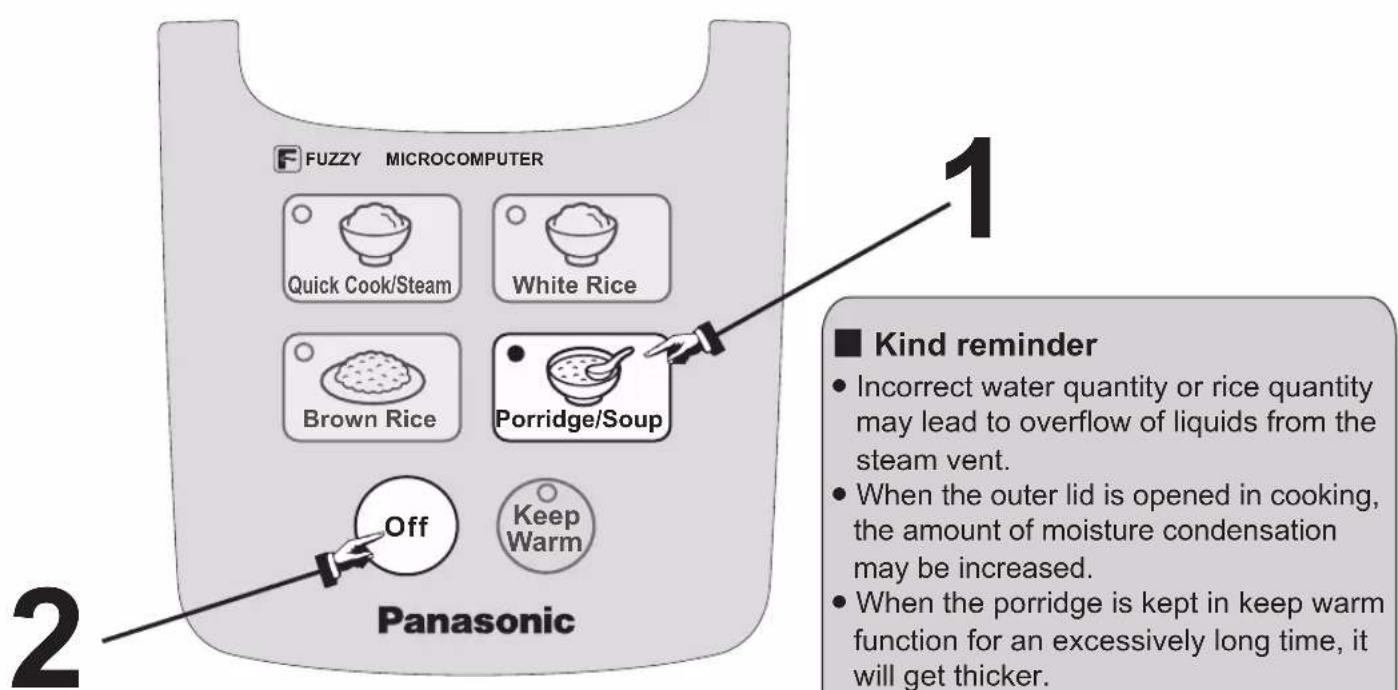
Operations (For example: cook porridge with [Porridge/Soup] function)
1 Press [Porridge/Soup] button
- The indicator for [Porridge/Soup] lights up and the cooking starts.
- Reference cooking time (approx.): 1 hour and 30 minutes.
When the maximum cooking volume of soup (ingredients and water) exceeds the maximum waterline for "PORRIDGE", overflow or half-cooked soup may occur. (Refer to P15 for specifications)
The indicator lights up
![PANASONIC SRDF101 - Press [Porridge/Soup] button - 1](/content/2026/03/463759/images/228ccfde4b10133988c4eb6bbff465eb0adc776f8dd637bb7e5b84a61cbe6af0.jpg)
The cooking is over.
2 Press [Off] button
- When the cooking process is over, the rice cooker will turn to keep warm function automatically. However, keep warm function is not recommended to prevent from affecting the taste, press [Off] button after cooking.
- No sound when the cooking process is over.
![PANASONIC SRDF101 - Press [Off] button - 1](/content/2026/03/463759/images/c70d6ce6c12c0eaba480ddd989d35c3e0e94638d66d03eba0eea50c25d7f905a.jpg)
Recipes
Caution: Because of the different ingredients added into the rice, there may be scorched rice at the bottom.
In this recipe, the cooking volume is for 1.8 L Model. Please refer to the specifications listed on P15 for cooking volumes for 1.0 L Model.
- 1 cup (measuring cup): about 150 g.
Mixed Chicken Rice
Ingredients:
Seasoning:
Rice 3 measuring cups
Cooking wine, soy sauce 20 mL each
Water 4 measuring cups
Salt
3g
Chicken 80 g, chopped into small pieces
Burdock 35 g, sliced
Mushroom 2 pieces, after soaking in water, remove
the base and shred into strips
Fried bean curd 2 pieces, pour with hot water to remove
grease and then shred into strips
Carrot 40 g, shredded into strips
Cooking method:
1) Boil the chicken and burdock in hot water quickly and drain them immediately. 2) Wash the rice, put into the pan and add 4 measuring cups of water. 3) Pour the seasoning into the pan, stir and put the remaining ingredients in. Close the outer lid. 4) Press [White Rice] button to start cooking. When the cooking process is over, you can enjoy the meal.
Corn and Rib Soup
Ingredients:
Seasoning:
Ribs 500 g, chopped into 5 cm pieces
Salt 6.5 g
Corn 2, about 450 g cut into 5 cm pieces
Water 5 measuring cups
Cooking method:
1) Put the ribs into boiling water to remove residual blood and drain them for later use. 2) Put all ingredients into the pan, add salt and close the outer lid. 3) Press [Porridge/Soup] button, and the cooking process will end after about 1 hour and 30 minutes.
(Other seasoning such as chicken powder can be added according to personal preference.)
Recipes
Dim Sum (frozen)
Ingredients:
(A) Small pieces
(B) Big pieces
Shrimp dumplings
Steamed BBQ pork buns
Sumai
Steamed buns
Sticky rice in lotus leaf
Cooking method:
1) Defrosting is not required. Just put the frozen Dim Sum on the steaming basket and spray some water on the surface of Dim Sum. 2) Add 1/2 measuring cup of cold water into the pan. 3) Put the steaming basket into the pan and close the outer lid. 4) Press [Quick Cook/Steam] button, wait for about 10 minutes and then press [Off] button.
Mung Bean and Lilium Porridge
Ingredients:
Seasoning:
Mung bean 70g
Sticky rice 70g
Lilium 10g
Sugar according to personal preference
Cooking method:
1) Put the washed mung beans, sticky rice and lilium into the pan and add water until scale 1 of waterline for "PORRIDGE". 2) Close the outer lid and press [Porridge/Soup] button. The cooking process will end after about 1 hour and 30 minutes. 3) Add some sugar according to personal preference and enjoy the meal.
Cleaning and maintenance
Attentions
- Before cleaning and maintenance, please pull out the power plug first. Do not clean the rice cooker until it cools down.
- When cleaning the rice cooker, do not immerse it into water, or clean it with lacquer thinner, alcohol, cleaning powder or hard brush, etc.
- Do not use dishwasher.
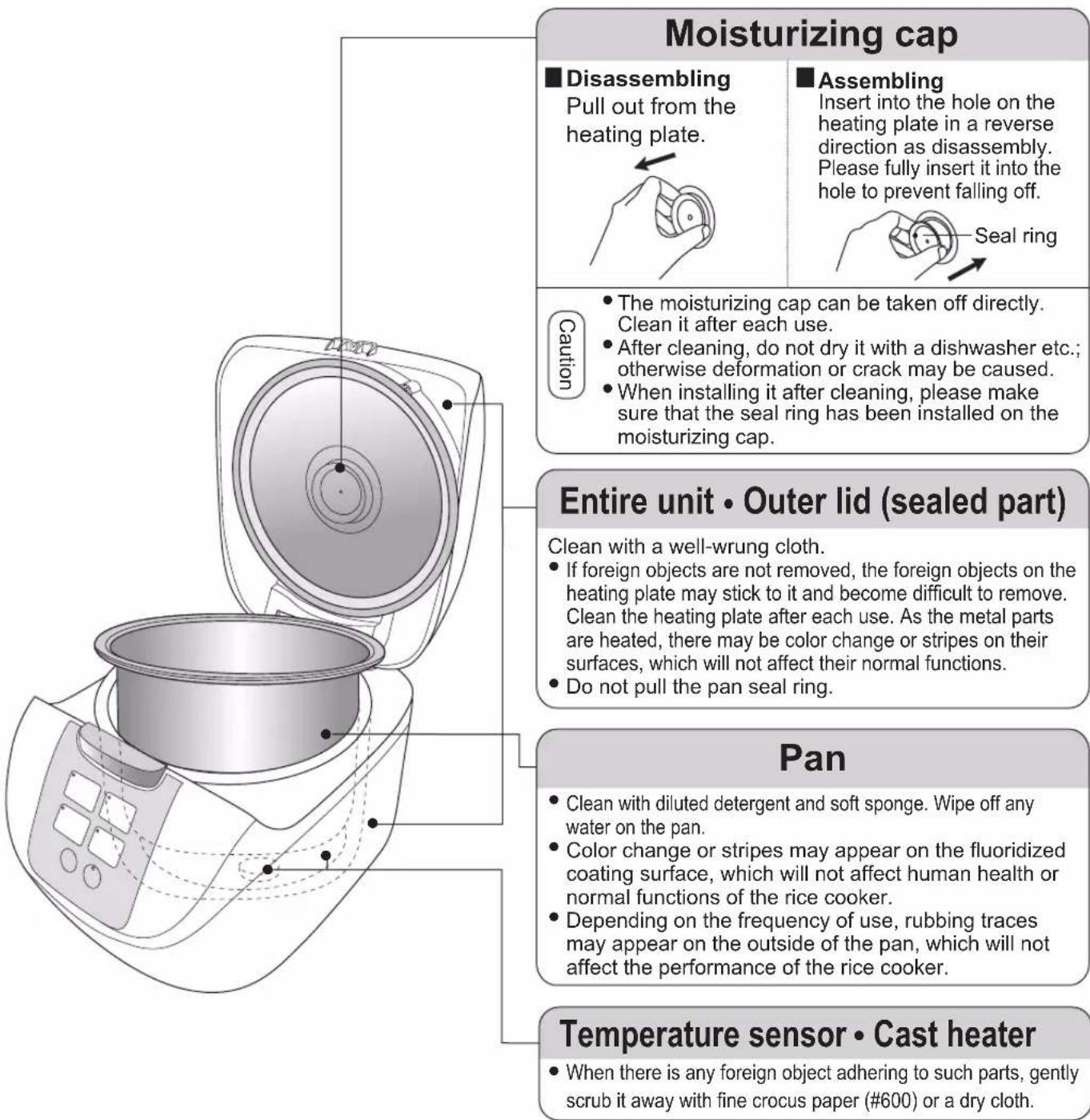
Accessories
Clean with diluted detergent and soft sponge.
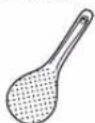
Rice scoop
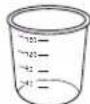
Measuring cup
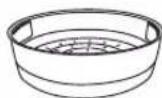
Steaming basket
Troubleshooting
Please check the following items
| In the following eventsItems for check | Rice | Rice crusts | Rice kept warm | do not work | Button operations | The plug is pulled out or gets loose. | When there are [click] sounds in cooking, water drops at the bottom of the pan (outside) and gets broken after being heated. This is not a malfunction. | |||||
| Harder | Half-cooked | Soffer | overflow | strange | change | color | dry | |||||
| Incorrect rice quantity or water quantity | ● | ● | ● | ● | ● | ● | When there are [click] sounds in cooking, water drops at the bottom of the pan (outside) and gets broken after being heated. This is not a malfunction. | |||||
| Rice is not fully washed | ● | ● | ● | |||||||||
| The pan bottom is uneven | ● | ● | ● | |||||||||
| There are foreign objects on the outside of the pan or temperature sensor | ● | ● | ● | ● | ● | |||||||
| The outer lid is not correctly closed | ● | ● | ● | |||||||||
| The moisturizing cap is not correctly installed | ● | ● | ● | ● | ||||||||
| Grease is added when cooking the rice | ● | ● | ● | |||||||||
| After cooking is finished, the rice is not loosen | ● | ● | ||||||||||
| Keep warm over 5 hours | ● | ● | ● | ● | ||||||||
| The quantity of rice kept warm is too small | ● | |||||||||||
| The rice scoop is left in the rice cooker when the rice is kept warm | ● | |||||||||||
| The cold rice is kept warm | ● | ● | ● | |||||||||
| The outer lid is not firmly closed | ● | ● | ||||||||||
| The pan is not cleaned | ||||||||||||
| While in cooking, the plug is pulled out or the [Off] button is touched | ● | |||||||||||
| The wrong button is pressed | ● | ● | ● | ● | ● | |||||||

Specifications
| Model No. | SR-DF101 | SR-DF181 | |
| Power/rated frequency | 120 V~60 Hz | ||
| Rated power (rice cooking) | 750 W | ||
| Rated volume of pan L | 3 | 4.8 | |
| Rice cooking volume (rice quantity) L | White Rice/Quick Cook | 0.18~1.0 [1~5.5 cups] | 0.18~1.8 [1~10 cups]Quick Cook [1~8 cups] |
| Brown Rice | 0.18~0.54 [1~3 cups] | 0.18~1.08 [1~6 cups] | |
| Mixed rice/Glutinous rice | 0.18~0.54 [1~3 cups] | 0.18~0.9 [1~5 cups] | |
| Porridge cooking volume (rice quantity) L | 0.09~0.18 [1/2~1 cup] | 0.09~0.36 [1/2~2 cups] | |
| Maximum cooking volume (ingredients + water) for soup L | 1.5※ | 2.3※ | |
| Power cord length (approx.) m | 1.0 | ||
| Product weight (approx.) kg | 2.5 2.8 | ||
| Dimensions (approx.) cm | Width | 24.5 | |
| Length | 33.9 | ||
| Height | 19.9 | 24.7 | |
- Marked with ※, it means that the maximum cooking volume for soup is the highest waterline for “PORRIDGE”.
- For power cord replacement and product repairing, please contact the authorized service center of Panasonic.
- The design and specifications are intended to change without prior notice.
1 Press the [Porridge/Soup] button
© Panasonic Corporation 2012
RZ19AF12
S0812-0
Printed in China
Panasonic®
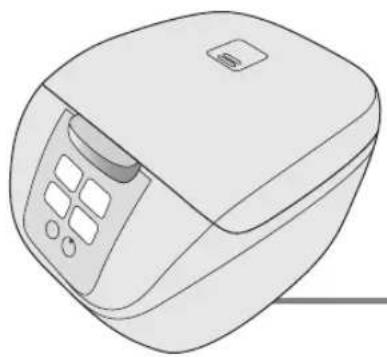
/ (Quick Cook/Steam)
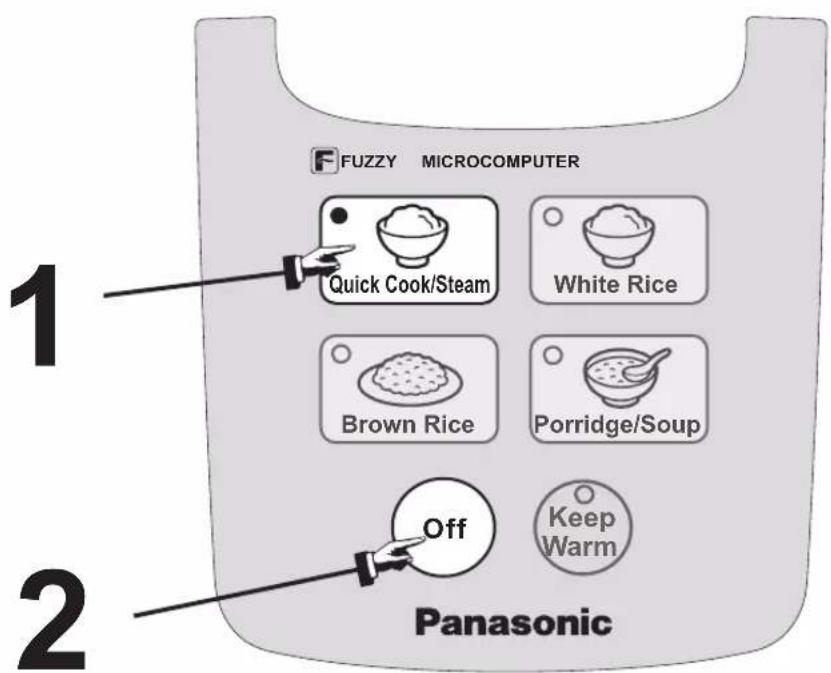
1 [Quick Cook/Steam]
© Panasonic Corporation 2012
RZ19AF121
S0812-11013
Printed in China
Limited Warranty
(ONLY FOR U.S.A. AND PUERTO RICO)
Panasonic Kitchen Appliance Limited Warranty
Limited Warranty Coverage (For USA and Puerto Rico Only) If your product does not work properly because of a defect in materials or workmanship, Panasonic Corporation of North America (referred to as "the warrantor") will, for the length of the period indicated on the chart below, which starts with the date of original purchase ("warranty period"), at its option either (a) repair your product with new or refurbished parts, (b) replace it with a new or a refurbished equivalent value product, or (c) refund your purchase price. The decision to repair, replace or refund will be made by the warrantor.
| Product or Part Name Labor Parts | ||
| Bread Maker, Rice Cookers (Fuzzy Logic), Meat Grindler, Toaster Oven, Coffee Maker, Electronic Kettle, 2-Slice Toaster | 1 yr. 1 yr. | |
| Large Capacity Rice Cookers (SR-42 series) | 6 Months 6 Months | |
During the "Labor" warranty period there will be no charge for labor. During the "Parts" warranty period, there will be no charge for parts. This warranty only applies to products purchased and serviced in the United States or Puerto Rico. This warranty is extended only to the original purchaser of a new product which was not sold "as is".
Carry-In or Mail in Service:
To find a service center please visit http://www.panasonic.com/help or call 1-800-211-PANA (7262).
IF REPAIR IS NEEDED DURING THE WARRANTY PERIOD, THE PURCHASER WILL BE REQUIRED TO FURNISH A SALES RECEIPT/PROOF OF PURCHASE INDICATING DATE OF PURCHASE, AMOUNT PAID AND PLACE OF PURCHASE. CUSTOMER WILL BE CHARGED FOR THE REPAIR OF ANY UNIT RECEIVED WITHOUT SUCH PROOF OF PURCHASE.
Limited Warranty Limits And Exclusions
This warranty ONLY COVERS failures due to defects in materials or workmanship, and DOES NOT COVER glass, plastic parts, temperature probes (if included) and normal wear and tear or cosmetic damage. The warranty ALSO DOES NOT COVER damages which occurred in shipment, or failures which are caused by products not supplied by the warrantor, or failures which result from accidents, misuse, abuse, neglect, bug infestation, mishandling, misapplication, alteration, faulty installation, set-up adjustments, maladjustment of consumer controls, improper maintenance, power line surge, lightning damage, modification, or commercial use (such as in a hotel, office, restaurant, or other business), rental use of the product service by anyone other than a factory service center or other authorized servicer, or damage that is attributable to acts of God.
THERE ARE NO EXPRESS WARRANTY EXCEPT AS LISTED UNDER "LIMITED WARRANTY COVERAGE".
THE WARRANTYOR IS NOT LIABLE FOR INCIDENTAL OR CONSEQUENTIAL DAMAGES RESULTING FROM THE USE OF THIS PRODUCT, OR ARISING OUT OF ANY BREACH OF THIS WARRANTY. (As examples, this excludes damages for lost time, travel to and from the servicer, loss of or damage to media or images, data or other memory or recorded content. The items listed are not exclusive, but for illustration only.)
ALL EXPRESS AND IMPLIED WARRANTY, INCLUDING THE WARRANTY OF MERCHANTABILITY, ARE LIMITED TO THE PERIOD OF THE LIMITED WARRANTY.
Some states do not allow the exclusion or limitation of incidental or consequential damages, or limitations on how long an implied warranty lasts, so the exclusions may not apply to you.
This warranty gives you specific legal rights and you may also have other rights which vary from state to state. If a problem with this product
develops during or after the warranty period, you may contact your dealer or Service Center. If the problem is not handled to your satisfaction, then write to:
Consumer Affairs Department
Panasonic Corporation of North America
661 Independence Pkwy
Chesapeake, VA 23320
PARTS AND SERVCE, WHICH ARE NOT COVERED BY THIS LIMITED WARRANTY, ARE YOUR RESPONSIBILITY.
Customer Services Directory (United States and Puerto Rico)
Obtain Product Information and Operating Assistance; locate your nearest Dealer or Service Center; purchase Parts and Accessories; or make Customer Service and Literature requests by visiting our Web Site at: http://www.panasonic.com/help
or, contact us via the web at:
http://www.panasonic.com/contactinfo
You may also contact us directly at:
1-800-211-PANA (7262)
Monday-Friday 9am-9pm, Saturday-Sunday 10am-7pm EST
For hearing or speech impaired TTY users, TTY: 1-877-833-8855
Accessory Purchases (United States and Puerto Rico)
Purchase Parts, Accessories and Owner's Manual online for all Panasonic Products by visiting our Web Site
at: http://www.pstc.panasonic.com
Or, send your request by E-mail
to:npcparts@us.panasonic.com
You may also contact us directly at:
1-800-332-5368 (Phone) 1-800-237-9080 (Fax Only)
(Monday-Friday 9am-9pm EST)
Panasonic National Parts Center
20421 84th Avenue South
Kent, WA 98032
(We accept Visa, MasterCard, Discover Card, American
Express)
For hearing or speech impaired TTY users, TTY: 1-866-605-1277
As of July 2013
Panasonic Canada Inc.
5770 Ambler Drive, Mississauga, Ontario L4W 2T3
PANASONIC PRODUCT - LIMITED WARRANTY
EXCHANGE PROGRAM
Panasonic Canada Inc. warrants this product to be free from defects in material and workmanship under normal use and for a period as stated below from the date of original purchase agrees to, at its option either (a) repair your product with new or refurbished parts, (b) replace it with a new or a refurbished equivalent value product, or (c) refund your purchase price. The decision to repair, replace or refund will be made by Panasonic Canada Inc.
| Electric Rice Cooker | One (1) year |
| Electric Thermo Pot | One (1) year |
| Automatic Bread Maker | One (1) year |
| Multi Cooker | One (1) year |
| Toaster Oven | One (1) year |
This warranty is given only to the original purchaser, or the person for whom it was purchased as a gift, of a Panasonic brand product mentioned above sold by an authorized Panasonic dealer in Canada and purchased and used in Canada, which product was not sold "as is", and which product was delivered to you in new condition in the original packaging.
IN ORDER TO BE ELIGIBLE TO RECEIVE WARRANTY SERVICE HEREUNDER, A PURCHASE RECEIPT OR OTHER PROOF OF DATE OF ORIGINAL PURCHASE, SHOWING AMOUNT PAID AND PLACE OF PURCHASE IS REQUIRED
LIMITATIONS AND EXCLUSIONS
This warranty ONLY COVERS failures due to defects in materials or workmanship, and DOES NOT COVER normal wear and tear or cosmetic damage. The warranty ALSO DOES NOT COVER damages which occurred in shipment, or failures which are caused by products not supplied by Panasonic Canada Inc., or failures which result from accidents, misuse, abuse, neglect, mishandling, misapplication, alteration, faulty installation, set-up adjustments, misadjustment of consumer controls, improper maintenance, power line surge, lightning damage, modification, introduction of sand, humidity or liquids, commercial use such as hotel, office, restaurant, or other business or rental use of the product, or service by anyone other than a Authorized Servicer, or damage that is attributable to acts of God.
THIS EXPRESS, LIMITED WARRANTY IS IN LIEU OF ALL OTHER WARRANTIES, EXPRESS OR IMPLIED, INCLUDING ANY IMPLIED WARRANTIES OF MERCHANTABILITY AND FITNESS FOR A PARTICULAR PURPOSE. IN NO EVENT WILL PANASONIC CANADA INC. BE LIABLE FOR ANY SPECIAL, INDIRECT OR CONSEQUENTIAL DAMAGES RESULTING FROM THE USE OF THIS PRODUCT OR ARISING OUT OF ANY BREACH OF ANY EXPRESS OR IMPLIED WARRANTY. (As examples, this warranty excludes damages for lost time, travel to and from the Authorized Servicer, loss of or damage to media or images, data or other memory or recorded content. This list of items is not exhaustive, but for illustration only.)
In certain instances, some jurisdictions do not allow the exclusion or limitation of incidental or consequential damages, or the exclusion of implied warranties, so the above limitations and exclusions may not be applicable. This warranty gives you specific legal rights and you may have other rights which vary depending on your province or territory.
CONTACT INFORMATION
For product information and operation assistance, please visit our Support page:
www.panasonic.ca/english/support
For defective product exchange within the warranty period, please contact the original dealer.
Panasonic Canada Inc.
5770, Ambler Drive, Mississauga (Ontario) L4W 2T3
PANASONIC PRODUCT - LIMITED WARRANTY
REPLACEMENT PROGRAM


- TABLE OF CONTENTS
- SAVE THESE INSTRUCTIONS
- NOTE
- WARNING
- CAUTION
- THE SYMBOLS ARE CLASSIFIED AND EXPLAINED AS FOLLOWS
- CLEAN THE POWER PLUG REGULARLY
- DO NOT USE THE APPLIANCE ON FOLLOWING PLACES
- DO NOT EXPOSE THE POWER PLUG TO STEAM
- BE SURE TO HOLD THE POWER PLUG WHEN UNPLUGGING THE POWER PLUG
- UNPLUG THE POWER PLUG FROM THE POWER OUTLET WHEN THE APPLIANCE IS NOT IN USE
- PLEASE ALLOW THE APPLIANCE TO COOL DOWN BEFORE CLEANING IT
- DO NOT USE OTHER PANS THAN THE ONE SPECIFIED
- PRECAUTIONS FOR USE
- PLEASE PUT IN CORRECT AMOUNT OF RICE AND WATER AND SELECT FUNCTIONS CORRECTLY ACCORDING TO THE OPERATING INSTRUCTIONS
- DO NOT PUT INGREDIENTS TO BE COOKED DIRECTLY INTO THE APPLIANCE IN WHICH NO PAN IS PLACED
- DO NOT USE THE APPLIANCE ON ANY HEAT SENSITIVE OBJECT SUCH AS CARPET, ELECTRIC HEATING CARPET AND TABLECLOTH (MADE OF VINYL PLASTICS), ETC
- AVOID USING THE APPLIANCE UNDER DIRECT SUNLIGHT
- PLEASE ALWAYS CLEAN THE FOREIGN OBJECTS SUCH AS RICE ON THE PAN, CAST HEATER AND TEMPERATURE SENSOR
- PARTS IDENTIFICATION
- ACCESSORIES
- PREPARATIONS
- MEASURE RICE WITH THE MEASURING CUP PROVIDED
- WASH THE RICE UNTIL THE WATER TURNS RELATIVELY CLEAR
- ATTENTIONS
- PLACE THE WASHED RICE INTO THE PAN
- PUT THE PAN INTO THE BODY AND CLOSE THE OUTER LID
- CONNECT THE PLUGS
- FUNCTIONS QUICK COOK/STEAM
- KIND REMINDER
- OPERATIONS (FOR EXAMPLE: STEAM WITH [QUICK COOK/STEAM] FUNCTION)
- PRESS [QUICK COOK/STEAM] BUTTON
- THE COOKING IS OVER
- PRESS [OFF] BUTTON
- FUNCTIONS: WHITE RICE, KEEP WARM
- OPERATIONS (FOR EXAMPLE: COOK RICE WITH [WHITE RICE] FUNCTION)
- PRESS [WHITE RICE] BUTTON
- LOOSEN THE RICE
- KEEP WARM
- FUNCTIONS BROWN RICE
- OPERATIONS (FOR EXAMPLE: COOK RICE WITH [BROWN RICE] FUNCTION)
- PRESS [BROWN RICE] BUTTON
- COOKING TIME (REFERENCE)
- FUNCTIONS PORRIDGE/SOUP
- OPERATIONS (FOR EXAMPLE: COOK PORRIDGE WITH [PORRIDGE/SOUP] FUNCTION)
- PRESS [PORRIDGE/SOUP] BUTTON
- RECIPES
- MIXED CHICKEN RICE
- INGREDIENTS
- SEASONING
- COOKING METHOD
- CORN AND RIB SOUP
- DIM SUM (FROZEN)
- MUNG BEAN AND LILIUM PORRIDGE
- CLEANING AND MAINTENANCE
- TROUBLESHOOTING
- PLEASE CHECK THE FOLLOWING ITEMS
- SPECIFICATIONS
- PRESS THE [PORRIDGE/SOUP] BUTTON
- PANASONIC®
- (QUICK COOK/STEAM)
- [QUICK COOK/STEAM]
- LIMITED WARRANTY
- (ONLY FOR U.S.A. AND PUERTO RICO)
- PANASONIC KITCHEN APPLIANCE LIMITED WARRANTY
- CARRY-IN OR MAIL IN SERVICE
- LIMITED WARRANTY LIMITS AND EXCLUSIONS
- CUSTOMER SERVICES DIRECTORY (UNITED STATES AND PUERTO RICO)
- ACCESSORY PURCHASES (UNITED STATES AND PUERTO RICO)
- PANASONIC CANADA INC
- PANASONIC PRODUCT - LIMITED WARRANTY
- EXCHANGE PROGRAM
- IN ORDER TO BE ELIGIBLE TO RECEIVE WARRANTY SERVICE HEREUNDER, A PURCHASE RECEIPT OR OTHER PROOF OF DATE OF ORIGINAL PURCHASE, SHOWING AMOUNT PAID AND PLACE OF PURCHASE IS REQUIRED
- LIMITATIONS AND EXCLUSIONS
- CONTACT INFORMATION
- REPLACEMENT PROGRAM
Brand : PANASONIC
Model : SRDF101
Category : Rice cooker