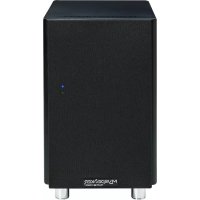
MySPEAKER MyAMP inside - Speaker Micromega - Free user manual and instructions
Find the device manual for free MySPEAKER MyAMP inside Micromega in PDF.



| Product Type | Amplified speaker (active speaker + passive speaker) |
| Brand | Micromega |
| Model | MySPEAKER MyAMP inside |
| Output Power | 30 W at 8 Ω / 60 W at 4 Ω |
| Recommended Load Impedance | >4 Ω |
| Power Supply | 85-150 Vac / 150-265 Vac, 50-60 Hz (voltage selector) |
| Standby Power Consumption | < 500 mW |
| Audio Inputs | 1 analog (RCA), 1 USB type B (24 bits / 96 kHz), 1 optical (Toslink), 1 coaxial (RCA), Bluetooth aptX |
| SPDIF Sampling Frequencies | 32 kHz - 192 kHz |
| USB Sampling Frequencies | 44.1 kHz - 96 kHz |
| Audio Resolution | 16 - 24 bits (USB / SPDIF / Bluetooth) |
| Bluetooth | aptX module, up to 8 pairable devices, standard range |
| Outputs | 1 subwoofer (RCA), 1 passive speaker terminal |
| Trigger Input | 3.5 mm mini-jack for external control (5-12 Vdc) |
| Auto-Standby Function | Automatic standby after 15 minutes without audio signal |
| Speaker Type | Bass-reflex |
| Transducers | High frequency and mid-woofer |
| Maintenance and Cleaning | Unplug the power cord, clean with a soft, slightly damp cloth. Do not use solvents. |
| Safety | Do not open the device. Risk of electric shock. Refer all repairs to qualified personnel. |
| Warranty | 1 year from the date of purchase, excluding damage due to misuse. |
Frequently Asked Questions - MySPEAKER MyAMP inside Micromega
User questions about MySPEAKER MyAMP inside Micromega
0 question about this device. Answer the ones you know or ask your own.
Ask a new question about this device
Download the instructions for your Speaker in PDF format for free! Find your manual MySPEAKER MyAMP inside - Micromega and take your electronic device back in hand. On this page are published all the documents necessary for the use of your device. MySPEAKER MyAMP inside by Micromega.
USER MANUAL MySPEAKER MyAMP inside Micromega
Cables de raccordements
© 2012 CSR plc and its group companies.
The aptX® mark and the aptX® logo are trade marks of CSR plc or one of its group companies and may be registered in one or more jurisdictions."
The Bluetooth word mark and logos are owned by the Bluetooth SIG, Inc. and any use of such marks by [licensee name] is under license. Other trademarks and trade names are those of their respective owners.
CHARACTERISTIQUES TECHNIQUES
Distorsion THD + Bruit (10W/1 kHz/8Ω) ≤ 0,003%
Emballage (L x P x H mm)
Poids
Poids de la paire
Emballage
deux voies
1
51/4"
50Hz-20KHz+/-3dB
90 dB
90W
C13
85 - 150 V ac ou 180 - 265V ac
47-63 Hz
<500mW
90x320x315
475x376x390
12 kg
13 kg
Thank you for choosing a Micromega product. This powered speaker is designed for high quality sound with easy set-up and user-friendly operation. It is worth taking the time to read this user manual so that you can get the best out of the speakers and the different functions available.
Check List
Please check the packaging carefully for any damage. If you have the slightest concern please contact your authorised vendor. Your package should contain:
- One pair of speakers (one active speaker with integrated MyAMP amplifier and one passive speaker)
A power cable - A speaker wire (to connect the speakers to each other)
- An infrared remote control
Eight speaker legs
Eight rubber feet
Mains supply
Your speakers can be used with a voltage ranging from 85 - 150V / 50 - 60Hz and with a frequency of 85 - 150V / 50 - 60Hz or 150 - 265V / 50 - 60Hz . Please ensure that the voltage supply indicated on the speaker corresponds with your mains supply.
If it doesn't, do not plug your speakers into the mains. Please change the voltage by unscrewing the cover plate above the voltage selector.

WARNING: If you are concerned about this and do not feel qualified to make this adjustment please contact your authorised vendor.
Connector cables
Your speakers do not come with input and output cables. We recommend you use good quality cables for the best sound quality. The MyCABLE range works perfectly with MySPEAKER products. You can buy MyCABLE products for different uses (TV, DVD, CD) from your Micromega vendor, including a high quality connector cables for your speakers. (Look for MySPEAKER powered speaker cables).
Terminals
You can connect several different audio sources to the back of your speakers. Please connect these before plugging the speaker into the mains supply.
These speakers have been designed to be placed either on the left or on the right depending on how close your mains plug is to where you want the speakers. The SET adjustment switch on the right allows you to set up either right or left positioning of the speakers. If the switch is pushed in at the bottom that means that the left hand speaker is the one connected to the mains. If the switch is pushed in at the top that means that the right speaker should be connected to the mains.
You should adjust the SET switch before connecting the speakers to the mains.
11
MySPEAKER powered speakers have an AN1 analogue line level audio input, a 24/96 USB digital input plus two SPDIF inputs, Optical and Coaxial 24/192. What is more the MySPEAKER is equipped the latest Bluetooth aptX® module which produces exceptional sound quality.
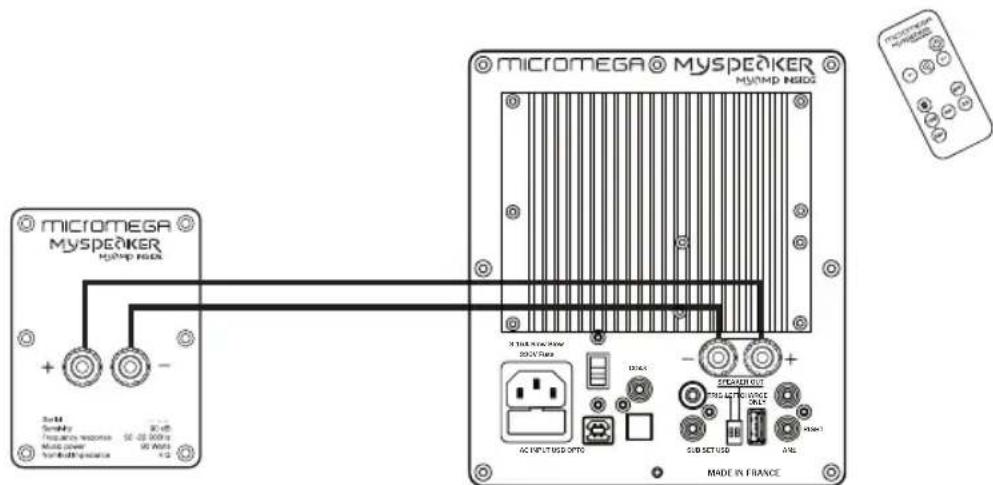
Speaker out: Cable connection terminal for connecting the active speaker to the passive speaker.
AN1: analogue terminal for RCA plug
OPTO: optical digital input terminal with a Toslink plug, only compatible with PCM signal
COAX: digital input terminal with an RCS plug, only compatible with a PCM signal
Sub: analogue output terminal for connecting a Subwoofer
USB (type A): this port is only for charging your devices (smartphone, tablet, MP3 player)
Trig: 3.5mm mini-jack connection for external control
SET: use to set up your system with either OPTO or COAX and left and right speakers
Mains plug and fuse: for connecting the mains cable and safety fuse (factory-installed)
Voltage selector: two different positions, protected by a detachable cover plate
Operation
Once you have connected all of the cables you can plug your MySPEAKER into the mains. The speakers are in "STANDBY" mode which is indicated by the red LED light which is just behind the cone on the front of the speaker. Use the remote control to work the speakers.
In order to avoid any noise and to ensure the stabilisation of all the speakers circuits there will be short time delay of 15 seconds once "STANDBY" mode is disabled. The red light will flash during this time delay, meaning you cannot do anything with the remote. Then the light will turn green.
When your MySPEAKER comes out of 'STANDBY' mode it will connect to its most recently used audio source and the volume will be adjusted to an average level.
In order to change the audio source use the buttons on the remote control to select the source you want to listen to.
When you select a digital source, your MySPEAKER will only start working once it receives a valid digital signal to the digital input terminal you have chosen.
MySPEAKER speakers have a trigger input, specifically for the OPTO and COAX digital terminals. This ensures that the device is turned on and off via and external plug which is between 5 and 12VDC
When the Trigger function is in use, the selected input terminal is defined by the position of the left SET adjustment switch on the back of the speaker. If the bottom of the switch is pushed in then this will connect the OPTO input. If the top of the switch is pushed in then this will connect the COAX input. The volume will come on at the same level as it was last used by the same input terminal.
MySPEAKER speakers comply with the latest norms regarding use of environmental materials and they use less than 500mW of power in "STANDBY" mode. Therefore they have no on/off switch, which preserves the life of the components as they are not subjected to stress every time power runs through them from an off position. What is more MySPEAKER has an AUTO-Standby function. If there is no audio signal for more than 15 minutes the speakers will automatically go into standby mode to avoid using excess electricity.
If there is a power failure your speakers will go into safety mode and the red light will flash. Please disconnect the mains cable, wait for around 20 seconds and then reconnect. Turn on the speakers with the remote control. Once the speakers have initialised if they remain in safety mode please contact your authorised vendor.
Bluetooth Connection
This product is equipped with a Bluetooth module featuring aptX decoding. Using the remote control, select the Bluetooth logo. When you do this for the first time the speakers will go straight to "pairing" mode. You will find "MySPEAKER" in the list of Bluetooth products on your device (smartphone, tablet or computer).
If you need to pair a different Bluetooth device with your speakers, once you have selected the Bluetooth logo on the remote control, press and release "BTC." "MySPEAKER" will once again appear in the list of Bluetooth products on your device (smartphone, tablet or computer).
Active Bluetooth connection available: blue light comes on for 3 seconds and then turns off for 1 second
Bluetooth connection in "pairing" mode: blue and red lights flash quickly
Bluetooth is connected to a source: blue light flashes twice quickly every 3 seconds
Bluetooth connection with audio signal: steady blue light
You can connect several different devices to MySPEAKER powered speakers, so each member of the family can listen to their favourite music in turn. Only one Bluetooth connection can be made in time.
You can pair up to 8 different devices with your MySPEAKER. If you pair a new device once 8 devices have already been paired the first pairing you made will be wiped from the memory.
You can erase the Bluetooth module's memory from your MySPEAKER at any time. In order to do this, press on the BTC button of the remote control for 15 seconds... the red light will flash five consecutive times indicating that the memory has been erased.
If you want to make new Bluetooth connections to your MySPEAKER once erased, select the Bluetooth input. The speaker will search and connect to the most recent Bluetooth sources found (AUTO CONNECT). This function only works when the Bluetooth module is initially turned on. When you are changing Bluetooth source, even if the new source is already recognised by the speakers, you will need to select MySPEAKER on your Bluetooth source. Alternatively you can change the source (for example select AN) and then re-select Bluetooth.

© 2012 CSR plc and its group companies.
The aptX® mark and the aptX® logo are trade marks of CSR plc or one of its group companies and may be registered in one or more jurisdictions."
The Bluetooth word mark and logos are owned by the Bluetooth SIG, Inc. and any use of such marks by [licensee name] is under license. Other trademarks and trade names are those of their respective owners.
TECHNICAL DETAILS
Audio Characteristics of the amplifier
Analogue input 1 x (250mV / 1MΩ)
SPDIF coaxial input 1 x (>0.2v p-p / 75Ω)
SPDIF optical input 1 x (Toslink)
USB port 1 x (class1.0)
Bluetooth aptX® Module BT 3.0
SPDIF sample range 32kHz - 192kHz
USB sample range 44.1 kHz - 96 kHz
USB/SPDIF/BLUETOOTHresolution16-24bits
Maximum Bluetooth sample range 48 kHz
Number of Bluetooth devices that can be paired 8
Power/8Ω 30W
Power/4Ω 60W
Recommended load impedance
Distortion THD + Noise (10W/1 kHz/8Ω)
Damping factor
Acoustic speaker Characteristics
Bass reflex speaker
High-frequency transducer
Mid-low range transducer
Frequency response 50Hz - 20 KHz +/- 3dB
Sensitivity (to 1W/1m)
Impedance
Power
Electric supply
Cable type
Voltage range
Frequency range
Energy consumption in standby mode (85-265 Vac)
Dimensions
1 speaker (L × D × H mm)
Packaging (L x D x H mm)
Weight
Weight of pair of speakers
With packaging 13kg
4Ω
≤ 0,003%
100 to 1 kHz
two way
1
51/4"
90 dB
4Ω
90W
C13
85-150VACor180-265VAC
47-63 Hz
<500mW
90x320x315
475× 376× 390
12 kg
Cleaning your speakers
- Disconnect the mains cable from your MySPEAKER powered speaker.
- Using a soft or slightly damp cloth, remove any dust or marks. Take care not to spill any liquid inside the device. Warning: to avoid damage do not use any solvents or cleaning products with a solvent base (acetone, trichloroethylene.) nor any abrasive products. We recommend you spray any cleaning products onto your cloth and not directly onto your MySPEAKER and then clean it.
- Reconnect the mains supply.
Environmental conditions
Working temperature: 0^ to 35^ (32^ to 95^)
Storage temperature: -25^ to 60^ C (-13° to 140° F)
Relative humidity (working): 20% to 80%
Humidity (storage): 10% to 90% (without condensation)
Avoid damp places
Keep your MySPEAKER powered speaker away from liquids such as drinks, sinks, baths, shower cubicles etc. Protect your MySPEAKER from direct sunlight, rain or any other source of damp. Take care to not spill food or liquid on your device. If this happens unplug your speaker before cleaning. If too much liquid has spilt on your speaker we advise you to return it to your authorised vendor. It is important not to connect it to a mains supply in this state.
GUARANTEE
Your MySPEAKER powered speaker is guaranteed for 1 year from the date of purchase. If your speaker needs repairing you should take it back to your authorised vendor in its original packaging along with a receipt for purchase. The guarantee covers manufacturing defects with the exception of:
- Accidental damage, negligence or misuse
- Setting up the speaker in a way that is not in the manual
- Any repair carried out by a third party (unskilled worker)
- Damage in transit.
HIFI-AKTIV-LAUTSPRECHERSYSTEM
© 2012 CSR plc and its group companies.
The aptX® mark and the aptX® logo are trade marks of CSR plc or one of its group companies and may be registered in one or more jurisdictions."
The Bluetooth word mark and logos are owned by the Bluetooth SIG, Inc. and any use of such marks by [licensee name] is under license. Other trademarks and trade names are those of their respective owners.
TECHNISCHE DATEN
USB-Abtastrate 44.1 kHz - 96 kHz
Auflösung USB / S/P-DIF / BLUETOOTH 16 - 24 bit
Max. Abstrate Bluetooth 48 kHz
Please read all instructions before proceeding. If you have any questions about the operation or use of this product, please contact your dealer.
This unit was designed and manufactured to ensure personal safety. Improper use can result in potential electrical shock or fire hazards. Please retain these instructions for future reference. The lightning flash with arrowhead symbol within the equilateral triangle is intended to alert the user to the presence of non-isolated dangerous voltage within the product's enclosure that may be of sufficient magnitude to constitute a risk of electric shock.

CAUTION Risk of electric shock Do not open

To prevent the risk of electrical shock do not remove enclosure or disassemble. No user-serviceable parts inside. Refer servicing to qualify service personnel. The exclamation point within an equilateral triangle is intended to alert the user to the presence of important operating, maintenance and servicing instructions in the literature associated with this device.