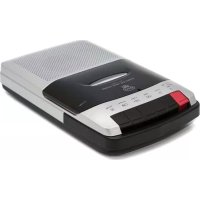
W0162B - Voice recorder GPO - Free user manual and instructions
Find the device manual for free W0162B GPO in PDF.



| Product Type | Portable cassette recorder/player |
| Brand | GPO |
| Model | W0162B |
| Power Supply | 4 UM-2 batteries (C size) or DC mains adapter (not included) |
| Microphone | Built-in condenser microphone + external microphone jack input (3.5 mm) |
| Speaker | Built-in speaker + external speaker jack (3.5 mm) |
| Functions | Playback, recording, fast forward, rewind, pause, stop/eject |
| Automatic Stop | Yes, at end of tape during playback or recording |
| Maintenance | Clean the casing with a soft cloth. Clean the heads, capstan, and pinch roller after 100 hours with a cotton swab moistened with isopropyl alcohol |
| Safety | Do not open the casing. No user-serviceable parts. Opening voids the warranty |
| Support | www.gporetro.com |
Frequently Asked Questions - W0162B GPO
User questions about W0162B GPO
0 question about this device. Answer the ones you know or ask your own.
Ask a new question about this device
Download the instructions for your Voice recorder in PDF format for free! Find your manual W0162B - GPO and take your electronic device back in hand. On this page are published all the documents necessary for the use of your device. W0162B by GPO.
USER MANUAL W0162B GPO
Thanks for purchasing the GPO WO 162 Cassette Recorder. You're now just the push of a button away from being able to record speeches, conversations and lectures with this lightweight and durable recorder. You'll never need a notepad again!
Location of Controls
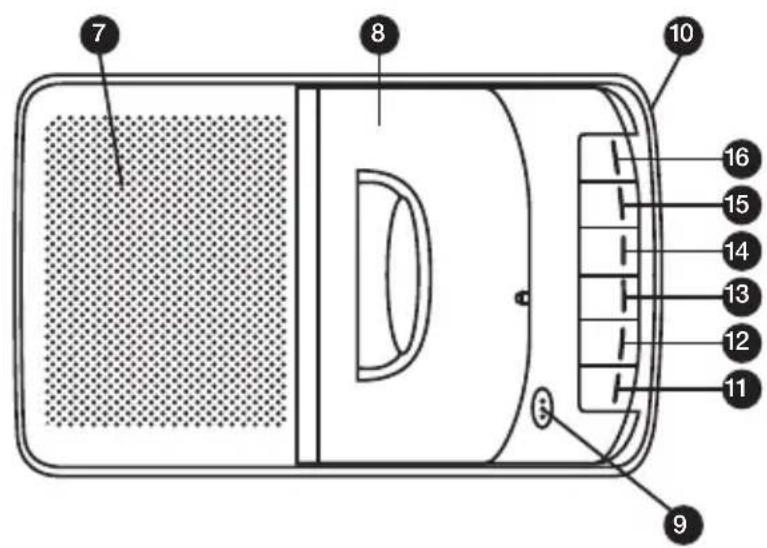
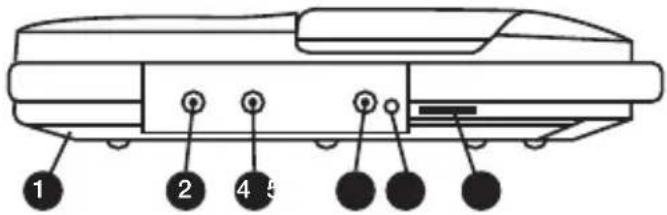
Battery Door
2 DC Jack
External Speaker Jack
External Microphone Jack
External Microphone Remote Jack
Volume Control
Speaker
Cassette Door
9 Condenser Microphone
10 Handle
1 Record Button
12 Play Button
13 Rewind Button
14 Fast Forward Button
15 Stop/Eject Button
16 Pause Button
Power Source
Operation with AC/DC Adaptor
The WO 162 Cassette Recorder is designed to operate with the included AC/DC adaptor, or with four size C batteries.
Insert the small plug of the AC/DC adaptor into the DC jack located on the side of the recorder.
Insert the AC/DC plug adaptor into a power outlet in a convenient location
Note: When the recorder is using mains power, the batteries will be automatically disconnected.
Operation with Batteries
Remove the battery compartment door on the rear of the unit Insert four size C batteries, taking care to make sure they are positioned according to the polarity markings on the unit Close the battery compartment door
Note: Check your batteries regularly. If the unit will be run using the AC/DC adaptor for a long period of time, remove any installed batteries to prevent leakage.
All spent batteries should be recycled or disposed of in the appropriate location.
Playback
The WO 162 Cassette Recorder can be used to play any cassette tape using the unit's built-in speaker.
- To open the compartment cover, press the Stop/Eject button. If a cassette is currently playing, press this button twice. Once to stop the cassette, and a second time to open the cover.
- Insert the cassette you wish to play into the compartment holder completely, ensuring that the open part of the cassette is facing upwards.
- Push the Play button to begin playback through the built-in speaker.
- The speaker volume can be adjusted using the volume control located on the side of the unit.
- To temporarily stop playback, press the Pause button. Pressing the Pause button a second time will resume playback.
- To move forward or backwards through the cassette tape, use the Fast Forward and Rewind buttons.
- Once the cassette tape comes to an end, the unit will stop automatically and the power will be turned off.
- To turn the unit off before the tape comes to an end, press the Stop/Eject button. This button can be pressed a second time to open the cassette door and remove the cassette.
- Once the tape has come to an end, it must be either rewound using the Rewind button, or ejected and reversed using the Stop/Eject button.
Note: If the Play button is pushed after the automatic stop system has operated, the tape will not resume playing. The cassette must be rewound or reversed.




Recording
The WO 162 Cassette Recorder can be used to record sound or speech to a cassette tape using the built-in microphone.
- Ensure that a cassette tape has been correctly inserted into the cassette cover.
- Push the Record AND Play buttons together.
- The built-in microphone will begin to record nearby sounds and speech. It is not necessary for you to hold the microphone near to your mouth.
- To stop the recording at any time, press the Stop/Eject button.
- Once the cassette tape comes to an end, the unit will stop automatically and the power will be turned off.
- When a new recording is made to the same cassette tape, any previous recordings will be erased and only the new recording will remain.
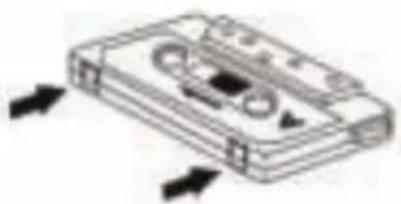
Note: Make sure that the erase prevention tab on top of the tape has not been cut off. If these tabs have been removed, the tape cannot be used for recording.
Cleaning the Unit
- The exterior casing of this unit may be cleaned with a dust cloth. Use caution when cleaning and wiping any plastic parts.
- Mild soap and a damp cloth may be used to clean the front panel.
- The tape heads, capstan and pinch roller should be cleaned after every 100 hours of use. Use a cotton swab moistened with head cleaning solution or isopropyl alcohol, then carefully dry with another cotton swab.
Note: Never use metal objects on or near the tape heads. Do not allow any cleaning materials to fall into the tape assembly.
Troubleshooting
Q) The unit will not turn on
A) Ensure that the DC cable is properly connected to the unit and plugged in to a working outlet. If you are running from battery power, ensure that the batteries are fully charged and installed correctly.
Product Support
For more advice or assistance, please visit www.gporetro.com, or call our support team on 0845 521 4095.
Please note, for your personal safety you SHOULD NOT attempt to open the unit's casing. Opening the casing voids your warranty, and no user serviceable parts are contained inside
German
Hereby ProtelX, declares that this equipment (GPO 162B) is in compliance with the essential requirements and other relevant provisions of Directive, you can access a copy of this certificate on www.gporetro.com/Certificate-of-Conformity
DE
ProTelX Ltd, Unit 6, Park 17 Industrial Estate, Moss Lane,
Whitefield, Manchester, M45 8FJ UK
Brand : GPO
Model : W0162B
Category : Voice recorder