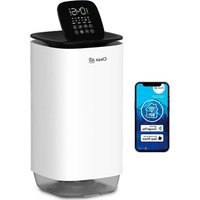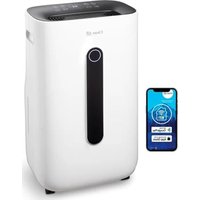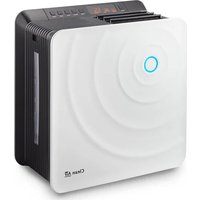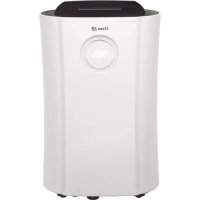
CA704 - Humidifier Clean Air Optima - Free user manual and instructions
Find the device manual for free CA704 Clean Air Optima in PDF.



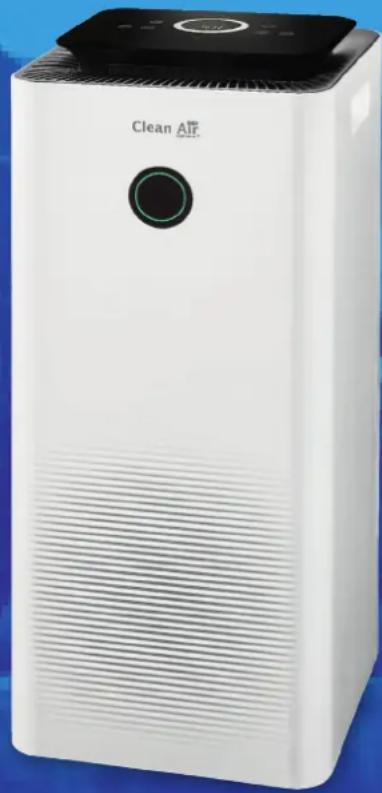
| Product Type | 2-in-1 Dehumidifier and Air Purifier |
| Brand | Clean Air Optima |
| Model | CA-704 Smart |
| Dimensions (L x W x H) | 250 x 250 x 500 mm |
| Weight | 9.5 kg |
| Power Supply | 220-240 V, 50 Hz |
| Power Consumption | 200 W |
| Dehumidification Capacity | 10 L/day (at 30 °C, 80 % RH) |
| Water Tank | 3 L |
| Recommended Room Size | Up to 40 m² / 100 m³ |
| Filtration System | Pre-filter, activated carbon filter, True HEPA H13 filter, UV-C lamp, ionizer |
| Filtration Performance | 99.97 % of particles, 99.9 % sterilization |
| Negative Ions | > 3,000,000 ions/cm³ |
| Connectivity | WiFi 2.4 GHz, Clean Air Optima app |
| Noise Level | < 30 dB(A) (low) / 42 dB(A) (high) |
| Operating Temperature Range | 5 °C to 32 °C |
| Refrigerant | R290 (propane), 30 g |
| Included Accessories | Continuous drainage hose (1.5 m), pre-installed activated carbon and True HEPA H13 filters |
| Safety | Automatic tank full shut-off, automatic defrost, refrigerant leak protection |
| Maintenance | Monthly pre-filter cleaning, replace carbon and HEPA filters every 3 to 6 months |
| Warranty | 2 years |
Frequently Asked Questions - CA704 Clean Air Optima
User questions about CA704 Clean Air Optima
0 question about this device. Answer the ones you know or ask your own.
Ask a new question about this device
Download the instructions for your Humidifier in PDF format for free! Find your manual CA704 - Clean Air Optima and take your electronic device back in hand. On this page are published all the documents necessary for the use of your device. CA704 by Clean Air Optima.
USER MANUAL CA704 Clean Air Optima
Clean Air Optima® 2in1: Dehumidifier & Air Purifier
Model: CA-704 Smart / CA-707 Smart
(EN) User manual
(DE)Gebrauchsanweisung
(NL) Gebruiksaanwijzing
(FR) Mode d'emploi
(ES) Manual del usuario
(PL) Instrukcja obstugi
(CZ) Uživatelská príroducka
(RO) Manual de utiliser
(LT) Naudotojo vadovas
(EE) Kasutusjuhend
(LV) Lietosanas pamaciba
(RU)PykoBoOdCTBO NOIb3OBaTeJIa
(MK) Прпрачнк за користende
Find more languages on: www.cleanairoptima.com/ info/manuals
Read these instructions carefully before you start using this Clean Air Optima device and keep the manual for future reference.
Clean Air Optima
Table of contents
English 3
German 20
Dutch 37
French 54
Spanish 71
Polish 88
Czech 105
Romanian 122
Lithuanian 139
Estonian 156
Latvian 173
Russian 190
Macedonian 207
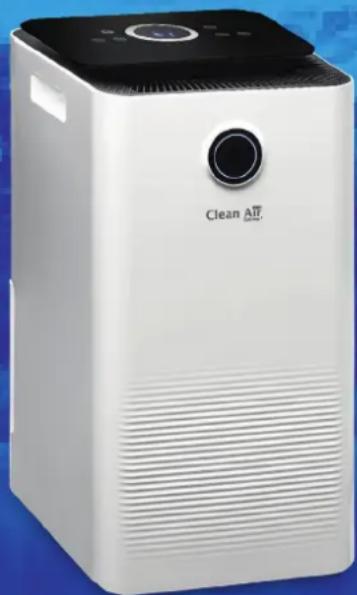
CA-704 Smart / CA-707 Smart Main unit
Clean Air Optima
English
Thank you for purchasing the Clean Air Optima® 2in1: Dehumidifier & Air Purifier CA-704 Smart / CA-707 Smart.
We wish you many years of healthy indoor air with this efficient and effective product. Ensure that all safety precautions are followed when using this electrical appliance for the proper operation of the device. These instructions describe the safety precautions to be observed during operation. They are meant to prevent injuries and to avoid damaging the device.
Description
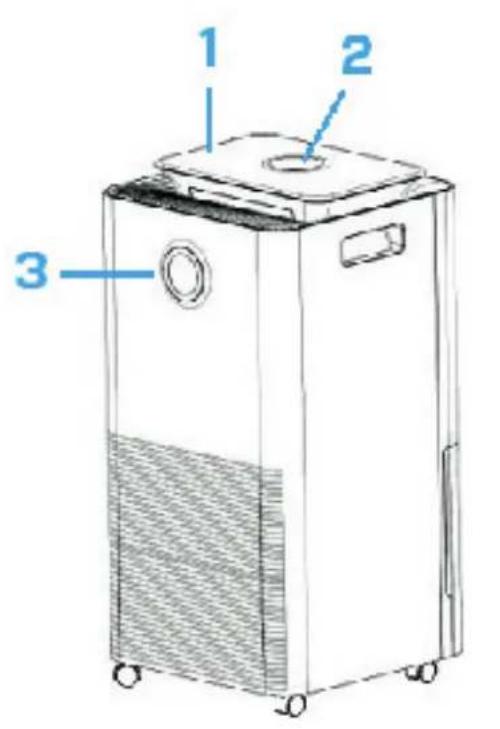
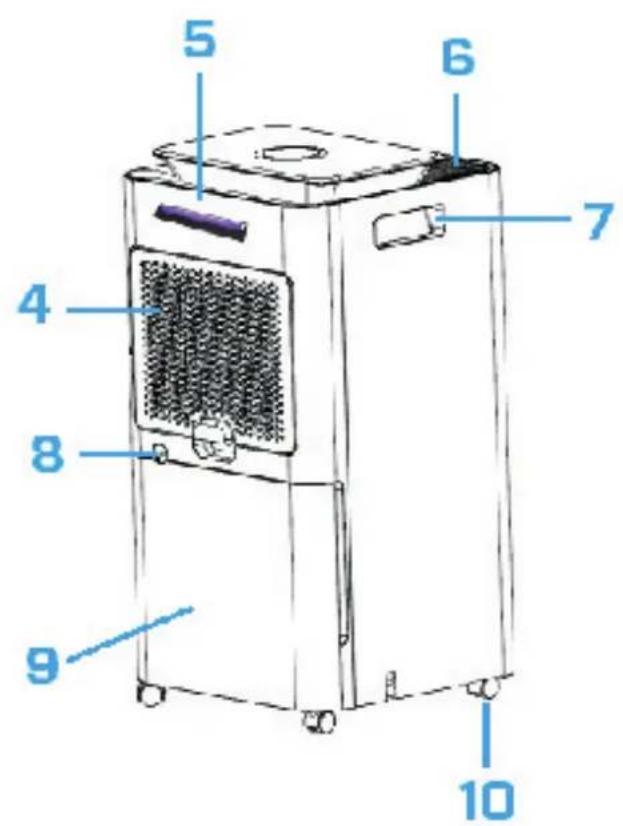
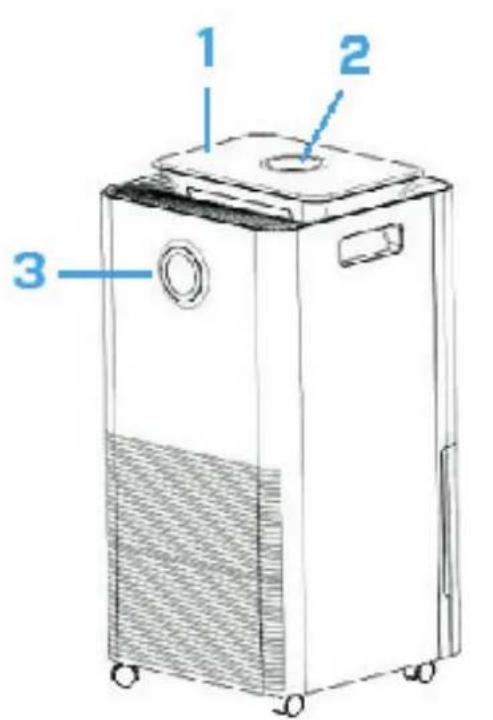
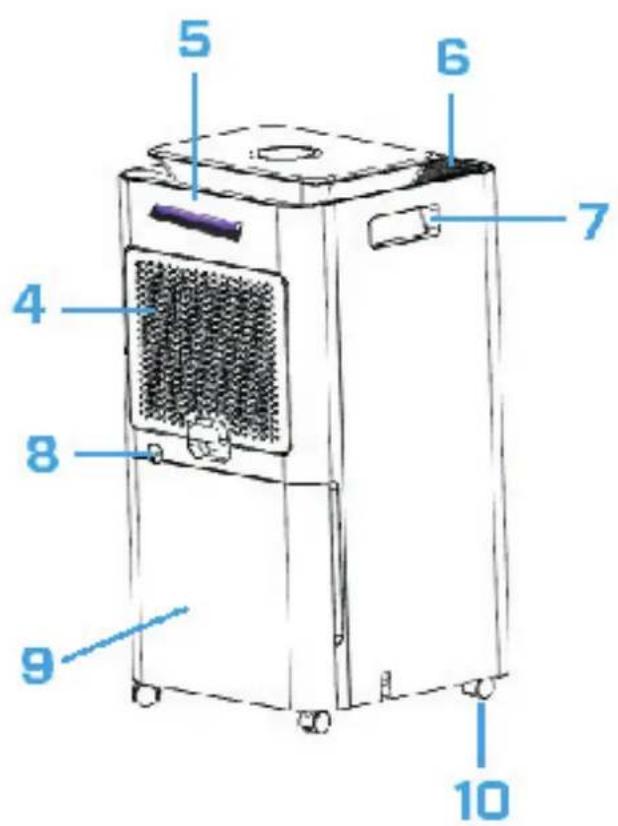
This Clean Air Optima device consists of the following main components:
- Control panel
- Digital display indicates relative humidity in %,WiFi and function settings
- Color LED monitor indicates relative humidity in blue (below 53% ), green (between 53% - 68% ) and red (above 68% )
- Air inlet and filter frame compartment, includes: Pre-filter, Activated Carbon Filter, True HEPA H13 Filter
- UV-C lamp position
- Air outlet and lonizer position
- Handle
- Continuous drainage (water drain, hose connection). Drain hose 1.5 meter included
- Water tank
- Caster wheels
After the dehumidifier has been delivered/moved, it must be left static for at least two hours before it is switched on. Since the compressor line in the dehumidifier contains refrigerant, the refrigerant must flow for at least two hours after the move before it returns to its original position.
Safety warnings
This device may only be used in accordance with this safety instructions. Take the following steps to minimize the risk of personal injury caused by for example electric shocks or fire.
- Leave the device to stand for at least two hours before use, especially after transportation.
- Only for indoor use. Do not use or store outdoors.
- Use proper voltage: AC 220V - 240V, 50/60Hz.
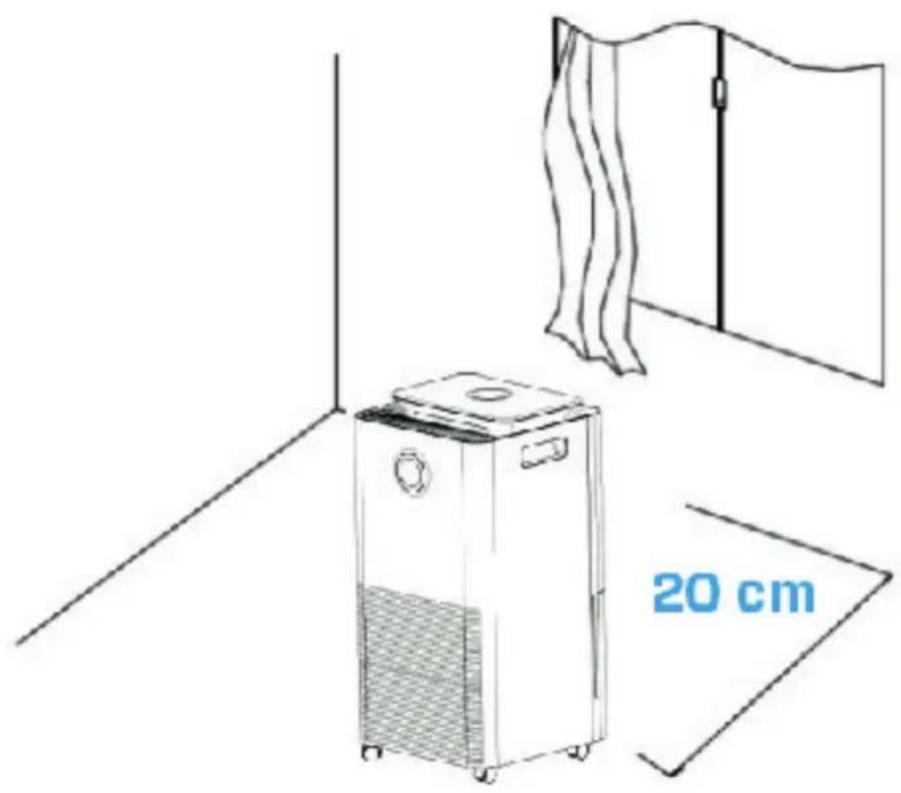
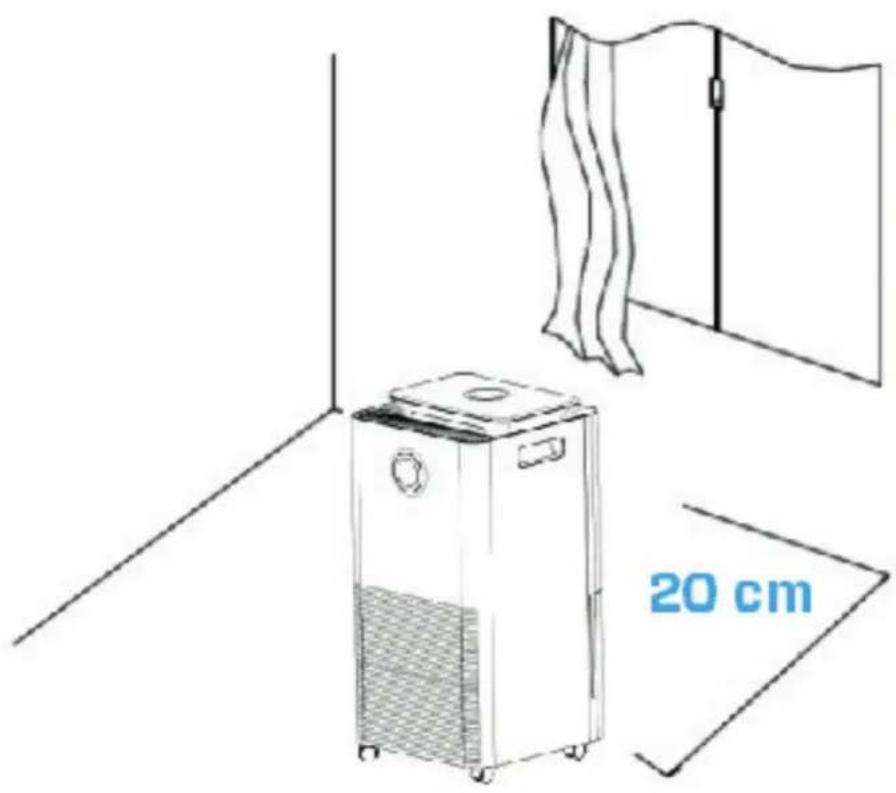
- Allow a free space of min. 20 cm around the air inlet and air outlet of the device.
- The appliance is not intended to be used by children or persons with reduced physical, sensory or mental capabilities, unless they are supervised by a person responsible for their safety.
-
Do not use the device when there is visible damage on the electrical cord or on the device itself. Do not repair the device yourself in case of damage. Never pull the device by its cord. If the power cord is damaged, then it must be replaced by an authorized service person to prevent electric shock or fire.
-
Repairs may only be performed by authorized service personal. Do not try to repair the device yourself to prevent electric shock or fire.
- Do not touch the power cord and plug with wet hands.
- Always switch off the device before disconnecting the plug.
- Never attempt to turn of the device by disconnecting the plug.
- Pull the plug when you do not use the device or when you clean internal or external parts of it.
- For safety use put the device in a steady, horizontal position. Do not move while using.
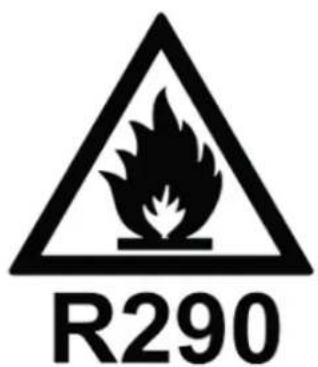
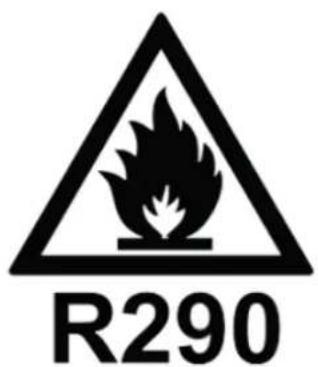
- Refrigerant: R290. This refrigerant complies with European environmental regulations. No part of the cooling circuit may be perforated.
- Only place the device in rooms where potential refrigerant leaks cannot accumulate. Non-ventilated rooms, where the device is installed, used, or stored, should be constructed in such a way that any refrigerant leaks cannot accumulate. This helps to prevent fire or explosion hazards caused by the ignition of the refrigerant from electrical heaters, stoves, or other ignition sources.
- Only place the device in rooms where no ignition sources (such as open flames, electric heaters) are present.
- Be aware that the refrigerant is odorless.
- Never insert any other object into the body to avoid breakdown.
- Never cover the air inlet and air outlet grid.
- Never disassemble or replace the device's inner parts.
- Use and store the device not under 0^ or above 40^ .
- Do not tip the unit to any side when the water tank is full.
- Do not put heavy objects on the unit.
- Please avoid places with direct sunlight. There is a risk that the device discolors.
- Never immerse the device in water or other liquids.
- Empty the water tank regularly. In extreme conditions the water tank may be full after a few hours operation.
- Clean the Pre-filter regularly, if the Pre-filter is saturated with dust, it will lead to poor purifying and dehumidifying effect. The power consumption will increase, it can cause failure.
- Replace the Activated Carbon Filter and True HEPA H13 Filter every 3 - 6 months, if the Activated Carbon Filter and True HEPA H13 Filter are saturated, it will lead to poor purifying and dehumidifying effect. The power consumption will increase, it can cause failure.
- Use, maintain and clean the device as described in this manual.
Clean Air Optima
Installation
Make sure that the distance from the device is 20 cm away from walls and furniture, see the illustration below.
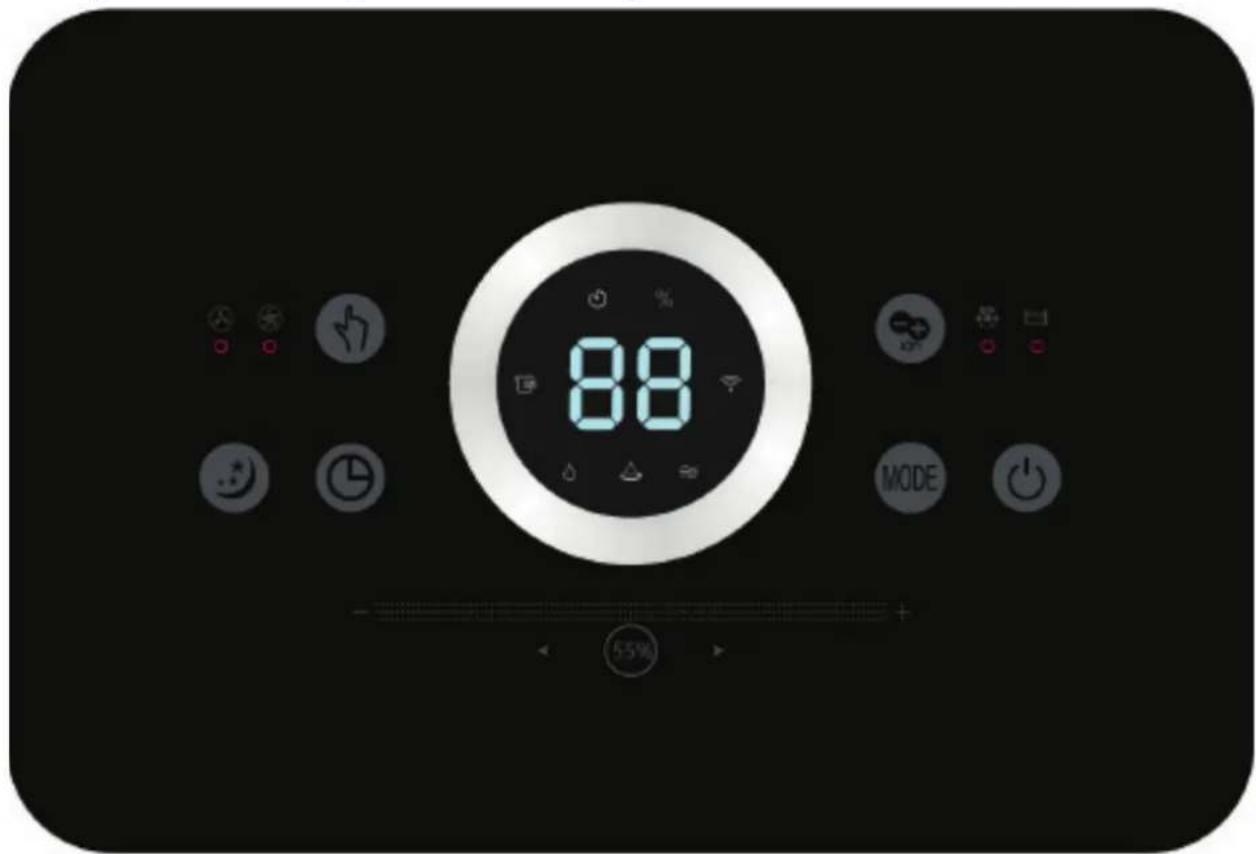
Control panel / Operation instruction
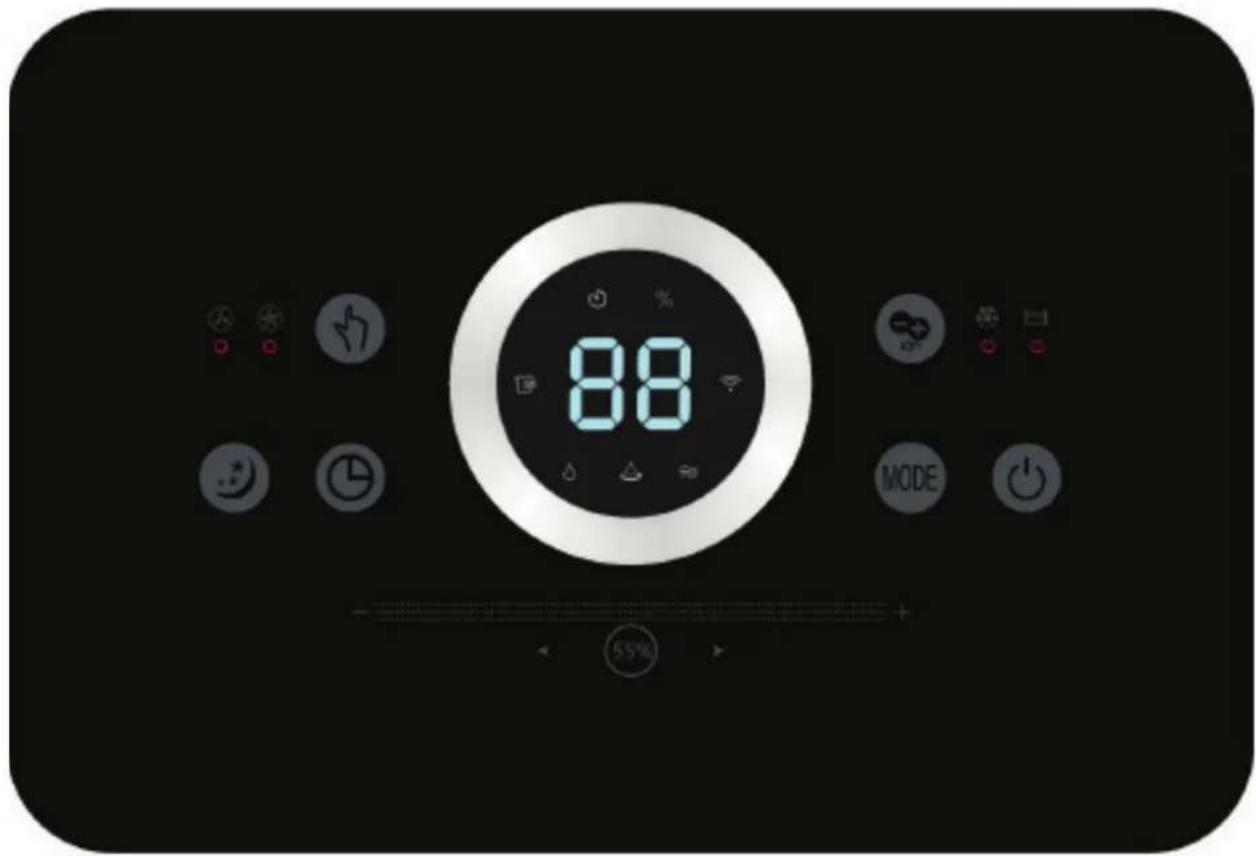

Power
Press the Power Button to activate the device. Press the Power Button again, the device turns off.

MODE
Press the MODE Button to select one of four desired programs:

- Normal dehumidification (adjustable fan speed and humidity setting) Icon with name in App: Normal
- Continuous dehumidification (low fan speed, humidity setting not adjustable) Icon with name in App: Continuous
- Continuous air purification (adjustable fan speed, no dehumidifying function) Icon with name in App: Air purification
- Dry clothes mode (high fan speed, fan speed and humidity setting not adjustable) Icon with name in App: Dry clothes

Humidity sliding setting Button
(Only for MODE program: Normal dehumidification)
By pressing the Humidity sliding setting Button, you can select the desired humidity level by pressing and sliding this button repeatedly until the required humidity level is displayed (from 30% to 80% in increments of 5% ). Once you select your desired humidity level, simply stop pressing and sliding the button and your humidity level will be set. When the humidity level in the room reaches the set humidity level, the device will go into automatic sleep state and stops dehumidifying and air purifying. When the room's actual humidity level increases again above your set humidity level, then the device will start dehumidifying and air purifying again.
Air purification
If the desired humidity level is reached at a constant level, you can switch to program 3 to use the device for continuous air purification.

Fan Speed
(Only for MODE program: Normal dehumidification and Continuous air purification) By pressing the Fan Speed Button, you can change the fan speed level. The 2 fan speeds offer individual air flow.

Negative Ion, icon with name in App: Ion
Pressing the Negative Ion Button will activate the negative ion generator with a total capacity of >3.000.000 negative ions / cm^2 that are spread through out the entire room and thereby neutralize pollutants and smells. Negative ions attach onto dust particles, microorganisms and other unwanted particles in the air and connect them to each other. This way, the particles become heavier than air and fall onto the ground so that you can no longer breathe them in.
Negative ions are most found in the forest, mountains and by the sea.
Negative ions ensures fresh and healthy air.

Timer
Press the Timer Button to set 0-24 hours timing. Press the button one time, the timer will increase with one hour. When the device is operating, the timer that is set indicates when the device switches off. If the device is in stand-by mode, the timer that is set is to instruct the device when to turn on.

Sleep
Press the Sleep Button and the sleep mode is activated, the display will turn off in ca. 3 seconds. Press the Sleep Button 2x rapidly to switch back again in the settings before.
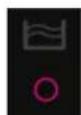
Water Tank Full Indicator Light
When the water tank is full, the device will stop automatically. Do not immediately remove the water tank, but wait 10 minutes. The water must first drain from the
compressor. The Water Tank Full Indicator Light turns on and lights up. Drain the water tank, and return the water tank to the body of the device, the Water Tank Full Indicator Light will turn off. The device will work automatically again.
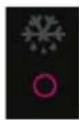
Defrosting Indicator Light
The evaporator in the dehumidifier may defrost automatically if it is operated with a room temperature less than 18^ . The defrosting device in the dehumidifier my start up and operate for some time (about 5 minutes) automatically every 25 minutes or even longer.
- During the defrosting operation, the dehumidification function and air purification function may intermit.
- Don't turn of the power or pull out the power plug of the device during the defrosting operation.
Operation with Clean Air Optima® App
Connectivity
Compatibility with smartphone and tablet:
iPhone, iPad and Android devices
Device connets via WiFi with App:
CleanAirOptima
Attention: The router must be set to the 2.4 GHz broadband. If the router is set to the 5.0 GHz, it is impossible to establish a connection.
SetupWiFiconnection
- Download and install the "CleanAirOptima" App in the App Store or Google Play Store.
- Make an account and log in.
- The router must be set to the 2.4 GHz broadband. If the router is set to the 5.0 GHz, no connection can be established.
- Make sure Bluetooth is enabled on your smartphone.
- Plug the device into the power socket and switch it on. The WiFi indicator will blink. If the WiFi light does not blink, press the MODE button for 5 seconds. Then the WIFI light will flash quickly. If the WIFI light blinks quickly, the device is ready to connect.
- Make sure that your smartphone or tablet is successfully connected to your WiFi network.
- Open the 'CleanAirOptima' App and click on 'Add device'. Your device is listed and you can select it. If not choose 'Auto Scan'. Follow the on-screen instructions to connect the device to your network.
- Choose to add the Clean Air Optima device on the App, follow the instructions in the App.
- When the device is paired, the WiFi indicator light stays on constantly.
- After the configuration is successful, you can use the Clean Air Optima® App to operate the device.
Note:
- If your default network has changed, reset the WiFi connection, follow step 1 to 9 in the 'Set up WiFi connection' section.
Clean Air Optima
If you want to pair multiple devices to your smartphone or tablet, you have to do this one after the other.
- Make sure that the distance between your smartphone or tablet and the device is less than 5 meters and there are no obstacles. Also make sure you are in the same room as the device.
Reset the WiFi function:
- The device must be switched off.
- Reset the WiFi by pressing the 'Mode' button for 5 seconds, the indicator light of the WiFi will blink rapidly.
Turn off WiFi function:
- The device must be switched off.
- Reset the WiFi by pressing the 'Mode' button for 5 seconds, the indicator light of the WiFi will blink rapidly.
- Turn of the WiFi by pressing the 'Mode' button for another 5 seconds, the indicator light of the WiFi will go out.
Connect devices to multiple phones
Note: First the other person needs to install the Clean Air Optima® App on his/her phone and create a new account.
Share the device with limited access:
You can choose to share 1 device with several persons.
This person will then have access, but will not be able to manage all the settings.
Follow the instructions below to share the device with several persons:
- Go to the relevant device.
- Go to the pencil or three dots in the top right.
- Select 'Share device.'
- Choose 'Add sharing'.
- Choose the sharing method e.g. via email, Whatsapp, sms etc. and continue.
- The device will automatically appear in the Clean Air Optima App with the other account.
Share device with full access:
You can add a person or several persons to your home management.
That person will then have access to all your devices that are already linked and has full rights and permissions. You will always remain the main administrator.
Follow the instructions below to add someone to your home management:
- Open the Clean Air Optima App and go to 'Me'.
- Then choose 'Home Management'.
- Choose 'Create a home'
- Select the relevant 'Home' and 'Add member'.
- Choose the sharing method e.g. via email, Whatsapp, sms etc. and continue.
- The corresponding 'Home' will automatically appear in the Clean Air Optima App of the person with whom you have shared your 'Home'.
- On the other account: Go to the home screen from the Clean Air Optima App. Go to the top left and select the 'Home'.
Room temperature increases during operation
The Clean Air Optima dehumidifier doesn't have a cooling function. The device will produce heat during operation and increase the room temperature between 1^ to 4^ .
Dehumidifying capacity
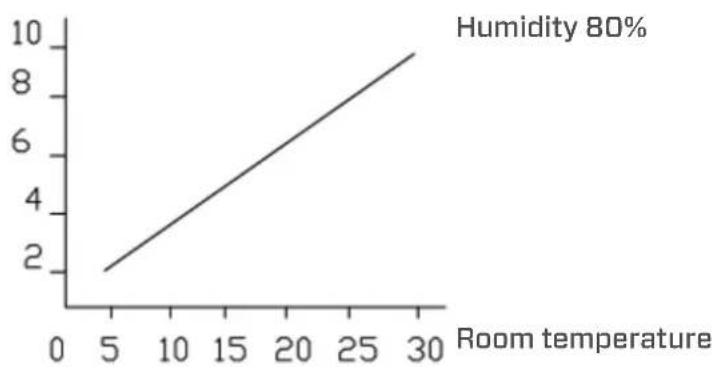
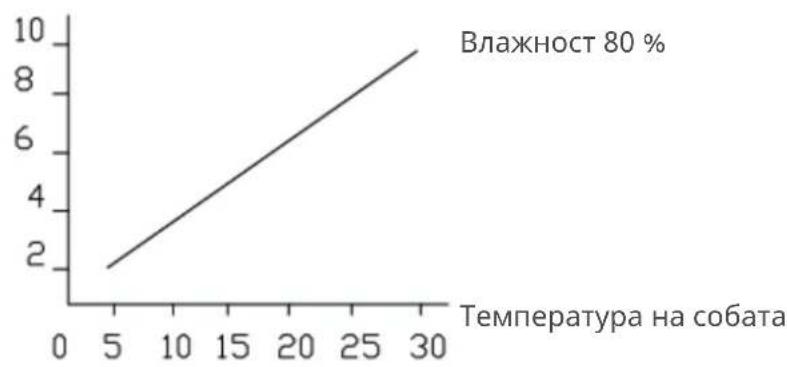
The illustration below shows the dehumidifying capacity of the Clean Air Optima dehumidifier. By different temperatures and relative humidity, the dehumidifier may have different dehumidifying capacities.
Dehumidifying capacity
Water Drainage
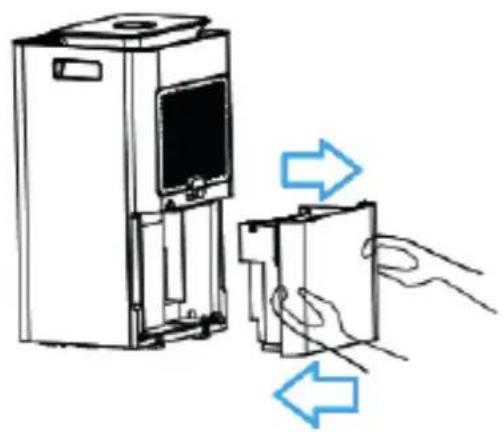
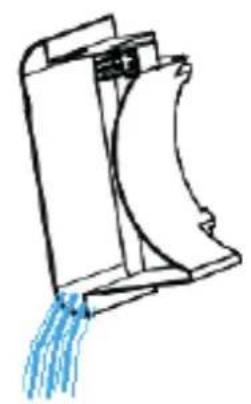
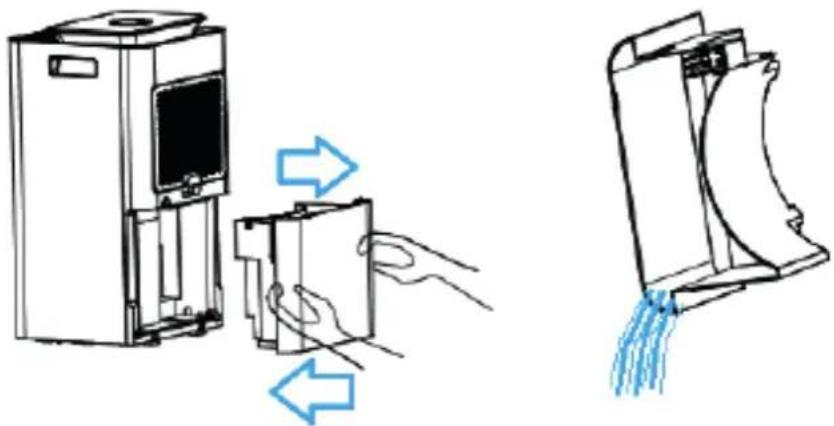
The Water Tank Full Indicator Light will light up when the water tank is full. Do not immediately remove the water tank, but wait 10 minutes. The water must first drain from the compressor. Take out the water tank and empty the water inside. Then put the water tank back into the dehumidifier correctly, see the illustration below.
Clean Air Optima
Continuous Drainage
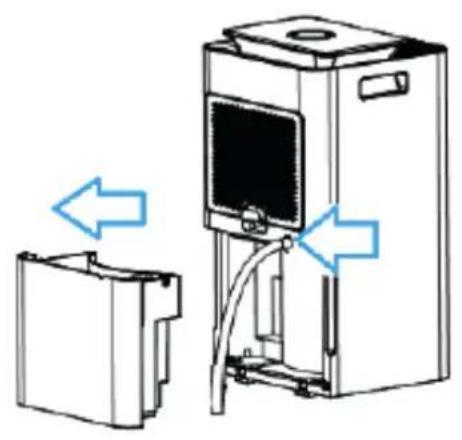
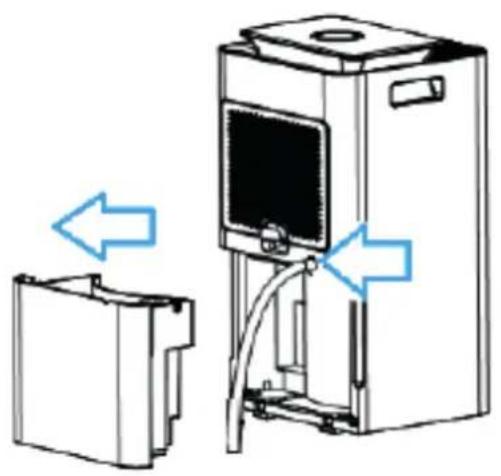
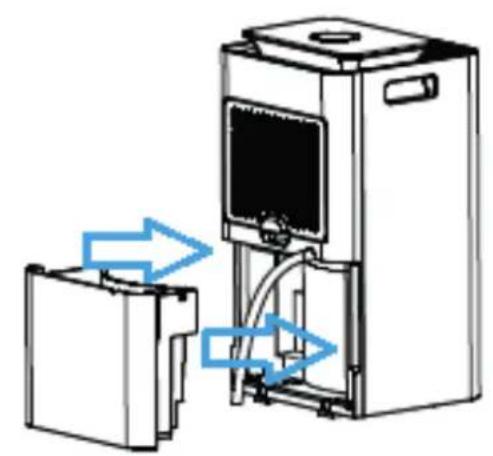
For continuous operation you can use the drain hose of 1.5 meter long that is included. Remove the water tank and install the hose to the water drain hose connection correctly, see the illustration below. Make sure the water tank is put back into the device.
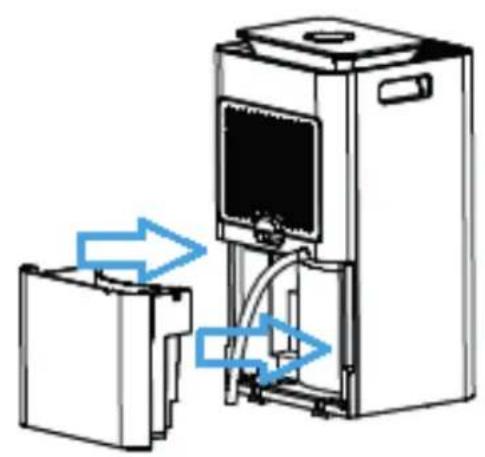
Sometimes when the humidity is very high, even though we use a drain pipe, some of the condensation water will flow to the tank to prevent water accumulation. This is built in to prevent the water from not being able to drain out of the device.
Replacing the Clean Air Optima® True HEPA H13 Filter and Activated Carbon Filter
The Clean Air Optima® CA-704 Smart/ CA-707 Smart Dehumidifier & Air Purifier is equipped with a filter lifespan surveillance mechanism that signals that the filters have to be replaced after 1000 working hours. To show that the filters need to be replaced, the dehumidifier emits
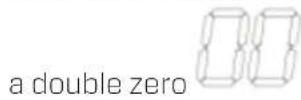
indicator light in the display.
Reset the timer for the filter replacement by pressing and holding the Power button for about 3 seconds. If the indicator light goes out, the timer has been successfully reset and the dehumidifier is ready for use again.
Maintenance
Cleaning the housing of the Clean Air Optima dehumidifier
- Switch off the device and pull the plug.
- Use a soft and humid piece of cloth to clean the device. Do not use chemical solvent such as benzene, alcohol or gasoline.
- Make sure that no water gets into the device, do not sprinkle with water.
Replacing of filters
Depending on the use, the Activated Carbon Filter and True HEPA H13 Filter has a lifespan of approx. 3 - 6 months. The Pre-filter and UV-C lamp are permanent, no replacement needed.
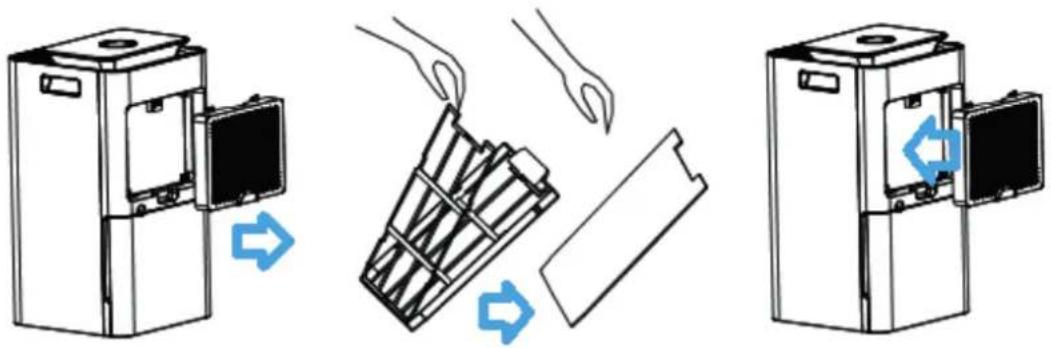
Take out the filters from the filter frame compartment. After filter replacement or filter cleaning reinstall the filters back into the filter frame compartment and assemble back to the device, see the illustration below.
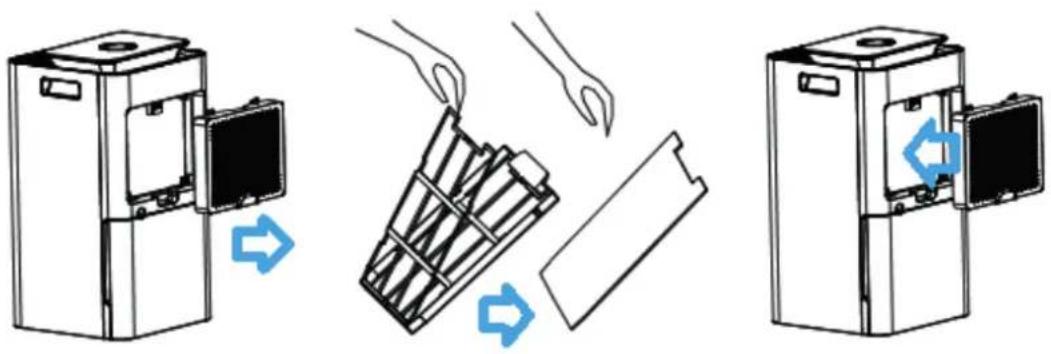
Filter cleaning
The best effect for a longer lifespan of the Filters is reached by cleaning the filters once a month. If indoor air is extremely polluted, we advice to clean the filters more often ca. once per two weeks.
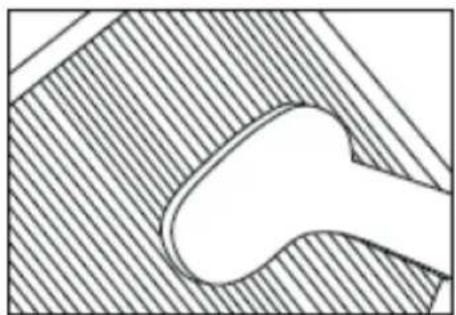
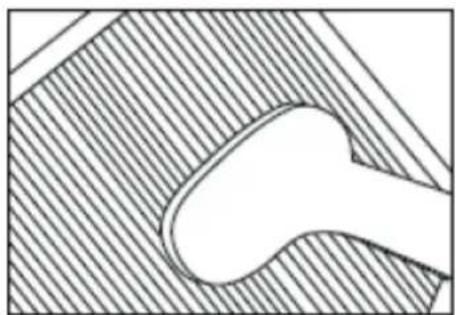
Clean the Pre-filter, Activated Carbon Filter and True HEPA H13 Filter carefully with a brush or your vacuum cleaner. That way bigger dust particles like lint, hair, dust and dander of pets can be removed from the filters.
Clean Air Optima
Warning!
Do not damage the filters, the filters must not be cracked. Damaged filters needs to be replaced.
Never wet or rinse the filters (Only for Activated Carbon Filter and True HEPA H13 Filter) with water. Filters that are rinsed with water needs to be replaced.
Signs for used up filters that needs to be replaced
(Only for Activated Carbon Filter and True HEPA H13 Filter)
Increased sound, reduced air flow, congested filters, rising presence of smells. Filters needs also to be replaced by new ones when the True HEPA H13 Filter changes its color from white to grey or black. If the True HEPA H13 Filter remains white, there is NO need to replace the filters.
How to order filters:
Contact Clean Air Optima Customer Service tel. +31 (0) 742670145 or visit our webshop: https://www.cleanairoptima.com/accessoires/mg/44/
Clean Air Optima® dehumidifier storage
If the dehumidifier will not be used for an extended period of time:
- Drain the water tank completely and make sure that there is no water stocked inside the water tank.
- Unplug the device and fold up the power supply cord.
- Remove and clean the filters. After cleaning reinstall the filters back into the device.
- Store the dehumidifier in a cool, dry location, away from direct sunlight, extreme temperature and excessive dust.
- If the dehumidifier is not used for a long time, apply a protective cover to cover the dehumidifier to prevent dust deposits, which may cause cleaning and maintenance problems in the future.
Troubleshooting
The following is a troubling shooting guide to help you solve any issues that you may have using the Clean Air Optima® dehumidifier CA-704 Smart/ CA-707 Smart.
| Problem Possible | Cause Solution | |
| Device does not switch on | The power cord does not connect correctly | Connect the power plug and power socket correctly |
| The water tank is full or water tank is not in the correct position | Drain the water tank and replace the water tank to the correct position. Once the drainage hose has been installed, the water tank must be placed back in the device. | |
| Inefficiency dehumidification | The filters are blocked by dust | Clean or replace the filters |
| The air inlet and outlet have a blockage | Clean the blockage from the air inlet and outlet | |
| The setting humidity is higher than environmental humidity | Set the humidity at least 5% lower than environmental humidity | |
| The dehumidifier is in Continuous air purification MODE | Change the operation MODE | |
| Noise | The device is installed askew | Make sure the device is installed uprightly |
| The filters are blocked | Clean or replace the filters | |
| Operation stops during spot dehumidifying | The room temperature is higher than the usable operating temperature | The dehumidifying operation will be started automatically when the temperature lowers |
| Washed clothes are not dried | The room temperature is to low W | Washed clothes are hard to be dried under low temperature conditions |
| Operation with Clean Air Optima® App does not work | Smartphone or tablet is not connected to WiFi network | Switch off the device and reset the WiFi on the device by pressing the Mode button for 5 seconds, the indicator light of the WiFi will blink rapidly. Than follow step 4 to 8 from chapter Operation with Clean Air Optima® App |
| The device has no connection to the network |
Clean Air Optima
WARNING!
If the above recommended solutions do not work, please contact Clean Air Optima® technical support at the telephone number for your region. Do not attempt to disassemble, reassemble, or repair the device as this may void the warranty.
Specifications CA-704 Smart
| Model | CA-704 | Smart |
| For rooms up to | 40m² / 100m³ / 430ft² | |
| Rated voltage | 220V - 240V, 50Hz | |
| Rated power | 200W | |
| Fan capacity | 120 m³/h | |
| Dehumidifying capacity | 10 liters per day at 30°C and 80%RH | |
| Working temperature range | 5°C - 32°C | |
| Water tank | 3 | liter |
| Air purification with: | Pre-Filter, Activated Carbon Filter, True HEPA H13 Filter, UV-C | lamp, lonizer |
| Filter performance | 99,97%, Sterilization rate 99.9% | |
| Negative ion | >3.000.000 ions/cm² | |
| Sound level | Silent fan < 30dB(A) Low / 42dB(A) High | |
| Drain hose | 1.5 | meter |
| Dimensions | 250 x 250 x 500mm | |
| Weight | 9.5kg | |
| Colour White / black | ||
| Refrigerant | R290 | / 30g |
| Complies with EU regulations | CE / WEEE / RoHS | |
Specifications CA-707 Smart
| Model | CA-707 | Smart |
| For rooms up to | 70m² / 175m³ / 750ft² | |
| Rated voltage | 220V - 240V, 50Hz | |
| Rated power | 320W | |
| Fan capacity | 195 m³/h | |
| Dehumidifying capacity | 20 liters per day at 30°C and 80%RH | |
| Working temperature range | 5°C - 32°C | |
| Water tank | 4 liter | |
| Air purification with: | Pre-Filter, Activated Carbon Filter, True HEPA H13 Filter, UV-C | lamp, lonizer |
| Filter performance | 99,97%, Sterilization rate 99.9% | |
| Negative ion | >3.000.000 ions/cm² | |
| Sound level | Silent fan < 30dB(A) Low / 48dB(A) High | |
| Drain hose | 1.5 meter | |
| Dimensions | 260 x 260 x 618mm | |
| Weight | 12.1kg | |
| Colour White / black | ||
| Refrigerant | R290 / | 60g |
| Complies with EU regulations | CE / WEEE / RoHS | |
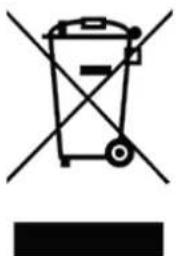
Ask your retailer or your municipality for updated information regarding the disposal of the packaging and of the device.
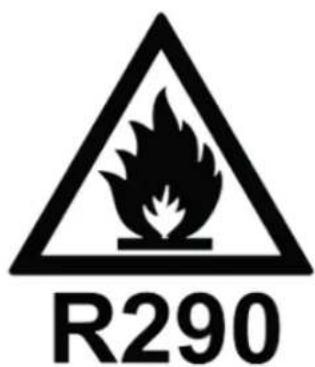
Danger
Natural refrigerant propane (R290)!
Clean Air Optima
Service
Warranty Certificate for the Clean Air Optima® Dehumidifier CA-704 Smart / CA-707 Smart.
Date of purchase:
Customers name:
Address:
Telephone:
Email:
Seller's name:
Address:
- Please fill in completely this Warranty Certificate. Send it with the invoice and the unit, postage pre-paid and using the original packing box, to your distributor. Make sure to include the appropriate return postage for the package.
- Please enclose a short description of the damage, fault or malfunction, and the circumstances under which these problems arose.
The Clean Air Optima® Dehumidifier CA-704 Smart / CA-707 Smart is subjected to strict testing procedures before leaving the factory. If within two years from the date of purchase the product does not perform according to the specifications, because of factory defects, the purchaser is entitled to free repairs or replacement of parts upon presentation of this warranty (provided that the malfunction or damage to the device and/or parts occurred under normal operating conditions). What is covered: All parts defective in material and workmanship. For how long: two years from purchase date. What we will do: Repair or replace any defective parts.
Other Conditions
The provisions of this warranty are in lieu of any other written warranty whether express or implied, written or oral, including any warranty of merchantability or fitness for a particular purpose. The manufacturer's maximum liability shall not exceed the actual purchase price paid by you for the product. In no event shall the manufacturer be liable for special, incidental, consequential, or indirect damages. This warranty does not cover a defect that has resulted from improper or unreasonable use or maintenance, faulty assembly, accident, natural catastrophes, improper packing, or unauthorized tampering, alteration, or modification as determined solely by us. This warranty is void if the label bearing the serial number has been removed or defaced.
Thank you for reading!

Share your feedback about the Clean Air Optima® Dehumidifier CA-704 Smart / CA-707 Smart on: www.cleanairoptima.com

For frequently asked questions about the CA-704 Smart / CA-707 Smart, go to: www.cleanairoptima.com and search for the CA-704 Smart / Smart

Download PDF instruction manual on: airoptima.com/info/manuals

Watch all Clean Air Optima® Product video's on: www.youtube.com
Clean Air Optima International B.V. | David Ricardostraat 9-7 / 9-9 | 7559 SH Hengelo (ov) The Netherlands | Phone: +31 (0) 74 - 2670145
Clean Air Optima Germany GmbH | Enschedestraße 14 | 48529 Nordhorn | Germany Phone: +49 (0) 5921 879-121
E-mail: info@cleanairoptima.com
Internet: www.cleanairoptima.com
Agent frigorific R290/30g
Agent frigorific R290/60g
Pericol Agent frigorific natural propan (R290)!
Service
Certificat de garantie pour Clean Air Optima® Dezumidificator CA-704 Smart / CA-707 Smart.
Data achiztiei:
Nume client:
Adresa:
Telefon:
E-mail:
Nume vanzator:
Adresa:
Pn6op Clean Air Optima coCTOnT n3 TaKnx OCHOBbIX KOMNOHETOB:
- NaheIb ynpabLeHna
- LufpoBOn DnCnIe, NOKa3bBaHouuN OTHOCHTbHyo BnaXHOCTb B %, COCTOHNepokluoyenK cetu Wi-Fi n HactpOki
- CBetHOCBeToOnHOHbI 3KpaH, NOKa3bIBaHOUINBENHUYOTHCNTeHBHO BIAxHOCTN: CnHM (Hxke 53 %), 3eNEHbIM (53-68 %) n KpachbIM (60ee 68 %) UBETOM
- OTBepCTne IJyBa B03dyxa nOTcK paMKn fNbTpoB, COCTOaIuN 3 fNbTpa npedBapnteJbHOJ ONUCTKU, fNtbpca cAKTNBnPOBaHHbIM YrJEM u NfNbTpa True HEPA H13
- yΦ-λaMna
- BbInyckHoe OTBepCTne HnoHN3aTOp
- RykoRTka
- HenpepbBbHbI cINB (cINB BObI, OTBepCTne IJIa NOCDoeHNHeHnaHa); cINBHOJ WlnaHn DInHoH 1.5 M BXODNT B KOMNJIeKT NocTaBKn
- Pe3epByap Dnla BOdbi
- Koneca
Iocne doctabkn/epemeuehenra ocuunteera ro Heo6xOmo OCTaBnB B CTaTuHOM coCTOHN He MeHee DByx YacOB nepeB BKIOUeHMe. NockoJbky IINHnKOMPpeccopa B OcyuHTeLe cOepkNT XlaDAreH, XlaDAreH TdoXKeH Teyb He MeHee DByx YacOB nocJe nepemeuehenra, npexde yem OH BepHETcB INCXODHOe NOLOKeHne.
IpeDynpexKdHnnoTexHnke 6e30nacHocTn
HdikkaTop pa3MopaxnBaHna
Icnapntelb B OcyuHTeMe MoKet aBtOMaTneckn pa3MopaxNBaTcR, eCIn OH pa6oTaET npN KOMHaTHoI TemnepaType MeHee 18°C. YcTpoiCTBO pa3MopaxNBaHn B OcyuHTeJe ABToMaTneCKn 3aNyckaTeCn I pa6oTaE T TeueHne HeKOtOporo BpemeHn (OKOLO 5 MInHyT) KaXdIe 25 MInHyT nIIu Chepe3 BoJIbShn IpomexyTok BpemeHn.
-BoBpeMa pa3MopaxnBaHna yHKunOcUWeHHn OOnCTKn Bo3dyxa MOryT He pa60TaB.
- He BBiklnoaIte nHTaHne i He n3BleKaITe BnIKy nITaHnI np60pa I3 po3eTKI BO BpeMa pa3MopaxKuBaHnI.
Pa60Ta c npiloxeHnem Clean Air Optima
Bo3MOxHocTb NpOdkJIOUeHnA
CoBmecTUMOCtB CO cMapTfoHAMN INIaHWeTaMn: ycToiCTBa iPhone, iPad u Android
Pn6opbl, noKluoyauuuecK npnoxehnno Wi-Fi: CleanAirOptima
BHHMaHHe:MapuTy3aTOpdoJKeH6bTbHaCTpoeHa 1nPoKoIooChbI DoctynB DnaNa3OHe2,4Tt. EcIn poyTeP HAcTpoeH Ha5,O Tt, HeBO3MOxHO yCTaHOBnTB coeINHeHne.
HactpoKa coeHHenry Wi-Fi
- 3arpyuTe n yctaHOBuTe npiloxeHne CleanAirOptima B App Store nn Google Play.
- Co3daIte yuTeHyU 3aIncb u BOyIInTe B CnCTeMy.
- MapspTy3aTOp dOJKeH 6bITb HAcTpoEH Ha WnPOKoNOLChBIOCTyB DnAna3OHe 2,4 TtC, EcnI MapspTy3aTOp HAcTpoEH Ha YactOTy 5,0 TtC, CoedInHeHne He MoXeT 6bITb yCTaHOBJIeHO.
- Y6eDntecb, yTo Bluetooth BkIouen Ha BaWem cMapTfoHe.
- BCTaBbTe BnIky B 3JIeKtpopo3eTky N BKNIOHTe yCTpOcTBO. INHdkaTOp Wi-Fi HaHET MIRaTb. Ecn Wi-Fi OTKIOUey, BbI6epNTe PEXIM N Bbl6epNTe ero B TeueHne 5 cekyHd. Tada greitai mirkses Wi-Fi He pa6OtaT. BaW Wi-Fi npocT B nCNOJb3OBaHN, IN BB IM DOBOJbHbl.
- Y6eINTEcB, yTO cMapTfoH nIIN nIIaHwET noDKnHoueH K cetN Wi-Fi.
- OtkpoIte npniloxeHne CleanAirOptima n HaxMnte KhoNky Add device . BaI np6op Dolxeh HaxOHTbcB CnncKe. Ecln Bbl He MoXeTe Bbl6paTb erO, HaxMnte KhoNky Auto Scan. CledyIte INCTpyKcIaM Ha ekpaHe, YTO6bl NODKNouHTb np6Op K cetn.
8.Добавытпрбop Clean Air OptimaВ пиложен,СдунHTpyкцяM. - Nocle yctaHOBKn cnpjxHn np60pa HndkaTOp Wi-Fi BeNTcH enpepbIBHO.
- Посл заевшинанстоюп риложенue Clean Air Optima moхно Испьзоватыдя уравлиени пбором.
PpimMeaHnA
BcIyue n3MeHnna cTe n no yMOJuaHnO c6pocbTe coeHNHeHne Wi-Fi n BblonHnTe 1-9 B pa3dene «HaCtpoKa coeHNHeHnra Wi-Fi>.
BybTe octopoxHbI, YTO6bI He nobpeNTb fNtbpI, Ha Hx He doJXHbI 06pa3OBbBaTbcr TpeunHbI. NobpexdeHHbIe fNtbpI Heo6xoJIMO 3aMeHnTb. HkOrda He cMaunBaIte n He npMbIaIte fNtbpI C aKTHBnPoBAHHbIM yrJIem N True HEPA H13 BOdof. fNtbpI, Ipombltie BDOon, Heo6xoJIMO 3aMeHnTb.
Пизнakи ИСпОьБОВHых ФИльТpoB C aKTbUpOBaHbIM yrIeM N True HEPA H13, NOДlexаux 3amHe: NOBbIseHHbI yPoBeHb шуMa, Ocna6JIeHHbI nOTOK BO3dYxa, 3acopeHHbIe FInlbTpbl, NOBbIseHHoe npCytCTBnE 3anaxoB.ФИльТp True HEPA H13 Heo6xOДmo 3ameHITb, ecn erO cBet n3MeHnLcA 6beLo rHa cepbI nIu chePbI. Ecn FInlbTp True HEPA H13 OCTaETc8eJIbIM, 3aMeHЯTb erO He HuxHo.
KaK 3aKa3bIBaTb ΦNlbTpbl:
Cbryntecb co cnyk6oN noDepkKn KIneHToB KOMnHn Clean Air Optima® nO TelefoHy + 31 (0) 742670145 nnn noceTte haW nHTepHeT-Mara3nH: https://www.cleanairoptima.com/ accessoires/mg/44/
XpaHHeNc ocUHTeJ Clean Air Optima
EcnOcuynteHb 6ydtncnB3oBaTbcB TeueHne nnTeHoro nepnoa BpeMeHH:
- NolnoctbO cneIte BDOy n3 pe3epByapa n y6eINTEcb, UTO B HEM 60JIbSe HeT BObl.
- OTKJIUOHTe npI6Op OT NCTOUYHka NITaHnI N CLOXITE Ka6eJb NITaHnI.
3.ИЗВЕКЛТЕ ИОЧСТЛТЕ ФИЛБТРБ.ПОСLE OЧСТКУ YCTAHOBNTE ФИЛБТРБ 6OpaTHOВ I npi6Op. - XpaHInTe OcyuINTeB C cyXOM npoxlaHOM MecTe, He DoNYCKa BO3JeCTBnI pRmblx COJIHeuHbIX Lyuei, kCTpeMaJIbHbIX TempeaTp i nbln.
- Ecnn OcyuHntBbO3dyxa He nCNOJb3yETcB TeueHne dIITeJIbHO BpEmH, HApoTReero 3aunTHbIM yexlOM, YTO6bl npedOTBpaNTb CKONHeHne NblN, KOTOpoe MOKeT Bbl3BaTb npo6JIembl C uHCTKoN I OcbnykBAHNEM B 6yduem.
ДиагстикaN yctpaHenne HeNCnpaBHOteN
B Ta6nue Hnke npINBOaTcYka3aHnno DaarHOCTnke N yCTpaHeHNO HeNCnPpABHoCTe, KOtOpBie NOMOyT peuNTb BO3MOXHbIe npo6JIeMbI npn EKcNJaTaun OcyuHTeJr Clean Air OptimaCA-704 Smart/CA-707Smart.
N OTHOCHTeJIbHOI BIAJXHOCTN 80%
Dnana3oH pa60uX Tempepatyp 5-32°C
06bem pe3epByapa Iy BOdy 3n
N OTHOCHTeBHOI BIAKHOCTN 80%
Dnana3oH pa60uX Tempepatyp 5-32°C
06bem pe3epByapa IIN BODbl 4n
CpeCTBa OunchKn BO3dyxa: ΦnIbTp npeBapnteHNoOChTK,ΦnIbTp
caKTHBnpoBaHHbIM yIJIeM,ΦnJIbTp True HEPA H13,
yΦ-naMnNa, noHn3aTOp
Pa3Mepbl 260x260x618MM
Macca 12,1Kr
CBeT BeIbI/YeepHbI
Xnaaarent R290/60r
CoTBeCTByeT HopMaM EC CE/WEEE/RoHS
Clean Air Optima
3a npocnte y BaWero npoDaBca nI npedCTaBnteJ MeCTHO OpraHa ynpaBleHnO6HOBLeHHyU NHOpMaCnIO no yTuIN3aCnN ynaKOBKn np6opa.
Onacho!
PnpoHbI xnaaareHT - nponaH (R290)!
TexHnueckoe 6cIyKnbHne
TapaHTnHbI TaIOH ocyuHTeJIa Clean Air Optima CA-704 Smart / CA-707 Smart.
Даразпокурки:
Ф.И.O.KlneHTa:
Ampes:
TeIefoH:
3n. nouta:
HaMeHOBaHne npOaBua:
Ampes:
- 3aONHnTe HactoIgIraPANTnHbI TaHO. OtnpaBte erO Bmecte co Cuetom-kaKtpyoi n np6opom B opunHaJIbHO ynaKOBKe CBOeMy DnCTpn6bHTOpy NO NoT, PpeBaPntJIbHO ONlAtnB NOTOBbie paXOdbI. YkaxnTe COOTBeTCTByUOyHO CTOnMOCTb BO3BpTa NocblKN.
2.ПиВeДИTe KpaTkoe OINcaHne NOBpeXdEHHa,deΦekTa NnN HeuCnpaBHOCTN,a TAKKe 6OCToRteJIbCTBa,prN KOToPbIX BO3HnKIn 3TN npo6JIembl.
Ipepe noctynneHnem Ha pbHOK ocuWnteHn Clean Air Optima CA-704 Smart / CA-707 Smart npoxoTCTpOre 3aBODcKne nCbItAHn. Ecn B TeueHne DByx Iet C DaTbI NOKyKnnpOdyKT He pa6oTaET B COOTBeTCTBnC TExHnueckmX xapaKTePncTtKamn 13-3a 3aBOCDkN X DeEeKTOB, NOKyNaTeB IMeET npabo Ha 6ecnLaTHbI peMOHT nIN 3aMeHy DeTaleN Pocne npedctabHeHn HacToaSeR rapaHTnn (pnu yCNOBn, YTO HeNCnPABHOCTb INN NOBpeJDeHne UcTPOiCTBa n/Inn DeTaleN pOnzOShn pnHopMaJIbHbIX pa6oUHX ycNoBnx).YTO nOKpbIbaETcraPantne: BCE DetAin C DeEeKtAmM MaTePnaIOB n 3rOToBHeHn. Cpok rapaHTn: DBA rOda coDnny NOKynk. YTo BydET CdeHa: PeMOHT nIN 3aMeHa HeNCnPABHbx DeTaleN.
Dpyrueycnobna
Ioloxhenna Hactoane rapaHTn 3aMeHOTcraIObO npCbMeHHo rapaHTne, BbipaxeHHo nnno pOpa3yMaemOn, nncbMeHHo nnu yCTHO, BKIOUaA IIO6yo rapaHTNO TOBapHO npirodHOCTn nnnpirodHOCTn dJe OnpedeJIeHHo ceJN. MaKcImaJIbHa OTBeTCTBEHHOCt bpON3BOIDTeJr He DoJXHa PpeBbIaTb oakTuYeCKyO CTOMMOCTb NOKyIKn, ONNaueHHyO 3a daHHe u3deJIne. Hn npK KaNX o6CToRteJBCTBax npON3BOIDTeJIb He Hecet OTBeTCTBEHHOCt 3a ocObIe, cLyuAHbIe, nocJeYooJIe nn KocBeHHbIe y6bITKn. HAcToaRa rapaHTn r paCpOcTpaHReTc Ha DeΦeKT, BO3NKuIN B pe3yJIbTaTe He npabInbHOro nn Hepa3ymHO rCNoIb3OBAHNr nnTexHnueCKOr O6CnykBaHn, HenpaBnBHOr C6OpKn, HeCuaCTHO rOcluyA, CTnxNHBx 6eDCTBn, HenpaBnBHOr yNAKOKN nn HeCaHKuOHPOBaHHO BMeWateJIbCTBa, n3MeHeHnN nn MOiΦkaUN, kAk onpeDeJeHO NCKIouHTeJIbHO Hamn. HAcToaRa rapaHTn aHHynpyETc, eCNI 3TNKeTKa C cepNHbIM HOMEpOM ydaJIeHa nn nobpeXKeHa.
Cnacn6o 3a
Bнманne!

Поделпесь сбОИМ MнЕнем об осушIntе ВОзduха Clean Air Optima® CA-704 Smart / CA-707 Smart на саиTe www.cleanairoptima.com

UTo6bI O3HaKOMITbcr C OTBeTaMn Ha uacto 3aDaBaembIe BOpocbl o np6opax CA-704 Smart / CA-707 Smart, nepeiDnte Ha caT www.cleanairoptima.com n hainTe np6op CA-704 Smart / CA-707 Smart.

3arpy3ntb pykoBODCTBO no 3KcNlyatauIN B opMaTe PDF moXHo Ha caIte mairoptima.com/info/manuals

C aHIMaIIOHHbIMN BVideopOLnKamN O npOdykTe Clean Air Optima MoXHO O3HaKOMNTbcr Ha caHTe www.youtube.com
Clean Air Optima International B.V. | David Ricardostraat 9-7/9-9 | 7559 SH XeHreNo (OBepeNccen) HndeplaHdbI | TenefoH: +31 (0) 74 - 2670145
Clean Air Optima Germany GmbH | Enschedestraße 14 | 48529 Hopdxopn | TepMaHia Teléφon: +49 (0) 5921 879-121
Д. почт:a: info@cleanairoptima.com
Be6-caɪr: www.cleanairoptima.com
TlabHa eDHHnca
CA-704 Smart / CA-707 Smart
Clean Air Optima
MaKeDoHcKn
Bn 6laogapime wto ro kynBte Clean Air Optima2in1: OdblaKHyBaH npouncTyBaH Na Bo3dyx CA-704 Smart / CA-707 Smart.
Bn nocakyBaMe MHOry roHN Ha 3dpaB BO3dyX BO BaUNte npocTOpH co OBOj eNkaceH n efeKTHBeH npOn3BOd. 3a da fYHKUHOHa npaBnIHO OBOj eEeKtpuH e anapaT, norpnHexTe ce da rncnTe cnte 6e36eHOCn MEPn Ha npETNa3INBOCT DoEka rO KopnCTnte. YnatCTBaTa ONNuBaAT 6e36eHOCn MEPn Ha npETNa3INBOCT KOn Tpe6a da rN noHTyBaTe DoEka pa60t N ypeDTo. HameHeTn Ce da nOMoHAt Da cnpeuTe NobpeDi N da n36erHeTe oWtetyBaHbHe Ha ypeDTo.
Onnc Ypeob Clean Air Optima ce cocto on od cneHnBe rnaBn KOMnoHeHTN:
- KoHTpOJIeH naHeI
2.Дигиталнол рпка зукуba на peлathва влжноct BO %,Wi-Fi и постбт eэфнкци - LED MOHITOPOT BO 6oja nokaxya peIaTINBHa BnaXHOCT BO cHa (noI 53 %), 3eJeHa (nomety 53 % - 68%) i CpBeHa 6oja (HaI 68%)
- Перрада за влес на воздух и рамкata за силтетр ВклчуbaaT:пед-флтетр, силтетр co akтуен jarлегор, силтетр True HEPA H13
5.ПозициаHA UV-C CBetnilka
6.ИЗлз Ha BO3duxи nO3nuzja Ha joHn3aTOpOT - Pauka
- BknyeHo e nocTojaH npa3HeHbe (oBbOHa BOda, nobp3yBaHbe co UpeBO) COUpeBO 3a OBOd 1,5 MeTpN
- Pe3epBoap 3a B0da
- Tpkalua
Otkako Ke ce nCnpa/npemecTn OdBnaXHyBaOT, Mopa da octaHe cTaTuueH HajMaJky Dba Yaca nped Da Ce Bknyu. Bndejkn LInHjata Ha KOMnPecopoT Bo OdBnaXHyBaOT CoDPxN CpeCTBO 3a Naede, TeuHOCTa 3a Naede He Mopa da Teue HajMaJky DBA Yaca no DBNXeBeto nped Da Ce BpATN BO npBo6nTHata NoIox6a.
Be36eHocn npedynpeyBaHa
UpeodT Moxe da ce Kopnctu camo BO corlaacnoCT co OBue ynaTCTBa 3a 6e36edHocT. CneTe Tn cIeHNITE yeKOpn 3a da ro HamaJIte pN3IKOT od NOBpea IpeIN3BnKaHa, Ha npimep, Od eIekTpueh yap nII noxap.
- Octabete ro ypeoT da oTcOn Hajmalky dBa yaca nped ynoTpe6ata, oco6eHo no TpaHcnpT.
- Camo 3a 3aTBopeH npocToP. He KopncTe Te nn yBajTe Ha OTBopeHo.
- CooDBeTeH HanoH 3a ynoTpe6a: AC 220 V - 240 V, 50/60 Hz.
- OBO3MOXeTe cno6oJeH npocTOp oMnH. 20 cm okOly Bne3OT nI3JIe3OT Ha BO3dyx Ha ypeIoT.
-
YpeodT He e HameHET 3a KopncTeHe oD cTpaHa Ha Deua Nn Nua co HamaJeHn AnuK, ceH3OpHN Nn MeHTaHn CnOc6HocTn, OCBeH aKO Ce HndrJeDyBaHn OD cTpaHa Ha NtceTo Koe e OndroBOPHO 3a HNBHaTa 6e36eHocT.
-
He kopncTeTe ro ypeoT kora nma BnIINBO oWTeYBaHe Ha eNeKtpuHnOT ka6eI nnHa camnoT ypei. He nonpabajte ro ypeoT camn aKO ce oWTeN. Hnkoraa He BnueTe ro ypeoT 3a Ka6eIoT. Ako Ka6eIoT 3a HanojyBaBe e oWTeTeH, ToraM Mopa Da rO 3aMeHN OBlaCTeH cepBncep 3a da cnpueHTe eNEKtpuHEn ydap nn noxap.
-
Порпавки може да вши само лиунов oblaстен сервс. He ошдува对接 самп ду对接 Агларыт eypedOT за ду срочи телегктуншок пожар.
8.He donnpajte ng ka6enot npiknyokot 3a HanojyBaHe co BnaXn paCe.
-
CekorauncknyuBajre ro ypeoT nped da ro ncknyuTe npNKyokuTo.
-
HnKoraw He o6yBaTe ce da ro ncknyuTe ypeoT co ncknyuBaHbe Ha npNKyOKOT.
11.ИЗБLEeTe ro npKJyOkoT od cTpyja KOra He ro KopnCTnte ypeDoT nI IN KOra rN ChCTNTe HeROBtE BHaTpeuHn IIN HaDBopeuHn DeNoBn.
-
3a 6e36eHNO KOpIcTeHBe, CTaBeTe ro ypeoT Bo cTa6uHa, XOpN3OHTaHa nIoX6a. He nomecTyBaJte ro IdoEka ro KopIcTnTe.
-
CpeCTBO 3a JanaHe: R290. CpeCTBO BO 3a JanaHe e BO corlaChoc Co EBpOncKe peRyIaTINBn 3a JnIBOTHa cpeDInHa. Hnty eJeH JeI od Kpyrot Ha JanaHe He Cmee da 6nnde nepOpnpaH.
-
Ctabete ro ypeot camo BO npocstopn Kaede To He moxe da ce akymylnpa notehu jao HcTekyBaHe Ha cpeCTBOTo 3a laebe. Ipocstopne To He ce BeHTnilnpaaT, Kaede To ypeoTe nHctanipah, Kopnteh nncklaqnap, Tpe6a Da 6ndat n3rpaedn Ha taKOB hauHH To He Moxe Da ce akymylnpa NcTekyBaHe Ha naDInHOTo cpeCTBO. Oba nomara da ce cnpechat onachoctn od noxap nneknnojna ppein3BvkaHn od naIeBe Ha pa3naHOTO cpeCTBO OD eJektpnuHn rpeaju, Wnpetn nn dpyrn n3BOPn Ha naIeHe.
-
Ctabete ro ypeoT cmo BO npocTopn Kaede ITO Hema N3BOpn Ha naneHbe (kako OTbopeh nnameH, eIektpuHn rpejaH).
-
BHIMABajTe DeKa cpeDCTBTO 3a JaaHee e 6e3 Mnpnc.
-
HnKoraw He BmTeyBajTe npedmetn BO TeIOTo 3a da n36erHete dekeKT.
-
HnKoraw He nokpnbajte ja peWetkata 3a Bne3 nI3ne3 Ha BO3dyx.
-
Hnkoraaw He Baade Te rnnn He 3ameHyBajTe r n BHaTpeWHnTe deNoBn Ha ypeoT.
20.He yubajTe ro n He kopncTeTe ro ypeoT Ha TeMpepaTpa noD 0^ nnn haad 40^
21.He HabaIyBaJTe ro ypeoT Ha HnTu eHa cTpaHa DoEka e noH pe3epBoapot 3a Boda.
- He CTabajTe TeuKn IpeMeTn Bp3 ypeDoT.
23.ИЗБЕНУВAJTe MecTa co ДИРЕТнA COHUEBa CBETINHa.ПОСТOn рИЗК DeKa Ke ИЗБЛeДи 6оJAТа NaуpeДOT.
-
HnKoraw He notonyBajTe ro ypeoT BO BODa nn npytn TeuHocTn.
-
Peobho npa3HeTe ro pe3epBoapot 3a Boda. Bo ekctpeMHn ycnoBn, pe3epBoapot 3a Boda Moke da ce HanoHn no HeKoNky yaca pa6oTeHe.
-
PEOBNO YIcTeTo Ipei-ΦHITepoT aKe e HAnOpHET co npaunHa, nHaKy eKToT Ha npOuNCTyBaHBe i ODbIaxHyBaHBe Ke 6nIe cna6. NpToPoUyBaUkata Ha eHeprJia Ke ce 3roJeMn I MOKe Da IpeDn3BnKa DeΦeKT.
-
Mehybajte rH fIHTepoT co akTBeH jaJIepeO n fIHTepoT True HEPA H13 ha cekon 3-6 meceu aKO fIHTepoT co akTBeH jaJIepeO n fIHTepoT True HEPA H13 ce u3BaKanu, uHaKy eFekt Ha npOuNCTyBaHe n OdBnAaXHyBaHe Ke 6nJe cJa6. IToPoWsyBaUkata Ha eHeprJia Ke ce 3roIeMn m MoKe Da npEduN3BnKa DeFekt.
-
KopncTeTe ro, odpxyBaJte ro n uicTeTe ro ypeoT kaKo wTo e oNnHaHO BO OBOJ npnpaHnik.
Clean Air Optima
ИнстациJA
IpoBepeTe daHn ypeoT e Ha paTojaHne od 20 cm od snIOBnte n Me6eIoT, BnDeTe ja nnycTaPaujata noDony.
KoHTpOJIeH nAHeN/yNaTcTbA 3a KOpIcTeIbe

HanojyBaHe
PntncheTo KOueto Power 3a da ro akTbnpate ypeoT.
Co noBtOpHo npTnUckaHBe Ha konUeTo Power, ypeIoT ce nckIyUba.

MODE
PnTnCHTe ro konyeTo MODE 3a da n36epe Te eHa od ueTnpTe noCaKyBaHn nporpaMn:

- HopMaJIHo OJbIaxHyBaHBe (npIlaRoIINBa 6p3nHa Ha BeHTIaTOPoT I NOCTaKa 3a BJIaXHOCTa) IVkoHa CO UMe BO aIIuKaUJa: HopMaJIHo
- KOHTHHynpaHO OdBnaxHyBaHe (Mana 6p3Ha Ha BeHTnlaTopoT, NOCTaBkata 3a BJaXHOCTa He MoKe Da Ce npnaRoDn) IKoHa Co Ime BO anNkaUja: KOHTHHynpaHO
- KONTHHynpaHO npounctyBaHe Ha BO3dyxOT (pnpilaogdInBa 6p3nHa Ha BeHTnlaTOpOT, 6e3 cyHKuia 3a odBnaXHyBaHe) IkoHa co nme Bo apnkaunja: IpOnuCTyBaHe BO3dyx
- Pexim Ha cyBa obLeKa (rOleMa 6p3Ha Ha BeHTnIaTOPOT, 6p3HaTa Ha BeHTnIaTOPO TIOCTaBkata 3a BlaxHOCTa He MoXe Da Ce npIarOdaT) IkoHa Co NMe BO aAnNkaunja: CyBu annuTa

KoMaTn6uHocT co NaMeTeH TeLefoH u Ta6JeT: iPhone, iPad u Android ypeDi
UpeodT ce noBp3yBa npeky Wi-Fi co anlkaunja: CleanAirOptima
BHHMaHHe: PyTePO T MOpa Da 6nDe NocTaBeH Ha 1uPOKoNoJac INTepHET Od 2,4 GHz. Ako pyTePoTe nocTaBeH Ha 5,0 GHz, HEBO3MOxHO e Da Ce BOCNoCTaBN Bpcka.
Noctabete Wi-Fi Bpcka
- Празимею щ и салларJTе щалkaцида "CleanAirOptima" ВО App Store и Google Play Store.
- Co3dajTe cMeTka HajaBeTe ce.
- pytepot mopa da 6nne noctabeh Ha shnpokonojace nHTepheT od 2,4 GHz. Ako pytepot e noctabeh Ha 5,0 GHz, He moxe da ce Bocnoctabn Bpcka.
- Поверете дал e Вклуен Bluetooth Ha Baшnot NaMeTeH TeJefoH.
- ПиклуеTe ro anapaToT bo wTekeR n BkIyueTe ro. ИндКаTopoT 3a Wi-Fi Ke TpenKa. Jei Wi-Fi lempute nomirksi, passpauskite MODE mygtuku n palaikykite 5 cekyndi. Добpo e da ce kopnst Ni Wi-Fi. Baunot Wi-Fi e leceH 3akopnstHe, leceH 3akopnstHe.
- Побере Тади ВашиотnameTeH Teleфон ИлгТа6net e ycneшн NOBp3aH co BaWata Wi-Fi Мржа.
- OTbOpTe ja anIIkaunjata „CleanAirOptima" n KlnkHeTe Ha „Add device" (Doaj ype) BaHnOT ypeE haBeDen Moxe da ro n36epTe. Ako He e, n36epTe „Auto Scan" (ABTomatcko cKeHnpaBc). CneDeTe rN INHCTpyKUnTe Ha ekpaHot 3a da ro nobp3eTe ypeDTo CO BauTa MpeKa.
- DojaTe ro ypeoT Clean Air Optima BO ankaunjata n cneTe rnyaTbata BO ankaunjata.
- Kora ypeodT e cnapeH, nHdNkaTopoT 3a Wi-Fi octaHyBa BknyeH noctojaHO.
- OTKAKO KOHΦnIpyaunjata Ke 6nde ycneuHa, MoKe Ja ja KOpIcTnTe anIInKaunjata Clean Air Optima3a da ynpabByBaTe co ypeDToT.
3a6eileka:
Ako ja npomehnte ctaHapHaTa Mpeka, pecetupajte ja Wi-Fi BpckaTata, cJeTe ro YekopoT 1do 9 BO DeIOT „Set up WiFi connection" (Noctabn Wi-Fi Bpcka).
Clean Air Optima
Ako cakate da cnapnte noBeke ypeeni co Baunot naMeTeH TeJeoh nn Ta6Jet, Mopa da ro HappaBNTe Oba eDHO NO dpyro.
Ocinyapejte ce deka pactojaheTo nomery Baunot nameTeH TelefoH nn TabneT uyeodTo e nomano od 5 metpn i deka Hema npuekn. Uto TaKa, norgxete ce da 6nnde Bo ncta npoctopna co ypeDot.
PecetnpajTe ja yHKujuata Wi-Fi:
- YpeDOT MOPa Da e NCKLnyeH.
- PecetnapajTe ja Wi-Fi Bpckata co npTnckaHe Ha konueTo "Mode" 5 cekyHn n HndkaTopckata cnjaJInuKa 3a Wi-Fi Ke Tpenka 6p30.
IcknyeTe ja yHKunjata Wi-Fi:
- YpeDOT MOPa Da e NcKlnyeH.
- PecetupajTe ja Wi-Fi Bpckata co npTnckaHe Ha konueTo "Mode" 5 cekyHn n HndkaTopckata cnjaunka 3a Wi-Fi Ke TpeNka 6p30.
- Ncknyte ja cyHKunjata Wi-Fi co npntncKahe Ha konyeTo „Mode" yuTe 5 cekyHn n HdkaTOpckata cnajnuka 3a Wi-Fi ke ce ncknyu.
Iobp3eTe ypeiHa noBeKe TelefoHn
3a6euleka: npbo npyroto nue tpe6a da ja nHctannpa annkaunjata Clean Air Optima@ Ha cBOJOT TeneoH n da co3dahe HOBa CMeTKa.
CnoJeIeTe ro ypeDoT co orpaHnueH npncTan:
Moxete da n36epete da cnoJeIne 1 ypeD co HeKoNky Iuca.
IInueBO nToa Ke IMa npCTan, Ho Hema da Moxe da ynpabyBa co CITE NOCTABKN.
Cnepe Tn ynatcbata doy 3a da ro cnoeJeNte ypeoT co HeKoJky Iuca:
- OndeHa peIeBaHTHnOtypei
- OndeHa NkOHaTa 3a MoJIb NII TPN TOKN Rope DecHO.
3.ИЗбете „Share device"(СпостелуpeД).
4.ИЗбете „Add sharing" (Ддaj спделуваьe). - ɪnʒepeTe ro haunHot ha cnoJeLyBaHbe, Ha npɪmep, npeky e-NoʊtTa, WhatsApp, SMS uTH.ɪnpɔdɒlʌkete.
- YpeoT aBOMaTcK Ke ce nojABN Bo annkaunjaTa Clean Air Optima® co npyra cMeTka.
CnoeIeTe ro ypeoT co eIoocen npucTan:
Moxete da odaede Te eHNO nIIN NOBeKe Iua BO ynpaByBaHbETo cO dOMOT.
Toa Inue nToa Ke IMa npuctan Do cnte Baun ypei uTo Ce Beke NOBp3aHn Ke IMa ueIOCHnpabaNdo3BOJn. Bne cekoraWKe 6ndete rnaBHnot admHnctpaTOp.
Cnepe Tn ynaTcBaTa DOJy 3a da OdaTe Hekoj BO ynpaByBaHbETo CO DOMOT:
- OTbopeTe ja anIIkaunjata Clean Air Optima® n oTe Ha „Me" (MeHe).
- Notoa n36epete "Home Management" (UnpaByBaBe co domot).
3.ИЗберетe „Create a home"(CoэдajДOM).
4.ИЗбете ro peileBaHTHnOT „Home" (ДOM)иnotoa n36peTe „Add member"(Доаьчн). - ɪnʒepeTe ro haunHot Ha cnoJeLyBaHbe, Ha npɪmep, npeky e- noʊtTa, WhatsApp, SMS uTn.ɪnpɔdɒŋkete.
- CooDBeTHNOT DOM aBtOMaTcKn Ke ce npkaKe BO annkaunjaTa Clean Air Optima® HaJIuTeTO CO KOE CTe FO CNODeJIIne BaUNOT DOM.
- Ha pyrata smetka: Ote Ha noeHTnoT ekpaH od anikaunjata Clean Air Optima®. Ote rope lebo n 36epete "Home" (dom).
TemnepaTypaTa Ha co6aTa ce 3roJeMyBa 3a BpeMe Ha pa6oTeHeTo
OdBnaxHybaot Clean Air OptimaHema fynkunja 3a nahebe. UpeoT ke npoun3BvBa TOnnHa 3a BpeMe Ha pa6oTaT a n Ke ja 3roJeMn TemnepaTypata Ha co6aT a nomery 1^ n 4^
KanaunTeT 3a OdBlaJxHyBaIbe
Nlyctpaunjata noony ro nokaxyba kanaTeTOT 3a oBnaXHyBaHbe Ha OdBnaXHyBaOT Clean Air Optima®. Co pa3nHn Temnepatypn npelaTnBHa BnaXHOCT, OdBnaXHyBaOT MOxe da Ima pa3nHn kanaTeTn 3a OdBnaXHyBaHbe.
Kanauntet3aOdBlaJxHyBaHb
Ppa3HebeB0da
Hndkatopckata cnajnueka 3a noiH pe3epboap 3a BOda ke cBeTHe Kora pe3epBOapot Ke ce HanoHn. He ro otctpaHybajTe BeHaaw pe3epBOapOT 3a BOda, Tyky noyekajTe 10 MNHTN. BoDATA mopa npBO da ce nCueDi ON KomnpecopoT.N3BaJeTe ro pe3epBOapOT 3a BOda n nCnpa3HeTe r. IpToa, npAunHO BpaTeTe ro pe3epBOapOT 3a BOda BO OdBnaXHyBaOTo, BVdTe ja nnucTaqujata doJy.
Clean Air Optima
NoctojoH npa3Hebe
3a KOHTINHynpaHa pa6ota, Moxe da ro KopnCTte UpeBOTo 3a ODBd OJIo 1,5 MeTpN Koe e BknyeHo. OTcTpaHeTe ro pe3epBoapOT 3a BOda N PpaBnHO NOCTaBeTe ro UpeBOTo 3a ODBd 3a BOda, BnTe ja nUcytpaunjata noDoIy. IpoBepTe daI npEepBoapOT 3a BOda e IOBTOPO BpAteH BO ypeDTo.
IOnHeKoraw Kora BnaXHOCTa e MHORY BnCOKa, nako KopnCTmme ODBoHa cEBKa, den od KOHdeH3aunohata BOda Ke Teue Bo peepBoapot 3a da cnpeu n akymylaunja Ha BOda. Oba e BrpaedeHo 3a da ce cnpeu BODaTa Da He MoKe da Ce NcueDn OD ypeDoT.
3aMeHa Ha 9ntepot Clean Air Optima® True HEPA H13 n 9ntepoT co aKtNbEh jaIeH
Clean Air Optima CA-704 Smart/ CA-707 Smart oДьлжнБачи почиТУВЧИ BA 6e onpeMeH co MexaHn3am 3a NaДзор HaЖИВОТНИТ ВЕК HA ФпгелOT кОJ сИгналИЗра Deka ФИПТРИТЕ Tpe6a Дa ce ЗамеHT no 1000 pa6OTHи уaca. 3a Дa ce nOKахе Deka ФИПТРИТЕ Tpe6a Дa ce ЗамeHAT, OДьлжнБачOT и почиТУВЧИ BA 6x ИСпУSTa
INHdkaTOpckoCBeTIO CO BojHO Hyla.
PecetnpajTe ro TajmepOT 3a 3ameHa Ha fntepOT co npitnckaHe n dpxeHbe Ha konyeTo 3a BklyyBaHbe OKoly OKoly 3 cekyn. Ako noka3HOTo CBeTIO ce n3rache, TajmepOT e ycneuHo peceTnpaH.
OdpxkyBaHe
YnCTeHe Na KyKmTTeTo Ha OdBnaJxHyBaUOT Clean Air Optima
- NcknyuyeTo ypeoN n3BneUeTe ro npNKyuOKOT od ctpya.
- KopncTeMeKo N BnaXHo napYe TkaeHnHa 3a YncTeHe Ha ypeIoT. He KopncTeTe Xemnckn pactBopvBauch, kaco 6eH3eH, ankoXoI nn 6eH3nH.
- BhimabajTe da He Hablne BoDa BO ypeIoT, He npckajTe co Boda.
3aMeHa Ha 0nItpn
Bo 3aBnchocT od ynoTppe6ata, fntepoT co aKtueh jaIeH n fntepoT True HEPA H13 maaat XNBOTeH BEk oD np6nnxHo 3 do 6 meceu. Ppe-ntepoT uV-C cbetukkata ce TpaJHn I He Ce 3aMeHyBaat.
I3BaTe rH fHnTpHe oN npepaDAta 3a paMaHa fHnTepOT. I0 3aMeHaTa Ha fHnTepOT nn HcTeHBeTo Ha fHnTepOT, NOBTOPO HnCTaIIpajTe rH fHnTpe Bo npepaDAta 3a paMaHa fHnTepOT n coCTaBeTe rH Ha3aD BO ypeoT, BnTe ja nnUyctpaunjata noDoIy.
UncTeHbeΦnTep
Hajodabepfekt3a nooJr XIBOTeH Bek Ha fIITpIte ce noCTnHyBa co uNCTeHe Ha fIITpIte eHaM MeceHNO.AKO BHaTpeHHNt BO3dyx e ekCTpeMHO 3araJeH, Bu COBeTyBame da Tn UcCTnTe fIITpIte NoecTo OTKoJIky EaHaW Ha DBe HeDen.
Icunctete rnped-phiinTepot, pntepot 3a akTuben jaJIepoN n pntepot True HEPA H13 BnMaTeJHo co yeTka nn npabocmykajka. Ha ToJ NaHmOKe da rN OTCTpaHnTe oD pnte IORoJemte yecTNUKn PpaUNHa, KaKO BnaKHeucaTa Od TkaeHNH, Kocata N npByTOT Od MInJeHnUHba.
Clean Air Optima
Ppeynpeybahe!
He ouTeTyBajTe rH fNlTpnte, He cMee da ce HanykHaTn. OuTeTeHInTe fNlTptn Tpe6a da ce 3aMeHaT.
Hnkoraa He HabnaKHyBajTe rnnn He nlaKHeTn fNtprte (fntep 3a akTuben jarlepOd n fntepot HEPA H13) co Boda. FNTpTe KOI ce nCnlaKHeTn co Boda Tpe6a da ce 3aMeHaT.
3Haun 3a nckopncTeHH fHnTpN KOu Tpe6a da ce 3aMeHaT (cAmO 3a fHnTepot co akTuBHeJ arJIepoN fHnTepot True HEPA H13)
3roIeMeH 3Byk, HamaIeH IpoTOK Ha BO3dyx, 3aTHaTIu FNITpN, 3roIeMeHO npscycTBo Ha MnpNCn. FInTpTe Tpe6a da ce 3ameHaT co HObN aKo fInTePoT True HEPA H13 Ke ja cMeHn 6oJata oD 6ena Bo CnBa nn CpHa. Ako fInTePoT True HEPA H13 e 6en, HEMA noTpe6a od 3ameHa.
Kako Da HapaaTe FnItpn:
KoHTaKTnpajTe ja cnjx6ata 3a Kopncnucn Ha Clean Air Optima®, TeI. + 31 (0) 742670145 nnn noCeTeTe ja haawata nHTepHeT-npOdaBnua: https://www.cleanairoptima.com/accessoires/ mg/44/
CklaIpaIbe Ha oBJIaXHyBaUOT Clean Air Optima
Ako OdbnaXhyBaOHT He IlaHpaTe Da ro KopnCTnte NdoJr BpeMeHcN nepnoD;
- Lelocno nCnpa3HeTe ro pe3epBoapoT 3a BODa N yBepeTe ce DeKa Beke Hema Boa BO pe3epBoapot.
2.Иckluyte ro ypeodnt n co6epete ro ka6eJot 3a HanojyBaHe. - ⅢBaTeTe rH n HcHcTeTe rH fHtpnte. NOn cHcTeHbETo, NOBtOpHo IHCTaHnpajTe rH fHnTpnte BO VpeDOT.
- YyBaJTe ro OdBlaJxHyBaUOT Ha JaJaHa, CyBa IOKaIJa, DaJIeKy OD DnpeKTHa COHueBa CBETInHa, ekCTpeMHa TEMpePaTypa I NpeKymepHa npaShHa.
- Ako OdBlaJxHyBaOT He ce KopnCTn DoIro BpeMe, HaHeCeTe 3aHTnTHa OBnBka 3a Da TOnKpIeTe OdBlaJxHyBaOT 3a Da CnpueHte TaIOXeHbe Ha npaunHa, ITO MoKe Da npedn3BnKa npo6JIemn Co YnCTeHbTo n ODpyBaHbTo BO NdHnHa.
CnpaByBaHe co npo6JIeMn
CleNyBa yNaTCTBO co Ynja NOMOJI Ke rI peWnte npo6nMeTe OKOly pa6oTaTa Ha OdBnaXHyBaUOT Clean Air Optima CA-704 Smart / CA-707 Smart.
| П robем можна | причINA Рецени | |
| Уреот не се вklува Неб凡事 no ODblaxнува | КабелOT за наюльные He se по标注ува правлино РezервоарOT за вoda e пол ил e BO He npавлиha по标注у? Фиltprite ce 6lolkitarhi Од пашина Блokирани ce bilestOT и n3lestOT За BOZduyot Влajхоста на по标注ува; e Nobicsoka od bliaxnocta Na сpeiniHata Од blalaxnybauch ot bo MODE na KOHTINHUnpo по标注ува Ha BOZduyot | Правлино сtabete го рпигкунуокOT набелOT bo shtekepot Испразнete го рзервоарOT за Вoda и сtabete го BO павлината палжб. Ото ке с посту Од boDnTo zupeBO, pezepвоарOT ЗА ВODЯ мора дуceьату habад Во уpresOT. Исучstete ги плл заменete ги Филт pine ОстразеJTа b6lOKадаТа на ВileSTOTи n3IeSTOT 3a BOZduyot Пос tabeteJTа bliaxnocta на majмалу 5% поисOTdo bliaxnocta BO сpeiniHata Наравete посяма co MODE |
| Боча Уреот e по标注у Бучава UpreodT e по标注у Фиltprite ce 6lolkitarhi | Проберете дали у预先 Е павлино Исталлар ИсUALTPE TELI ZAMENETe Фиltprite ce 6lolkitarhi | |
| Равота занир За врeme Na ODblaxнува; Ha MeCTOTO | Од blajxHyBaJIeTO Ke ce stapTuBa авTomatcKo Kora Tempepatypata Ke ce HaMaLI | |
| Перенье aiinstа не се сушat | Перенье aiinstа teшko ce сушat TeSHKO BO yCNOBn Na HnscKa Tempepatyra | |
| Равота co алл��ида Clean Air Optima® App He Функционда Y一侧 Функционда | Искльчete ro у预先 песенайт je Wi-Fi Функцида у预先Co по标注сане на кочeto Mode 5 sesyndi и indikatopckata сinasiluca за Wi-Fi Ke trpenka 6p30. Потoa с一侧тгу чекорite od 4do8 od по标注у „Pa6ota co apnlnkazija за Clean Air Optima®" |
Clean Air Optima
PNEyPENEYBAHbE!
Дokолу горецpenopанite ршения He ФункционирааТ, контейрajte ja Тхниката слжба за подришka на Clean Air Optima® на телефонсnot бpoj за вшиот PernoH. He обuddy bajte ceда ro packлonsite,_nonрази te ппслonsite уpeDOT, Затоа ШтTo takakе пессанда вальциjsa .
CneuФикauи 3a CA-704 Smart
Moden CA-704 Smart
IorodeH3a npoctopndo 40 m²/100 m³/430 ft²
HomHaJIeH HAnOH 220 V-240V,50 Hz
HomHaJIHa MoKHOCT 200W
KaIauHT Ha BeHTnlaTOpOT 120m³/y
KaIauHT Ta ODBaJXHyBaJIe 10IITpn Ha DeH Ha 30°C n 80%RH
Oncer Ha pa6oTHa TempepaTypa 5°C-32°C
Pe3epBOap 3a BODa 3IITpn
IpouchTyBaJIe Ha BO3dYxOT co: Ipei-PhiItep, FInItep co aKTHBeH jaJIePOD,
FInItep True HEPA H13, UV-C cbTeNka, JOHN3aTOP
IpefOpMaHcHn Ha FInItePOT 99,97%, cTApKa Ha cTeprnIaZuJa 99,9%
HeratNBn JoH >3.000.000 JoH/cm²
HbO Ha 3Byk TbOK BeHTnlaTOp < 30 dB(A) Hncko / 42 dB(A) BnCoko
UpeBo 3a ODbod 1,5 MeTpN
DImeHnn 250 x 250 x 500mm
TexnHa 9,5kg
Boja BeLa/CprNa
CpeICTBO 3a IaJeHe R290/30g
Bo corlaacnoCT co npOnncTe Ha EY CE/WEEE/RoHS
CneuΦkaun 3a CA-707 Smart
Moden CA-707 Smart
IorodeH3a npoctopn do 70 m²/175 m³/750 ft²
Hominaen Hanoh 220 V - 240 V, 50 Hz
HominaHa Mokhoct 320W
KanaHT Ha BeHTnlaTOpOT 195 m³/4
KanaHT Ta ODbLaXHyBaHBe 20 nTpHn Ha DeHn Ha 30 °C n 80 %RH
Oncer Ha pa6oTHa TempepaTypa 5 °C - 32 °C
Pe3epBoap 3a Boda 4 nTpHn
IpouchTyBaHbe Ha Bo3dyxot co: IpeD-PhiInTeP, FInTeP co aKTINBeH jaJIePoD,
FInTeP True HEPA H13, UV-C cbETnIka, joHn3aTOp
IepfOpMaHCn Ha FInTePOT 99,97 %, cTaNkHa cTePnIzauJa 99,9 %
HeratNBn JoHn >3.000.000 jOnn/cm²
HnBO Ha 3Byk TnBOK BeHTnlaTOp < 30 dB(A) Hncko / 48 dB(A) Bncko
UpeBO 3a ODBod 1,5 MeTrn
ДиMeH3nn 260 x 260 x 618mm
TexnHa 12,1kg
Boja BeJa/LprHa
CpeCTBO 3a LaedeBe R290 / 60g
Bo corlaacnoCT co nponncite Ha EY CE / WEEE / RoHS
IpaawajTe ro npoDaBaOT nHn ONHTnHaTa 3a HajHOBn NHΦopMaun BO Bpcka co nCΦpnaHeTo Ha aM6aJaxata N Ha ypeDTo BO OTnAd.
Onachoct
PnpnoHcpeDCTBO 3a IaIeHe nponaH (R290)!
Clean Air Optima
CepBnC
Гаранту серtnфикатзаodвлaxHybaot Clean Air Optima CA-704 Smart / CA-707 Smart.
Датун ha kynyahe:
Иme Ha kynyauch:
Adeca:
Telefoh:
E-noiTa:
Ime Ha npodaBaOT:
Adeca:
-
Понолнete Гелосно OBOJ rapaHTe срtnФИКAT. ИспаTe Г Do BaUNOT ДИСТРИБЕТ Задно-co ФakTypaTа и уpeДOT, паTeHa NOшТариHa в BO opRiHaJIHATA КУТЯ 3a NaKуВаНe. ГладITE да ѳ ВКluЧITE сeнота за поштapиHa на napETOT.
-
Пиложete кратук опс на Штета, гршkaда пл дфektOT И OKолносту по КОп се поавип лproбLEMпte.
OdBaxHyBaOT Clean Air Optima CA-704 Smart / CA-707 Smart ce n3noxyba Ha cTporn TeCTnpaHa nped Da ja HanyuStn fapnkata. Ako Bo pok od DBe roDHH oD deHOT Ha KnyBaHeTo npOn3BODOT He pa6OT cnoped CneuNkauNTe nopadn fapnuKn deFeKTn, KnyBaOH mHa npabo Ha 6ecnlaTHn nonpaBkn nn 3ameHa Ha neOBn OTkako Ke ja npInoXn OBaa rapaHcjuJa (doKoIky DeFekTOT nnn OwTeYBaHeTo Ha ypeDoT n/nn DeNoBnte Ce clyuNIO npn HopMaHn ycNoBn Ha pa6ota). UTo e onfoHeo: Cnte DeFekTN BO nOrIeH Na MaTePnJaIOT n 3pa6boktata. Kolky doJIro: DBe roDHH oD daTymot Ha knyBaHe. UTo Ke CTOpIMe: PnonpabKa nn 3ameHa Ha deFekTHnTE DeOBn.
Dpyru ycIOBn
Ondep6nte od Obaa rapaHcuija rni 3ameHyBaat kon 6nlo dpyrn nncMeHH rapaHcui, 6e3 pa3nka daJI Tne ce n3pa3eHN nnmIINu npaHn, nncMeHN nnu yCHn, BknyUyBajKn KAKBa 6nlo rapaHcuija 3a npoJaxHnOT kapaKTeP nnu cooDBetHOCTa 3a odpeJeHa HameHa. MakcImaJIHaT a ODROBOPHOCT Ha npoN3BOIDNTeLOT He Tpe6a Da ja NaDMnHyBa BVCTNHCKaTa KynOBHa cHeHa STO KnyBaOH Ja nnl3a npoN3BOIDOT. Bo Nkoj cnuyaj npoN3BOIDNTeLOT He ODROBAPa 3a noce6Hn, CnyajHn, nocleOBaTEHN nnu nHdInpeKTTH WTeTN. Obaa rapaHcuija He NOKpNBa DeΦekTu To npoN3JIeYBaAT od HecooDBeTHA nnu HepaZymHa yNoTpe6a nnu OdpXyBaBe, NorpeSho CKIoNyBaHe, HecpeKa, npnpOHN KaTAcTpophi, HecooDBeTHO naKyBaHe nnu HeOBlaCTeHo MeShaHe, MeHyBaHe nnu MODnΦHKaCNIJA Ha JeIOBtE, OHaka KaKO WTo e ONpeDeJeHO cAmO od Hac. Obaa rapaHcuija e HebaxeUka Ako etNKeTata Co cepnsckn 6proj e OTCTpaHeta nn OStTeHa.
Ви 6лагорадаме За чптаheveto!

CnopeTe ro BaSeTo MncIeHe 3a Clean Air Optima OdJIaxHyBaU CA-704 Smart / CA-707 Smart Ha: www.cleanairoptima.com

3a HajyeTo noctaByBaHnTe npaHaBa 3a CA-704 Smart / CA-707 Smart oDeTe Ha: www.cleanairoptima.com n no6apajTe ro moJeIot CA-704 Smart / CA-707 Smart

Ппeзмete ГуиаТСВаТа 3a уnotpe6a BO PDF Формат Ha: mairoptima.com/info/manuals

IorneHeTe ro ceIoTo aHIMnpaHo Bndeo 3a Clean Air OptimaHa: www.youtube.com
Clean Air Optima International B.V. | David Ricardostraat 9-7 / 9-9 | 7559 SH Hengelo (ov) XoIaHnJa | TenefoH: +31 (0) 74 - 2670145
Clean Air Optima Germany GmbH | Enschedestraße 14 | 48529 Nordhorn | Германija Телегон: +49 (0) 5921 879-121
E-owTa: info@cleanairoptima.com
Be6-ctpaHnca: www.cleanairoptima.com