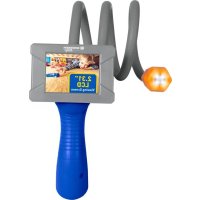
Junior Adventure Scope - Camera BRESSER - Free user manual and instructions
Find the device manual for free Junior Adventure Scope BRESSER in PDF.



| Product type | Endoscopic camera with LED light |
| Brand | Bresser |
| Model | Junior Adventure Scope |
| Screen | 5.86 cm (2.31") LCD |
| Lens | 140° wide-angle |
| Video resolution | 1280×720 (30 fps) / 640×480 (30 fps) |
| Video format | AVI |
| Photo resolution | 3 MP, 2 MP, 1 MP |
| Memory card | Micro SD up to 32 GB (Class 10 SDHC or later, not included) |
| Power supply | 5 V / 1 A via USB |
| Battery | Lithium-ion 400 mAh |
| Charging time | Approx. 2 hours |
| Flexible tube length | Approx. 68 cm (27") |
| Main functions | Video recording, photo taking, playback, settings |
| Safety | Do not look directly at the sun (risk of blindness); use under adult supervision |
| Maintenance and cleaning | Unplug before cleaning; use a dry cloth; do not use liquid |
| Repairability | Do not disassemble; contact the dealer for any repairs |
| Disposal | Do not dispose of with household waste; follow the WEEE directive |
| Warranty | 2 years; extension possible upon registration at www.bresser.de/warranty_terms |
| Compliance | CE declaration available on the Bresser website |
Frequently Asked Questions - Junior Adventure Scope BRESSER
User questions about Junior Adventure Scope BRESSER
0 question about this device. Answer the ones you know or ask your own.
Ask a new question about this device
Download the instructions for your Camera in PDF format for free! Find your manual Junior Adventure Scope - BRESSER and take your electronic device back in hand. On this page are published all the documents necessary for the use of your device. Junior Adventure Scope by BRESSER.
USER MANUAL Junior Adventure Scope BRESSER

SERVICE AND WARRANTY:
www.bresser.de/warranty_terms

GUIDES:
Never look through this device directly at or near the sun. There is a risk of BLINDING YOURSELF!
Children should only use this device under supervision. Keep packaging materials (plastic bags, rubber bands, etc.) away from children. There is a risk of SUFFOCATION.
This device contains electronic components that operate via a power source. Children should only use the device under adult supervision. Only use the device as described in the manual; otherwise, you run the risk of an electric shock.
RISK of material damage!
Never take the device apart. Please consult your dealer if there are any defects. The dealer will contact our service centre and send the device in for repair if needed.
FIRE-/ DANGER OF EXPLOSION!
Do not expose the device to high temperatures. Excessive heat or improper handling could trigger a short-circuit, a fire or an explosion.
TIPS on cleaning
Before cleaning the device, disconnect it from the power supply (remove USB cable)!
Only use a dry cloth to clean the exterior of the device. To avoid damaging the electronics, do not use any cleaning fluid.
RESPECT privacy!
This device is intended only for private use. Please heed the privacy of other people. Do not use the device to look into apartments, for example.
DISPOSAL
Dispose of the packaging material/s as legally required. Consult the local authority on the matter if necessary.
Do not dispose of electrical equipment in your ordinary refuse. The European guideline 2002/96/EU on Electronic and Electrical Equipment Waste and relevant laws applying to it require such used equipment to be separately collected and recycled in an environment-friendly manner. Empty batteries and accumulators must be disposed of separately. Information on disposing of all such
equipment made after 01 June 2006 can be obtained from your local authority.
EC Declaration of Conformity
Bresser GmbH has issued a "Declaration of Conformity" in accordance with applicable guidelines and corresponding standards. The full text of the EU declaration of conformity is available at the following internet address:
The regular guarantee period is 2 years and begins on the day of purchase. To benefit from an extended voluntary guarantee period as stated on the gift box, registration on our website is required.
You can consult the full guarantee terms as well as information on extending the guarantee period and details of our services at www.bresser.de/warranty_terms.
Parts overview
- Endoscope camera with LED lighting
- Flexible goose neck (27^ )
- ON/OFF/OK: On/Off Power button and OK button (recording)
- LCD viewing screen (2.31")
- Handle
- MODE/MENU button (Video>Photo>Playback>Settings)
- Reset hole (reset device to factory settings)
- UP button (long press) and DOWN button (short press)
- SD card* slot
- Charging indicator
- USB interface for charging the device
- USB cable
Inserting Micro SD card*
- SDHC Class 10 or higher required
- Capacity up to 32 GB
Note: For best performance, please choose a branded Micro SD card and format it on your computer before use. Unbranded cards are not guaranteed to work flawlessly.

Charging the battery
A. Simply connect the USB cable to your computer or to a USB power adapter to charge the battery.
B. The camera can record video while charging
C. The camera can also be charged when the power is off.
Turning camera on and off
Press and hold the ON/OFF/OK button (3) for 2 to 3 seconds to turn the camera on or off.
Mode Switching
Press the MODE/MENU button (6) repeatedly to cycle through the camera modes.
Video Mode > Photo Mode > Playback Mode
Record Videos
Switch to video mode and press the ON/OFF/OK button (3) to start recording. Press the ON/OFF/OK button (3) again to stop recording.
Take photos
Switch to photo mode. The number of photographs taken and the number of remaining photographs are displayed on the screen. Press the ON/OFF/OK button (3) to take a picture.
Playback Mode/Delete File
Press the UP/DOWN button (8) to select the next video or image. Press the ON/OFF/OK button (3) to play the video. Press the MODE/MENU button for 2 to 3 seconds to delete the selected image or video. Press the ON/OFF/OK button (3) to confirm and then press the MODE/MENU button (6) again to exit the menu.
Settings Menu
Press and hold the MODE/MENU button (6) for 2 to 3 seconds to open the setup menu. Press the MODE/MENU button (6) again to exit the menu.
Navigation
Press the UP/DOWN button (8) to scroll down or to the side. Press the UP/DOWN button (8) for 2 to 3 seconds to move up. Press the ON/OFF/OK button (3) to confirm.
Settings
Resolution: VGA/HD
Image quality: 1MP, 2MP, 3MP
Cyclic Record: Off/3 Min/5 Min
Creates a new video after the selected runtime
Date tag: YES/NO
Saves the current date on the recordings
Time Setting: Set date and time
Auto Power-Off: Off/1 Min/3 Min
Turns the camera off automatically after the selected time.
Language Setting: Select language
Flicker: 50Hz/60hz
Screen savers: Off/3 Min/5 Min/10 Min
Format: Format SD card (Attention: all data on the card will be deleted!)
Reset System: All made settings will be reset.
Version: Displays the current firmware.
Technical data
Display: 2.31'' (5.86 cm)
Lens: 140^ Wide angle
Video resolution: 1280X720(30FPS), 640X480(30FPS)
Video format: AVI
Picture resolution: 3MP, 2MP, 1MP
Storage: Micro SD Memory card* (up to 32 GB)
(not included) (SDHC Class 10 or higher required)
Power source: 5V / 1A
Battery capacity: 400 mAh
Battery charging time: 2 hours
EN

- RISK of material damage!
- FIRE-/ DANGER OF EXPLOSION!
- TIPS on cleaning
- RESPECT privacy!
- DISPOSAL
- EC Declaration of Conformity
- Parts overview
- Inserting Micro SD card*
- Charging the battery
- Turning camera on and off
- Mode Switching
- Record Videos
- Take photos
- Playback Mode/Delete File
- Settings Menu
- Navigation
- Settings
- Technical data
Brand : BRESSER
Model : Junior Adventure Scope
Category : Camera