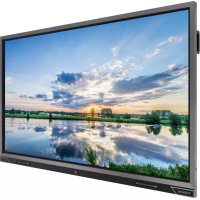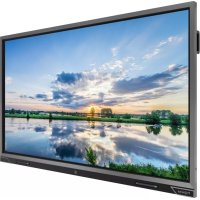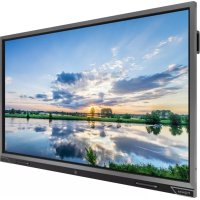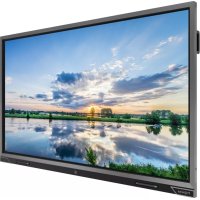
PW.1.15065.1001 - Monitor Prowise - Free user manual and instructions
Find the device manual for free PW.1.15065.1001 Prowise in PDF.


User questions about PW.1.15065.1001 Prowise
0 question about this device. Answer the ones you know or ask your own.
Ask a new question about this device
Download the instructions for your Monitor in PDF format for free! Find your manual PW.1.15065.1001 - Prowise and take your electronic device back in hand. On this page are published all the documents necessary for the use of your device. PW.1.15065.1001 by Prowise.
USER MANUAL PW.1.15065.1001 Prowise
Quick Start Guide & Safety Instructions
Prowise Touchscreen
Buttons and connections
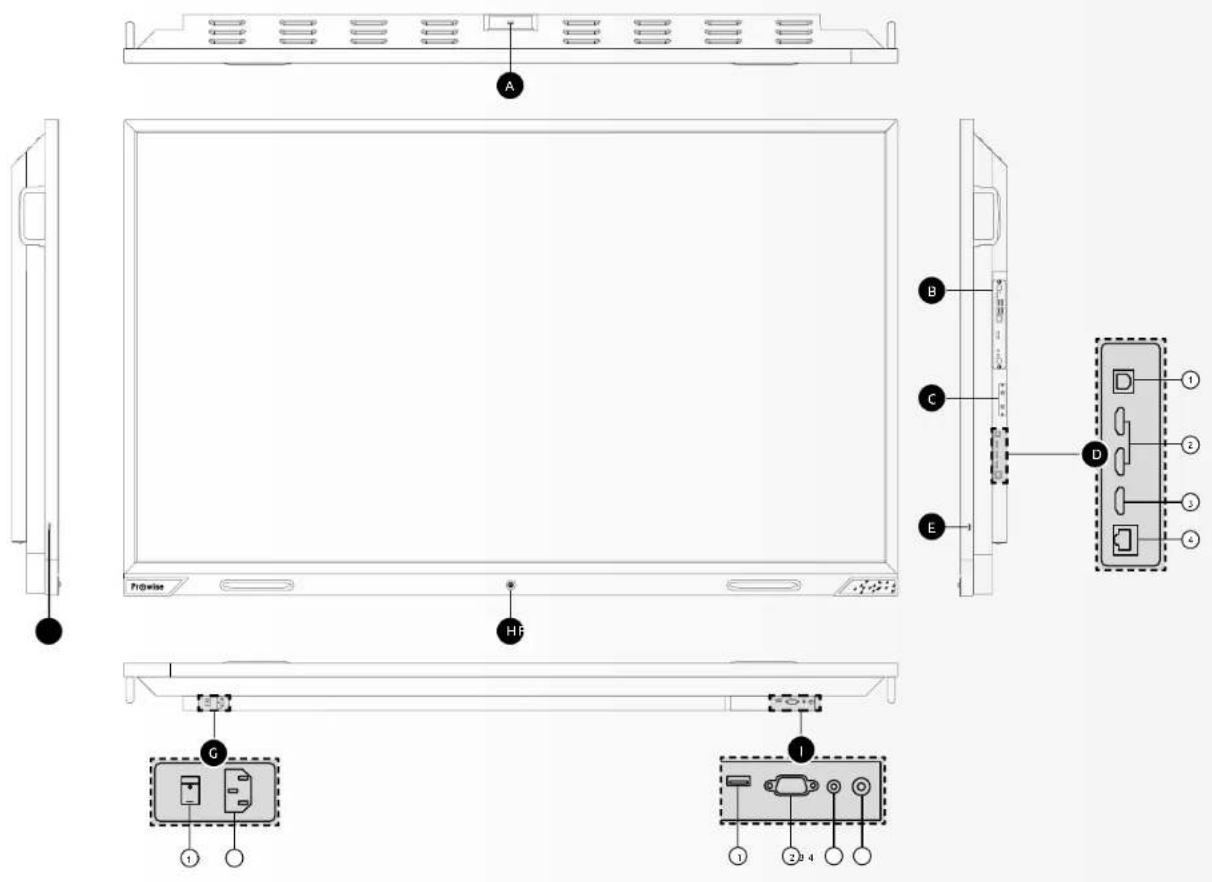
USB 3.0 (external camera)
OPS slot (side)
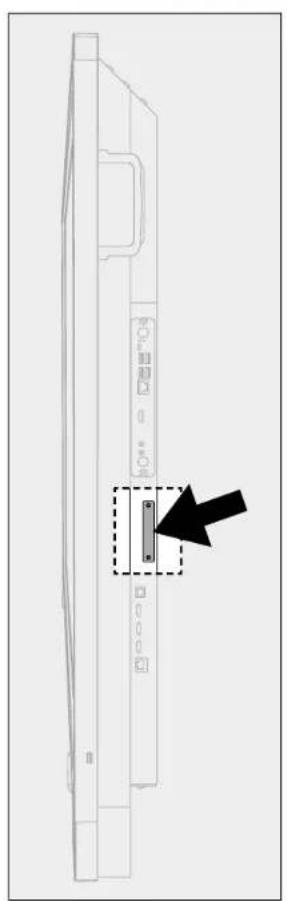
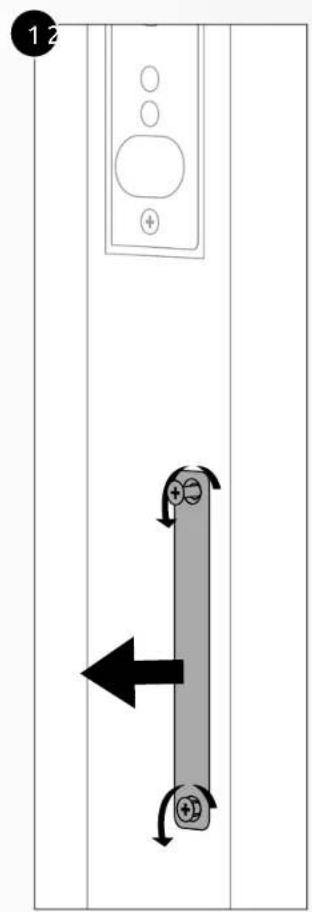
Wi-Fi module slot (side)
External inputs / outputs (side)
USB Type-B
HDMI2.0 inputs
HOM12.0ARC
LAN port
USB2.0
USB2.0
AC-in and main power switch (bottom)
① Main power switch
AC input
Control-Button(front) When screen is off :
Activates screen
When screen is on:
- Short press to activate Prowise Central Menu
- Hold 2 seconds to activate Prowise Central Menu
Lift (Bottom)
USB 2.0 for lift control and service
2 R5232
③ Headphone
Digital Coax
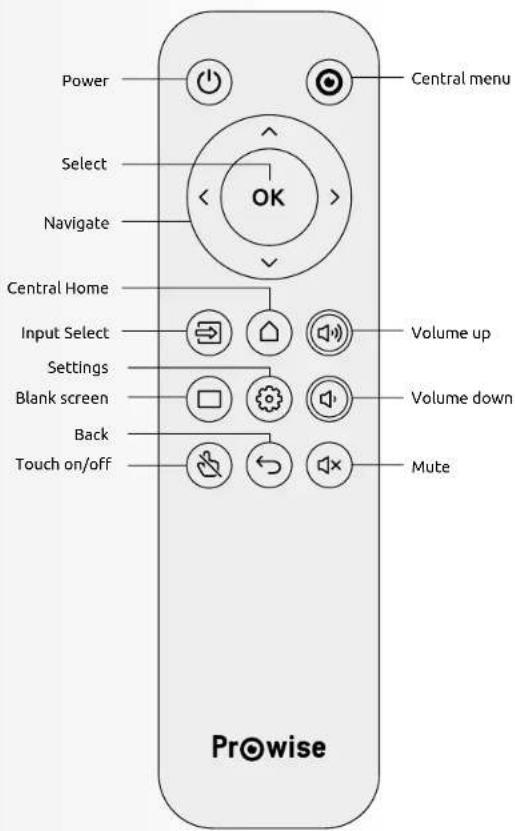
Remote Control
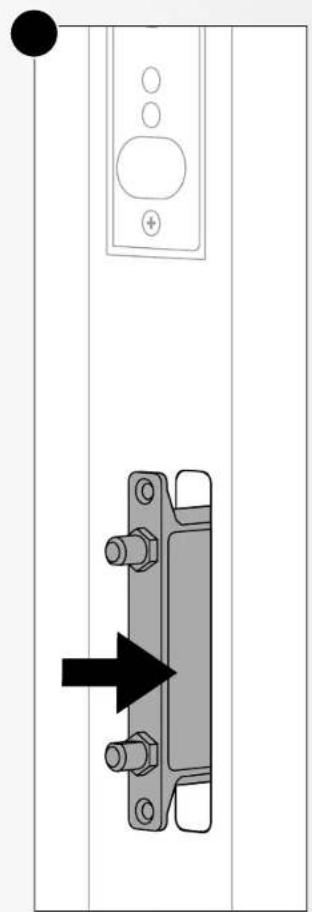
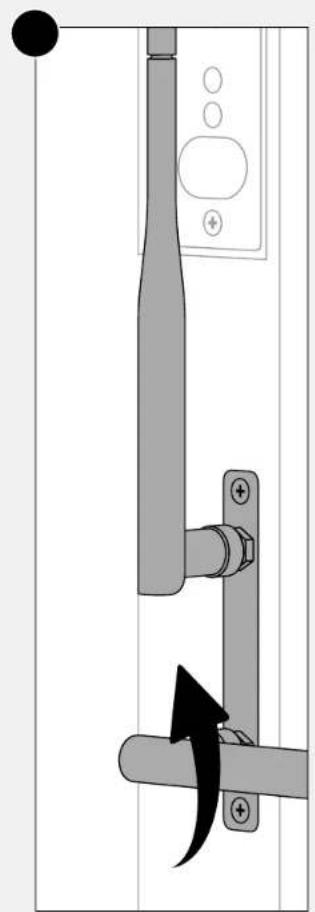
Wi-Fi module Installation Procedure
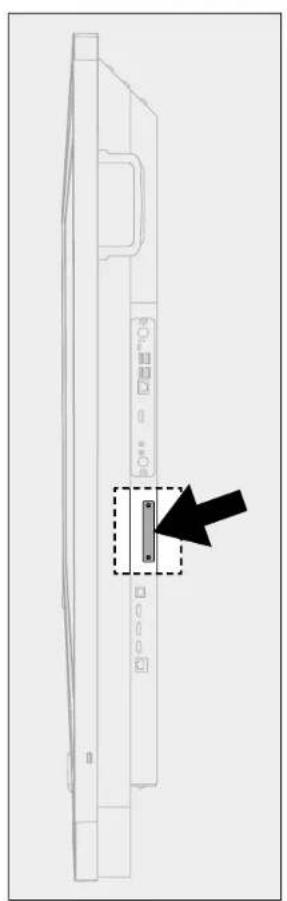
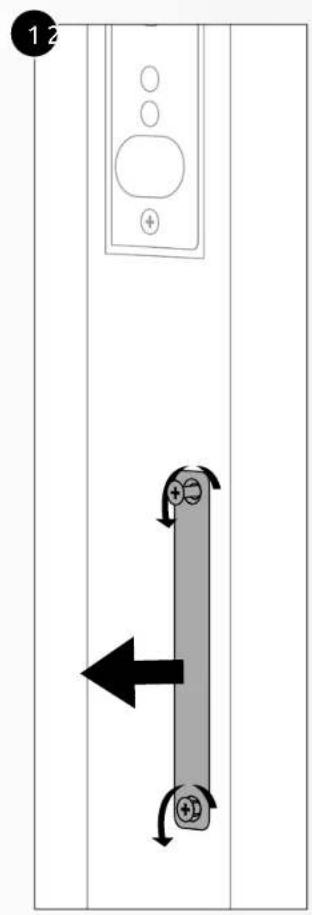
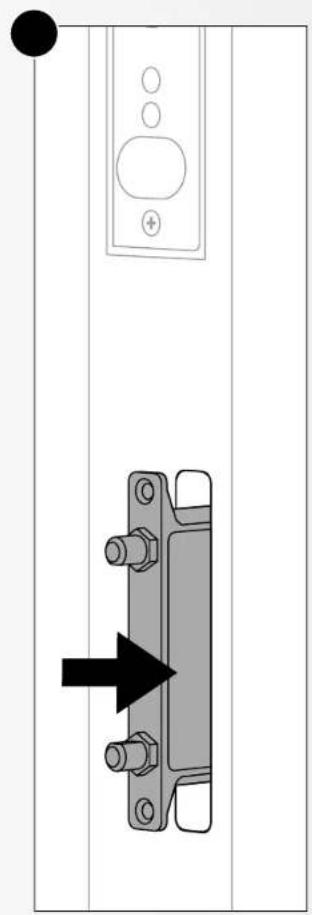
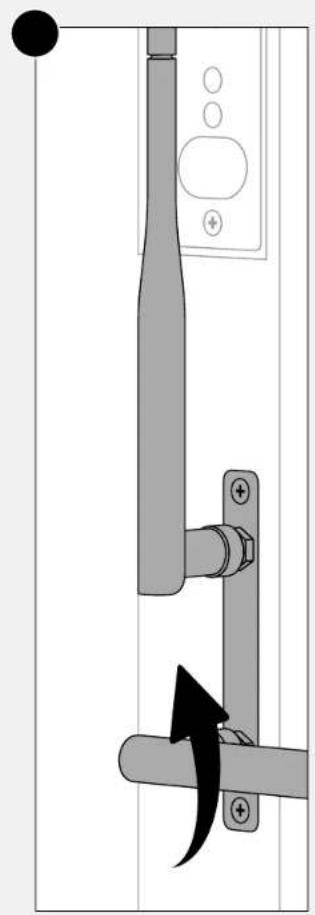
Table of contents
1. About these Instructions 6
1.1 Symbols and Keywords used in these instructions 6
1.2. Proper use 6
1.3.Declaration of Conformity 6
2. Safety instructions 7
2.1 Important safety instructions 7
2.2. Scope of delivery 8
2.3 Repair 8
Backup
2.5. Setup location 8
2.6.Ambient conditions 8
2.7.Erononomics
2.8. Connecting
2.8.1. Power supply
2.9.Cabls
2.10. The touchscreen
2.10.1. Measures to protect the screen
2.10.2. Maintaining the screen
2.11. The remote control
2.12. Moving the touchescreen
2.13 W-tH module
3. Repair
4.Environment
4.1. Recycling and disposal
出
9
9
1. About these safety Instructions
Read the safety instructions carefully before using the touchscreen. Follow the warnings stated on the device and in the user manual. Always keep these safety instructions and the user manual within reach.
1.1. Warning pictograms and symbols used in these safety instructions

HAZARD WARNING!
Warning for possible (serious) injury.

WARNING!
Warning for electrified parts.

WARNING!
Warning for risk of hearing damage due to high sound volume.

CAUTION!
Follow these instructions to avoid material damage.

PLEASE NOTE!
Information and advice about the use of the device.
1.2. Intended Use
This device is intended for digital communication and for using, managing and editing electronic documents and multimedia content. If it is used for purposes other than those described in these safety instructions and the user manual, Prowise B.V. will not bear any responsibility or liability in case of material damage and/or injury. Do not make changes to the device without written permission from Prowise. Improper use will void the warranty.
1.3. Declaration of Conformity
Provice B.V.
Luchthavenweg b
6021PXBodel
The Netherlands
Hereby declares entirely on its own responsibility that the product
Provice Touchscreen with product numbers:
PW.1.15055.0001/PW.1.15065.0001/PW.1.15075.0001/PW.1.15086.0001
To which this declaration applies, satisfies the fundamental health and safety requirements of the following
European directives:
Low Voltage Directive 2014/35/EU
EMC Directive 2014/30/EU
RoHS 2011/63/EU
And, where applicable, that it complies with the following harmonised standards or parts of these standards:
European Certification:
| • CE: EMC LVD | CE |
| • RoHS | RoHS |
| • REACH |
International certification:
| • FCC - Part 15. Sub part B (US) | FCC |
| • LI (US) | UL |
| • IC (Canada) | IC |
| • RCM (Australia) |
2. Safety instructions
2.1. Important safety instructions
Following these safety instructions will help guarantee reliable functioning and a long lifespan of your Prowise Touchscreen.

CAUTION!
Follow the safety instructions below:
- Prowise B.V. is not liable for injury, damage and/or excessive wear due to incorrect use or maintenance of, or modifications to, the device.
Only use components and accessories supplied by Prowise. - Repairs or modifications by third parties are not permitted.
- Do not use this device in an environment with potential explosion hazards. This includes EX, dust, or gas zones.
- Do not use the device in extreme weather conditions.

WARNING!
Warning for electrified parts
- Never open the housing of the touchscreen! You can get an electric shock, cause a short circuit or even start a fire, which can cause injuries or damage to the touchscreen.
- On not insert objects into the openings of the touchscreen that are not intended for this. This could result in a short circuit or even fire.
Do not use the touchscreen during thunderstorms to avoid damage due to a lightning strike.
Make sure your touchscreen does not get well. This could lead to short circuiting and electrocution hazard. Do not install the device close to water and do not place objects containing liquid on or next to it.
The plugs must never come into contact with water. In case this does happen, switch off and unplugging the device immediately. The plugs must be completely dry before you can use the device again. - Never touch the plugs with wet hands.
- Ensure that you do not overload the electrical outlet. For example, by using a multi-outlet adapter. Overloading can result in short circuiting.
- Switch off the touchscreen immediately or do not switch it on, unplug it from the electrical outlet, and contact our service desk if.
- the power cable or plug is damaged. Only replace defective connection cables with original parts. Never repair damaged cables and plugs yourself; replace them.
The housing or the screen is damaged or if liquids have penetrated in the device. - The device emits unusual noises or odours. This could be the result of an internal short circuit.

HAZARD WARNING!
Warning for possible (serious) injury
- Do not stand on a chair, stool or other object to operate the touchscreen. This especially applies for children! This involves a risk of falling that could result in serious injury.
- Ensure that the screen is inflated at the correct height or that the lift is set to the correct height when the screen is used.
- Never allow children to hang from the screen.
Ensure that the connection cable does not lie across the walkway to avoid the risk of tripping.
If the screen breaks for any reason, there is a risk of cutting on sharp glass.
Always contact our service desk or a certified Prowise partner in case of defects to the SPLIT.

CAUTION!
- Always place the touchscreen close to an electrical outlet. The electrical outlet must remain readily accessible while using the touchscreen.
- Only connect the touchescreen to a grounded electrical outlet.
To avoid damage to the device, only use the power cable supplied. - Never remove a module (for example the PC module) while the touchscreen is switched on.
- Do not cover the openings at the back of the touchscreen. These openings provide necessary ventilation and the touchscreen can overheat if they are covered.
- Over time, dust can accumulate inside the sunscreen which can cause overheating. To avoid this, have the sunscreen cleaned periodically by Prowse or a certified partner.
- Ensure that the screen is not exposed to severe shocks, vibrations or impacts. This can damage the device and the screen.
To avoid damage, do not touch the screen with sharp or hard objects. - Do not try to install or move the touchscreen yourself. Avoid damage and leave this to the skilled staff of Prowise or a certified partner.

DA
DF
ES
II
NL
NO
SV
2.2. Scope of delivery
Please check that the delivery is complete and if it is incomplete, contact our service desk in writing within five (5) days of delivery. Provide the serial number and a copy of the invoice in this notice.
You have received the following items in the box delivered:
- Prowise Touchscreen
- Accessaire box:
Remote control
Batteries 1.SVAAA (x2)
- Wi-Fi module
WiFIAnuPnncs(x2)
Passive pen (2x)
NFC cards (x2)
-
Cable box:
-
Safety instructions
- User manual WiFi
EV,UK and US power cable.
USB touch cable - HDMI cable

HAZARD WARNING!
Keep the packaging material, such as plastic film, away from children. Improper use of packaging material
can result in a suffocation hazard.
- Wait to use the touchscreen for 24 hours after transport to allow the touchscreen to acclimatise to the ambient temperature. Temperature fluctuations or high humidity can cause condensation to occur in the touchscreen, which can cause short circuiting.
Only have the touchscreen installed by skilled Prowise staff or by a certifed partner.
2.3. Repair

WARNING!
Never try to open or repair the device yourself. This involves a risk of electric shock, short circuiting and/or fire hazard.
In case of malfunctions, please contact our Prowise service desk or a certifed Prowise partner to avoid damage.
2.4.Backup

CAUTION!
Always make a backup on an external storage device after updating data. No claims for compensation of any consequential damages due to data loss will be accepted.
2.5. Setup location
Install the Touchscreen on a stable wall or floor.
- Only connect the touchscreen to a grounded electrical socket.
- Avoid contaminated environments and vibrations.
- Do not place the touchescreen close to equipment that generates heat.
- Do not install or use the device close to water or objects containing liquid.
- Make sure that all the ventilation openings on the back of the touchscreen remain unobstructed so that hot air can escape.
When using a lift:
Use the Touchscreen with the mobile lift on a stable surface.
- Ensure that the power cable is long enough for both the minimum and maximum positions of the lift.
2.6.Ambient conditions
- The sunscreen can be used at an ambient temperature from 0^ to +38^ and relative humidity from 10% to 90% (without condensation).
- When switched off, the touchscreen can be stored at an ambient temperature between -20^ and +60^ and a relative humidity from 10% to 90% (without condensation).
- Do not use the touchscreen at an elevation of more than 2000 metres (6561.68 feet).
- Unplag the touchscreen from the mains outlet during thunderstorms. We advise you to use an overvoltage protection device to protect the touchscreen against damage due to voltage peaks or a lightning strike to the electrical mains supply.
2.7. Ergonomics

WARNING!
Excessive sound volume causes permanent hearing damage. It can also cause hearing damage to the listener if the device is used at a high sound volume for an extended period of time. This also applies when using headphones!
Always adjust the screen to the correct height before use. Avoid standing in a stooped or bent posture and ensure that the ends of the screen are located within arm's reach.
In the optimal position of the screen, you can reach both the top and bottom of the screen without needing to stoop or reach for up. By positioning the screen properly, you can avoid physical problems that could result from an incorrect, work posture.
Set the sound volume to the minimum before you play sounds, music or video's. Start the media file and increase the volume to a comfortable sound level. This prevents permanent hearing damage, including if you use headphones.
2.8. Connecting
Follow the instructions below to connect the Touchscreen safety
2.8.1 Power supply

WARNING!
Do not use damaged connection cables or plugs. Only replace defective connection cables with original parts. Never repair damaged cables and plugs yourself.
- The touchscreen must be installed close to an electrical outlet and the electrical outlet must be easy to reach.
- Switch the power supply off by switching off the main power switch and removing the power cable plug from the electrical outlet.
Only plug the power cable into grounded electrical outlets with AC 100 240V-50/60Hz if you are not sure about the power supply at the installation location, consult your energy company.
Only use the connection cable and plug supplied. - We advise you to use an overvoltage protection device to protect the touchscreen against damage due to voltage peaks or a lightning strike to the electrical mains supply.
2.9.Cables
- Do not lay cables in the walkway to avoid anyone stepping on them or tripping over them.
- Do not place any objects on the cables to avoid damaging them.
- Only connect peripheral devices such as a keyboard, mouse or external PCs while the touchscreen is switched off. This prevents damage to the equipment.
- Keep at least a distance of one metre from sources with high frequency and/or magnetic interference (IV, speakers, mobile telephone, DCCT telephones, etc) to avoid malfunctions or data loss.
- To connect the touchescreen to external interfaces, only use a shielded cable with a maximum length of 3 metres.
- Do not replace the cables supplied with other cables. Only use the cables supplied by Prowise.
- When you want to connect peripheral devices to the touchscreen, only use the cables that are supplied with the peripheral devices.
- Ensure that all connection cables are connected to the corresponding peripheral devices to avoid interference. Remove cables that are not in use.
Only connect peripheral devices that are conform to the EN-IEC 60950 standard 'Safety of information technology equipment' or the EN-IEC 60065 standard 'Audio, video and similar electronic devices - Safety requirements'.
The screens is made of glass. If it breaks for any reason, there is a risk of cutting injuries. Always contact our service desk in case of defects to the screen.
Follow the instructions below to extend the lifespan of the Touchscreen.
Operate the Touchscreen with your finger(s) or with the supplied Prowise Pens, which has been speclaly
developed for this purpose. Do not operate the screen with a ballpoint pen on a sharp object. This could damage the touchscreen.
- Dust and grease on the touchscreen reduce its sensitivity. Remove dust or grease from the screen with a soft, dry lint-free cloth. If you wish to use a cleaning agent, apply it to a cloth first. Never apply the cleaning agent directly to the screen and only use cleaning agents that are recommended by Prowise.
Do not affix objects to the screen or the edge of the screen and do not hang anything from the screen. This can negatively affect the functioning of the display and the touchscreen. - Make sure the screen is not exposed to severe shocks, vibrations or knocks. This can damage the device and the screen.
2.10.1. Measures to protect the screen

PLEASE NOTE!
The touchscreen is delivered with a protective film to protect the device against scratches duringproduction and transport. Remove all film after installation before using the device.
- Avoid contact between the screen and hard objects (such as buttons, wristwatches, etc.).
Do not lay objects on the screen when it is used as a touch table.
- Do not allow objects to fall onto the screen and/or do not throw objects at the screen.
Do not write on the screen with fell lip or permanent markers. If this does occur, remove the ink as quickly as possible with a soft, dry, lint-free cloth. If you wish to use a cleaning agent, apply it to a cloth first. Never apply a cleaning agent directly onto the touchscreen and only use cleaning agents that are recommended by Prowise.
Do not pour liquids into the screen. This can cause short circuits.
- Do not scratch the screen with hard and/or sharp objects.
2.10.2. Maintaining the screen

CAUTION!
The touchscreen does not have any internal components that need to be cleaned or maintained. To avoid damage, the connection points of the power supply must not come into contact with water. If this does occur, the connection points must be completely dry before the device may be used.
- Unplug the power supply before cleaning the screen.
Clean the display with a soft, dry, lint free cloth.
- Do not use aggressive chemical cleaning agents. Only use the cleaning agent recommended by Prowse.
Apply the cleaning agent to a cloth First. Never apply the cleaning agent directly onto the touchscreen.
The cloth can be slightly damp, but not wet to avoid damage to the screen.
2.11. The remote control

HAZARD WARNING!
Remove leaking batteries from the remote control as soon as possible. Leaking chemicals are toxic and must never come into contact with the mouth, skin or eyes.
Follow the instructions below to extend the lifespan of the remote control.
- Do not drop the remote control and do not throw it.
The remote control must never come into contact with water. Ensure that you do not use or place the remote control in an environment which is exposed to water. If the remote control does become wet, dry it off immediately with a soft, dry, lint-free cloth.
Only clean the remote control with a dry, soft, lint free cloth. This cloth must not be wet.
- Do not open the housing of the remote control. Aside from the cover plate for the batteries, no parts of the housing may be opened.
Only use 1.5V AAA batteries in the remote control.
- Orient the plus and minus poles of the batteries as indicated on the remote control.
2.12. Moving the touchscreen

HAZARD WARNING!
Only move the screen if it is mounted on a mobile lift or an All-in-One lift. Do not try to disassemble or move the screen by yourself. The screen is heavy and may only be removed by skilled staff of Prorise or a certifid partner.
Follow the guidelines below when moving the touchscreen:
- Set the lift to the lowest position before moving the screen.
- Switch off - The touchscreen and unplug it.
- Undo the brakes on the wheels before moving the lift (if applicable).
- Ensure that the connection cable is not dragged along the ground or in the path of the mobile lift.
- Ensure that no objects or people are standing in the path of the mobile lift.
- Only move the mobile lift and screen across a stable, flat surface.
- Hold the screen by the handles on the sides of the screen to move it.
- Insure that you do not bump into anything while moving the lift; this could cause damage to the screen and the surroundings.
- Do not stand on the lift or hang from the screen while moving it.
- Apply the brakes to the wheels once the lift is in the desired position.
2.13.Wi-Fi module

HAZARD WARNING!
This product contains small parts that could be swallowed by children. Keep this product out of reach of children to avoid the risk of suffocation.
The tounscreen is equipped with an integrated Wi-Fi module. Follow the instructions below to optimise the lifespan of the Wi-Fi module:
- The WHI module is only compatible with the Prowse Touchscreen. Don't try to insert the WHI module in a different device.
- Don't use force to insert the WH1 module, if the WH1 module doesn't fit in the slot, it is most likely the module is held upside down.
- Avoid use in costly environments.
- Do not allow the device to come into contact with water, this can cause short circuiting.
- Do not place the product close to equipment that generates heat.
The WHI module can be used at an ambient temperature from 0^ to +38^ (32° to 100.4°F) and relative humidity from 10% to 90% (without condensation).
Ensure that the touchscreen is switched off and not connected to mains power when installing the Wi-Fi module.
- To avoid damage, do not let the Wi-Fi module fall and/or do not expose it to shocks.
Do not insert objects into the device. This can cause short circuiting or damage to the Wi-Fi module.
- Contact with liquid can cause short circuiting.
Contact: Prwisi or a certifed parther for maintenence.
3. Repair
Always contact the Prowise service desk or a certified partner if there are defects to the touchscreen.
- Never try to open or repair the touchscreen yourself
The housing of the touchscreen should only be opened by certified Prowise service Technicians.
The warranty on the Promise touchscreen will be void if unauthorised modifications or repairs are made to the screen, unless otherwise stated.

WARNING!
Never try to open or repair the device yourself. This involves a risk of electric shock, short
circulating and/or fire hazard.
In case of malfunctions, please contact the Prowise service desk or a certifed partner to avoid damage.
4.Environment
- Unplug the power cable if the screen will not be used for an extended period.
The energy consumption in sleep mode is < 0.5 watts. - When the touchscreen is no longer usable, it can be disposed of at a designated collection point.
4.1. Recycling and disposal
If you have questions about correct disposal, please contact Prowise or a certifed partner.

PACKAGING
The device is packaged to prevent transport damage. Packaging consists of resources that can be reused or recycled.

DEVICE
Do not dispose of the device with household waste at the end of its lifespan. Ask about the
possibilities for an environmentally friendly and responsible method of disposal.

BATTERIES
Deplored or defective batteries do not belong in household waste. Dispose of them at a collection point for empty batteries. The remote control uses 1.5V AAA batteries.
Installationsprocedure for wi-fi-modul
Indhold
| • CE: EMC: LVD | CE |
| • RoHS | RoHS |
| • REACH |
Internationale certifi ceringer:
| • FCC part 15, subpart B (USA) | FCC |
| • UL (USA) | UL |
| • IC (Canada) | IC |
| • RCM (Australia) | AC |
| • CE: EMC-LVD | CE |
| • RoHS | RoHS |
| • REACH |
| • CE: EMC: LVD | CE |
| • RoHS | ✓RoHS |
| • REACH |
| • CE: EMC: LVD | CE |
| • RoHS | RoHS |
| • REACH |
Certification internationale:
| • FCC - Partie 15, sous partie B (US) | FCC |
| • LTI (US) | U/L |
| • IC (Canada) | IC |
| • RCM (Australia) | ▲ |
| • CE: EMC: LVD | CE |
| • RoHS | RoHS |
| • REACH |
WAARSCHUWING VOOR GEVAAR!
-
Accessoire doos;
-
Afstandsbediening
Batterijen 1.5 V AAA (2 sLuks) - WiFi module
- WiFi antenna (2 stubs)
Passive pen (2 s.uks)
Kabel doos:
Veilighieidsevoerschriften
- Gebruikershandelecing Wi-Fi module
Stroomkebel EU, UK and US
USB touch kabel
HDMikabel

WAARSCHUWING VOOR GEVAAR!
WAARSCHUWING VOOR GEVAAR!
WAARSCHUWING VOOR GEVAAR!
WAARSCHUWING VOOR GEVAAR!
m = 311
65
65
65
63
66
66
66
66
66
EN
DA
DE
ES
FR
11
NL
NO
13/14
SV
medfere are for kvehing.
| • CE: EMC: LVD | CE |
| • RoHS | RoHS |
| • REACH |
Internasional sertifi sering:
| • FCC - del 15, capitol B (USA) | FCC |
| • LI (USA) | U L |
| • IC (Kanada) | I C |
| • RCM (Australian) | A C |
2. Sakerhetsanvisiningar
2.1.Viktiga sakerhetsanvisiningar
Folancsekemetsanwisingharjaleritactgarenta paitigfunktionochenlanglvstngdfordin
Prowiscpokskarn.

FÖRSIKTIGHET!
Folj sakerhetsanvisingarna nedan: