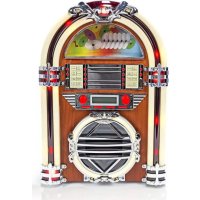
RDJB3000BNUK - Radio NEDIS - Free user manual and instructions
Find the device manual for free RDJB3000BNUK NEDIS in PDF.


| Product type | Clock radio with CD player and AM/FM tuner |
| Brand | Nedis |
| Model | RDJB3000BNUK |
| Output power | 1.5 W + 1.5 W (stereo) |
| Frequency response (amplifier) | 60 - 20,000 Hz |
| FM frequency range | 87.5 - 108 MHz |
| AM frequency range | 530 - 1,600 kHz |
| Frequency response (CD player) | 60 - 20,000 Hz ±4 dB |
| Signal-to-noise ratio (CD player) | 55 dB (IEC-A) |
| Speaker type | 1-way |
| Speaker impedance | 8 ohms |
| Max. input power of speaker | 3 W |
| Power supply | 230 V~50 Hz |
| Power consumption | 19 W |
| Main functions | CD player, AM/FM tuner, LCD display, ambient lighting, adjustable volume |
| Display | LCD screen |
| Antenna | Telescopic antenna (FM) |
| CD playback | Audio CD, play/pause, skip forward/backward, stop, fast forward/rewind |
| Safety | Do not open, do not expose to water or moisture, unplug if problems occur |
| Care and cleaning | Clean with a dry cloth only, no solvents or abrasives |
| Spare parts and repairability | Repair by a qualified technician only |
| General information | Design and specifications subject to change without notice; keep the manual and packaging |
Frequently Asked Questions - RDJB3000BNUK NEDIS
User questions about RDJB3000BNUK NEDIS
0 question about this device. Answer the ones you know or ask your own.
Ask a new question about this device
Download the instructions for your Radio in PDF format for free! Find your manual RDJB3000BNUK - NEDIS and take your electronic device back in hand. On this page are published all the documents necessary for the use of your device. RDJB3000BNUK by NEDIS.
USER MANUAL RDJB3000BNUK NEDIS
MANUAL DE USO (p. 17)
Jukebox
Listening to a Compact Disc
- Slide the function selector to CD position.

- Open the CD door and place the CD on the tray.
- Close the tray and start playing the CD.

The CD will start playing from the first track.
- Press the FF button once to skip to the beginning of the next track.
- Press the FR button once to skip to the beginning of the current track. Press the FR button twice to skip to the beginning of the previous track.
- Pause CD playback.
Press the PLAY/PAUSE button will restart the CD where it was paused.
Do not switch the unit off while playing a CD, as this will damage the unit.
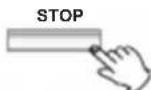
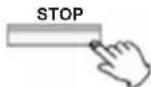
- Stop CD playback.
Fast rewind (FR) and fast forward (FF), you can search through the track by pressing and holding the FR or FF button.
Note: Do not press both buttons at the same time, as this may damage the unit.
As the unit is tracking quickly forward or reverse, you will hear your selection playing at a distorted speed. Simply release the pressed button to continue playing at normal speed at the desired position in the selected track.
- LIGHT
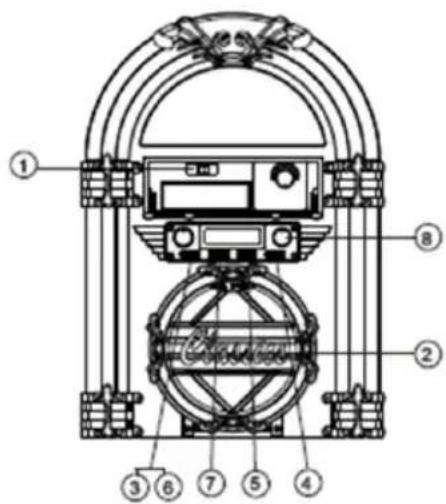
Turn the light knob clockwise to turn the light on, the light will light up all the time around the unit.
Listening to the Radio
- Slide the function selector to AM or FM position.
- Tune into the desired frequency.
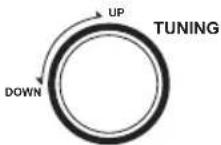
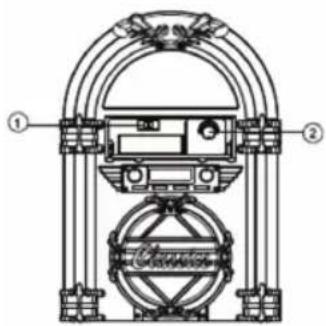
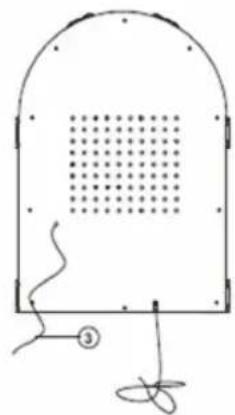
- Antenna
For optimal FM reception be sure to stretch the built-in FM wire antenna located at the back of the unit and move it around until the station you have tuned into is received clearly.
Specifications
AMPLIFIER section
Output Power. 1.5 W +1.5 W
Frequency Response 60 to 20,000 Hz
TUNER section
FM Section
Frequency Range 87.5 to 108 MHz
AM Section
Frequency Range 530 to 1600 KHz
CD PLAYER section
Frequency Response 60 to 20, 000 Hz +/-4 dB
Signal-to-Noise Ratio. 55 dB (IEC-A)
SPEAKER SYSTEM section
Type 1-way
Impedance 8 ohms
Input Power ..Max.3W
GENERAL
Power Requirements 230 V \~50 Hz
Power Consumption 19 W
Safety precautions:

CAUTION RISK OF ELECTRIC SHG DO NOT OPEN

To reduce risk of electric shock, this product should ONLY be opened by an authorized technician when service is required. Disconnect the product
from mains and other equipment if a problem should occur. Do not expose the product to water or moisture.
Maintenance:
Clean only with a dry cloth. Do not use cleaning solvents or abrasives.
Warranty:
No guarantee or liability can be accepted for any changes and modifications of the product or damage caused due to incorrect use of this product.
General:
Designs and specifications are subject to change without notice.
All logos brands and product names are trademarks or registered trademarks of their respective holders and are hereby recognized as such.
Keep this manual and packaging for future reference.
Attention:
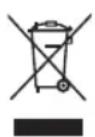
This product is marked with this symbol. It means that used electrical and electronic products should not be mixed with general household waste. There is a separate collections system for these products.
DEUTSCH
- Pausa CD-upppseling.
- Stoppa CD-upppseling.
- Lampor
- Diakotn avatapaywyns CD.
Tupiote To koupi f wtiouo deiooppa ia va avaeteto woc, to wc aavaei ouvexw yupw ano tvnovda.
Akpocan Paioqvou
Brand : NEDIS
Model : RDJB3000BNUK
Category : Radio