HPG 331BT - Radio CALIBER - Free user manual and instructions
Find the device manual for free HPG 331BT CALIBER in PDF.


| Product Type | Bluetooth Portable Radio |
| Brand | CALIBER |
| Model | HPG 331BT |
| Power Supply | Built-in rechargeable battery, charges via USB 5V (micro-USB cable included) |
| Main Functions | Bluetooth, FM Radio, Micro SD Player, AUX Input (3.5mm jack) |
| Bluetooth | Version not specified, range not specified, detected name: HPG331BT_CALIBER, PIN code: 0000 |
| FM Radio | Automatic station search and memory, navigation between memorized stations |
| Micro SD Player | Automatic playback of audio files on micro SD card |
| AUX Input | 3.5mm jack for external device (jack-to-jack cable not included) |
| Controls | On/Off (B/O button), Mode (M), Navigation (◀/▶), Play/Pause (▶II) |
| Maintenance and Cleaning | Soft dry cloth; for stubborn stains, damp cloth (water only) |
| Safety | Listening at high volumes may damage hearing |
| Spare Parts and Repairability | Built-in rechargeable battery not user replaceable |
| Recycling | Do not dispose of with household waste; take to a collection point |
| General Information | Manufactured by CALIBER EUROPE BV, Kortakker 10, 4264 AE Veen, Netherlands |
Frequently Asked Questions - HPG 331BT CALIBER
User questions about HPG 331BT CALIBER
0 question about this device. Answer the ones you know or ask your own.
Ask a new question about this device
Download the instructions for your Radio in PDF format for free! Find your manual HPG 331BT - CALIBER and take your electronic device back in hand. On this page are published all the documents necessary for the use of your device. HPG 331BT by CALIBER.
USER MANUAL HPG 331BT CALIBER
Bluetooth® version: v3.0 supports A2DP and AVRCP profiles
Bluetooth® range: up to 10 meters (without barrier)
Bluetooth®Freq range: 2402-2480 Mhz
Bluetooth®Max e.r.p: <100mW/20dBm
Speakers: 3W 4Ohm 1X 2^
FM frequency range: 87.5 - 108Mhz
Power supply: Built-in rechargeable Li-ion battery 1200 mAh (Plays up to 6 hours)
Recharge power: DC5V / 5A (USB-to-Micro USB, cable included)
Dimensions: 108(W) x 68(D) x 100(H) mm
Weight: 320 gr.
PRECAUTIONS
GB • Listening at loud volume levels may cause hearing damage.
- Product cleaning. Use a soft dry cloth for periodic cleaning of the product. For more severe stains, please dampen the cloth with water only. Anything else has the chance of dissolving the paint or damaging the plastic.
- The built-in rechargeable battery is not replaceable.
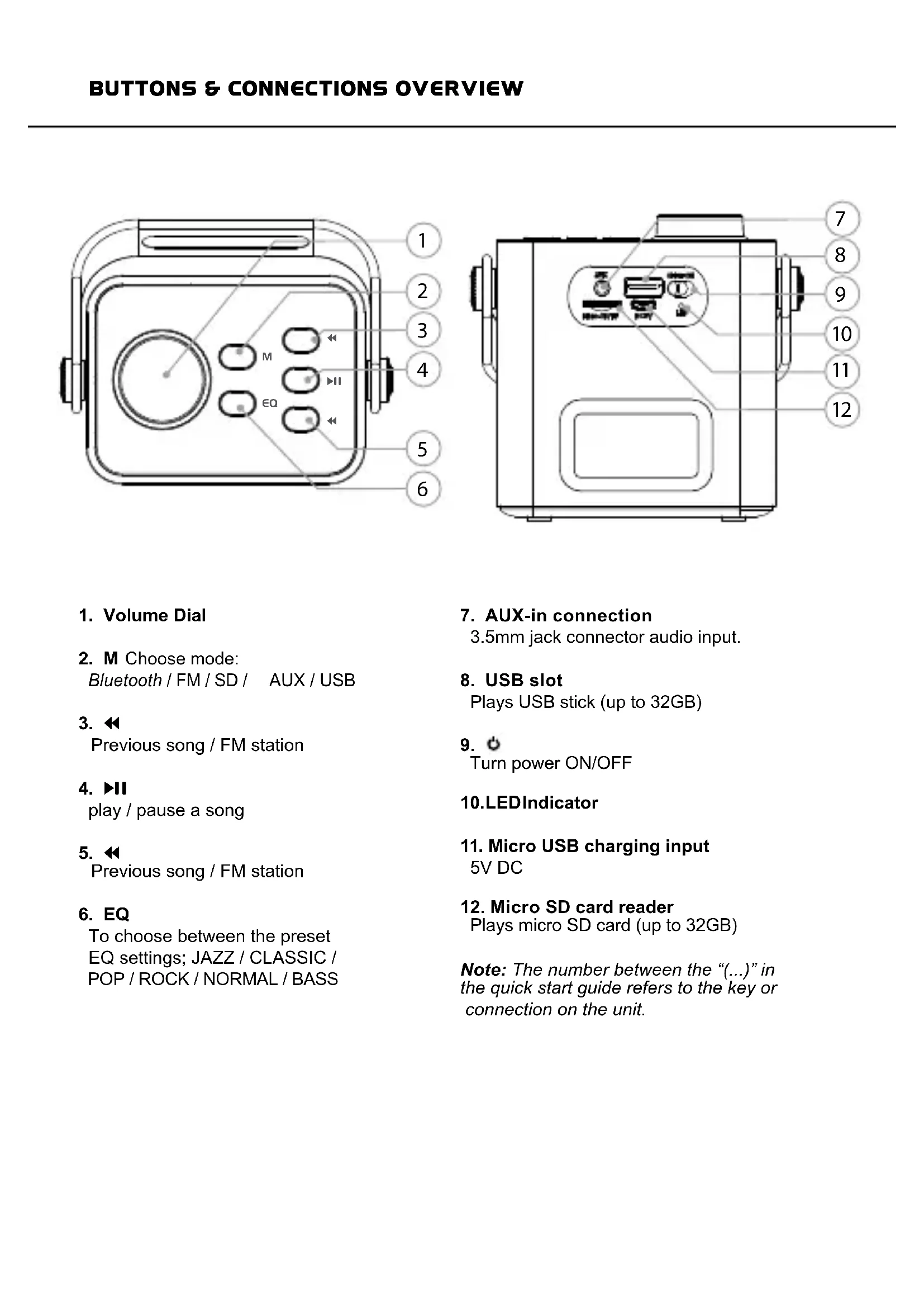
- Volume Dial
- M Choose mode: Bluetooth / FM / SD / AUX / USB
- Previous song / FM station
- play / pause a song
- Previous song / FM station
-
EQ To choose between the preset EQ settings;JAZZ/CLASSIC/ POP/ROCK/NORMAL/BASS
-
AUX-in connection 3.5mm jack connector audio input.
- USB slot Plays USB stick (up to 32GB)
- Turn power ON/OFF
10.LEDIndicator
- Micro USB charging input 5V DC
- Micro SD card reader Plays micro SD card (up to 32GB)
Note: The number between the "(..." in the quick start guide refers to the key or connection on the unit.
-
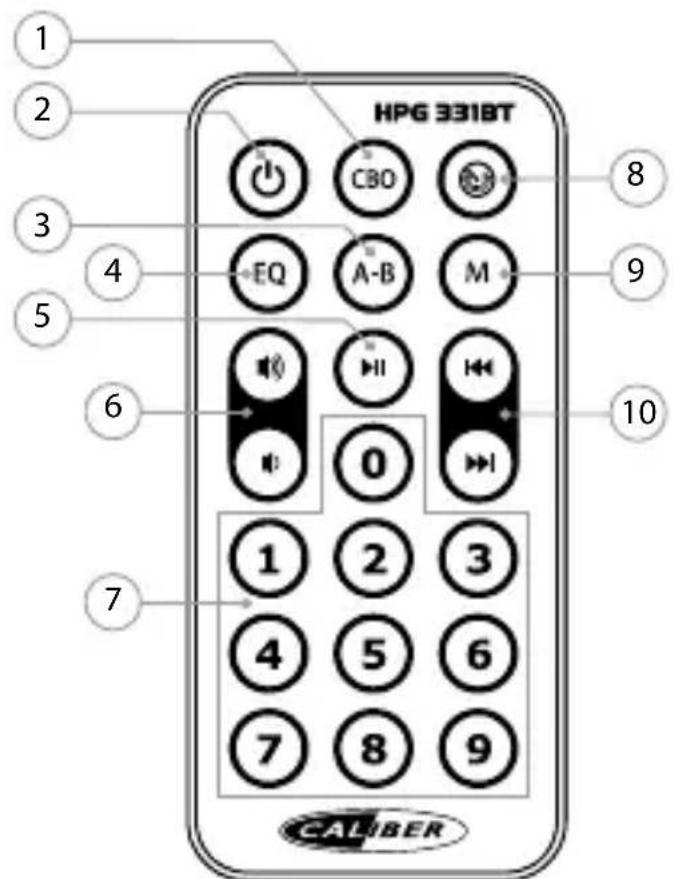
CBO
-
ALL: Repeat all (default)
- RAND: Random playmode
-
SING: Repeat current song
-
Standy
Turn ON/OFF standby mode (only if unit switch is ON)
- A-B
To choose a playlist/song section to play/repeat.
- EQ
To choose between the preset EQ settings; JAZZ / CLASSIC / POP / ROCK / NORMAL / BASS
5.
Bluetooth & SD mode:
- play/pause playback
- Call answer/end (at incoming call)
FM mode:
long press: auto.freq scan and store
- Volume /
In- or decrease volume (0~32)
- Numeric buttons (0 9)
SD mode:
to type in track number
FM mode:
to type in frequency number
- Radio channel search
Start a fresh scan for the strongest radio stations with automatic storage.
- Mode
Switch between;
FM / Bluetooth / USB / SD / AUX
-
/
-
Bluetooth & SD mode:
Short press:
previous / next track
Long press:
fast backward / fast forward
FM mode:
short press: previous / next preset station
Power ON/OFF
- Switch the [ ] (9) to turn ON.
- Switch [ Ⓞ] (9) again to turn OFF.
Battery charging
The device has a built-in rechargeable battery. The unit is provided with a USB-to-Micro USB cable. Connect the USB to a 5V USB port and the other end to the DC-in of the unit (11). While charging, the indicator will light up and will turn OFF when fully charged.
The unit will operate without the charging cable using the internal battery.
The battery discharge rate depends on the use of it. E.G: Heavy, loud, bass music will use more energy to produce than spoken word.
Bluetooth connection
- The speaker is automatically in Bluetooth mode (LED is flashing quickly in blue). Else use the [M] button (2) to select the Bluetooth mode.
- Set your Bluetooth device to 'Search' using the devices' Bluetooth menu.
- Choose 'HPG331BT_CALIBER' from the list. If required, confirm the pairing with the passkey: "0000".
- When the devices are paired successfully, a sound will be heard and you can start playing music on your device. If your device supports AVRCP you can use the buttons on the HPG to control the playback.
Playing from USB / micro SD card
- Insert a USB-stick / micro SD card into the slot, the stored music will be played automatically.
While playing, short press [ ] or [ ] (3/5) to select the previous or next song.
Note: Under Bluetooth or FM mode, if a micro SD will be inserted it will automatically start playing it. To return to the previous mode, use the [ M] button (2).
FM Mode
- Press the [M ] button (2) to switch to FM mode.
- Short press the [▶II] (4) button to search FM stations.
- Use [< ]/ [▶] (3/5) to switch between FM stations.
AUX-IN:
For the optional wired connection you can connect an external device e.g.
MP3 player to the AUX-in of the HPG using the provide jack-to-jack cable.
- Use the provided 3.5mm jack-to-jack cable or another cable with a 3.5mm jack plug, to connect an external device to the AUX-in (7).
- The HPG will go into AUX mode automatically.
- To control the playback, use the controls on your external device.
Note: The playback control buttons on the HPG will not work in this mode.
Power ON/OFF
Tpoosooia evapn/δiakotn (ON/OFF)
-PlntoTo [O] (9) yia va evepyotoinθεi.
PiEe ava [b] (9) via va aTevpyoToin _i
ΦoPtiOμTatapiaC
H oukeun diaheTei evomegaatwuev n eTavaopptioevn mTataia. H ovad aivai epodiaou evn e kalwio USB-oe-Micro USB. uovdeote kaiwio USB o thupa USB 5V (11)kai to aAko akpo otnv utdoxh DC-in tnc voadac. Kat a tn option gn avasei miia evdiqn kai oBnoi otav ivai pnpwoc optioevn.
H movába λeitoupyei xwpi to kaλδio φóptiαns, xpnoiopoioiwvtaç tnv evωμatωμevn μπatapia. O xpovoç avanapaywyng εxaptatai ano tn xphon ncs ouakeuç. I.x.: Iia evtovn, duvatn mouikn μe πλa μπaa ataitei TEPIOOTepn Evpeia σ οxéon μe tny aπλ ouiλia.
Σνδεση Bluetooth
To nxeio maievau tomuatao tn aeitoupyia Bluetooth (to LED avaabobrnevypinyopa pTxAopETiKa xpnoipoiotote To nAiktpo [M] (2) yia va etiAeEe taeitoupyia Bluetooth.
- Puθμiστε ηι συακεύνιBluetooth στη λειρουργία 'Search-Avaζήτησι' χροσιμοποιώντας το μενού Bluetooth της συακεύνις.
- Eπλεξετ'HPG331BT_CALIBER' απο τη λιστα.Ενχρείαζεται, επιβεβαιωτε τη ζεύξη πληκτρολούγυντας τον κωδικό προσβασης: "0000".
- Meta tvv etiuxn ceuugn tow oukeuwv, 0a akouotei evac nxc kai mtopeite va ekivnoete tn v avattapaywyn mouoknctn oukeun oac. Eav n ouokeun oac utootnpici to npopia AVRCP, mtopeite emionc va xpnoiotoine T a nnktpa oto HPG yia tov elyxyo ts c avattapaywyng.
Avapaywyn ano kapra SD
GB Old appliances and/or batteries must not be disposed with garbagel If the device/battery can not be used anymore, every user is legally obliged to dispose of old appliances and/or batteries separated from the garbag, e.g. at a collection point of his municipality district.