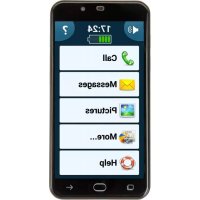
PowerTel M9500 - Smartphone Amplicomms - Free user manual and instructions
Find the device manual for free PowerTel M9500 Amplicomms in PDF.


| Product type | Senior smartphone |
| Brand | Amplicomms |
| Model | PowerTel M9500 |
| Dimensions | approx. 144 × 72 × 11 mm |
| Weight | approx. 177 g with battery |
| Operating system | Android |
| Memory | 1 GB RAM, 8 GB ROM, expandable up to 32 GB via micro SD card |
| Screen | Touchscreen |
| Camera | Front and rear camera |
| Connectivity | Wi-Fi, mobile data 4G/3G/2G, Dual SIM |
| Dual SIM | Yes (1 x Standard SIM, 1 x Micro SIM) |
| Battery | Rechargeable lithium-ion |
| Battery life | Not specified |
| Charger | Micro USB, EU standard |
| Headphone jack | 3.5 mm jack |
| SOS emergency button | Yes (long press) |
| Audio amplification | Amplification button during calls |
| Hearing aid compatible | Yes |
| Included accessories | Charger, battery, headset, USB cable, SIM adapter, user manual |
| Optional accessories | Protective case, screen protector, spare batteries |
| Warranty | 2 years |
Frequently Asked Questions - PowerTel M9500 Amplicomms
User questions about PowerTel M9500 Amplicomms
0 question about this device. Answer the ones you know or ask your own.
Ask a new question about this device
Download the instructions for your Smartphone in PDF format for free! Find your manual PowerTel M9500 - Amplicomms and take your electronic device back in hand. On this page are published all the documents necessary for the use of your device. PowerTel M9500 by Amplicomms.
USER MANUAL PowerTel M9500 Amplicomms
4G Band-FDD LTE (800/1800/2100/2600 MHz)
SIM + 4G USIM; dual standby
M4/T4
MTK 6735M Quad-cortex 1GHz CPU
Android 5.1
Front 2 M pixel, Rückseite 8 M pixel, Autofocus
IEEE 802.11b/g/n, 2G GPRS, 3G: WCDMA/HSPA, 4G:FDD-LTE
Li-Ionen, 3.7V, 3200 mAh
bis zu +40dB
bis zu 8 Stunden
bis zu 210 Stunden
The M9500 features a simple user interface and is still a full-fledged smartphone with a camera, an internet connection (WiFi access or data carrier provided by the mobile operator) and other features familiar to traditional smartphones.
To select a menu item, enter a digit when dialling a telephone number, enter a character when writing a message or all other actions, press and hold the appropriate area of the touch-sensitive screen until a vibration is felt (about 1 second). Thus, erroneous operations are largely avoided.
The built-in operating instructions (icon "?", 11 in the figure) support you in the day-to-day use of the M9500, so an instruction manual is not absolutely necessary. However, the M9500 offers further adjustment possibilities and performance features, for which there is a detailed instruction manual available.
Use the free download to get the complete user guide as PDF on our web site www.amplicomms.com.
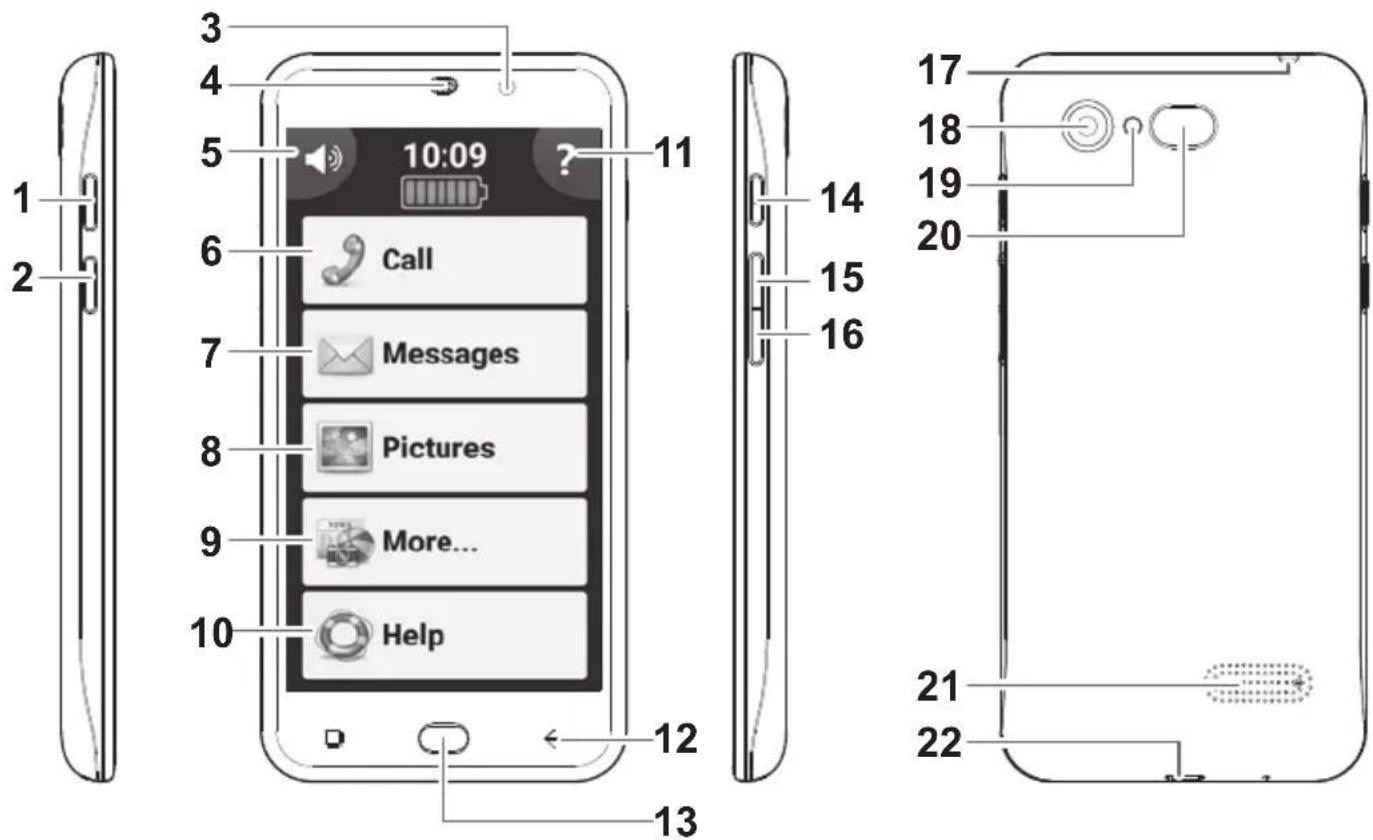
1 Get to know your M9500
1.1 At a glance
1 Torch button (long press)
2 Boost button (long press whilst in a call to boost the receiver volume)
3 Front camera
4 Receiver
5 Silent / Vibrate only / Normal mode sound
6 Calls
Phone book, speed dial, calls log
7 Message Center - SMS, WhatsApp, email, etc. all in one place
8 Pictures Center - View received photos and videos sent to you by WhatsApp, email etc.
9 More . . . Flashlight, camera, applications, settings etc.
10 Help - Technical assistance from a family member
11 Built in User Guide
12 Back button
13 Home Button
14 Turn on/off the screen.
15 Volume up key
16 Volume down key
17 Headset socket
18 Main camera
19 Flashlight / Flash LED
20 Emergency call (SOS) key
21 Speaker
22 Micro-USB socket for charging
Helpline 0844 800 6503 (See page 47 or M9500 user guide for costs and hours of operation)
1.2 Delivery contents
1 Mobile phone 1 Lithium Ion Battery 1 Battery charger
1 Headset 1 USB cable 1 SIM card adapter
1 Quick Start Guide
1.3 Insert SIM card(s), memory card and battery
Possible risk of swallowing small parts!
The SIM card can be removed. Small children could swallow it. Please make sure that the SIM card is not bent or scratched. Avoid contact with water, dirt, or electrical charges.
If you use the SIM card from your previous phone then you will keep your phone number. It is highly recommended to copy your phone contacts from your previous phone to the SIM card before removing the SIM card and inserting it into the M9500.
- The phone must be powered off!
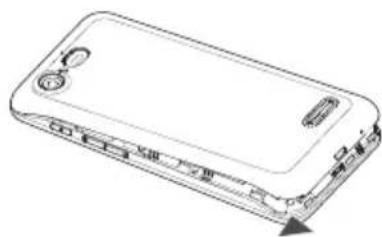
- Remove the back cover by sliding a fingernail in the small slot found on the bottom side of the phone, and pulling the cover up.
- If a battery is inserted, remove it.
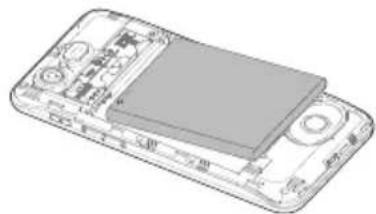
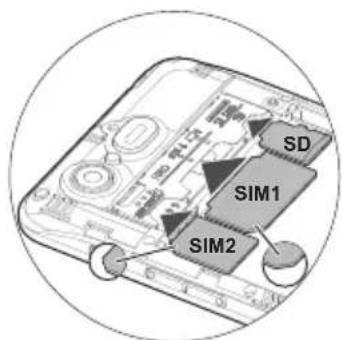
- The M9500 offers two equivalent SIM card holders in different sizes (slot 1 for standard SIM cards used in older mobile phones, and slot 2 for micro SIM cards commonly used in smartphones). Depending on the format of your SIM card, you can choose which SIM card holder you want to use. Insert the SIM card(s) into the SIM card holder(s) with the gold contacts facing down as shown in the sketch. Pay attention to the position of the bevelled corner.
In addition, the device supports the simultaneous operation of two SIM cards. This enables you to use cards from two different networks and/or countries. Before making an outgoing call, sending a text message or using
Helpline 0844 800 6503 (See page 47 or M9500 user guide for costs and hours of operation)
data services the phone will prompt you to decide and chose which SIM Card to use if you are using two at that time (depending on Android: Settings -> Advanced settings -> SIM cards).
NOTE: Both card slots (1=Standard SIM, 2=Micro SIM) support LTE (4G). However, if you use two SIM cards at a time, the SIM card in slot 2 is limited to UMTS/GSM (3G/2G).
- You have the option to insert a micro SD card (max. 32 GB) to increase the storage capacity. Slide the memory card, with the golden contacts facing down, into the slot until it stops.
- Insert the battery. In doing so, the battery's contacts will be on the left and point up. Press lightly on the bottom end of the battery until it snaps into place.
- Place the back cover back onto the phone and press firmly all around the edges until it snaps into place.
1.4 Charging the battery
- Ensure that the battery is correctly installed before charging. Do not remove the battery while the phone is charging. The phone could be damaged as a result.
- When first starting your phone charge the battery for at least 4 hours. Some batteries only reach their full capacity after multiple complete charging/discharging cycles.
- Insert the small plug of the charger into the mini USB charging socket (22 in the figure), ensuring the plug is inserted the correct way around. Do not use excessive force when inserting the plug.
- Connect the charger. For safety reasons use only the charger delivered with phone.
Helpline 0844 800 6503 (See page 47 or M9500 user guide for costs and hours of operation)
1.5 Turning on your mobile phone
To turn on your phone hold the On-Off button (14 in the figure) at the side of the phone down until the display lights up. Depending on the setting of your SIM card you will then be prompted to enter your PIN.
1.6 First use
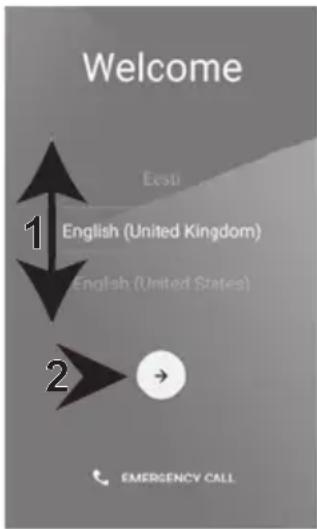
When you turn on your phone for the first time, you will be guided by an assistant.
You'll see a Welcome screen.
Select the language you want by swiping with your finger up or down on the screen (1) and then touch the arrow (2) to continue. Follow the instructions on the screen.
Note: To complete the setup process, it's best to have a Wi-Fi connection, but if you don't have, just skip this step.
Remark: With the SIMPLE Smartphone software, it's better not to use a lockscreen, whereas it is suggested by Android wizard. Please skip this step.
1.7 Enter SIM PIN
(relevant for some carriers only)
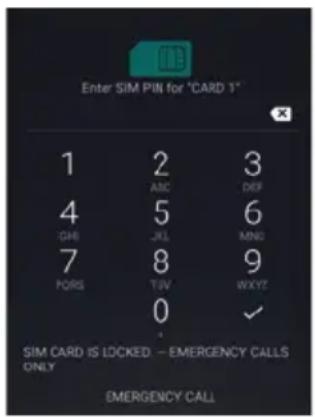
Depending on the setting of your SIM card you may then be prompted to enter your PIN.
Enter the SIM PIN and then click
The phone will log onto the mobile phone network.
Note: The SIM-Code (the SIM card PIN), which you received together with the SIM card, protects the SIM card from use by unauthorized persons. The PIN2 code, which you will receive together with certain SIM cards, is required for access to certain services. If you enter the PIN, or PIN2, incorrectly three times in a
row you will be prompted to enter the PUK or the PUK2 code. Please contact your mobile phone company if you do not know these codes.
1.8 Sleep mode
After approx. 1 minute of non-use, the M9500 screen will automatically go into "sleep mode" to save battery power and the screen will go dark. To "wake" the phone, simply press the On-Off button (14 in the figure) at the side of the phone briefly.
1.9 Turning off your mobile phone
To turn off your phone press "More" -> "3" -> "Power off" and answer the confirmation query.
Available accessories:
- Protective cover in leather optic
- Protective foils
- Replacement batteries
For further information, please visit: www.amplicomms.com
Helpline 0844 800 6503 (See page 47 or M9500 user guide for costs and hours of operation)
Appendix
Technical data
| Band | GSM (850/900/1800/1900 MHz), WCDMA (2100/850 MHz), 4G Band-FDD LTE (800/1800/2100/2600 MHz) |
| Dual cards | SIM + 4G USIM; dual standby |
| HAC | M4/T4 |
| Processor | MTK 6735M Quad-cortex 1GHz CPU |
| OS | Android 5.1 |
| Memory | RAM 1 GB DDR2, ROM 8 GB, supports a TF Memory Card up to 32 GB (optional) |
| Camera | Front 2 M pixel, Rear 8 M pixel, Autofocus |
| WiFi / Mobile data | IEEE 802.11b/g/n, 2G GPRS, 3G: WCDMA/HSPA, 4G:FDD-LTE |
| Battery | Li-Ion, 3.7V, 3200 mAh |
| Maximum earpiece volume | up to +40dB |
| Talk time | up to 8 hours |
| Standby time | up to 210 hours |
| Dimensions / Weight | approx. 144 x 72 x 11 mm / approx. 177 g incl. battery, approx. 118 g without battery |
| USB jack | Micro USB, EU Standard |
| Headset connection | 3.5 mm jack |
| SAR | GSM 900 - Head: 0.133 W/kg Body: 0.518 W/kgDCS 1800 - Head: 0.265 W/kg Body: 0.928 W/kgWCDMA Band I - Head: 0.161 W/kg Body: 0.626 W/kgWCDMA Band VIII - Head: 0.223 W/kg Body: 0.599 W/kgLTE Band 1- Head: 0.211 W/kg Body: 0.657 W/kgLTE Band 3 - Head: 0.492 W/kg Body: 1.269 W/kgLTE Band 7 - Head: 0.269 W/kg Body: 0.850 W/kgLTE Band 20 - Head: 0.171 W/kg Body: 0.342 W/kgWIFI 2.4G - Head: 0.067 W/kg Body: 0.162 W/kg |
Service hotline
In the event of technical problems, please contact our service hotline under tel. 0844 800 6503 (Using a UK landline, at the time of going to print: calls cost 6p for connection charge and then 5p a minute. Mobile costs may vary.) In the case of claims under the terms of guarantee, contact your sales outlet. There is a 2 year period of guarantee.
Tips on the battery
- Only use batteries, cables and charging unit approved by the manufacturer, otherwise the battery could be damaged.
Do not short circuit the battery. Always leave the battery in the phone to avoid accidentally short circuiting the battery contacts. - Keep the battery contacts clean and free of dirt.
The battery can be charged/discharged hundreds of times but its service life is limited. Replace the battery when the battery power has decreased noticeably.
Intended use
This mobile phone is designed for use when connected to a mobile phone network. Any other use is considered unintended use. Unauthorized modification or reconstruction is not permitted. Under no circumstances complete any repair work yourself.
Areas of use
- Do not use the phone in prohibited areas.
- Switch the phone off in the vicinity of medical equipment (e.g. in hospitals).
- Do not use the phone in petrol stations or near fuels and chemicals.
- Check with the airline whether mobile phones may be used on board.
Safety Information
Prevent exposure to smoke, dust, vibration, chemicals, moisture, heat and direct sunlight. The phone is not waterproof; therefore, keep it dry.
- Only use original accessories and batteries. Never attempt to connect other products.
If you want to connect the phone to another device, read the manual supplied with that device with regard to any detailed safety information.
- Never attempt to connect incompatible products.
- Repairs to this device may only be completed by qualified service personnel.
- All mobile communication equipment is subject to interference which may impair its performance.
- Keep the phone and accessories out of the reach of children.
- The SIM card can be removed. Caution! Small children can swallow them.
The ringing tone is issued via the loudspeaker. Take an incoming call first and then hold the phone to your ear. This prevents any possible hearing damage.
- Only use the phone while driving or riding a transport vehicle in road traffic when using the approved handsfree equipment and appropriately positioned holders. Ensure that no safety-related functions are interfered with when operating the phone. It is essential to observe the applicable national laws and regulations.
Always maintain a distance of at least 15cm to implanted heart pacemakers to prevent any possible interference. If you have had a pacemaker implanted, do not carry the phone in a breast pocket when switched on. Always hold the phone to the ear furthest away from the pacemaker during calls.
Switch the phone off immediately if you notice or suspect any adverse effects.
This phone is hearing aid compatible. If you wear a hearing aid, however, please contact your doctor or the hearing aid manufacturer to inquire about any possible impairments through mobile communication equipment.
- Do not rely on the mobile phone as a safeguard for emergencies. For a variety of technical reasons, it is not possible to guarantee a reliable connection under all circumstances.
Power adapter plug
The power adapter plug supplied fulfils the ecodesign requirements of the European Community (Directive 2005/32/EC). This means that the current consumption is considerably less, both in operation as well as in standby, in comparison to older power adapter plug models.
Disposal
In order to dispose of your device, take it to a collection point provided by your local public waste authorities (e.g. recycling centre). According to laws on the disposal of electronic and electrical devices, owners are obliged to dispose of old electronic and electrical devices in a separate waste container. The symbol indicates that the device must not be disposed of in normal domestic waste!

Batteries represent a hazard to health and the environment!
Never open, damage or swallow batteries or allow them to pollute the environment. They may contain toxic, ecologically hazardous heavy metals. You are legally required to dispose of batteries and rechargeable batteries safely, either at a retailer that sells batteries or at an appropriate collection point that provides a suitable container. Never put batteries in the household waste. Disposal is free of charge.
Lithium batteries and battery packs of all kinds should be fully discharged before you drop them off. Be sure to take precautions against short-circuits, e.g. by covering poles with adhesive tape, to prevent the risk of a fire.
Packaging materials must be disposed of according to local regulations.

Declaration of Conformity
This device fulfils the requirements stipulated in the EU directive: RED 2014/53/EU. Conformity with the above mentioned directive is confirmed by the CE mark on the device. To view the complete Declaration of Conformity, please refer to the free download available on our web site www.amplicomms.com
Helpline 0844 800 6503 (See page 47 or M9500 user guide for costs and hours of operation)
Guarantee
AMPLICOMMS equipment is produced and tested according to the latest production methods. The implementation of carefully chosen materials and highly developed technologies ensure trouble-free functioning and a long service life. The terms of guarantee do not apply when a device malfunction was caused by the mobile telecommunications network operator/provider. The terms of guarantee do not apply to the batteries or power packs used in the products. The period of guarantee is 24 months from the date of purchase.
All deficiencies related to material or manufacturing errors within the period of guarantee will be redressed free of charge. Rights to claims under the terms of guarantee are annulled following tampering by the purchaser or third parties.
Damage caused as a result of improper handling or operation, normal wear and tear, incorrect positioning or storage, improper connection or installation or Acts of Gods and other external influences are excluded from the terms of guarantee. In the case of complaints, we reserve the right to repair defective parts, replace them or replace the entire device.
Replaced parts or devices become our property. Rights to compensation in the case of damage are excluded where there is no evidence of intent or gross negligence by the manufacturer.
If your device shows signs of defect during the period of guarantee, please return it to the sales outlet in which you purchased the AMPLICOMMS device together with the purchase receipt. All claims under the terms of guarantee in accordance with this agreement can only be asserted at the sales outlet.
No claims under the terms of guarantee can be asserted after a period of two years from the date of purchase and hand-over of the product.
4G Bande FDD LTE (800/1800/2100/2600 MHz)
SIM + 4G USIM; dual standby
M4/T4
MTK 6735M Quad-cortex 1GHz Proesseur
Android 5.1
frontale 2 M pixels, dos 8 M pixels, Autofocus
IEEE 802.11b/g/n, 2G GPRS, 3G: WCDMA/HSPA, 4G:FDD-LTE
lithium- Ions, 3.7V, 3200 mAh
jusqu'à 40dB
jusqu'à 8 heures
jusqu'à 210 heures
Banda 4G FDD LTE (800/1800/2100/2600 MHz)
SIM + USIM 4G; dual standby
M4/T4
MTK 6735M Quad-cortex 1GHz CPU
Android 5.1
4G Band-FDD LTE (800/1800/2100/2600 MHz)
SIM + 4G USIM; dual standby
M4/T4
MTK 6735M Quad-cortex 1GHz CPU
Android 5.1
Banda 4G-FDD LTE (800/1800/2100/2600 MHz)
SIM + 4G USIM; dual standby
M4/T4
MTK 6735M Quad-cortex 1GHz CPU
Android 5.1
Frontal 2 M pixel,trasera 8 M pixel, Autofocus
IEEE 802.11b/g/n, 2G GPRS, 3G: WCDMA/HSPA, 4G:FDD-LTE
Iones de litio, 3.7V, 3200 mAh
hasta + 40dB
hasta 8 horas
hasta 210 horas
aprox. 144× 72 / 11mm /aprox. 177g con bateria, aprox 118g sin bateria
Micro USB, norma UE
3.5 mm clavija jack
GSM 900 - Head: 0.133 W/kg Body: 0.518 W/kg
DCS 1800 - Head: 0.265 W/kg Body: 0.928 W/kg
WCDMA Band I - Head: 0.161 W/kg Body: 0.626 W/kg
WCDMA Band VIII - Head: 0.223 W/kg Body: 0.599 W/kg
LTE Band 1-Head:0.211 W/kg Body:0.657 W/kg
LTE Band 3 - Head: 0.492 W/kg Body: 1.269 W/kg
LTE Band 7 - Head: 0.269 W/kg Body: 0.850 W/kg
LTE Band 20 - Head: 0.171 W/kg Body: 0.342 W/kg
WIFI 2.4G - Head: 0.067 W/kg Body: 0.162 W/kg
Whenever you use the telephone, please use a computer.
Selecionar no érá de boas-vindas o idioma desejado, deslizando o dedo no érá para cima ou para baixo (1) e toque depuis na seta (2), para continuar.
4G Band-FDD LTE (800/1800/2100/2600 MHz)
SIM + 4G USIM; dual standby
M4/T4
MTK 6735M Quad-cortex 1GHz CPU
Android 5.1
4G Band-FDD LTE (800/1800/2100/2600 MHz)
SIM + 4G USIM; dual standby
M4/T4
MTK 6735M Quad-karna 1GHz CPU
Android 5.1
Front 2 Megapixel, baksida 8 megapixel, Autofokus
IEEE 802.11b/g/n, 2G GPRS, 3G: WCDMA/HSPA, 4G:FDD-LTE
Li-Ion, 3.7V, 3200 mAh
4G Band-FDD LTE (800/1800/2100/2600 MHz)
SIM + 4G USIM; dual standby
M4/T4
MTK 6735M Quad-cortex 1GHz CPU
Android 5.1
RAM 1 GB DDR2, ROM 8 GB, stotter et TF Memory Card inntil 32 GB (optional)
Front 2 M pixel, Bakside 8 M pixel, Autofokus
IEEE 802.11b/g/n, 2G GPRS, 3G: WCDMA/HSPA, 4G:FDD-LTE
Li-Ionen, 3.7V, 3200 mAh
inntil +40dB
inntil 8 timer
inntil 210 timer
ca. 144× 72× 11mm / ca.177g med batteri, ca. 118g uten batteri
Micro USB, EU Standard
3.5 mm laseplugg
GSM 900 - Head: 0.133 W/kg Body: 0.518 W/kg
DCS 1800 - Head: 0.265 W/kg Body: 0.928 W/kg
WCDMA Band I - Head: 0.161 W/kg Body: 0.626 W/kg
WCDMA Band VIII - Head: 0.223 W/kg Body: 0.599 W/kg
LTE Band 1- Head:0.211 W/kg Body:0.657 W/kg
LTE Band 3 - Head: 0.492 W/kg Body: 1.269 W/kg
LTE Band 7 - Head: 0.269 W/kg Body: 0.850 W/kg
LTE Band 20 - Head: 0.171 W/kg Body: 0.342 W/kg
WIFI 2.4G - Head: 0.067 W/kg Body: 0.162 W/kg
Service-Hotline
4G band-FDD LTE (800/1800/2100/2600 MHz)
SIM + 4G USIM; dual standby
M4/T4
MTK 6735M Quad-cortex 1GHz CPU
Android 5.1
RAM 1GB DDR2, ROM 8 GB, understotter et TF-hukommelseskort
Front 2 M pixel, bagkamera 8 M pixel, autofocus
IEEE 802.11b/g/n, 2G GPRS, 3G: WCDMA/HSPA, 4G:FDD-LTE
Li-ioner, 3.7V, 3200 mAh
optil +40dB
op til 8 timer
op til 210 timer
ca. 144× 72× 11mm / ca .177 g med batteri, ca. 118 g laden batteri
Micro-USB, EU standard
3.5 mm jackstick
GSM 900 - Head: 0.133 W/kg Body: 0.518 W/kg
DCS 1800 - Head: 0.265 W/kg Body: 0.928 W/kg
WCDMA Band I - Head: 0.161 W/kg Body: 0.626 W/kg
WCDMA Band VIII - Head: 0.223 W/kg Body: 0.599 W/kg
LTE Band 1- Head:0.211 W/kg Body:0.657 W/kg
LTE Band 3 - Head: 0.492 W/kg Body: 1.269 W/kg
LTE Band 7 - Head: 0.269 W/kg Body: 0.850 W/kg
LTE Band 20 - Head: 0.171 W/kg Body: 0.342 W/kg
WIFI 2.4G - Head: 0.067 W/kg Body: 0.162 W/kg
Service-hotline
Ved tekniske problemer kontakt vores service-hotline. Telefonummeret finder du pa vores hjemmeside www.amplicomms.com
Ved garantikrav skal du kontakte din forhandler. Garantiperioden er 2 ar.