KXHNC301 - Smart Home PANASONIC - Free user manual and instructions
Find the device manual for free KXHNC301 PANASONIC in PDF.


| Product type | Additional camera for baby monitor |
| Brand | Panasonic |
| Model | KX-HNC301 |
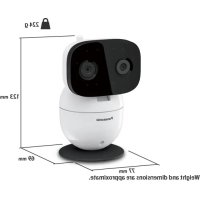
| Dimensions (H × W × D) | 123 mm × 77 mm × 69 mm |
| Weight | 224 g |
| Power supply | AC adapter 100-240 V AC, 50/60 Hz, output 5 V DC, 1000 mA |
| Power consumption | Normal: 2.8 W; Night vision: 4.2 W; Standby: 2.1 W |
| Wireless standard | DECT 1.92-1.93 GHz, RF power max 115 mW |
| Transmission range | Up to 457.5 m (outdoors, without interference) |
| Image sensor | 0.3 megapixel CMOS |
| Minimum illumination | 0 lux (with infrared LED) |
| Horizontal viewing angle | Approx. 37° |
| Vertical viewing angle | Approx. 28° |
| Adjustable angles | Horizontal: ±136°; Vertical: +0° to -44° |
| Motion detection | Built-in optical sensor |
| Mounting | On flat surface or wall (adapter supplied) |
| Care and cleaning | Clean with a soft damp cloth; do not use solvents |
| Safety | Do not expose to water; use only the supplied adapter; keep the cord out of reach of children (risk of strangulation) |
| Accessories supplied | AC adapter, wall mounting adapter, screws |
| Warranty (Canada) | 1 year parts and labor |
| Regulatory information | Complies with ISED Canada CNR; indoor use only |
Frequently Asked Questions - KXHNC301 PANASONIC
User questions about KXHNC301 PANASONIC
0 question about this device. Answer the ones you know or ask your own.
Ask a new question about this device
Download the instructions for your Smart Home in PDF format for free! Find your manual KXHNC301 - PANASONIC and take your electronic device back in hand. On this page are published all the documents necessary for the use of your device. KXHNC301 by PANASONIC.
USER MANUAL KXHNC301 PANASONIC
Baby Monitor Additional camera
Model No. KX-HNC301
(Camera Model No. KX-HNC300)
Thank you for purchasing a Panasonic product.
This unit is an additional camera compatible with the following series of Panasonic Baby Monitor:
-KX-HN3001/KX-HN3051
You must register this camera with your baby monitor before it can be used. This installation manual describes only the steps needed to register and begin using the camera. Please read the baby monitor's operating instructions for further details.
Please read this installation manual before using the unit and save it for future reference.
For U.S.A. users
For assistance, please contact us at 1-800-272-7033 or visit our Web
site: http://shop.panasonic.com/support for customers in the U.S.A.
For Canada users
For assistance, please visit our support page on:
www.panasonic.ca/english/support
www.panasonic.ca/french/support
Introduction
Accessory information
Supplied accessories
| No. | Accessory item/Part number Qty. | |
| ① | AC adaptor*1 | 1 |
| ② | Wall mounting adaptor*2 | 1 |
①


For U.S.A. users:
1 PNWYAC300W00 (for U.S.A. users only)
2 PNWYAC300W01 (for U.S.A. users only)
Other information
- Bsign and specifications are subject to change without notice.
- The illustrations in these instructions may vary slightly from the actual product.
Connections
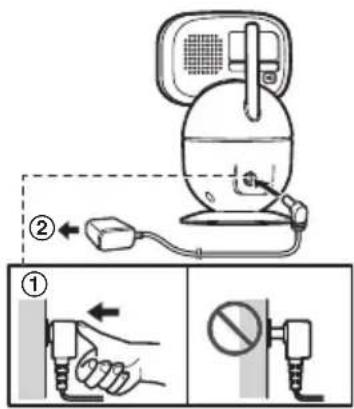
① Insert the AC adaptor plug firmly into the DC jack.
② Connect the AC adaptor to the power outlet.
Note:
- Ide only the supplied AC adaptor S006AKU0500100.
- The camera unit can be placed on a flat surface. Make sure to choose a stable location.
The camera can also be mounted on the wall (page 10).
Note about power connections
AC adaptor connection
- The AC adaptor must remain connected at all times. (It is normal for the adaptor to feel warm during use.)
- The AC adaptor should be connected to a vertically oriented or floor-mounted AC outlet. Do not connect the AC adaptor to a ceiling-mounted AC outlet, as the weight of the adaptor may cause it to become disconnected.
Installation
Registering a camera unit
You must register the camera unit to your monitor unit before it can be used.
1 Monitor unit:
$$ \begin{array}{l}\text {[ M E N U ]} \rightarrow [ \bigstar ]: \text {" C a m e r a M a n g e m e n t "} \rightarrow [ O K ] \rightarrow [ \bigstar ]: \text {" A d d}\\text {C a m e r a "} \rightarrow [ O K ]\end{array} $$
-
An operation guide is displayed. Press [OK] to continue.
-
Complete the following step within 90 seconds.
2 Camera unit:
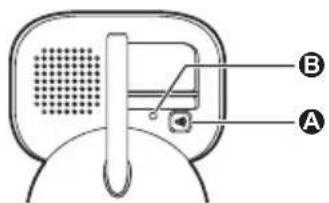
Press and hold [ ] for 3 seconds until the LED indicator starts blinking.
A 【】(Pairing)
3 LED indicator
Note:
- Amessage is displayed on the monitor unit to show if the registration was successful or not, and a beep sounds.
LED indicator
You can use the LED indicator to confirm the camera unit's status.
| LED indicator Status | |
| Off No power | |
| Green, lit Normal operation | |
| Green, blinking slowly Registration mode | |
| Green, blinking quickly Device malfunction |
Graphical symbols for use on equipment and their descriptions
| Symbol | Explanation Symbol | Explanation | |
| ~ | Alternating current (A.C.) | □ | Class II equipment (equipment in which protection against electric shock relies on Double Insulation or Reinforced Insulation) |
| --- | Direct current (D.C.) | ||
| For indoor use only Stand-by (power) | |||
About this system
- This system is an auxiliary system; it is not designed to provide complete protection from property loss. Panasonic will not be held responsible in the event that property loss occurs while this system is in operation.
- This product should not be used as substitute for a medical or caregiver's supervision. It is the caregiver's responsibility to stay close enough to handle any eventuality.
- The system's wireless features are subject to interference, therefore functionality in all situations cannot be guaranteed. Panasonic will not be held responsible for injury or damage to property that occurs in the event of wireless communication error or failure.
- If a power failure occurs or the power is disconnected, the temperature will not be accurate for up to an hour.
Important Information
For your safety
To prevent severe injury and loss of life/property, read this section carefully before using the product to ensure proper and safe operation of your product.

WARNING
Power connection
- Completely insert the AC adaptor/power plug into the power outlet. Failure to do so may cause electric shock and/or excessive heat resulting in a fire.
- Regularly remove any dust, etc. from the AC adaptor/power plug by pulling it from the power outlet, then wiping with a dry cloth. Accumulated dust may cause an insulation defect from moisture, etc. resulting in a fire.
- Unplug the product from power outlets if it emits smoke, an abnormal smell, or makes an unusual noise. These conditions can cause fire or electric shock. Confirm that smoke has stopped emitting and contact us.
For U.S.A. users
http://shop.panasonic.com/support
For Canada users
www.panasonic.ca/english/support www.panasonic.ca/french/support
- Unplug from power outlets and never touch the inside of the product if its casing has been broken open. Danger of electric shock exists.
- Never touch the plug with wet hands. Danger of electric shock exists.
Installation
- prevent the risk of fire or electrical shock, do not expose the product to rain or any type of moisture.
- Do not place or use this product near automatically controlled devices such as automatic doors and fire alarms. Radio waves emitted from
Important Information
this product may cause such devices to malfunction resulting in an accident.
WARNING:
Strangulation Hazard: Children have STRANGLED in cords. Keep this cord out of the reach of children (more than 1 m (3 feet) away).
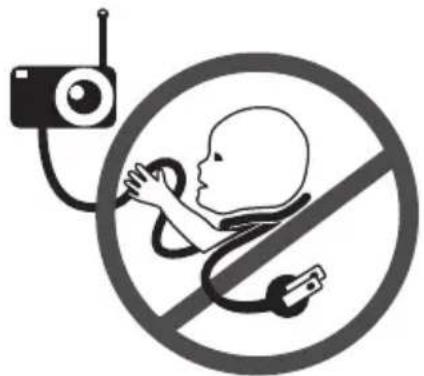
- Do not allow the AC adaptor to be excessively pulled, bent or placed under heavy objects.
- Keep small parts, such as screws, out of the reach of children. There is a risk of swallowing. In the event they are swallowed, seek medical advice immediately.
Operating safeguards
- Plug the product from power outlets before cleaning. Do not use liquid or aerosol cleaners.
- Do not disassemble the product.
- Never put metal objects inside the product. If metal objects enter the product, turn off the circuit breaker and contact an authorized service center.
Medical
- @nsult the manufacturer of any personal medical devices, such as pacemakers or hearing aids, to determine if they are adequately shielded from external RF (radio frequency) energy. DECT features
Important Information
operate between 1.92 GHz and 1.93 GHz with a peak transmission power of 115mW (max.).
- Do not use the product in health care facilities if any regulations posted in the area instruct you not to do so. Hospitals or health care facilities may be using equipment that could be sensitive to external RF energy.
CAUTION
Installation and location
- Never install wiring during a lightning storm.
- The AC adaptor is used as the main disconnect device. Ensure that the AC outlet is installed near the product and is easily accessible.
- Mount the product on the stable location where the camera unit can be adequately supported when installing.
- Do not mount the product on soft material. It may fall down, break or cause injury.
- Donot mount the product on the following materials: gypsum board, ALC (autoclaved lightweight cellular concrete), concrete block, plywood less than 25mm (1 inch) thick, etc.
Preventing accidents and injuries
- D not put your ear(s) near the speaker, as loud sounds emitted from the speaker may cause hearing impairment.
Important safety instructions
When using your product, basic safety precautions should always be followed to reduce the risk of fire, electric shock, and injury to persons, including the following:
- Do not use this product near water for example, near a bathtub, washbowl, kitchen sink, or laundry tub, in a wet basement or near a swimming pool.
- Use only the power cord indicated in this manual.
SAVE THESE INSTRUCTIONS
Other information
Routine care
- Wipe the outer surface of the product with a soft moist cloth.
- Do not use benzine, thinner, or any abrasive powder.
Camera image quality
- Camera images may have the following characteristics.
- Colors in images may differ from the actual colors.
- Faces or objects may appear dark when there is light behind the subject (i.e., backlighting).
- Image quality may be reduced in dark locations.
When the subject is lit by sunlight or halogen lights, black areas of the image may appear purplish. This is not a malfunction.
Notice:
Wall mounting
Wall mounting
- Each wall mounting adaptor to the camera unit after making the connections (page 3).
- Only use the supplied screw that is attached to the camera base when attaching the wall mounting adaptor to the camera unit. Do not use user supplied screws. This may cause the camera unit to become loose from the wall mounting adaptor.
- Mount the camera unit on the stable location where the unit can be adequately supported when installing.
- Use a string or wire to prevent the camera unit from falling and causing injury if the camera unit comes off from the wall.
- Do not mount the wall mounting adaptor to a ceiling.
- Do not mount the camera unit on a soft material. It may fall down, break or cause injury.
- Do not mount the camera unit on the following places: plaster board, ALC (autoclaved lightweight cellular concrete), concrete block, plywood less than 25mm (1 inch) thick, etc.
1 Remove the screw and then remove the camera base from the camera unit.
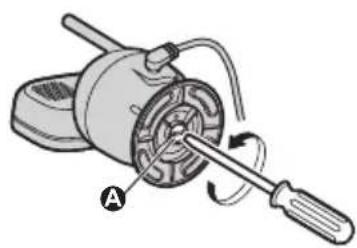
A Supplied screw
Wall mounting
2A ttach the wall mounting adaptor to the camera unit.
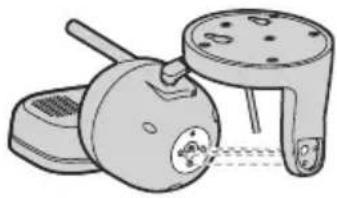
3D rive the supplied screw into the camera unit.
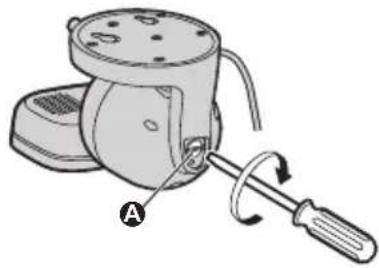
A Supplied screw
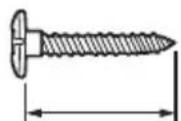
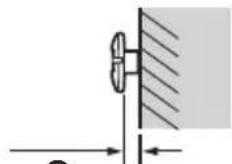
4D rive the screws (not supplied) into the wall.
Longer than 20 mm (5/32 inches)
Space 1.3 mm (1/32 inches)
B
C
Wall mounting
Note:
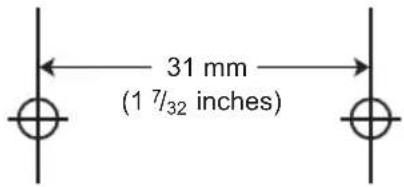
- Use the following template when determining the location of the screw holes.
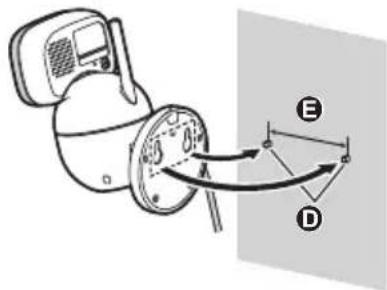
5M ount the camera unit to the wall.
D Screws
31 mm (1 7/32 inches)
6A adjust the angle of the camera unit by using [], [], [] , or [] on the monitor unit.
Appendix
Specifications
- Standards
DECT (Digital Enhanced
Cordless Telecommunications)
Frequency range
DECT: 1.92 GHz - 1.93 GHz
RF transmission power
DECT: 115 mW (max.)
Power source
Input: 100 - 240VAC
50/60 Hz
Output: 5.0 V DC, 1,000 mA
Power consumption
Normal operation: 2.8 W
Night vision mode: 4.2 W
Sleep mode: 2.1 W
- Operating conditions
0°C - 40°C (32°F-104°F)
up to 90% relative humidity (non-condensing)
Transmitting range
Up to 457.5 m (1,500 feet)
- Image sensor
0.3 megapixel CMOS
Minimum illuminance required
0|x*2
- Focal length
Fixed (0.4 m (1.3 feet) - infinity)
- Angular field of view (camera angle)
Horizontal: approx. 37°
Vertical: approx. 28°
Motion detection method
Visual sensor
- Detection range
Motion sensor:
Horizontal: approx. 37°
Vertical: approx. 28°
- Adjustable mounting angles
Horizontal: ±136°
Vertical: facing forward - facing down approx. +0° to -44°
(movable range with the pan/tilt)
- Dimensions (height × width × depth)
Approx. 123mm× 77mm×
69 mm (4 13/16 inches ×
3 1/16 inches × 2 11/16 inches)
Mass (weight)
Approx. 224 g (0.49 lb)
*1 When used in the direction of maximum radiation, in the line of sight, and with no interference.
*2 The infrared LEDs that surround the camera lens will illuminate in low-light conditions.
Appendix
FCC and other information (for U.S.A. users)
This device complies with Part 15 of the FCC Rules. Operation is subject to the following two conditions:
(1) This device may not cause harmful interference, and (2) this device must accept any interference received, including interference that may cause undesired operation.
Privacy of communications may not be ensured when using this device.
CAUTION:
Any changes or modifications not expressly approved by the party responsible for compliance could void the user's authority to operate this device.
NOTE:
This equipment has been tested and found to comply with the limits for a Class B digital device, pursuant to Part 15 of the FCC Rules. These limits are designed to provide reasonable protection against harmful interference in a residential installation. This equipment generates, uses, and can radiate radio frequency energy and, if not installed and used in accordance with the instructions, may cause harmful interference to radio communications. However, there is no guarantee that interference will not occur in a particular installation. If this equipment does cause harmful interference to radio or television reception, which can be determined by turning the equipment off and on, the user is encouraged to try to correct the interference by one or more of the following measures:
- Reorient or relocate the receiving antenna.
- Increase the separation between the equipment and receiver.
- Connect the equipment into an outlet on a circuit different from that to which the receiver is connected.
- Consult the dealer or an experienced radio/TV technician for help.
Appendix
Some devices operate at frequencies that may cause interference to nearby TVs and VCRs. To minimize or prevent such interference, this device should not be placed near or on top of a TV or VCR. If interference is experienced, move this device further away from the TV or VCR. This will often reduce or eliminate interference.
FCC RF Exposure Warning:
- This product complies with FCC radiation exposure limits set forth for an uncontrolled environment.
- To comply with FCC RF exposure requirements, the device must be installed and operated 20cm (8 inches) or more between the product and all person's body.
- This product may not be collocated or operated in conjunction with any other antenna or transmitter.
Notice:
FCC ID can be found on the rear of the unit.
Other notices and information (for Canada users)
NOTICE:
This device complies with Innovation, Science and Economic Development Canada licence-exempt RSS standard(s). Operation is subject to the following two conditions: (1) this device may not cause interference, and (2) this device must accept any interference, including interference that may cause undesired operation of the device.
RF Exposure Warning:
- This product complies with ISED radiation exposure limits set forth for an uncontrolled environment.
- To comply with ISED RF exposure requirements, the device must be installed and operated 20cm (8 inches) or more between product and all person's body.
Customer services (for U.S.A. users)
Shop Accessories!
for all your Panasonic gear
Go to
http://shop.panasonic.com/support
Get everything you need to get the most out of your Panasonic products
Accessories & Parts for your Camera, Phone, A/V products, TV, Computers & Networking, Personal Care, Home Appliances, Headphones, Batteries, Backup Chargers & more...
Customer Services Directory
For Product Information, Operating Assistance, Parts, Owner's Manuals, Dealer and Service info go to http://shop.panasonic.com/support
You may also contact us directly at: 1-800-272-7033,
Monday - Friday 9 am to 9 pm;
Saturday - Sunday 10 am to 7 pm, EST.
For the hearing or speech impaired TTY: 1-877-833-8855
As of June 2015
Limited Warranty (ONLY FOR U.S.A.)
Panasonic Products Limited Warranty
Limited Warranty Coverage (For USA Only)
If your product does not work properly because of a defect in materials or workmanship, Panasonic Corporation of North America (referred to as "the warrantor") will, for the length of the period indicated on the chart below, which starts with the date of original purchase ("warranty period"), at its option either (a) repair your product with new or refurbished parts, (b) replace it with a new or a refurbished equivalent value product, or (c) refund your purchase price. The decision to repair, replace or refund will be made by the warrantor.
| Product or Part Name | Parts | Labor |
| Home Network System Products | One (1) Year | One (1) Year |
| microSD card (Included model only) | 90 days N/A |
During the "Labor" warranty period there will be no charge for labor. During the "Parts" warranty period, there will be no charge for parts. This Limited Warranty excludes both parts and labor for non-rechargeable batteries, antennas, and cosmetic parts (cabinet). This warranty only applies to products purchased and serviced in the United States. This warranty is extended only to the original purchaser of a new product which was not sold "as is".
Mail-In Service--Online Repair Request
Online Repair Request
To submit a new repair request and for quick repair status visit our Web Site at http://shop.panasonic.com/support
When shipping the unit, carefully pack, include all supplied accessories listed in the Owner's Manual, and send it prepaid, adequately insured and packed well in a carton box. When shipping Lithium Ion batteries please visit our Web Site at
http://shop.panasonic.com/support as Panasonic is committed to providing the most up to date information. Include a letter detailing the complaint, a return address and provide a daytime phone number where you can be reached. A valid registered receipt is required under the Limited Warranty.
IF REPAIR IS NEEDED DURING THE WARRANTY PERIOD, THE PURCHASER WILL BE REQUIRED TO FURNISH A SALES RECEIPT/PROOF OF PURCHASE INDICATING DATE OF PURCHASE, AMOUNT PAID AND PLACE OF PURCHASE. CUSTOMER WILL BE CHARGED FOR THE REPAIR OF ANY UNIT RECEIVED WITHOUT SUCH PROOF OF PURCHASE.
Appendix
Limited Warranty Limits and Exclusions
This warranty ONLY COVERS failures due to defects in materials or workmanship, and DOES NOT COVER normal wear and tear or cosmetic damage. The warranty ALSO DOES NOT COVER damages which occurred in shipment, or failures which are caused by products not supplied by the warrantor, or failures which result from accidents, misuse, abuse, neglect, mishandling, misapplication, alteration, faulty installation, set-up adjustments, misadjustment of consumer controls, improper maintenance, power line surge, lightning damage, modification, introduction of sand, humidity or liquids, commercial use such as hotel, office, restaurant, or other business or rental use of the product, or service by anyone other than a Factory Service Center or other Authorized Servicer, or damage that is attributable to acts of God.
THERE ARE NO EXPRESS WARRANTY EXCEPT AS LISTED UNDER "LIMITED WARRANTY COVERAGE".
THE WARRANTYOR IS NOT LIABLE FOR INCIDENTAL OR CONSEQUENTIAL DAMAGES RESULTING FROM THE USE OF THIS PRODUCT, OR ARISING OUT OF ANY BREACH OF THIS WARRANTY.
(As examples, this excludes damages for lost time, travel to and from the servicer, loss of or damage to media or images, data or other memory or recorded content. The items listed are not exclusive, but for illustration only.)
ALL EXPRESS AND IMPLIED WARRANTY, INCLUDING THE WARRANTY OF MERCHANTABILITY, ARE LIMITED TO THE PERIOD OF THE LIMITED WARRANTY.
Some states do not allow the exclusion or limitation of incidental or consequential damages, or limitations on how long an implied warranty lasts, so the exclusions may not apply to you. This warranty gives you specific legal rights and you may also have other rights which vary from state to state. If a problem with this product develops during or after the warranty period, you may contact your dealer or Service Center. If the problem is not handled to your satisfaction, then write to:
Consumer Affairs Department
Panasonic Corporation of North America
661 Independence Pkwy
Chesapeake, VA 23320
PARTS AND SERVICE, WHICH ARE NOT COVERED BY THIS LIMITED WARRANTY, ARE YOUR RESPONSIBILITY.
As of June 2015
Warranty (for Canada users)
Panasonic Canada Inc.
5770 Ambler Drive, Mississauga, Ontario L4W 2T3
PANASONIC PRODUCT - LIMITED WARRANTY
EXCHANGE PROGRAM
Panasonic Canada Inc. warrants this product to be free from defects in material and workmanship under normal use and for a period as stated below from the date of original purchase agrees to, at its option either (a) repair your product with new or refurbished parts, (b) replace it with a new or a refurbished equivalent value product, or (c) refund your purchase price. The decision to repair, replace or refund will be made by Panasonic Canada Inc.
Home Network System Products - One (1) year
microSD card (Included model only) - One (1) year
This warranty is given only to the original purchaser, or the person for whom it was purchased as a gift, of a Panasonic brand product mentioned above sold by an authorized Panasonic dealer in Canada and purchased and used in Canada, which product was not sold "as is", and which product was delivered to you in new condition in the original packaging.
IN ORDER TO BE ELIGIBLE TO RECEIVE WARRANTY SERVICE HEREUNDER, A PURCHASE RECEIPT OR OTHER PROOF OF DATE OF ORIGINAL PURCHASE, SHOWING AMOUNT PAID AND PLACE OF PURCHASE IS REQUIRED
LIMITATIONS AND EXCLUSIONS
This warranty ONLY COVERS failures due to defects in materials or workmanship, and DOES NOT COVER normal wear and tear or cosmetic damage. The warranty ALSO DOES NOT COVER damages which occurred in shipment, or failures which are caused by products not supplied by Panasonic Canada Inc., or failures which result from accidents, misuse, abuse, neglect, mishandling, misapplication, alteration, faulty installation, set-up adjustments, misadjustment of consumer controls, improper maintenance, improper batteries, power line surge, lightning damage, modification, introduction of sand, humidity or liquids, commercial use such as hotel, office, restaurant, or other business or rental use of the product, or service by anyone other than a Authorized Servicer, or damage that is attributable to acts of God.
Dry cell batteries are also excluded from coverage under this warranty. Rechargeable batteries are warranted for ninety (90) days from date of original purchase.
THIS EXPRESS, LIMITED WARRANTY IS IN LIEU OF ALL OTHER WARRANTYES, EXPRESS OR IMPLIED, INCLUDING ANY IMPLIED WARRANTYES OF MERCHANTABILITY AND FITNESS FOR A PARTICULAR PURPOSE. IN NO EVENT WILL PANASONIC CANADA INC. BE LIABLE FOR ANY SPECIAL, INDIRECT OR CONSEQUENTIAL DAMAGES RESULTING FROM THE USE OF THIS PRODUCT OR ARISING OUT OF ANY BREACH OF ANY EXPRESS OR IMPLIED WARRANTY.
(As examples, this warranty excludes damages for lost time, travel to and from the Authorized Servicer, loss of or damage to media or images, data or other memory or recorded content. This list of items is not exhaustive, but for illustration only.)
Appendix
In certain instances, some jurisdictions do not allow the exclusion or limitation of incidental or consequential damages, or the exclusion of implied warranties, so the above limitations and exclusions may not be applicable. This warranty gives you specific legal rights and you may have other rights which vary depending on your province or territory.
CONTACT INFORMATION
For product information and operation assistance, please visit our Support page:
www.panasonic.ca/english/support
For defective product exchange within the warranty period, please contact the original dealer.
Panasonic®
www.panasonic.ca/english/support
www.panasonic.ca/french/support
Introduction
Accessoires
Accessoires inclus
www.panasonic.ca/english/support
www.panasonic.ca/french/support
Panasonic Canada Inc.
5770 Ambler Drive, Mississauga, Ontario L4W 2T3
PRODUIT PANASONIC - GARANTIE LIMITÉE
PROGRAMME DE REMPLACEMENT
Panasonic Corporation of North America
Two Riverfront Plaza, Newark, NJ 07102-5490
Panasonic Canada Inc.
5770 Ambler Drive, Mississauga, Ontario L4W 2T3
© Panasonic Corporation 2018
Printed in China
Imprimé en Chine

PNQX8737ZA
PNQX8737ZA CC0718YK0 (E)




- Introduction
- Accessory information
- Supplied accessories
- For U.S.A. users:
- Other information
- Connections
- Note:
- Note about power connections
- AC adaptor connection
- Installation
- Registering a camera unit
- LED indicator
- Graphical symbols for use on equipment and their descriptions
- About this system
- Important Information
- For your safety
- WARNING
- Power connection
- Operating safeguards
- Medical
- CAUTION
- Installation and location
- Preventing accidents and injuries
- Important safety instructions
- SAVE THESE INSTRUCTIONS
- Routine care
- Camera image quality
- Notice:
- Wall mounting
- Appendix
- Specifications
- FCC and other information (for U.S.A. users)
- CAUTION:
- FCC RF Exposure Warning:
- Other notices and information (for Canada users)
- RF Exposure Warning:
- Customer services (for U.S.A. users)
- Shop Accessories!
- Customer Services Directory
- Limited Warranty (ONLY FOR U.S.A.)
- Panasonic Products Limited Warranty
- Limited Warranty Coverage (For USA Only)
- Online Repair Request
- Limited Warranty Limits and Exclusions
- THERE ARE NO EXPRESS WARRANTY EXCEPT AS LISTED UNDER "LIMITED WARRANTY COVERAGE".
- Warranty (for Canada users)
- EXCHANGE PROGRAM
- LIMITATIONS AND EXCLUSIONS
- CONTACT INFORMATION
- Panasonic®
- Accessoires
- PROGRAMME DE REMPLACEMENT
Brand : PANASONIC
Model : KXHNC301
Category : Smart Home