
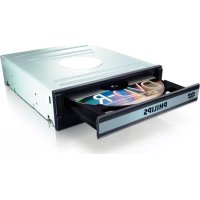
LX3900SA - DVD Recorder PHILIPS - Free user manual and instructions
Find the device manual for free LX3900SA PHILIPS in PDF.


| Brand | PHILIPS |
| Model | LX3900SA |
| Category | Home Cinema DVD System with amplifier and tuner |
| Dimensions (W x H x D) | 360 mm x 55 mm x 325 mm |
| Weight | 3 kg (main unit) |
| Power supply | 220-240 V, 50 Hz |
| Power consumption | 80 W |
| Compatible disc types | DVD, VCD, SVCD, SACD, CD, CD-R/RW, DVD+R/RW, MP3, JPEG, DivX, MPEG-4 |
| Video output | SCART (RGB), S-Video, CVBS composite |
| Analog audio output | Stereo or multichannel (Dolby Digital, DTS, Dolby Pro Logic II) |
| Output power (speakers) | Front 2x50 W RMS, Center 50 W RMS, Rear 2x50 W RMS, Subwoofer 75 W RMS |
| Tuner | FM and MW, 20 FM presets + 10 MW |
| Supplied accessories | Scart cable, FM wire antenna, MW loop antenna, remote control with batteries, brackets and screws |
| Main functions | DVD player, amplifier, radio tuner, MP3/JPEG/DivX playback, programming, parental control, screen saver, Eco Power standby |
| Maintenance and cleaning | Clean with a soft cloth lightly moistened with a mild detergent. Do not use products containing alcohol, ammonia or abrasives. |
| Safety | Avoid high temperatures, humidity, water and dust. Do not block ventilation. Unplug before cleaning. |
| Spare parts and repairability | Do not attempt to repair yourself. Contact an authorized Philips dealer or service center. |
| General information | Conforms to Directive 1999/5/EC. Zone code: 2. Software updates available at www.p4c.philips.com. |
Frequently Asked Questions - LX3900SA PHILIPS
User questions about LX3900SA PHILIPS
0 question about this device. Answer the ones you know or ask your own.
Ask a new question about this device
Download the instructions for your DVD Recorder in PDF format for free! Find your manual LX3900SA - PHILIPS and take your electronic device back in hand. On this page are published all the documents necessary for the use of your device. LX3900SA by PHILIPS.
USER MANUAL LX3900SA PHILIPS
natural_image
Exterior view of a white air conditioner unit with multiple units and a label 'LX3900SA' (no other text or symbols visible)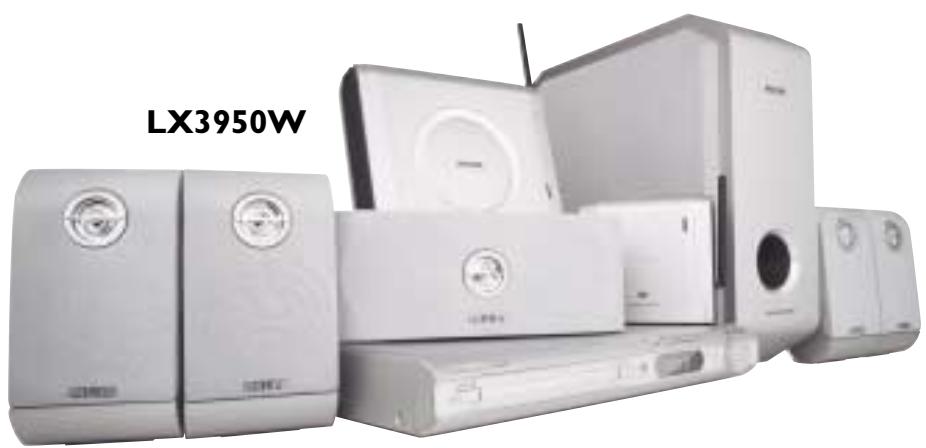
natural_image
Product photo of LX3950W air conditioner units with open doors and buttons (no visible text or symbols on main body)PHILIPS
Important notes for users in the U.K.
Mains plug
This apparatus is fitted with an approved 13 Amp plug. To change a fuse in this type of plug proceed as follows:
1 Remove fuse cover and fuse.
2 Fix new fuse which should be a BS1362 5 Amp, A.S.T.A. or BSI approved type.
3 Refit the fuse cover.
If the fitted plug is not suitable for your socket outlets, it should be cut off and an appropriate plug fitted in its place.
If the mains plug contains a fuse, this should have a value of 5 Amp. If a plug without a fuse is used, the fuse at the distribution board should not be greater than 5 Amp.
Note: The severed plug must be disposed of to avoid a possible shock hazard should it be inserted into a 13 Amp socket elsewhere.
How to connect a plug
The wires in the mains lead are coloured with the following code: blue = neutral (N), brown = live (L).
- As these colours may not correspond with the colour markings identifying the terminals in your plug, proceed as follows:
- Connect the blue wire to the terminal marked N or coloured black.
- Connect the brown wire to the terminal marked L or coloured red.
- Do not connect either wire to the earth terminal in the plug, marked E (or 12 ) or coloured green (or green and yellow).
Before replacing the plug cover, make certain that the cord grip is clamped over the sheath of the lead - not simply over the two wires.
Copyright in the U.K.
Recording and playback of material may require consent. See Copyright Act 1956 and The Performer's Protection Acts 1958 to 1972.
Italia
Philips Consumer Electronics
Philips, Glaslaan 2
5616 JB Eindhoven, The Netherlands
Norge
Use of controls or adjustments or performance of procedures other than herein may result in hazardous radiation exposure or other unsafe operation.
VAROITUS
Manufactured under license from Dolby Laboratories. "Dolby", "Pro Logic" and the double-D symbol are trademarks of Dolby Laboratories.
Manufactured under license from Digital Theater Systems, Inc. US Pat. No. 5,451,942, 5,956,674, 5,974,380, 5,978,762 and other world-wide patents issued and pending. "DTS" and "DTS Digital Surround" are registered trademarks of Digital Theater Systems, Inc. Copyright 1996, 2000 Digital Theater Systems, Inc. All Rights Reversed.
This product complies with the radio interference requirements of the European Community.
CAUTION
VISIBLE AND INVISIBLE LASER
RADIATION WHEN OPEN AVOID
EXPOSURE TO BEAM
ADVARSEL
SYNLIG OG USYNLIG LASERSTRÅLING
VED ÅBNING UNDGÅ UDSÆTTELSE
FOR STRÅLING
WARNING
SYNLIG OCH OSYNLIG
LASERSTRÅLNING NÄR DENNA DEL
ÄR ÖPPNAD BETRAKTA EJ STRÅLEN
VARO!
AVATTAESSA OLET ALTTIINA
NÄKYVÄLLE JA NÄKYMÄTTÖMÄLLE
LASER SÄTEILYLLE. ÄLÄ KATSO
SÄTEESEEN
VORSICHT
DivX ^® , DivX Certified, and associated logos are trademarks of DivXNetworks, Inc and are used under license.


This DVD player is in conformity with the EMC directive and low-voltage directive.
For Customer Use:
Read carefully the information located at the bottom of your DVD VIDEO player and enter below the Serial No. Retain this information for future reference.
Model No. DVD VIDEO LX3900SA/LX3950W
Serial No. ____
'CONSUMERS SHOULD NOTE THAT NOT ALL HIGH DEFINITION TELEVISION SETS ARE FULLY
COMPATIBLE WITH THIS PRODUCT AND MAY CAUSE
ARTIFACTS TO BE DISPLAYED IN THE PICTURE. IN
CASE OF 525 OR 625 PROGRESSIVE SCAN PICTURE
PROBLEMS, IT IS RECOMMENDED THAT THE USER
SWITCH THE CONNECTION TO THE 'STANDARD
DEFINITION' OUTPUT. IF THERE ARE QUESTIONS
REGARDING OUR TV SET COMPATIBILITY WITH THIS
MODEL 525p AND 625p DVD PLAYER, PLEASE
CONTACT OUR CUSTOMER SERVICE CENTRE'.
English
Hereby, Philips Consumer Electronics, B. U. Peripherals & Accessories, declares that this product is in compliance with the essential requirements and other relevant provisions of Directive 1999/5/EC.
Français
Due to the inconsistency of disc formats provided by various disc manufacturers, your DVD system may require a playability enhancement or upgrade. As DVD technology advances, these enhancement will become common and will be easy to complete. Go to www.p4c.philips.com for software upgarde.
Lecture multi-angle 62
Mode nocturne – activation/désactivation 65
natural_image
Illustration of various household appliances including a Philips remote, cable, and two batteries (no text or symbols)natural_image
Technical line drawing of a portable electronic device with labeled components (no text or symbols)Précautions de
manipulation des CD
ATTENTION!
natural_image
Grid of grayscale image thumbnails showing various scenes or objects, no visible text or symbolsMULTI-CHANNEL (Muticanal)
Mode nocturne - activation/désactivation
$$ " S L E E P 1 0" \rightarrow " S L E E P 9" \dots \rightarrow $$
$$ " S L E E P I" \rightarrow " S L E E P" $$
natural_image
Product photo of a Philips LX3900SA electronic device with various speakers and control panels (no visible text or symbols on the devices themselves)PHILIPS
12nc: 3139 115 22861
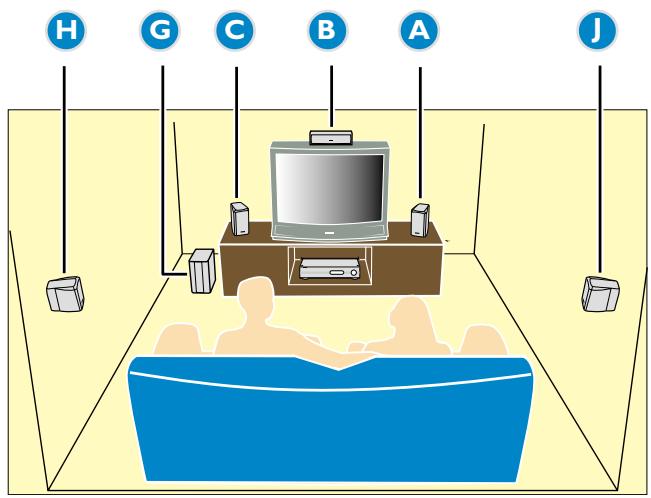
First connect ...
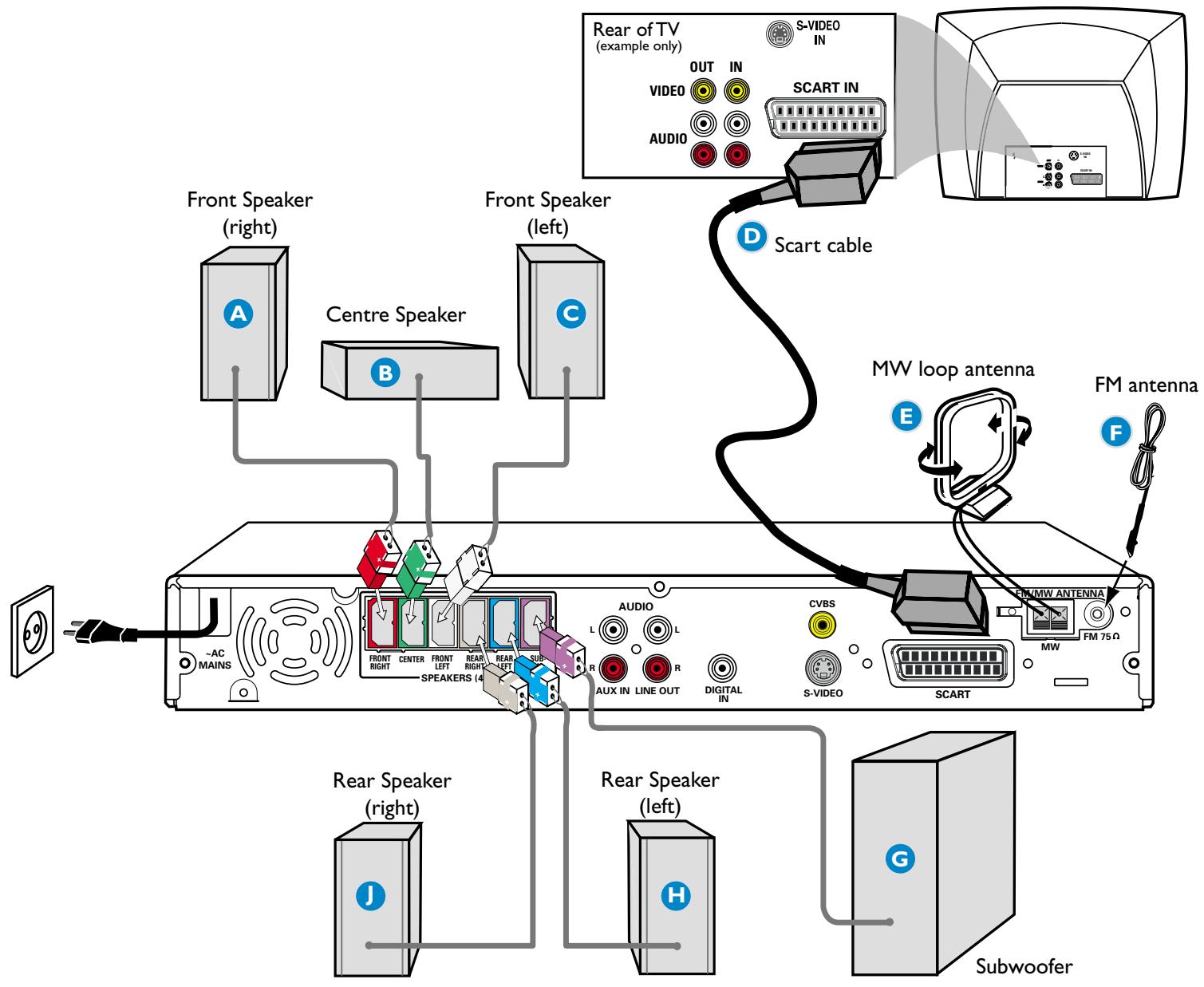
flowchart
graph TD
    A["Front Speaker (right)"] --> B["Centre Speaker"]
    B --> C["Front Speaker (left)"]
    C --> D["Scart cable"]
    D --> E["SCART IN"]
    E --> F["Rear of TV (example only)"]
    F --> G["S-VIDEO IN"]
    F --> H["OUT IN"]
    F --> I["IN"]
    F --> J["VIDEO"]
    F --> K["AUDIO"]
    G --> L["MW loop antenna"]
    H --> M["FM antenna"]
    I --> N["FM 75Ω"]
    J --> O["SCART"]
    K --> P["SCART"]
    L --> Q["FM/MW ANTENNA"]
    M --> R["FM ANTENNA"]
    N --> S["FM ANTENNA"]
    O --> T["FM ANTENNA"]
    U["~AC MAINS"] --> V["FRONT RIGHT CENTER FRONT LEFT REAR RIGHT REAR LEFT"]
    W["Rear Speaker (right)"] --> X["J"]
    Y["Rear Speaker (left)"] --> Z["H"]
    AA["Subwoofer"] --> AB["G"]
Helpful Hints
You only need to make one video connection to your TV in order to view the DVD playback.
| Use this video cable(s) | If your TV has this video input jack(s) | |
| 1 | ||
| 2 |
If your TV is not equipped with a SCART connector, connect your TV through the corresponding video connection 1 or 2 (cables not supplied).
Playing a disc
Make sure your DVD system and TV are connected and turned on!
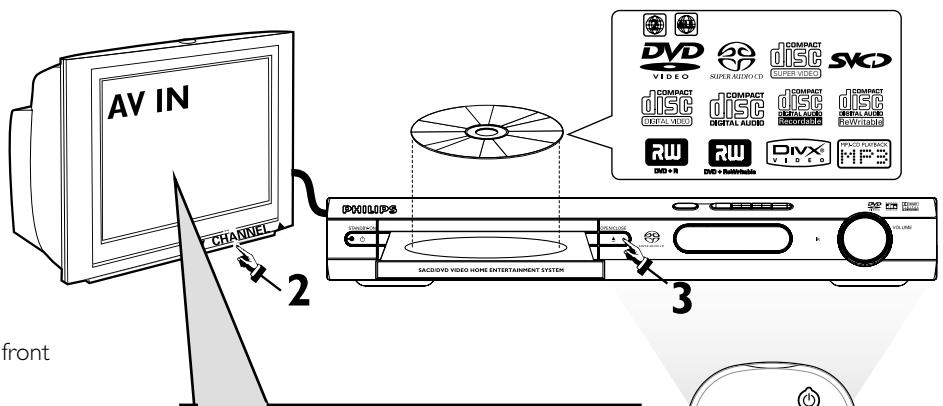
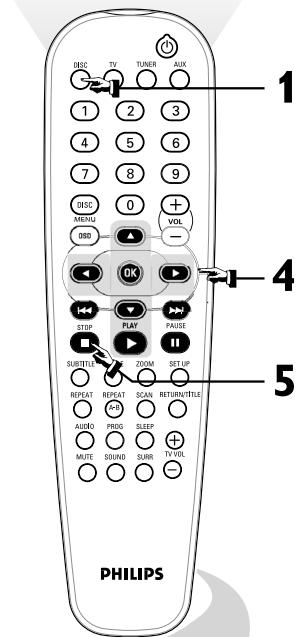
1 Press DISC on the remote control.
You can also press the SOURCE button on the front panel until “DISC” appears on the display panel.
2 Turn on the TV and select the correct Video In mode.
You should see the blue DVD background screen on the TV (if no disc in the DVD system).
3 Press OPEN/CLOSE ▲ on the front of the DVD system and load a disc, then press OPEN•CLOSE ▲ again to close the disc tray.
Make sure the disc label is facing up. For double-sided discs, load the side you want to play face up.
4 Playback will start automatically.
If a disc menu appears, use ▲▼◀▶ buttons on the remote to make the necessary selection, then press OK to confirm. Or, use the numeric keypad on the remote to select features. Follow the instructions given in the disc menu.
5 To stop playback, press STOP ■.
No picture?
Check the AV (Audio/Video) mode on your TV.
* Usually this channel is between the lowest and highest channels and may be called FRONT, A/V IN, or VIDEO.
* Or, you may go to channel 1 on your TV, then press the Channel down button repeatedly until you see the Video In channel.
* Or, your TV remote control may have a button or switch that chooses different video modes.
* See your TV manual for more details.
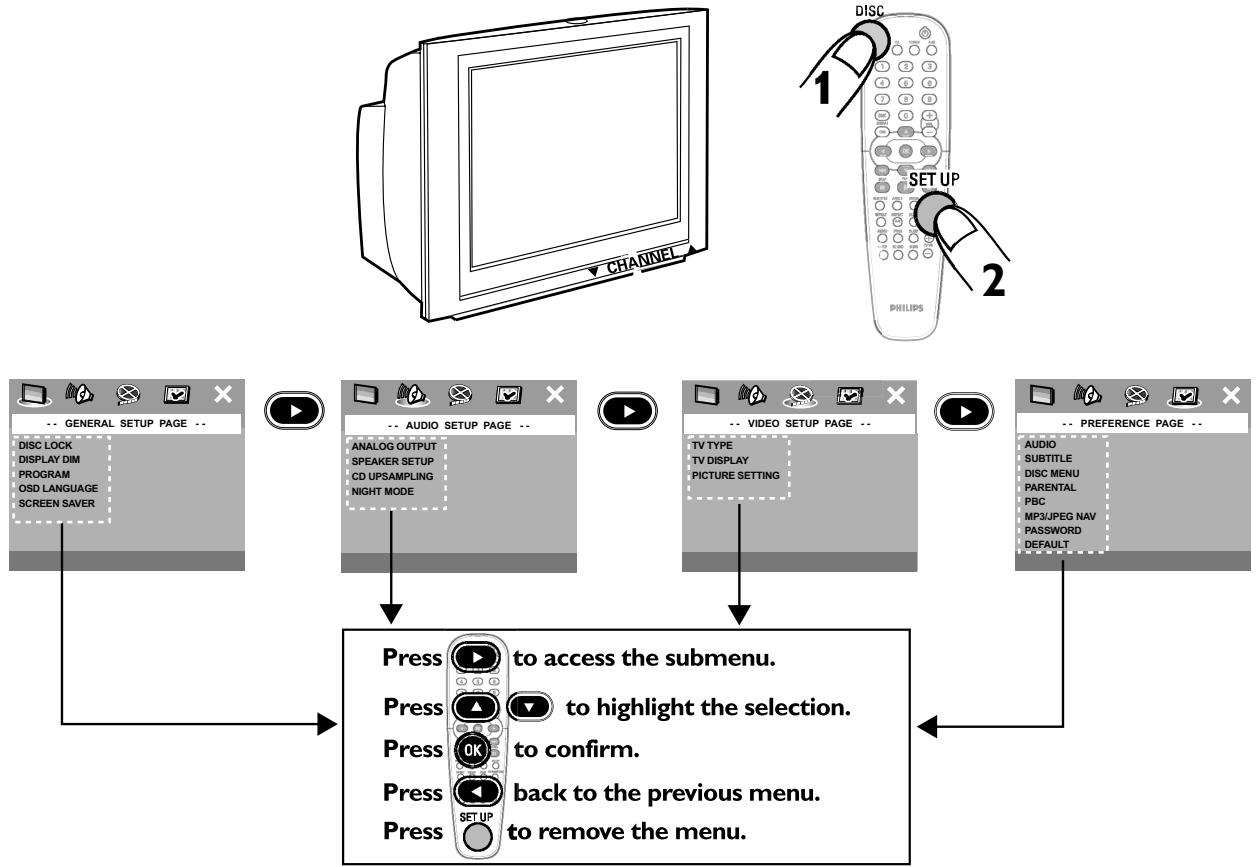
Using the DVD setup menu
flowchart
graph TD
    A["CHANNEL"] --> B["-- GENERAL SETUP PAGE --"]
    B --> C["-- AUDIO SETUP PAGE --"]
    C --> D["-- VIDEO SETUP PAGE --"]
    D --> E["-- PREFERENCE PAGE --"]
    E --> F["-- AUDIO SUBTITLE DISC MENU PARENTAL PBC MP3/JPEG NAV PASSWORD DEFAULT"]
    F --> G["Press to access the submenu."]
    G --> H["Press to highlight the selection."]
    H --> I["Press to confirm."]
    I --> J["Press back to the previous menu."]
    J --> K["Press to remove the menu."]
- PHILIPS
- Important notes for users in the U.K.
- Mains plug
- How to connect a plug
- Copyright in the U.K.
- Italia
- Norge
- VAROITUS
- CAUTION
- ADVARSEL
- WARNING
- VARO!
- SÄTEESEEN
- VORSICHT
- English
- Français
- Précautions de
- manipulation des CD
- ATTENTION!
- MULTI-CHANNEL (Muticanal)
- Mode nocturne - activation/désactivation
- First connect ...
- Helpful Hints
- Playing a disc
- No picture?
Brand : PHILIPS
Model : LX3900SA
Category : DVD Recorder