RG850 - Smartphone RugGear - Free user manual and instructions
Find the device manual for free RG850 RugGear in PDF.



| Product type | Rugged smartphone |
| Brand | RugGear |
| Model | RG850 |
| Dimensions (estimated) | 150 x 75 x 12 mm |
| Weight (estimated) | 200 g |
| Power supply | Rechargeable lithium battery, 5V/2A charging |
| Display | Rugged touchscreen |
| Connectivity | USB-C 2.0, 3.5mm headphone jack |
| SIM cards | Dual nano SIM (or one nano SIM + microSD) |
| Expandable storage | microSD up to 128 GB |
| Main camera | Yes, with flash / torch |
| Front camera | Yes |
| Speaker | Front-facing |
| Microphone | Primary and secondary |
| Operating temperature | -20 °C to +55 °C |
| Charging temperature | +5 °C to +35 °C |
| SAR (head) | 0.762 W/kg |
| SAR (body) | 1.027 W/kg |
| Maintenance and cleaning | Soft antistatic damp cloth, no chemicals |
| Safety | Do not expose to high temperatures, do not open yourself, keep a distance of 15 cm from pacemakers |
| Spare parts and repairability | Use only RugGear approved accessories; repairs by authorized specialists |
| General information | CE certification; separate recycling at end of life |
Frequently Asked Questions - RG850 RugGear
User questions about RG850 RugGear
0 question about this device. Answer the ones you know or ask your own.
Ask a new question about this device
Download the instructions for your Smartphone in PDF format for free! Find your manual RG850 - RugGear and take your electronic device back in hand. On this page are published all the documents necessary for the use of your device. RG850 by RugGear.
USER MANUAL RG850 RugGear
text_image
RugGear gear your life.Short guide
CONTENT
English 4
Deutsch 7
Česky 10
Dansk 13
Español 16
Suomi 19
Français 22
Magyar 25
Italiano 28
Nederlands 31
Norsk 34
Polski 37
Portuguesa 40
Русский 43
Svenska 46
Slovenčina 49
简体中文 52
العربية 54
(c) 2018 RugGear
Version: 2018-12-05
RugGear Ltd.
Unit 1301, 13/F., Wing Tuck
Commercial Centre
Hong Kong
www.RugGear.com
text_image
1 2 8 7 RugGear 10 11 3 4 6 5 RugGear 9SIM/MICRO SD
text_image
1.
text_image
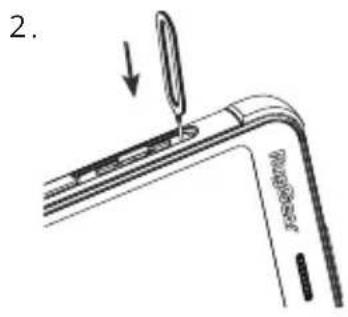
2. BlueBipper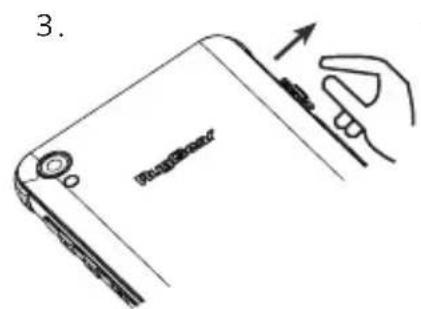
text_image
3.
text_image
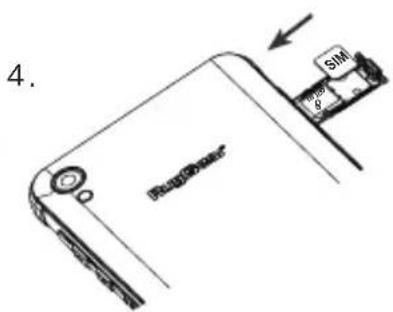
4. Boschweer SIMENGLISH
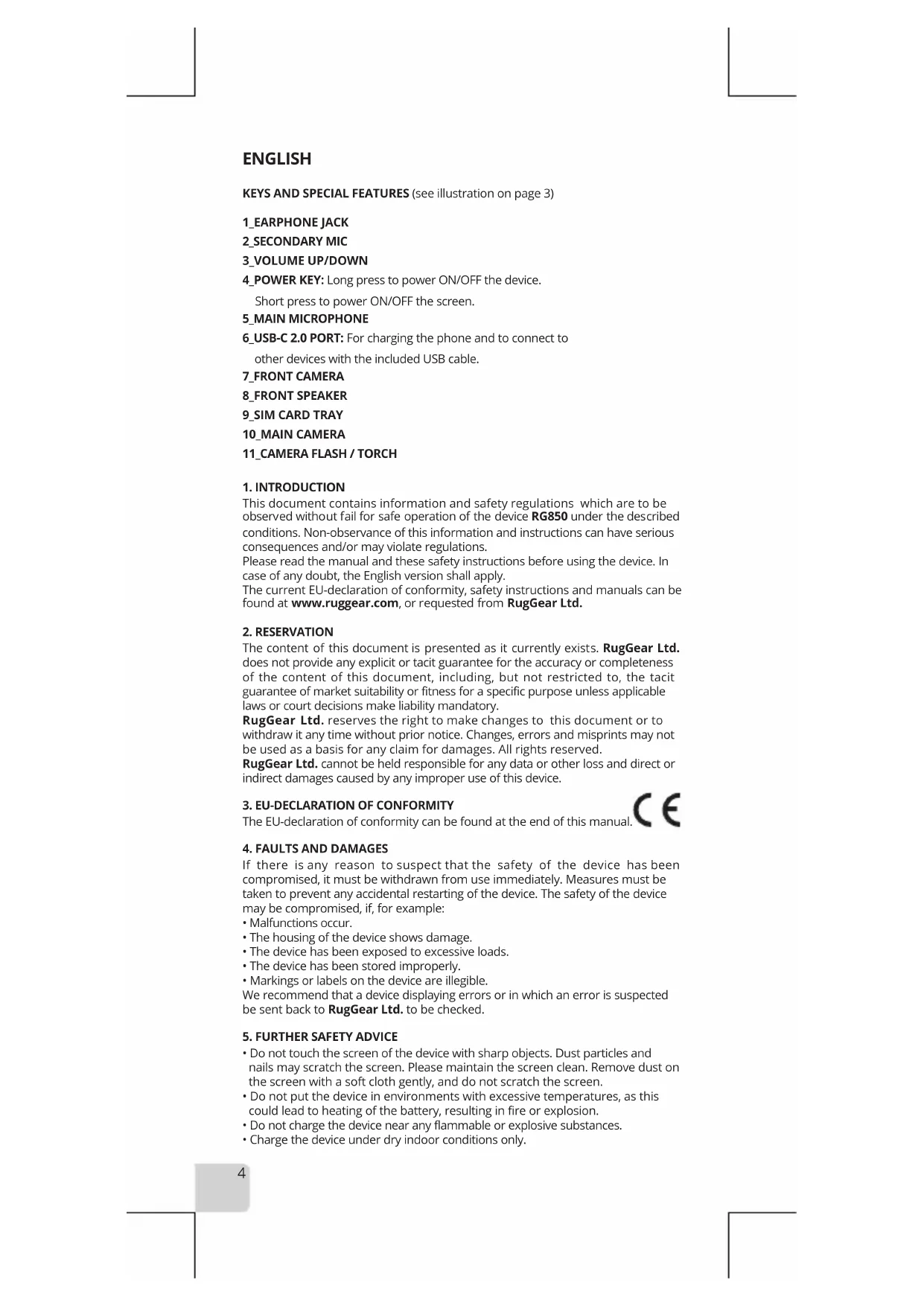
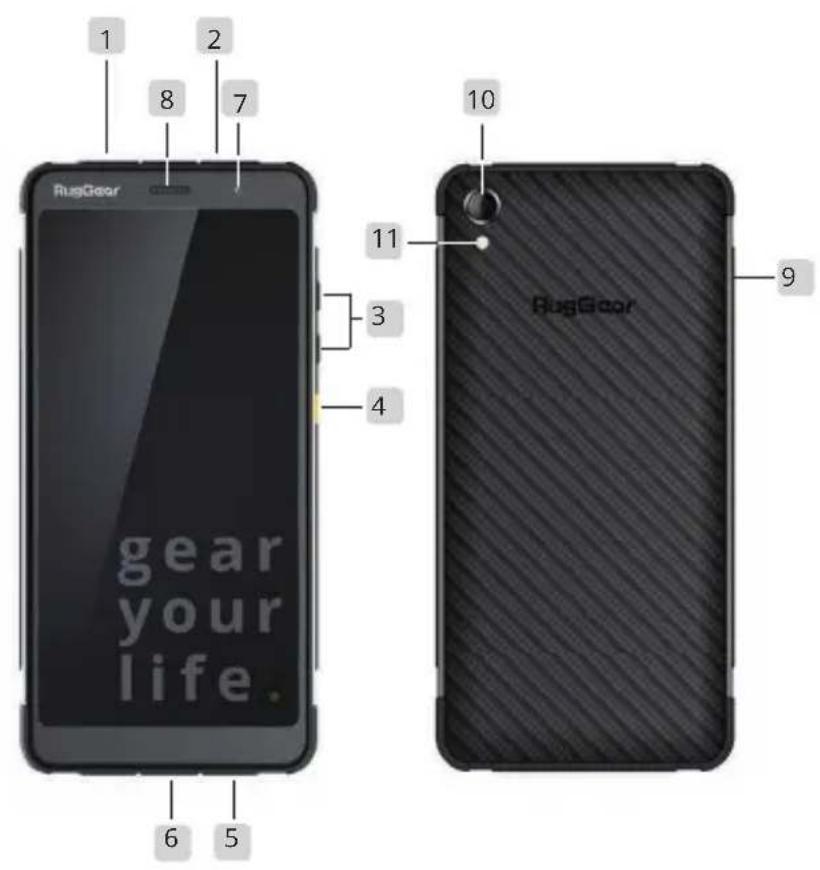
KEYS AND SPECIAL FEATURES (see illustration on page 3)
1_EARPHONE JACK
2 SECONDARY MIC
3_VOLUME UP/DOWN
4_POWER KEY: Long press to power ON/OFF the device.
Short press to power ON/OFF the screen.
5 MAIN MICROPHONE
6_USB-C 2.0 PORT: For charging the phone and to connect to other devices with the included USB cable.
7_FRONT CAMERA
8_FRONT SPEAKER
9_SIM CARD TRAY
10_MAIN CAMERA
11_CAMERA FLASH / TORCH
- INTRODUCTION
This document contains information and safety regulations which are to be observed without fail for safe operation of the device RG850 under the described conditions. Non-observance of this information and instructions can have serious consequences and/or may violate regulations.
Please read the manual and these safety instructions before using the device. In case of any doubt, the English version shall apply.
The current EU-declaration of conformity, safety instructions and manuals can be found at www.ruggear.com, or requested from RugGear Ltd.
- RESERVATION
The content of this document is presented as it currently exists. RugGear Ltd. does not provide any explicit or tacit guarantee for the accuracy or completeness of the content of this document, including, but not restricted to, the tacit guarantee of market suitability or fitness for a specific purpose unless applicable laws or court decisions make liability mandatory.
RugGear Ltd. reserves the right to make changes to this document or to withdraw it any time without prior notice. Changes, errors and misprints may not be used as a basis for any claim for damages. All rights reserved.
RugGear Ltd. cannot be held responsible for any data or other loss and direct or indirect damages caused by any improper use of this device.
- EU-DECLARATION OF CONFORMITY
The EU-declaration of conformity can be found at the end of this manual.

- FAULTS AND DAMAGES
If there is any reason to suspect that the safety of the device has been compromised, it must be withdrawn from use immediately. Measures must be taken to prevent any accidental restarting of the device. The safety of the device may be compromised, if, for example:
- Malfunctions occur.
• The housing of the device shows damage. - The device has been exposed to excessive loads.
• The device has been stored improperly. - Markings or labels on the device are illegible.
We recommend that a device displaying errors or in which an error is suspected be sent back to RugGear Ltd. to be checked.
-
FURTHER SAFETY ADVICE
-
Do not touch the screen of the device with sharp objects. Dust particles and nails may scratch the screen. Please maintain the screen clean. Remove dust on the screen with a soft cloth gently, and do not scratch the screen.
- Do not put the device in environments with excessive temperatures, as this could lead to heating of the battery, resulting in fire or explosion.
- Do not charge the device near any flammable or explosive substances.
-
Charge the device under dry indoor conditions only.
-
Do not charge the device in environments with much dust or humidity.
- Do not use the device in areas where regulations or legislatives prohibit the use.
- Do not expose the device or charger to strong magnetic fields, such as are emitted from induction ovens or microwaves.
- Do not attempt to open or repair the device. Improper repair or opening can lead to the destruction of the device, fire or explosion. Only authorized personnel are allowed to repair the device.
- Only use accessories approved by RugGear Ltd.
- Power off the device in hospitals or other places where the use of mobile phones is prohibited. This device may affect proper work of medical equipment, such as pacemakers. Always keep a distance of at least 15 cm between the device and these devices.
- Make sure the volume level is not set too high when plugging earphones and headphones to protect your hearing.
- Observe all corresponding laws that are in force in the respective countries regarding the use of devices while operating a vehicle.
- Please power off the device and disconnect the charging cable before cleaning the device.
- Do not use any chemical cleaning agents to clean the device or the charger. Use a damp and anti-static soft cloth for cleaning.
- Adapter shall be installed near the equipment and shall be easily accessible
• The product shall only be connected to a USB interface of version USB2.0. - Do not discard old and abandoned lithium batteries into the trash, send them to designated waste disposal locations.
- The user alone is responsible for any and all damages and liabilities caused by malware down-loaded when using the network or other data-exchange functions of the device. RugGear Ltd. cannot be held responsible for any of those claims.
Warning
RugGear Ltd. will not assume any liability for damages caused by disregarding any of these advices or by any inappropriate use of the device.
6. MAINTENANCE/REPAIR
Please note any legal requirements for periodic inspection. The device itself has no user-serviceable parts. It is recommended to perform inspections according to the safety regulations and advises. If there is a problem with the device, please contact your vendor or consult the service center. If your device is in need of repair, you can either contact the service center or your vendor.
7. BATTERY
The battery is not fully charged when the device is purchased, but it contains enough energy to power on the device. To obtain best battery performance and battery life, let the battery discharge completely before charging it completely for the first three charging cycles.
The device may only be charged at ambient temperatures in a range from +5°C ... +35°C. The phone's normal operating temperature is -20 °C to +55 °C. In order to ensure the normal phone functions, do not use this phone outside the temperature range.
Caution:
Risk of explosion if battery is replaced by an incorrect type. Dispose used batteries according to the instructions.
RG850 supports 5V/2A charging, using any higher charging current may damage your phone.
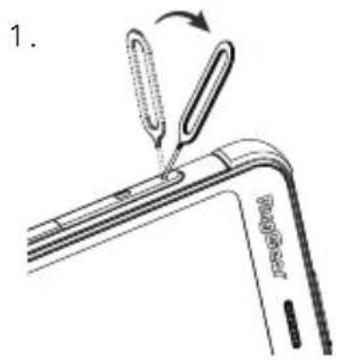
8. INSTALLATION OF THE NANO SIM CARD (see illustration on page 3)
The device has two slots for nano SIM cards. This is located on the left side of the unit. Use the ejector pin to access the SIM card slot until the SIM card tray ejects.
Warning
Do only change the SIM card when the device is switched off. Do not try to insert or remove the SIM card when any external power supply is connected, otherwise the SIM card may be damaged.
9. INSTALLATION OF THE MICROSD CARD (see illustration on page 3)
The device supports microSD card (up to 128GB). It located in the SIM card tray. SIM slot 2 can support either a microSD card or an additional SIM card. Example: one SIM card and microSD, or two SIM cards and no microSD.
Warning
Do only change the microSD card when the device is switched off. Do not try to insert or remove the microSD card when any external power supply is connected, otherwise the microSD card may be damaged.
10. RECYCLING
The crossed-out wheeled-bin symbol on your product, battery, literature, or packaging reminds you that all electrical and electronic products, batteries, and accumulators must be taken to separate collection at the end of their working life. This requirement applies in the European Union. Do not dispose of these products as unsorted municipal waste.
Always return your used electronic products, batteries, and packaging materials to dedicated collection points. This way you help prevent uncontrolled waste
disposal and promote the recycling of materials.
More detailed information is available from the product retailer, local waste authorities, national producer responsibility organisations, or your local RugGear Ltd. representative.

11. INFORMATION CONCERNING CE SAR CERTIFICATION
(Specific Absorption Rate)
The SAR limit of Europe is 2.0 W/kg. The device has also been tested against this SAR limit. The highest SAR value reported under this standard during product certification for use at the ear is 0.762 W/kg and when properly worn on the body is 1.027 W/kg. This device was tested for typical body-worn operations with the back of the handset kept 5mm from the body. The device complies with RF specifications when the device used at 5mm from your body. The use of belt clips, holsters and similar accessories should not contain metallic components in its assembly. The use of accessories that do not satisfy these requirements may not comply with RF exposure requirements, and should be avoided.
12. TRADEMARKS
- Google™, Google Play and Android are trademarks of Google Inc.
- All other trademarks and copyrights are the properties of their respective owners.
13. WARRANTY
- For European customers please check: https://ruggear.com/warranty-terms/ For Customers in Americas please check: https://ruggear.com/terms-and-conditions-americas/
- For FCC information, please go to www.RugGear.com and find it under the "Support" section.
DEUTSCH
(Specific Absorption Rate)
3. DÉCLARATION DE CONFORMITÉ CE
- For European customers please check: https://ruggear.com/warranty-terms/ For Customers in Americas please check: https://ruggear.com/terms-and-conditions-americas/
6. VEDLIKEHOLD / REPARASJON
Ta hensyn til eventuelle lovmessige direktiver i forbindelse med periodiske kontroller, som f.eks. driftssikkerhetsdirektivet (et direktiv som gjelder i Tyskland)!
1_VSTUP PRE SLÚCHADLÁ
2_PRÍDAVNÝ MIKROFÓN
3 ZVÝŠENIE/ZNÍŽENIE HLASITOSTI
https://ruggear.com/warranty-terms
https://ruggear.com/terms-and-conditions-americas
• حصول على معلومات
www.RugGear.com ییرجی زیارة FCC
natural_image
Two perpendicular lines forming an L-shape on a white background (no text or symbols)
natural_image
Pure geometric lines forming a right angle with no text, numbers, or symbols
natural_image
Two perpendicular lines forming an L-shape on a white background (no text or symbols)
natural_image
Pure geometric lines forming a right angle with no text, numbers, or symbolsgear your life.
RugGear Ltd.
Unit 1301, 13/F, Wing Tuck Commercial Centre
177 Wing Lok Street, Sheung Wan, Hong Kong
Hong Kong
www.RugGear.com