GPMF130E - Surveillance Camera PANASONIC - Free user manual and instructions
Find the device manual for free GPMF130E PANASONIC in PDF.


| Product Type | Surveillance Camera |
| Brand | Panasonic |
| Model | GPMF130E |
| Image Sensor | Interline transfer 1/3 inch, 752 (H) x 582 (V) pixels |
| Horizontal Resolution | 560 lines (at center) |
| Minimum Illumination | 1.0 lux (f/1.4, max gain, gamma OFF, 2:1 interlace, no shutter) |
| Signal-to-Noise Ratio | 54 dB typical |
| Shutter Speed | 10 steps: from 1/120 s to 1/96,000 s |
| Synchronization | Internal or external (auto-switching) |
| Power Supply | 12 V DC, 170 mA (class 2) |
| Dimensions (W x H x D) | 29 x 29 x 65 mm |
| Weight | 86 g (camera only) |
| Lens Mount | C-mount, lens max 300 g |
| Operating Temperature | -10 °C to +50 °C |
| Operating Humidity | ≤ 90% |
| Vibration Resistance | 10 G (10 Hz - 150 Hz, 2 h on 3 axes) |
| Shock Resistance | 80 G (IEC 68) |
| Maintenance and Cleaning | Clean with a soft dry cloth; for stubborn stains, use a cloth dampened with a mild detergent solution. Do not use abrasive products. |
| Safety | Do not expose to rain or moisture. Have any repairs carried out by a professional. Do not disassemble the housing. |
| Spare Parts and Repairability | Lens (sold separately), optional connection cable (GP-CA34, etc.). No user-serviceable parts inside. |
Frequently Asked Questions - GPMF130E PANASONIC
User questions about GPMF130E PANASONIC
0 question about this device. Answer the ones you know or ask your own.
Ask a new question about this device
Download the instructions for your Surveillance Camera in PDF format for free! Find your manual GPMF130E - PANASONIC and take your electronic device back in hand. On this page are published all the documents necessary for the use of your device. GPMF130E by PANASONIC.
USER MANUAL GPMF130E PANASONIC
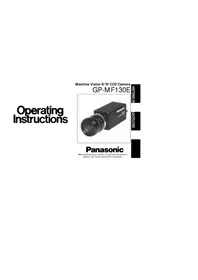
Operating Instructions
Machine Vision B/W CCD Camera
GP-MF130E
HS10NE SI
EHNNE
Panasonic
Before attempting to connect or operate this product, please read these instructions completely.
ENGLISH VERSION

CAUTION
RISK OF ELECTRIC SHOCK DO NOT OPEN

CAUTION:
TO REDUCE THE RISK OF ELECTRIC SHOCK, DO NOT REMOVE COVER (OR BACK). NO USER-SERVICEABLE PARTS INSIDE. REFER SERVICING TO QUALIFIED SERVICE PERSONNEL.
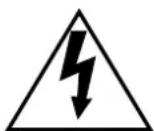
The lightning flash with arrowhead symbol, within an equilateral triangle, is intended to alert the user to the presence of uninsulated "dangerous voltage" within the product's enclosure that may be of sufficient magnitude to constitute a risk of electric shock to persons.

The exclamation point within an equilateral triangle is intended to alert the user to the presence of important operating and maintenance (servicing) instructions in the literature accompanying the appliance.
Remove dust on the faceplate of filter glass before mounting the lens on the camera.
The serial number of this product may be found on the top of the unit. You should note the serial number of this unit in the space provided and retain this book as a permanent record of your purchase to aid identification in the event of theft.
Model No.
Serial No.
WARNING: TO PREVENT FIRE OR ELECTRIC SHOCK HAZARD, DO NOT EXPOSE THIS APPLIANCE TO RAIN OR MOISTURE.
| We declare under our sole responsibility that the product to which this declaration relates is in conformity with the standards or other normative documents following the provisions of Directive EEC/89/336. |
| Nosotros declaresamos bajo这是我们 una responsabilidad que el producto a que hace referencia esta declaración está conforme con las normas u otros documentos normativos sugiendo las estipulaciones de la directiva CEE/89/336. |
| Noi dichiariamo sost我们在nosa esclusiva responsabilità che il prodotto a cui si riferisce la presente dichiarazione risultata conforma al segunt standard o altri documenti normativi conformi alle disposizioni della direttiva CEE/89/336. |
| Wij verzilrnen als enige aansprakelijkke, dat het product waarop deze verzilrking betrekking heeft, voldoot aan de volgende normen of andere normatieve dokumenten, overeenkomstig de bepalingen van Richtlij 89/336/EEC. |
| Vi erklær os eneansvarlige for, at ditte produit, som nelle déclaration omhandler, er i overensstemmelse med den falgende standarder aller andere normative dokumenter i folge bestemmelserne i direktiv 89/336/EEC. |
| Vi deklarer harmed värt fulla ansvar forl att den produit til vilen denna déclaration harvisar i üverensstammelse med standarddokument, ell derandra normativa dokument som framstölls i Direktiv 89/336/EEC. |
| Ilmoitamma yksinomaisella vastuullamme, etta tuote, jota tāma ilmoitius koskee, noudatta seuravia standardjoa tai multa ohjeellisia asiakirjoa, jotka noudattavat direktivin 89/336/EEC, sāddoksiá. |
| Vi erklær oder allene ansvarlige for, er i overensstemmelse med folgende normer aller andere normgivende dokumenter som fæliger bestemmelsense i direktiv 89/336/EEC. |
CONTENTS
PREFACE 2
FEATURES 2
PRECAUTIONS 3
MAJOR OPERATING CONTROLS AND
THEIR FUNCTIONS 5
PREPARATIONS 8
SYSTEM CONNECTIONS 9
EXTERNAL SYNCHRONIZATION 10
PREVENTION OF BLOOMING AND SMEAR ..10
SPECIFICATIONS 11
OPTIONAL ACCESSORIES 12
ENGLISH
PREFACE
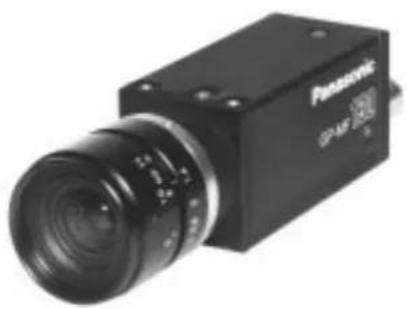
The Panasonic GP-MF130 Machine Vision B/W CCD Camera has a 1/3" Interline Transfer CCD image sensor which features 440 000 pixels, a horizontal resolution of 560 lines, and minimum smear.
FEATURES
- Newly developed multi-function solid state image sensor 1/3" Inter Line Transfer type CCD image sensor with 752 (H) x 582 (V) pixels.
-
Selectable scanning system: 1-line interlace and 2-line interlace are available for the highest quality possible within video processing.
-
External synchronization: External HD/VD input enables system setup with external video processors, etc.
- High speed shutters up to 1/96 000 second enables to capture the moving objects.
PRECAUTIONS
- Do not attempt to disassemble the camera.
To prevent electric shock, do not remove screws or covers.
There are no serviceable parts inside. Ask a qualified service person for servicing.
- Handle the camera with care.
Do not abuse the camera. Avoid striking, shaking, etc. The camera could be damaged by improper handling or shortage.
- Do not expose the camera to rain or moisture, or try to operate it in wet areas.
This camera is designed for indoor use.
Turn the power off immediately and ask a qualified service person for servicing.
Moisture can damage the camera and also create the danger of electric shock.
- Do not use the strong or abrasive detergents when cleaning the camera body.
Use a dry cloth to clean the camera when dirty.
In case the dirt is hard to remove, use a mild detergent and wipe gently.
- Clean the CCD faceplate with care.
Do not clean the CCD with strong or abrasive detergents. Use lens tissue or a cotton tipped applicator and ethanol.
- Never face the camera towards the sun.
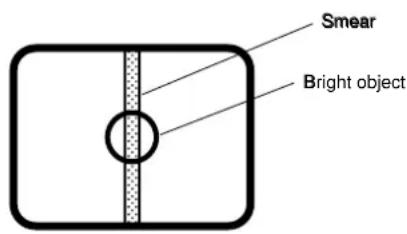
Do not aim the camera at bright objects. Whether the camera is in use or not, never aim at the sun or other extremely bright objects. Otherwise, blooming or smear may be caused.
7. Do not drop anything inside the camera.
Dropping metal for example inside the camera could permanently damage the unit. If anything is dropped inside the camera, turn the power off immediately and ask a qualified service person for servicing.
8. Do not operate the camera beyond the specified temperature, humidity or power source ratings.
Use the camera under conditions where temperature is between -10^ + 50^ (14^ - 122^) , and humidity is below 90% . The input power source is DC 12 V, 170 mA.
MAJOR OPERATING CONTROLS AND THEIR FUNCTIONS
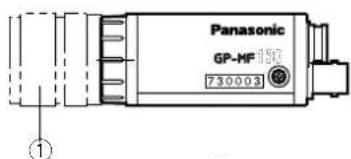
1. 1/3" Manual Iris Lens (Sold Separately)
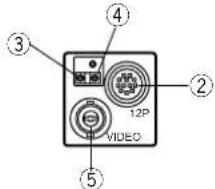
2. Camera Connector (12-pin)
This is connected with the optional Camera Cable GP-CA34, GP-CA33, GP-CA59 or GP-CA60.
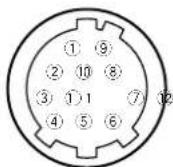
CAUTION: CONNECT THIS TO A DC 12V CLASS 2 POWER SUPPLY ONLY.
| Pin No. Description |
| 1 Ground |
| 2 +12V IN |
| 3 Ground for Video Out |
| 4 Video Out |
| 5 Ground for HD |
| 6 HD IN |
| 7 VD IN |
| 8 Ground |
| 9 No connection |
| 10 No connection |
| 11 No connection |
| 12 Ground for VD |
3. Pedestal Control
This controls the pedestal level from 0mV to 100mV .
4. Manual Gain Control
This controls the gain level from 0 to 6 dB.
5. Video Output Connector
This connector is used to connect with theVIDEO IN connector of the monitor.
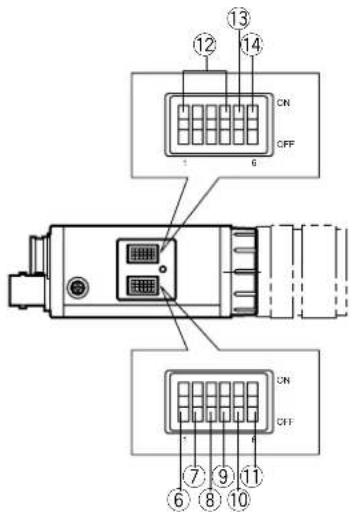
6. Switch 1 No.1 (1/ON) 1
N
This switch selects the Field or Frame Accumulation.
ON:Field Accumulation
OFF: Frame Accumulation
7. Switch 1 No.2 (2/ON) 2
N
8. Switch 1 No.3 (3/ON) 3
N
9. Switch 1 No.4 (4/ON) 4
N
10. Switch 1 No.5 (5/ON) 5
N
These switches (Switch 1 No.2,3,4,and 5) are used to set the shutter speed.
The shutter speed can be set as below:
| Switch 1 | Shutter Speed | |||
| No. 2 | No. 3 | No. 4 | No. 5 | |
| OFF | OFF | OFF | OFF | Normal |
| ON | OFF | OFF | OFF | 1/120 |
| OFF | ON | OFF | OFF | 1/500 |
| ON | ON | OFF | OFF | 1/1 000 |
| OFF | OFF | ON | OFF | 1/2 000 |
| ON | OFF | ON | OFF | 1/4 000 |
| OFF | ON | ON | OFF | 1/8 000 |
| ON | ON | ON | OFF | 1/16 000 |
| OFF | OFF | OFF | ON | 1/32 000 |
| ON | OFF | OFF | ON | 1/64 000 |
| OFF | ON | OFF | ON | 1/96 000 |
| Other Combinations | Not Specified | |||
- Switch 1 No.6 (6/ON) 6 ON This switch is not available for this model.
- Switch 2 No.1 (1/ON) 1 N
Switch 2 No.2 (2/ON) 2O N
Switch 2 No.3 (3/ON) 3O N
Switch 2 No.4 (4/ON) 4 O N These switches are not available for model. Keep these switches at OFF p tion. - Switch 2 No.5 (5/ON) 5 N This switch turns on or off the termination for HD signal with 75
- Switch 2 No.6 (6/ON) 6 N This switch turns on or off the termination for VD signal with 75
PREPARATIONS
1. Power Supply for Camera
Prepare a regulated DC power supply which can supply DC 12V± 10% 170 mA or more current and rated CLASS 2.
2. Lenses
Be sure to use the optional manual iris lens having the following items.
Focus:Adjustable
Lens Weight : Less than 300 g (0.66 lbs.)
Note: If the lens is heavier than 300g (0.66 lbs.), both the lens and the camera should be secured by using the supporter.
Mount : C-mount
The protrusion at the rear of the lens should be as shown in the illustration.
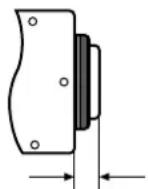
Less than 8 mm (Less than 5 / 6^m )
3. Switch Covers Removal
Caution: The following preparation should be made by qualified service personnel or system installers.
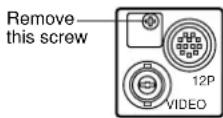
For setting the Switch 1 No.1 to 6 and 2 No. 1 to 6, remove the switch cover fixing screw on the side panel as shown below.
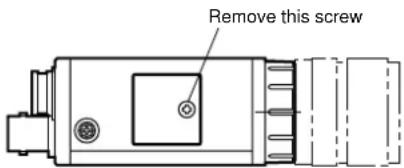
And to control the pedestal level or gain level, remove the cover fixing screw on the rear panel as shown below.
SYSTEM CONNECTIONS
Caution: Keep the power switches of all units to OFF before connections.
- Connect the optional camera cable GP-CA34 between the connector of this camera and the 12 V DC Class 2 power supply(not provided as an accessory).
- Connect the video connector of the GP-CA34 to the Video Monitor.
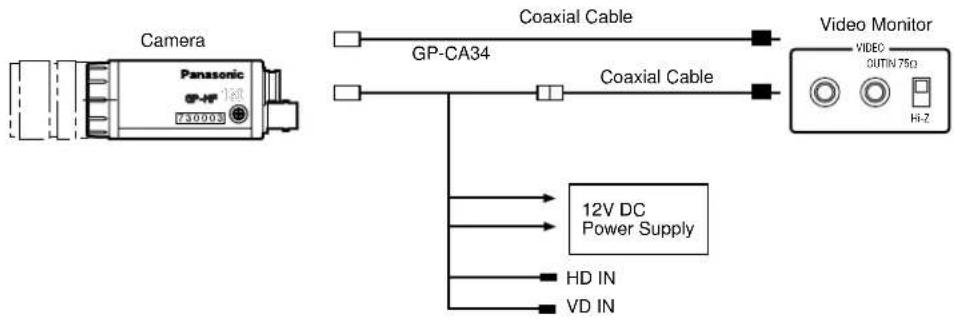
Caution: Use a 12 V DC Class 2
Power Supply only
EXTERNAL SYNCHRONIZATION
2:1 Interlace
The GP-MF130 works in 2:1 interlace mode when external 2:1 interlaced HD/VD signal is supplied to pin-6 and pin-7 of the camera connector (12-pin).
Note: If the picture appears disturbed, be sure to match the phases of falling edges of the external HD/VD.
PREVENTION OF BLOOMING AND SMEAR
When the camera is aimed at a bright light, such as a spotlight, or a surface that reflects bright light, smear or blooming may appear. Therefore, the camera should be operated carefully in the vicinity of extremely bright objects to avoid smear or blooming.
SPECIFICATIONS
Pick-up Device : Inter Line Transfer type CCD with 752 (H) x 582 (V) pixels.
Image Size : 1/3" (6.00 (H) x 4.96 (V) mm)
2:1 interlace 1-line interlace (Frame accumulation)
2:1 interlace 2-line interlace (Field accumulation)
Synchronization : Internal or External (Selectable Automatically)
Internal:Built-in sync generat
External: 4.0 V[p-p]/75 Ω Horizontal drive and Vertical drive pulses
for 2:1 interlace
External Reset: External signal (4.0 V[p-p]/75 Ω, negative) supplied to EXT VD IN con
nector can be used as reset signal
Horizontal Resolution : 560 lines at center
Minimum Illumination : 1.0 lx (0.1 foot-candles), (F1.4, Manual Gain Max (+6 dB), y OFF, 2 : 1
interlace, without shutter)
Signal to Noise Ratio: 54 dB Typical (Manual Gain OFF (0 dB), y OFF, 2:1 interlace without
shutter)
Gamma:1.0
Gain Selection : 0 - 6 dB (Adjustable by Manual Gain Control on rear panel)
Electronic Shuttor : 10-step (1/120 s to 1/96 000 s)
Lens Mount : C-Mount
Vibration Resistance : 10 G (10 Hz - 150 Hz) (2 hours each for three axes)
Shock Resistance : 80 G (IEC 68) *IEC=International Electronic Technical Commission
Power Source: DC + 12 V, 170 mA
Ambient Temperature: -10^ + 50^ (14°F - 122°F)
Dimensions: 29(W) x 29(H) x 65(D) mm [1-1/8" (W) x 1-1/8" (H) x 2-13/16" (D)]
Weight: 86 g (0.19 lbs.) (Camera Only)
Dimensions and weight indicated are approximate values.
Specifications are subject to change without notice.
OPTIONAL ACCESSORIES
Camera Cable GP-CA34
GP-CA33
GP-CA59
GP-CA60
DEUTSCHEAUSGABE
(GERMAN VERSION)

CAUTION
RISK OF ELECTRIC SHOCK DO NOT OPEN

WARNING:
WEDER DECKEL NOCH RÜCKPLATTE ABNEH
MEN, UM DIE GEFAIR EINES ELEKTRISCHEN
SCHLAGS ZU VERMEIDEN, DAS GERÄT ENT
HALT KEINE BAUTEILE, DIE VOM Kunden
GEWARTET WERDEN KÖNNEN.
ACCESSIONS OPTIONNELS 41
PREFACE
ACCESSIONS OPTIONNELS
Cable de raccordement deamera video GP-CA34
GP-CA33
GP-CA59
GP-CA60
Matsushita Electric Industrial Co., Ltd.
Central P.O. Box 288, Osaka 530-91, Japan
N0898-0 YWV8QA5002AN Printed in Japan
- Operating Instructions
- Panasonic
- ENGLISH VERSION
- CAUTION
- CAUTION:
- CONTENTS
- PREFACE
- FEATURES
- PRECAUTIONS
- Do not drop anything inside the camera.
- Do not operate the camera beyond the specified temperature, humidity or power source ratings.
- MAJOR OPERATING CONTROLS AND THEIR FUNCTIONS
- 1/3" Manual Iris Lens (Sold Separately)
- Camera Connector (12-pin)
- Pedestal Control
- Manual Gain Control
- Video Output Connector
- Switch 1 No.1 (1/ON) 1
- Switch 1 No.2 (2/ON) 2
- Switch 1 No.3 (3/ON) 3
- Switch 1 No.4 (4/ON) 4
- Switch 1 No.5 (5/ON) 5
- PREPARATIONS
- Power Supply for Camera
- Lenses
- Switch Covers Removal
- SYSTEM CONNECTIONS
- EXTERNAL SYNCHRONIZATION
- 2:1 Interlace
- PREVENTION OF BLOOMING AND SMEAR
- SPECIFICATIONS
- OPTIONAL ACCESSORIES
- DEUTSCHEAUSGABE
- (GERMAN VERSION)
- WARNING:
- ACCESSIONS OPTIONNELS
- Matsushita Electric Industrial Co., Ltd.
Brand : PANASONIC
Model : GPMF130E
Category : Surveillance Camera