ManualGo.com
TYSP65PV500 - TV PANASONIC - Free user manual and instructions
Find the device manual for free TYSP65PV500 PANASONIC in PDF.



Download the instructions for your TV in PDF format for free! Find your manual TYSP65PV500 - PANASONIC and take your electronic device back in hand. On this page are published all the documents necessary for the use of your device. TYSP65PV500 by PANASONIC.
USER MANUAL TYSP65PV500 PANASONIC
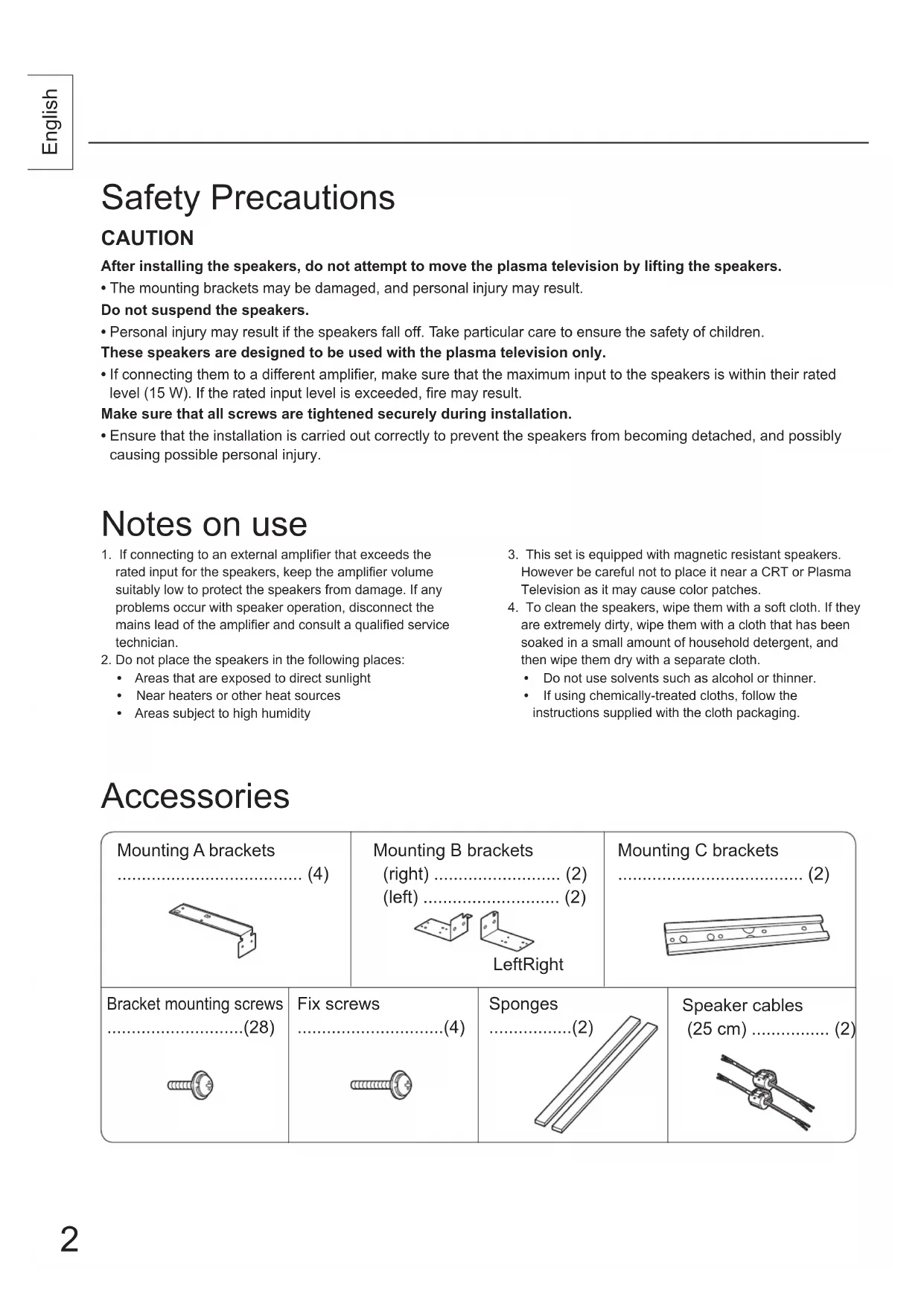
- The mounting brackets may be damaged, and personal injury may result. Do not suspend the speakers.
- Personal injury may result if the speakers fall off. Take particular care to ensure the safety of children. These speakers are designed to be used with the plasma television only.
- If connecting them to a different amplifier, make sure that the maximum input to the speakers is within their rated level (15 W). If the rated input level is exceeded, fire may result. Make sure that all screws are tightened securely during installation.
- Ensure that the installation is carried out correctly to prevent the speakers from becoming detached, and possibly causing possible personal injury. Safety Precautions Accessories
1. If connecting to an external amplifier that exceeds the
rated input for the speakers, keep the amplifier volume suitably low to protect the speakers from damage. If any problems occur with speaker operation, disconnect the mains lead of the amplifier and consult a qualified service technician.
2. Do not place the speakers in the following places:
- Areas that are exposed to direct sunlight
- Near heaters or other heat sources
- Areas subject to high humidity
3. This set is equipped with magnetic resistant speakers.
However be careful not to place it near a CRT or Plasma Television as it may cause color patches.
4. To clean the speakers, wipe them with a soft cloth. If they
are extremely dirty, wipe them with a cloth that has been soaked in a small amount of household detergent, and then wipe them dry with a separate cloth.
- Do not use solvents such as alcohol or thinner.
- If using chemically-treated cloths, follow the instructions supplied with the cloth packaging. Notes on use Mounting A brackets ...................................... (4) Mounting B brackets (right) .......................... (2) (left) ............................ (2) Bracket mounting screws ............................(28) Sponges .................(2) Speaker cables (25 cm) ................ (2) LeftRight Mounting C brackets ...................................... (2) Fix screws ..............................(4) TYSP65PV50069012095.indb2TYSP65PV50069012095.indb2 2005/09/1215:29:292005/09/1215:29:293 English Installation Speaker (right) Speaker (left)Bracket mounting screwsMount B brackets (right)Mount B brackets (left)
2. Mount A brackets to the
plasma television. (Four A brackets, for the left, right, top and bottom)
- Fit each hook into the slot of the plasma television, and securely fasten with two screws.
3. Mount B brackets to the
speakers. (Four B brackets, for the left, right, top and bottom)
1. Attach the sponges to the
- Attach the sponges to the surfaces which are in contact with the plasma television.• Clean the surfaces before attaching the sponges. Hook Slot Slot Rear of Plasma TelevisionBracket mounting screwsMount A brackets Fit with the clips (claws) at the top. Caution Trim TrimSpongesFor left For rightClips (Claws)Adjust plasma television and speaker position (front face and height) when fastening the A and B brackets.
Catch the B bracket claws in the A brackets (plasma television side). Fasten the A and B brackets with bracket mounting screws. Note
- If fixing the plasma television to the wall-hanging bracket, first attach the plasma television and then attach the speakers. • The left and right brackets are different, so please check carefully when mounting. Caution Bracket mounting screwsRear of Plasma TelevisionMount A bracket Mount B bracket TYSP65PV50069012095.indb3TYSP65PV50069012095.indb3 2005/09/1215:29:292005/09/1215:29:294
- After preparing the ends of the speaker cables for the right and left speakers, connect them as shown in the illustration.
- The red cable is for the (+) polarity and the black cable is for the (-) polarity. Do not connect the cables to the wrong polarities.
- If fixing the plasma television to the wall- hanging bracket, first connect the speaker cables to the plasma television.
6. Connect the speaker
cables. Preparing the ends of thespeaker cablesRemove while twisting1. Press down on the lever.2. Insert the cable. Release the lever.1. Push down the lever.3. Return the lever to its normal position.2. Insert the cable. Installation Information on Disposal for Users of Waste Electrical & Electronic Equipment (private households) This symbol on the products and/or accompanying documents means that used electrical and electronic products should not be mixed with general household waste.For proper treatment, recovery and recycling, please take these products to designated collection points, where they will be accepted on a free of charge basis. Alternatively, in some countries you may be able to return your products to your local retailer upon the purchase of an equivalent new product.Disposing of this product correctly will help to save valuable resources and prevent any potential negative effects on human health and the environment which could otherwise arise from inappropriate waste handling. Please contact your local authority for further details of your nearest designated collection point.Penalties may be applicable for incorrect disposal of this waste, in accordance with national legislation.For business users in the European UnionIf you wish to discard electrical and electronic equipment, please contact your dealer or supplier for further information.Information on Disposal in other Countries outside the European UnionThis symbol is only valid in the European Union. If you wish to discard this product, please contact your local authorities or dealer and ask for the correct method of disposal.
- To attach to each speaker, use the bracket mounting screws. To attach to the plasma TV, use the fixing screws.
5. Attach C brackets
Bracket mounting screwsFix screwsMounting C bracketRear of speaker Rear of Plasma Television English Black Red Black Red
5.7 cm x 12.6 cm, Oval-shaped, x2
15 W 100 (3.9 ") mm x 985 (38.8 ") mm x 90 (3.5 ") mm Weight Cabinet material