TV3210 - Fan BlueBuilt - Free user manual and instructions
Find the device manual for free TV3210 BlueBuilt in PDF.



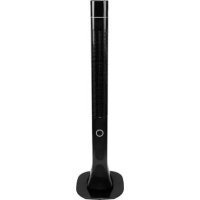
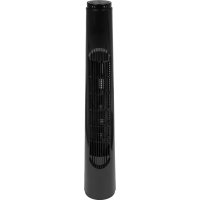
| Product type | Tower fan |
| Model | TV3210 |
| Brand | BlueBuilt |
| Connection voltage | 220-240 V / 50 Hz |
| Power consumption | 40 W |
| Weight | 2.25 kg |
| Dimensions (L x W x H) | 81.3 x 13.7 x 13.7 cm |
| Number of speeds | 3 (low, medium, high) |
| Ventilation modes | Normal ventilation, natural breeze, sleep mode |
| Oscillation | Yes, 75° angle |
| Timer | Yes, delayed shut-off up to 8 hours |
| Remote control | Yes, with battery |
| Display | LED, shows room temperature and intensity |
| Usage | Indoor use only |
| Required surface | Flat, horizontal and solid, clearance of 20 cm around |
| Intensity indicator color | Green (low), orange (medium), red (high) |
| Power cable | With storage system |
| Cleaning | Soft, dry cloth, avoid water inside |
| Seasonal storage | In its original packaging, dry place |
| Environmental protection | Do not dispose with household waste, recycle via collection point |
Frequently Asked Questions - TV3210 BlueBuilt
User questions about TV3210 BlueBuilt
0 question about this device. Answer the ones you know or ask your own.
Ask a new question about this device
Download the instructions for your Fan in PDF format for free! Find your manual TV3210 - BlueBuilt and take your electronic device back in hand. On this page are published all the documents necessary for the use of your device. TV3210 by BlueBuilt.
USER MANUAL TV3210 BlueBuilt
natural_image
Black cylindrical device with internal grid pattern and mounting base (no visible text or symbols)BlueBuilt TV3210 - Tower Fan
CONTENTS.
Table shaped.
Technical information 3.
Safety instructions 4.
How it works 6.
Different settings 6.
Ventilation 6.
Natural wind 6.
Setting a timer 7.
Oscillation 7.
Sleep mode 7.
Maintenance 8.
Occasional cleaning 8.
End-of-season cleaning 9.
Troubleshooting 10.
TECHNICAL INFORMATION.
T3(N[CA]\_.
| Model | BlueBuilt TV3210 |
| Connection voltage 220-240V/50Hz | |
| Required power 40W | |
| Weight (kg) 2.25 | |
| Dimensions (cm) 81.3x13.7x13.7 | |
SAFETY INSTRUCTIONS.
Better safe than sorry.
- This fan is only suitable for indoor use. Don't use it outdoors, as that will void the warranty.
- Have you discovered damage to the fan or its connector while you were unpacking it? Send it back or have it repaired by an expert, but don't use the machine.
- Make sure to fully assemble the fan before plugging the connector into the socket. Read how to do this in the installation manual.
- Only use the fan on a flat, sturdy, and horizontal surface.
- Don't put or hang anything on the machine and don't cover it. Don't place the fan near any curtains or other materials that may be sucked into the fan. This may cause the motor to jam, which leads to overheating.
- This machine may be used by children aged 8 years and up and by people with reduced physical, sensory, or mental capabilities or lack of experience and knowledge, provided that they're supervised or have received instructions on how to safely use the machine, and that they understand the dangers involved.
- Children shouldn't play with the machine. Children shouldn't clean or perform user maintenance without supervision.
- Turn off the fan when you leave, even if it's for a short period of time.
- Don't use the machine in a humid environment, such as the bathroom. Prevent splashing on or in the machine.
- Turn off the machine immediately when you hear a strange noise, smell something, or see smoke.
- Don't use the fan in a room with flammable or explosive substances and gases. A spark from the switch/motor may lead to an explosion.
- Never put your fingers, hands, arms or any objects inside the machine. This may hurt, cause injuries, or damage the fan.
- Never put the fan in an open window. Any rain hitting the fan may cause an electric shock.
-
Never touch the fan or connector with wet hands.
-
Don't connect the fan to a dimmer or timer.
- Don't set the fan on fire.
- Never pull the cord or the connector.
- Don't roll up the cord too tightly.
- Never use the fan in a room that's warmer than 40°C.
- Never repair the machine or the connector yourself. Always let an expert handle repairs.
- Always turn off the fan and remove the connector from the socket before cleaning or moving it.
- Don't let the fan continuously blow on small children, patients, or people who have difficulty walking. Their joints may stiffen or they may experience other physical complaints.
HOW IT WORKS.
Go for it.
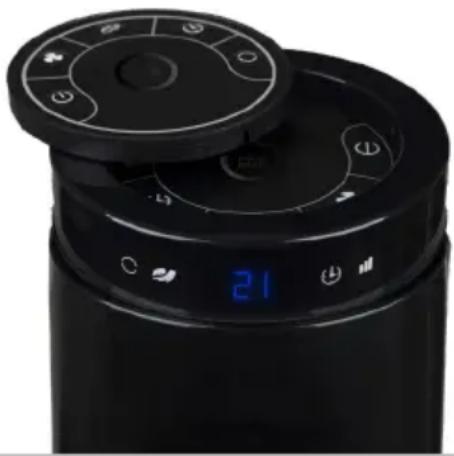
The fan has various settings to ventilate the room. Use the button on top of the fan or the remote to switch between settings.
natural_image
Close-up of a black cylindrical appliance with circular control panel and digital display (no visible text or symbols)Ventilation
The fan has 3 different settings. The light on the LED display of the fan shows which setting is turned on: green - low, orange - medium, and red - high.
- Press the ⏻ button to turn on the fan.
- Press the ♣ button to choose a speed setting.
- The fan starts in the lowest setting. Press once for the medium setting and twice for the high setting.
Natural wind
In the natural wind setting, the fan adjusts its speed several times. This produces the most natural airflow possible.
- Press the 📋 button to turn on the natural wind setting.
- Press this button again to turn off the natural wind setting.
Setting a timer
With a timer, you can set the fan to automatically turn off after a couple of hours.
- Turn on the machine and set the desired setting.
- Press the ⏻ button.
- Set the desired start time up to 8 hours by pressing the button multiple times. 1 press equals 1 hour, 2 presses equals 2 hours, et cetera.
Oscillation
Oscillation means that there's movement in the airflow. The fan will swivel at a 75-degree angle.
- Press the ○ button to let the fan swivel.
- Press this button again to stop the fan from swiveling.
Sleep mode
Do you use the fan in the bedroom? If so, turn on sleep mode at night.
-
Press the ♣ button to choose the lowest ventilation setting.
-
Press the ⏻ button to set the timer.
MAINTENANCE.
Neatly done.
Always turn off the machine and remove the connector from the socket before cleaning or doing maintenance on the machine.
Occasional cleaning
The fan doesn't need a lot of maintenance, but you don't want it to spread dust around the house either. To prevent this, it's important to clean the fan every so often.
- Clean the fan with a soft cloth or a feather duster on a regular basis, otherwise the fan will spread dust around the room.
- If the fan is very dirty, clean it with a slightly damp cloth.
- Make sure that no water enters the machine. Always dry the fan with a soft, dry cloth before turning it on again.
- Never use aggressive cleaners, gasoline, detergents, chemically impregnated cleaning cloths, or other cleaning solutions. They may cause discoloration or deformation of the fan.
End-of-season cleaning
Is the sun setting earlier again and is the temperature no longer causing you to sweat? If so, you probably no longer need the fan. To make sure you can use the fan again without any problems next summer, the way you store the fan is very important.
- Turn off the fan, remove the connector from the socket, and clean it.
- Store the fan in its original packaging or in a plastic bag. Store it in a safe and dry place.
- Don't put any objects on top of the machine. This may break the fan.
- Never wash or rinse the fan. The machine will break when water enters it.
TROUBLESHOOTING.
Need a Band-Aid.
| Problem Check the following | |
| The machine won't start when I press the ON/OFF button. | Is the connector plugged into the socket?Is the ground fault circuit interrupter on?Is there a power outage in the neighborhood? |
| The display shows the ambient temperature, but the control buttons on the fan don't work. | Did you use the remote while it's in the holder on top of the fan?Take it out of its holder and use the buttons on top of the fan.Is the fan in stand-by mode?First press the button to turn on the fan. |
| The remote doesn't work. | Have you tried replacing the batteries?Is the fan still in stand-by mode?First press the button to turn on the fan.Did you point the light of the remote at the receiver?Point the light on the side of the remote at the receiver next to the display that shows the temperature. |
| The power cord is very short. | • Is the cord still rolled up in the storage?• Remove the cord from the storage. |
| The fan is vibrating. | • Is the fan balanced?• Put the fan on a flat, horizontal surface. |
| The fan alternately blows both fast and slow. | • Is the fan in the 'natural wind' mode?• Press the button to turn off this setting. |
| The fan doesn't have enough power/the fan doesn't blow fast enough. | • Are the grilles dirty?• Carefully clean these grilles with the vacuum or a soft, dry cloth. |
Disposal
natural_image
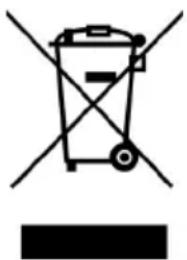
Symbol of a trash bin with crossed lines indicating no waste or discharge, and a solid black rectangle below (no text or labels)In the EU, this symbol indicates that this product may not be disposed of as ordinary household waste. Old equipment contains valuable materials that can and should be recycled to prevent any adverse effects to health and the environment caused by unregulated waste collection. Make sure to bring old equipment to a designated collection point or contact the company where you bought the machine. They can make sure that as many of the components as possible can be recycled.
CE Declaration
Coolblue BV, Weena 664, 3012 CN Rotterdam
hereby declares that the following products:
BlueBuilt Tower Fan
known under the brand
BlueBuilt, type TV3210
meet the requirements of the standards below:
LVD 2014/35/EU: EMC 2014/30/EU:
EN 60335-1:2012 + A11:2014 EN 55014-1:2006 + A1:2009 + A2:2011
EN 60335-2-80:2003 + A1:2004 EN 55014-2:1997 + A1:2001 + A2:2008
+ A2:2009 EN 61000-3-2:2014
EN 62233:2008 EN 61000-3-3:2013

text_image
C€NOTES.
Sensible scribbles.
NOTES.
Sensible scribbles.
BACKSIDE.
Stop staring.
blue built
MODE D'EMPLOI DÉTAILLÉ.
On vous dit tout.

natural_image
Black cylindrical electronic fan with visible grille and ventilation slots (no text or symbols)Ventilateur colonne - BlueBuilt TV3210
CONTENU.
natural_image
Close-up of a black cylindrical appliance with a digital display showing 21, no visible text or symbols.Ventilation
natural_image
Symbol of a trash bin with crossed lines indicating no waste or restriction, and a solid black rectangle below (no text or labels)BlueBuilt, type TV3210
natural_image
Black cylindrical device with a grid pattern and ventilation slots, no visible text or symbolsBlueBuilt TV3210 - Torenventilator
INHOUD.
Niet in steen.
natural_image
Close-up of a black digital air conditioner with control panel and digital display (no visible text or symbols)Ventilatie
natural_image
Symbol of a trash bin with crossed lines indicating no waste or restriction, and a solid black rectangle below (no text or labels)BlueBuilt, type TV3210