
SRU152 - Remote control PHILIPS - Free user manual and instructions
Find the device manual for free SRU152 PHILIPS in PDF.
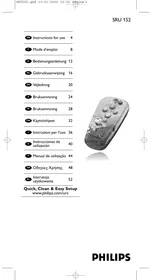


| Product type | Universal remote control |
| Brand | PHILIPS |
| Model | SRU152 |
| Power supply | 2 AAA batteries (R03, UM4) |
| Dimensions (approx.) | 20 cm x 5 cm x 2 cm |
| Weight (approx.) | 100 g (with batteries) |
| Main functions | TV control: on/off, volume, channels, mute |
| Programming methods | Code entry or automatic search |
| Brand compatibility | Most TV brands |
| Indicator light | Green LED for confirmation |
| Special keys | PROG +/-, VOL +/-, Mute, Standby |
| Care and cleaning | Clean with a soft, dry cloth |
| Safety | Observe battery polarity, do not expose to moisture |
| Spare parts and repairability | Not applicable (no spare parts available) |
| General information | Manual available in multiple languages at notice-facile.com |
Frequently Asked Questions - SRU152 PHILIPS
User questions about SRU152 PHILIPS
0 question about this device. Answer the ones you know or ask your own.
Ask a new question about this device
Download the instructions for your Remote control in PDF format for free! Find your manual SRU152 - PHILIPS and take your electronic device back in hand. On this page are published all the documents necessary for the use of your device. SRU152 by PHILIPS.
USER MANUAL SRU152 PHILIPS
Quick, Clean & Easy Setup
www.philips.com/urc

Contents
- Introduction 4
- Installing the remote control 4-6
Inserting the batteries 4 Testing the remote control 4 Setting the remote control 5 Automatically setting the remote control 6
- Keys and functions 7
Code list of all brands / equipment 56-59
1. Introduction
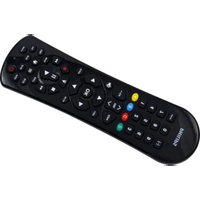
Congratulations on your purchase of the Philips SRU152 universal remote control. After installing the remote control it can operate the most-used functions of almost any brand of TV.
You can find information about how to prepare this remote control for use in the chapter 'Installing the remote control'.
2. Installing the remote control
Inserting the batteries
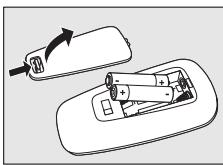
1 Press the cover inwards and slide it in the direction of the arrow. 2 Place two R03, UM4 or AAA type batteries into the battery compartment, as shown. 3 Slide the cover back and click it firmly into place.
Testing the remote control
The remote control has been programmed to operate the most-used functions of almost any brand of TV. Because the SRU152 may use different signals for each make and even for different models of the same make, it is advisable to test whether your TV responds to the SRU152.
The example below instructs you how to do this.
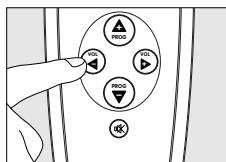
1 Turn your TV on manually or use the original remote control. Tune to channel 1. 2 Check whether all the keys are working. For an overview of the keys and their functions see '3. Keys and functions'. If the TV responds as it should to all of the key commands the SRU152 is ready for use. If the device does not respond at all or not to all of the key commands, follow the instructions under 'Setting the remote control'.
Setting the remote control
This is only necessary if your TV does not respond to the SRU152. If that is the case, the SRU152 does not recognize the brand and/or model of your TV and you need to program the remote control to do so.
The example below instructs you how to do this.
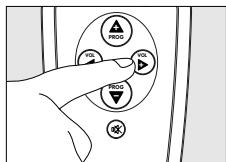
1 Turn on the TV manually or use the original remote control. Tune in to channel 1. 2 Look up the brand of your TV in the code list at the back of this manual. One or more five-figure codes are shown for each brand. Note the first code. 3 Keep keys and on the SRU152 pressed simultaneously for five seconds until the green LED remains lit.
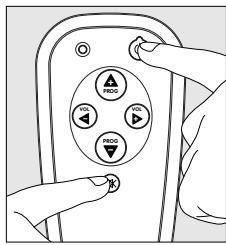
4 Then enter the code noted in step 2 using the remote control keys as follows:
- PROG + for entering 1;
- VOL - for entering 2;
- VOL + for entering 3;
- PROG - for entering 4;
- Mute (M) + for entering 5.
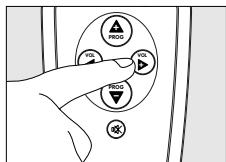
The green LED will now flash twice.
If the LED flashes once for an extended period, the code has not been entered properly or the wrong code has been entered. Start again from step 2.
5 Point the SRU152 at the TV and check that it responds as it should. - If the TV responds to all of the key commands, the SRU152 is ready for use. Do not forget to note your code.
If the device does not respond at all, or not to all of the key commands, start again from step 2 and try the next code from the list.
Automatically setting the remote control
If you cannot find the right code for your brand device, the remote control can automatically search for the right code.
1 Make sure the TV is switched on and select a channel using the original remote control or the keys on the TV (for example channel 1). The SRU152 emits the 'switch off TV' signal for all models of TV that are stored in the memory. 2 Then keep keys ① and ② on the SRU152 pressed simultaneously for five seconds, until the green LED remains lit.
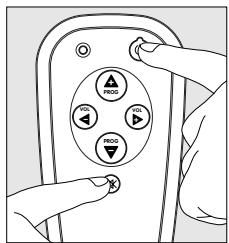
3 Press the Standby key of the SRU152 briefly.
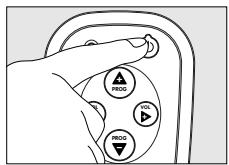
The SRU152 now starts emitting all known TV off' signals, one by one. Each time a code is sent, the green LED will flash.
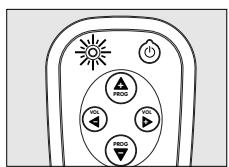
4 When your TV switches off (stand-by), you press the Standby key of the SRU152 twice within 1 second, to confirm.
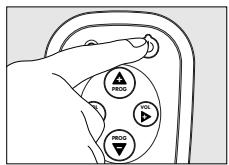
The SRU152 has now found a code that works on your TV. 5 Check if you can operate all functions on your TV with the SRU152.
If this is not the case, you can redo the automatic setting. The SRU152 will then search for a code that perhaps works better.
After the SRU152 has run through all the known codes, the search will stop automatically and the green LED will stop flashing. Automatic programming of a TV takes a maximum of 5 minutes.
3. Keys and functions
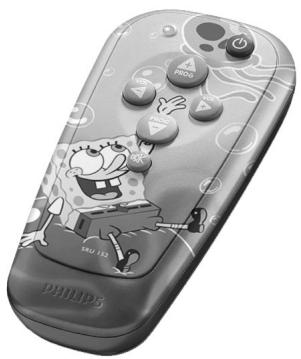
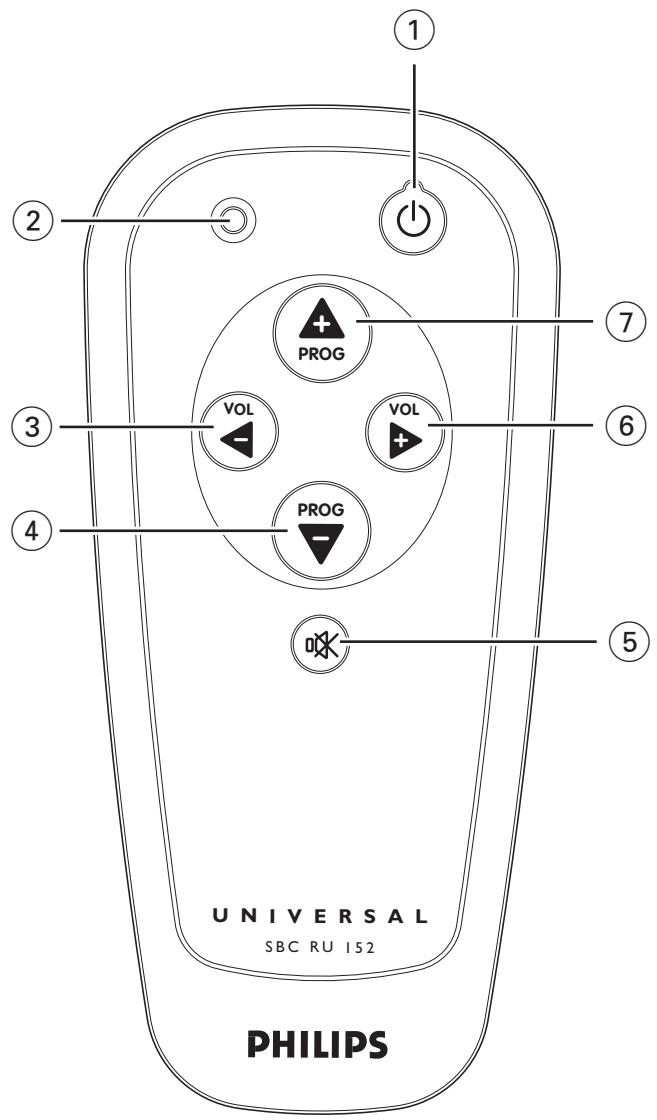
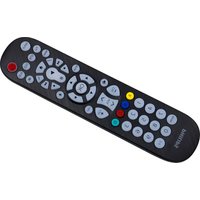
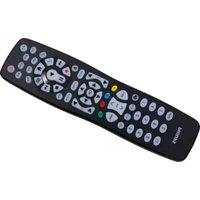
The illustration on page 3 gives an overview of all keys and their functions.
① (Standby). . . . switches the TV on or off. Indicator LED . . . flashes green when a code is being entered and when automatically setting the remote control. ② VOL - . . . reduces the TV volume.
Functions as '2' key when entering a code.
④ PROG - selects a previous channel. Functions as '4' key when entering a code. (5) (Mute) ........ mutes the sound of the TV. Functions as '5' key when entering a code. (6) VOL + . . . increases the TV volume. Functions as '3' key when entering a code. ④ PROG + . selects a following channel. Functions as '1' key when entering a code.
If the device does not respond at all, or not to all of the key commands, follow the instructions under 'Setting the remote control'. It is possible that you must enter another code for the device.
- PROG + to enter 1;
- VOL - to enter 2;
- VOL + to enter 3;
- PROG - to enter 4;
- Mute (K) + to enter 5.
Frontech. 24133, 13443, 21213, 23123, 24234
Fujitsu. 12314, 14332
Funai. 22112, 14143
GBC. 32114
GEC. 12123, 12314, 12111, 14421, 31244, 32131
GPM 14422
Geloso. 11321, 14411, 22423
Genexxa. 13443, 14422
GoldStar 12111, 14421, 23123, 13131, 21442
Goodmans. 12111, 12314, 14143, 23143, 31143, 11444, 14421, 21123, 22231, 22413, 23212
Gorenje 23142
Graetz..... 23121, 32131, 22423, 13443
Granada 23113, 12111, 12314, 14334, 22433, 23123, 31244, 14421, 22343
Grandin 21422, 32442
Grundig. 12312, 32122, 14233, 21131, 31113, 32124, 32323
HCM. 11321, 21422, 23424
Hanseatic. 23121, 12111, 22234, 24124, 31434, 32124
Hantarex 31244
Havermy 12431
Hifivox 31211
Hinari. 11321, 11444, 12111, 14422, 14143
Hisawa. 21422, 23334, 24313
Hitachi...13443, 14441, 12123, 22431, 22444, 13131, 12124, 14421, 11444, 14244, 14312, 32131, 13121, 22423, 23123, 31444
Huanyu. 14414, 23212
Hypson. 12111, 21422
ICE 14421, 23143
ICeS 14422
IR. 12322
ITC. 32114
ITS 23143
ITT. 32131, 22423, 23121, 22433, 13443, 31434, 31444
Imperial. 12322, 21213, 12344, 23442, 32114, 12324, 23142
Indesit 21131
Indiana 12111
Ingelen 32131, 13443
Inno Hit 12314, 31244
Interfunk. 12111, 23121, 32131, 31234, 13443, 21213, 31211
Intervention 12111, 13112, 14421
Isukai 14422
JVC. 12211, 11444, 14234, 23143, 32432, 33331
Kaisui. 14422, 14421,
11321, 14414, 21422
Kapsch. 32131, 13443, 14332
Karcher 32442
Kathrein 32124
Kendo. 12111, 21123, 23122
Kennedy. 32114
Kingsley 14414
Kneissel. 21243, 24143
Korpel. 12111
Korting. 12413
Koyoda 11321
Leyco 12314, 12111, 22112
Liesenk & Tter. 12111
Loewe.....31234, 12413, 12323, 21441
Luma. 14332, 23123, 22141
Luxor. 21131, 23121, 23123, 23111, 22431, 22444
M Electronic. 22422, 13121, 13114, 14421, 11321, 12111, 13131, 13443, 21433, 23212, 24434
MTC. 22431, 31234
Magnadyne 12413, 22423, 13112, 21213, 31244, 31434
Magnafon. 13112, 31244, 12324, 14411
Manesth. 22234, 14421, 21123
Marantz. 12111, 32124
Marelli. 12413
Mark. 12111
Matsui.....11321, 21123, 12111, 14141, 24223, 14334, 14421, 23123, .23143, 31434, 11323, 11443, 11444, ...12314, 21334, 22112, 31113, 31244
McMichael 12123
Mediator. 12111
Memorex. 11321
Memphis. 22341
Metz. 21343, 21133, 12413, 23133, 14411
Minerva. 31113, 12312, 21131, 32122
Minoka. 23141, 23424
Mitsubishi. 11444, 31234, 13124, 12413, 21131
Mivar. 21442, 21443, 14414, 21444, 31244, 32441
Motion. 12324
A
Multitech. 11321, 12324, 13112, 14414, 23123 Myryad. 32124 NEC. 14122 NEI. 12111, 22341, 24133 National. 21131 Neckermann. 22431, 12111, 23123, 12413, 32124, 14233, 14411, 32122 Nesco. 14143 Nicam. 31434 Nikkai. 12111, 11443, 14422, 22341, 12314, 14414 Nobliko. 12324, 13112 Nogamatic. 31211 Nokia. 24434, 31444, 23121, 24421, 32432, 33213 Nordmende. 14244, 13131, 14312, 22413, 31211, 21433, 14411 Oceanic. 23121, 22423, 13443 Orion. 14141, 22112, 31244, 21123, 31434, 12111, 22234, 22241, 24223 Osaki. 23424, 12314, 14421, 14422 Oso. 14422 Osume. 12314 Otake. 22231 Otto Versand. 12111, 22413, 31234, 22423, 22431, 11322, 11444, 14233, 14411, 14421, 22234, 32114, 32122, 32124 Palladium. 23142, 23123, 23442 Panama. 14421 Panasonic. 14442, 33322, 21131, 21342, 13443, 14411, 21134, 22344, 22423, 23133, 32131 Pathe Cinema. 22234, 14411, 21132, 14414, 32114 Pathe Marconi. 14244, 14312, 31211, 22331 Pausa. 11321 Perdio. 22234 Philco. 12413, 12322, 12344, 21213, 32114, 12324, 14411 Philex. 22433 Philips. 12111, 32124, 22243, 14241, 12123, 12413, 23212, 32122, 32431 Phoenix. 12413 Phonola. 12111, 12413 Pioneer. 13131, 21433, 13443 Prandoni Prince. 31244 Profex. 11321, 12324, 23121, 23123 Proline. 22241
Protech. 12111, 13112, 11321, 24133, 14421, 21213, 22341, 23442, 32114 Quelle. 12111, 12312, 31234, 12322, 11322, 12344, 11323, 14314, 21224, 22313, 23121, 32114, 13114, 14411, 22113, 22314, 31434, 32122 Questa. 11444 R-Line. 12111 RBM. 12312 RFT. 24124, 12413 Radiola. 12111, 22243 Radiomarelli. 12413, 31244 Rank Arena. 11444 Rediffusion. 23121, 22433 Revox. 12111 Rex. 22141, 14332, 13443, 21243 Roadstar. 11321, 14422, 23442 SBR. 12111, 12123, 14241 SEG. 14421, 11444, 12324, 32114 SEI. 31434, 31244, 13112, 22423, 11322, 12413, 14141, 14411, 22112 Saba. 13131, 31211, 22413, 12413, 13443, 14411, 14244, 21433, 14312, 22333, 12323, 22423, 32131 Saccs. 21132 Sagem. 32442 Saisho. 11323, 31244, 14141, 31434, 11321, 21123, 24133 Salora. 23121, 22431, 23123, 31444, 13443, 22444, 23113 Sambers. 13112, 12324, 31244, 14411 Samsung. 12111, 14421, 21442, 23142, 11321, 31114, 32124, 32323, 33244 Sandra. 14414 Sanyo. 11444, 14334, 11323, 12314, 13114, 14411, 22343 Schaub Lorenz. 23121, 22423, 32131 Schneider. 12111, 22334, 22243, 31434, 14422, 21213, 22434, 23143 Seleco. 14332, 21243, 13443, 22141, 23122, 23423 Sentra. 11443 Sharp. 12431, 11444 Shorai. 22112 Siarem. 12413, 31244, 13112, 14411, 22423 Siemens. 14314, 22313, 14233, 22314, 14411, 32122, 12111, 22423
Silver. 11444
Singer. 12413
Sinudyne. 31434, 31244, 13112, 11322, 12413, 14141, 14411, 21123, 22112, 22423
Skantic. 23111, 22444
Solavox 22433,13443
Sonitron. 14334
Sonoko. 11321, 12111
Sonolor 13443, 14334
Sontec. 12111
Sony.....11323, 11322, 11444, 21111
Soundwave. 12111, 23442
Standard. 14421, 14422, 11321
Brand : PHILIPS
Model : SRU152
Category : Remote control