PHILIPS

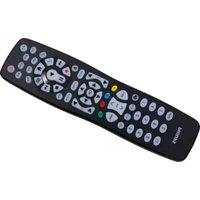
Universal Remote Control SRP9263C - Remote control PHILIPS - Free user manual and instructions

Find the device manual for free Universal Remote Control SRP9263C PHILIPS in PDF.

📄 2 pages English EN Download 💬 AI Question 10 questions ⚙️ Specs
Notice PHILIPS Universal Remote Control SRP9263C - page 1
Pick your language and provide your email: we'll send you a specifically translated version.
Product Type Universal Remote Control
Brand Philips
Model SRP9263C
Dimensions (approx.) 5.5 x 2.5 x 1.5 inches
Weight (with batteries) 4 ounces
Power Source 2 AAA batteries (not included)
Compatible Devices TVs, DVD/Blu-ray players, soundbars, streaming boxes, and more
Control Method Infrared (IR)
Programming Auto-search, direct code entry, or manual code search
Number of Devices Supported Up to 4 devices
Key Features Dedicated buttons for TV, DVD, AUX, and STB; volume and mute; channel up/down; numeric keypad; power button
Learning Capability Not supported
Backlight No
Cleaning Instructions Wipe with a soft, dry cloth; do not use liquids or abrasives
Safety Precautions Keep away from water and heat sources; remove batteries if not used for extended periods
Spare Parts Available Batteries only
Repairability Not user-serviceable; replace if defective
Included In Box Remote control, user manual
Warranty 1 year limited warranty

Frequently Asked Questions - Universal Remote Control SRP9263C PHILIPS

How do I program the Philips SRP9263C remote to my TV?
Use the auto-search method: turn on your TV, press and hold the TV button until the LED blinks then stays on, then press and hold the Power button. Release when the TV turns off. Test other buttons. If unsuccessful, try direct code entry using codes from the manual.
What batteries does the SRP9263C use?
It requires 2 AAA alkaline batteries (not included).
Can I use this remote with my soundbar?
Yes, it can control soundbars via the AUX or STB button. Program it using the appropriate code for your soundbar brand.
Why isn't my remote responding?
Check that batteries are installed correctly and fresh. Ensure there are no obstructions between the remote and device. Try reprogramming the device.
How do I reset the remote to factory settings?
Remove batteries, press and hold any button for 10 seconds, then reinsert batteries. This clears all programmed codes.
Does this remote support streaming devices like Roku?
It can control streaming devices if they use IR (infrared). Some newer devices use Bluetooth and won't work with this remote.
How many devices can I control?
You can control up to 4 devices using the TV, DVD, AUX, and STB buttons.
What is the range of the remote?
The IR range is typically up to 30 feet (10 meters) in a direct line of sight.
Can I program the remote without codes?
Yes, use the auto-search method: press and hold the device button until LED lights, then repeatedly press and release the Power button until the device turns off. Press Enter to save.
Is the remote backlit?
No, the SRP9263C does not have a backlight. Buttons are not illuminated.

User questions about Universal Remote Control SRP9263C PHILIPS

0 question about this device. Answer the ones you know or ask your own.

Ask a new question about this device

The email remains private: it is only used to notify you if someone responds to your question.

No questions yet. Be the first to ask one.

Download the instructions for your Remote control in PDF format for free! Find your manual Universal Remote Control SRP9263C - PHILIPS and take your electronic device back in hand. On this page are published all the documents necessary for the use of your device. Universal Remote Control SRP9263C by PHILIPS.

USER MANUAL Universal Remote Control SRP9263C PHILIPS
Manual assistant
Powered by Anthropic
Waiting for your message
Product information

Brand : PHILIPS

Model : Universal Remote Control SRP9263C

Category : Remote control