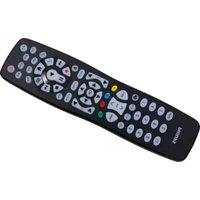
SRP9348D - Remote control PHILIPS - Free user manual and instructions
Find the device manual for free SRP9348D PHILIPS in PDF.


Pick your language and provide your email: we'll send you a specifically translated version.
| Product Type | Universal Remote Control |
| Brand | Philips |
| Model | SRP9348D |
| Dimensions (Approx.) | 20 x 5 x 2 cm |
| Weight (Approx.) | 80 g |
| Power Source | 2 x AAA batteries (not included) |
| Main Functions | Control TV, DVD, Blu-ray, streaming devices; volume, channel, input selection |
| Transmission Technology | Infrared (IR) |
| Number of Devices Controlled | Multiple (universal) |
| Programming Method | Auto-code search or manual code entry |
| Code Database | Pre-programmed for major brands |
| Battery Life (Approx.) | 6 months under normal use |
| Cleaning Instructions | Wipe with a soft, dry cloth; avoid liquids |
| Safety Warnings | Keep away from water and heat sources; do not disassemble |
| Spare Parts Available | Batteries (standard AAA) |
| Repairability | Non-repairable; replace if defective |
| General Information | Philips universal remote; suitable for most TV brands |
Frequently Asked Questions - SRP9348D PHILIPS
How do I program the Philips SRP9348D remote to my TV?
Turn on your TV. Point the remote at the TV and hold the SETUP button until the red light stays on. Press the TV device button. Then press POWER repeatedly until the TV turns off. Press SETUP to lock in the code.
What batteries does the SRP9348D use?
It uses two AAA alkaline batteries (not included). Insert them with correct polarity as marked in the battery compartment.
How can I reset the remote to factory settings?
Remove the batteries, press any key for 3 seconds to discharge, then reinsert batteries. This clears all programmed codes.
Does this remote work with all TV brands?
It works with most major brands like Samsung, LG, Sony, Panasonic, etc. Check the code list in the manual for full compatibility.
What to do if the remote stops working?
First, replace the batteries. Ensure nothing is blocking the IR sensor on the TV. If still not working, reprogram the remote or reset it.
Can I control multiple devices with one remote?
Yes, the SRP9348D is a universal remote that can control up to 4 devices (TV, DVD, Blu-ray, etc.) by pressing the corresponding device button.
How do I find the correct code for my device?
Use the auto-code search function: press SETUP, then device button, then POWER repeatedly until the device turns off. Or look up the code in the included code list.
Does the remote have a backlight?
No, the SRP9348D does not feature a backlight. Keys are standard with tactile feedback.
How should I clean the remote?
Wipe with a soft, dry cloth. Do not use water, cleaners, or abrasives as they may damage the remote.
Is the remote repairable?
No, the remote is not designed to be repaired. If defective, replace it with a new one.
User questions about SRP9348D PHILIPS
0 question about this device. Answer the ones you know or ask your own.
Ask a new question about this device
No questions yet. Be the first to ask one.
Download the instructions for your Remote control in PDF format for free! Find your manual SRP9348D - PHILIPS and take your electronic device back in hand. On this page are published all the documents necessary for the use of your device. SRP9348D by PHILIPS.
USER MANUAL SRP9348D PHILIPS


Manual assistant
Powered by Anthropic
Waiting for your message
Product information
Brand : PHILIPS
Model : SRP9348D
Category : Remote control