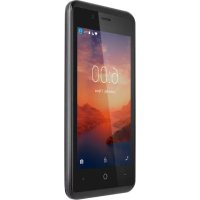
Move 6 mini - Smartphone Krüger&Matz - Free user manual and instructions
Find the device manual for free Move 6 mini Krüger&Matz in PDF.



| Product type | Smartphone |
| Brand | Kruger&Matz |
| Model | Move 6 mini |
| Reference | KM0445 |
| Dimensions | Approximately 140 x 68 x 9 mm |
| Weight | Approximately 130 g |
| Power supply | Rechargeable lithium-ion battery (removable) |
| Battery type | Removable battery, charging via micro USB |
| SIM card options | Dual SIM (two nano-SIM cards) |
| Expandable storage | Yes, via microSD card (up to 32 GB) |
| Connectors | 3.5 mm headphone jack, micro USB port |
| Camera | Camera with LED flash |
| Operating system | Android |
| Speaker | Built-in |
| Maintenance | Clean with a soft damp cloth; do not use chemicals |
| Safety | Do not use while driving without a hands-free kit; turn off in airplanes and hazardous areas |
| Spare parts and repairability | Removable battery; repairs exclusively by an authorized service center |
| Included accessories | Micro USB cable, mains charger |
| General information | Made in China; compliant with directive 2014/53/EU |
Frequently Asked Questions - Move 6 mini Krüger&Matz
User questions about Move 6 mini Krüger&Matz
0 question about this device. Answer the ones you know or ask your own.
Ask a new question about this device
Download the instructions for your Smartphone in PDF format for free! Find your manual Move 6 mini - Krüger&Matz and take your electronic device back in hand. On this page are published all the documents necessary for the use of your device. Move 6 mini by Krüger&Matz.
USER MANUAL Move 6 mini Krüger&Matz
SAFETY ALERT AND CAUTIONS
Road safety comes first: Do not use a hand-held phone while driving. Use hands-free fittings when calls are unavoidable while driving. In some countries, dialing or receiving calls while driving is illegal!
Switch off in aircraft: Wireless devices can cause interference in aircraft. Please make sure that your mobile phone is powered off (or switch to flight mode) in flight.
Switch off before entering risky areas: Strictly observe the relevant laws, codes, and regulations on the use of mobile phones in risky areas. Turn off your mobile phone before entering a place susceptible to explosion, such as an oil station, oil tank, chemical plant or a place where a blasting process is under way.
Observe all special regulations: Follow any special regulations in force in any area such as hospitals and always switch off your phone whenever it is forbidden to use it or, when it may cause interference or danger. Properly use your mobile phone near medical apparatuses, such as pacemakers, hearing aids and some other electronic medical devices, as it may cause interference to such apparatuses.
Interference: The conversation quality of any mobile phone may be affected by radio interference. An antenna is built inside the mobile phone and located below the microphone. Do not touch the antenna area during a conversation, lest that the conversation quality deteriorate.
Qualified service: Only qualified personnel may install or repair phone equipment. Installing or repairing the mobile phone on your own may bring great danger and violates the warranty rules.
Accessories and batteries: Use only approved accessories and batteries.
Use sensibly: Use only in a normal and proper manner, and only as indicated in this instruction manual.
Emergency calls: Ensure the phone is switched on and in service, enter the emergency number, e.g. 112, then press the Dial key. Give your location and state your situation briefly. Do not end the call
until told to do so.
Note: Similarly to other mobile phones, this device may not support every function described in this manual due to network settings or radio broadcast operator. Some networks may not support 112 emergency calls too. Therefore, you should not rely only on mobile phones in critical situations. In case of any doubts, it is advised to contact local operator.
CLEANING AND MAINTENANCE
- Please don't leave the phone, the battery, and the charger in the bathroom and other high humidity places, and prevent them from rain.
- Please clean the phone, the battery, and the charger using soft and dry cloth.
- Please don't wipe the phone using alcohol, thinner, or benzene and other chemical reagents.
乙
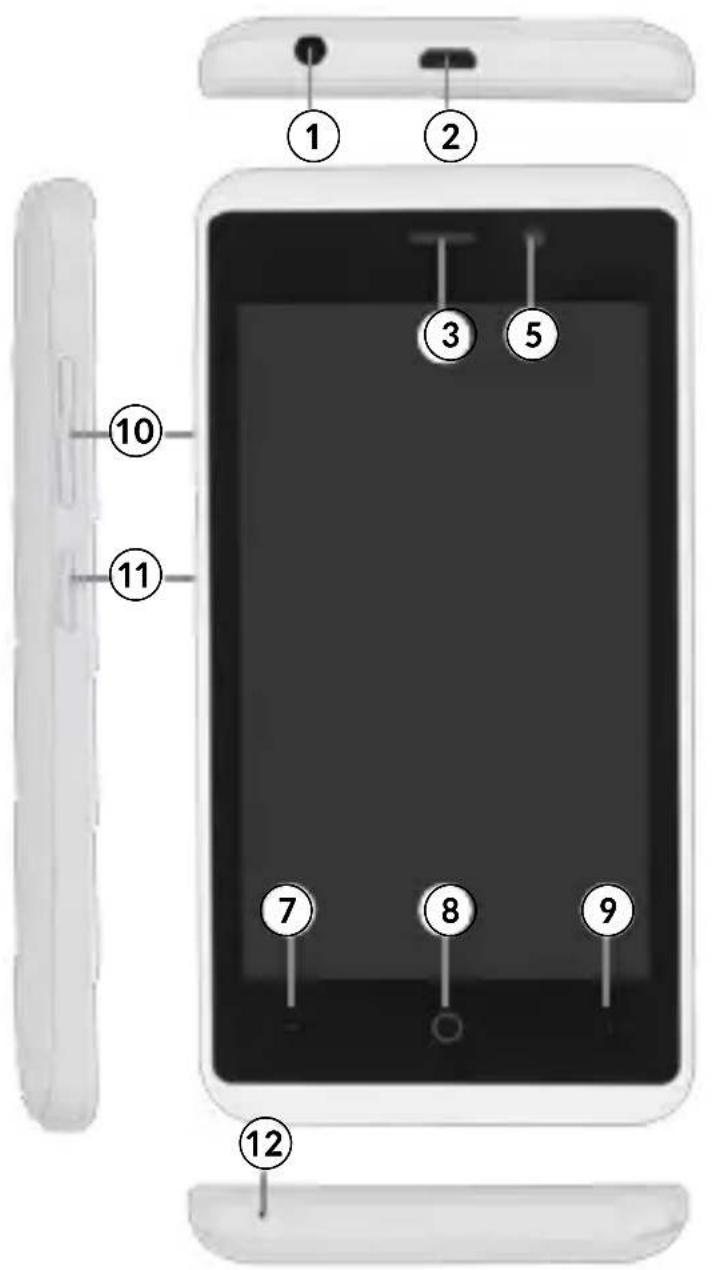
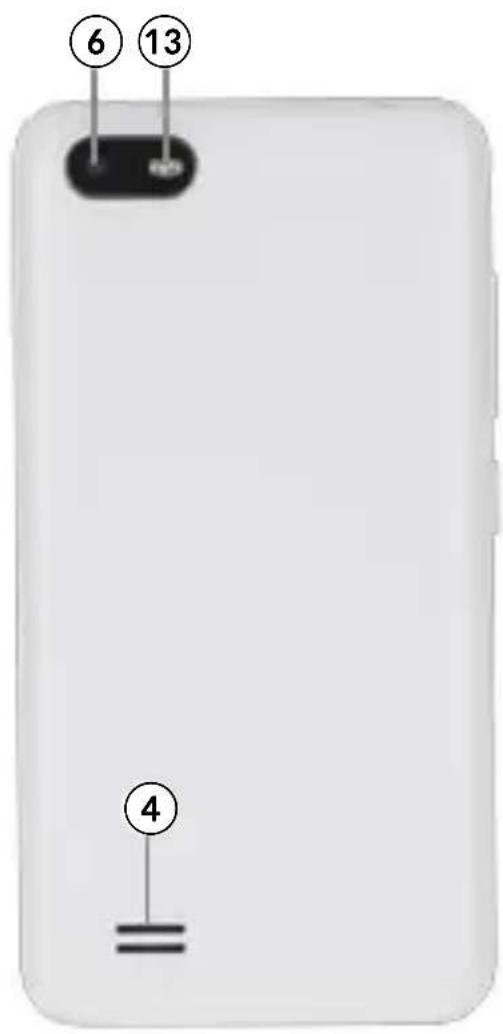
PRODUCT DESCRIPTION
- Headphone jack
- micro USB port (charging)
- Receiver
- Speaker
- Front camera
- Rear camera
- Overview button
- Home button
- Previous button
- Volume control button
- Power button
- Microphone
- Flash
GETTING STARTED
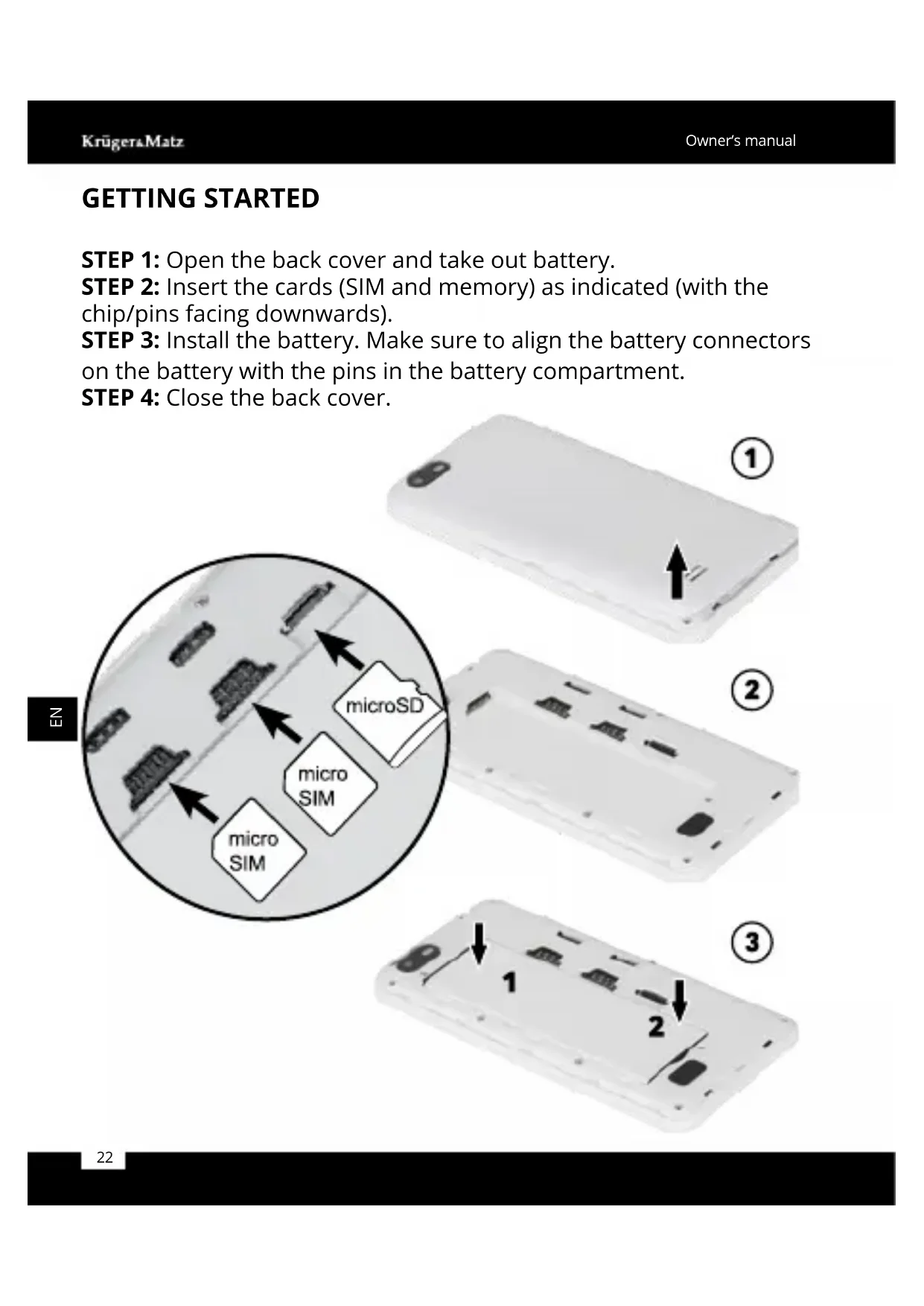
STEP 1: Open the back cover and take out battery.
STEP 2: Insert the cards (SIM and memory) as indicated (with the chip/pins facing downwards).
STEP 3: Install the battery. Make sure to align the battery connectors on the battery with the pins in the battery compartment.
STEP 4: Close the back cover.
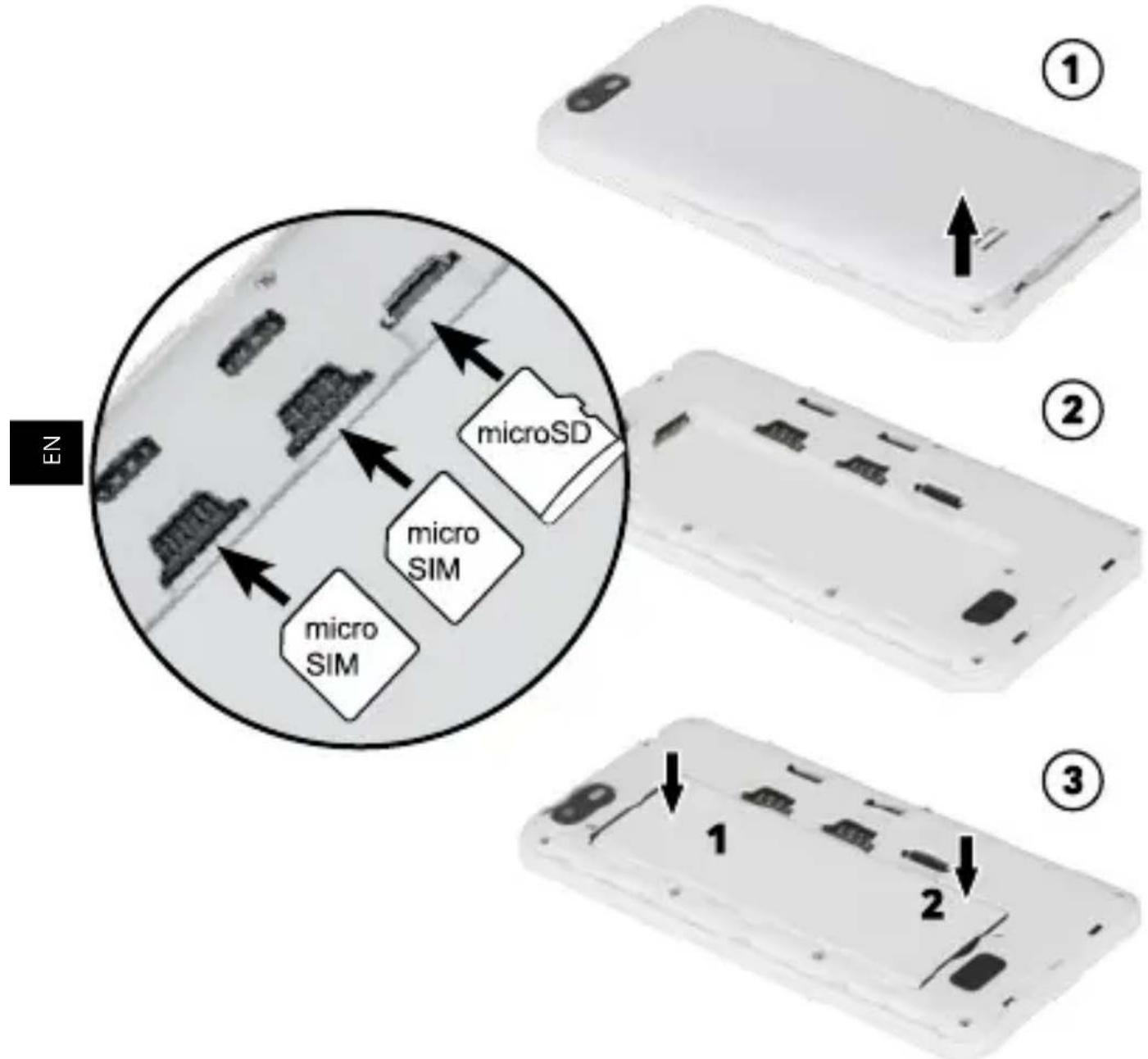
BATTERY/SIM CARD/MEMORY CARD INSTALLATION
- Power off the mobile phone and disconnect it from charger before unmounting battery or SIM cards.
- Before removing memory card, make sure it has been disconnected first!
- Exercise caution when operating SIM card/memory card, as friction or bending may damage the card.
- Keep the mobile phone and its fittings such as the SIM cards/ memory cards beyond children's reach.
- If the memory card cannot be read, please check whether it is has been inserted correctly.
- Producer does not guarantee compatibility with every memory card.
- Please note: Dual SIM in standby will shorten the standby time compared to single SIM.
- Make sure the battery is fully charged if it has been out of use for a long period.
CHARGING
乙
Charge the smartphone using the provided USB cable. Connect the cable to micro USB port on the device. Other end of the cable plug into provided charger or compatible USB port.
- Make sure the phone is fully charged before turning it on for the first time.
- Use only original charging devices and batteries approved by the producer. Using other accessories may damage the device.
TURN ON
Turn on: Press and hold the power button until the screen goes on.
Turn off: Press and hold the power button for about 2 seconds,
then choose appropriate (Power off).
LANGUAGE
Once the phone is ON you can personalize it to your needs. To change language go to Main Menu, open Settings, go to Language and input, enter Language and select appropriate.
FUNCTION KEYS
Power button: Press and hold Power key to open the power key menu, where you can turn off the phone (Power off) or Restart.
Volume button: Press the volume keys to change the ring volume (on the home screen) or the earpiece volume (during a call).
Overview button: Press the button to display recently used apps menu.

Home button: Press Home to return to the home screen. Press and hold the button to open Google Now function.
Back button: Opens the previous screen you were working in.
LEARN MORE
For more information on this device visit: www.krugermatz.com.
Read owner's manual carefully before using your smartphone.
Visit www.krugermatz.com website for more products and accessories.
In case of any doubts or questions reach out to our Frequently
Asked Questions section.
Please note: below illustrations and descriptions concerning operating system are for reference only, and may vary from actual software on your device!
"The LECHPOL ELECTRONICS Sp. z o.o. Sp.k. company declares that product KM0445 is consistent with the essential requirements and other relevant provisions of directive 2014/53/UE. The proper declaration for download from www.lechpol.eu"
English
Correct Disposal of This Product (Waste Electrical & Electronic Equipment)



(Applicable in the European Union and other European countries with separate collection systems) This marking shown on the product or its literature, indicates that it should not be disposed with other household wastes at the end of its working life. To prevent possible harm to the environment or human health from uncontrolled waste disposal, please separate this from other types of wastes and recycle it responsibly to promote the sustainable reuse of material resources. Household users should contact either the retailer where they purchased this product, or their local government office, for details of where and how they can take this item for environmentally safe recycling. Business users should contact their supplier and check the terms and conditions of the purchase contract. This product should not be mixed with other commercial wastes for disposal.
Made in China for LECHPOL ELECTRONICS Sp. z o.o. Sp.k., ul. Garwolinska 1, 08-400 Mietne.
SEGURIDAD
Kruger. Matz is a registered trademark


Brand : Krüger&Matz
Model : Move 6 mini
Category : Smartphone