Journi - Hi-fi system Griffin - Free user manual and instructions
Find the device manual for free Journi Griffin in PDF.


| Product Type | Portable Speaker System for iPod |
| Brand | Griffin |
| Model | Journi |
| Power | Rechargeable lithium-ion battery 3.7V / 2200mAh, up to 10h battery life; charges via USB (500mA) or AC via PowerBlock adapter (100-240V, 1000mA) |
| Speakers | 2 tweeter/midrange drivers approx. 50mm, 2 passive radiators approx. 64mm |
| Audio Processing | SRS WOW® Technology |
| Connectivity | iPod 30-pin Dock connector, 3.5mm auxiliary input, female 30-pin power/sync port |
| Remote Control | Multifunction infrared (on/off, volume, track navigation, play/pause) |
| Main Functions | iPod playback via dock, auxiliary input for other players, iPod charging, remote control, adjustable footpad, foldable base |
| Warranty | 1 year |
| Maintenance | Clean with a soft, dry cloth. Do not expose to moisture. |
| Repairability | Reset button accessible with a paperclip |
| Operating Temperature | 0°C to 35°C |
| Storage Temperature | -10°C to 60°C |
| Relative Humidity | 5% to 95% non-condensing |
Frequently Asked Questions - Journi Griffin
User questions about Journi Griffin
0 question about this device. Answer the ones you know or ask your own.
Ask a new question about this device
Download the instructions for your Hi-fi system in PDF format for free! Find your manual Journi - Griffin and take your electronic device back in hand. On this page are published all the documents necessary for the use of your device. Journi by Griffin.
USER MANUAL Journi Griffin
Personal Mobile Speaker System
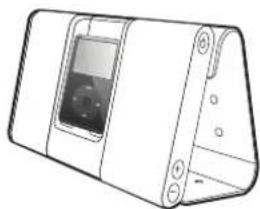
Thanks for choosing Griffin's Journi personal mobile speaker system. Journi sets your iPod or other mobile digital player free with massive sound in a sleek, portable package.
We've designed Journi to be easy to use and ready to go with you anywhere. Please take a moment to browse this quick start guide and learn about Journi's features.
To Use
Special Features
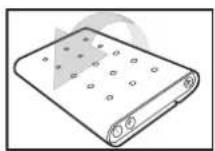
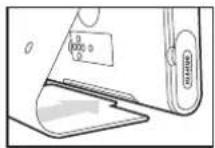
Seating & Removing your iPod
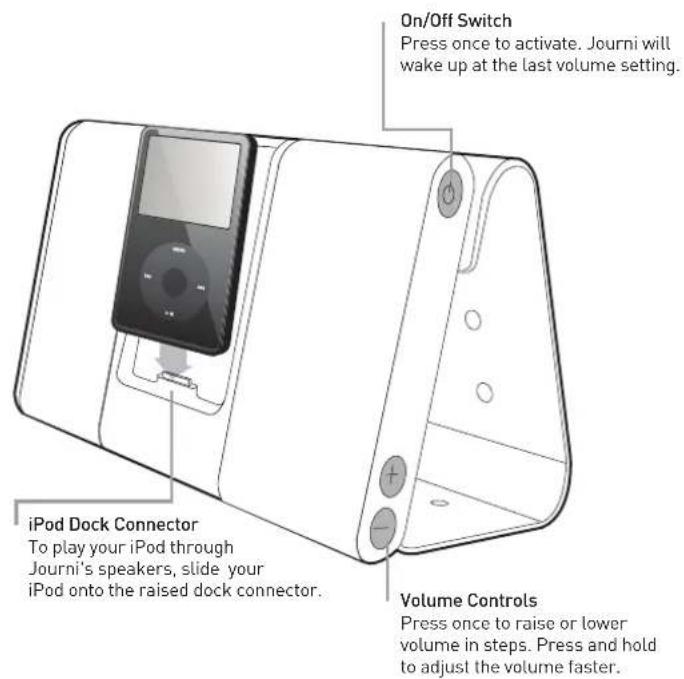
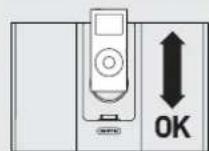
Your iPod should sit securely on the dockconnector with its face even with the front of Journi's speaker grilles.
Journi's cradle is designed to support your iPod as it plays. However, it does not lock your iPod in place or prevent it from falling if Journi is turned upside down or sideways when the wrapstand is open. To protect your iPod and Journi, you should always close the wrapstand before moving the unit.
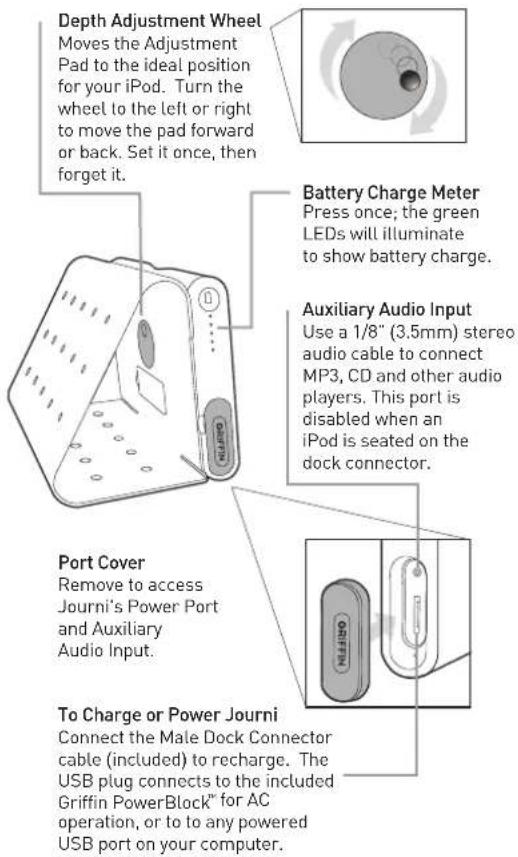
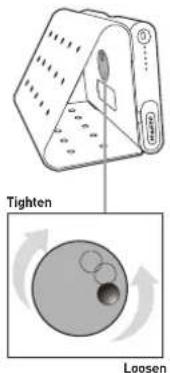
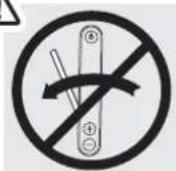
To set the Adjustment Pad, slowly turn the Depth Adjustment Wheel on Journi's back. Once you've set the depth for your iPod, you shouldn't have to adjust it again until you use a different iPod model.
natural_image
Diagram showing a device with a circular component and a magnified view of its internal structure (no text or symbols)
IMPORTANT: To remove your full-size iPod from the cradle, do NOT pull the iPod away from the cradle area. Doing so places excess strain on the dock connector and can damage Journi's connector and your iPod.
Instead, press your fingers or two thumbs lightly on the face of the iPod and slide gently upward. It will disengage from the dock connector and slide out.
For the iPod nano, simply grasp the iPod on both sides and gently push straight up until the iPod slides free.

Battery
Journi is equipped with a built-in, high-output Lithium-Ion battery designed to play up to ten hours on a full charge. In-battery circuitry prevents over-charging.
Griffin's Dual Fuel technology gives you two ways to recharge:
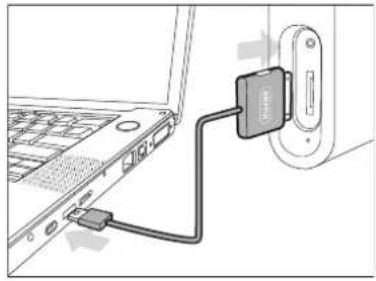
USB Charging
First, remove your iPod from the dock. Then, plug the USB-to-dock-connector cable into Journi's Power Port and a powered USB port on your computer. Once Journi's fully recharged, return your iPod to the dock, and your iPod can sync with your computer. The USB-to-dock-connector cable can also be used to connect Journi to Griffin's PowerJolt or PowerDuo auto power adapters, to charge Journi on the go.
AC Charging
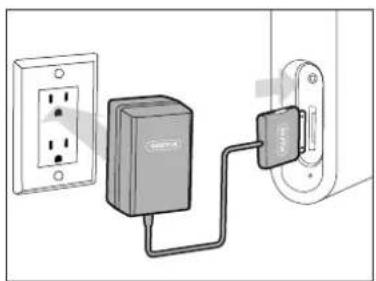
Use the included Griffin PowerBlock AC adapter and USB-to-dock-connector cable to charge Journi by plugging into any 100V - 240V wall outlet.
Journi can be used during either charging method.
natural_image
Diagram showing a laptop connected to an attached device (no text or symbols visible)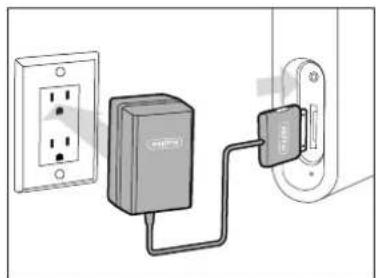
natural_image
Diagram showing a connected power supply unit and its internal component (no text or symbols visible)WOW® Sound
Journi has been designed to provide massive sound in a compact, easy-to-carry package. Two high-performance drivers and two passive radiators use SRS Labs' SRS WOW ^® digital sound shaping technology to produce the experience of an expanded sound stage and deep, rich bass. Used with your iPod, SRS WOW programming maximizes the sound.
When you connect a non-iPod digital music player through Journi's Auxiliary Audio Input, adjust your player to approximately 75% of top volume for best sound quality.
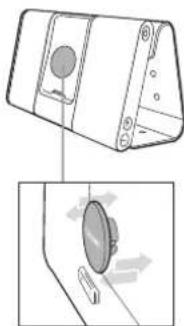
Slip the multi-function remote from its recess to control Journi from a distance.
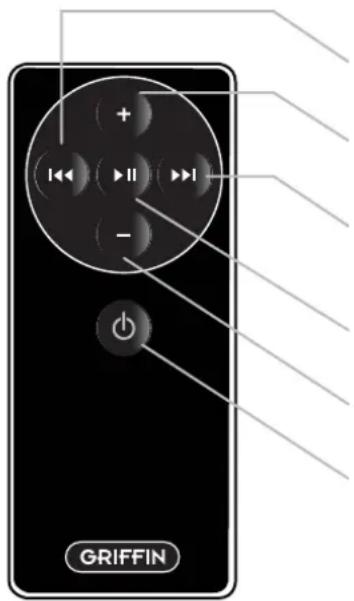
Remote
Journi's remote snaps into the recess on the back of the unit for storage.
Press once to skip to the next track. Press and hold to scan forward quickly through a track.
Press to adjust the system Volume up.
Press once to return to the beginning of the current track, or twice to skip to the beginning of the previous track. Press and hold to scan backward quickly through a track.
Press once to pause; again, to resume.
Press to adjust the system Volume down.
Press to turn Journi on and off.
Troubleshooting
No Sound from Journi
Check Journi's battery charge (pg. 2).
Check that iPod is powered on and seated completely on the dock connector (pg. 3).
Check that a song is playing on your iPod.
Check Journi's volume level (pg. 2).
If using a player other than an iPod, ensure an iPod is NOT seated in Journi's dock. When Journi detects that an iPod is present, the Auxiliary Audio Input is switched off.
Remote control doesn't control remotely. Check that the remote control battery is fresh.
Check that your iPod is powered on.
Reset Journi by gently pressing the reset switch (the small hole below the Power Switch) with a straightened paperclip. This will reset Journi.
Technical Support
Questions or an issue not covered here? Contact Griffin Technology online www.griffintechnology.com/support
Technical Specifications
Speaker System
- Two \~ 50mm high/mid range drivers
- Two \~ 64mm passive radiators
- SRS WOW ^® digital sound tuning and processing by SRS Labs, Inc.
- iPod dock with 30-pin (male) connector
- iPod charging via 30-pin (male) connector
- 1/8" (3.5mm) aux input
- 30-pin (female) Power/Sync input
- IR sensor for remote control operation
Power
Internal batteries:
Rechargeable Lithium-Ion Battery (3.7v / 2200mAh) with overcharge-prevention circuitry
DC power:
USB Type-A to 30-pin (male) cable
AC power:
Griffin PowerBlock 100-240V AC Adapter
Operating temperature: 32° to 95° F (0° to 35° C
Nonoperating/Storage temperature: 14^ to 140^ F ( -10^ to 60^ C)
Relative humidity: 5% to 95% noncondensing
Maximum operating altitude: 10,000 feet (3000 m)
USB charging 500mA @ 4.8v (nominal)
AC charging 1000mA @ 5v (nominal)
1 YEAR WARRANTY
We stand behind every product with the industry's best customer service, backed by a simple, fair warranty. Using this product signifies your acceptance of the terms of the warranty, so please read our warranty details at www.griffintechnology.com/support/ before using your Griffin product.

© 2007 Griffin Technology • www.griffintechnology.com • Journi and PowerBlock are trademarks of Griffin Technology, Inc. iPod is a trademark of Apple, Inc., registered in the U.S. and other countries. • SRS WOW technology is incorporated under license from SRS Labs, Inc. • SRS WOW, SRS and the symbol are trademarks of SRS Labs, Inc. • Made in China • Designed in Tennessee
GRIFFIN
GRIFFIN
Journi™
natural_image
Line drawing of a portable electronic device with ventilation slots and a button labeled 'GAPPER' (no text or symbols on the device itself)natural_image
Diagram showing a device with a circular component and a magnified view of its internal structure (no text or symbols)
natural_image
Diagram showing a laptop connected to an attached device (no text or symbols visible)Opladen via wisselstroom
natural_image
Diagram showing a power cord connected to a wall-mounted device (no text or symbols visible)WOW®-geluid
32^ to 95^ F (0^ to 35^ C)
natural_image
Line drawing of a rectangular electronic device with a screen and control buttons (no text or symbols)natural_image
Diagram showing a device with a circular component and a magnified view of its internal components (no text or symbols)
natural_image
Diagram showing a laptop connected to a USB drive (no text or symbols visible)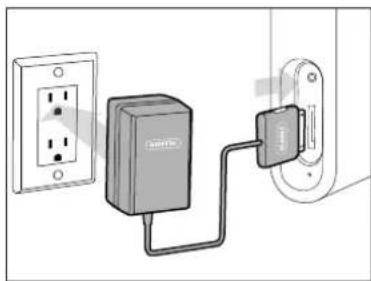
natural_image
Diagram showing a connected power strip connected to an electrical outlet (no text or symbols visible)Son WOW®
Assistance technique
natural_image
Line drawing of a rectangular electronic device with a screen and side ports (no text or symbols)GRIFFIN
GRIFFIN
Journi™
natural_image
Technical line drawing of a mechanical device with labeled parts (no readable text or symbols)natural_image
Diagram showing a device with a circular component and a magnified view of its internal structure (no text or symbols)
natural_image
Diagram showing a laptop connected to a USB drive via cable (no text or symbols visible)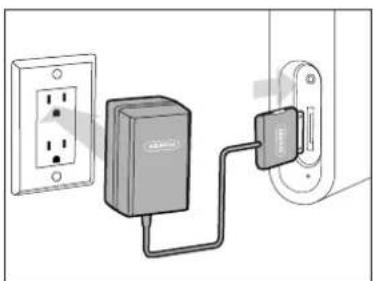
natural_image
Diagram showing a power outlet connected to a connected device (no text or symbols visible)WOW® Sound
natural_image
Line drawing of a rectangular electronic device with a screen and side connectors (no text or symbols)GRIFFIN
GRIFFIN
Journi™
natural_image
Line drawing of a portable electronic device with ventilation slots and buttons (no text or symbols)natural_image
Diagram showing a device with a circular component and directional arrows indicating motion or force (no text or symbols present)
natural_image
Diagram showing a laptop connected to an attached device (no text or symbols visible)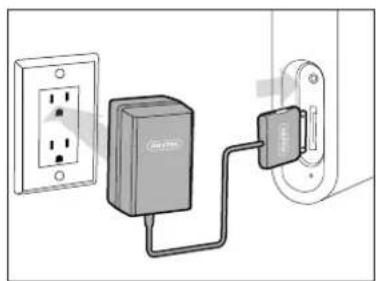
natural_image
Diagram showing connections between an electrical outlet and a connected device (no text or symbols present)Suono WOW®
Operating temperature: 32° to 95° F (0° to 35° C)
Nonoperating/Storage temperature: 14° to 140° F (-10° to 60° C)
Relative humidity: 5% to 95% noncondensing
Maximum operating altitude: 10,000 feet (3000 m)
USB charging 500mA @ 4.8v (nominal)
AC charging 1000mA @ 5v (nominal
No user serviceable parts inside
natural_image
Line drawing of a rectangular electronic device with a screen and control buttons (no text or symbols)GRIFFIN
GRIFFIN
Journi™
Sistema de altavoces portátil personal
natural_image
Diagram showing a device with a circular component and a magnified view of its internal components (no text or symbols)
natural_image
Line drawing of a laptop connected to a USB cable (no text or symbols visible)