SBCRU410 - Remote control PHILIPS - Free user manual and instructions
Find the device manual for free SBCRU410 PHILIPS in PDF.


User questions about SBCRU410 PHILIPS
0 question about this device. Answer the ones you know or ask your own.
Ask a new question about this device
Download the instructions for your Remote control in PDF format for free! Find your manual SBCRU410 - PHILIPS and take your electronic device back in hand. On this page are published all the documents necessary for the use of your device. SBCRU410 by PHILIPS.
USER MANUAL SBCRU410 PHILIPS
Instructions for Use
Mode d'emploi
Let's make things better

PHILIPS
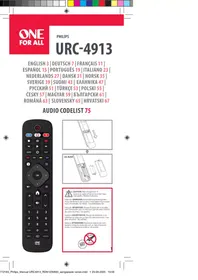
You just made a great choice by buying this Philips universal remote control! It can operate the most-used functions of almost any brand of TV. Best of all, it's quick to setup and easy to use. Here's how...
AT A GLANCE
Once you've installed the batteries, this remote is ready to work with any Philips TV. Simply press to test. For other brands of equipment, it needs to be set up first- see Getting Started.
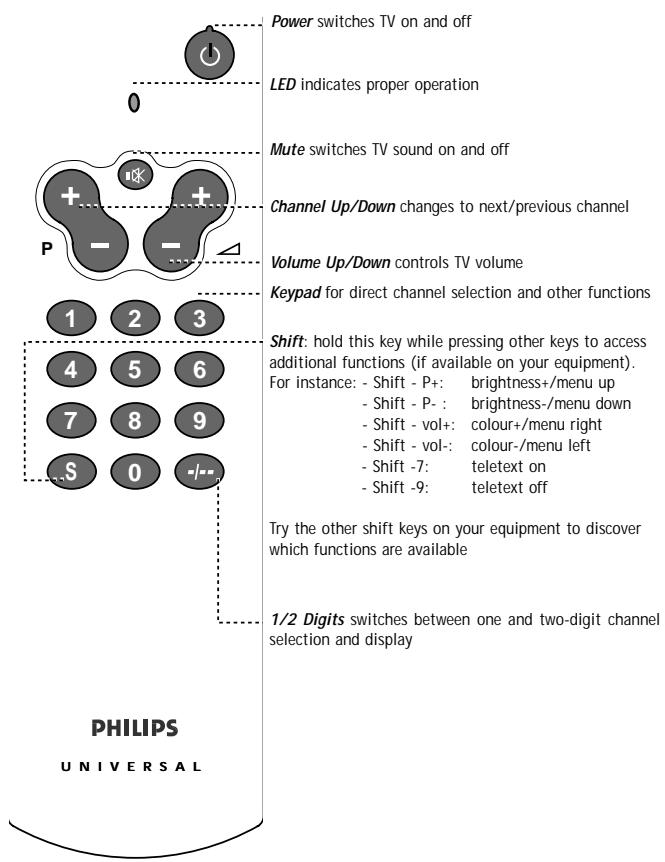
Try it out! The easiest way to find out how your new remote works, is to try pressing the keys and see what happens - don't worry, you won't damage anything! Most of the keys work just like on your original remote control. Of course, if your TV does not offer a specific function, pressing that key will have no effect.
DON'T FORGET THE BATTERIES!
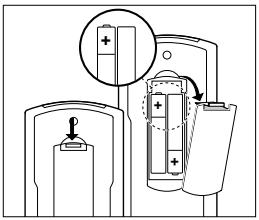
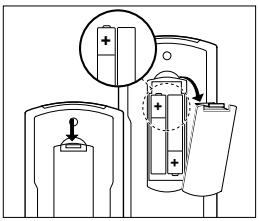
You'll need two 1.5V batteries, type R03, UM4 or AAA only. Put them in like this.
Remember to replace the batteries at least once a year. Don't leave the batteries out for longer than one hour, otherwise you will need to set the remote up again.
GETTING STARTED
This remote is ready to work with any Philips TV. For other brands of equipment, it needs to be set up first. That only takes a couple of seconds, thanks to Philips' Simple System Setup!
Before you start, make sure the equipment is switched on. Sit right in front of it.
If you know the brand of your equipment, look at the code list at the back of this booklet, and find the first 3-digit code for your equipment.
① Press and hold 1 and 3 at the same time until the green LED lights up. (Release the keys, the green LED should stay on)
② Enter the 3-digit code using the keypad. The green LED blinks twice.
That's it! Now, press a few keys on the remote to check that the equipment responds correctly. If it doesn't, try again using the next code in the list. In the rare instance that none of the codes work, follow the instructions in the next section.
Tip: Make a note of the code inside the battery case, and in the back of this booklet in case you ever need to setup again.
If you don't know the brand of your equipment or if you can not find it in the coderlist, setup still won't take long. Philips' patented Handsfree autosearch tests all the codes one after another and finds the right one for you! The search time averages about 90 seconds. (Maximum search time is 5 minutes for TV)
Make sure the TV is switched on. You will know when the correct code has been found because the equipment will switch off.
① Press and hold 1 and 3 at the same time until the green LED lights up.
② Press to start the search. Each time the green LED blinks, another code is sent. When the right code is found, the equipment switches off.
③ Immediately press to stop the search.
If you missed the correct code because the search went too far, switch the equipment back on, then press (down) to send the previous code again. Press (down) repeatedly until the equipment switches off again.
④ Once you've found the correct code, press to lock it in memory. The green LED blinks twice.
That's it! Now, switch the equipment manually on again, then press a few keys on the remote to check that the equipment responds correctly. In the rare instance that it doesn't, try again from step 1 to find a better code.
Note that code! To save time if you ever need to setup again, make a note of the correct code inside the battery case and in the back of this booklet. In case you have forgotten to note the code you can still 'read out' the code from the remote. Here's how:
① Press and release ① and ⑥ at the same time; the green LED lights up.
② Press . The green LED goes out.
③ Press ① and count the number of times the green LED blinks. This is the first digit of the 3-digit code. (No blinks means the digit is zero.)
Press 2 and count the number of blinks for the second digit.
Press 3 and count the number of blinks for the third digit.
NEED HELP?
If you have questions about your remote or if you are missing certain functions on your remote, call our free-phone helpline!
Before you call, please read the manual carefully. Most questions will clear themselves. If you don't find an answer to your questions, make a note of your equipment in the table below - this makes it easier for the operators to help you quickly. Look for model numbers in the equipment instruction manual, or on the back of the equipment. Be in front of the equipment, this way our operators can help you verify the functionality of your remote.
In the UK. call 0800 968 118. In Ireland, call 1 800 553 136.
The model number of your Philips universal remote control is: SBC RU410 Date of purchase:

Day/month/year
| Equipment | Brand | Model nr. | Nr. of origi- nal remote | Used code |
| TV |
As you add new components to your home entertainment system, Philips again offers a universal remote control that will fit your new needs. Look for below unique full range of universal remote controls from Philips at a retailer near you.
RU 110: Universal easy TV zapper
RU 422; 2 in 1 Universal Remote Control for TV and VCR
RU 430; 3 in 1 Universal Remote Control for TV, VCR and SAT/Cable
RU 440; 4 in 1 Universal Remote Control for TV, VCR, SAT/Cable and AUX for audio
RU 455; 4 in 1 Universal Remote Control for TV, VCR, SAT/Cable and AUX for second device
RU 460: 6 in 1 Universal Remote Control - Pre-programmed and Learnable
Another very nice product from Philips is the Philips SBC L1510 Remote Control Extender Set, the wireless extension of your infra-red (IR) remote control! This system allows you to operate every IR driven equipment (i.e. Sat-receivers, VCRs or Hi-Fi-sets) from anywhere in or around the house.
N'OUBLIEZ PAS LES PILES!
Alba .064,245,398,036,262
Allorga 321
Amplivison 244, 427
Amstrad. 398, 036, 381, 389, 396, 439, 460, 543
Anitech. .036
Arcam. 243, 244
ASA 114
Asuka 245
Atlantic. 233
Audiosonic .064,136
Autovox. 233, 114, 363
B
Baird 370,584
Bang & Olufsen 114
Barco. 407
Basic Line 245,036
Baur. .064,037,092 376,388,532,539,562
Beko. 397, 513
Beon. .064
Binatone 244
Bush. .064,245,401,398 321,036,309,376,382,546
C
Cascade 036
Cathay .064
Centurion .064
Century 114
CGE 274,333
Cimline .036
Clarivox. .064
Clatronic 397,274
Clayton 412
Condor. 397, 347
Contec. 243, 036
Continental Edison. 223, 360, 426
Crosley. 114
Crown. .064, 397, 445, 036, 606
Crystal 458
CS Electronics 243
CTC 274
Cybertron 245
D
Daewoo. .064, 401, 036, 526
Dainichi 245, 242
Dansai. .064
Dayton. 036
De Graaf. 235, 575
Decca .064,099,543
Dixi .064, 036
Doric. 033
Dual 363, 379, 546
Dual Tec. 244
Dumont. .097, 114
E
Elbe. 286
Elin .064,575
Elite 245,347
Elta .036
Emerson. 114, 388
Erres. 064, 039
Europhon. 543
Expert 233
F
Ferguson. .064, 136, 220 265, 314, 362, 370
Fidelity. 243, 220, 388
Finlandia 235, 373, 386
Finlux. .064,099,097 114,132,373,438,543
Firstline. 243, 244, 321, .036, 348, 274
Fisher. 397, 244, 235, 330
Flint 482
Forgestone 220
Frontech 291,458,475,190,274
Fujitsu. .099,233
Osaki 244, 245, 099, 291, 439
0so. 245
Osume 099,184
Otake. 344
Otto Versand .064,244,347 037,218,370,376 532,539,562,583
P
Palladium 397
Panama 244, 291
Panasonic 277,153,190 253,394,584
Pathe Cinema 243, 347, 265
Pathe Marconi. 223, 360
Pausa .036
Perdio 347
Philco. 114, 274
Philips .064, 401, 033, 034, .039, 040, 114, 220, .320, 350, 359, 583
Phoenix. 114
Phonola .064, 039, 040, 114, 320
Pioneer. 136, 190, 314
Prandoni Prince. .543
Profex. 036, 388
Proline 348
Protech .064,244,445,036 291,129,458,274,364
Pye .034,039
0
Quelle .064,037,038,097 227,333,354,355 388,532,539,562
R
R-Line .064
Radiola. .064, 039, 350
Radiomarelli 114,543
RBM. .097
Rediffusion 388
Revox. .064
Rex. 233, 291, 190, 286
RFT 114
Roadstar 245,036,291
S
Saba 136, 114, 190, 223, 314, 362, 370, 584
Saccs 265
Saisho. 036, 291, 458, 038
262,381,543
Salora. 190, 376, 386, 388, 575
Sambers. 129, 543
Samsung. 064, 397, 244, 036, 291, 117, 317, 515, 583
Sandra 243
Sanyo .099, 038, 184, 235, 366
SBR. .064,033,034 039,040,220
Schaub Lorenz 388,584
Schneider .064,245,398,040 274,330,350,363,379,421
SEG 244, 291
SEI. 321, 129, 114,
Sei-Sinudyne. 037, 543
Seleco. 233, 190, 286, 389, 438
Sentra .062
Sharp 120
Shorai 321
Siarem 129, 114, 543
Siemens. 064, 184, 218, 222, 227, 354, 355, 562
Singer 114
Sinudyne 321, 129, 114, 262
Solavox 190
Sonitron. 235
Sonoko .064,036
Sonolor. 190,235,242
Sontec .064
Sony .037,038,532
Soundwave .064, 445
Standard. 244, 245, 036
Stern. 233, 190, 286
Sunkai 321,348,382
Susumu 245
Sysline .064
T
Tandy. 244, 245, 099, 190
Tashiko 244,386
Tatung .064,244,099,543
Tec. 244, 274
Technema 347
Technics 277
Teleavia 360, 370
Telefunken 136,289,333 362,370,498,525
Telemeister 347
Teletech. 036
Teleton. 244, 233, 376
Tensai 245,321,347,344