
SBCHC8560 - Hi-Fi System PHILIPS - Free user manual and instructions
Find the device manual for free SBCHC8560 PHILIPS in PDF.


| Product Type | FM Wireless Headphone |
| Brand | Philips |
| Model | SBC HC8560 |
| Transmission | Radiofrequency (RF) 863-865 MHz, FM modulation |
| Effective Range | Up to 100 meters, omnidirectional |
| Frequency Response | 20-20,000 Hz |
| Transmitter Power Supply | 12 V DC / 200 mA, mains adapter included (Philips SBC CS030/00) |
| Headphone Power Supply | 2 NiMH rechargeable batteries R03/AAA (type Philips SBC HB550S) |
| Battery Life | Approximately 15 hours |
| Charging Time | Approximately 16 hours |
| Channels | 3 selectable channels: 863.5 MHz, 864 MHz, 864.5 MHz |
| Auto Tuning | Yes, by AUTO-TUNING button |
| Sound Optimization | 3-position switch: Off / Bass / Treble |
| Connectivity | 3.5 mm stereo audio input (transmitter); 6.3 mm adapter and RCA cable supplied |
| Compatibility | Other Philips 864 MHz headphones/speakers (same 19 kHz pilot tone) |
| Cleaning | Soft, slightly damp cloth; no alcohol, ammonia or abrasive products |
| Temperature and Environment | Avoid humidity, rain, sand, heat sources and direct sunlight |
| Certifications | R&TTE Directive 1999/5/EC; class 3 according to EN 301 489-1 and EN 301 489-9 |
Frequently Asked Questions - SBCHC8560 PHILIPS
User questions about SBCHC8560 PHILIPS
0 question about this device. Answer the ones you know or ask your own.
Ask a new question about this device
Download the instructions for your Hi-Fi System in PDF format for free! Find your manual SBCHC8560 - PHILIPS and take your electronic device back in hand. On this page are published all the documents necessary for the use of your device. SBCHC8560 by PHILIPS.
USER MANUAL SBCHC8560 PHILIPS
Instructions for use
English 4
Mode d'emploi
Français 12
Functional overview 4
Safety precautions 5
System compatibility 5
Using your FM wireless headphone system 6-8
Problem Solving 8-10
Technical Specification 10
European Regulations 11
FM Wireless Headphone System
SBC HC8560
Congratulations! You have just bought one of the most sophisticated FM wireless headphone system.
This system implements the latest FM wireless technology, which offers you complete freedom of movement while enjoying your favourite movie or music. With energizing docking station, your headphone can be recharged in ease while it is not in use. This allows your headphone to be fully charged and always be ready for use whenever you need to enjoy a movie.
To ensure you achieve the best performance from your FM wireless headphone system, please read this manual carefully and keep it for future reference.
Functional overview - Product illustrations on inside flap
A) Transmitter
1 Power on/off indicator
2 Charging indicator
3 3.5 mm stereo input jack
4 Channel switch
5 DC power input jack
B) Receiver
6 Auto-tuning switch
7 Volume control
8 Power on/off button
9 Power on/off indicator/ low battery indicator
10 Sound Enhancement switch
Important information
Please read the following instructions carefully, and retain this booklet for future reference. All the safety and operating instructions should be read before using the FM wireless headphone system.
Safety precautions
- Prevent fire or shock hazard: do not expose this equipment to humidity, rain, sand or excessive heat caused by heating equipment or direct sunlight.
- Radio equipment for wireless audio applications is not protected against disturbance from other radio services.
- Do not use cleansing agents containing alcohol, spirits, ammonia or abrasives as they may harm the housing. Use a slightly dampened chamois cloth to clean the housing.
- If fluid spills into the headphone system, remove the batteries immediately and consult an authorized dealer.
- Do not use this product in damp places or close to water.
- Do not expose this product to extreme heat or direct sunlight.
- Do not disassemble the product. In the event of technical difficulties, take it to your Philips retailer.
- Do not cover this product
- Inadequately protected or sensitive electronic equipment may be affected by the use of this product. This interference may lead to damage to either equipment. Please check whether or not surrounding equipment may be affected by this product before you start using it.
- Hearing Safety! Continuous use at high volume may permanently damage your hearing.
System compatibility
It is technically possible to use an additional number of FM wireless headphones or Philips FM wireless speakers with a single transmitter if they all*:
- operate in the 864 MHz band
- work according to the same modulation scheme
can detect a 19kHz pilot tone
Please consult the appliance's electrical specification sheets for confirmation on compatibility.
This statement is to be interpreted from a technical point of view only and does therefore not constitute any guarantee nor obligation whatsoever regarding the commercial availability of single FM wireless headphones /speakers compatible with SBC HC8562.
6 ENGLISH
Using your FM wireless headphone system
IMPORTANT!
- Use only Philips SBC CS030/00 (105 for UK, Ireland) 12V/200mA AC/DC adapter.
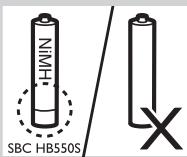
- Use only Philips'shortened sleeve rechargeable batteries NiMH (R03/AAA, type number: SBC HB550S, partnumber 996500015757).
- Do not use NiCd batteries or alkaline batteries as they may damage your FM wireless headphone system.
Installing/replacing batteries
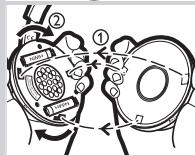
1 Unscrew and remove the left ear cushion of the headphone.
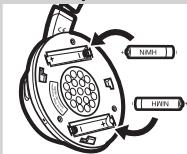
2 Insert the rechargeable batteries into the battery compartment. Use only Philips' shortened sleeve rechargeable batteries NiMH (R03/AAA, type number: SBC HB550S, partnumber 996500015757).
3 Make sure the batteries are correctly inserted as indicated by the engraved polarity symbol in the battery compartment. Always remove the batteries from the headphone if the system will not be used for a long period of time.
4 Put the left ear cushion back into place.
Setting up the transmitter
5 Make sure the adapter's rated voltage indicated on the type plate corresponds to the mains voltage supply.
6 Connect the DC power output connector of the 12 Volt/ 200mA AC/DC adapter to the DC POWER INPUT JACK at the back of the transmitter.
7 Connect the 12 Volt/200mA AC/DC adapter to the mains socket. Always remove the adapter from the mains socket if the transmitter will not be used for a period of time.
Charging the headphone
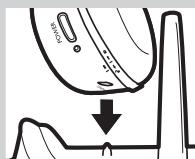
8 Place the headphone onto the energizing docking station, and make sure the charging pins of the transmitter and the charging contact of the headphone are well aligned.
The CHARGING INDICATOR light will be on automatically indicating charging is taking place. At the same time, the headphone will power off automatically (i.e. POWER ON/OFF INDICATOR lights off).
When charging is finished (which takes approximately 16 hours), the green CHARGING INDICATOR light will also be off automatically.
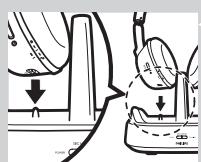
IMPORTANT!
- The energizing docking station does not transmit audio signal when charging is activated.
WARNING!
- Before using the FM headphone for the first time, please ensure that the batteries are fully charged for at least 16 hours. This will guarantee a longer operating lifetime of batteries.
- This product complies with the latest safety regulations. Please only charge the batteries with the docking station provided (SBC HC8562) or with fully compatible charger.
Audio Connection
9 Connect one end of the audio cable (3.5 mm stereo plug) to the transmitter's 3.5 mm STEREO INPUT JACK.
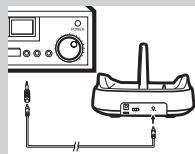
10 Connect the other end of the 3.5mm stereo cable to either:
a) The headphone output of an audio source, such as TV, HiFi or PC. Adjust the volume level of the audio source to a fixed reasonably high level; for example 25% of the maximum level.
- In case your audio source has a 6.3mm headphone output, use the supplied 3.5mm to 6.3mm stereo adapter plug.
IMPORTANT!
- In case of certain TVs, the headphone jack output level can only be adjusted after accessing the TV on-screen menu.
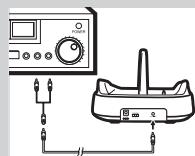
b) The line output of an audio source, such as REC OUT or LINE OUT (with the Y-cable supplied).
- Check if the red RCA plug (right channel) is connected to the right channel (red) of the audio source.
- Check if the white RCA plug (left channel) is connected to the left channel (white) of the audio source.
- In case the audio source has an adjustable RCA output level, adjust the output level to the highest acceptable undistorted level.
11 Switch on your audio source and carefully increase the volume of the audio source.
The POWER ON/OFF INDICATOR of the transmitter lights up when signals are received.
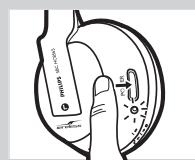
12 Switch on the POWER ON/OFF button of the headphone.
The POWER ON/OFF INDICATOR will be switched on automatically.
8 ENGLISH
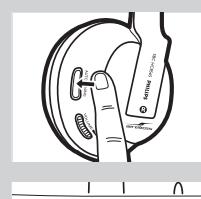
13 Press and hold the AUTO-TUNING BUTTON on the headphone for about 1 second to tune to the correct transmission channel.
The headphone will automatically tune to the transmitter.
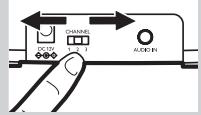
14 In case interference from neighbouring transmitters has occurred, adjust the transmission channel of the transmitter, then repeat step 13 to tune the headphone to the transmitter.
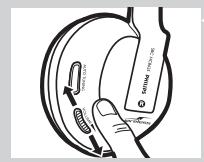
15 Adjust the volume of the headphone to the desired listening level.
IMPORTANT!
- Avoid adjusting the listening volume level at the audio source as this may compromise the audio quality on too low input levels.
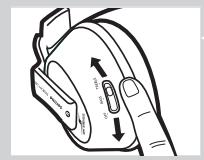
16 To enjoy sound enhancement features, adjust the SOUND
ENHANCEMENT switch located on the right ear shell.
Three options are provided: 1) Sound Enhancement Off, 2) Bass, 3) treble.
Adjust the sound quality to fit your personal preference.
Problem solving
If a fault occurs, first check the points listed below. If you are unable to remedy a problem by following these hints, contact the helpline (see 'Need help?') or consult your dealer.
Never try to open the set yourself as this will void the guarantee.
First, check all cables to ensure that they are connected correctly.
| Problem | Possible Cause | Solution |
| Headphone fails to charge | No battery installed | Follow step 1 to 4 of 'Installing/replacing the batteries' |
| Wrong battery orientation | Reposition the batteries according to the engraved polarity symbol. | |
| No power supply | Make sure the docking station is connected to the local mains power supply through an adapter and follow steps 5 to 7. | |
| Charging pin of the docking station not in contact with the metal plate of the headphone | Lock the headphone in place, and make sure the CHARGE INDICATOR light is on. | |
| Wrong headphone orientation when placed onto the charging dock | Reposition the headphone with correct orientation. | |
| No sound/distorted sound | Headphone power off | Push the POWER ON/OFF BUTTON. The POWER ON/OFF INDICATOR light turns on automatically indicating the headphone is on. |
| No battery installed | Follow step 1 to 4 of 'Installing/replacing the batteries' |
| Wrong battery orientation | Reposition the batteries according to the engraved polarity symbol. |
| No power supply to transmitter | Make sure the docking station is connected to the local mains power supply through an adapter and follow step 5 to 7. |
| Battery power running low | Follow steps 5 to 7 to recharge the system. |
| Audio source not connected | Make sure the audio output of your audio source is connected to the 3.5 mm STEREO INPUT JACK of your transmitter. Follow step 9 to 12. |
| Audio source is off | Turn on your audio source. |
| Volume level set too low | Adjust the volume level of your audio source or the headphone.Hearing Safety: Continuous use at a high volume may permanently damage your hearing. |
| Audio output level low | In case of audio sources with adjustable output level, adjust the output level to a higher and non-distorted level.IMPORTANT: In case of certain TVs, the headphone jack output level can only be adjusted after accessing the TV on-screen menu. |
| Headphone not tuned to the transmitter | Push and hold the AUTO-TUNING BUTTON for about 1 sec, then the headphone will automatically search for the best possible reception. |
| Interference from other radio sources | 1) Alter the transmitter's frequency channel. Select 1 of the 3 options for best reception.We advise you to select channel 1 as the first option. Next adjust the headphone's tuning channel as described above.2) Move transmitter or headphone elsewhere |
| Receiver too far away from transmitter | Move closer for reception |
| Transmitter other than SBC HC8562 is used | Make use of the SBC HC8562 transmitter provided. Some transmitters already built into other equipment may not be compatible with the SBC HC8565 headphone because of the advanced technologies used. |
10 ENGLISH
No sound (multiple headphones or Philips wireless speaker)
The energizing docking station does not transmit audio signal when charging is taking place. Therefore other Philips headphones or wireless speaker cannot receive any signal, even if they are compatible with the SBC HC8562 docking station.
If you want to enjoy music with other Philips wireless headphones or speakers which is compatible with the SBC HC8562 docking station, be sure to remove the SBC HC8565 headphone from the docking station.
Technical specifications*
| Transmitter | System: | Radio Frequency (RF) |
| Modulation: | Frequency Modulation (FM) | |
| Pilot Tone: | 19kHz | |
| Carrier Frequency: (/00 & /05) | Channel 1: 863.5MHz Channel 2: 864MHz Channel 3: 864.5MHz | |
| Radiated Output Power | <10mW | |
| Effective Transmission Range | Up to 100m **, omni directional (360°) | |
| Input Level: | 500 mV | |
| Power supply: | 12 Volts/ 200mA DC, center positive; type number: SBC CS030/00 (/05 for UK, Ireland) | |
| Headphone | Reception Frequency: (/00 & /05) | 863MHz – 865MHz |
| S/N ratio: | ~ 70 dB (1kHz sine wave,A-weighted) | |
| Distortion: | ≤ 2% THD | |
| Channel Separation: | ≥ 30 dB | |
| Audio frequency range: | 20-20,000 Hz | |
| Power Supply: | 2 × R03/AAA rechargeable batteries (Philips, NiMH, type number: SBC HB550S, partnumber 996500015757) | |
| Battery Life Time: | ~ 15 hours |
) All specifications are subject to change
*) Depending on ambient conditions
European Regulations
Hereby, Philips Consumer Electronics, B.U. Peripherals & Accessories, declares that this FM wireless headphone system SBC HC8560 is in compliance with the essential requirements and other relevant provisions of Directive 1999/5/EC.
This product has been designed, tested and manufactured according to the European R&TTE Directive 1999/5/EC.
Following this Directive, this product can be brought into service in the following states:
SBC HC 8560/00
R&TTE Directive 1999/5/EC
| B | ✓ | DK | ✓ | E | ✓ | GR | ✓ | F | ✓ |
| IRL | × | I | ✓ | L | ✓ | NL | ✓ | A | ✓ |
| P | ✓ | SU | ✓ | S | ✓ | UK | × | N | ✓ |
| D | ✓ | CH | ✓ |
SBC HC 8560/05
R&TTE Directive 1999/5/EC
| B | X | DK | X | E | X | GR | X | F | X |
| IRL | ✓ | I | X | L | X | NL | X | A | X |
| P | X | SU | X | S | X | UK | ✓ | N | X |
| D | X | CH | X |
This product complies with class 3 requirements as set down in EN 301 489-1 and EN 301 489-9.
12 FRANÇAIS
Index
R&TTE Directive 1999/5/EC
| B | ✓ | DK | ✓ | E | ✓ | GR | ✓ | F | ✓ |
| IRL | × | I | ✓ | L | ✓ | NL | ✓ | A | ✓ |
| P | ✓ | SU | ✓ | S | ✓ | UK | × | N | ✓ |
| D | ✓ | CH | ✓ |
SBC HC 8560/05
R&TTE Directive 1999/5/EC
| B | X | DK | X | E | X | GR | X | F | X |
| IRL | ✓ | I | X | L | X | NL | X | A | X |
| P | X | SU | X | S | X | UK | ✓ | N | X |
| D | X | CH | X |
| B | ✓ | DK | ✓ | E | ✓ | GR | ✓ | F | ✓ |
| IRL | × | I | ✓ | L | ✓ | NL | ✓ | A | ✓ |
| P | ✓ | SU | ✓ | S | ✓ | UK | × | N | ✓ |
| D | ✓ | CH | ✓ |
SBC HC 8560/05
Directiva R&TTE 1999/5/EC
| B | X | DK | X | E | X | GR | X | F | X |
| IRL | ✓ | I | X | L | X | NL | X | A | X |
| P | X | SU | X | S | X | UK | ✓ | N | X |
| D | X | CH | X |
| B | ✓ | DK | ✓ | E | ✓ | GR | ✓ | F | ✓ |
| IRL | × | I | ✓ | L | ✓ | NL | ✓ | A | ✓ |
| P | ✓ | SU | ✓ | S | ✓ | UK | × | N | ✓ |
| D | ✓ | CH | ✓ |
SBC HC 8560/05
| B | X | DK | X | E | X | GR | X | F | X |
| IRL | ✓ | I | X | L | X | NL | X | A | X |
| P | X | SU | X | S | X | UK | ✓ | N | X |
| D | X | CH | X |
| B | ✓ | DK | ✓ | E | ✓ | GR | ✓ | F | ✓ |
| IRL | × | I | ✓ | L | ✓ | NL | ✓ | A | ✓ |
| P | ✓ | SU | ✓ | S | ✓ | UK | × | N | ✓ |
| D | ✓ | CH | ✓ |
SBC HC 8560/05
| B | X | DK | X | E | X | GR | X | F | X |
| IRL | ✓ | I | X | L | X | NL | X | A | X |
| P | X | SU | X | S | X | UK | ✓ | N | X |
| D | X | CH | X |
| B | ✓ | DK | ✓ | E | ✓ | GR | ✓ | F | ✓ |
| IRL | × | I | ✓ | L | ✓ | NL | ✓ | A | ✓ |
| P | ✓ | SU | ✓ | S | ✓ | UK | × | N | ✓ |
| D | ✓ | CH | ✓ |
SBC HC 8560/05
| B | X | DK | X | E | X | GR | X | F | X |
| IRL | ✓ | I | X | L | X | NL | X | A | X |
| P | X | SU | X | S | X | UK | ✓ | N | X |
| D | X | CH | X |
Colocar/substituir as pilhas
| B | ✓ | DK | ✓ | E | ✓ | GR | ✓ | F | ✓ |
| IRL | × | I | ✓ | L | ✓ | NL | ✓ | A | ✓ |
| P | ✓ | SU | ✓ | S | ✓ | UK | × | N | ✓ |
| D | ✓ | CH | ✓ |
SBC HC 8560/05
Directiva R&TTE 1999/5/EC
| B | X | DK | X | E | X | GR | X | F | X |
| IRL | ✓ | I | X | L | X | NL | X | A | X |
| P | X | SU | X | S | X | UK | ✓ | N | X |
| D | X | CH | X |
Este produit obedece aos requisitos da classe 3 conforme definidos pelas normas EN 301 489-1 e EN 301 489-9.
60 SVENSKA
Sakregister
R&TTE-directivet 1999/5/EC
| B | ✓ | DK | ✓ | E | ✓ | GR | ✓ | F | ✓ |
| IRL | × | I | ✓ | L | ✓ | NL | ✓ | A | ✓ |
| P | ✓ | SU | ✓ | S | ✓ | UK | × | N | ✓ |
| D | ✓ | CH | ✓ |
SBC HC 8560/05
R&TTE-direktivet 1999/5/EC
| B | X | DK | X | E | X | GR | X | F | X |
| IRL | ✓ | I | X | L | X | NL | X | A | X |
| P | X | SU | X | S | X | UK | ✓ | N | X |
| D | X | CH | X |
Oδηγia R&TTE 1999/5/EK
| B | ✓ | DK | ✓ | E | ✓ | GR | ✓ | F | ✓ |
| IRL | × | I | ✓ | L | ✓ | NL | ✓ | A | ✓ |
| P | ✓ | SU | ✓ | S | ✓ | UK | × | N | ✓ |
| D | ✓ | CH | ✓ |
SBC HC 8560/05
Odyia R&TTE 1999/5/EK
| B | X | DK | X | E | X | GR | X | F | X |
| IRL | ✓ | I | X | L | X | NL | X | A | X |
| P | X | SU | X | S | X | UK | ✓ | N | X |
| D | X | CH | X |
To napov npoiov oumuopwvetai e tis anaiaoeis nks klaon3, onwgs avapepovtai ota potuma EN 301 489-1 kaI EN 301 489-9.
76 TURKÇE
Fihrist
| B | ✓ | DK | ✓ | E | ✓ | GR | ✓ | F | ✓ |
| IRL | × | I | ✓ | L | ✓ | NL | ✓ | A | ✓ |
| P | ✓ | SU | ✓ | S | ✓ | UK | × | N | ✓ |
| D | ✓ | CH | ✓ |
SBC HC 8560/05
1999/5/EC R&TTE sayili Direktif
| B | X | DK | X | E | X | GR | X | F | X |
| IRL | ✓ | I | X | L | X | NL | X | A | X |
| P | X | SU | X | S | X | UK | ✓ | N | X |
| D | X | CH | X |
R&TTE Directive 1999/5/EC
| B | ✓ | DK | ✓ | E | ✓ | GR | ✓ | F | ✓ |
| IRL | × | I | ✓ | L | ✓ | NL | ✓ | A | ✓ |
| P | ✓ | SU | ✓ | S | ✓ | UK | × | N | ✓ |
| D | ✓ | CH | ✓ |
SBC HC 8560/05
R&TTE Directive 1999/5/EC
| B | X | DK | X | E | X | GR | X | F | X |
| IRL | ✓ | I | X | L | X | NL | X | A | X |
| P | X | SU | X | S | X | UK | ✓ | N | X |
| D | X | CH | X |
| B | ✓ | DK | ✓ | E | ✓ | GR | ✓ | F | ✓ |
| IRL | × | I | ✓ | L | ✓ | NL | ✓ | A | ✓ |
| P | ✓ | SU | ✓ | S | ✓ | UK | × | N | ✓ |
| D | ✓ | CH | ✓ |
SBC HC 8560/05
R&TTE Direktiva 1999/5/EC
| B | X | DK | X | E | X | GR | X | F | X |
| IRL | ✓ | I | X | L | X | NL | X | A | X |
| P | X | SU | X | S | X | UK | ✓ | N | X |
| D | X | CH | X |
Tento vyrobek splnjupe požadavky tridy 3, stanovené normami EN 301 489-1 a EN 301 489-9.
100 MAGYAR
Tartalomjegyzék
| B | ✓ | DK | ✓ | E | ✓ | GR | ✓ | F | ✓ |
| IRL | × | I | ✓ | L | ✓ | NL | ✓ | A | ✓ |
| P | ✓ | SU | ✓ | S | ✓ | UK | × | N | ✓ |
| D | ✓ | CH | ✓ |
SBC HC 8560/05
R&TTE Direktiva 1999/5/EC
| B | X | DK | X | E | X | GR | X | F | X |
| IRL | ✓ | I | X | L | X | NL | X | A | X |
| P | X | SU | X | S | X | UK | ✓ | N | X |
| D | X | CH | X |
3Byk OTCyTCTByeT/ NCKaXKeeHHbI 3ByK
3To IN3dEIne 6bIaO pa3pa6oTaHO, IN3rOToBLaEHO IN cNbItaHO B COOTBeTCTBnC eBpOeNcKoI AnpeKtNbOe European R&TTE Directive 1999/5/EC.
COrlaCHO 3TOI AnPeKTHBe 3TO H3AeAne MOKeT NcPOnb3OBA TbCB CLeyUoXx CTpaHax:
SBC HC 8560/00 Диpeктуba R&TTE Directive 1999/5/EC
| B | ✓ | DK | ✓ | E | ✓ | GR | ✓ | F | ✓ |
| IRL | × | I | ✓ | L | ✓ | NL | ✓ | A | ✓ |
| P | ✓ | SU | ✓ | S | ✓ | UK | × | N | ✓ |
| D | ✓ | CH | ✓ |
SBC HC 8560/05 Анpeктуba R&TTE Directive 1999/5/EC
| B | X | DK | X | E | X | GR | X | F | X |
| IRL | ✓ | I | X | L | X | NL | X | A | X |
| P | X | SU | X | S | X | UK | ✓ | N | X |
| D | X | CH | X |
3To n3AeAne COOTBeTCTByET Tpe6oBaHnAm Kaacca 3, KaK yctaHOBaeHo B EN 301 489-1 n EN 301 489-9.
116 EESTI KEEL
Sisukord
| B | ✓ | DK | ✓ | E | ✓ | GR | ✓ | F | ✓ |
| IRL | × | I | ✓ | L | ✓ | NL | ✓ | A | ✓ |
| P | ✓ | SU | ✓ | S | ✓ | UK | × | N | ✓ |
| D | ✓ | CH | ✓ |
SBC HC 8560/05
R&TTE Direktiv 1999/5/EC
| B | X | DK | X | E | X | GR | X | F | X |
| IRL | ✓ | I | X | L | X | NL | X | A | X |
| P | X | SU | X | S | X | UK | ✓ | N | X |
| D | X | CH | X |
| B | ✓ | DK | ✓ | E | ✓ | GR | ✓ | F | ✓ |
| IRL | × | I | ✓ | L | ✓ | NL | ✓ | A | ✓ |
| P | ✓ | SU | ✓ | S | ✓ | UK | × | N | ✓ |
| D | ✓ | CH | ✓ |
SBC HC 8560/05
R&TTE direktiva 1999/5/EC
| B | X | DK | X | E | X | GR | X | F | X |
| IRL | ✓ | I | X | L | X | NL | X | A | X |
| P | X | SU | X | S | X | UK | ✓ | N | X |
| D | X | CH | X |
Sis izstradajums atbilst 3. klases prasibam, kas noteiktas atbilstoşi standartiem EN 301 489-1 un EN 301 489-9.
132 LIETUVISKAI
Turinio rodyklé
Funkciju apzvalga 132
Saugos nuorodos 133
Sistemas suderinamumas 133
FM belaides ausiniusistemas naudojimas 134-136
Trikciu salinimas 136-138
Techniques characteristikos 138
Europos Sajungos reglamentu atitikties deklaracija 139
FM belaide ausiniu systema
SBC HC8560
Sveikiname! Jus jsigjote vien moderniausi FM belaidziusini siemu.
Sioje sistemoje yra idiegra naujausia FM belaide technologija, suteikianti jums visiška judéjimo laïvè tuomet, kai Žürite savo migstamus filmus ar klausotés muzikos. Jkraunamojo stovo déka jusu ausiniu baterjos gali buti jkraunamos tuomet, kai ju nenaudojate. Todél jusu ausinès visuomet yra iki galo jkrautos ir paruostos naudoti, kada besumanytUMEte pasimégauti kino filmu.
| B | ✓ | DK | ✓ | E | ✓ | GR | ✓ | F | ✓ |
| IRL | × | I | ✓ | L | ✓ | NL | ✓ | A | ✓ |
| P | ✓ | SU | ✓ | S | ✓ | UK | × | N | ✓ |
| D | ✓ | CH | ✓ |
SBC HC 8560/05
| B | X | DK | X | E | X | GR | X | F | X |
| IRL | ✓ | I | X | L | X | NL | X | A | X |
| P | X | SU | X | S | X | UK | ✓ | N | X |
| D | X | CH | X |
- FM Wireless Headphone System
- SBC HC8560
- Functional overview - Product illustrations on inside flap
- A) Transmitter
- B) Receiver
- Important information
- Safety precautions
- System compatibility
- ENGLISH
- Using your FM wireless headphone system
- IMPORTANT!
- Installing/replacing batteries
- Setting up the transmitter
- Charging the headphone
- WARNING!
- Audio Connection
- ENGLISH
- Problem solving
- ENGLISH
- European Regulations
- SBC HC 8560/00
- SBC HC 8560/05
- FRANÇAIS
- Index
- Colocar/substituir as pilhas
- SVENSKA
- Sakregister
- TURKÇE
- Fihrist
- MAGYAR
- Tartalomjegyzék
- EESTI KEEL
- Sisukord
- LIETUVISKAI
- Turinio rodyklé
- FM belaide ausiniu systema
Brand : PHILIPS
Model : SBCHC8560
Category : Hi-Fi System