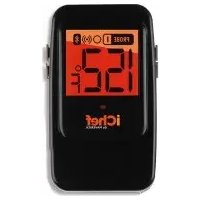
ET735 - Food thermometer Maverick - Free user manual and instructions
Find the device manual for free ET735 Maverick in PDF.


| Product Type | Bluetooth Food Thermometer |
| Model | ET735 |
| Brand | Maverick |
| Power Source | 2 AAA batteries (not included) |
| Temperature Range | -4 °F to 572 °F (-20 °C to 300 °C) |
| Number of Probes | Up to 4 (2 included) |
| Connectivity | Bluetooth, range up to 160 feet (48.8 m) in open field |
| Compatible App | Redi Chek (free, iOS and Android) |
| Main Functions | Timer, stopwatch, BBQ mode, cooking alerts, custom temperature |
| Display | Blue LED, flashing Bluetooth icon |
| Temperature Units | °F / °C selectable |
| Care and Cleaning | Probes: wipe with a soft cloth and soapy water. Do not immerse the main unit or probe jacks. |
| Safety | Do not touch hot probes without gloves; do not expose wires to direct flame. |
| Spare Parts and Repairability | Additional probes available at maverickhousewares.com; 90-day limited warranty. |
| General Information | For barbecue, smoker, or oven; compatible with iPhone, iPad, Android. |
Frequently Asked Questions - ET735 Maverick
User questions about ET735 Maverick
0 question about this device. Answer the ones you know or ask your own.
Ask a new question about this device
Download the instructions for your Food thermometer in PDF format for free! Find your manual ET735 - Maverick and take your electronic device back in hand. On this page are published all the documents necessary for the use of your device. ET735 by Maverick.
USER MANUAL ET735 Maverick
Thank you for selecting Maverick's ET-735 Barbecue Thermometer. Simply Download the Free Redi Chek App from the Apple Store or Google Play Store, and follow the easy instructions that will turn your iPhone, iPad, Android or Tablet into a roasting thermometer.
MAVERICK
GETTING STARTED
Step 1:
Preheat your grill, smoker or oven to your desired roasting temperature.
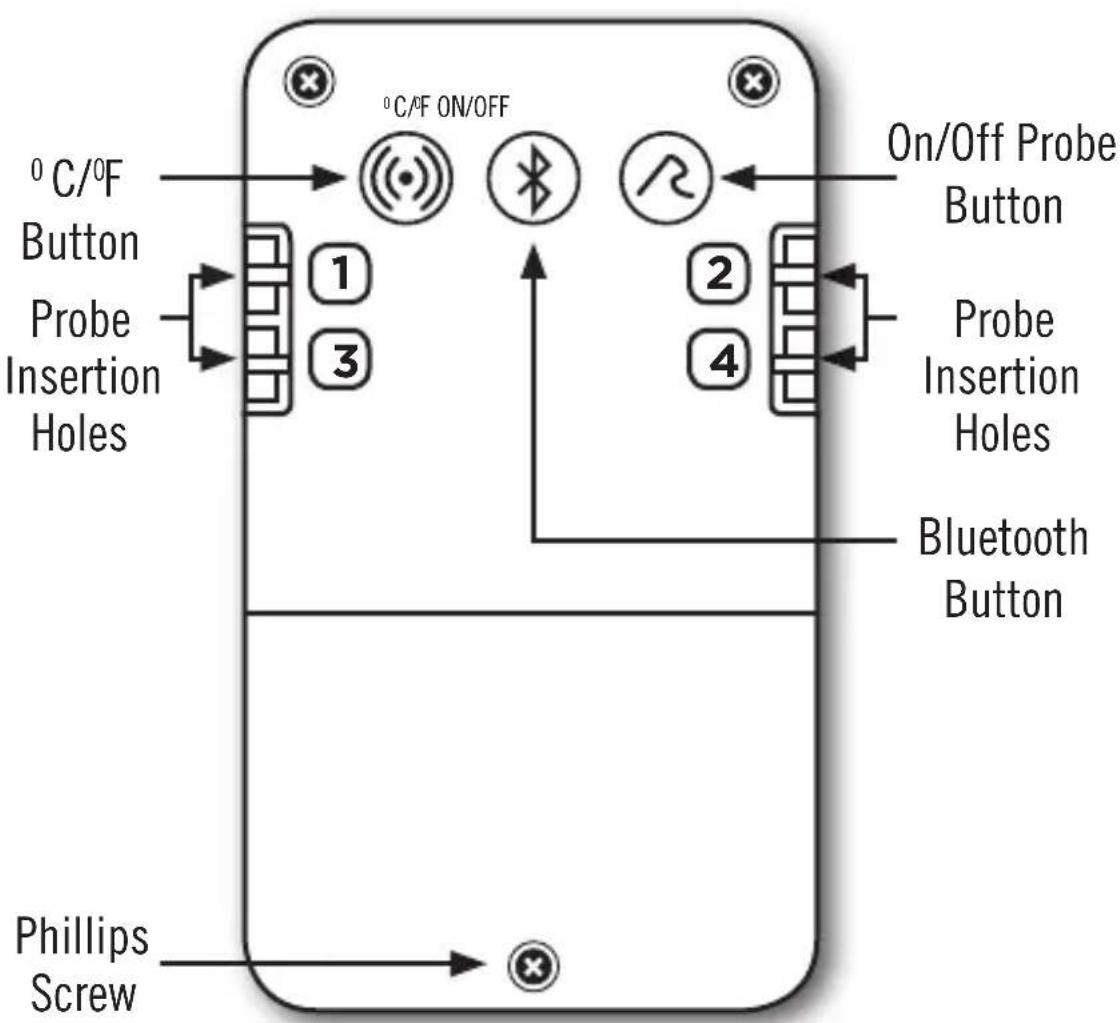
Back of the ET-735 Barbecue Thermometer shown here
Step 2:
Remove the ET-735 Thermometer back cover with a small Phillips screwdriver. Install 2 AAA batteries (not included) and replace back cover.
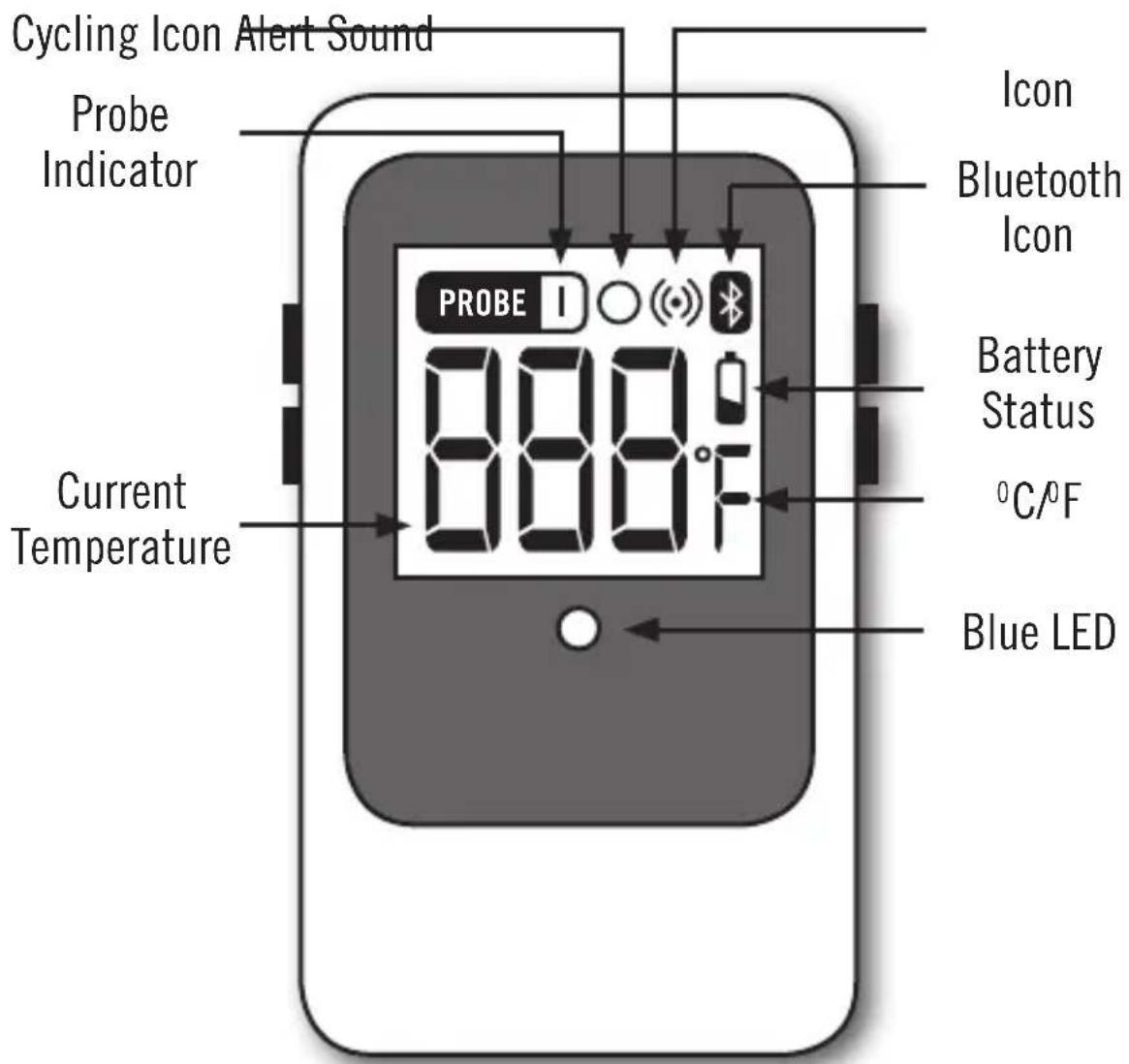
Front of the ET-735 Barbecue Thermometer shown here
Step 3:
Remove protective plastic film from the ET-735 Thermometer front screen. On the back of the unit, press ON/OFF Probe button for 3 seconds. Blue LED and Bluetooth Icon will be blinking. If they don't blink, press BLUETOOTH Icon button to connect. Press ^ C / ^ F button to select temperature mode.
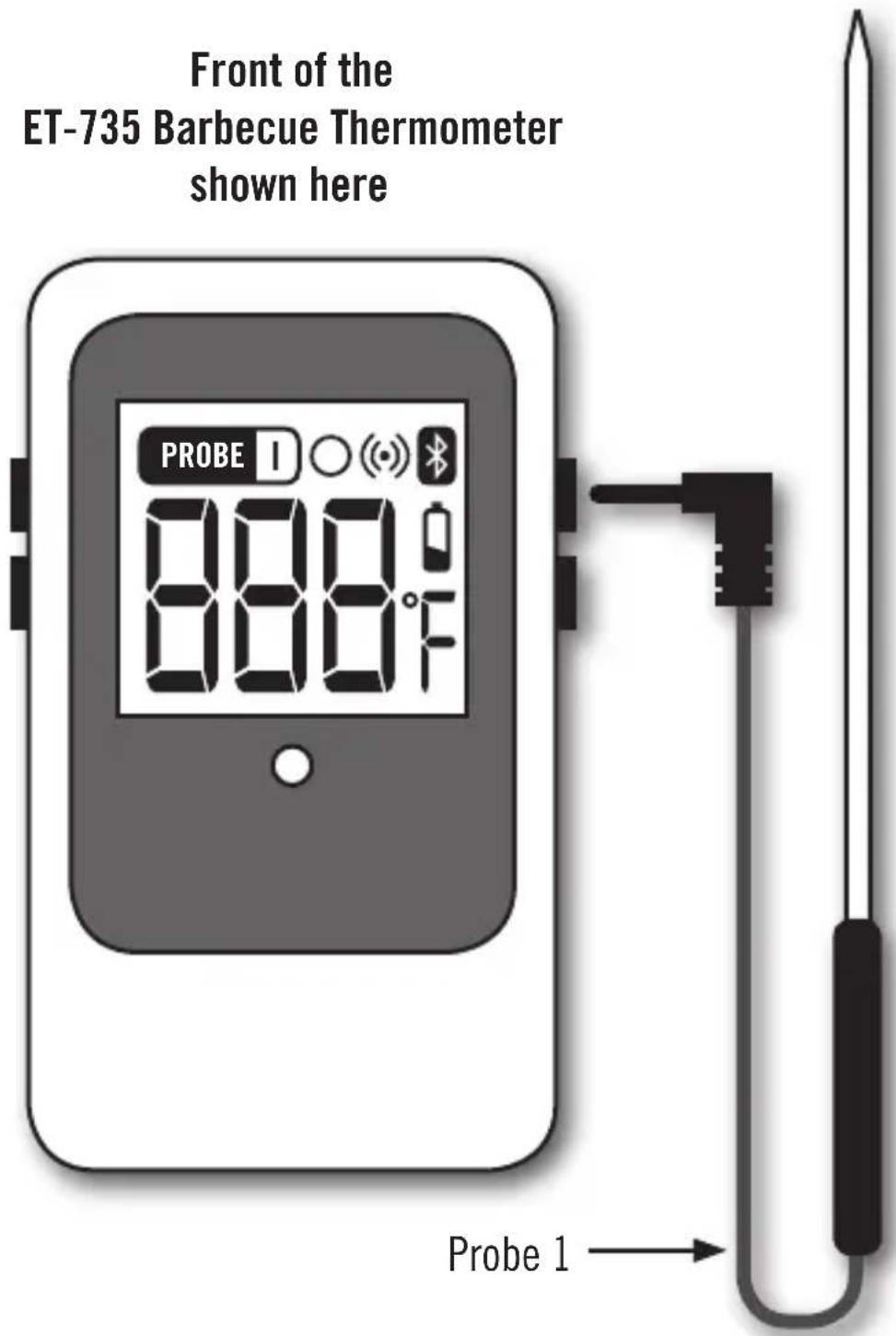
Step 4:
Open rubber cover and insert metal probe into slot [1]. On the front of the Thermometer, Probe indicator will be cycling 1, 2, 3, 4. Quickly press ON/OFF Probe button to set Probe 1.
Step 5:
On your iPhone, iPad, Android or Tablet, go to Settings and turn on Bluetooth.


Step 6:
Go to the Apple App Store or Google Play Store to download the Free Redi Chek app. When searching for the app, make sure to type Redi Chek as two words. Once you have successfully downloaded the Redi Chek app, open it.

Redi Chek app icon
step 7:
When you turn on the Redi Chek app, screen (A) will appear. Tap the unit displayed at the top to pair to Bluetooth. Your ET-735 Thermometer unit may have its own unique name which may be different than the one shown below.
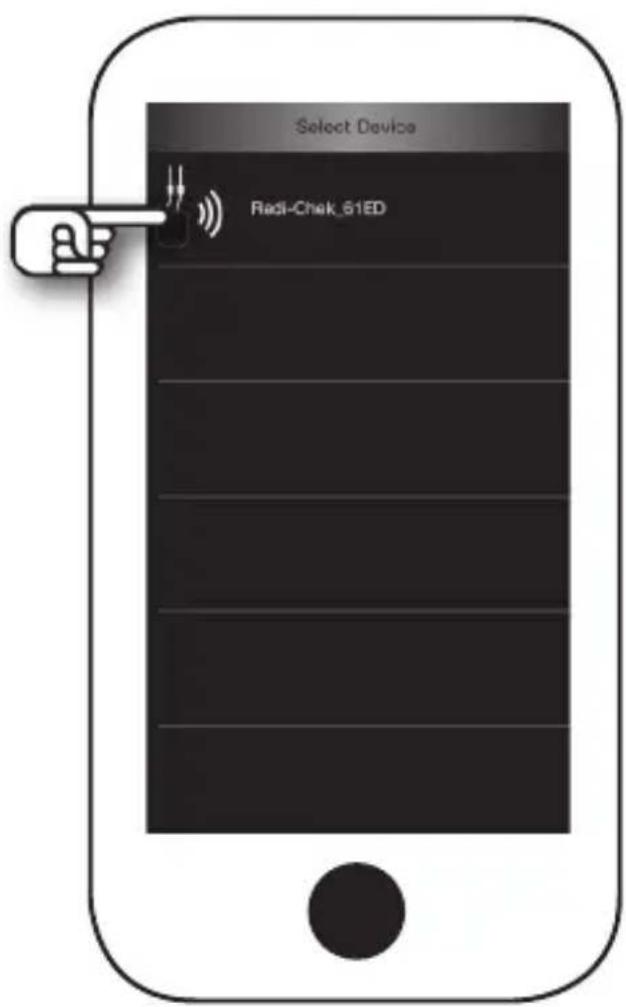
(A)
Step 8:
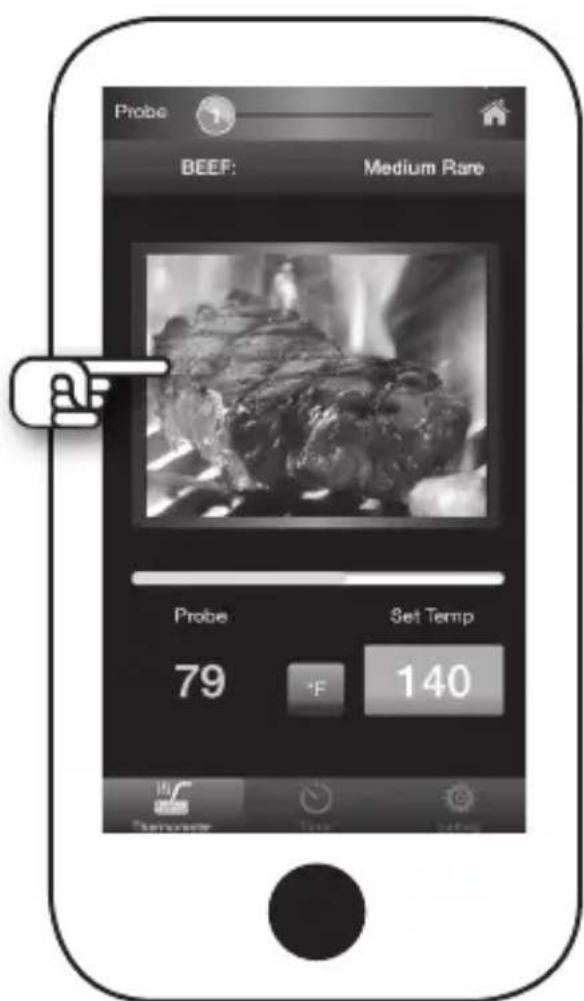
Now you are on screen (B). Tap Setting at lower right corner of the screen.
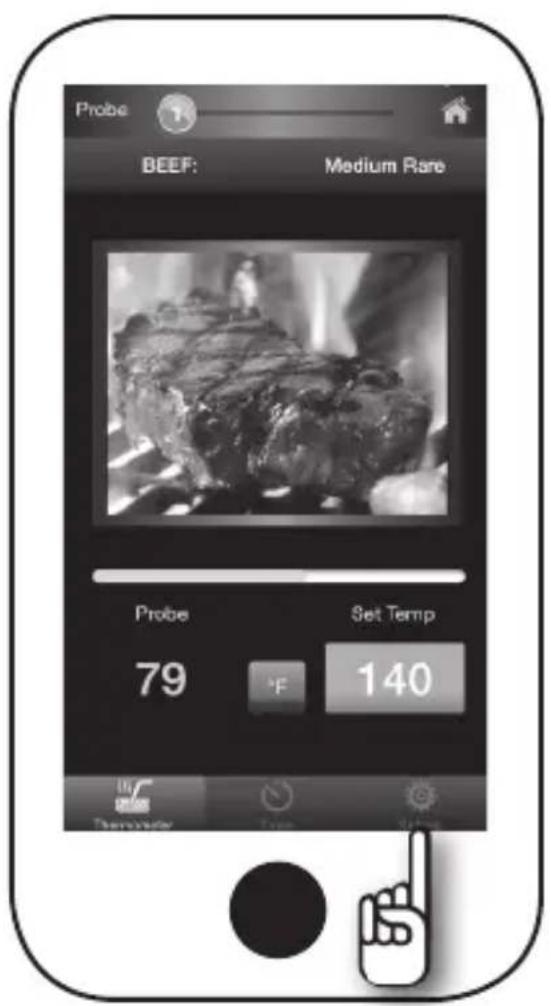
(B) (C)
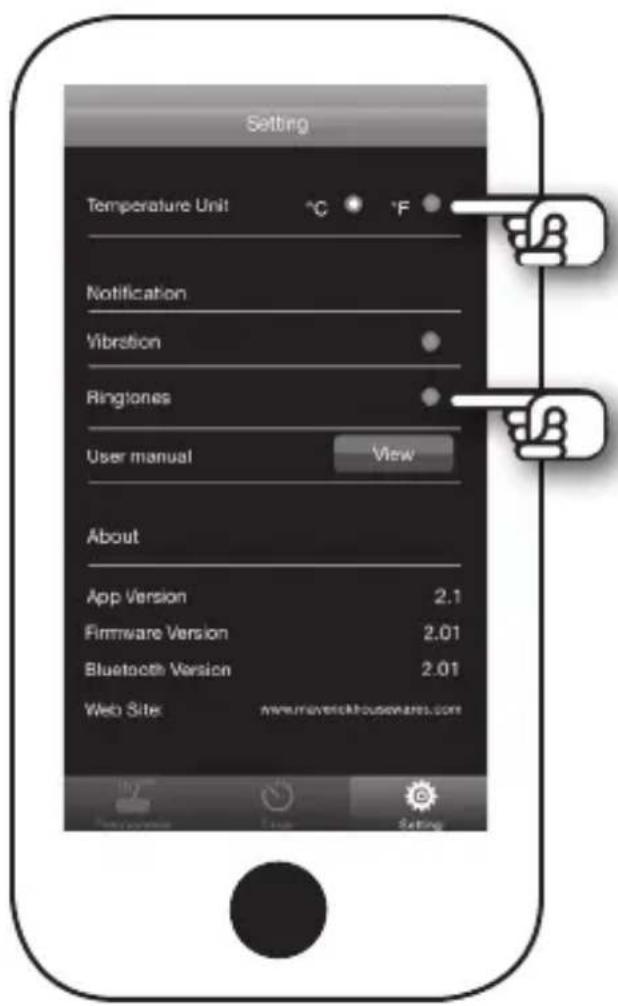
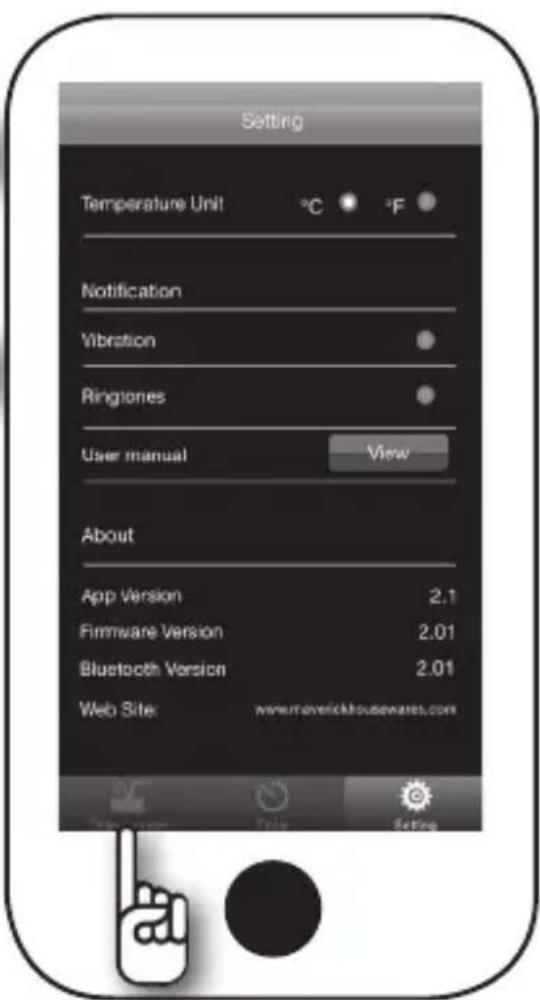
Step 9:
Now you are on screen (C). Select Temperature Unit ^ C or ^ F . Next, select Ringtones.
step 10:
Now you are on screen (D). Select your preferred alert sound.
Tap Confirm.
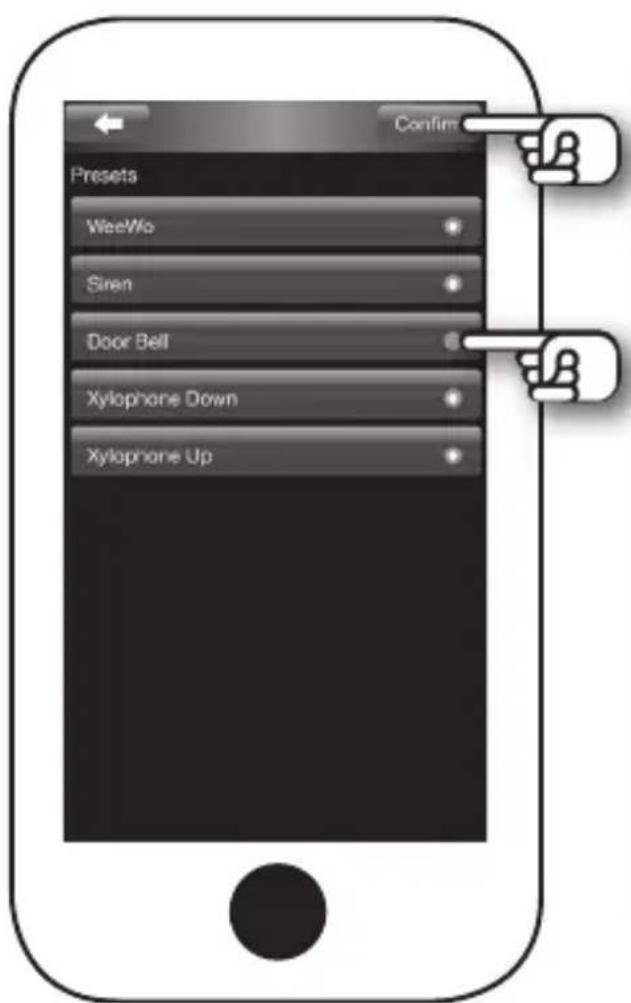
(D)
(C)
step 11:
Now you are back on screen (C). At the bottom left of the screen, tap Thermometer.
step 12:
Now you are back on screen (B). Tap photo in center of your screen to set Probe [1].
(B) (E)
step 13:
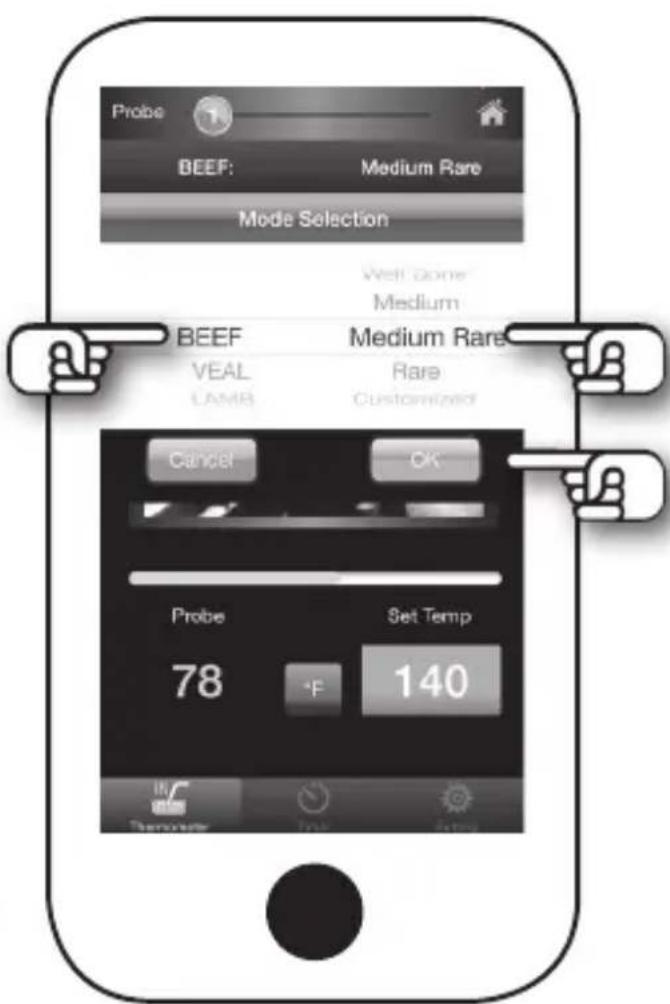
You are now on screen (E). Scroll through the meat or BBQ options on the left side of your screen and make a selection. (For directions on how to set the BBQ option, go to page 13 of this manual.) Then scroll down the right side of the screen to choose a preset temperature for desired doneness or select a Customized doneness temperature. Tap OK.
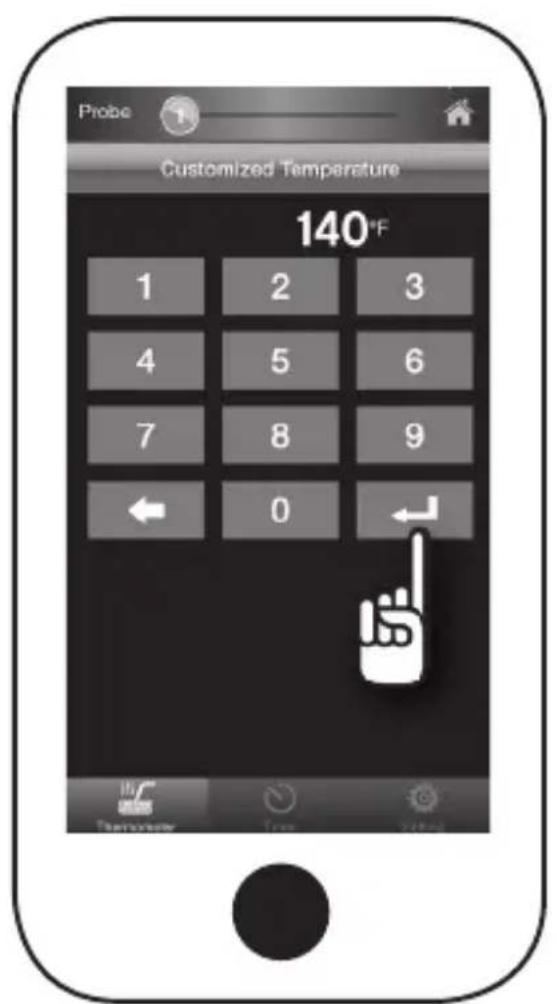
If you select Customized Temperature, you will open up screen (F). Select a Customized Temperature setting and then tap the return arrow.
(F) (B)
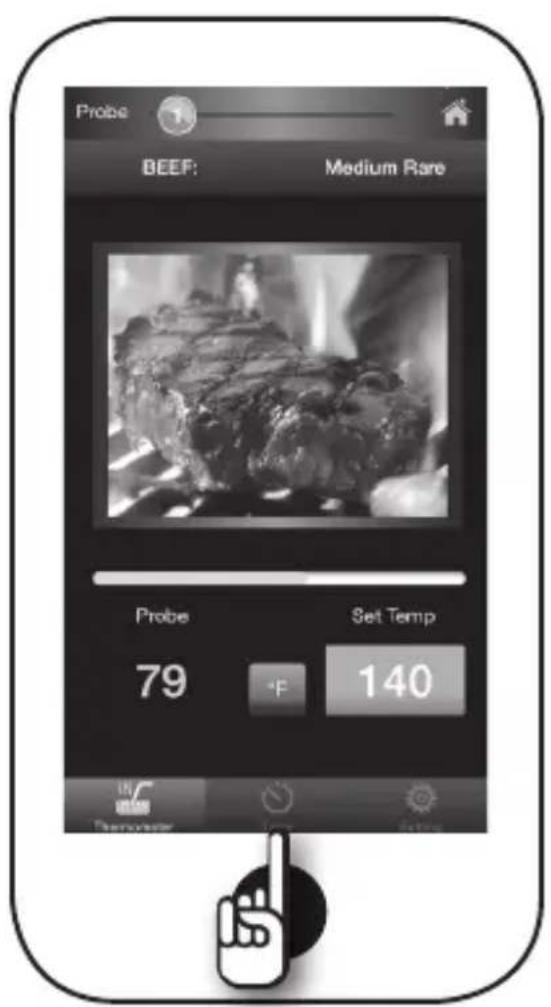
Step 14:
You are now back on screen (B). At bottom center of the screen, tap Timer.
Step 15:
You are now on screen (G). The Timer may be set to determine doneness in addition to, or instead of, the preset or Customized Temperature setting. Scroll to set cooking time in hours, minutes and seconds. When you are ready to start the Timer, tap the green button.
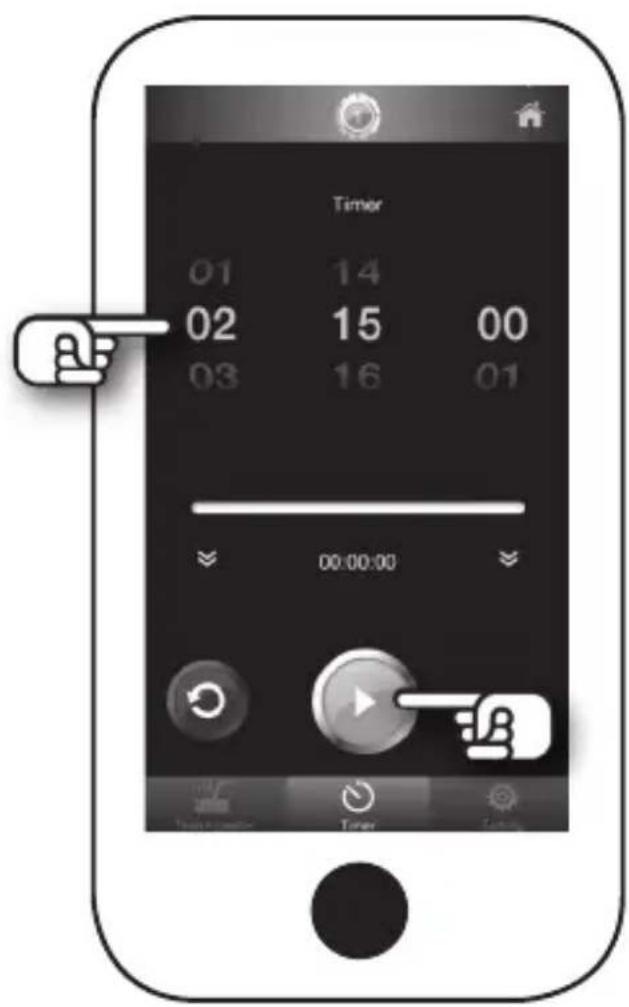
(G)
step 16:
Insert the metal probe tip into the center of the meat. Place the meat onto the grill or into the oven but leave the probe wire and the ET-735 Thermometer outside the grill cover or oven door. Be sure the probes and their wires do not come in direct contact with the flame on your grill. When the internal temperature of the meat reaches the programmed doneness, the alert will sound on your smart device and the temperature setting on the ET-735 thermometer will flash.
Monitor Your Cooking:
Tap Home Icon to get to screen (H). Now you can monitor your [1] Probe temperature progress.
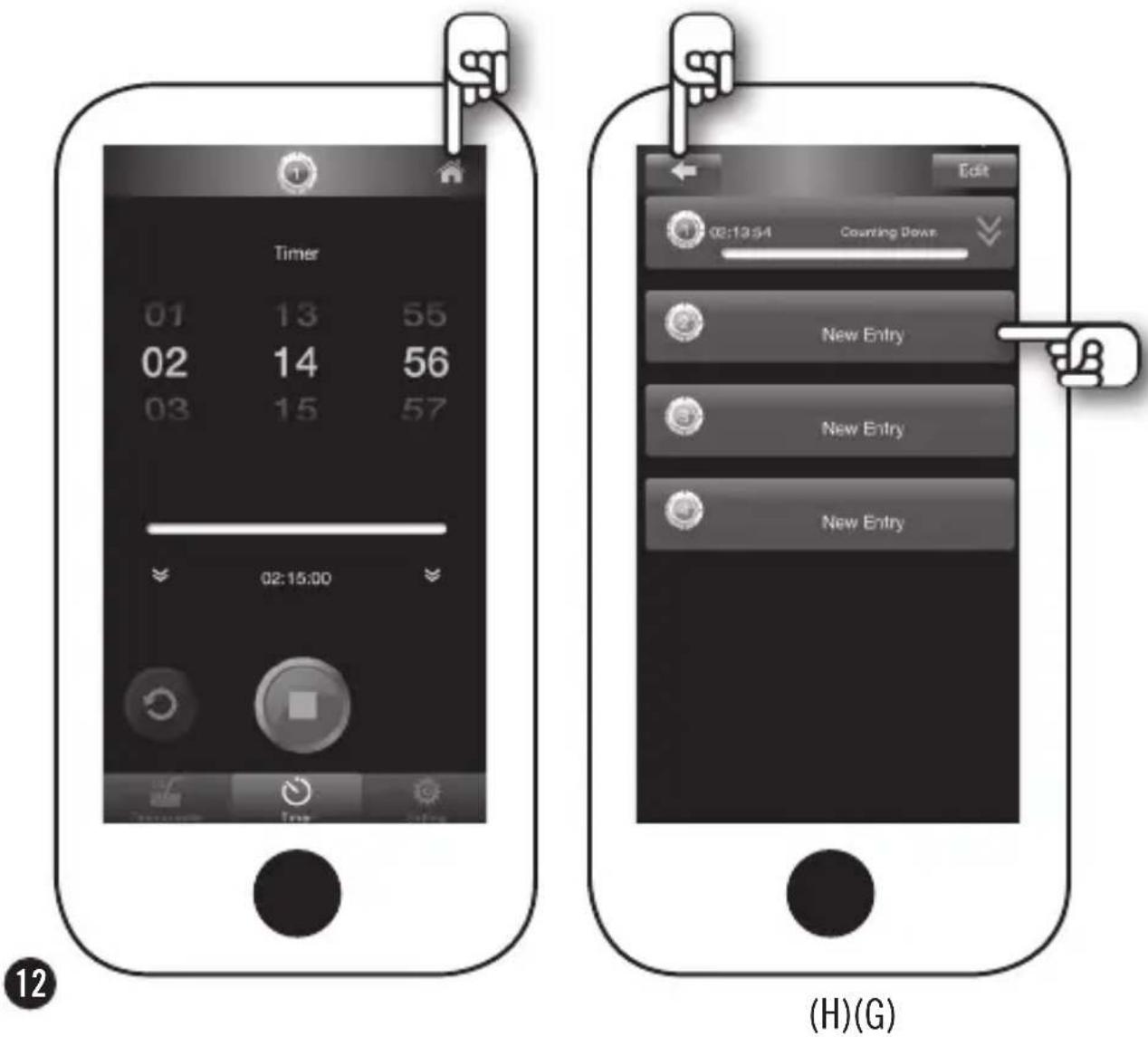
Program Additional Probes:
Press back arrow to set additional probes. Follow previous Step 12 and 13 to program up to three additional probes. The ET-735 comes with two probes. To purchase additional probes, go to www.maverickhousewares.com.
BBQ Mode Selection:
Scroll to the BBQ setting on the left of the screen. Tap OK. The BBQ option allows you to control the grilling temperature from an optimum High 572^ F to an optimum Low 32^ F. Tap your desired High Temperature and then tap the return arrow in lower right corner. Now tap in desired Low Temperature.
If the grill temperature falls out of either your High or Low set temperature range, your smart device will alert you so you can adjust the grill's heat settings. Attach the probe securely onto the grill grates using the enclosed grill clip/s. Make sure the probes and their wires do not come in direct contact with the flame on your grill.
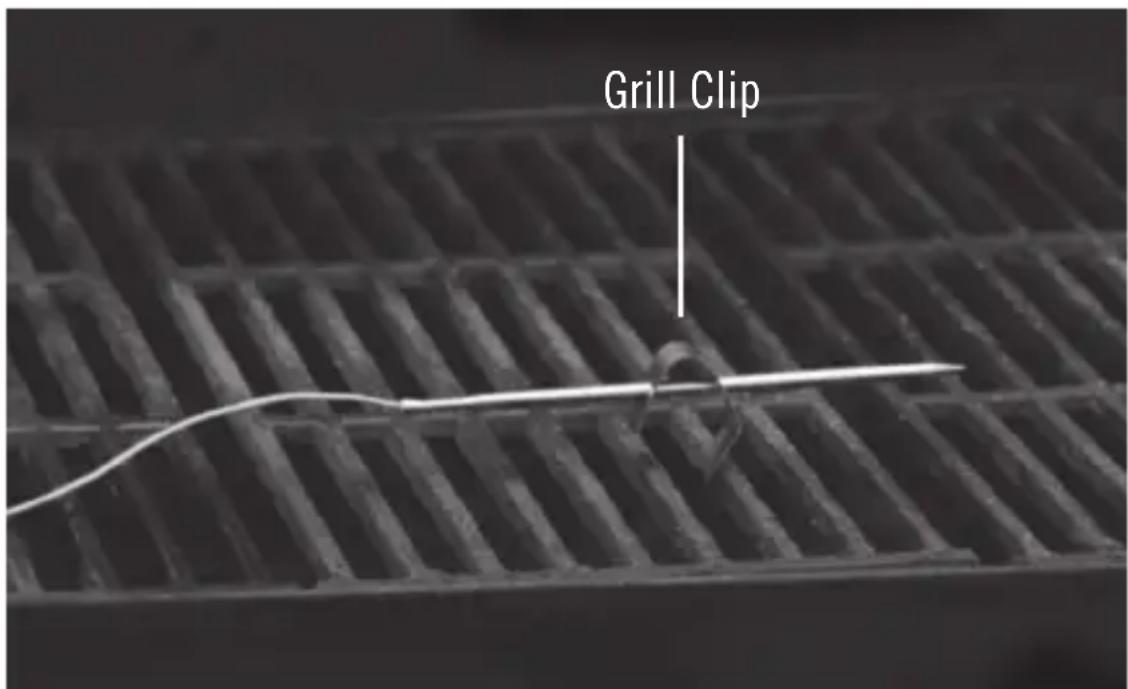
Important ET-735 Barbecue Thermometer Information
- To turn off the ET-735, press and hold the ON/OFF button for 3 seconds.
- When you are on the Timer screen (G), you can swipe the screen to the left to reveal the Stopwatch function.
- Do not touch hot stainless steel probes or wires with bare hands. Always wear heat resistant gloves before removing probes and wires from food during or just after cooking.
ET-735 temperature range is -4^ to 572^ (-20°C to 300°C). - Clean the Food Probe and Probe Wires by wiping them with a soft cloth and warm, soapy water. Do not immerse the Probe Jacks or Thermometer in water or dishwasher.
- Optimum Bluetooth range is 160 feet. This is under ideal conditions with no obstructions and a straight line between the thermometer and your smart device. Actual range may be less.
Cooking Tips
- When inserting the Food Probe, be sure the tip is not touching bone or resting in fat.
- For steaks and chops, insert the Food Probe from the side to the center.
- Allow meats to rest 3 to 5 minutes or longer before slicing to allow its colorful juices time to redistribute throughout the meat.
- Meat continues to cook while resting. Final doneness temperature can increase 3 to 10 degrees.
Maverick Limited 90-Day Warranty
Maverick Industries, Inc. warrants this product to be free of defects in parts, materials and workmanship for a period of 90 days from date of purchase. Should any repairs or servicing under this warranty be required, contact Maverick Customer Service by mail or phone for instructions on how to pack and ship the product to Maverick's National Service Center located as follows:
Maverick Customer Service
94 Mayfield Ave.
Edison, NJ 08837
Telephone: (732) 417-9666
Hours: Weekdays 8:30 am - 4:30 pm
Do not send any parts or product to Maverick without calling and obtaining a Return Authorization Number and instructions. This warranty is Void if instructions for use are not followed; for accidental damage; for commercial use; for damage incurred while in transit; or if the product has been tampered with. This warranty gives you specific legal rights and you may also have other rights which vary from state to state.