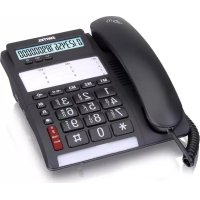
TF535 - Telephone SWITEL - Free user manual and instructions
Find the device manual for free TF535 SWITEL in PDF.



| Product type | Analog landline phone |
| Brand | Switel |
| Model | TF535 |
| Dimensions (H x W x D) | 180 x 205 x 86 mm |
| Weight | 737 g |
| Power supply | 1 AA 1.5 V alkaline battery (for display and functions) |
| Display type | 7-segment display + 5x5 matrix |
| Memory functions | 3 direct call keys (M1, M2, M3), 10 speed dial numbers (key + 0-9) |
| Call functions | Redial, mute, +35 dB amplification (Boost), recall (adjustable flash 100/300/600 ms) |
| Settings | Combined volume, ring volume and tone |
| Compatibility | Induction coil for hearing aids (T position) |
| Clock | Built-in with timer |
| Package contents | Telephone, coiled cord, telephone connection cable, 1 AA battery, instruction manual |
| Maintenance | Clean with a soft, lint-free cloth. Do not use cleaning products or solvents. |
| Safety | Use only the supplied power adapters, batteries of the same type, do not open the device. |
| Warranty | 24 months from date of purchase |
| Disposal | Electronic device to be recycled separately. Batteries must be disposed of in designated containers. |
| General information | Manufactured by Switel. EU declaration of conformity at www.switel.com |
Frequently Asked Questions - TF535 SWITEL
User questions about TF535 SWITEL
0 question about this device. Answer the ones you know or ask your own.
Ask a new question about this device
Download the instructions for your Telephone in PDF format for free! Find your manual TF535 - SWITEL and take your electronic device back in hand. On this page are published all the documents necessary for the use of your device. TF535 by SWITEL.
USER MANUAL TF535 SWITEL
Operating Instruction.... 18-22
switel
Komfort-Telefon
TF535
DEUTSCH
Bedienungsanleitung

Operating Instructions

Please read and observe the following information and keep the operating manual nearby for future reference!

WARNING!
Safety information
→ Risk of explosion!
→ Only use the power adapter plugs supplied!
→ Only use batteries supplied or ones of the same type!
Always treat batteries with due care and attention and only use batteries as described.
→ Never use standard and rechargeable batteries together. Never use rechargeable batteries or standard batteries with different capacities or charge statuses together. Never use standard or rechargeable batteries which are damaged.
→ Risk of suffocation through small objects, packaging and protective foil!
→ Keep children away from the product and its packaging!
→ Risks to health and the environment from batteries!
→ Never open, damage or swallow batteries or allow them to pollute the environment. They could contain toxic and ecologically harmful heavy metals.

CAUTION!
→ Risk of hearing damage!
→ Avoid listening at full receiver volume.
ATTENTION!
→ Risk of property damage.
→ Prevent exposure to environmental influences, e.g. smoke, dust, vibration, chemicals, moisture, heat and direct sunlight.
→ Only allow repairs to be completed by qualified personnel.
i Contact your telephone network provider with regard to enabling supplementary services.
INTENDED USE
The telephone is suitable for telephoning within a public telephone network system. Any other use is considered unintended use. Observe all local directives and regulations. Unauthorised modification or reconstruction is not permitted. Under no circumstances open the device or complete any repair work yourself.
PACKAGE CONTENTS
1 Base station, 1 Spiral cable, 1 Telephone connection cable, 1 AA battery, 1 Operating instruction
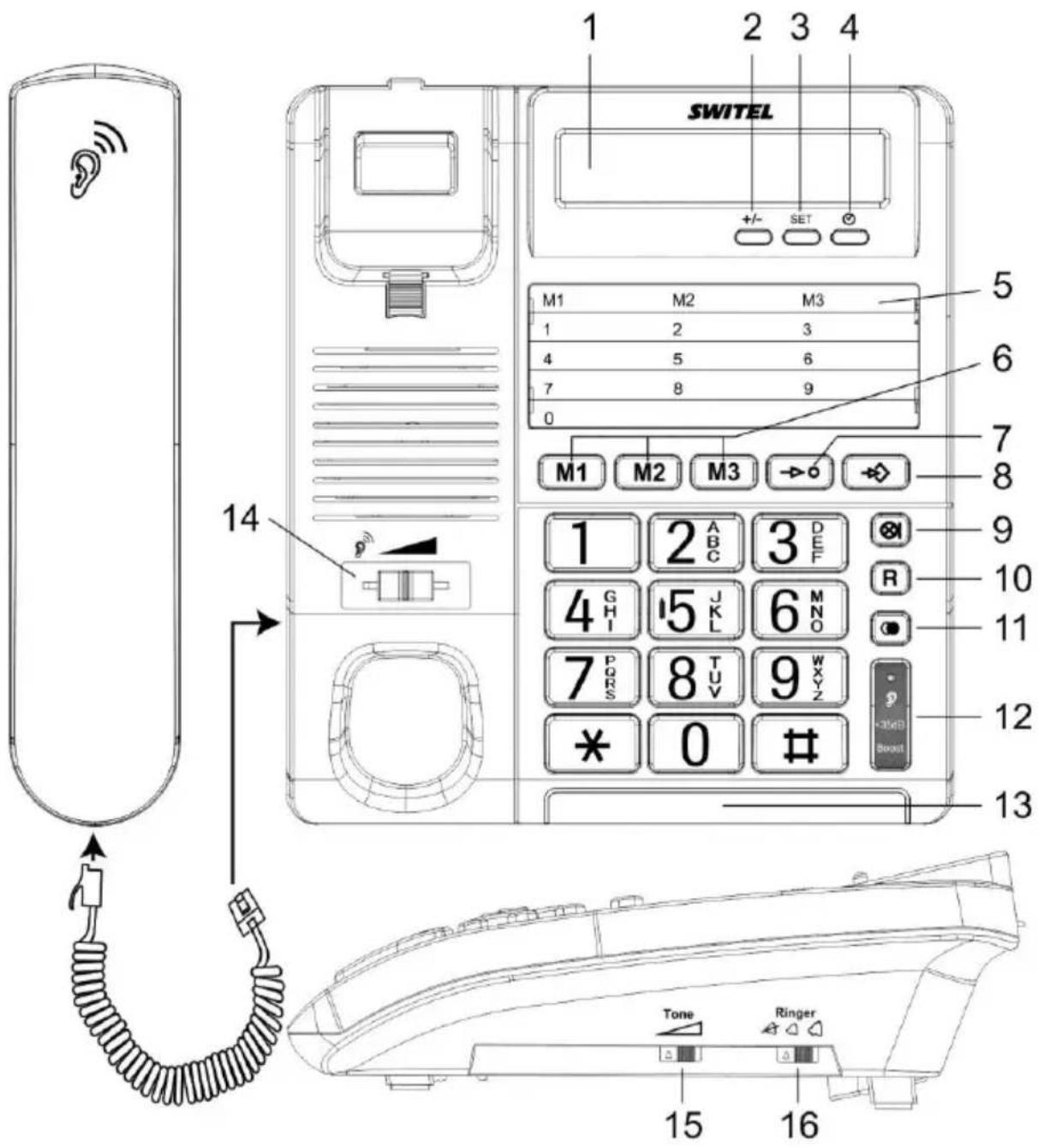
OPERATING ELEMENTS
1 Display
2 +/- Up/Down
3 SET
4 Call Duration / Stop Watch
5 Index for Speed Dial Numbers
6 Direct call keys
7 Two-touch dialling (+ keys 0-9)
8 Store Button
9 Mute Button
10 R-key (Flash)
11 Redial Button
12 Boost function (+35dB)
13 LED
14 Volume control receiver
15 Ringer tone Control
16 Ringer volume control
Connecting the handset
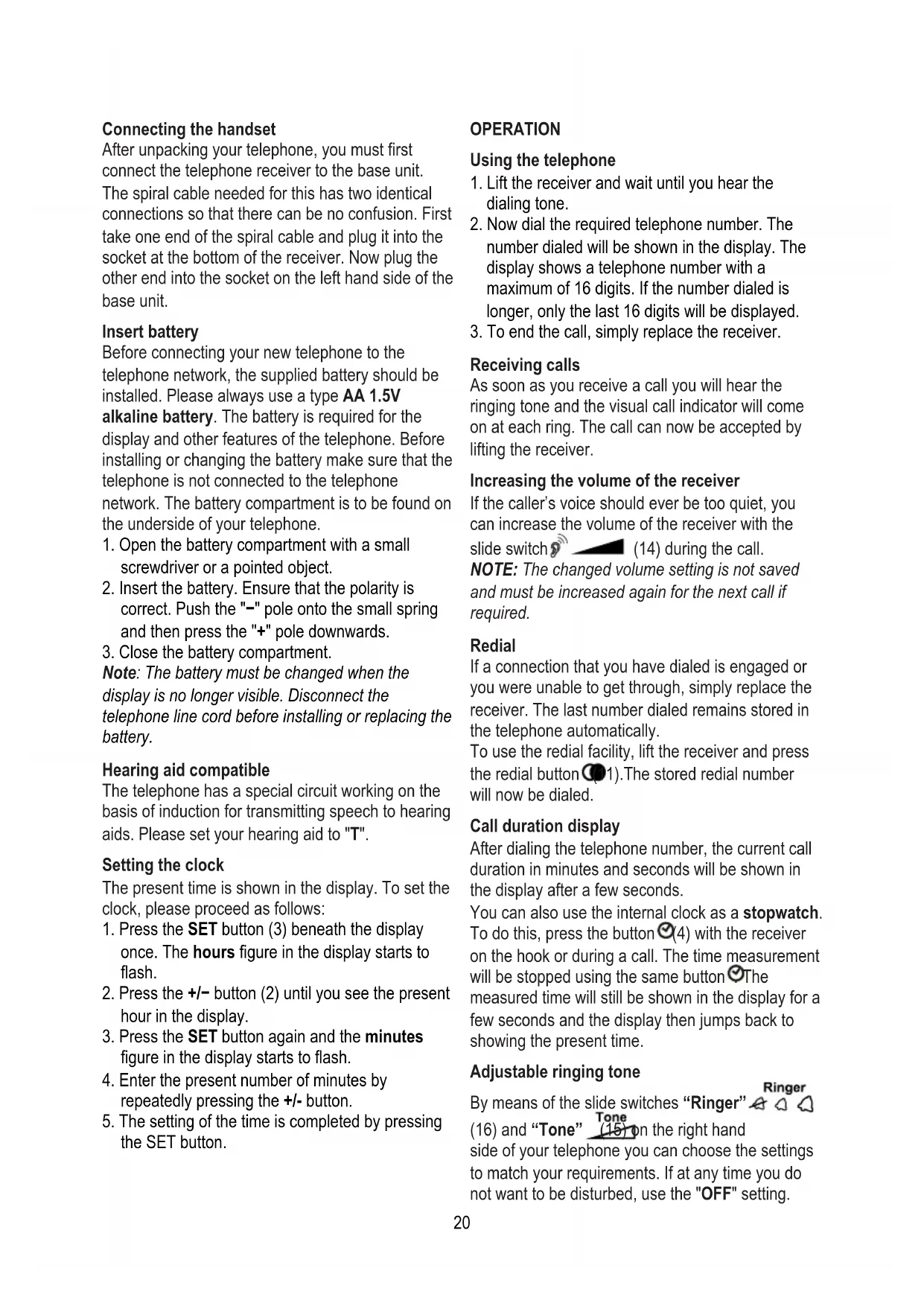
After unpacking your telephone, you must first connect the telephone receiver to the base unit. The spiral cable needed for this has two identical connections so that there can be no confusion. First take one end of the spiral cable and plug it into the socket at the bottom of the receiver. Now plug the other end into the socket on the left hand side of the base unit.
Insert battery
Before connecting your new telephone to the telephone network, the supplied battery should be installed. Please always use a type AA 1.5V alkaline battery. The battery is required for the display and other features of the telephone. Before installing or changing the battery make sure that the telephone is not connected to the telephone network. The battery compartment is to be found on the underside of your telephone.
- Open the battery compartment with a small screwdriver or a pointed object.
- Insert the battery. Ensure that the polarity is correct. Push the "-" pole onto the small spring and then press the "+" pole downwards.
- Close the battery compartment.
Note: The battery must be changed when the display is no longer visible. Disconnect the telephone line cord before installing or replacing the battery.
Hearing aid compatible
The telephone has a special circuit working on the basis of induction for transmitting speech to hearing aids. Please set your hearing aid to "T".
Setting the clock
The present time is shown in the display. To set the clock, please proceed as follows:
- Press the SET button (3) beneath the display once. The hours figure in the display starts to flash.
- Press the +/− button (2) until you see the present hour in the display.
- Press the SET button again and the minutes figure in the display starts to flash.
- Enter the present number of minutes by repeatedly pressing the +/- button.
- The setting of the time is completed by pressing the SET button.
OPERATION
Using the telephone
- Lift the receiver and wait until you hear the dialing tone.
- Now dial the required telephone number. The number dialed will be shown in the display. The display shows a telephone number with a maximum of 16 digits. If the number dialed is longer, only the last 16 digits will be displayed.
- To end the call, simply replace the receiver.
Receiving calls
As soon as you receive a call you will hear the ringing tone and the visual call indicator will come on at each ring. The call can now be accepted by lifting the receiver.
Increasing the volume of the receiver
If the caller's voice should ever be too quiet, you can increase the volume of the receiver with the slide switch (14) during the call.
NOTE: The changed volume setting is not saved and must be increased again for the next call if required.
Redial
If a connection that you have dialed is engaged or you were unable to get through, simply replace the receiver. The last number dialed remains stored in the telephone automatically.
To use the redial facility, lift the receiver and press the redial button (1). The stored redial number will now be dialed.
Call duration display
After dialing the telephone number, the current call duration in minutes and seconds will be shown in the display after a few seconds.
You can also use the internal clock as a stopwatch. To do this, press the button ☑(4) with the receiver on the hook or during a call. The time measurement will be stopped using the same button ☑The measured time will still be shown in the display for a few seconds and the display then jumps back to showing the present time.
Adjustable ringing tone
By means of the slide switches "Ringer" (16) and "Tone" (15) on the right hand side of your telephone you can choose the settings to match your requirements. If at any time you do not want to be disturbed, use the "OFF" setting.
Direct and speed dial numbers
You can store telephone numbers for direct dialing on the red buttons M1, M2 and M3 (6). The direct dial buttons are suitable for use as emergency call buttons. An additional ten important numbers can be stored as speed dial numbers.
Storing direct and speed dial numbers
- Lift the handset.
- Press the store button→8).
- Enter the telephone number using the number pad. The maximum length is 16 digits.
- Press the store button—again.
- Now press the required direct dial button M1, M2 or M3 or a button on the number pad (0-9) to save the telephone number.
- Replace the handset.
NOTE: Press the Button if you need to insert a pause in the telephone number.
Storage locations already used are deleted automatically when you store a new telephone number in this location.
The numbers stored can be recorded on the index (5) underneath the display. For this purpose, the cover can be removed with a pointed object.
Dialing using the direct dial buttons
- Lift the handset and wait for a dial tone.
- Press the Memory Button M1-M3, the stored telephone number will now be dialed.
Dialing using the speed dial buttons
- Lift the handset and wait for a dial tone.
- Press the speed dial button → and the required storage location from 0 to 9 on the number pad.
Recall
Press the recall button R (10) followed by the extension number to transfer calls when connected to a PBX (TBR only).
Access to additional network services can be gained by using the recall button R, ✕ and # Buttons. Contact your network operator for more information.
Dialing and storing telephone numbers when using private exchanges
NOTE: The pause function after an outside line code described in this chapter is only required on older private exchanges.
With some private exchanges, there is a short pause between the code for the outside line (usually 0 or 9) and the dialing tone. When dialing manually and when dialing using the direct dial and speed dial buttons, this pause can be entered along with the number so that the following digits are not dialed too quickly.
Entering the pause when dialing manually
Press the Ⓐ11) button once between the number for the outside line and the actual telephone number. The pause will be shown by a "P" in the display.
After connecting to an outside line your telephone will wait for three seconds before dialing the actual telephone number.
Storing the pause
When storing a number, simply press the button (11) after the number for the outside line and before the actual telephone number. The pause will be shown by a "P" in the display. When dialing with the direct dial or speed dial buttons a pause of three seconds will automatically be inserted after the number for the outside line.
Mute
While talking, press Ⓧutton (9), the other side will not hear anything.
Amplification & Receiver volume control The receiver volume can be boosted up to +35dB max. during a conversation. Press the +35dB
button (12), and the Boost LED (13) will light. You can increase the handset volume by turning the volume slide switch 9(14, installed
under the handset) to the required listening level. You can turn off the boost function by pressing the +35dB button at any time during your conversation, the Boost LED will turn off and the volume will return to normal level. When you replace the handset to the cradle after the call, the boost volume will be reset to normal automatically.
NOTE: Only press the +35dB boost Button if you really need this additional amplification.
Warning: Setting your earpiece volume too high can damage your hearing!!!
Service hotline
In the case of technical problems, contact our Service hotline. Switzerland: Tel. 0900 00 1675 (national charges, Swisscom at time of going to print: CHF 2.60/min). In the case of claims under the terms of guarantee, contact your sales outlet.
Maintenance
Clean the surface of the housing with a soft, fluff-free cloth. Do not use any cleaning agents or solvents.
Guarantee
SWITEL equipment is produced and tested according to the latest production methods. The implementation of carefully chosen materials and highly developed technologies ensure trouble-free functioning and a long service life. The terms of guarantee do not apply when a device malfunction was caused by the mobile telecommunications network operator/provider. The terms of guarantee do not apply to the batteries or power packs used in the products. The period of guarantee is 24 months from the date of purchase. All deficiencies related to material or manufacturing errors within the period of guarantee will be redressed free of charge. Rights to claims under the terms of guarantee are annulled following tampering by the purchaser or third parties. Damage caused as the result of improper handling or operation, normal wear and tear, incorrect positioning or storage, improper connection or installation or Acts of God and other external influences are excluded from the terms of guarantee. In the case of complaints, we reserve the right to repair defective parts, replace them or replace the entire device. Replaced parts or devices become our property. Rights to compensation in the case of damage are excluded where there is no evidence of intent or gross negligence by the manufacturer. If your device does show signs of a
defect within the period of guarantee, please contact the sales outlet where you purchased the SWITEL device, producing the purchase receipt as evidence. All claims under the terms of guarantee in accordance with this agreement can only be asserted at the sales outlet. No claims under the terms of guarantee can be asserted after a period

of two years from the date of purchase and hand-over of the product.

Disposal
In order to dispose of your device, take it to a collection point provided by your local public waste authorities (e.g. recycling centre). According to the laws on the disposal of electronic and electrical devices, owners are obliged to dispose of old electronic and electrical devices in a separate waste container. The adjacent symbol indicates that the device must not be disposed of in normal domestic waste!
You are legally obliged to dispose of power packs and batteries at the point of sale or in the corresponding containers provided at collection points by local public waste authorities. Disposal is free of charge. The symbols indicate that the batteries must not be disposed of in normal domestic waste and that they must be brought to collection points provided by local public waste authorities. Packaging materials must be disposed of according to local regulations.
Simplified EU declaration of conformity
CE Hereby SWITEL declares, that the radio equipment type TF535 is in compliance with Directive: 2014/53/EU and
2011/65/EU. The full text of the EU declaration of conformity is available at the following internet address: www.switel.com
Technical data (All rights reserved)
| Feature | Value |
| TF535 | |
| W x H x D / Weight | 180x205x86mm / 737g |
| Flash Time | 100/300/600 mS |
| Display | 7 segment display + 5x5 matrix |


- SWITEL
- KOMFORT-TELEFON
- TF535
- DEUTSCH
- BEDIENUNGSANLEITUNG
- OPERATING INSTRUCTIONS
- WARNING
- SAFETY INFORMATION
- CAUTION
- ATTENTION
- INTENDED USE
- PACKAGE CONTENTS
- OPERATING ELEMENTS
- CONNECTING THE HANDSET
- INSERT BATTERY
- HEARING AID COMPATIBLE
- SETTING THE CLOCK
- OPERATION
- USING THE TELEPHONE
- RECEIVING CALLS
- INCREASING THE VOLUME OF THE RECEIVER
- REDIAL
- CALL DURATION DISPLAY
- ADJUSTABLE RINGING TONE
- DIRECT AND SPEED DIAL NUMBERS
- STORING DIRECT AND SPEED DIAL NUMBERS
- DIALING USING THE DIRECT DIAL BUTTONS
- DIALING USING THE SPEED DIAL BUTTONS
- RECALL
- DIALING AND STORING TELEPHONE NUMBERS WHEN USING PRIVATE EXCHANGES
- ENTERING THE PAUSE WHEN DIALING MANUALLY
- STORING THE PAUSE
- MUTE
- AMPLIFICATION & RECEIVER VOLUME CONTROL THE RECEIVER VOLUME CAN BE BOOSTED UP TO +35DB MAX. DURING A CONVERSATION. PRESS THE +35DB
- SERVICE HOTLINE
- MAINTENANCE
- GUARANTEE
- DISPOSAL
- SIMPLIFIED EU DECLARATION OF CONFORMITY
Brand : SWITEL
Model : TF535
Category : Telephone