ManualGo.com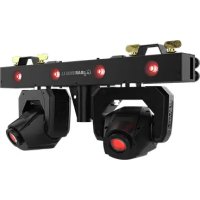
GigBAR Bridge ILS - Lamp Chauvet - Free user manual and instructions
Find the device manual for free GigBAR Bridge ILS Chauvet in PDF.




Download the instructions for your Lamp in PDF format for free! Find your manual GigBAR Bridge ILS - Chauvet and take your electronic device back in hand. On this page are published all the documents necessary for the use of your device. GigBAR Bridge ILS by Chauvet.
USER MANUAL GigBAR Bridge ILS Chauvet
GigBAR Bridge ILS QRG Rev. 2
QUICK REFERENCE GUIDE
Safety Notes These Safety Notes include important information about installation, use, and maintenance of the GigBAR Bridge ILS. FCC Statement of Compliance This device complies with Part 15 Part B of the FCC rules. Operation is subject to the following two conditions:
1. This device may not cause harmful interference, and
2. This device must accept any interference received, including interference that may cause undesired operation.
This equipment has been tested and found to comply with the limits for a Class B digital device, pursuant to Part 15 of the FCC Rules. These limits are designed to provide reasonable protection against harmful interference in a residential installation. This equipment generates uses and can radiate radio frequency energy and, if not installed and used in accordance with the instructions, may cause harmful interference to radio communications. However, there is no guarantee that interference will not occur in a particular installation. If this equipment does cause harmful interference to radio or television reception, which can be determined by turning the equipment off and on, the user is encouraged to try to correct the interference by one or more of the following measures: ♦ Reorient or relocate the receiving antenna. ♦ Increase the separation between the equipment and receiver. ♦ Connect the equipment into an outlet on a circuit different from that to which the receiver is connected. ♦ Consult the dealer or an experienced radio/TV technician for help. Any changes or modifications not expressly approved by the party responsible for compliance could void the user’s authority to operate the equipment. ■ ALWAYS: ♦ Connect to a grounded circuit. ♦ Connect to operating voltages as specified on the product's spec sticker. ♦ Disconnect from power before replacing the fuse. ♦ Disconnect from its power source during periods of inactivity. ♦ Use a safety cable when suspending overhead. ♦ Heed all restrictions and warnings on the spec sticker. ♦ Mount in a location with at least 20 in (50 cm) of ventilation. ♦ Replace the fuse with the same type and rating. ♦ Use a clamp with a captive bolt when a single hanging bracket is used. ♦ Keep the machine level. ■ In the event of a serious operating problem, stop using immediately. ■ DO NOT: ♦ Open this product or attempt any repairs. It contains no user-serviceable parts. ♦ Look at the light source when the product is on. ♦ Use if the power cord is crimped or damaged. ♦ Disconnect by pulling on the power cord. ♦ Allow flammable materials close to the product when it is operating. ♦ Touch the housing when it is on. ♦ Block any ventilation holes/slots in the housing. ♦ Connect to a dimmer or rheostat. ♦ Carry the product by its power cord. ♦ Operate in temperatures higher than 104°F (40°C). ♦ Expose to environments that exceed the Ingress Protection (IP) rating. ♦ Expose to rain or moisture. ♦ Use outdoors. ♦ Submerge. ♦ Leave outdoors for extended periods of time. ♦ Expose to corrosive environmental conditions such as temperature, humidity, salinity, pressure, radiation, or shock.
Set this product on a flammable surface.2
GigBAR Bridge ILS QRG Rev. 2 What is Included Control Panel Description ILS Connection The GigBAR Bridge ILS uses the DMX data connection and the D-Fi USB for wireless connection to the Integrated Lighting System (ILS) ecosystem (patent pending). For more information about configuring the GigBAR Bridge ILS into ILS mode, please refer to the User Manual available at www.chauvetdj.com
♦ GigBAR Bridge ILS ♦ Power cable ♦ Hanging bracket (x2) ♦ Carry bag ♦ Quick Reference Guide Button Function <MENU> Exits from the current menu or function <UP> Navigates upwards through the menu list and increases the numeric value when in a function <DOWN> Navigates downwards through the menu list and decreases the numeric value when in a function <ENTER> Enables the currently displayed menu or sets the currently selected value into the selected functionES
GigBAR Bridge ILS GRR Rev. 2
GigBAR Bridge ILS GRR Rev. 2
GigBAR Bridge ILS QRG Rev. 2Multi-Language